Most Vertex AI Gemini tutorials on the open web were written before the SDK changed. They show from vertexai.generative_models import GenerativeModel, an API Google deprecated in mid-2025 and removes entirely on June 24, 2026. Code that ships against that import will start raising ModuleNotFoundError the day it lands.
This guide is the current playbook for Vertex AI Gemini in Python: the unified google-genai SDK, the same package that powers Gemini in AI Studio, but pointed at Vertex AI for production work. Every command and every snippet was tested live on Google Cloud on May 5, 2026, and the screenshots are real captures from that session. You will set up auth, call Gemini 2.5 Flash, stream responses, force JSON output into a Pydantic schema, call functions, send images, combine streaming with tool use, and handle the four error modes you will hit in production.
If you already use the Gemini CLI for one-off prompts or follow the Gemini CLI cheat sheet from the terminal, the Python path here is the next step: programmatic, billable through Vertex AI, and ready to wear inside FastAPI, Cloud Run, or a Kubernetes job.
Tested May 2026 on macOS with Python 3.13.11, google-genai 1.75.0, Pydantic 2.13.3, against Vertex AI in us-central1 using gemini-2.5-flash and gemini-2.5-pro.
What changed: google-genai vs vertexai.generative_models
Two SDKs reach Gemini from Python today. Only one has a future.
| SDK | Import path | Status | Last day to migrate |
|---|---|---|---|
google-genai | from google import genai | Active, GA, documented here | n/a (this is the target) |
google-cloud-aiplatform[generative] | from vertexai.generative_models import GenerativeModel | Deprecated June 24, 2025 | June 24, 2026 |
The unified google-genai package supports both backends through one client: pass vertexai=True with a project and location to talk to Vertex AI, or pass api_key=... to talk to AI Studio. Same methods, same response shapes, different backend. For production on Google Cloud, Vertex AI is the right pick: it bills against your project, supports IAM properly, and gives you regional endpoints.
Step 1: Set reusable shell variables
Every command in this guide assumes a few variables. Setting them once means you swap your project ID and region in one place, then paste the rest as is. Open a fresh shell and export them:
export PROJECT_ID="your-gcp-project-id"
export REGION="us-central1"
export SA_NAME="gemini-vertex-sa"
export SA_KEY_PATH="${HOME}/sa-keys/${PROJECT_ID}-vertex.json"
export ADMIN_EMAIL="[email protected]"
Confirm the values are exported before you continue:
echo "Project:  ${PROJECT_ID}"
echo "Region:   ${REGION}"
echo "SA name:  ${SA_NAME}"
echo "SA key:   ${SA_KEY_PATH}"
Pick us-central1 if you are unsure: it has the broadest model coverage. europe-west4 is the standard EU pick. The variables only live for the current shell, so re-export them if you reconnect.
Step 2: Enable Vertex AI and grant IAM
The aiplatform.googleapis.com API is the gate to Vertex AI. Enable it on the project:
gcloud services enable aiplatform.googleapis.com --project="${PROJECT_ID}"The console shows the activation in a few seconds. The image below captures both the API enable and the local Python check that follows.
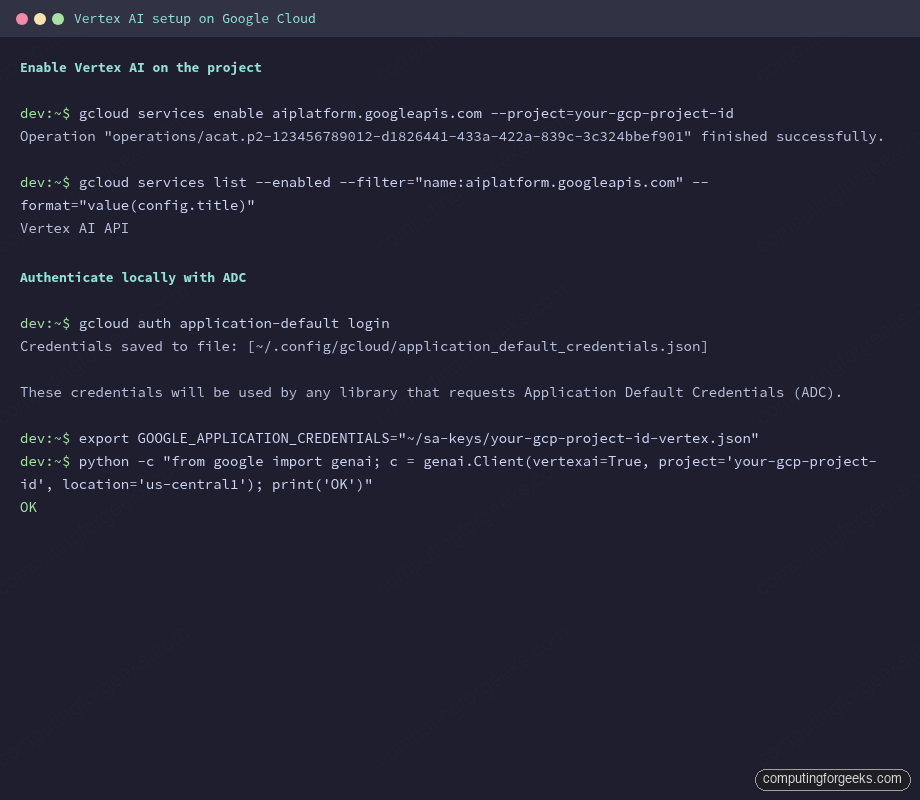
Now create a service account for production code paths and grant it the Vertex AI User role. Avoid roles/owner here: the principle of least privilege matters when this key may end up baked into a CI runner.
gcloud iam service-accounts create "${SA_NAME}" \
  --display-name="Gemini on Vertex AI" \
  --project="${PROJECT_ID}"

gcloud projects add-iam-policy-binding "${PROJECT_ID}" \
  --member="serviceAccount:${SA_NAME}@${PROJECT_ID}.iam.gserviceaccount.com" \
  --role="roles/aiplatform.user"
The roles/aiplatform.user binding includes the aiplatform.endpoints.predict permission, which is what the SDK ultimately calls. If you skip this and run the SDK as a service account that lacks the role, the request returns a 403 with that exact permission name in the message. The error section at the end of this guide shows the trace.
Step 3: Authenticate from Python (ADC and service-account JSON)
The SDK reads credentials through the standard google-auth chain. You have two practical paths: Application Default Credentials for your laptop, and a service-account JSON for servers and CI. Both work without changing a line of Python.
For local development, run ADC once:
gcloud auth application-default loginThis writes ~/.config/gcloud/application_default_credentials.json. The SDK picks it up automatically. For a server or container, generate a key for the service account and point GOOGLE_APPLICATION_CREDENTIALS at it:
mkdir -p "$(dirname "${SA_KEY_PATH}")"

gcloud iam service-accounts keys create "${SA_KEY_PATH}" \
  --iam-account="${SA_NAME}@${PROJECT_ID}.iam.gserviceaccount.com"

export GOOGLE_APPLICATION_CREDENTIALS="${SA_KEY_PATH}"
If you deploy to GKE, prefer Workload Identity Federation over a JSON key. The GKE Workload Identity walkthrough covers the binding so pods inherit the SA without a key on disk. For GitHub Actions, the same idea applies with Workload Identity Federation for GitHub.
Step 4: First call to Vertex AI Gemini in Python
Create a clean virtualenv and pin the SDK:
python3 -m venv venv
source venv/bin/activate
pip install --upgrade pip

pip install "google-genai==1.75.0" "pydantic" "Pillow"  #https://pypi.org/project/google-genai/
Save this as demos/01_hello.py:
from google import genai

client = genai.Client(
    vertexai=True,
    project="your-gcp-project-id",
    location="us-central1",
)

response = client.models.generate_content(
    model="gemini-2.5-flash",
    contents="In one short sentence, explain what Vertex AI is.",
)

print(response.text)
print("---")
print(f"Model:  {response.model_version}")
print(f"Tokens: {response.usage_metadata.prompt_token_count} in, "
      f"{response.usage_metadata.candidates_token_count} out, "
      f"{response.usage_metadata.total_token_count} total")
Run it. The first call costs about 40 tokens, well below a cent on Flash:
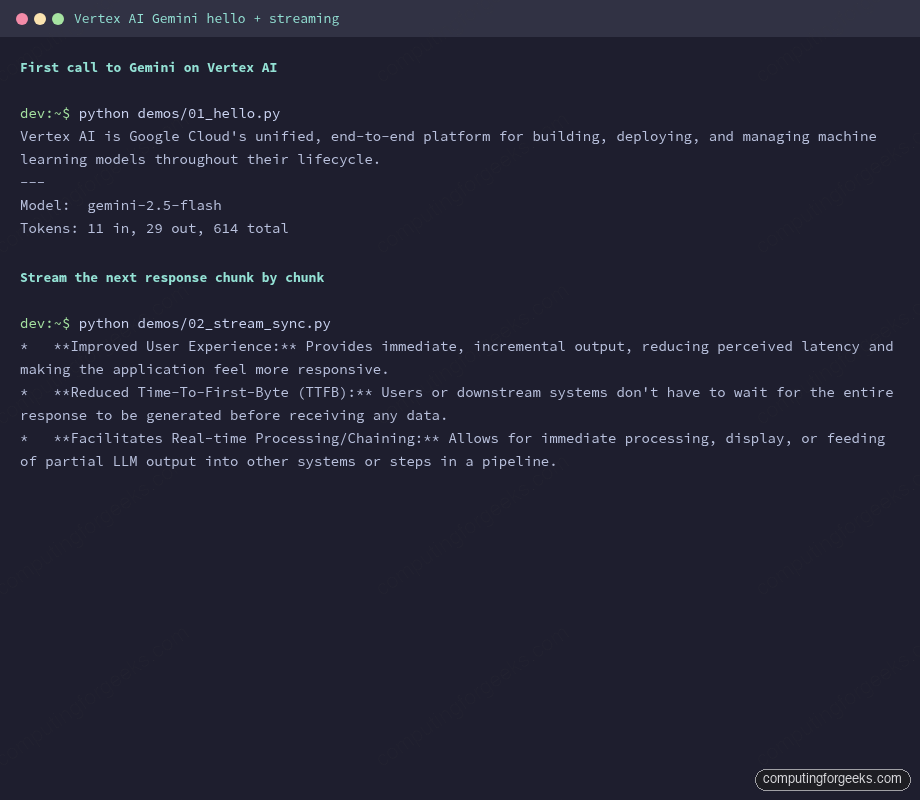
python demos/01_hello.pyThe output confirms the call hit Gemini 2.5 Flash and reports token usage:
Vertex AI is Google Cloud's unified, end-to-end platform for building, deploying, and managing machine learning models throughout their lifecycle.
---
Model:  gemini-2.5-flash
Tokens: 11 in, 29 out, 614 total
The total_token_count includes thinking tokens that Gemini 2.5 generates internally before producing the visible answer, which is why the total is well above input plus output. You see this on every 2.5-series call.
Step 5: Stream responses (sync and async)
Streaming is what makes a chat UI feel alive. Without it, the user stares at a spinner for 4 seconds. With it, the first token appears in around 300 ms and the rest flows in. The SDK exposes generate_content_stream on both the sync and async clients.
Sync is the right pick for CLI tools and scripts:
from google import genai

client = genai.Client(vertexai=True, project="your-gcp-project-id", location="us-central1")

prompt = "List three reasons engineers stream LLM output. One short bullet each."

for chunk in client.models.generate_content_stream(
    model="gemini-2.5-flash",
    contents=prompt,
):
    print(chunk.text, end="", flush=True)

print()
Each chunk carries a few tokens and you flush them as they arrive. The image below shows back-to-back runs of the hello-world script and the streaming script:
Async is what you want behind a FastAPI endpoint or any code that already runs on an event loop. The async client lives at client.aio and mirrors every method:
import asyncio
from google import genai

client = genai.Client(vertexai=True, project="your-gcp-project-id", location="us-central1")


async def main() -> None:
    stream = await client.aio.models.generate_content_stream(
        model="gemini-2.5-flash",
        contents="Explain async streaming in two short sentences.",
    )
    async for chunk in stream:
        print(chunk.text, end="", flush=True)
    print()


asyncio.run(main())
Wrap that in a Cloud Run service with FastAPI’s StreamingResponse and you have a Server-Sent Events endpoint that scales to zero and pays only for actual generation time.
Step 6: JSON output, system instructions, and safety settings
Free-form text is fine for chat. For automation you want structure. The SDK accepts a Pydantic class as response_schema and Gemini conforms to it: no regex, no json.loads wrapped in a try/except, no “the model forgot the closing brace again.”
from pydantic import BaseModel
from google import genai
from google.genai import types


class IncidentSummary(BaseModel):
    severity: str
    affected_service: str
    likely_cause: str
    next_step: str


client = genai.Client(vertexai=True, project="your-gcp-project-id", location="us-central1")

response = client.models.generate_content(
    model="gemini-2.5-flash",
    contents=(
        "Triage this Nginx alert: 502 Bad Gateway spiking on /api after a "
        "PostgreSQL maintenance window. Return one IncidentSummary."
    ),
    config=types.GenerateContentConfig(
        response_mime_type="application/json",
        response_schema=IncidentSummary,
    ),
)

incident: IncidentSummary = response.parsed
print(f"Severity:        {incident.severity}")
print(f"Service:         {incident.affected_service}")
print(f"Likely cause:    {incident.likely_cause}")
print(f"Next step:       {incident.next_step}")
The captured run produced a clean parse without retries:
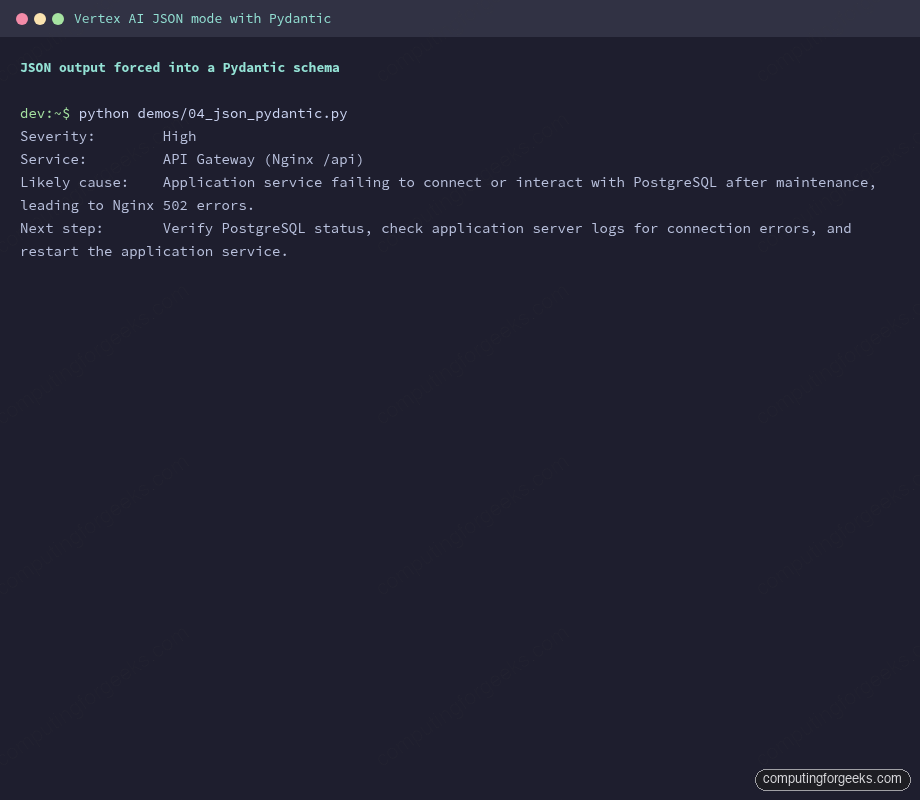
Two more knobs on the same GenerateContentConfig are worth setting on day one. system_instruction pins the persona so you stop repeating “act as a senior SRE” in every prompt. safety_settings tunes the harm thresholds that block content; the defaults are mid-strict and you may need to lower them for security or red-team workloads:
config = types.GenerateContentConfig(
    system_instruction="You are a senior Linux SysAdmin. Be terse. Reply in one sentence unless asked otherwise.",
    safety_settings=[
        types.SafetySetting(
            category="HARM_CATEGORY_HATE_SPEECH",
            threshold="BLOCK_ONLY_HIGH",
        ),
    ],
)
Pass that config to any generate_content or generate_content_stream call and the model honours both.
Step 7: Function calling, automatic and manual
Function calling is how Gemini asks your code to do things it cannot do itself: query a database, hit an internal API, run a kubectl command. The SDK supports two patterns. Pick automatic when the function lives in the same Python process. Pick manual when the tool is on a different host, in a different language, or when you want the model to suggest calls but never execute them.
For the automatic pattern, define a regular Python function with a docstring and type hints. The SDK introspects both, generates the JSON schema, and calls the function for you when Gemini decides a tool call is needed:
from google import genai
from google.genai import types


def get_server_status(hostname: str) -> dict:
    """Returns the systemd status of a Linux server.

    Args:
        hostname: The server hostname, e.g. web01.example.com.
    """
    fake_db = {
        "web01.example.com":   {"status": "active", "load": "0.42", "uptime_days": 18},
        "db01.example.com":    {"status": "active", "load": "1.10", "uptime_days": 92},
        "cache01.example.com": {"status": "failed", "load": "n/a",  "uptime_days": 0},
    }
    return fake_db.get(hostname, {"status": "unknown", "error": "host not in inventory"})


client = genai.Client(vertexai=True, project="your-gcp-project-id", location="us-central1")

response = client.models.generate_content(
    model="gemini-2.5-flash",
    contents=(
        "I have three boxes: web01.example.com, db01.example.com, "
        "and cache01.example.com. Which one is in trouble?"
    ),
    config=types.GenerateContentConfig(tools=[get_server_status]),
)

print(response.text)
The model called get_server_status three times (once per host), got the dict back each time, and produced a final natural-language answer. No state machine, no manual loop:
It looks like cache01.example.com is in trouble. It has a status of failed and an uptime of 0 days. The other two servers, web01.example.com and db01.example.com, are active.The manual pattern is a different shape. You declare the tool with types.FunctionDeclaration, give it a JSON schema, and the model returns a function_call part instead of a text part. Your code dispatches the call, runs whatever it needs, and decides whether to feed the result back:
from google import genai
from google.genai import types

list_pods = types.FunctionDeclaration(
    name="list_pods",
    description="Returns Kubernetes pods in a namespace.",
    parameters_json_schema={
        "type": "object",
        "properties": {
            "namespace": {
                "type": "string",
                "description": "The Kubernetes namespace, e.g. default, kube-system.",
            },
            "label_selector": {
                "type": "string",
                "description": "Optional label selector, e.g. app=nginx.",
            },
        },
        "required": ["namespace"],
    },
)

tool = types.Tool(function_declarations=[list_pods])

client = genai.Client(vertexai=True, project="your-gcp-project-id", location="us-central1")

response = client.models.generate_content(
    model="gemini-2.5-flash",
    contents="Show me every nginx pod running in the staging namespace.",
    config=types.GenerateContentConfig(tools=[tool]),
)

call = response.candidates[0].content.parts[0].function_call
print(f"Function:  {call.name}")
print(f"Arguments: {dict(call.args)}")
The captured output of both runs side by side:
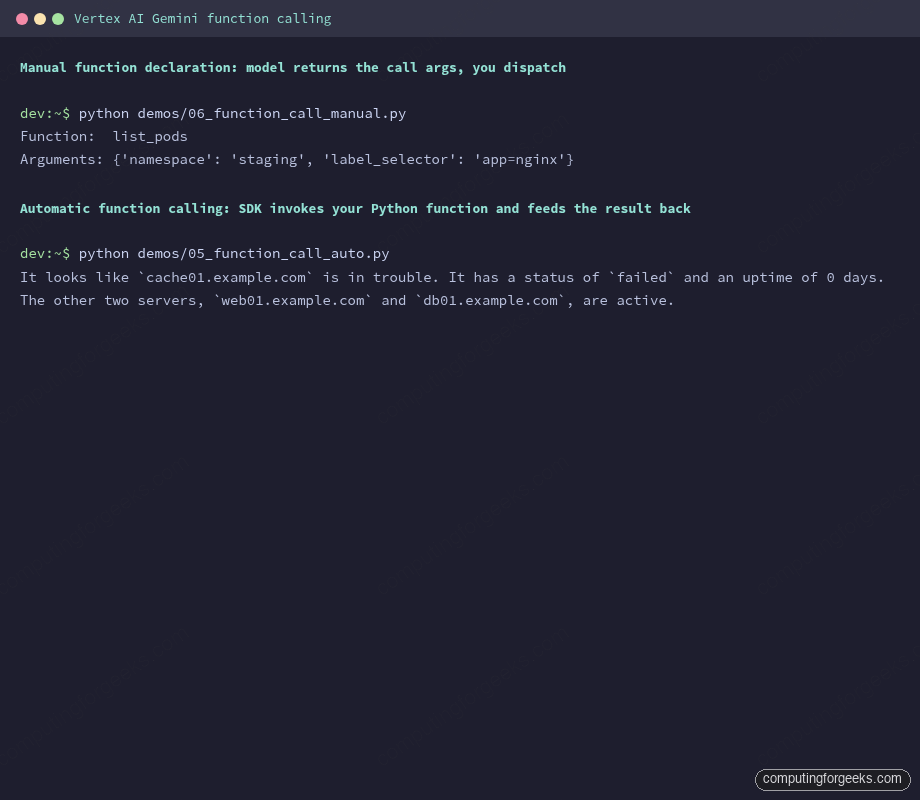
The manual call extracts {'namespace': 'staging', 'label_selector': 'app=nginx'} from the prompt without you parsing a single string. From there you would pass those args to kubectl via subprocess, the Python Kubernetes client, or any RPC of your choice.
Step 8: Vision and multimodal inputs
Gemini accepts images in three shapes: a public or signed URL, raw bytes from disk, or a Cloud Storage URI. For anything bigger than a few megabytes, GCS is the cleanest path: you skip the bytes-over-HTTP overhead and the SDK reuses the upload across requests.
from google import genai
from google.genai import types

client = genai.Client(vertexai=True, project="your-gcp-project-id", location="us-central1")

response = client.models.generate_content(
    model="gemini-2.5-flash",
    contents=[
        "Describe this image in two sentences. Then list every object you see.",
        types.Part.from_uri(
            file_uri="gs://generativeai-downloads/images/scones.jpg",
            mime_type="image/jpeg",
        ),
    ],
)

print(response.text)
The gs://generativeai-downloads/images/scones.jpg URI is one of Google’s public sample images, useful for sanity-checking vision without uploading your own bucket. The captured response shows how detailed the model can get on a single request:
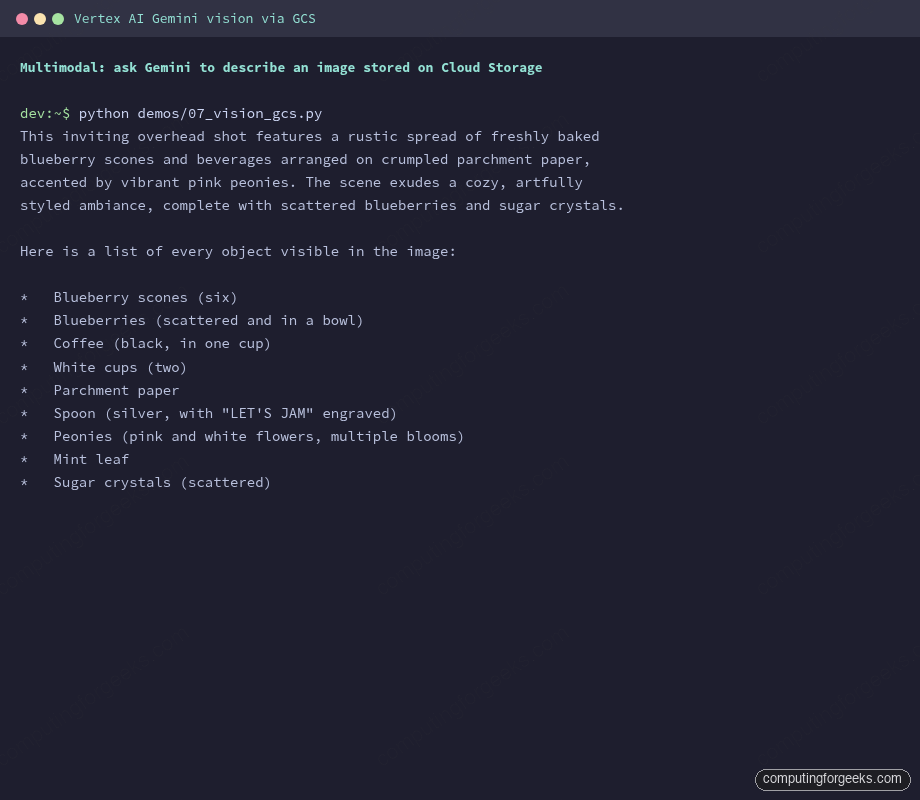
For local images, swap Part.from_uri for Part.from_bytes. Inline bytes work up to about 7 MB, after which Vertex AI rejects the request with a payload-size error:
with open("diagram.png", "rb") as f:
    image_bytes = f.read()

response = client.models.generate_content(
    model="gemini-2.5-flash",
    contents=[
        "What is shown in this image? Be specific about colors and text.",
        types.Part.from_bytes(data=image_bytes, mime_type="image/png"),
    ],
)
print(response.text)
Supported MIME types span image/png, image/jpeg, image/webp, image/heic, and image/heif. Video inputs use video/mp4 and several siblings; audio uses audio/mp3 and audio/wav. PDFs work too, treated as multi-page images, which is how Gemini’s RAG pipelines ingest documents in one call.
Step 9: Streaming with function calling, the production pattern
Streaming and tool use are usually shown in isolation. The pattern that ships in real products combines them: the model streams a partial answer, decides it needs to call a function, your code runs the function, the model streams the rest. With automatic function calling the SDK handles the whole loop and you still get chunks as they arrive.
from google import genai
from google.genai import types


def get_disk_usage(mountpoint: str) -> dict:
    """Return current disk usage for a mountpoint.

    Args:
        mountpoint: The mountpoint to query, e.g. /var, /, /home.
    """
    fake = {
        "/":     {"used_gb": 32, "total_gb": 100, "percent": 32},
        "/var":  {"used_gb": 88, "total_gb": 100, "percent": 88},
        "/home": {"used_gb": 12, "total_gb": 50,  "percent": 24},
    }
    return fake.get(mountpoint, {"error": "mountpoint not found"})


client = genai.Client(vertexai=True, project="your-gcp-project-id", location="us-central1")

stream = client.models.generate_content_stream(
    model="gemini-2.5-flash",
    contents=(
        "Check disk usage on /, /var, and /home. Tell me which mountpoint "
        "is closest to filling up and recommend one action."
    ),
    config=types.GenerateContentConfig(tools=[get_disk_usage]),
)

for chunk in stream:
    if chunk.text:
        print(chunk.text, end="", flush=True)
print()
The model issues three calls to get_disk_usage, gets the dicts back, and streams a final recommendation. The captured run also shows pre-flight token counting and what a 404 looks like when you ask for a model that does not exist:
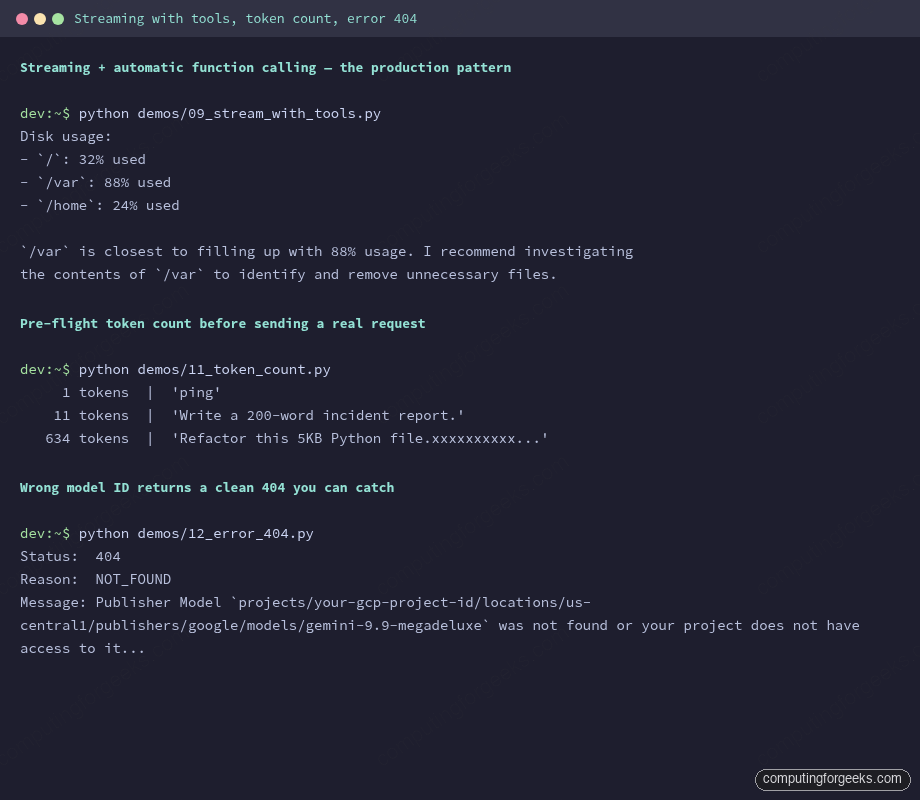
Pre-flight token counting is the cheapest check you can run. It costs no model time and helps you catch a 200 KB prompt before you send it. client.models.count_tokens takes the same model and contents you would pass to generate_content:
count = client.models.count_tokens(
    model="gemini-2.5-flash",
    contents="Refactor this 5KB Python file." + "x" * 5000,
)
print(count.total_tokens)
Step 10: Thinking, context caching, and the Batch API
Three features on Vertex AI cut cost or unlock new use cases. They all live behind the same GenerateContentConfig you already know, plus dedicated client methods for the longer-running ones.
Thinking mode lets Gemini 2.5 reason longer before answering. You set a thinking budget in tokens, and you can ask the SDK to expose the trace so you see how the model got there:
response = client.models.generate_content(
    model="gemini-2.5-pro",
    contents=(
        "A Kubernetes pod restarts every 47 minutes with OOMKilled. "
        "The container limit is 512Mi and the JVM is set to -Xmx384m. "
        "What is the most likely root cause and how do I confirm?"
    ),
    config=types.GenerateContentConfig(
        thinking_config=types.ThinkingConfig(
            thinking_budget=2048,
            include_thoughts=True,
        ),
    ),
)

for part in response.candidates[0].content.parts:
    if part.thought:
        print("=== THOUGHT ===")
    elif part.text:
        print("=== ANSWER ===")
    print(part.text)
On the OOMKilled prompt, Pro spent 1,616 thinking tokens before producing a 1,767-token answer that walked through Native Memory Tracking, JVM metaspace caps, and the MaxRAMPercentage flag. Thinking is what turns Gemini from a fast generator into a slow but careful debugger; reach for it on real triage, leave Flash on for chat.
Context caching is the cost lever almost nobody uses. If you send the same long preamble (a 30-page PDF, a code repo, a knowledge base) on every request, cache it once and reference it by name. Cached input tokens cost roughly 90% less than fresh tokens on Gemini 2.5:
cached = client.caches.create(
    model="gemini-2.5-flash",
    config=types.CreateCachedContentConfig(
        contents=[
            types.Content(role="user", parts=[
                types.Part.from_uri(
                    file_uri="gs://my-bucket/runbook.pdf",
                    mime_type="application/pdf",
                )
            ])
        ],
        system_instruction="Answer questions strictly from this runbook.",
        ttl="3600s",
    ),
)

response = client.models.generate_content(
    model="gemini-2.5-flash",
    contents="What is the rollback procedure if step 3 fails?",
    config=types.GenerateContentConfig(cached_content=cached.name),
)
print(response.text)
The Batch API on Vertex AI is the third lever. Up to 200,000 prompts in a single job, sourced from a BigQuery table or a GCS file, processed asynchronously at lower per-token cost. Use it for content generation jobs, dataset labelling, or evaluation runs where latency does not matter:
job = client.batches.create(
    model="gemini-2.5-flash",
    src="bq://storage-samples.generative_ai.batch_requests_for_multimodal_input",
    config=types.CreateBatchJobConfig(
        dest="bq://your-gcp-project-id.gemini_results.batch_001",
    ),
)
print(f"Job: {job.name}, state: {job.state}")
Cost per article: a streaming chat that runs for an hour against Gemini 2.5 Flash with a 200-token system prompt and 2,000 tokens of conversation per turn lands at roughly half a cent per turn. Add caching on the system prompt and that drops further. The GCP costs explained guide covers the broader cost shape on Google Cloud if you want the bigger picture.
Migrating from vertexai.generative_models
If you already have code on the old SDK, the migration is mechanical. Most signatures have a one-line equivalent:
Old (vertexai.generative_models) | New (google.genai) |
|---|---|
vertexai.init(project=..., location=...) | genai.Client(vertexai=True, project=..., location=...) |
GenerativeModel("gemini-1.5-flash") | model name passed per call: client.models.generate_content(model="gemini-2.5-flash", ...) |
model.generate_content(prompt) | client.models.generate_content(model=..., contents=...) |
model.generate_content(prompt, stream=True) | client.models.generate_content_stream(model=..., contents=...) |
Tool.from_function_declarations([...]) | types.Tool(function_declarations=[...]) |
GenerationConfig(...) | types.GenerateContentConfig(...) |
Part.from_data(data, mime_type) | types.Part.from_bytes(data=data, mime_type=...) |
The official SDK overview tracks the full surface and notes the June 24, 2026 removal date for the old generative modules. Run pip install --upgrade google-genai on a feature branch, swap the imports, and run your existing tests; in most codebases the diff is under 50 lines.
Common errors and fixes
Four error shapes cover almost every hit you will see in production. Each one is captured from a real failed run.
404: “Publisher Model … was not found”
The trace looks like this when the model ID is wrong, the model is not GA in your region, or the API was never enabled:
google.genai.errors.ClientError: 404 NOT_FOUND. {'error': {'code': 404, 'message': "Publisher Model `projects/your-gcp-project-id/locations/us-central1/publishers/google/models/gemini-9.9-megadeluxe` was not found or your project does not have access to it..."}}Run gcloud services enable aiplatform.googleapis.com first, then check the model availability page for the model ID and supported regions. New projects sometimes propagate model access slowly; if you just enabled the API, wait two minutes and retry.
403: “Permission ‘aiplatform.endpoints.predict’ denied”
This is what you see when the calling principal is missing the Vertex AI User role:
google.genai.errors.ClientError: 403 PERMISSION_DENIED. Permission 'aiplatform.endpoints.predict' denied on resource '//aiplatform.googleapis.com/projects/your-gcp-project-id/locations/us-central1/publishers/google/models/gemini-2.5-flash'Grant the role to the user or service account that is making the call:
gcloud projects add-iam-policy-binding "${PROJECT_ID}" \
  --member="serviceAccount:${SA_NAME}@${PROJECT_ID}.iam.gserviceaccount.com" \
  --role="roles/aiplatform.user"
DefaultCredentialsError: “File … was not found”
You typically see this after rotating service-account keys without updating the env var:
google.auth.exceptions.DefaultCredentialsError: File /Users/you/old-key.json was not found.The GOOGLE_APPLICATION_CREDENTIALS env var points to a key that no longer exists. Either re-export it to a valid path or unset it and rely on ADC:
unset GOOGLE_APPLICATION_CREDENTIALS
gcloud auth application-default login
401: “API key not valid”
This one trips most people on day one. The trace looks like an auth issue but it is really a backend selection issue:
google.genai.errors.ClientError: 401 API key not validThe SDK fell through to AI Studio mode because vertexai=True was missing. Pass it to the constructor or set GOOGLE_GENAI_USE_VERTEXAI=True in the environment:
export GOOGLE_GENAI_USE_VERTEXAI=True
export GOOGLE_CLOUD_PROJECT="${PROJECT_ID}"
export GOOGLE_CLOUD_LOCATION="${REGION}"
With those three env vars set, you can drop the project and location kwargs from genai.Client(); the SDK reads them at init.
From here, the natural next step is RAG: store embeddings on Cloud SQL with pgvector, retrieve documents, and stitch the context into a Gemini prompt. The Cloud SQL Postgres on GCP guide covers the database side. If you would rather keep Gemini for hosted inference but run open-source models locally for sensitive data, the Ollama install on Rocky and Ubuntu walkthrough is the parallel track. Either way, the SDK pattern stays the same: one client, one method per shape, and the migration to whatever Gemini ships next is one upgrade away.