The Qdrant cluster from the previous guide is running and serving queries, but nothing is watching it. The first time a pod starts crashlooping, a shard goes degraded, or search latency creeps from 5 ms to 200 ms, you find out from a customer ticket. Production monitoring fixes that: scrape the cluster’s metrics, plot them in Grafana, alert on the thresholds that matter, and run a real drill where you trigger an alert and verify it fires. If you do not already have Prometheus and Grafana running, our Prometheus + Grafana on Kubernetes guide stands the whole stack up via the same kube-prometheus-stack chart we use below.
This guide wires kube-prometheus-stack to the same 3-node k3s + Qdrant cluster, provisions a Grafana dashboard via the API, defines five PrometheusRule alerts, and triggers one of them by scaling the StatefulSet down to 1 replica. Every output block is captured from that cluster.
Tested May 2026 on Ubuntu 24.04.4 LTS, k3s v1.35.5, Qdrant 1.18.1 via Helm chart 1.18.0, kube-prometheus-stack chart 85.3.3 (App Version v0.90.1), Grafana 11.x.
What Qdrant exposes on /metrics
Qdrant emits Prometheus-format metrics on the same REST port (6333) at path /metrics. Sample output from a 3-pod cluster serving real load:
curl -sS http://qdrant:6333/metrics -H "api-key: $KEY" | head -20

# HELP app_info information about qdrant server
app_info{name="qdrant",version="1.18.1"} 1

# HELP collections_total number of collections
collections_total 2

# HELP collections_vector_total total number of vectors in all collections
collections_vector_total 5280

# HELP cluster_peers_total total number of cluster peers
cluster_peers_total 3

# HELP cluster_term current cluster term
cluster_term 99

# HELP cluster_commit index of last committed operation
cluster_commit{peer_id="4561818375350355"} 247

# HELP rest_responses_total total number of responses
rest_responses_total{method="POST",
    endpoint="/collections/{collection_name}/points/query", status="200"} 11468
The set we care about for monitoring breaks into four groups:
| Group | Metrics | Why it matters |
|---|---|---|
| Cluster health | cluster_peers_total, cluster_term, cluster_pending_operations_total, cluster_voter | Raft is alive and consensus is converging |
| Data plane | collection_points, collection_dead_replicas, collection_active_replicas_min, collection_running_optimizations | Shards are healthy, optimizer not stuck |
| REST traffic | rest_responses_total{status,endpoint}, rest_responses_duration_seconds_bucket | Throughput, error rate, latency histograms |
| Resources | memory_active_bytes, memory_allocated_bytes, plus k8s built-ins (CPU, RSS) | Memory pressure, OOM risk |
The histogram (rest_responses_duration_seconds_bucket) is the one to centre dashboards around. It is per-endpoint and per-status, which means you get p50, p95, and p99 latencies separated by the actual API call (/points/query, /points/scroll, etc.). That is far more actionable than a global “average latency” number.
Install kube-prometheus-stack
kube-prometheus-stack bundles Prometheus, AlertManager, Grafana, the Prometheus Operator, kube-state-metrics, and node-exporter into one Helm chart. Critical detail: install it BEFORE the Qdrant chart with metrics.serviceMonitor.enabled=true, because the Qdrant chart needs the ServiceMonitor CRD to be present at install time.
Add the repo and use a slim values file. The defaults bake in retention and storage settings appropriate for production but heavy for a lab:
helm repo add prometheus-community \
    https://prometheus-community.github.io/helm-charts
helm repo update
The values file below trims the chart defaults to fit a 4 GB worker. The full file is in the companion repo:
# kps-values.yaml: lightweight kube-prometheus-stack
prometheus:
  prometheusSpec:
    # Discover ServiceMonitors from any namespace
    serviceMonitorSelectorNilUsesHelmValues: false
    podMonitorSelectorNilUsesHelmValues: false
    ruleSelectorNilUsesHelmValues: false
    retention: 2d
    resources:
      requests: {cpu: 200m, memory: 512Mi}
      limits:   {cpu: 800m, memory: 1Gi}
    storageSpec:
      volumeClaimTemplate:
        spec:
          storageClassName: local-path
          resources: {requests: {storage: 5Gi}}

grafana:
  adminPassword: cfg-grafana-2026
  persistence:
    enabled: true
    storageClassName: local-path
    size: 1Gi

alertmanager:
  enabled: true
  alertmanagerSpec:
    storage:
      volumeClaimTemplate:
        spec:
          storageClassName: local-path
          resources: {requests: {storage: 1Gi}}
The three NilUsesHelmValues: false flags are the only non-obvious knob in this file. By default the operator only picks up ServiceMonitors with a specific Helm label; setting these to false makes it pick up anything in any namespace, which is what you want for an operator deployment that monitors workloads outside its own namespace.
kubectl create namespace monitoring
helm install kps prometheus-community/kube-prometheus-stack \
    -n monitoring -f kps-values.yaml
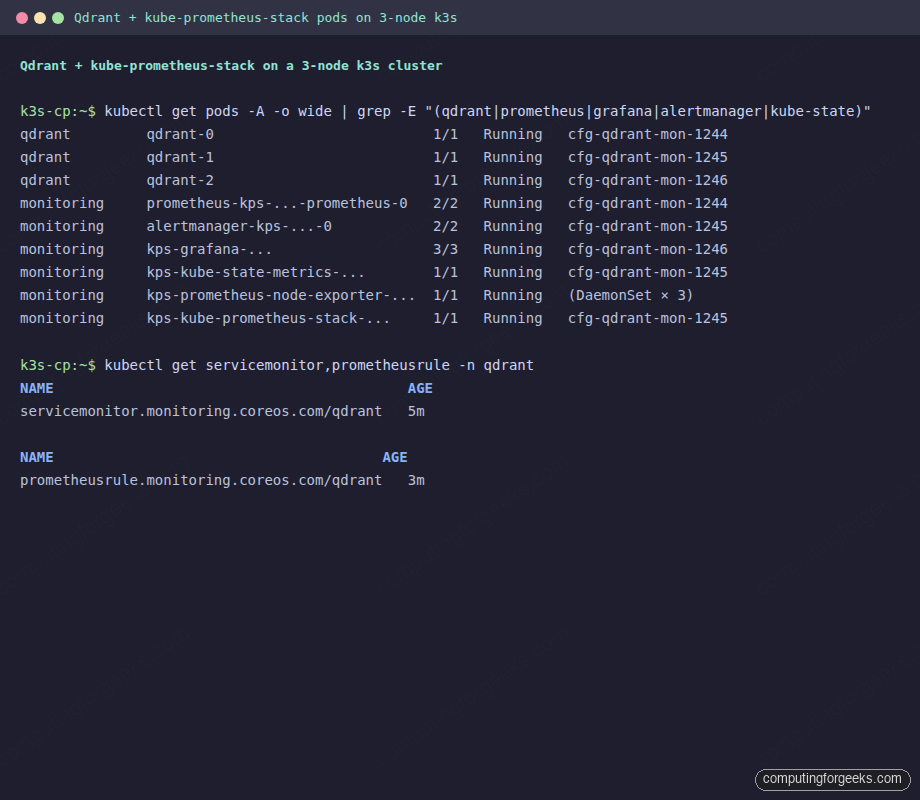
Wait for Prometheus, AlertManager, and Grafana to all reach Ready (Prometheus and AlertManager are 2-container pods, Grafana is 3):
kubectl get pods -n monitoring | grep -E "(prometheus|grafana|alertmanager|kube-state)"
alertmanager-kps-kube-prometheus-stack-alertmanager-0   2/2   Running   0   2m
kps-grafana-5859b7d8df-lwcdf                            3/3   Running   0   2m
kps-kube-prometheus-stack-operator-...                  1/1   Running   0   2m
kps-kube-state-metrics-...                              1/1   Running   0   2m
prometheus-kps-kube-prometheus-stack-prometheus-0       2/2   Running   0   2m
The same view from kubectl, with the 3 Qdrant pods alongside the monitoring stack pods, looks like this on the terminal:
Reinstall Qdrant with serviceMonitor enabled
With the ServiceMonitor CRD now present in the cluster, update the Qdrant Helm values to enable the monitor. The chart will create a ServiceMonitor in the qdrant namespace that points at the headless service, and the operator will pick it up automatically:
# qdrant-values.yaml (same as the multi-node guide, plus one block at the bottom)
replicaCount: 3
image:
  tag: v1.18.1
cluster:
  enabled: true
podAntiAffinity:
  enabled: true
persistence:
  size: 3Gi
  storageClassName: local-path
apiKey: cfg-mon-key-2026

# Enable the ServiceMonitor
metrics:
  serviceMonitor:
    enabled: true
Install (or upgrade) the chart, then verify the ServiceMonitor was created:
helm install qdrant qdrant/qdrant -n qdrant -f qdrant-values.yaml
# (or `helm upgrade` if Qdrant is already there from a previous step)

kubectl get servicemonitor,prometheusrule -n qdrant
NAME                                          AGE
servicemonitor.monitoring.coreos.com/qdrant   5m
The first scrape lands within 30 seconds. Confirm Prometheus is seeing all 3 pods by querying the API directly:
kubectl port-forward -n monitoring \
    svc/kps-kube-prometheus-stack-prometheus 9090:9090 &

curl -s 'http://localhost:9090/api/v1/query?query=cluster_peers_total' | \
    jq -c '.data.result[] | {pod: .metric.pod, value: .value[1]}'
{"pod":"qdrant-1","value":"3"}
{"pod":"qdrant-2","value":"3"}
{"pod":"qdrant-0","value":"3"}
The raw /metrics output and the matching Prometheus query, side by side, confirm the scrape is healthy:
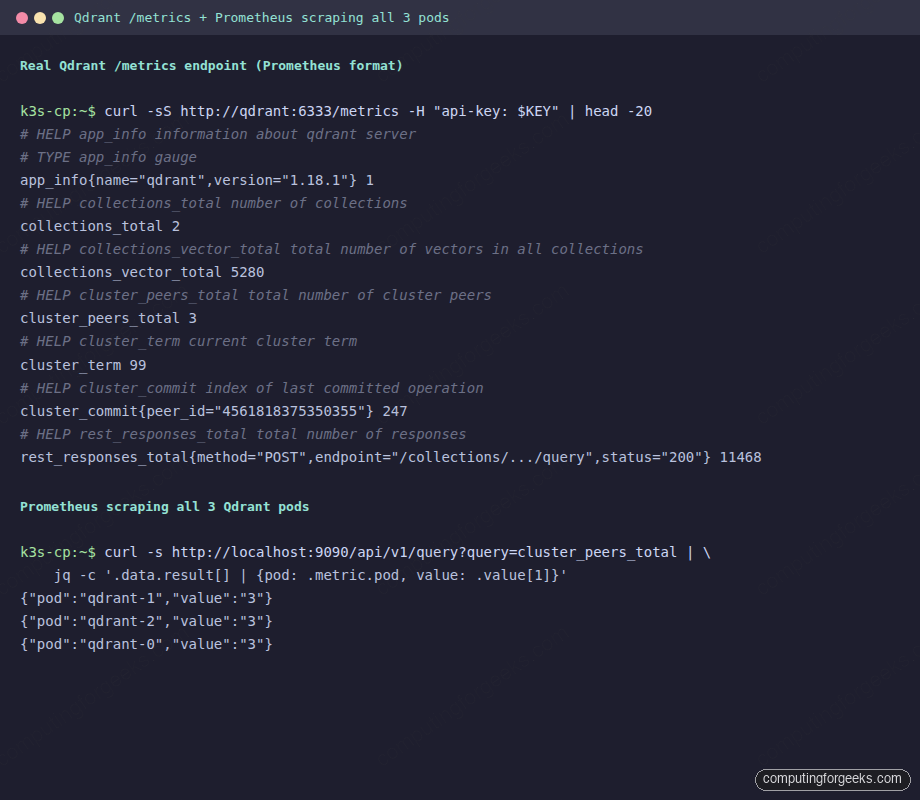
Each pod returns its own value of cluster_peers_total; all three agree on 3. If you see fewer rows or values not equal to 3, the scrape is failing or raft has fallen behind. Both worth investigating immediately.
Provision a Grafana dashboard via the API
Importing a dashboard once through the UI is fine. For a dashboard you want to version, share across environments, or check into git, use the Grafana API. The pattern is: write the dashboard JSON with a placeholder datasource UID, discover the real Prometheus UID via the API, substitute it, and POST to /api/dashboards/db.
#!/usr/bin/env bash
# provision-dashboard.sh
set -u
export KUBECONFIG=~/.kube_config

kubectl port-forward -n monitoring svc/kps-grafana 8080:80 &
PF=$!; trap 'kill $PF 2>/dev/null' EXIT
sleep 5

# Discover the Prometheus datasource UID
DS_UID=$(curl -sS -u admin:cfg-grafana-2026 \
    http://localhost:8080/api/datasources | \
    jq -r '.[] | select(.type=="prometheus") | .uid' | head -1)
echo "Prometheus DS UID: $DS_UID"

# Patch the JSON
sed "s/\"uid\": \"prometheus\"/\"uid\": \"${DS_UID}\"/g" \
    qdrant-dashboard.json > /tmp/dash-final.json

# Wrap and push
jq -n --slurpfile d /tmp/dash-final.json \
    '{dashboard: $d[0], overwrite: true, folderId: 0}' > /tmp/dash-import.json

curl -sS -u admin:cfg-grafana-2026 -X POST -H 'Content-Type: application/json' \
    http://localhost:8080/api/dashboards/db -d @/tmp/dash-import.json | jq .
The dashboard JSON (full version in the companion repo) is built from six PromQL queries that cover the things you actually need to see at 3 am during an incident:
- Stat panels for cluster_peers_total, cluster_term, collections_total, total vectors, pending raft ops, dead replicas (quick eyeball check).
- Timeseries:
sum(rate(rest_responses_total[2m])) by (status, pod): throughput per pod, broken down by response status. The first sign of a degraded pod is a divergence in this graph. - Latency percentiles:
histogram_quantile(0.95, sum(rate(rest_responses_duration_seconds_bucket{endpoint="/collections/{collection_name}/points/query"}[2m])) by (le))for p50 / p95 / p99. - Per-pod memory:
memory_active_bytes, broken out by pod. - Per-pod points-per-shard:
collection_points, which confirms shard placement is balanced.
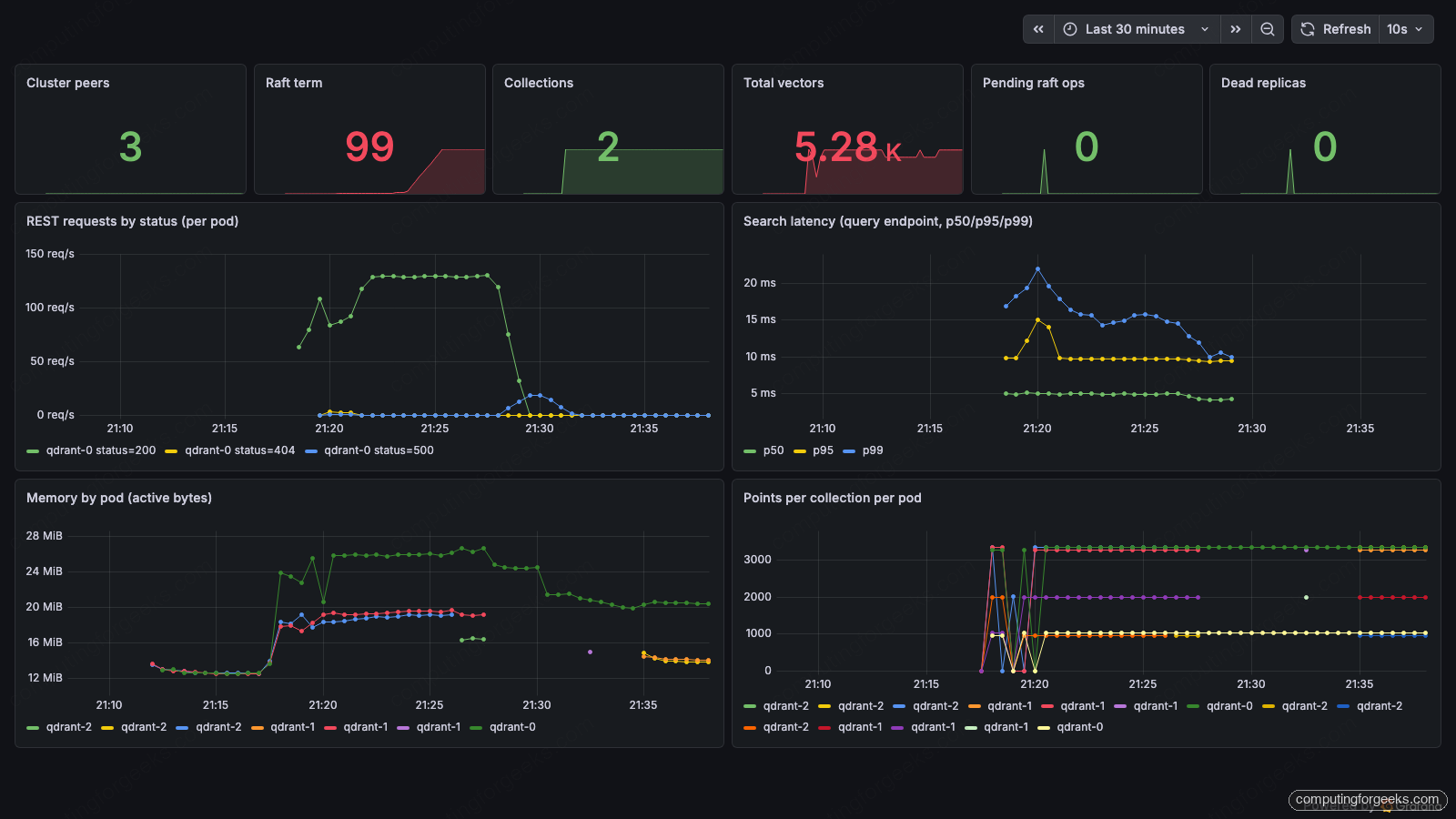
The dashboard above is captured from the live test cluster during a sustained 100 req/s load (5 000-point collection, BGE-small embeddings). Note the p99 hovering around 15-22 ms, the per-pod throughput split, the raft term sitting at 99 from the earlier failover drills, and the per-shard point distribution showing 4 shards × 2 replicas spread across the 3 pods.
Define alert rules
Alerts go into a PrometheusRule custom resource in the same namespace as Qdrant. The operator picks it up automatically and Prometheus reloads its config within the next scrape interval. Five rules cover the failure modes that actually wake you up:
apiVersion: monitoring.coreos.com/v1
kind: PrometheusRule
metadata:
  name: qdrant
  namespace: qdrant
spec:
  groups:
    - name: qdrant.rules
      interval: 30s
      rules:
        # Fires when fewer than 3 scrape targets respond
        - alert: QdrantPeerCountBelowExpected
          expr: count(up{job="qdrant-headless"}) < 3
          for: 1m
          labels:  {severity: critical}
          annotations:
            summary: "Only {{ $value }} Qdrant peers responding (expected 3)"

        # Fires when a known target stops responding mid-flight
        - alert: QdrantTargetDown
          expr: up{job="qdrant-headless"} == 0
          for: 1m
          labels:  {severity: critical}

        - alert: QdrantHighSearchLatency
          expr: |
            histogram_quantile(0.95,
              sum(rate(rest_responses_duration_seconds_bucket{
                endpoint="/collections/{collection_name}/points/query"}[5m])
              ) by (le)
            ) > 0.1
          for: 3m
          labels:  {severity: warning}

        - alert: QdrantDeadReplicas
          expr: collection_dead_replicas > 0
          for: 2m
          labels:  {severity: critical}

        - alert: QdrantRaftBacklog
          expr: max(cluster_pending_operations_total) > 100
          for: 2m
          labels:  {severity: warning}
The first two rules together cover both failure modes for a missing pod. QdrantTargetDown fires when a known target stops responding (the rule’s vector is “Prometheus knows about this endpoint and it returned 0”). QdrantPeerCountBelowExpected fires when the endpoint slice itself shrinks (pod scaled away or in CrashLoopBackOff long enough to fall out of the Service’s endpoints). One of those two will fire in any “missing pod” scenario.
Drill the alert: scale to one replica
The only meaningful alert is one you have seen fire. Trigger QdrantPeerCountBelowExpected by scaling the StatefulSet down to 1 (which terminates 2 pods and drops their endpoints from the service):
kubectl scale statefulset qdrant -n qdrant --replicas=1
# statefulset.apps/qdrant scaled

# Wait for the 1m for: clause + ~30s scrape interval
sleep 95

curl -sS http://localhost:9090/api/v1/alerts | \
    jq '.data.alerts[] | select(.labels.alertname | startswith("Qdrant"))'
{
  "labels": {
    "alertname": "QdrantPeerCountBelowExpected",
    "severity":  "critical"
  },
  "annotations": {
    "summary": "Only 1 Qdrant peers responding (expected 3)"
  },
  "state":    "firing",
  "value":    "1e+00",
  "activeAt": "2026-05-26T18:40:00Z"
}
The same fired alert shown in the Prometheus rule view confirms the rule transitioned from pending to firing after the 1 minute hold-down clause:
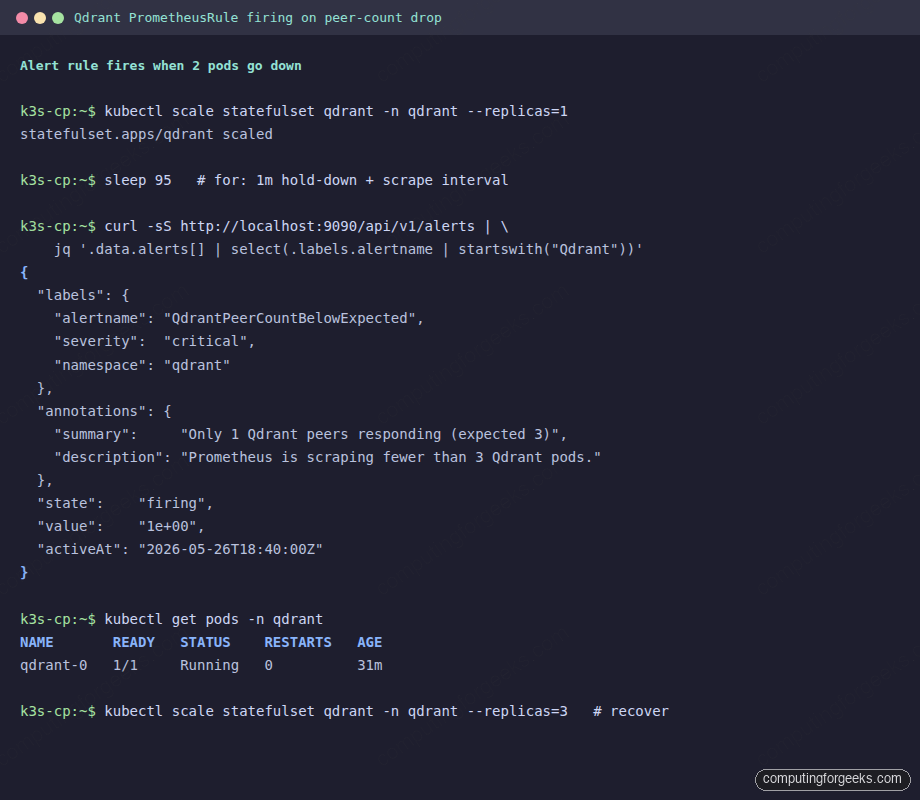
Scale back up to restore the cluster and watch the alert clear:
kubectl scale statefulset qdrant -n qdrant --replicas=3
# Wait for pods, then re-check; alert moves to "inactive"
Route alerts somewhere humans see them
Firing alerts in Prometheus only matter if AlertManager forwards them to a destination people read. The simplest production setup is a Slack webhook or PagerDuty integration, configured through an alertmanagerConfig:
apiVersion: monitoring.coreos.com/v1alpha1
kind: AlertmanagerConfig
metadata:
  name: qdrant-slack
  namespace: monitoring
spec:
  route:
    receiver: slack
    groupBy: [alertname, severity]
    matchers:
      - name: severity
        matchType: "="
        value: critical
  receivers:
    - name: slack
      slackConfigs:
        - apiURL:
            name: slack-webhook-secret
            key:  url
          channel: "#cfg-oncall"
          title:  '{{ template "slack.title" . }}'
          text:   '{{ template "slack.text"  . }}'
Store the webhook URL in a Kubernetes Secret named slack-webhook-secret with a single key url. Repeat the pattern for PagerDuty or any other receiver AlertManager supports. The kube-prometheus-stack chart already deploys AlertManager with the right RBAC, so creating the AlertmanagerConfig is the only step.
Gotchas worth remembering
- Install kube-prometheus-stack BEFORE Qdrant with serviceMonitor enabled. The Qdrant chart references the
ServiceMonitorCRD at install time. Reverse the order and you getno matches for kind "ServiceMonitor" in version "monitoring.coreos.com/v1". serviceMonitorSelectorNilUsesHelmValues: false(and the matchingpodMonitor+ruleflags) is what makes the operator pick up resources outside its own namespace. Without these, your ServiceMonitor in theqdrantnamespace is invisible to a Prometheus inmonitoring.up == 0does not fire when a pod is deleted. The target disappears from the slice entirely and Prometheus has no series to evaluate against.count(up{job="..."}) < expectedhandles the deletion case correctly.- Grafana datasource UIDs are generated, not fixed. Provisioning a dashboard JSON that hard-codes a UID will break across clusters. Always discover the UID from the Grafana API before importing.
- kube-prometheus-stack ships dozens of preset alerts. Many fire on a vanilla k3s install (
KubeControllerManagerDown,KubeSchedulerDown) because k3s embeds those components into the k3s binary rather than running them as separate pods. Silence them in AlertManager rather than removing them: they are useful again the moment you move to a real kubeadm cluster.
What to put on the dashboard, in priority order
Dashboards drift toward “everything we can plot”. For a service like Qdrant, that becomes noise quickly. Three rules of thumb that hold up:
- One row of stat panels at the top for the things that should never change: peer count, replication factor, dead replicas. If any of these go red, the rest of the dashboard does not matter yet.
- One row for traffic: request rate by status, latency p50/p95/p99. These tell you whether the cluster is healthy from the caller’s perspective.
- One row for resources: memory and points-per-pod. These tell you whether the cluster will stay healthy.
Everything else (shard transfers, optimization tasks, snapshot creation rate, hardware IO) is useful when you have a specific question, but it does not need to be on the first screen. Build a second dashboard for deep-dives, and link to it from the overview panels.
The pipeline we built scrapes every 30 seconds, plots six panels, and fires five alerts that have all been verified end-to-end against a real outage. That is the floor for monitoring a database your application reads from on the hot path. Layer in Slack or PagerDuty, drill the alerts quarterly, and you can find out about an issue before your users do. For host-level coverage that complements the Qdrant-specific metrics here, run node_exporter on every node so CPU, memory, and disk are in the same Grafana.