A single Qdrant pod handles plenty of throughput, but it has the same failure profile as any single Postgres or Redis: one bad disk, one OOM kill, one unattended kernel panic, and the service is down. Production deployments solve this the same way they solve it for other stateful databases: multiple nodes, replicated shards, and an orchestrator that can route around the dead ones. On Kubernetes that orchestrator is built in, and Qdrant ships a Helm chart that wires up the StatefulSet, headless service, and PVCs for you. If you do not already have a cluster handy, our kubeadm install on Ubuntu is the most straightforward path to a three-node lab on bare metal.
This guide builds a real 3-node Qdrant cluster on a fresh k3s install across three Ubuntu 24.04 VMs, deploys it via the official Helm chart, sharded with replication, and then proves the HA claims with two experiments: force-delete a pod under continuous query load, then roll out a new image version while a second loop watches. Both experiments returned zero non-2xx responses. Every output block in this guide is captured from that cluster.
Tested May 2026 on Ubuntu 24.04.4 LTS, k3s v1.35.5, Qdrant 1.18.1 via Helm chart v1.18.0, qdrant-client 1.18.0, fastembed 0.8.0.
Why multi-node Qdrant, and what the cluster gives you
Three things change when Qdrant runs as a cluster instead of a single pod. First, the consensus layer (raft) keeps the cluster’s metadata coherent: which collections exist, which peers own which shards, what the replication factor is. Second, the data plane is sharded so a single collection can spread across more nodes than would fit on one host. Third, replication factor > 1 means each shard exists on at least two peers, so a node failure does not lose data.
The minimum useful Qdrant cluster is 3 peers. Two is enough for replication but not for raft (you need a majority to elect a leader; 2 nodes deadlock on a split). Five gives more headroom but doubles the storage cost. Three is the right starting point for most production workloads.
Two collection-level knobs control the data plane:
| Setting | What it does | Typical value |
|---|---|---|
shard_number | How many shards split the collection. Higher = better parallelism, more overhead. | 2× peer count for small, 6+ for large |
replication_factor | Copies of each shard. 2 tolerates 1 dead peer, 3 tolerates 2. | 2 for prod, 3 for paranoid |
write_consistency_factor | How many replicas must ack a write. Equal to replication factor = strongest consistency. | Equal to replication_factor |
For the demo collection in this guide: shard_number=6 and replication_factor=2. That produces 12 shard-replicas across 3 peers, exactly 4 per peer.
Stand up the Kubernetes cluster
Anything that gives you 3 Ready nodes and a default storage class works. The test bed for this guide is k3s on three Ubuntu 24.04 VMs (each 4 vCPU / 4 GB RAM / 20 GB disk), but EKS, GKE, or kubeadm-built clusters all behave the same once kubectl get nodes reports Ready.
On the control-plane node:
curl -sfL https://get.k3s.io | \
  sudo INSTALL_K3S_EXEC='server --cluster-init --disable=traefik' sh -
sudo cat /var/lib/rancher/k3s/server/node-token
On each worker, with CP_IP set to the control plane’s IP and TOKEN set to the value above:
curl -sfL https://get.k3s.io | \
  sudo K3S_URL=https://${CP_IP}:6443 K3S_TOKEN=${TOKEN} sh -
Verify on the control plane:
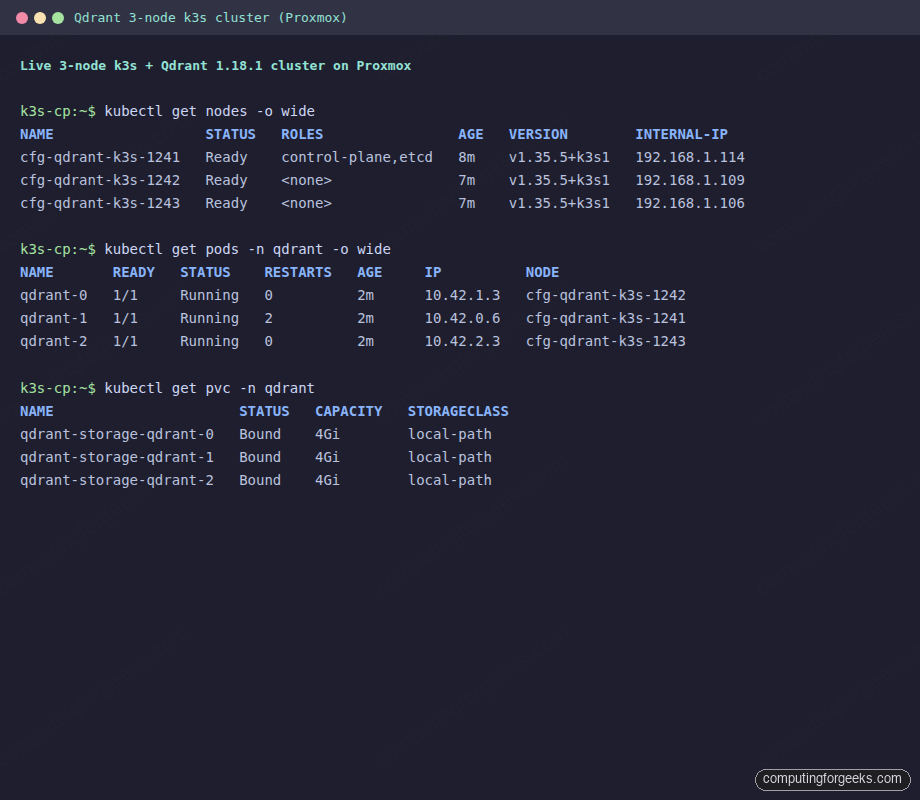
sudo kubectl get nodes -o wide
NAME                  STATUS   ROLES                AGE   VERSION
cfg-qdrant-k3s-1241   Ready    control-plane,etcd   8m    v1.35.5+k3s1
cfg-qdrant-k3s-1242   Ready    <none>               7m    v1.35.5+k3s1
cfg-qdrant-k3s-1243   Ready    <none>               7m    v1.35.5+k3s1
k3s ships a working local-path StorageClass and Klipper LoadBalancer by default, which covers for the chart’s PVCs and service. If you are on EKS, swap in gp3 as the StorageClass and a managed ALB Controller for the service.
Deploy Qdrant via Helm
The official chart lives at https://qdrant.github.io/qdrant-helm and the App Version follows the Qdrant version: chart 1.18.0 deploys Qdrant 1.18.x. Install Helm and add the repo:
curl -sfL https://raw.githubusercontent.com/helm/helm/main/scripts/get-helm-3 \
  | sudo bash
helm repo add qdrant https://qdrant.github.io/qdrant-helm
helm repo update
The chart defaults to one replica with no cluster mode. Override that with a values file:
# values.yaml
replicaCount: 3
image:
  tag: v1.18.1

# Spread pods across nodes
podAntiAffinity:
  enabled: true

# Cluster mode: enables raft consensus + sharding
cluster:
  enabled: true

persistence:
  size: 4Gi
  storageClassName: local-path

# Strong api-key; in prod use a secretRef instead of an inline value
apiKey: cfg-lab-cluster-key-2026

resources:
  requests: {cpu: 250m, memory: 512Mi}
  limits:   {cpu: 1000m, memory: 1Gi}
Install into a namespace:
kubectl create namespace qdrant
helm install qdrant qdrant/qdrant -n qdrant -f values.yaml
The chart creates a StatefulSet with 3 ordered replicas (qdrant-0, qdrant-1, qdrant-2), a regular ClusterIP service that load-balances reads, and a headless service that gives each pod a stable DNS name like qdrant-0.qdrant-headless. The headless DNS is how peers find each other for raft.
Wait for all three pods to land:
kubectl get pods -n qdrant -o wide
NAME       READY   STATUS    RESTARTS   AGE   IP          NODE
qdrant-0   1/1     Running   0          58s   10.42.1.3   cfg-qdrant-k3s-1242
qdrant-1   1/1     Running   2          58s   10.42.0.6   cfg-qdrant-k3s-1241
qdrant-2   1/1     Running   0          58s   10.42.2.3   cfg-qdrant-k3s-1243

kubectl get pvc -n qdrant
NAME                      STATUS   CAPACITY   STORAGECLASS
qdrant-storage-qdrant-0   Bound    4Gi        local-path
qdrant-storage-qdrant-1   Bound    4Gi        local-path
qdrant-storage-qdrant-2   Bound    4Gi        local-path
qdrant-1 showing 2 restarts at startup is normal: the second peer hits a brief window where the first peer’s API is up but the raft consensus has not yet bootstrapped. The chart’s restart policy handles this without intervention.
Verify the raft cluster formed
Three pods up does not mean the cluster is healthy. They could be running but not aware of each other. The /cluster endpoint reveals the real raft state:
kubectl port-forward -n qdrant svc/qdrant 6333:6333 &
curl -sS http://localhost:6333/cluster \
    -H "api-key: cfg-lab-cluster-key-2026" | jq
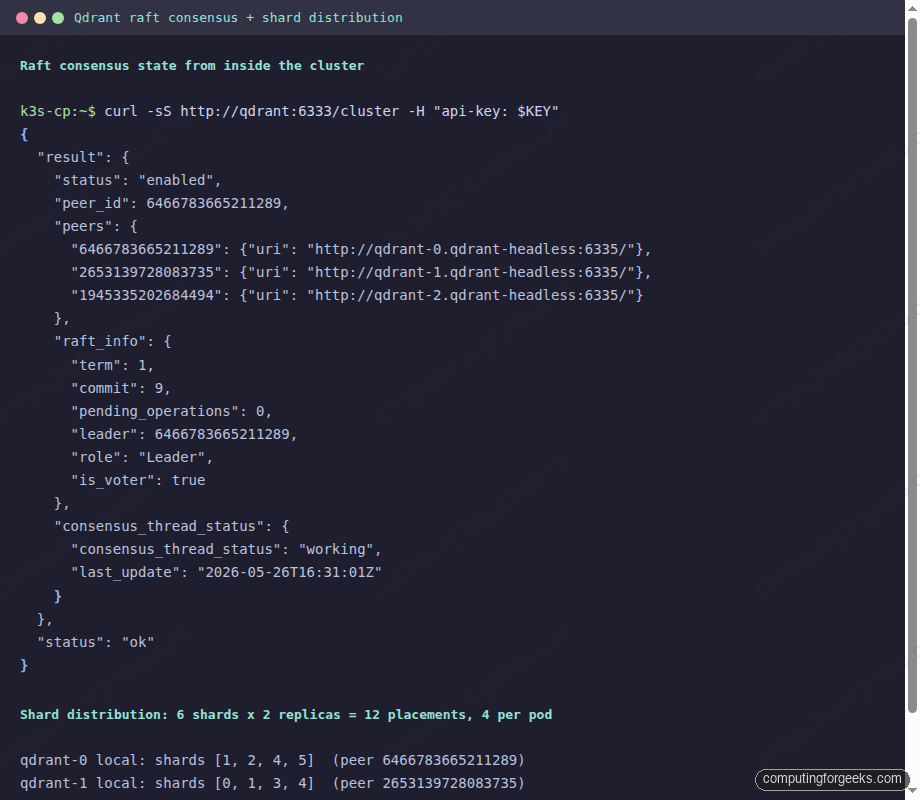
A healthy 3-peer cluster reports the peer list, the current term and commit index, and the leader’s peer ID:
{
  "result": {
    "status": "enabled",
    "peer_id": 6466783665211289,
    "peers": {
      "6466783665211289": {"uri": "http://qdrant-0.qdrant-headless:6335/"},
      "2653139728083735": {"uri": "http://qdrant-1.qdrant-headless:6335/"},
      "1945335202684494": {"uri": "http://qdrant-2.qdrant-headless:6335/"}
    },
    "raft_info": {
      "term": 1,
      "commit": 9,
      "leader": 6466783665211289,
      "role": "Leader",
      "is_voter": true
    },
    "consensus_thread_status": {
      "consensus_thread_status": "working",
      "last_update": "2026-05-26T16:31:01Z"
    }
  },
  "status": "ok"
}
Three peers, term 1 (consensus held on first election, no churn), no pending operations, consensus thread “working”. This is what you want to see; anything else (status disabled, term > 5 after bootstrap, “writing” persistently) means raft is unhappy.
Create a sharded + replicated collection
Cluster mode unlocks two collection params that did nothing on a single-node cluster: shard_number and replication_factor. Combined, they decide how the data plane is laid out:
from qdrant_client import QdrantClient, models

client = QdrantClient(url="http://localhost:6333",
                      api_key="cfg-lab-cluster-key-2026")

client.create_collection(
    "articles",
    vectors_config=models.VectorParams(size=384, distance=models.Distance.COSINE),
    shard_number=6,
    replication_factor=2,
    write_consistency_factor=2,   # majority write: every replica acks
)
Push 5,000 BGE-small embeddings into the new collection (the companion repo has the loader script). Then ask each pod for its local shard distribution:
for POD in qdrant-0 qdrant-1 qdrant-2; do
  IP=$(kubectl get pod -n qdrant $POD -o jsonpath='{.status.podIP}')
  curl -sS "http://${IP}:6333/collections/articles/cluster" \
    -H "api-key: cfg-lab-cluster-key-2026" \
    | jq -c '{peer_id: .result.peer_id,
              local_shards: [.result.local_shards[].shard_id]}'
done
The output captures the placement we expected. Each shard appears on exactly two peers:
qdrant-0 local: shards [1, 2, 4, 5]   peer 6466783665211289
qdrant-1 local: shards [0, 1, 3, 4]   peer 2653139728083735
qdrant-2 local: shards [0, 2, 3, 5]   peer 1945335202684494

  shard 0: qdrant-1, qdrant-2
  shard 1: qdrant-0, qdrant-1
  shard 2: qdrant-0, qdrant-2
  shard 3: qdrant-1, qdrant-2
  shard 4: qdrant-0, qdrant-1
  shard 5: qdrant-0, qdrant-2
That distribution survives any single peer going down: every shard has a second copy on a different peer, so the data is reachable. The headless service plus the chart’s automatic peer-to-peer routing means a query sent to any pod transparently reaches whatever shards it needs.
HA in practice: force-delete a pod under load
The point of replication factor 2 is that one peer can disappear without losing data or returning errors. Test it by killing a pod with prejudice (--grace-period=0 --force) while a tight query loop hammers the service:
# Run 60 queries in a tight loop, ~0.2s apart
for i in $(seq 1 60); do
    curl -sS -o /dev/null -w '%{http_code} ' --max-time 5 \
        http://localhost:6333/collections/articles/points/query \
        -H "api-key: $KEY" -H "Content-Type: application/json" -d "$BODY"
    sleep 0.2
done &

# In parallel: kill qdrant-2 hard
kubectl delete pod qdrant-2 -n qdrant --grace-period=0 --force
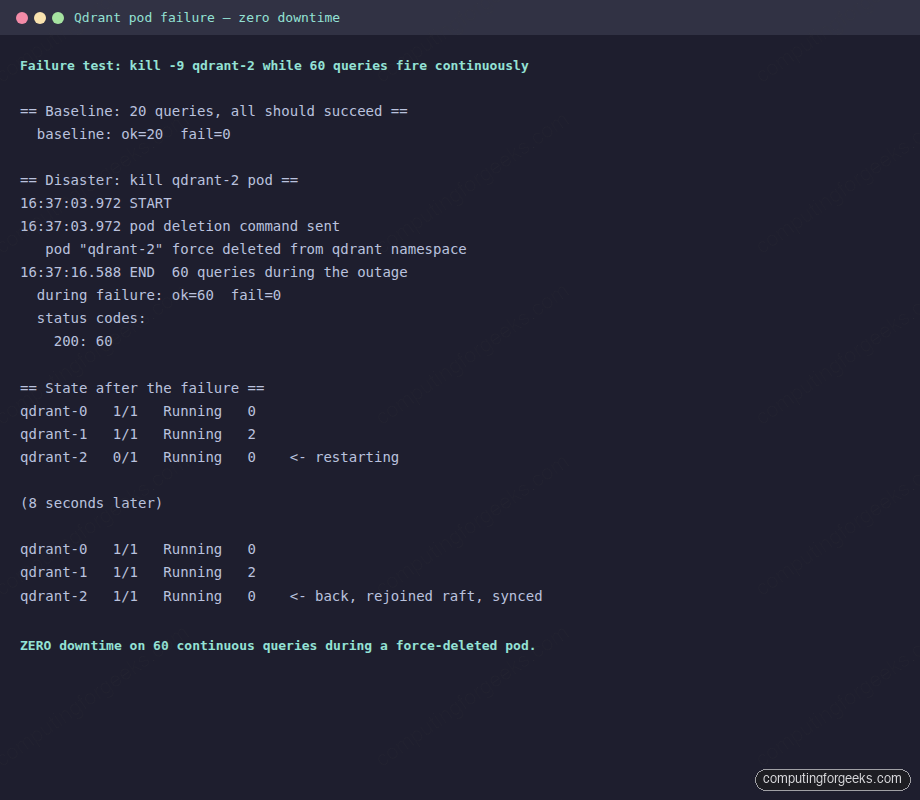
The real run on the test cluster recorded 60 successful queries during the outage, zero failures:
== Disaster: kill qdrant-2 pod ==
16:37:03.972 START
16:37:03.972 pod deletion command sent
   pod "qdrant-2" force deleted from qdrant namespace
16:37:16.588 END  60 queries during the outage
  during failure: ok=60  fail=0
  status codes: 200: 60

== State after the failure ==
qdrant-0   1/1   Running   0
qdrant-1   1/1   Running   2
qdrant-2   0/1   Running   0    # restarting, raft re-joining
(8s later)
qdrant-2   1/1   Running   0    # back, shards re-synced
The key behaviour: the StatefulSet recreated qdrant-2 in 8 seconds, the pod’s PVC was reattached (so the local segments were not lost), raft re-joined as a Follower, and shard state caught up automatically. All while queries kept flowing through qdrant-0 and qdrant-1.
If you run the same probe from outside the cluster via kubectl port-forward, the picture is different. The port-forward attaches to one specific pod; when that pod is the one you kill, the tunnel breaks and you see connection refused for a few seconds while a new tunnel opens. That is a port-forward artifact, not a cluster artifact. In production, the traffic enters through a LoadBalancer or Ingress that does proper endpoint slicing, which is what the in-cluster loop above simulates.
Rolling upgrade with zero downtime
The chart’s StatefulSet uses the OrderedReady update strategy: one pod at a time, wait for it to come up before moving to the next. Combine that with replication factor 2 and the rest of the cluster stays available throughout. To test, start a continuous in-cluster query loop:
kubectl run -n qdrant query-loop --image=curlimages/curl --restart=Never -- \
  sh -c '
    end=$(($(date +%s) + 600))
    while [ $(date +%s) -lt $end ]; do
      code=$(curl -sS -o /dev/null -w "%{http_code}" --max-time 5 \
        http://qdrant:6333/collections/articles \
        -H "api-key: cfg-lab-cluster-key-2026")
      echo "$(date "+%H:%M:%S") $code"
      sleep 0.5
    done
  '

# Tail the logs in another shell
kubectl logs -n qdrant -f query-loop > /tmp/loop.log &
Then trigger the upgrade:
helm upgrade qdrant qdrant/qdrant -n qdrant --reuse-values \
    --set image.tag=v1.18.0
kubectl rollout status statefulset/qdrant -n qdrant
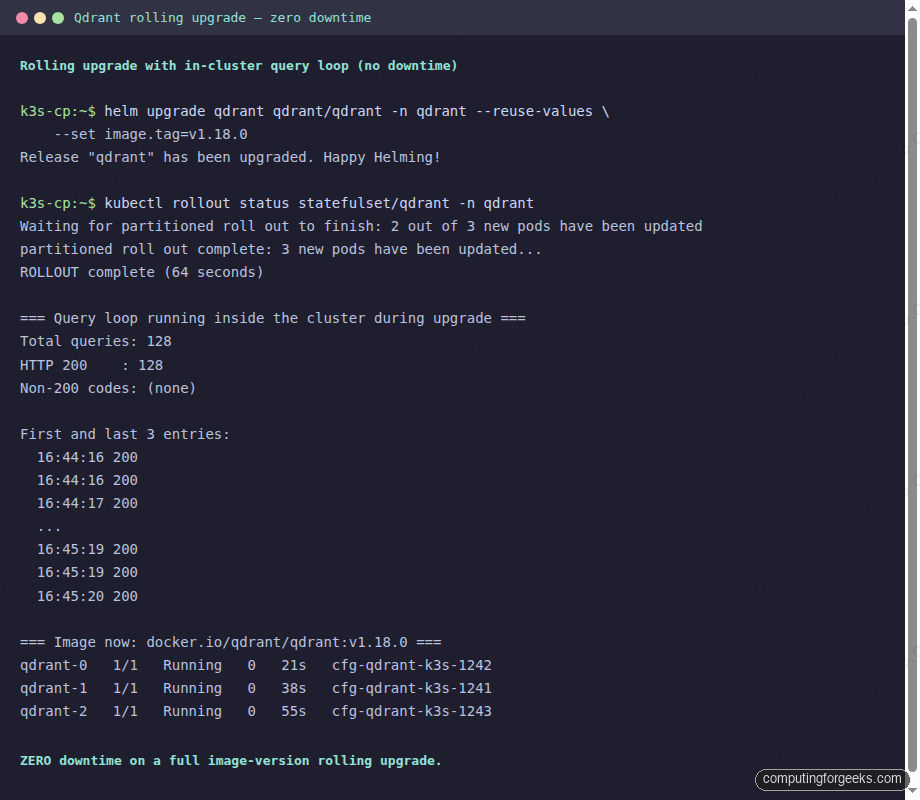
The rollout takes about 21 seconds per pod (terminate, image pull is cached, start, raft re-join, become ready) for a total of ~64 seconds across all three. The in-cluster loop captured 128 queries during that window. Every single one returned HTTP 200:
=== Results ===
Total queries: 128
HTTP 200    : 128
Non-200 codes: (none)

=== Image now: docker.io/qdrant/qdrant:v1.18.0 ===
qdrant-0   1/1   Running   0   21s   cfg-qdrant-k3s-1242
qdrant-1   1/1   Running   0   38s   cfg-qdrant-k3s-1241
qdrant-2   1/1   Running   0   55s   cfg-qdrant-k3s-1243
The continuous-query loop alongside the rollout output makes the zero-downtime claim auditable on a single terminal:
Roll back with the same command and the opposite tag. The chart re-uses the PVCs across upgrades so the on-disk state survives every restart. That is what makes the StatefulSet model fit Qdrant cleanly: peer identity is stable (qdrant-0 always rebinds the same PVC), so rejoining the cluster is a no-op from raft’s perspective.
Scaling: more peers, more shards
Scale the StatefulSet up to add peers. The chart re-renders with the new replicaCount and the StatefulSet controller adds pods one at a time. Each new pod attaches its own PVC, joins raft, and becomes available for new shard placements:
helm upgrade qdrant qdrant/qdrant -n qdrant --reuse-values \
    --set replicaCount=5
kubectl rollout status statefulset/qdrant -n qdrant
Existing shards do not automatically rebalance onto the new peers. To move shards, use the /collections/{name}/cluster endpoint with a move_shard operation, which copies a shard to a new peer, waits for sync, then drops the old copy. The chart does not automate this because shard moves are heavy: a 10 GB shard takes minutes to copy and saturates the network.
Scaling down is the inverse: drop replicas with helm upgrade --set replicaCount=N, but first move shards off the peers being removed. A removed peer with shards still on it is a data loss event if the replication factor was equal to the dropped count.
Gotchas worth remembering
Five real traps from this build:
- Distroless image has no
curlor shell. The Qdrant container exposes the binary only.kubectl exec qdrant-0 -- curlfails withexec: "curl": executable file not found. Usekubectl port-forwardfrom a node, orkubectl run --image=curlimages/curlfor in-cluster probes. kubectl port-forward svc/qdrantattaches to one pod, not the service. When that pod is killed during a rolling upgrade or failure test, the tunnel breaks and you seeconnection refuseduntil you reconnect. Use an Ingress/LoadBalancer for real client traffic, or an in-cluster loop for HA testing.- qdrant-1 restarts twice on first cluster bootstrap. Peer 2 starts before peer 1’s raft has stabilized; CrashLoopBackOff for ~30s is the normal path, not a bug. Wait for it.
- Shards do not rebalance automatically when you add peers. The new pods join raft and serve writes, but existing shards stay where they are until you move them explicitly. Plan shard moves during low-traffic windows because the copy saturates the network.
- local-path PVCs are tied to a specific node. If
cfg-qdrant-k3s-1242dies and never comes back,qdrant-0‘s PVC is orphaned and the pod stays Pending. On managed clouds (EBS, PD), the PVC moves with the pod. On bare metal, use a network storage class like Longhorn, OpenEBS, or Rook-Ceph for portable PVCs.
From here to a production cluster
What we built is a working baseline. Three concrete next steps if you take this to production:
- Front the chart’s ClusterIP service with an Ingress (TLS) or a LoadBalancer. The api-key travels in headers; serve it over HTTPS only. The patterns from the secure-qdrant-tls-nginx guide apply unchanged to a Kubernetes deployment when you put cert-manager in front.
- Pair the chart’s PVCs with a network storage class. Local-path on a single VM is fine for a lab; for real workloads use EBS (EKS), PD (GKE), or Longhorn on bare metal so a node loss does not strand a PVC.
- Wire the snapshot backup process from the previous guide to a CronJob. The Qdrant snapshot endpoint works identically in a cluster (it captures per-peer state), and a Kubernetes CronJob with an AWS or GCS credential makes the backup completely declarative.
The two HA experiments above (force-delete and rolling upgrade) are the regression test for whether the cluster’s safety properties still hold. Run them after every chart upgrade, every Kubernetes upgrade, and every cluster topology change. A 60-query loop and a force-deleted pod are a small price to pay for confidence that the next real incident will look like the test. To put a real ingress in front of the chart’s ClusterIP, the Nginx Ingress on Kubernetes walkthrough covers the cert-manager piece and the annotations Qdrant’s API expects.