IPv6 exists because the 32-bit IPv4 address space ran out: roughly 4.3 billion addresses was never going to cover the modern internet. IPv6 uses 128-bit addresses, which is an almost unimaginably larger pool, but the size is not the part that trips people up. What trips people up is the five address types that all look similar and the EUI-64 math that turns a MAC address into an interface ID. This guide covers the address format, how to identify any address by type, what each type is for, the EUI-64 process worked out against real router output, and how to configure IPv6 on a Cisco router.
The behavior and command output described here were checked on a Cisco IOS router (a GNS3 c7200) in June 2026. It assumes you are comfortable with IPv4 addressing and prefix notation; if not, the subnetting primer covers the /n prefix idea that carries straight over to IPv6.
What an IPv6 address looks like
An IPv6 address is 128 bits, written as eight groups of four hexadecimal digits separated by colons. Written in full, an address is long, so two abbreviation rules shorten it. First, drop the leading zeros in any group. Second, replace the single longest run of consecutive all-zero groups with a double colon (::), which may appear only once in an address. The key insight is that :: can appear once because a parser fills it back out by counting the groups on either side; allow it twice and the length becomes ambiguous.
Here is the same address written long and short:
| Form | Address |
|---|---|
| Full | 2001:0DB8:0000:0001:0000:0000:0000:0001 |
| Leading zeros dropped | 2001:DB8:0:1:0:0:0:1 |
| Longest zero run as :: | 2001:DB8:0:1::1 |
Prefix length works exactly as in IPv4: a /n after the address marks how many leading bits are the network portion. For LAN subnets that value is almost always /64, which splits the address into a 64-bit network half and a 64-bit host (interface) half.
How to identify an IPv6 address by its first digits
The type of an IPv6 address is decided by its first digit or two, so identification is a lookup, not a calculation. This is the table worth keeping in your head:
| First digits | Address type | Routability | Notes |
|---|---|---|---|
| 2 or 3 | Global unicast | Internet-routable | Assigned by an ISP or RIR (2000::/3) |
| FD | Unique local | Site only, not on the internet | The RFC 1918 of IPv6 |
| FE80 | Link-local | One link only, never forwarded | Auto-generated on every interface |
| FF | Multicast | Scope-dependent | Replaces broadcast; no unicast use |
| FC | Unique local (reserved) | None today | Officially reserved, not deployed |
Anycast is the exception: it has no prefix of its own. An anycast address looks identical to a global unicast or unique local address, and the only difference is administrative, covered below.
Global unicast addresses
A global unicast address (GUA) is the IPv6 equivalent of a public IPv4 address: globally unique and routable on the internet. It starts with a 2 or 3 (the 2000::/3 block). What’s actually happening inside a GUA is a three-part split. The first 48 bits are the Global Routing Prefix your ISP or regional registry assigns. The next 16 bits are a Subnet ID you control, enough for 65,536 subnets. The last 64 bits are the Interface ID, the host part.
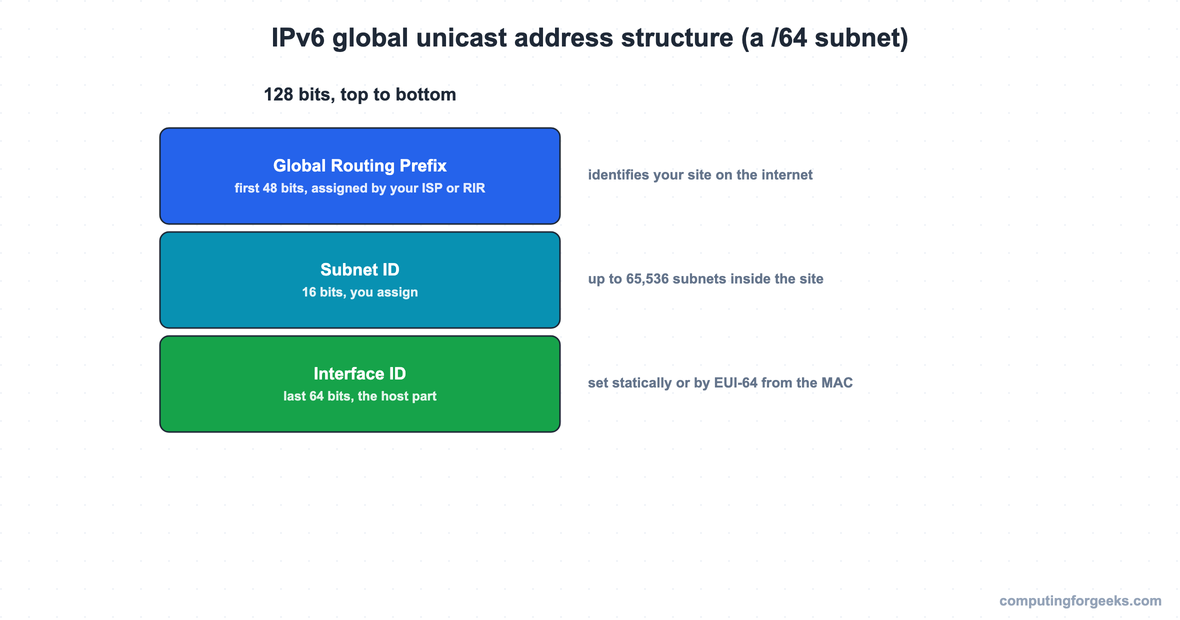
The 64-bit boundary matters because it is where the host part begins, and it is the line that EUI-64 and stateless autoconfiguration both work against. A site that receives a /48 from its ISP has 16 subnet bits to carve /64 networks from, which is the standard enterprise layout. The carving is the same binary exercise as variable-length subnetting in IPv4, only with so many bits that you rarely subnet below /64.
Unique local addresses
Unique local addresses (ULAs) are the RFC 1918 of IPv6: usable inside a site, never routed on the public internet. In practice they always begin with FD. The standard reserves the wider FC00::/7 block, but RFC 4193 requires a bit that forces the second hex digit to D, so a real ULA is always FD; FC is reserved and unused. After the FD comes a 40-bit Global ID that you are meant to generate randomly, which is what keeps two organizations from colliding when they merge networks that both use internal IPv6. A ULA looks like FD00:1234:5678:1::1/64, and you configure it exactly like a GUA.
Link-local addresses and the EUI-64 process
Every IPv6-enabled interface gets a link-local address automatically, with no configuration, the moment IPv6 is active on it. Link-local addresses always begin FE80 and are never forwarded past the local link. They are not a curiosity: the mechanism that discovers a neighbor’s MAC (NDP, the IPv6 replacement for ARP) runs over link-local, routing protocols form neighbor adjacencies over link-local, and the next hop in an IPv6 routing table is a link-local address, not a global one. That last point surprises people the first time they read show ipv6 route: the next hop they expected to be a global address is an FE80 one, because link-local addresses never change even when the global prefix does.
Cisco IOS builds the interface ID for that link-local address with modified EUI-64, a four-step process that turns a 48-bit MAC into a 64-bit interface ID. Worked out against the lab router’s MAC of 0201.ABCD.0001:
| Step | Action | Result |
|---|---|---|
| 1 | Start with the 48-bit MAC (12 hex digits) | 0201.ABCD.0001 |
| 2 | Split it into two 24-bit halves | 0201AB and CD0001 |
| 3 | Insert FFFE between the halves | 0201:ABFF:FECD:0001 |
| 4 | Flip the 7th bit of the first byte (02 becomes 00) | 0001:ABFF:FECD:0001 |
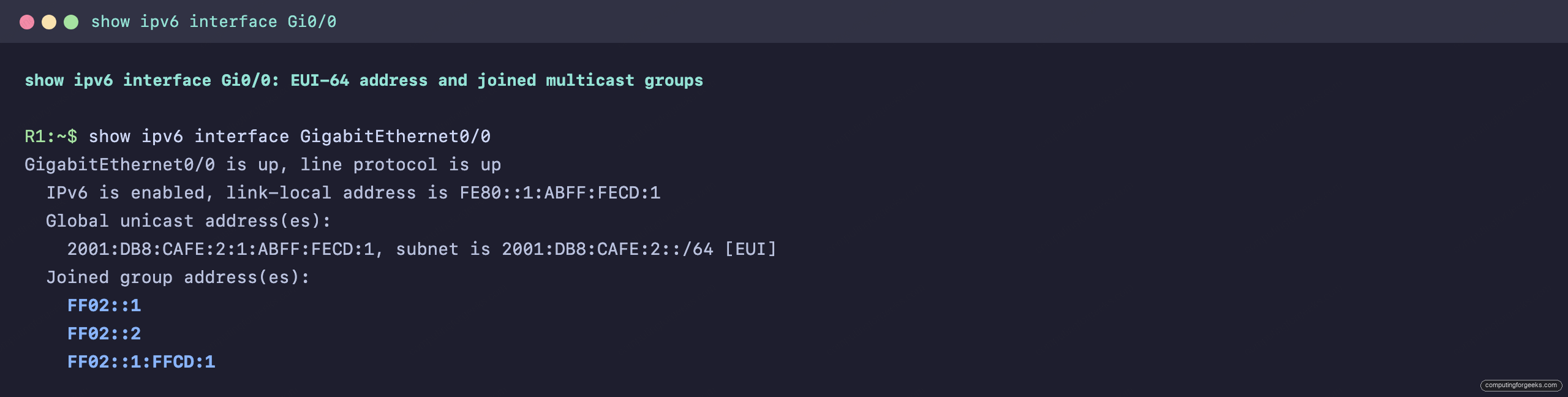
The interface ID is 0001:ABFF:FECD:0001, so the link-local address is FE80::1:ABFF:FECD:1. The two giveaways that an address came from EUI-64 are the FF:FE sitting in the middle and the flipped 7th bit. The router output confirms the math exactly, on both the link-local and the EUI-64 global address:
Multicast addresses
IPv6 has no broadcast. Multicast does that job, and every multicast address begins with FF. The fourth hex digit encodes scope, which is how far the packet travels: FF02 is link-local scope (stays on the link), while FF0E is global. A handful of link-local multicast groups appear constantly and are worth memorizing.
| Address | Group |
|---|---|
| FF02::1 | All nodes on the link |
| FF02::2 | All routers on the link |
| FF02::5 | All OSPFv3 routers |
| FF02::6 | All OSPFv3 designated routers |
These are not theoretical. The show ipv6 interface capture above lists FF02::1 and FF02::2 under “Joined group address(es)”, alongside a solicited-node address (FF02::1:FFCD:1) that NDP derives from the interface’s own address to do efficient neighbor discovery.
Anycast addresses
An anycast address is one address assigned to several interfaces, usually on several routers. The network delivers a packet sent to that address to whichever holder is topologically nearest. There is no special prefix; an anycast address is drawn from the global unicast or unique local range and configured with an anycast keyword so the device knows not to treat duplicates as a conflict. For CCNA the requirement is the concept, not deep configuration: same address, nearest node answers.
Configuring IPv6 on a Cisco router
The one command people forget is the first one. IPv6 routing is off by default on a Cisco router, the opposite of IPv4. A router with addresses configured still drops any IPv6 packet not destined to itself until you enable routing globally:
enable
configure terminal
ipv6 unicast-routing
interface GigabitEthernet0/0
ipv6 address 2001:DB8:CAFE:2::/64 eui-64
no shutdown
end
The eui-64 keyword tells IOS to build the interface ID from the MAC, as worked out above. To set the whole address by hand instead, give the full address and prefix: ipv6 address 2001:DB8:CAFE:1::1/64. Verify both forms with show ipv6 interface brief, which lists each interface with its automatic link-local address and its configured global address:
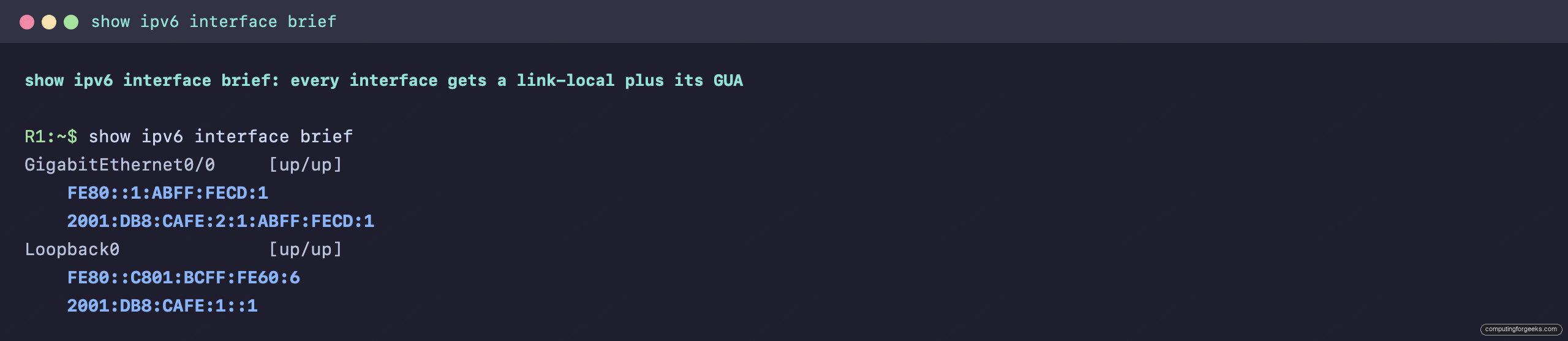
Each interface shows two addresses: the FE80 link-local that IOS generated on its own, and the global address you configured. That pairing, one automatic link-local and one routable global address per interface, is the normal IPv6 state, and it is the same workflow as the rest of the base device configuration.
Enabling routing also populates the routing table. Running show ipv6 route connected on the lab router lists each configured /64 as a directly connected route, the 2001:DB8:CAFE:1::/64 and 2001:DB8:CAFE:2::/64 prefixes that the router can now forward between. Without ipv6 unicast-routing, those addresses still exist on the interfaces, but the router refuses to forward anything between them, which is the gotcha worth burning into memory.
Practice IPv6 addressing
Drill the address types, the first-digit identifiers, and the EUI-64 steps with the flashcards, then test yourself on the quiz. The deck is a downloadable Anki package for spaced repetition.
Now check what stuck:
Common IPv6 addressing misconceptions
Four ideas that carry over wrongly from IPv4 or from a quick skim of the address types.
Link-local addresses are not throwaway. An FE80 address looks like noise, but it is what neighbor discovery, routing adjacencies, and routing-table next hops actually use. You never configure it, and you never ignore it either.
The private prefix is FD, not FC. The standard reserves FC00::/7, so it is tempting to write a private address starting with FC. Real unique local addresses always start with FD; FC is reserved and not in use.
IPv6 does not need NAT to function. Unique local addresses give you private addressing, but the design intent is that every device can hold a real global address. NAT was an IPv4 workaround for scarcity, and IPv6 has no scarcity to work around.
The double colon is a one-time tool. :: compresses one run of zero groups per address. Using it twice makes the address ambiguous, so a parser rejects it. When two zero runs are equal length, compress the first. Get the address format and the five type prefixes solid, and the rest of IPv6 on the CCNA reads as routing and services layered on top of these same addresses. The CCNA 200-301 roadmap shows what comes next.