A working Valkey on Debian 13 takes about two minutes. Valkey is the community fork of Redis and a drop-in replacement for it, so the commands, the wire protocol, and the data files are the same. There are three ways to install it on Debian, and which one you pick comes down to the version you want. Here is each, straight to it.
Built and run on Debian 13 (trixie) in June 2026.
Install from apt
Debian ships Valkey in its own repositories. Install the server and the valkey-cli client:
sudo apt update
sudo apt install -y valkey-server valkey-tools
The service starts and enables itself. Check the version and that it answers:
valkey-server --version
systemctl is-active valkey-server
valkey-cli ping
That returns a PONG. On Debian 13 the package comes from the main repository (the 8.1 line); the service is valkey-server and the config file is /etc/valkey/valkey.conf. On Debian 12, Valkey is only in bookworm-backports, so enable backports there or use the Docker or source method below, both of which work on any Debian release. A quick write confirms it is live:
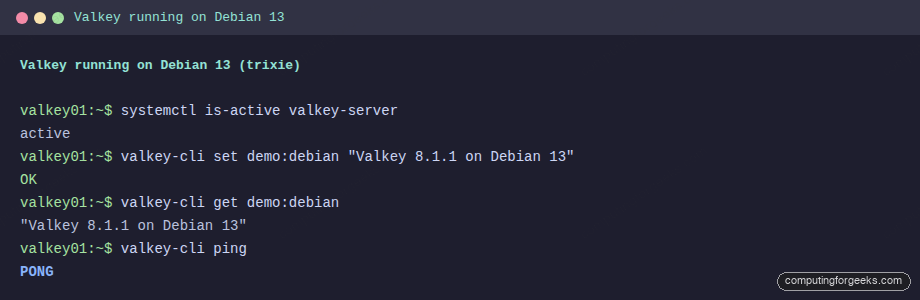
That is the whole install if the apt version is current enough for you. If you need the newest release, use one of the next two.
Run the latest with Docker
The official image gives you the newest release in one command. Install Docker and run it:
sudo apt install -y docker.io
sudo docker run -d --name valkey -p 6379:6379 valkey/valkey:9.1
Check the version inside the container:
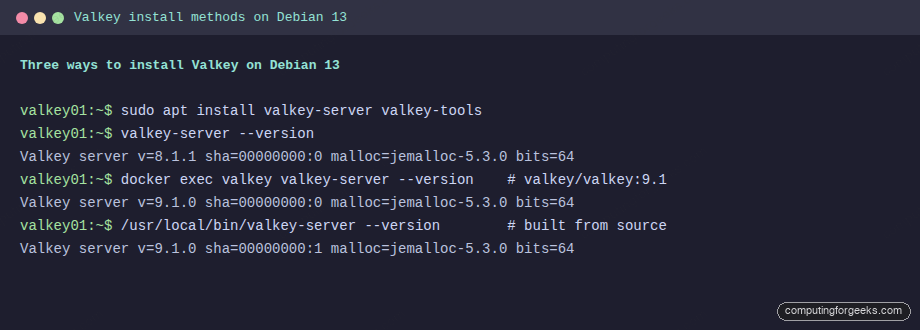
sudo docker exec valkey valkey-server --versionThat reports the current 9.x release. The screenshot shows the version from each method side by side, so the gap between the apt package and the container is clear:
Build from source
For the newest release as a native service with TLS, build it. Install the toolchain:
sudo apt install -y build-essential pkg-config libssl-dev libsystemd-dev curlDetect the latest release, download, and compile with TLS and systemd support:
VER=$(curl -fsSL https://api.github.com/repos/valkey-io/valkey/releases/latest | grep -oP '"tag_name":\s*"\K[^"]+')
cd /usr/local/src
sudo curl -fsSL "https://github.com/valkey-io/valkey/archive/refs/tags/${VER}.tar.gz" -o "valkey-${VER}.tar.gz"
sudo tar xzf "valkey-${VER}.tar.gz"
cd "valkey-${VER}"
sudo make BUILD_TLS=yes USE_SYSTEMD=yes -j"$(nproc)"
sudo make install
Keep libsystemd-dev in that list. Without it a Type=notify service starts the server but times out waiting for a ready signal it never sends. The systemd unit, user, and config are the same as in the Valkey on Ubuntu guide, which uses the identical build on the Debian-family base.
Use it
You are live. Before you put traffic on it, set bind 127.0.0.1, keep protected-mode yes, and add a password if anything off the box will connect. From there, the Valkey integration guide shows it working as a real cache with measured latency, a rate limiter, database-level ACLs, and a live Redis migration. On Rocky or AlmaLinux instead, the RHEL-family install covers the dnf and SELinux specifics.
valkey-cli quick reference
The commands you will reach for most, all against the running server:
| Command | What it does |
|---|---|
valkey-cli ping | Check the server answers |
valkey-cli set key value | Store a string |
valkey-cli get key | Read it back |
valkey-cli set key value ex 60 | Store with a 60-second TTL |
valkey-cli ttl key | Seconds left before expiry |
valkey-cli incr counter | Atomic increment |
valkey-cli info memory | Memory usage and the maxmemory ceiling |
valkey-cli dbsize | Number of keys |
valkey-cli monitor | Watch every command live |
valkey-cli flushall | Wipe everything (careful) |
That covers day-to-day use. For configuration and clustering, the full command set is in the built-in help: valkey-cli --help and valkey-cli help inside the prompt.