A three node MariaDB Galera cluster behind an HAProxy pair and a Keepalived virtual IP survives a power-killed database node with a 7.7 second write gap, survives a power-killed load balancer with a 3.2 second gap, and loses zero rows in both cases. Those numbers come from drills run against the exact build below, not from a vendor datasheet, and they are the whole point of a MariaDB high availability setup: the application keeps one connection string while any single machine in the stack dies.
This guide builds that stack end to end on the current MariaDB LTS from the official MariaDB repositories: a 3 node Galera cluster for synchronous multi-master replication, a Galera-aware health check on every node, two HAProxy load balancers so the proxy layer is not the new single point of failure, and a floating virtual IP that moves between them. The build is measured at every stage, the failover drills are scripted and timed, and the full-outage recovery runbook at the end was executed against a real crashed cluster, including the case where only two of three nodes come back.
Built and failover-tested June 2026 on MariaDB 12.3 LTS.
The architecture, and why writes go to one node
Galera replicates synchronously: a transaction commits on every node or on none, so any node can take writes and a failed node never holds data the others lack. That is what removes the promotion step you would need with asynchronous primary replica replication, and it is why recovery point objective is zero for single node failures.
The trap is concluding that you should therefore write to all nodes at once. Two transactions touching the same rows on different nodes both execute locally, and at commit time Galera certification kills one of them with a deadlock error the application rarely handles. The measured fix used by every serious deployment is single-writer routing: all writes go to one node, the other two are hot standbys for writes and active servers for reads. The cluster below enforces that in the load balancer, with a separate round-robin port for reads.
The second SPOF problem sits above the database. A single HAProxy in front of the cluster, the layout in our earlier Galera with HAProxy build, just moves the failure domain from the database to the proxy. This build runs two HAProxy machines with Keepalived floating one virtual IP between them. The application connects to the VIP and nothing else.
                 application -> VIP 10.0.1.100 (Keepalived VRRP)
                                   |
                +------------------+------------------+
                | lb01 (HAProxy + Keepalived, MASTER)  |
                | lb02 (HAProxy + Keepalived, BACKUP)  |
                |   :3306 writes -> one active node    |
                |   :3307 reads  -> round robin        |
                +------------------+------------------+
                                   | health: HTTP :9200 on each db node
              +--------------------+--------------------+
              | db01 (writer)  | db02 (backup)  | db03 (backup)
              |     MariaDB 12.3 LTS + Galera 4, mariabackup SST
              +-----------------------------------------+
One option deliberately not used here: MaxScale. It is MariaDB’s own proxy and it is technically excellent, but since the 25.01 release MaxScale is closed-source commercial software that requires a MariaDB Enterprise subscription in production. Even the older BSL-licensed releases only permitted free production use with fewer than three backend servers, which a 3 node Galera cluster already exceeds. HAProxy and Keepalived are unrestricted open source, ship in every distribution repository, and measured failover through them is fast enough that the licensing cost buys little for a cluster this size.
Prerequisites
- Five servers or VMs: three database nodes and two load balancers, sized for your workload as described below. Tested on Ubuntu 24.04 LTS, with the Rocky Linux 10 differences called out at each step.
- One free IP on the same subnet for the virtual IP, outside any DHCP pool.
- Root or sudo on all five machines.
- Every table you plan to run on the cluster must be InnoDB and must have a primary key. Galera does not replicate MyISAM writes, and DELETE is unsupported on tables without a primary key.
Size the database nodes for the application, not for the tutorial. The rule that changes from single-server thinking is that all three nodes must be identical and each must be specced like the dedicated primary you would otherwise run: the whole cluster commits at the pace of its slowest member, so one undersized node throttles all of them through flow control. RAM is the usual driver, set the InnoDB buffer pool to roughly 70 percent of it and buy enough that your working set fits, which for a real OLTP application usually means 16 to 64 GB per node rather than a token 4 GB. Disk needs the dataset plus the gcache plus around 30 percent headroom, on storage that is fast at synchronous writes, because every commit waits for an fsync at the default durability setting. Keep the three nodes on the same low latency network segment, ideally under a millisecond apart, since commit latency is bounded by the round trip to the slowest node. The drill cluster in this guide ran 2 vCPU, 4 GB RAM and 25 GB disk per database node, which is a floor for following along, not a production recommendation.
The load balancers are the opposite case. HAProxy in TCP mode is cheap, and 2 vCPU with 2 GB RAM comfortably proxies thousands of concurrent connections; raise maxconn and file descriptor limits before adding hardware there.
The cluster needs four ports open between database nodes, plus the health check port for the load balancers:
| Port | Protocol | Purpose |
|---|---|---|
| 3306 | TCP | Client connections |
| 4567 | TCP | Galera group replication traffic |
| 4568 | TCP | Incremental State Transfer (IST) |
| 4444 | TCP | State Snapshot Transfer (SST) |
| 9200 | TCP | HTTP health check for the load balancers |
Step 1: Set the cluster variables
Every command in this guide references shell variables, so you change one block and paste the rest unmodified. Export these on each machine you work on, with values adjusted to your network:
export CLUSTER_NAME="prod_cluster"
export NODE1_IP="10.0.1.11"
export NODE2_IP="10.0.1.12"
export NODE3_IP="10.0.1.13"
export LB1_IP="10.0.1.21"
export LB2_IP="10.0.1.22"
export VIP="10.0.1.100"
export SST_PASSWORD="ChangeMe-SST-2026"
export CHECK_PASSWORD="ChangeMe-Check-2026"
Confirm the values before running anything else:
echo "cluster: ${CLUSTER_NAME} | nodes: ${NODE1_IP} ${NODE2_IP} ${NODE3_IP} | VIP: ${VIP}"The variables hold for the current shell session only. Re-export them if you reconnect.
Step 2: Install MariaDB from the official repository on all three nodes
Distribution repositories lag the MariaDB project by years. Ubuntu 24.04 ships the 10.11 series and Rocky Linux 10 AppStream ships 10.11 as well, while the current LTS series is 12.3, with three years of community maintenance, into mid 2029. The official repository setup script pins the series and configures everything in one pass. On each database node:
curl -LsSO https://r.mariadb.com/downloads/mariadb_repo_setup
chmod +x mariadb_repo_setup
sudo ./mariadb_repo_setup --mariadb-server-version="mariadb-12.3"
The script verifies the signing keys, writes the repository definition, and refreshes the package index:
# [info] MariaDB Server version 12.3 is valid
# [info] Repository file successfully written to /etc/apt/sources.list.d/mariadb.list
# [info] Adding trusted package signing keys...
# [info] Running apt-get update...
# [info] Done adding trusted package signing keys
Here is the install gotcha that breaks every pre-12.3 tutorial: starting with the 12.3 series, the server package no longer pulls in Galera as a dependency. apt-get install mariadb-server on its own gives you a server with no wsrep provider, no SST scripts, and no galera_new_cluster command. The cluster pieces live in two packages you must name explicitly, and the SST method used later needs two more. Install the full set on all three nodes:
sudo apt-get install -y mariadb-server mariadb-server-galera galera-4 mariadb-client mariadb-backup socatThe galera-4 package carries the replication provider library, and mariadb-server-galera carries the glue: the galera_new_cluster bootstrap wrapper, the galera_recovery tool, all the wsrep_sst_* transfer scripts, and the systemd drop-ins. mariadb-backup and socat are the SST transport. Confirm the version that landed:
mariadbd --versionThe build used here reports the first GA release of the 12.3 LTS line:
mariadbd Ver 12.3.2-MariaDB-ubu2404 for debian-linux-gnu on x86_64 (mariadb.org binary distribution)The package starts and enables the service automatically. Stop it on all three nodes before touching the configuration:
sudo systemctl stop mariadbUbuntu 26.04 and the manual repository
The corporate setup script supports Ubuntu 22.04 and 24.04 but not yet 26.04. On a 26.04 host, point apt at the MariaDB Foundation mirrors directly with a deb822 source instead. Fetch the signing key, then create the source file:
sudo mkdir -p /etc/apt/keyrings
sudo curl -o /etc/apt/keyrings/mariadb-keyring.asc 'https://mariadb.org/mariadb_release_signing_key.pgp'
sudo vim /etc/apt/sources.list.d/mariadb.sources
Add the repository definition, swapping resolute for your release codename:
X-Repolib-Name: MariaDB
Types: deb
URIs: https://deb.mariadb.org/12.3/ubuntu
Suites: resolute
Components: main
Signed-By: /etc/apt/keyrings/mariadb-keyring.asc
Then apt-get update and the same install command as above applies.
Rocky Linux, AlmaLinux and RHEL
On the RHEL family, the repository is a single file. Create it:
sudo vim /etc/yum.repos.d/MariaDB.repoNote that AppStream already contains lowercase mariadb-server at 10.11, while the official repository ships capitalized package names at the current LTS, so the capitalization in the next step is load bearing. Add the repository definition:
[mariadb]
name = MariaDB
baseurl = https://rpm.mariadb.org/12.3/rhel/$releasever/$basearch
gpgkey = https://rpm.mariadb.org/RPM-GPG-KEY-MariaDB
gpgcheck = 1
Install the equivalent set. The same 12.3 packaging change applies, so MariaDB-server-galera is mandatory:
sudo dnf install -y MariaDB-server MariaDB-server-galera galera-4 MariaDB-client MariaDB-backup socat policycoreutils-python-utilsThe cross-distribution differences in one table, all verified on Ubuntu 24.04 and Rocky Linux 10.1 with the same 12.3 repository:
| Item | Ubuntu / Debian | Rocky / Alma / RHEL |
|---|---|---|
| Server package | mariadb-server | MariaDB-server (capital M) |
| Galera glue package | mariadb-server-galera | MariaDB-server-galera |
| wsrep provider path | /usr/lib/galera/libgalera_smm.so | /usr/lib64/galera-4/libgalera_smm.so |
| Config drop-in directory | /etc/mysql/mariadb.conf.d/ | /etc/my.cnf.d/ |
| Galera arbitrator (garbd) | separate galera-arbitrator-4 package | included in galera-4 |
| Firewall | ufw | firewalld + SELinux port labels |
Step 3: Configure Galera on every node
The configuration is identical on all three nodes except for two lines, the node’s own address and name. Open the Galera drop-in that mariadb-server-galera installed:
sudo vim /etc/mysql/mariadb.conf.d/60-galera.cnfReplace its contents with the following, adjusting wsrep_node_address and wsrep_node_name per node, and aligning wsrep_cluster_name, the three gcomm:// addresses and the wsrep_sst_auth password with the values you exported in Step 1. On the RHEL family the file is /etc/my.cnf.d/galera.cnf and the provider path is the lib64 one from the table above:
[galera]
wsrep_on                 = ON
wsrep_provider           = /usr/lib/galera/libgalera_smm.so
wsrep_cluster_name       = "prod_cluster"
wsrep_cluster_address    = "gcomm://10.0.1.11,10.0.1.12,10.0.1.13"
wsrep_node_address       = "10.0.1.11"
wsrep_node_name          = "db01"
binlog_format            = ROW
innodb_autoinc_lock_mode = 2
wsrep_slave_threads      = 4
wsrep_sst_method         = mariabackup
wsrep_sst_auth           = mariadbbackup:ChangeMe-SST-2026

[mysqld]
bind-address             = 0.0.0.0
Three of these lines deserve their reasoning. wsrep_sst_method = mariabackup replaces the default rsync SST because rsync locks the donor for the duration of the transfer, while mariabackup keeps the donor writable except for a short commit block at the end. On a loaded cluster that difference decides whether adding a node degrades production.
wsrep_slave_threads = 4 sets the parallel applier count. MariaDB still uses this variable name, the wsrep_applier_threads rename you may see in other tutorials belongs to Percona XtraDB Cluster and does not exist in MariaDB. Watch wsrep_cert_deps_distance after go-live, on this build it averaged 242, which means far more parallelism is available than 4 threads use, and busy clusters can raise it toward the core count.
The bind-address = 0.0.0.0 override matters because the official package ships bind-address = 127.0.0.1 in 50-server.cnf. Miss it and you get the most confusing failure in this whole build: the cluster forms perfectly, all wsrep status checks pass, and the load balancers still cannot connect to port 3306 on any node, because Galera’s group communication binds its own port independently of the SQL listener.
Step 4: Open the firewall, and fix the SELinux port labels on RHEL
On the Ubuntu nodes, ufw needs the four cluster ports plus the health check port from the prerequisites table:
sudo ufw allow 22/tcp
sudo ufw allow 3306/tcp
sudo ufw allow 4567/tcp
sudo ufw allow 4568/tcp
sudo ufw allow 4444/tcp
sudo ufw allow 9200/tcp
sudo ufw --force enable
On Rocky, Alma and RHEL the firewalld equivalent is one line:
sudo firewall-cmd --permanent --add-port={3306,4567,4568,4444,9200}/tcp && sudo firewall-cmd --reloadSELinux stays enforcing, and the port labels are where RHEL-family Galera setups actually fail. Two of the three Galera ports are already labeled for other services, port 4444 belongs to kerberos_port_t and port 4567 to tram_port_t, so the usual semanage port -a add command fails on them with ValueError: Port tcp/4444 already defined. Modify those two and add only 4568:
sudo semanage port -m -t mysqld_port_t -p tcp 4567
sudo semanage port -a -t mysqld_port_t -p tcp 4568
sudo semanage port -m -t mysqld_port_t -p tcp 4444
Verify all the cluster ports now carry the MariaDB label:
sudo semanage port -l | grep mysqld_port_tThe labels were the complete SELinux story on this build. A Rocky Linux 10.1 node joined the running cluster with a full mariabackup SST under enforcing mode, and ausearch -m avc afterwards showed zero denials, so no custom policy module is needed.
Step 5: Bootstrap the cluster
The first node must be told it is founding a cluster rather than joining one. That is the only time galera_new_cluster is used. On db01 only:
sudo galera_new_clusterBefore joining the other nodes, create the SST account on db01. The mariabackup SST authenticates on the donor side: when a new node requests state, the donor runs a backup of itself using its own local wsrep_sst_auth credentials and streams the result. Any node can be selected as donor later, which is why the same credentials go in every node’s config:
sudo mariadb -e "CREATE USER 'mariadbbackup'@'localhost' IDENTIFIED BY '${SST_PASSWORD}';
GRANT RELOAD, PROCESS, LOCK TABLES, BINLOG MONITOR, REPLICA MONITOR ON *.* TO 'mariadbbackup'@'localhost';"
Now start the other two nodes normally, one at a time. A joining node finds the cluster through the gcomm:// list and pulls a full state snapshot from a donor:
sudo systemctl start mariadbThe journal on the joiner shows the whole SST conversation, donor selection included. This is the sequence a healthy mariabackup SST produces:
WSREP: Member 1.0 (db02) requested state transfer from '*any*'. Selected 0.0 (db01)(SYNCED) as donor.
WSREP_SST: [INFO] mariabackup SST started on joiner
WSREP_SST: [INFO] Streaming with mbstream
WSREP_SST: [INFO] Using socat as streamer
WSREP: 0.0 (db01): State transfer to 1.0 (db02) complete.
WSREP_SST: [INFO] Preparing the backup at /var/lib/mysql/.sst
WSREP_SST: [INFO] mariabackup SST completed on joiner
On the donor side the interesting line is the state change: the donor shifts from SYNCED to DONOR/DESYNCED for the duration of the transfer and back, while continuing to take writes. With all three nodes started, check the cluster from any of them:
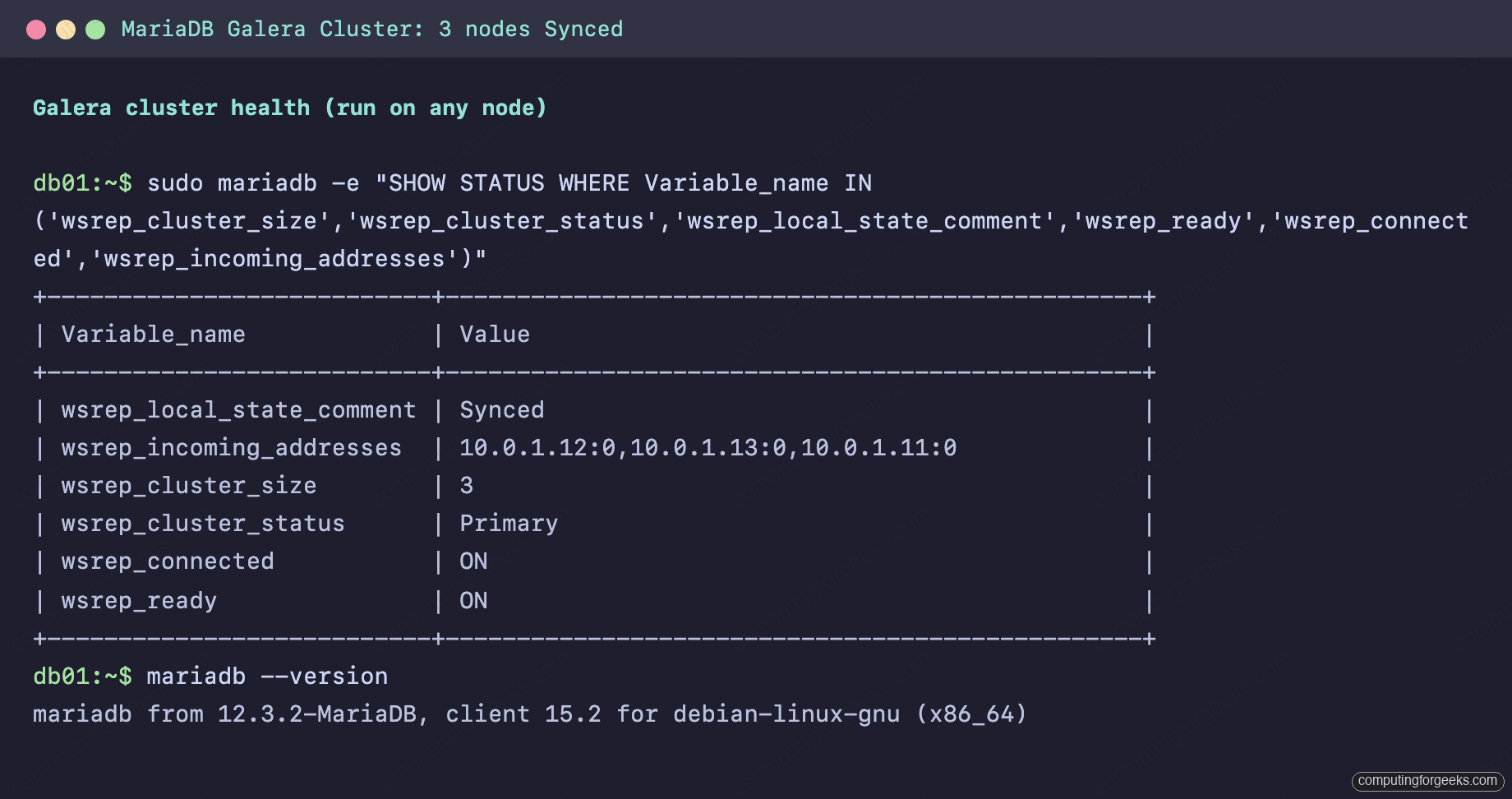
sudo mariadb -e "SHOW STATUS WHERE Variable_name IN ('wsrep_cluster_size','wsrep_cluster_status','wsrep_local_state_comment','wsrep_ready','wsrep_connected','wsrep_incoming_addresses')"A healthy cluster reports size 3, status Primary, and every node Synced:
Error: “State transfer failed: Invalid argument” and “Will never receive state. Need to abort.”
This pair of messages, the first on the donor and the second on the joiner just before mariadbd exits, means the donor could not authenticate to run the backup. Either the mariadbbackup account is missing, its grants are short, or wsrep_sst_auth is absent or wrong on the donor. The misleading part is which node’s config matters: a joiner with a wrong password in wsrep_sst_auth will SST fine as long as the donor’s copy is correct, because the credentials are only ever used donor-side. When you see this error, fix the account and wsrep_sst_auth on the nodes already in the cluster, not on the one trying to join, then start the joiner again.
Step 6: Add a Galera-aware health check on every database node
HAProxy can check whether port 3306 accepts connections, but a Galera node can accept TCP connections while being entirely unsafe to use, for example while desynced as an SST donor or while partitioned into a non-Primary component. The standard fix is a tiny HTTP service on port 9200 that returns 200 only when the node reports wsrep_local_state 4, Synced, and 503 otherwise. The classic implementation rode on xinetd; systemd socket activation does the same job with nothing extra installed.
Create a check account with no privileges on db01 (it replicates to the others):
sudo mariadb -e "CREATE USER 'clustercheck'@'localhost' IDENTIFIED BY '${CHECK_PASSWORD}';"Create the check script on every database node:
sudo vim /usr/local/bin/galera-clustercheckWith this content, password adjusted:
#!/bin/bash
# HTTP 200 when this node is Synced (wsrep_local_state = 4), 503 otherwise.
# Drain the request first: closing the socket with unread data sends a TCP RST,
# which can destroy the response before the load balancer reads it.
while read -t 1 -r line; do line=${line%$'\r'}; [ -z "$line" ] && break; done
STATE=$(mariadb --connect-timeout=2 -uclustercheck -pChangeMe-Check-2026 -sN \
  -e "SHOW GLOBAL STATUS LIKE 'wsrep_local_state'" 2>/dev/null | awk '{print $2}')
if [ "$STATE" = "4" ]; then
  printf 'HTTP/1.1 200 OK\r\nContent-Type: text/plain\r\nConnection: close\r\n\r\nGalera node is synced.\n'
else
  printf 'HTTP/1.1 503 Service Unavailable\r\nContent-Type: text/plain\r\nConnection: close\r\n\r\nGalera node is not synced (state: %s).\n' "${STATE:-down}"
fi
The request-draining loop at the top is not decoration. Without it the script answers and exits with the client’s request bytes still unread in the socket buffer, the kernel signals that with a TCP reset, and the response evaporates in flight. The symptom is maddening: the check works from localhost and fails from every remote machine.
Make it executable, then wire it to port 9200 with a socket unit pair:
sudo chmod 755 /usr/local/bin/galera-clustercheck
sudo vim /etc/systemd/system/clustercheck.socket
The socket unit accepts connections on 9200 and spawns one service instance per request:
[Unit]
Description=Galera health check socket

[Socket]
ListenStream=9200
Accept=yes

[Install]
WantedBy=sockets.target
Create the matching service template:
sudo vim /etc/systemd/system/[email protected]It runs one instance of the check script per incoming connection:
[Unit]
Description=Galera health check service

[Service]
ExecStart=/usr/local/bin/galera-clustercheck
StandardInput=socket
StandardOutput=socket
StandardError=journal
DynamicUser=yes
Enable the socket and test it from another machine, not just localhost:
sudo systemctl daemon-reload
sudo systemctl enable --now clustercheck.socket
curl http://${NODE1_IP}:9200/
A synced node answers in plain text:
Galera node is synced.Step 7: Put an HAProxy pair in front
Both load balancer machines get identical HAProxy configurations, so the VIP can move between them without changing what the application sees. Install the packages on lb01 and lb02:
sudo apt-get install -y haproxy keepalivedOpen the shipped HAProxy configuration on both machines:
sudo vim /etc/haproxy/haproxy.cfgReplace the contents with the two-listener layout below. Port 3306 is the write path: db01 is the only active server and the other two are backup entries, so writes hit exactly one node at a time and certification conflicts cannot happen. Port 3307 is the read path, round robin across all three:
global
    log /dev/log local0
    maxconn 4096
    user haproxy
    group haproxy
    daemon

defaults
    log     global
    mode    tcp
    option  tcplog
    timeout connect 5s
    timeout client  30m
    timeout server  30m

listen galera_write
    bind *:3306
    mode tcp
    option httpchk GET /
    http-check expect status 200
    default-server port 9200 inter 2s downinter 5s rise 3 fall 2 on-marked-down shutdown-sessions
    server db01 10.0.1.11:3306 check
    server db02 10.0.1.12:3306 check backup
    server db03 10.0.1.13:3306 check backup

listen galera_read
    bind *:3307
    mode tcp
    balance roundrobin
    option httpchk GET /
    http-check expect status 200
    default-server port 9200 inter 2s downinter 5s rise 3 fall 2
    server db01 10.0.1.11:3306 check
    server db02 10.0.1.12:3306 check
    server db03 10.0.1.13:3306 check

listen stats
    bind *:8404
    mode http
    stats enable
    stats uri /
    stats refresh 5s
The health check parameters translate to numbers you will see again in the failover drills: checks run every 2 seconds, a node is evicted after 2 consecutive failures and readmitted after 3 consecutive passes, and on-marked-down shutdown-sessions kills established connections to a dead node immediately instead of letting them hang until timeout. Restart and enable:
sudo systemctl restart haproxy && sudo systemctl enable haproxyThe stats page on port 8404 shows the routing logic at a glance, db01 green and active in the write farm, db02 and db03 blue as backups, and all three active for reads:
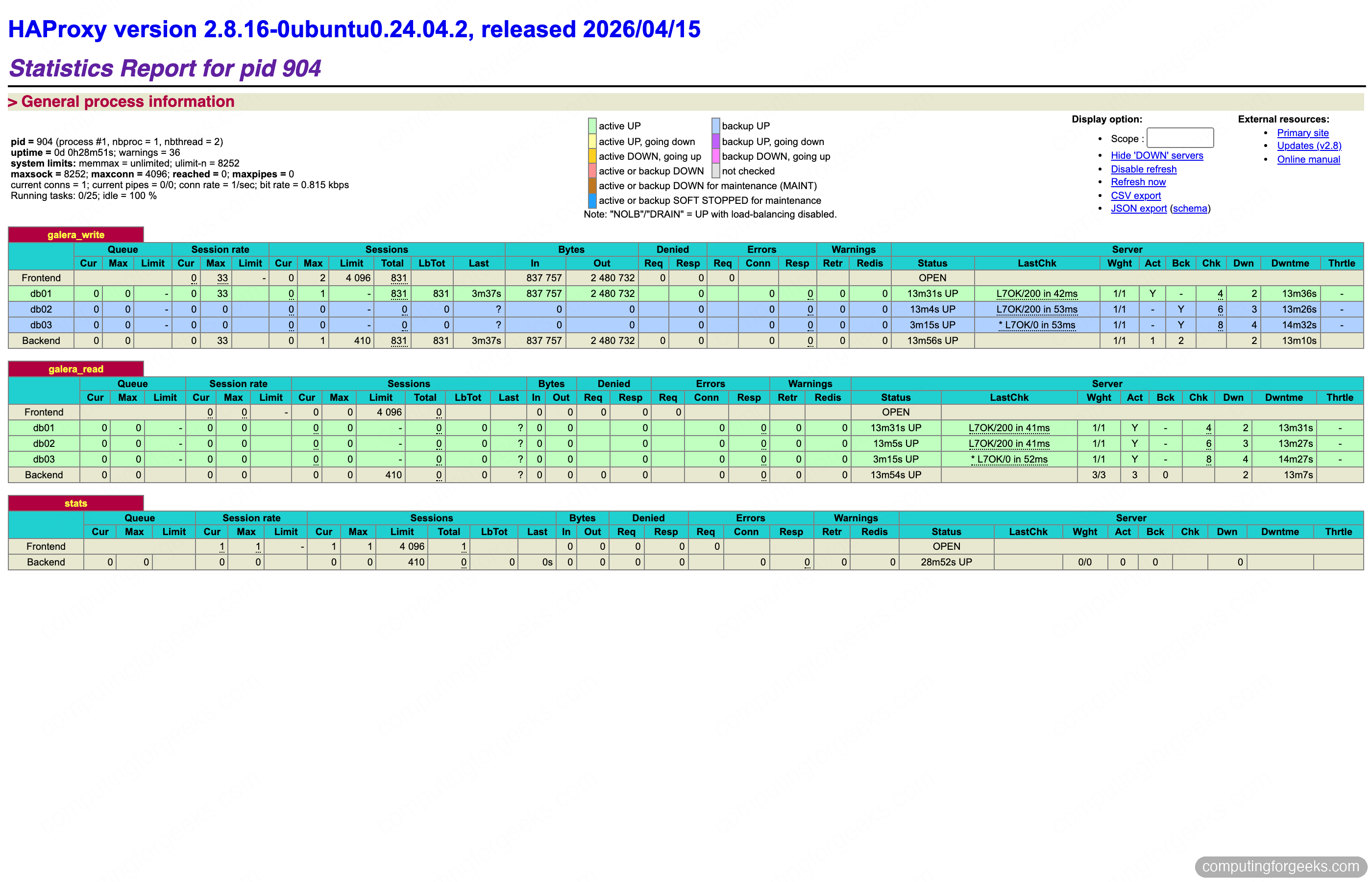
Step 8: Float a virtual IP with Keepalived
Keepalived runs VRRP between the two load balancers and assigns the VIP to whichever holds the MASTER role. The configuration uses unicast peering, which works on any network including clouds and VLANs that filter multicast. Replace eth0 with your actual interface name from ip -br a, keepalived refuses to start on an interface that does not exist. On lb01, create the configuration file:
sudo vim /etc/keepalived/keepalived.confAdd the following, aligning the unicast addresses and the VIP with your Step 1 values:
vrrp_script chk_haproxy {
    script "/usr/bin/pgrep -x haproxy"
    interval 2
    weight 4
}

vrrp_instance GALERA_VIP {
    state MASTER
    interface eth0
    virtual_router_id 51
    priority 101
    advert_int 1
    unicast_src_ip 10.0.1.21
    unicast_peer {
        10.0.1.22
    }
    authentication {
        auth_type PASS
        auth_pass Galera51
    }
    virtual_ipaddress {
        10.0.1.100/24
    }
    track_script {
        chk_haproxy
    }
}
On lb02 the same file changes four values: state BACKUP, priority 100, and the two unicast addresses swapped. The chk_haproxy tracker is what makes this an HAProxy failover and not just a machine failover: if the haproxy process dies while the machine stays up, the weight penalty drops the MASTER below its peer and the VIP moves anyway.
Two networking details to get right. First, this configuration binds HAProxy to *:3306, so it starts fine on the standby where the VIP is absent; if you bind to the VIP explicitly instead, set net.ipv4.ip_nonlocal_bind=1 in sysctl on both machines or HAProxy will refuse to start on the standby. Second, VRRP is its own IP protocol, number 112, not TCP or UDP, so a port rule will not pass it. With ufw the simplest correct rule is to allow the peer wholesale, and the peer differs per machine: on lb01 allow from ${LB2_IP} as below, on lb02 allow from ${LB1_IP}. Get this wrong and each balancer stops hearing the other’s VRRP advertisements, both promote to MASTER, and the VIP exists twice on the subnet. The firewall block for lb01, SSH included before the enable:
sudo ufw allow 22/tcp
sudo ufw allow 3306/tcp
sudo ufw allow 3307/tcp
sudo ufw allow 8404/tcp
sudo ufw allow from ${LB2_IP}
sudo ufw --force enable
sudo systemctl restart keepalived && sudo systemctl enable keepalived
Run the same block on lb02 with the peer rule swapped to allow from ${LB1_IP}. Port 8404 is the HAProxy stats page; restrict it to an admin network instead of opening it wide if the load balancers sit anywhere reachable from untrusted hosts.
Confirm the VIP landed on the MASTER:
ip -br a show eth0lb01 carries both its own address and the VIP:
eth0 UP 10.0.1.21/24 10.0.1.100/24 fe80::be24:11ff:fefe:aaab/64Step 9: Verify routing through the VIP
Create an application account on the cluster (any node, it replicates), then test both ports through the VIP from any machine on the subnet:
sudo mariadb -e "CREATE DATABASE appdb;
CREATE USER 'appuser'@'10.0.1.%' IDENTIFIED BY 'ChangeMe-App-2026';
GRANT ALL ON appdb.* TO 'appuser'@'10.0.1.%';"
Six connections to the read port and three to the write port make the routing visible:
for i in 1 2 3; do mariadb -h ${VIP} -P 3306 -u appuser -p -sN -e "SELECT @@hostname"; done
for i in 1 2 3 4 5 6; do mariadb -h ${VIP} -P 3307 -u appuser -p -sN -e "SELECT @@hostname"; done
Writes pin to one node while reads walk the cluster:
db01
db01
db01
db01
db02
db03
db01
db02
db03
That output is the contract this stack offers the application: one address, one write target, three read targets, no cluster awareness required in the code.
Step 10: Kill things on purpose, with a stopwatch
An HA stack you have not failure-tested is a diagram, not a capability. These drills ran a write loop through the VIP, one INSERT roughly every 250 ms with a 3 second client timeout, while machines were power-killed from the hypervisor, not gracefully stopped. The results:
| Drill | Failure injected | Client-visible write gap | Rows lost |
|---|---|---|---|
| 1 | Active writer node, power off | 7.7 seconds | 0 |
| 2 | MASTER load balancer, power off | 3.2 seconds | 0 |
| 3 | Writer node, graceful restart | under 5 seconds, IST rejoin | 0 |
| 4 | All three database nodes, power off | full outage until nodes return | 0 |
Drill 1 is the one that matters most. The writer died mid-traffic, HAProxy’s port 9200 checks went connection-refused, two failed checks at 2 second intervals marked db01 down, and the write listener promoted the first backup. The loop recorded three failed attempts, each burning its 3 second timeout, and then writes continued on db02:
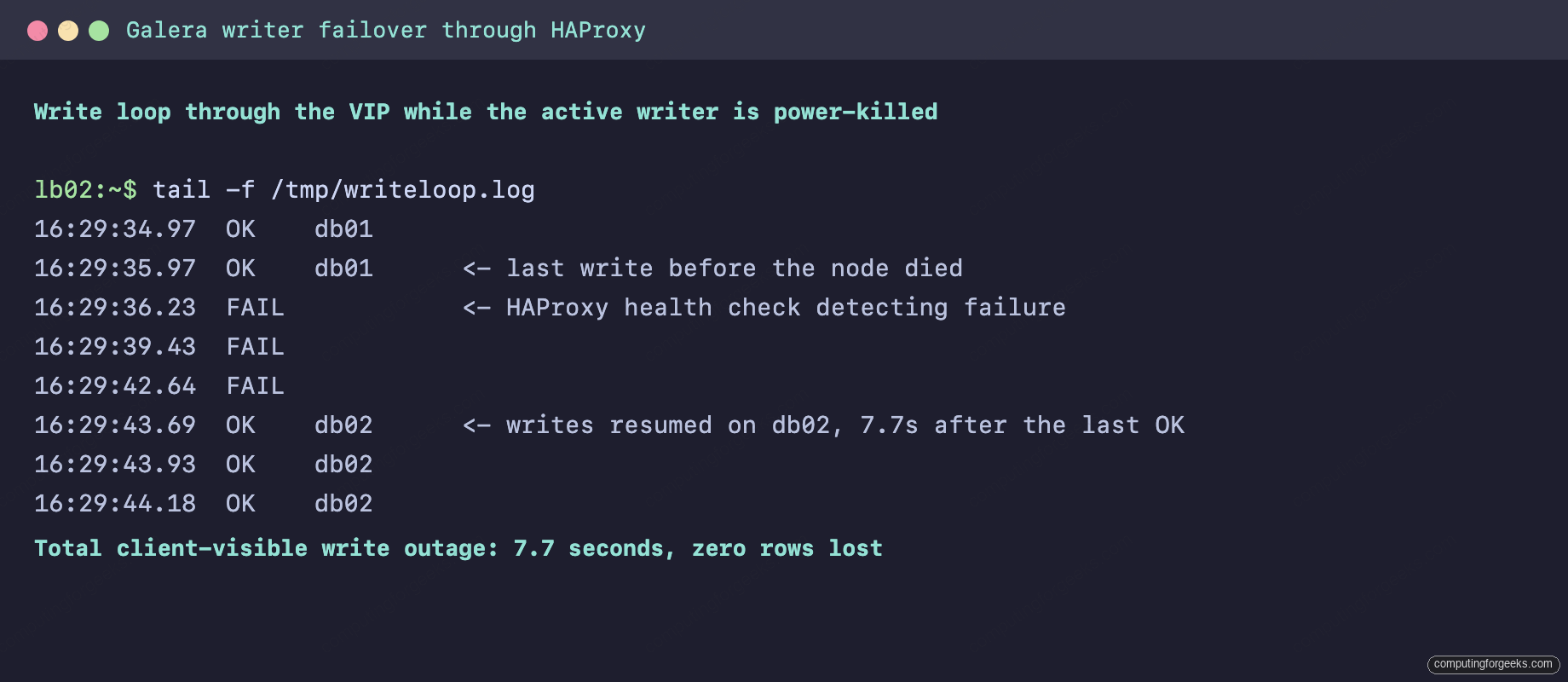
The 7.7 second figure decomposes into roughly 4 seconds of health check detection plus the in-flight client timeouts. Tightening inter and fall shrinks it at the cost of more sensitivity to network blips. No transaction acknowledged before the kill was missing afterwards, which is the synchronous replication guarantee doing its job.
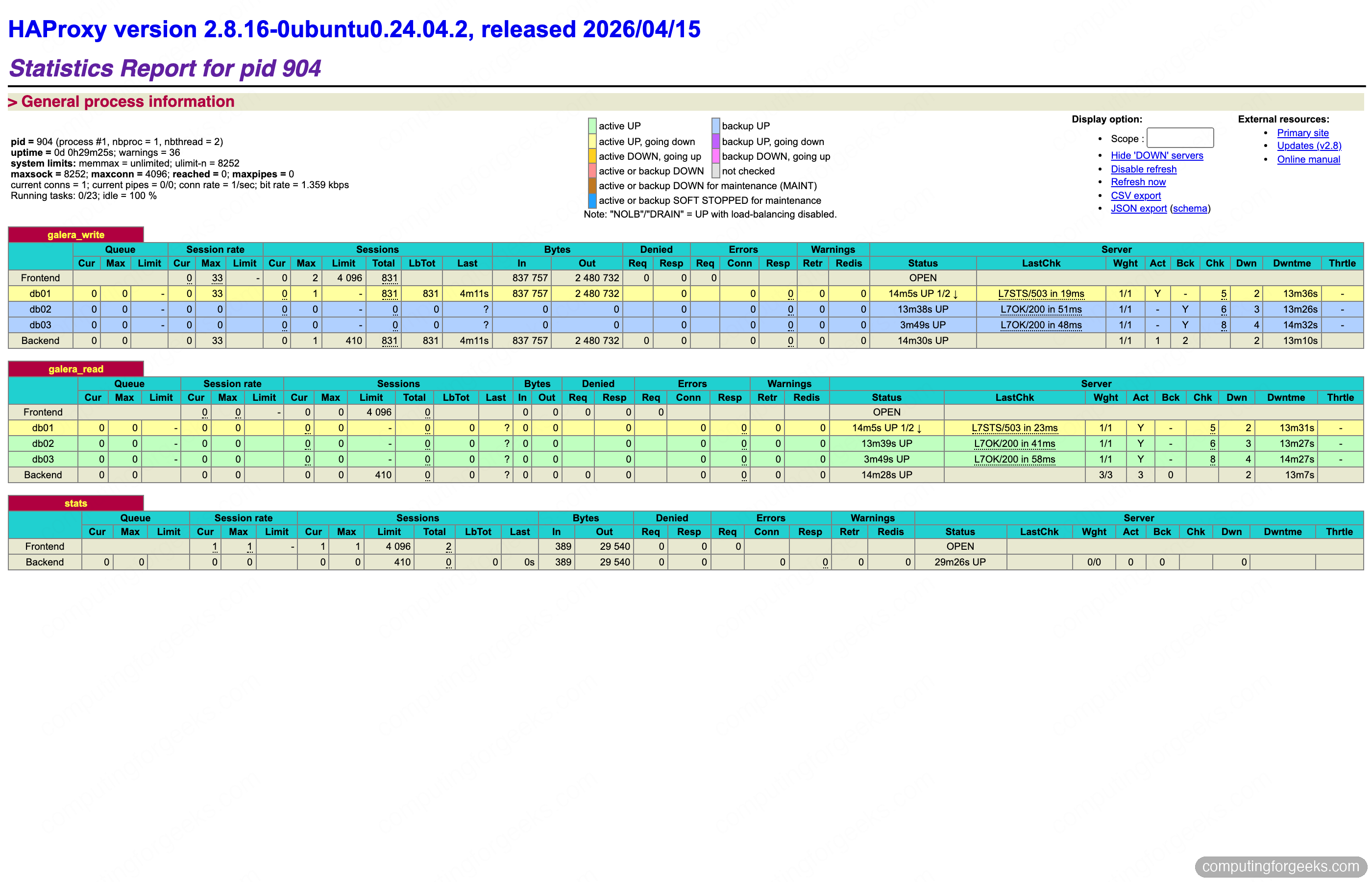
The HAProxy stats page during the same drill shows the mechanics, db01 marked down in red while a backup serves the write farm:
Drill 2 power-killed the load balancer holding the VIP. Keepalived on lb02 stopped receiving VRRP advertisements, promoted itself after the standard 3 advertisement intervals, and claimed the VIP with a gratuitous ARP. The write loop logged exactly one failed attempt. 3.2 seconds, end to end.
Drill 3 exposed a distinction worth knowing before you need it. A gracefully restarted node writes its position into grastate.dat and rejoins with an Incremental State Transfer, replaying only the writesets it missed from a donor’s gcache, the journal logs a line like IST uuid:4394d5e6... f: 701, l: 706 and the node is Synced in seconds. The power-killed node from drill 1 came back differently: an unclean shutdown leaves seqno: -1 in grastate.dat, the recovered position cannot vouch for the data files, and Galera takes the safe path of a full SST. Plan for that bandwidth on any unclean restart.
Step 11: Recover from a full cluster outage
Drill 4 power-killed all three database nodes simultaneously, the lab version of a rack losing power. What happened next contradicts most Galera tutorials: when all three machines booted, the cluster reassembled itself with no human input. Every node carried the crash signature in grastate.dat, seqno: -1 and safe_to_bootstrap: 0, but Galera’s pc.recovery feature, enabled by default, had saved the last Primary Component membership in gvwstate.dat on each node. When every member of that saved view reconnected, the journal logged promote to primary component and the cluster went Primary with all 838 test rows intact.
Manual recovery is needed in exactly one situation: not all former members return, so the saved view can never complete. With one node dead and two booting, both survivors sat in activating forever, their SQL ports closed, mariadbd retrying group communication. The runbook, executed and captured below: stop the wedged services, ask each survivor for its recovered position, bootstrap the most advanced one, and start the rest normally.
sudo systemctl stop mariadb
sudo -u mysql galera_recovery
Each node prints the position its InnoDB engine can recover to:
--wsrep_start_position=4394d5e6-64e8-11f1-9832-7e98ddefb627:875Compare the number after the colon across survivors. On this cluster both reported 875, identical because synchronous replication had them in lockstep at the moment of the kill; when they differ, the highest seqno holds data the others lack and must be the bootstrap node. Mark it safe and found the new Primary Component on it:
sudo sed -i 's/safe_to_bootstrap: 0/safe_to_bootstrap: 1/' /var/lib/mysql/grastate.dat
sudo galera_new_cluster
The other survivor starts normally with systemctl start mariadb and joins by IST. The dead node, whenever it returns, joins by SST. The full sequence on one screen:
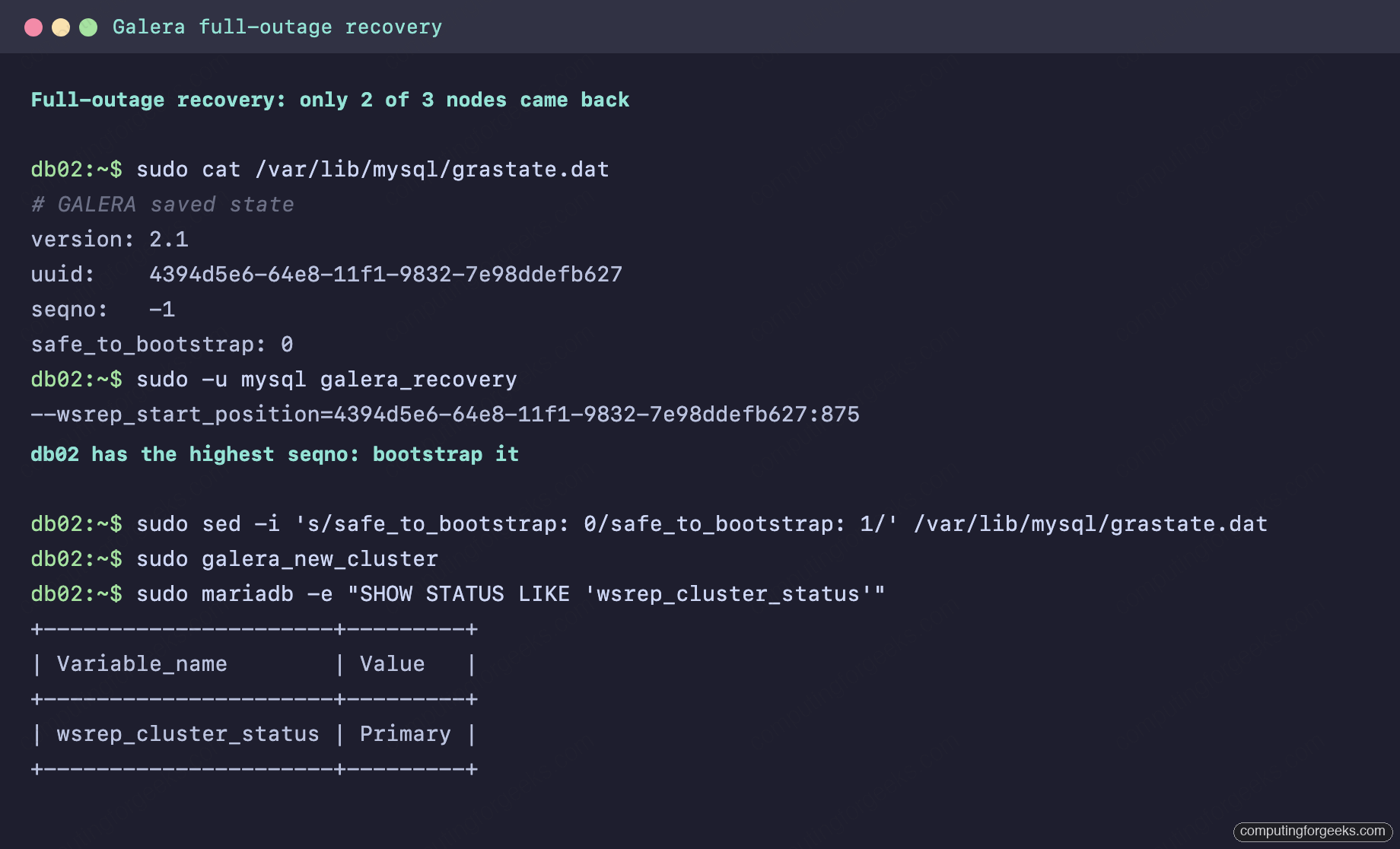
Bootstrapping the wrong node is the one way to lose data in this scenario, every transaction past the bootstrap node’s seqno is discarded when the more advanced node later SSTs from the new Primary. The seqno comparison is two minutes of work. Do it every time.
What to watch in the metrics
Day 2 on a Galera cluster is about catching degradation before it becomes flow control. The whole cluster commits at the pace of its slowest member: when a node’s receive queue exceeds gcs.fc_limit, 16 writesets by default on this build, that node tells the cluster to pause and every commit everywhere stalls. The fraction of time spent paused since the last FLUSH STATUS is wsrep_flow_control_paused, on the drilled cluster it read 0.00000008, effectively zero; treat anything climbing past 0.1 as a fire alarm and find the slow node via wsrep_flow_control_sent, which increments on the node causing the pauses.
One number from the lab makes the queue mechanics concrete. With a backup lock held on db03, the documented way a backup tool pauses the applier, its wsrep_local_recv_queue climbed to 497 writesets while the cluster kept committing at full speed, because a node in that state declares itself Donor/Desynced and is exempt from flow control. The lock released, the queue drained to zero, and the node was Synced again with every row applied. Distinguishing a desynced backup donor from a genuinely slow Synced node is exactly why you monitor wsrep_local_state_comment alongside the queue depth.
Size the gcache for the restarts you expect. The 128M default ring buffer on each node feeds IST to returning nodes; once a node has been away longer than the cache covers, its rejoin escalates to a full SST. Compute your write rate from successive wsrep_received_bytes samples, multiply by the longest maintenance window you intend to tolerate, set gcache.size to that with margin via wsrep_provider_options, and a 30 minute kernel update stops costing a full copy of the dataset.
Backups still matter on a cluster, replication faithfully replicates a bad DELETE to all three nodes. The same mariabackup binary the SST uses takes consistent online backups, and pointing it at a backup account on one node is a one-liner worth putting in cron, this run completed in seconds and produced a 49M snapshot of the test dataset:
sudo mariadb-backup --backup --target-dir=/var/backups/mariadb/full-$(date +%F) \
  --user=mariadbbackup --password="${SST_PASSWORD}"
Ship the result somewhere that is not one of the three nodes, the S3 backup workflow we use for standalone servers applies unchanged. For dashboards, the cluster exports everything shown in this guide through standard exporters, and the existing MariaDB monitoring stack with Prometheus and Grafana picks up wsrep status variables without extra configuration. The official Galera configuration reference documents every wsrep variable touched here.
If you run PostgreSQL alongside MariaDB, the equivalent HA build with Patroni, etcd and HAProxy follows the same architecture with a different replication engine, and comparing the two failover models is instructive. For a gentler, single-proxy introduction to Galera itself, the three node Galera install on Ubuntu and the ProxySQL variant on Debian both stop short of the VIP layer this build adds. The stack above is what we would put a production write workload on: every failure mode in the drills table has been injected, timed, and recovered, and the numbers are ones an application team can plan around.