

Before you reach for a high availability tool, the real problem to solve is the connection string. A single PostgreSQL server is easy to point an application at, but the moment that server dies, every client that cached its address is stuck. Replication alone does not fix this. You can have a perfectly healthy standby and still be down, because nothing promoted it and nothing told the application where to go. PostgreSQL high availability is two jobs: decide who the primary is, and give clients one address that always points at it.
The combination that solves both, and the one most teams settle on, is Patroni for automated failover, etcd as the consensus store that keeps everyone honest, and HAProxy as the single front door. We built and broke this cluster on PostgreSQL 18 with Patroni 4.1.3, on Rocky Linux 10 (RHEL family) and Debian 13, with the package paths verified on Ubuntu 24.04 and 26.04 too, so the commands, the failover timing, and the per-distro differences below are all real, current as of July 2026. This guide walks the whole stack: a three-node Patroni cluster, an etcd quorum behind it, HAProxy splitting reads from writes, and a floating virtual IP so the proxy itself is not a single point of failure.
The PostgreSQL high availability architecture
Each component earns its place by removing a specific failure mode. It helps to see the whole shape before touching a terminal.
          application
              |
        VIP 10.0.1.10            (Keepalived: floats between ha1/ha2)
              |
   +----------+----------+
   |  ha1          ha2    |       HAProxy  (VRRP MASTER / BACKUP)
   |  :5000 writes -> /primary  (200 only on the leader)
   |  :5001 reads  -> /replica  (200 only on standbys)
   +----------+----------+
              | health check on :8008
   +----------+-----------+-----------+
   |  pg1        pg2          pg3      |
   |  Patroni    Patroni      Patroni  |
   |  etcd       etcd         etcd     |   3-node DCS quorum
   |  PostgreSQL PostgreSQL   PostgreSQL|
   +-----------------------------------+
        primary  <-- streaming --> standbys
The roles break down like this:
- Patroni runs on every database node. It manages PostgreSQL, watches its health, and races for a leader lock. Whoever holds the lock is the primary. If the lock expires, Patroni promotes a standby and demotes the old primary the moment it comes back.
- etcd is the distributed configuration store that holds the leader lock. It uses the Raft consensus algorithm, so only one node can hold the lock at a time. This is what makes split-brain impossible at the cluster layer. It needs an odd number of members, three at minimum, for a quorum.
- HAProxy is the single address clients connect to. It does not guess who the primary is. It asks Patroni’s REST API on each node and routes accordingly, so when the primary changes, the backend changes but the client’s endpoint never does.
- Keepalived gives HAProxy the same treatment HAProxy gives PostgreSQL. A floating virtual IP moves between two HAProxy nodes using VRRP, so a dead proxy is not a dead cluster.
The trade-off worth naming up front: this is five machines to run one logical database. If you only need a warm standby for disaster recovery and can tolerate a manual promotion, plain streaming replication is simpler and cheaper. Reach for the full stack when an unplanned primary loss has to heal itself in under a minute with no human in the loop.
Prerequisites
Five nodes give the cleanest separation: three for the database and etcd, two for the proxy layer. You can collapse the proxy onto the database nodes in a lab, but keeping them apart is what you want in production.
- Three database nodes (
pg1,pg2,pg3) and two proxy nodes (ha1,ha2), each a recent Linux server with at least 2 vCPU and 2 GB RAM. - Static IPs on the same subnet, plus one free address for the virtual IP. This guide uses
10.0.1.11-13for the database nodes,10.0.1.21-22for the proxies, and10.0.1.10for the VIP. - Tested on: PostgreSQL 18, Patroni 4.1.3, etcd 3.4-3.6, HAProxy 3.0, Keepalived 2.2, on Rocky Linux 10 / AlmaLinux 10, Debian 13, and Ubuntu 24.04 / 26.04.
- Time synchronisation (chrony) running on every node. Clock skew breaks lease timing.
If PostgreSQL is new to you, the single-server install guides for Rocky and AlmaLinux and for Ubuntu and Debian cover the basics this guide assumes.
Set the cluster variables
The same addresses and passwords appear in dozens of commands. Export them once at the top of each shell session so you edit one block and paste the rest unchanged. Set these on whichever node you are working on, swapping the real values for yours.
export PG1=10.0.1.11
export PG2=10.0.1.12
export PG3=10.0.1.13
export VIP=10.0.1.10
export SUBNET=10.0.1.0/24
# Pick real passwords. These three accounts drive replication and failover.
export SUPERUSER_PWD='ChangeMe-Super#2026'
export REPL_PWD='ChangeMe-Repl#2026'
export REWIND_PWD='ChangeMe-Rewind#2026'
These hold for the current session only. Re-export them if you reconnect or switch to a root shell.
Install PostgreSQL, Patroni and etcd
This is the one step where the distributions genuinely diverge. The package names, the repository setup, and one important gotcha differ between the RHEL family and the Debian family. Everything after this section is identical across all of them. Run the install on all three database nodes.
On the RHEL family (Rocky Linux, AlmaLinux)
Add the PGDG repository and EPEL, which carries some of Patroni’s Python dependencies:
sudo dnf install -y https://download.postgresql.org/pub/repos/yum/reporpms/EL-10-x86_64/pgdg-redhat-repo-latest.noarch.rpm
sudo dnf install -y https://dl.fedoraproject.org/pub/epel/epel-release-latest-10.noarch.rpm
etcd and Patroni live in the PGDG “extras” repository, which ships disabled. Enable it, then import its signing key. On Enterprise Linux 10 this is the classic config-manager syntax, not the newer dnf5 form, and the key import is required because the extras repo verifies its own metadata:
sudo dnf config-manager --set-enabled pgdg-rhel10-extras
sudo rpm --import /etc/pki/rpm-gpg/PGDG-RPM-GPG-KEY-RHEL
Skip that rpm --import and the next command fails with repomd.xml GPG signature verification error: Signing key not found. With the key in place, install the stack:
sudo dnf install -y postgresql18-server postgresql18-contrib etcd patroni patroni-etcdNote the patroni-etcd package. On the RHEL family it pulls the etcd driver Patroni needs. Do not run initdb or enable the postgresql service here. Patroni initialises the data directory itself.
On Debian and Ubuntu
Add the PGDG apt repository keyed to your release codename (the variable resolves to trixie, bookworm, noble, or resolute automatically):
sudo apt-get update
sudo apt-get install -y curl ca-certificates
sudo install -d /usr/share/postgresql-common/pgdg
sudo curl -fsSL -o /usr/share/postgresql-common/pgdg/apt.postgresql.org.asc https://www.postgresql.org/media/keys/ACCC4CF8.asc
. /etc/os-release
echo "deb [signed-by=/usr/share/postgresql-common/pgdg/apt.postgresql.org.asc] https://apt.postgresql.org/pub/repos/apt ${VERSION_CODENAME}-pgdg main" | sudo tee /etc/apt/sources.list.d/pgdg.list
sudo apt-get update
Install PostgreSQL, Patroni, and etcd. etcd was renamed on recent Debian and Ubuntu releases, so the package is etcd-server and etcd-client, not the old etcd:
sudo apt-get install -y postgresql-18 patroni etcd-server etcd-client python3-etcdThat python3-etcd package is easy to miss and Patroni will not tell you politely. The Debian Patroni package does not pull the etcd driver the way the RHEL patroni-etcd package does, so without it Patroni starts and immediately dies with Can not find suitable configuration of distributed configuration store. Available implementations: consul, kubernetes. Installing python3-etcd puts etcd back on that list.
Now the gotcha that catches everyone. Installing postgresql-18 on Debian or Ubuntu automatically creates and starts a cluster called main on port 5432. Patroni needs that port free and an empty data directory, so drop the auto-created cluster on every node:
pg_lsclusters
sudo pg_dropcluster --stop 18 main
The RHEL packages have no equivalent step, because they never auto-initialise a cluster. This single difference is the most common reason a Debian Patroni node refuses to bootstrap.
What actually differs between the families
Keep this table handy. Every path and name below shows up again in the config files, and getting one wrong is the difference between a clean start and a cryptic Python traceback.
| Item | RHEL family (Rocky, Alma) | Debian, Ubuntu |
|---|---|---|
| PostgreSQL package | postgresql18-server | postgresql-18 |
| etcd driver for Patroni | patroni-etcd | python3-etcd |
| etcd package | etcd | etcd-server etcd-client |
| Auto-created cluster | none | drop with pg_dropcluster --stop 18 main |
| Patroni binaries | /usr/pgsql-18/bin | /usr/lib/postgresql/18/bin |
| Data directory | /var/lib/pgsql/18/data | /var/lib/postgresql/18/main |
| etcd config file | /etc/etcd/etcd.conf | /etc/default/etcd |
| Patroni config file | /etc/patroni/patroni.yml | /etc/patroni/config.yml |
| Firewall | firewalld | ufw |
| Mandatory access control | SELinux (enforcing) | AppArmor (no action needed) |
Open the firewall ports
The cluster speaks on a handful of ports: PostgreSQL on 5432, the Patroni REST API on 8008, and etcd on 2379 (clients) and 2380 (peers). Open these on all three database nodes.
On the RHEL family, firewalld is the tool:
sudo firewall-cmd --permanent --add-port={5432,8008,2379,2380}/tcp
sudo firewall-cmd --reload
On Debian and Ubuntu, the same ports through ufw:
sudo ufw allow proto tcp to any port 5432,8008,2379,2380The two proxy nodes need 5000, 5001, and 7000 open for the HAProxy front ends and stats page, plus the VRRP protocol for Keepalived. We will cover those when we set up the proxy layer.
Bootstrap the etcd quorum
etcd comes first, because Patroni has nowhere to store the leader lock without it. Configure all three members as a static cluster. On the RHEL family the config lives in /etc/etcd/etcd.conf; on Debian and Ubuntu it is /etc/default/etcd. The contents are the same environment variables either way. Here is pg1 (set the matching self-address on each node):
ETCD_NAME=pg1
ETCD_DATA_DIR=/var/lib/etcd
ETCD_LISTEN_PEER_URLS=http://10.0.1.11:2380
ETCD_LISTEN_CLIENT_URLS=http://10.0.1.11:2379,http://127.0.0.1:2379
ETCD_INITIAL_ADVERTISE_PEER_URLS=http://10.0.1.11:2380
ETCD_ADVERTISE_CLIENT_URLS=http://10.0.1.11:2379
ETCD_INITIAL_CLUSTER=pg1=http://10.0.1.11:2380,pg2=http://10.0.1.12:2380,pg3=http://10.0.1.13:2380
ETCD_INITIAL_CLUSTER_STATE=new
ETCD_INITIAL_CLUSTER_TOKEN=pg-etcd
Repeat on pg2 and pg3, changing ETCD_NAME and the three self-addresses. The ETCD_INITIAL_CLUSTER line stays identical on all three. Start etcd on every node within a few seconds of each other so the initial election succeeds:
sudo systemctl enable --now etcdConfirm all three members joined and every endpoint is healthy:
etcdctl --endpoints=http://${PG1}:2379,http://${PG2}:2379,http://${PG3}:2379 endpoint health -w tableAll three should report true in the HEALTH column:
+-----------------------+--------+------------+-------+
|       ENDPOINT        | HEALTH |    TOOK    | ERROR |
+-----------------------+--------+------------+-------+
| http://10.0.1.11:2379 |   true | 2.21561ms  |       |
| http://10.0.1.12:2379 |   true | 2.32060ms  |       |
| http://10.0.1.13:2379 |   true | 1.62423ms  |       |
+-----------------------+--------+------------+-------+
Three is the minimum for a real quorum. With three members the cluster survives one failure and keeps a majority; drop to two and a single loss takes the whole DCS offline, which would freeze every failover decision.
Configure Patroni
Patroni reads one YAML file per node. The only fields that change between nodes are name and the two connect_address lines. Write this to /etc/patroni/patroni.yml on the RHEL family, or /etc/patroni/config.yml on Debian and Ubuntu. The example below is the RHEL family version for pg1; the inline comment marks the one block Debian and Ubuntu change.
scope: pg-cluster
namespace: /service/
name: pg1

restapi:
  listen: 0.0.0.0:8008
  connect_address: 10.0.1.11:8008

etcd3:
  hosts:
    - 10.0.1.11:2379
    - 10.0.1.12:2379
    - 10.0.1.13:2379

bootstrap:
  dcs:
    ttl: 30
    loop_wait: 10
    retry_timeout: 10
    maximum_lag_on_failover: 1048576
    synchronous_mode: true
    postgresql:
      use_pg_rewind: true
      use_slots: true
      parameters:
        wal_level: replica
        hot_standby: "on"
        max_wal_senders: 10
        max_replication_slots: 10
        wal_keep_size: 256MB
        wal_log_hints: "on"
  initdb:
    - encoding: UTF8
    - data-checksums
  pg_hba:
    - host all all 127.0.0.1/32 scram-sha-256
    - host all all 10.0.1.0/24 scram-sha-256
    - host replication replicator 10.0.1.0/24 scram-sha-256

postgresql:
  listen: 0.0.0.0:5432
  connect_address: 10.0.1.11:5432
  data_dir: /var/lib/pgsql/18/data          # Debian/Ubuntu: /var/lib/postgresql/18/main
  bin_dir: /usr/pgsql-18/bin                 # Debian/Ubuntu: /usr/lib/postgresql/18/bin
  authentication:
    superuser:
      username: postgres
      password: 'ChangeMe-Super#2026'
    replication:
      username: replicator
      password: 'ChangeMe-Repl#2026'
    rewind:
      username: rewind_user
      password: 'ChangeMe-Rewind#2026'
  parameters:
    password_encryption: scram-sha-256

watchdog:
  mode: automatic
  device: /dev/watchdog
  safety_margin: 5

tags:
  nofailover: false
  noloadbalance: false
  clonefrom: false
  nosync: false
Two settings carry most of the weight here. synchronous_mode: true tells Patroni to keep one standby in lockstep with the primary and only ever promote that standby, which is what gives you a zero data loss failover. use_pg_rewind: true lets a failed primary rejoin as a standby without a full re-clone once it recovers. The watchdog block is the last line of defence against split-brain, covered in the next section.
Set the file ownership so the postgres user can read it, then move on to the watchdog before starting anything:
sudo chown postgres:postgres /etc/patroni/patroni.yml
sudo chmod 600 /etc/patroni/patroni.yml
Wire up the watchdog
etcd’s lock stops two nodes from both believing they are primary at the cluster layer, but there is a nastier edge case: a primary that is hung or paused long enough to lose its lock, then wakes up and keeps accepting writes for a few seconds before it notices. A hardware or software watchdog closes that window by resetting the node if Patroni stops feeding it a heartbeat. The Linux softdog module provides one on any machine, virtual or physical.
Load it at boot and let Patroni hand ownership of the device to the postgres user. Run this on all three database nodes:
echo softdog | sudo tee /etc/modules-load.d/softdog.conf
sudo modprobe softdog
sudo install -d /etc/systemd/system/patroni.service.d
printf '[Service]\nExecStartPre=+/sbin/modprobe softdog\nExecStartPre=+/bin/chown postgres /dev/watchdog\n' | sudo tee /etc/systemd/system/patroni.service.d/watchdog.conf
sudo systemctl daemon-reload
With mode: automatic in the config, Patroni uses the watchdog when it is present and carries on without it when it is not, which is the right default for mixed environments. For maximum safety in production, switch that to mode: required so a node refuses to become leader if it cannot arm the watchdog. The trade-off is real: required means a node with a misconfigured watchdog will sit out rather than serve, so test it before you rely on it.
Start the cluster
Start pg1 first and let it become the leader. It runs initdb, creates the three roles, and takes the lock:
sudo systemctl enable --now patroniGive it half a minute, then start Patroni on pg2 and pg3. They clone from the leader with pg_basebackup and come up as standbys. Check the cluster from any node (use config.yml in place of patroni.yml on Debian and Ubuntu):
sudo patronictl -c /etc/patroni/patroni.yml listOne leader, one synchronous standby, and a streaming replica, all on the same timeline with zero lag:
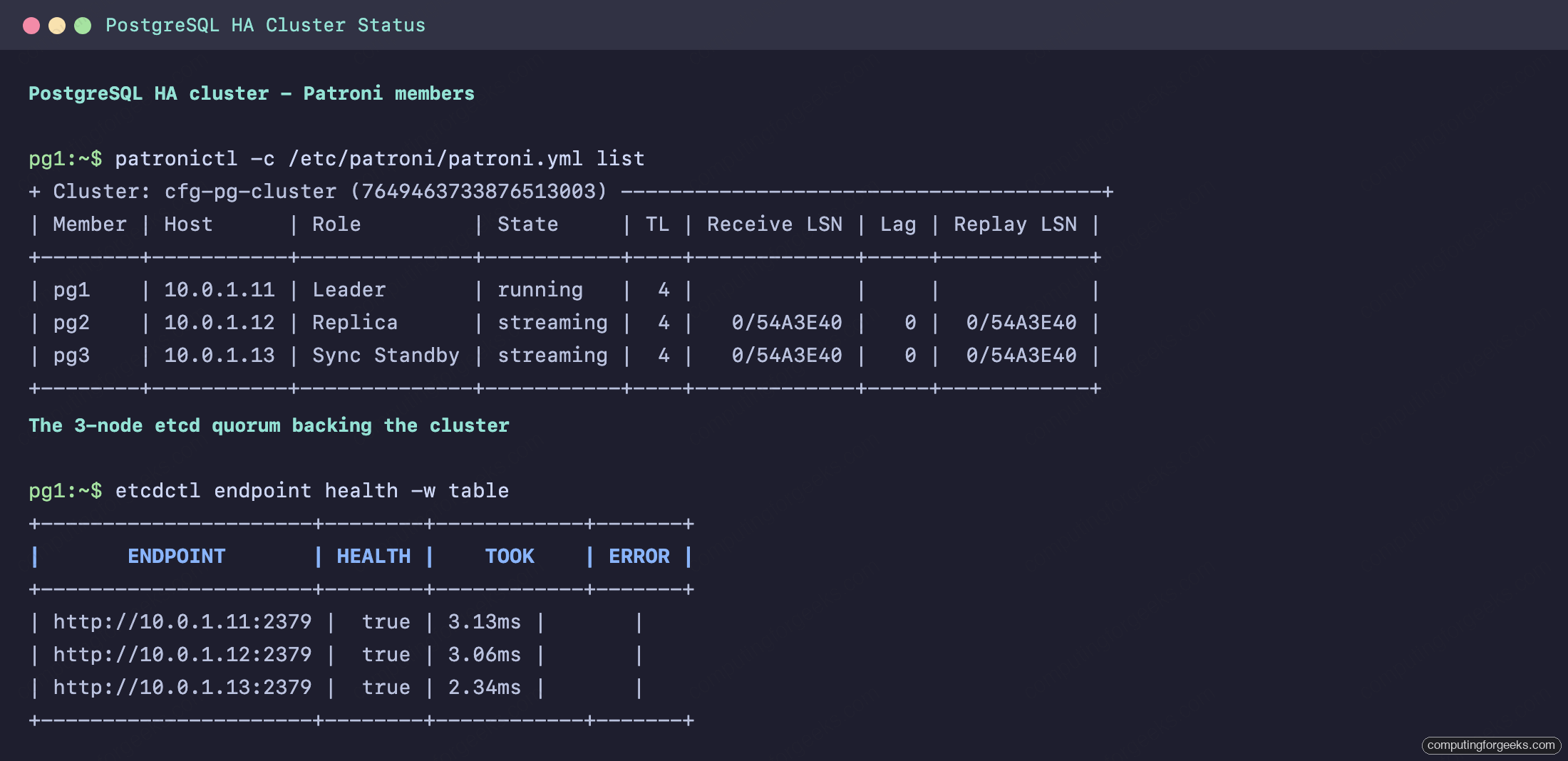
The Sync Standby role is the visible proof that synchronous_mode is working. That node has every committed transaction the primary has, which is exactly why Patroni will only ever promote it.
Put HAProxy in front
HAProxy is what turns three database nodes into one address. The clever part is the health check: rather than guess which node is primary, HAProxy calls Patroni’s REST API on port 8008. Patroni answers 200 on /primary only on the leader and 503 everywhere else, and the mirror image on /replica. So a front end that checks /primary naturally pools only the leader, and one that checks /replica pools only the standbys. When the primary changes, the checks flip and HAProxy follows within a couple of seconds.
Install HAProxy on both proxy nodes:
sudo dnf install -y haproxy        # RHEL family
sudo apt-get install -y haproxy    # Debian, Ubuntu
Write the same /etc/haproxy/haproxy.cfg to both nodes. Port 5000 carries writes to the primary, 5001 load-balances reads across the standbys, and 7000 serves the stats page:
global
    maxconn 2000
    log /dev/log local0

defaults
    log     global
    mode    tcp
    retries 2
    timeout client  30m
    timeout server  30m
    timeout connect 4s
    timeout check   5s

listen stats
    mode http
    bind *:7000
    stats enable
    stats uri /
    stats refresh 5s

# Writes: only the Patroni leader answers 200 on /primary
listen postgres_primary
    bind *:5000
    option httpchk
    http-check send meth OPTIONS uri /primary
    http-check expect status 200
    default-server inter 3s fall 3 rise 2 on-marked-down shutdown-sessions
    server pg1 10.0.1.11:5432 maxconn 200 check port 8008
    server pg2 10.0.1.12:5432 maxconn 200 check port 8008
    server pg3 10.0.1.13:5432 maxconn 200 check port 8008

# Reads: every healthy standby answers 200 on /replica
listen postgres_replicas
    bind *:5001
    option httpchk
    http-check send meth OPTIONS uri /replica
    http-check expect status 200
    balance roundrobin
    default-server inter 3s fall 3 rise 2 on-marked-down shutdown-sessions
    server pg1 10.0.1.11:5432 maxconn 200 check port 8008
    server pg2 10.0.1.12:5432 maxconn 200 check port 8008
    server pg3 10.0.1.13:5432 maxconn 200 check port 8008
The on-marked-down shutdown-sessions directive is small but critical. It kills every existing connection to a server the instant that server fails its check, so when the primary goes down, clients are dropped immediately rather than left hanging on a demoted node. Leave it out and an application can keep trying to write to the old primary for the length of its connection timeout. Note also the modern check syntax: HAProxy 2.2 and newer use http-check send meth OPTIONS uri /primary rather than the old one-line option httpchk OPTIONS /primary, and Patroni dropped the legacy /master endpoint in favour of /primary, so older configs you find online will quietly health-check the wrong path.
SELinux on the RHEL family needs one boolean flipped before HAProxy can reach the backends, because the confined HAProxy domain will not open arbitrary outbound ports by default:
sudo setsebool -P haproxy_connect_any 1Open the proxy ports and start the service on both nodes:
sudo firewall-cmd --permanent --add-port={5000,5001,7000}/tcp && sudo firewall-cmd --reload   # RHEL family
sudo systemctl enable --now haproxy
The stats page at http://10.0.1.21:7000/ shows the routing decision in real time. The leader is green and UP in the postgres_primary pool, while the standbys correctly report DOWN there (they answer 503 on /primary) and UP in the postgres_replicas pool.
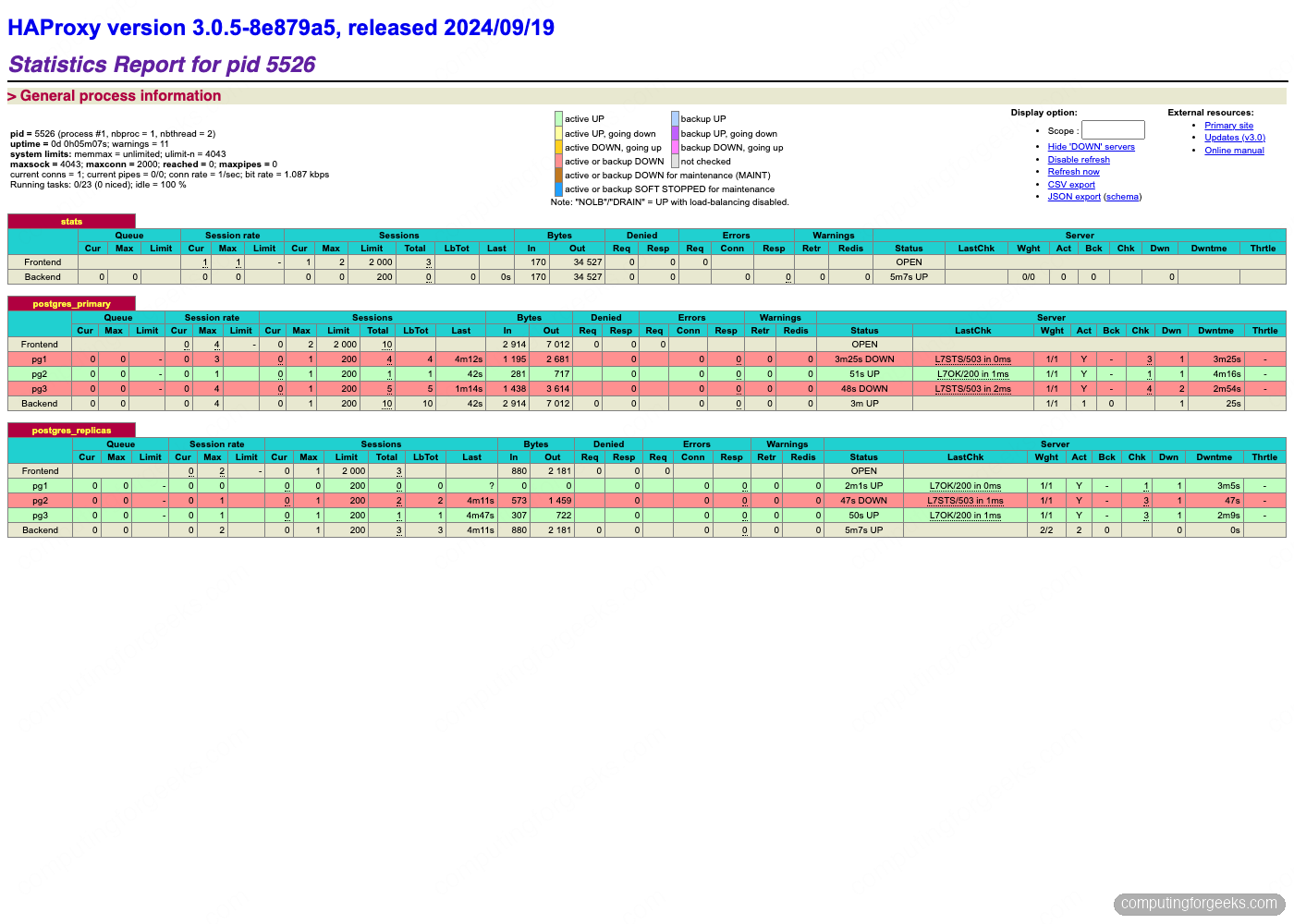
That red row in the writes pool is not an error. A standby is supposed to fail the /primary check, and HAProxy showing it DOWN there is the routing working as designed. If you set this up with one proxy, you would be done, but the proxy would now be your single point of failure. That is what Keepalived solves.
Add a floating VIP with Keepalived
Keepalived runs a virtual IP across both proxy nodes using VRRP. One node holds the VIP as MASTER; if it or its HAProxy dies, the BACKUP takes the address over in about a second. The application only ever talks to the VIP, so it never knows a proxy failed. The same VRRP failover underpins a general-purpose HAProxy and Keepalived HA cluster for any service, not just a database.
Install Keepalived on both proxy nodes:
sudo dnf install -y keepalived        # RHEL family
sudo apt-get install -y keepalived    # Debian, Ubuntu
Then open its configuration file:
sudo vim /etc/keepalived/keepalived.confThis is ha1, the MASTER:
vrrp_script chk_haproxy {
    script "/usr/bin/pidof haproxy"
    interval 2
    weight 2
    fall 2
    rise 2
}

vrrp_instance VI_PG {
    state MASTER
    interface eth0
    virtual_router_id 51
    priority 101
    advert_int 1
    authentication {
        auth_type PASS
        auth_pass cfgha26
    }
    virtual_ipaddress {
        10.0.1.10/24
    }
    track_script {
        chk_haproxy
    }
}
On ha2, use the identical file with two changes: state BACKUP and priority 100. The chk_haproxy script means the VIP only lives on a node whose HAProxy is actually running, so a crashed proxy hands the address over even if the node itself stays up. Match the interface name to your hardware (ip -br addr will tell you). Start it on both nodes:
sudo systemctl enable --now keepalivedIf you copy the config in from another machine on an SELinux system and the service refuses to start with a permission error, run sudo restorecon -v /etc/keepalived/keepalived.conf to fix its security label. A file edited in place gets the right label automatically.
Test the routing through the VIP
Everything now hangs off one address. Point a write at the VIP on port 5000 and it lands on the primary; point a read at port 5001 and it lands on a standby. The pg_is_in_recovery() flag confirms which is which (false on the primary, true on a standby):
export PGPASSWORD="$SUPERUSER_PWD"
psql "host=${VIP} port=5000 user=postgres dbname=postgres" -c "SELECT inet_server_addr(), pg_is_in_recovery();"
psql "host=${VIP} port=5001 user=postgres dbname=postgres" -c "SELECT inet_server_addr(), pg_is_in_recovery();"
Writes resolve to the primary and reads spread across the standbys, all through the single VIP:
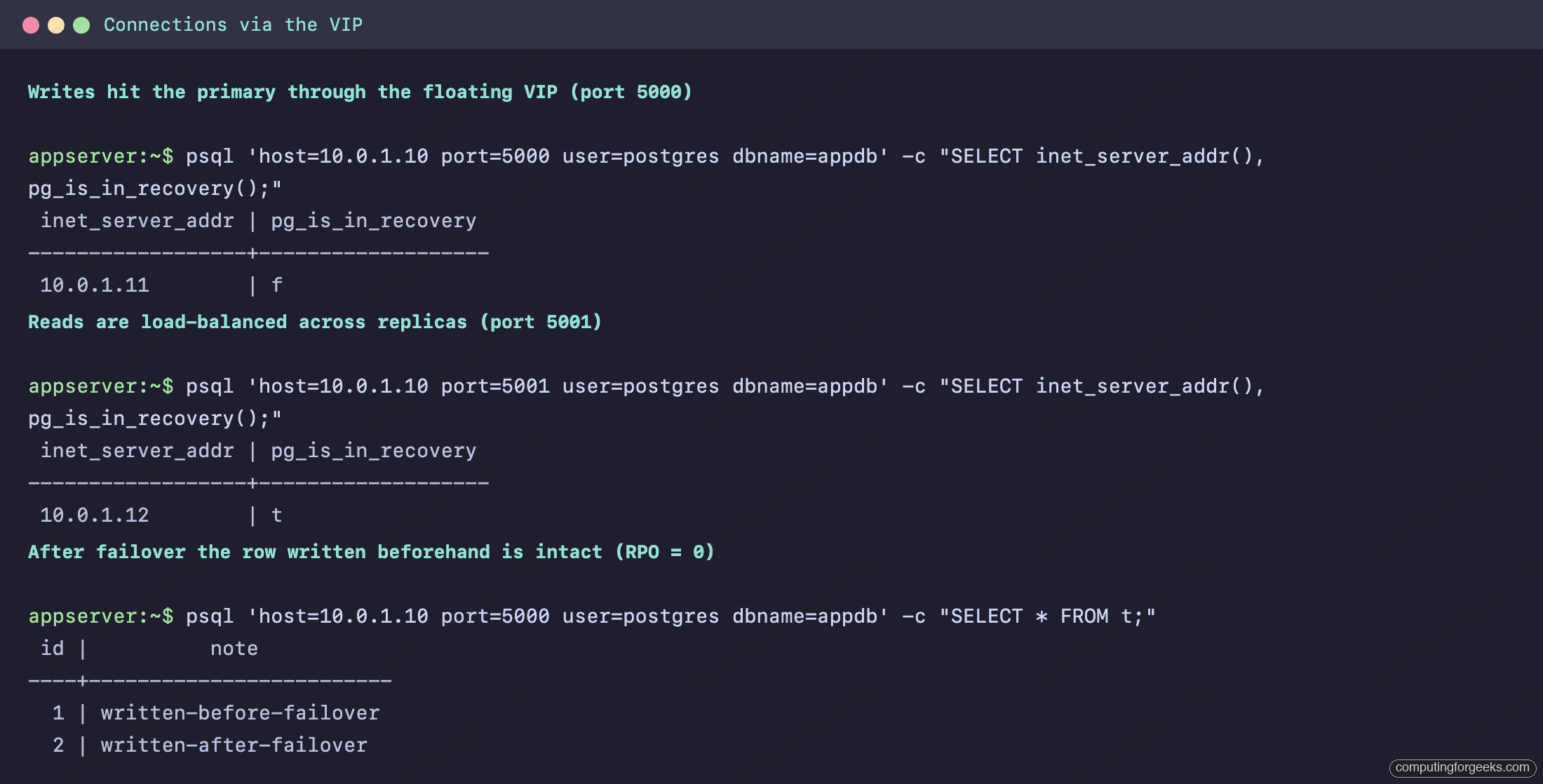
This is the payoff of the whole architecture. Your application’s connection string is 10.0.1.10:5000 for writes and 10.0.1.10:5001 for reads, and it never changes again.
Prove the failover
A cluster that has never failed over is a cluster you do not trust yet. Seed a row so we have something to lose, then kill the primary outright and watch what happens.
psql "host=${VIP} port=5000 user=postgres dbname=postgres" -c "CREATE DATABASE appdb;"
psql "host=${VIP} port=5000 user=postgres dbname=appdb" -c "CREATE TABLE t(id serial primary key, note text);"
psql "host=${VIP} port=5000 user=postgres dbname=appdb" -c "INSERT INTO t(note) VALUES ('written-before-failover');"
Now simulate a hard failure. Power off the primary node, or stop both services on it. From a surviving node, watch the cluster react:
watch -n2 'sudo patronictl -c /etc/patroni/patroni.yml list'Within roughly twenty to twenty five seconds, Patroni notices the lock has expired, promotes the synchronous standby, and bumps the timeline. The async replica re-attaches to the new leader:
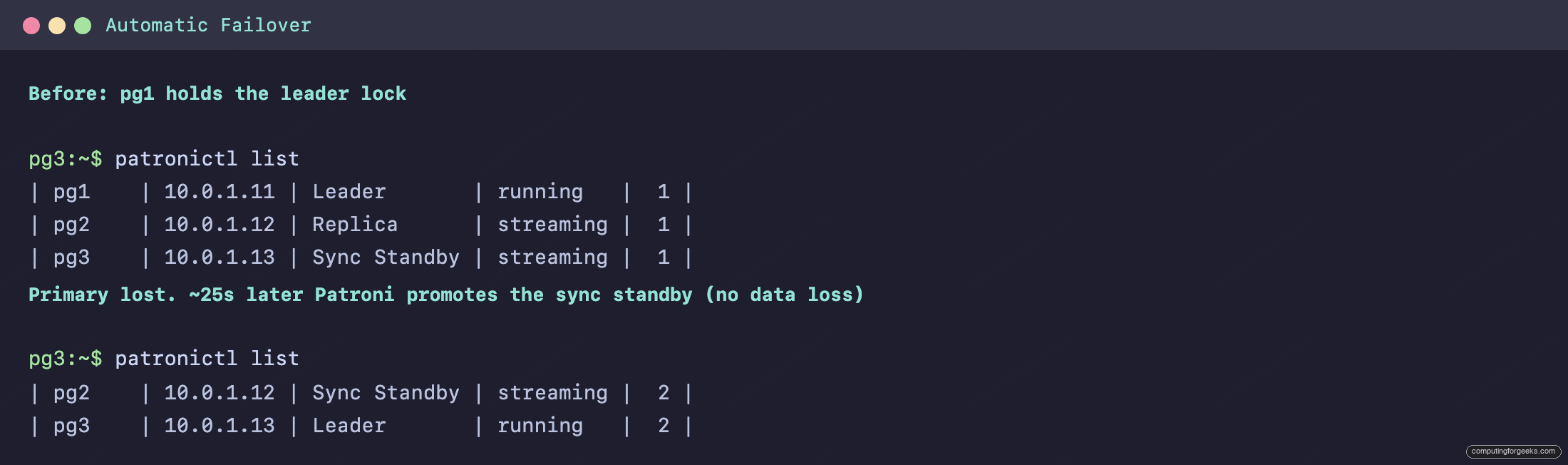
Because synchronous_mode guarantees the promoted node already held every committed transaction, the failover is lossless. The same connection string, retried, now lands on the new primary, the pre-failover row is intact, and new writes succeed:
psql "host=${VIP} port=5000 user=postgres dbname=appdb" -c "SELECT * FROM t;"
psql "host=${VIP} port=5000 user=postgres dbname=appdb" -c "INSERT INTO t(note) VALUES ('written-after-failover');"
Bring the dead node back online and Patroni rejoins it automatically. Thanks to use_pg_rewind, it rewinds onto the new timeline and resumes streaming as a standby instead of demanding a full re-clone. The cluster is three healthy nodes again with no manual intervention.
One behaviour to know for planned maintenance: a manual patronictl switchover under synchronous_mode will only accept the current synchronous standby as the candidate. Aim it at an async replica and Patroni refuses with candidate name does not match with sync_standby. That is the safety guarantee doing its job, not a bug.
Hardening and where to go from here
The cluster works, but a few choices separate a lab from production:
- Encrypt etcd and replication. This guide ran etcd over plain HTTP for clarity. In production, give etcd TLS peer and client certificates and require
scram-sha-256with TLS on the PostgreSQL replication connections. The leader lock and your WAL stream both cross the network. - Decide your synchronous posture deliberately.
synchronous_mode: truebuys zero data loss, but if the lone sync standby is also down, a strict configuration will refuse writes to protect consistency. Weigh that againstsynchronous_mode_strictand the number of standbys you keep in sync. The trade-off is durability versus write availability, and only you know which your application needs. - Add connection pooling. HAProxy balances connections but does not pool them, and PostgreSQL handles a flood of short-lived connections poorly. PgBouncer in front of (or alongside) each node keeps the connection count sane under load. It does not handle failover itself, which is exactly why it sits behind HAProxy rather than replacing it.
- Watch the right things. Scrape Patroni’s
/metricsendpoint and alert on replication lag, the number of healthy etcd members, and timeline changes. A timeline bump you did not expect is a failover you did not notice. - Promote the watchdog to required. Once you have confirmed
softdogarms cleanly on every node, switchwatchdogtomode: requiredfor the strongest split-brain guarantee.
When this cluster outgrows a single primary’s write capacity, the next move is not a bigger box but read offloading and sharding: point read-heavy services at the 5001 port to spread load across standbys, and when even that is not enough, look at Citus for horizontal scale. For now, you have a database that survives losing any one node, heals itself, and presents one unchanging address to everything that depends on it. If you came from a simpler setup, comparing the write throughput here against a single server using the same method as our PostgreSQL benchmark guide is a good way to size the synchronous-commit overhead before you go live. If you also run MariaDB, the same architecture built on Galera is the sister guide to this one.






Excellent article. I have followed instructions and it works perfectly.
1. In article is a statement: “You can collapse the proxy onto the database nodes in a lab, but keeping them apart is what you want in production.”
Question: Why should HA severs be separated in production? Is it security, something else?
2. I have tested this solution and it looks like from total three PG servers, there must always be two PG servers up and running. PG1=Leader, PG2=Syn-standby, PG3=Replica. If PG3 is powered-off then cluster works fine. If I additionally power-off PG2, then whole cluster shuts-down and PG1 does now accepts connections anymore. Is it possible to set-up, so PG3 and PG2 are both closed down and PG1 still survives?
1. Failure domains and resources, not security. A proxy that shares a database node dies with it, which defeats the redundancy, and HAProxy connection spikes compete with PostgreSQL for CPU and memory. Separate layers also patch and resize independently.
2. That is by design. etcd runs on the three database nodes, so powering off pg2 and pg3 drops it to 1 of 3 members and quorum is lost, and Patroni on pg1 demotes itself because it can no longer hold the leader lock. A lone node cannot tell powered-off peers from a network partition, so staying up would risk split-brain. If you need pg1 to survive that scenario, host the etcd quorum on machines that stay up (the two proxy nodes plus one more works); Patroni then relaxes synchronous replication when no standby is available and the leader keeps accepting writes.
Instructions: “Install Keepalived on both proxy nodes”, but there are no instructions how to do this. I see in Red Hat it works by installing keepalived package like:
“sudo dnf -y install keepalived”
I suggest to add this info to article to make it more complete.
You are right, the install command was missing. The article now includes it just before the config file: sudo dnf install -y keepalived on the RHEL family, sudo apt-get install -y keepalived on Debian and Ubuntu. Thanks for flagging it.