A single HAProxy box in front of your web servers solves load balancing, but the box itself is now the bottleneck and the single point of failure. Reboot it, hit a kernel panic, or run a bad update and the whole site is down even though every backend is fine. The fix is to run two HAProxy nodes and let Keepalived shuffle a virtual IP between them with VRRP, so traffic rides through whichever load balancer is currently alive.
This guide walks through a 4-VM lab on Rocky Linux 10. Two nodes run HAProxy plus Keepalived as an active/passive pair sharing a virtual IP. Two backend nodes run Nginx serving distinct pages so the round-robin and failover behaviour is visible at a glance. We cover the SELinux booleans HAProxy needs on RHEL family, the net.ipv4.ip_nonlocal_bind sysctl that lets the standby node bind a VIP it does not own yet, the vrrp_script hook that demotes a peer when its HAProxy dies, and the firewalld rich rule that lets VRRP packets through. Tested commands, real terminal captures, real failover.
Tested April 2026 on Rocky Linux 10.1 (kernel 6.12), HAProxy 3.0.5, Keepalived 2.2.8, Nginx 1.26, SELinux enforcing
Architecture and traffic flow
Four Rocky Linux 10 nodes, all on the same Layer 2 segment so VRRP advertisements (multicast 224.0.0.18, IP protocol 112) reach both load balancers. Keepalived elects a master based on priority, the master keeps the virtual IP, and HAProxy on whichever node currently holds the VIP forwards requests to the two Nginx backends with health checks.
- lb1 (10.0.0.10): HAProxy + Keepalived,
state MASTER, priority 110 - lb2 (10.0.0.11): HAProxy + Keepalived,
state BACKUP, priority 100 - web1 (10.0.0.12): Nginx, serves
Backend: web1 - web2 (10.0.0.13): Nginx, serves
Backend: web2 - VIP: 10.0.0.100 (floats between lb1 and lb2)
A client hits http://10.0.0.100/. The VIP currently lives on lb1, so lb1’s HAProxy receives the connection and round-robins it to web1 or web2. If lb1’s HAProxy dies, Keepalived’s tracking script drops lb1’s effective priority below lb2’s, lb2 sends a gratuitous ARP claiming the VIP, and the next request lands on lb2 instead. The same VIP, no DNS change, no downtime longer than a couple of VRRP advert intervals.
Prerequisites
- Four Rocky Linux 10.x VMs (lb1, lb2, web1, web2) on the same /24 network. KVM, Proxmox, or any hypervisor that lets the guests share an L2 broadcast domain works. Cloud setups need a virtual IP service instead, because most public clouds block VRRP multicast.
- SSH as a user with
sudoon all four. The lab usesrocky. - SELinux enforcing (the Rocky 10 default). The article shows the booleans HAProxy needs.
- One free IP address in the same /24 to use as the virtual IP.
- If this is your first HAProxy install, the predecessor guide on a single node is Install and Configure HAProxy on Rocky Linux 10. This article assumes you understand the basics and want HA on top.
Step 1: Set reusable shell variables
Every command in this guide uses shell variables so you only edit one block. Open an SSH session to your jump host (or any of the four VMs, they all reach each other) and export these. Replace the IP addresses with your own and pick a real VRRP password:
export LB1_IP="10.0.0.10"
export LB2_IP="10.0.0.11"
export WEB1_IP="10.0.0.12"
export WEB2_IP="10.0.0.13"
export VIP="10.0.0.100"
export VIP_CIDR="10.0.0.100/24"
export VRRP_PASS="ChangeMeStrong2026"
export STATS_USER="admin"
export STATS_PASS="StatsPass2026"
Confirm they read back correctly before doing anything destructive:
echo "LBs:    ${LB1_IP} (master)  ${LB2_IP} (backup)"
echo "Webs:   ${WEB1_IP}  ${WEB2_IP}"
echo "VIP:    ${VIP}"
The VRRP password is shared between both Keepalived nodes. It does not authenticate users, only VRRP peer identity, so a peer with the wrong password gets ignored on the wire. Treat it as a config secret, not as a real authentication credential.
Step 2: Prepare all four VMs
Push hostnames, /etc/hosts entries, time sync, and firewalld baseline onto every node. Run this loop from your jump host:
for PAIR in "${LB1_IP}:lb1" "${LB2_IP}:lb2" "${WEB1_IP}:web1" "${WEB2_IP}:web2"; do
  IP=${PAIR%:*}; NAME=${PAIR##*:}
  ssh rocky@${IP} "sudo hostnamectl set-hostname ${NAME} && \
    sudo dnf -q install -y firewalld chrony && \
    sudo systemctl enable --now firewalld chronyd && \
    sudo timedatectl set-ntp true"
done
Push a shared /etc/hosts block so the VMs resolve each other by name in logs and HAProxy errors:
HOSTS_BLOCK="${LB1_IP} lb1
${LB2_IP} lb2
${WEB1_IP} web1
${WEB2_IP} web2
${VIP} haproxy-vip"

for IP in ${LB1_IP} ${LB2_IP} ${WEB1_IP} ${WEB2_IP}; do
  ssh rocky@${IP} "echo '${HOSTS_BLOCK}' | sudo tee -a /etc/hosts >/dev/null"
done
If you already have a managed DNS resolver, skip the /etc/hosts step. Names matter only for log readability, not for traffic flow.
Step 3: Install Nginx on the backend nodes
Each backend serves a unique HTML page so the failover behaviour is obvious in curl output. Install and configure both in parallel:
for PAIR in "${WEB1_IP}:web1" "${WEB2_IP}:web2"; do
  IP=${PAIR%:*}; NAME=${PAIR##*:}
  ssh rocky@${IP} "sudo dnf -q install -y nginx && \
    sudo systemctl enable --now nginx && \
    echo '<html><body style=\"font-family:sans-serif;text-align:center;padding:50px;\">
    <h1>Backend: ${NAME}</h1><p>Hostname: '\$(hostname)'</p><p>IP: ${IP}</p>
    </body></html>' | sudo tee /usr/share/nginx/html/index.html >/dev/null && \
    sudo firewall-cmd --add-service=http --permanent && \
    sudo firewall-cmd --reload"
done
Verify each backend responds with its own marker before HAProxy is even installed. This isolates failures: if the backend itself is broken, the load balancer cannot fix it.
curl -s http://${WEB1_IP} | grep -oE '<h1>[^<]+'
curl -s http://${WEB2_IP} | grep -oE '<h1>[^<]+'
Both should return their respective <h1>Backend: webN line. If one is silent, check systemctl status nginx and the SELinux context on /usr/share/nginx/html/ with ls -lZ.
Step 4: Install and configure HAProxy on lb1 and lb2
HAProxy ships in the AppStream repo on Rocky 10. Install on both load balancers and check the version:
for IP in ${LB1_IP} ${LB2_IP}; do
  ssh rocky@${IP} "sudo dnf -q install -y haproxy && haproxy -v | head -1"
done
You should see HAProxy version 3.0.5 or newer. Now write a config that defines the frontend on port 80, a round-robin backend pointing at both Nginx boxes, and a stats page on port 8404 with basic auth. Open the file on lb1:
sudo vi /etc/haproxy/haproxy.cfgReplace the file contents with the following. The placeholders (WEB1_IP_HERE, WEB2_IP_HERE, STATS_USER_HERE, STATS_PASS_HERE) get substituted from your shell variables in the next step:
global
    log         127.0.0.1 local2
    chroot      /var/lib/haproxy
    maxconn     4000
    user        haproxy
    group       haproxy
    daemon
    stats socket /var/lib/haproxy/stats

defaults
    mode                    http
    log                     global
    option                  httplog
    option                  dontlognull
    option http-server-close
    option forwardfor       except 127.0.0.0/8
    option                  redispatch
    retries                 3
    timeout http-request    10s
    timeout queue           1m
    timeout connect         10s
    timeout client          1m
    timeout server          1m
    timeout http-keep-alive 10s
    timeout check           10s
    maxconn                 3000

frontend http-in
    bind *:80
    default_backend webservers

backend webservers
    balance roundrobin
    option httpchk GET /
    server web1 WEB1_IP_HERE:80 check inter 2000 rise 2 fall 3
    server web2 WEB2_IP_HERE:80 check inter 2000 rise 2 fall 3

listen stats
    bind *:8404
    stats enable
    stats uri /stats
    stats refresh 10s
    stats admin if TRUE
    stats auth STATS_USER_HERE:STATS_PASS_HERE
Substitute the placeholders from your shell variables and copy the file to lb2 in one shot. Run this from your jump host:
ssh rocky@${LB1_IP} "sudo sed -i \
  -e 's|WEB1_IP_HERE|${WEB1_IP}|g' \
  -e 's|WEB2_IP_HERE|${WEB2_IP}|g' \
  -e 's|STATS_USER_HERE|${STATS_USER}|g' \
  -e 's|STATS_PASS_HERE|${STATS_PASS}|g' \
  /etc/haproxy/haproxy.cfg"

ssh rocky@${LB1_IP} "sudo cat /etc/haproxy/haproxy.cfg" | \
  ssh rocky@${LB2_IP} "sudo tee /etc/haproxy/haproxy.cfg >/dev/null"
SELinux on Rocky 10 ships with a http_port_t type that covers 80 and 443 but not 8404. Add the stats port to the type and flip the haproxy_connect_any boolean so HAProxy can talk to backend ports it does not normally know about. Without these two commands, the daemon refuses to bind 8404 with cannot bind socket (Permission denied):
for IP in ${LB1_IP} ${LB2_IP}; do
  ssh rocky@${IP} "sudo semanage port -a -t http_port_t -p tcp 8404 2>/dev/null || \
    sudo semanage port -m -t http_port_t -p tcp 8404
    sudo setsebool -P haproxy_connect_any 1"
done
Validate the config syntax, start HAProxy on both nodes, and open the firewall for HTTP and the stats port:
for IP in ${LB1_IP} ${LB2_IP}; do
  ssh rocky@${IP} "sudo haproxy -c -f /etc/haproxy/haproxy.cfg && \
    sudo systemctl enable --now haproxy && \
    sudo firewall-cmd --add-service=http --permanent && \
    sudo firewall-cmd --add-port=8404/tcp --permanent && \
    sudo firewall-cmd --reload"
done
Each node should report Configuration file is valid and the service should come up active. Hit either load balancer directly to confirm round-robin works before introducing the VIP:
for i in 1 2 3 4; do curl -s http://${LB1_IP} | grep -oE '<h1>[^<]+'; doneYou should see web1 and web2 alternate. If only one backend appears, the other Nginx is down or the SELinux boolean did not stick. Re-run the boolean command and check ausearch -m avc -ts recent for denials.
Step 5: Allow non-local bind on both load balancers
The standby node needs to bind sockets on the VIP it does not yet own, otherwise HAProxy on the backup node refuses to accept connections after a failover. Set the sysctl on both lb1 and lb2 and persist it:
for IP in ${LB1_IP} ${LB2_IP}; do
  ssh rocky@${IP} "echo 'net.ipv4.ip_nonlocal_bind = 1' | \
    sudo tee /etc/sysctl.d/99-keepalived.conf >/dev/null && \
    sudo sysctl -p /etc/sysctl.d/99-keepalived.conf"
done
The backup node now binds the VIP socket lazily, so when Keepalived adds the address, HAProxy is already listening and serves the very next request without a restart.
Step 6: Configure Keepalived MASTER and BACKUP
Find the network interface name on each load balancer first. Cloud images and KVM templates use different names (eth0, ens18, enp1s0):
ssh rocky@${LB1_IP} "ip -br -4 addr | awk '\$2==\"UP\" && \$1!=\"lo\" {print \$1}'"
ssh rocky@${LB2_IP} "ip -br -4 addr | awk '\$2==\"UP\" && \$1!=\"lo\" {print \$1}'"
Both sides should report the same interface name. Replace eth0 in the configs below if yours is different. Install Keepalived and write the MASTER config on lb1:
ssh rocky@${LB1_IP} "sudo dnf -q install -y keepalived && sudo vi /etc/keepalived/keepalived.conf"Drop in this config. The vrrp_script calls killall -0 haproxy every two seconds (a no-op signal that succeeds only if the process exists) and applies a weight -20 penalty to the priority when it fails, so lb1 demotes itself below lb2 the moment its HAProxy dies:
global_defs {
    router_id LB1
    enable_script_security
    script_user root
}

vrrp_script chk_haproxy {
    script "/usr/bin/killall -0 haproxy"
    interval 2
    weight -20
    fall 2
    rise 2
}

vrrp_instance VI_1 {
    state MASTER
    interface eth0
    virtual_router_id 51
    priority 110
    advert_int 1
    authentication {
        auth_type PASS
        auth_pass VRRP_PASS_HERE
    }
    virtual_ipaddress {
        VIP_CIDR_HERE
    }
    track_script {
        chk_haproxy
    }
}
Substitute the placeholders from the shell variables. The same virtual_router_id (51) must match on both nodes, otherwise they form two independent VRRP instances and both end up holding the VIP, which causes ARP conflicts on the LAN:
ssh rocky@${LB1_IP} "sudo sed -i \
  -e 's|VRRP_PASS_HERE|${VRRP_PASS}|g' \
  -e 's|VIP_CIDR_HERE|${VIP_CIDR}|g' \
  /etc/keepalived/keepalived.conf"
The BACKUP config on lb2 is the same file with three changes: router_id LB2, state BACKUP, and priority 100. Open the file on lb2:
ssh rocky@${LB2_IP} "sudo dnf -q install -y keepalived && sudo vi /etc/keepalived/keepalived.conf"Paste this version. Note the lower priority and the BACKUP state:
global_defs {
    router_id LB2
    enable_script_security
    script_user root
}

vrrp_script chk_haproxy {
    script "/usr/bin/killall -0 haproxy"
    interval 2
    weight -20
    fall 2
    rise 2
}

vrrp_instance VI_1 {
    state BACKUP
    interface eth0
    virtual_router_id 51
    priority 100
    advert_int 1
    authentication {
        auth_type PASS
        auth_pass VRRP_PASS_HERE
    }
    virtual_ipaddress {
        VIP_CIDR_HERE
    }
    track_script {
        chk_haproxy
    }
}
Substitute the same VRRP password and VIP value on lb2:
ssh rocky@${LB2_IP} "sudo sed -i \
  -e 's|VRRP_PASS_HERE|${VRRP_PASS}|g' \
  -e 's|VIP_CIDR_HERE|${VIP_CIDR}|g' \
  /etc/keepalived/keepalived.conf"
VRRP packets use IP protocol 112, not TCP or UDP. Firewalld blocks them by default, so add a rich rule that lets VRRP through on both nodes, then start the service:
for IP in ${LB1_IP} ${LB2_IP}; do
  ssh rocky@${IP} "sudo firewall-cmd --add-rich-rule='rule protocol value=\"vrrp\" accept' --permanent && \
    sudo firewall-cmd --reload && \
    sudo systemctl enable --now keepalived && \
    sleep 3 && \
    sudo systemctl is-active keepalived"
done
Both nodes should report active. Watch journalctl -u keepalived on lb1 and you should see Entering MASTER STATE within a couple of seconds.
Step 7: Verify VIP placement
Check which node currently holds the virtual IP. The MASTER (lb1) gets it on a fresh start because its priority is higher:
ssh rocky@${LB1_IP} "ip addr show eth0 | grep 'inet '"
ssh rocky@${LB2_IP} "ip addr show eth0 | grep 'inet '"
lb1 should report two inet lines (its real IP plus the VIP as a secondary). lb2 should show only its real IP. Now push some traffic through the VIP and confirm round-robin to both backends works:
for i in 1 2 3 4; do curl -s http://${VIP} | grep -oE '<h1>[^<]+'; doneOutput alternates between web1 and web2. Open the HAProxy stats page on the master to inspect health checks: http://${LB1_IP}:8404/stats with the credentials from STATS_USER and STATS_PASS. Both backends should be solid green with L7OK/200 in the LastChk column.
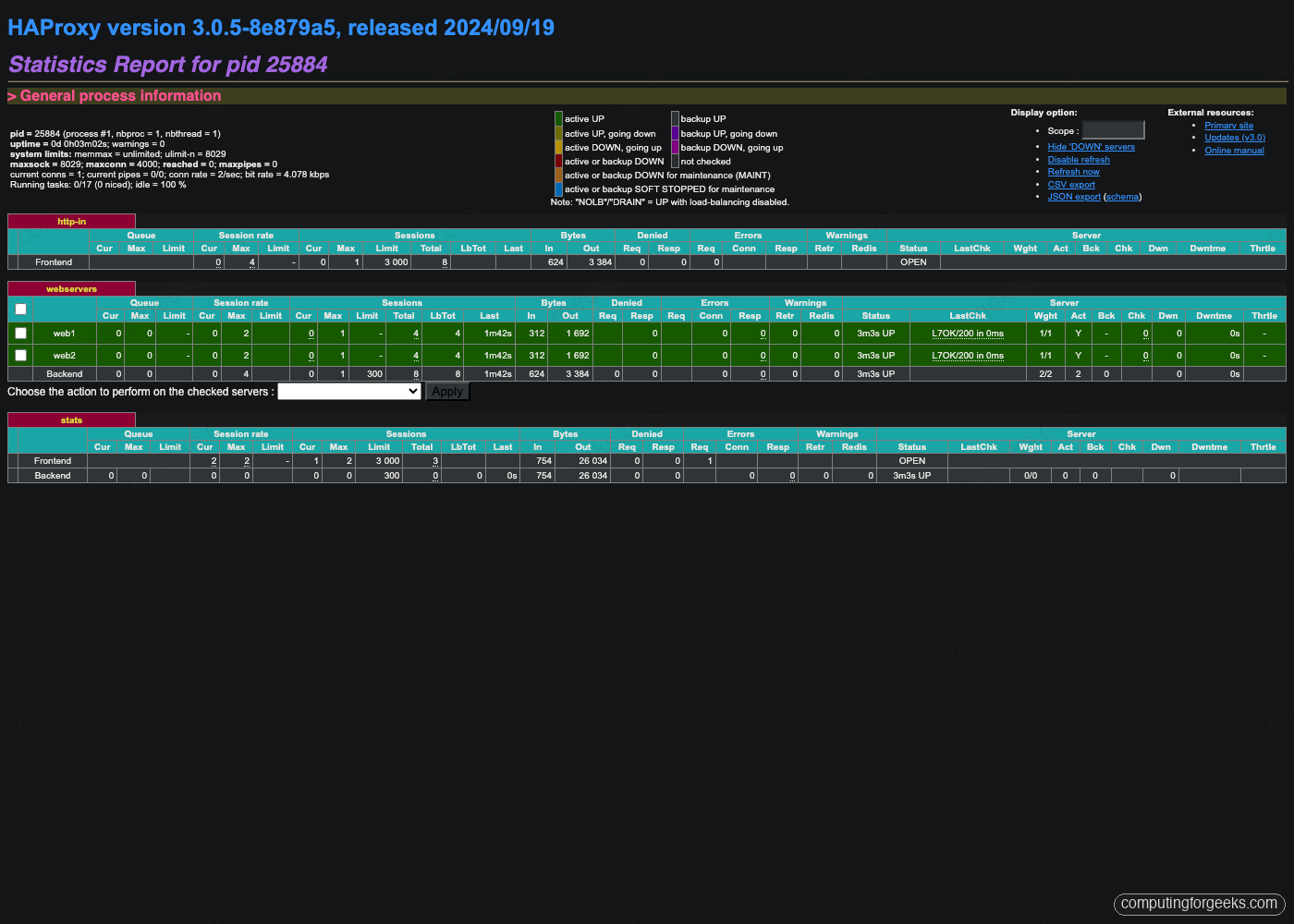
Stats Refresh is set to 10 seconds in the config, which keeps the page light enough to leave open during failover testing without hammering the daemon.
Step 8: Failover test by stopping HAProxy on the master
The interesting test is what happens when the load balancer process itself crashes, which in real life happens far more often than the entire VM going down. Capture the VIP state, kill HAProxy on lb1, wait six seconds for VRRP to react, and inspect again:
ssh rocky@${LB1_IP} "ip addr show eth0 | grep 'inet '"
ssh rocky@${LB1_IP} "sudo systemctl stop haproxy"
sleep 6
ssh rocky@${LB1_IP} "ip addr show eth0 | grep 'inet '"
ssh rocky@${LB2_IP} "ip addr show eth0 | grep 'inet '"
Before the stop, lb1 has both its real IP and the VIP. After the stop, lb1 has only its real IP and lb2 has gained the VIP. The exact sequence is: chk_haproxy fires twice (interval 2 sec, fall 2), Keepalived applies weight -20 to lb1’s priority dropping it to 90 (below lb2’s 100), lb2 wins the VRRP election, sends a gratuitous ARP for the VIP, and the LAN’s ARP caches get updated.

Curl through the VIP again. The connection now lands on lb2’s HAProxy, which still round-robins to web1 and web2 because the backend pool is unchanged:
for i in 1 2 3 4; do curl -s http://${VIP} | grep -oE '<h1>[^<]+'; doneRestart HAProxy on lb1, wait, and watch the VIP preempt back. Preemption is the default because we did not set nopreempt in the config. Most production deployments leave preemption on so the priorities stay meaningful, but a long-lived backup that has been serving traffic for hours is sometimes left in place to avoid an unnecessary failover bump:
ssh rocky@${LB1_IP} "sudo systemctl start haproxy"
sleep 6
ssh rocky@${LB1_IP} "ip addr show eth0 | grep 'inet '"
ssh rocky@${LB2_IP} "ip addr show eth0 | grep 'inet '"
The VIP is back on lb1. If you want a cluster that does not preempt, add nopreempt to the vrrp_instance on the BACKUP side and change its state from BACKUP to BACKUP and set both nodes to start as BACKUP at boot.
Step 9: Failover test for backend failures
Stopping a backend Nginx is a different failure than stopping HAProxy. The VIP does not move, but HAProxy marks the dead backend DOWN within a couple of health checks and stops sending traffic to it. Stop nginx on web1 and watch the stats page:
ssh rocky@${WEB1_IP} "sudo systemctl stop nginx"
sleep 12
ssh rocky@${LB1_IP} "curl -s -u ${STATS_USER}:${STATS_PASS} 'http://localhost:8404/stats;csv' | \
  awk -F, '/^webservers,(web1|web2|BACKEND),/ {print \$2,\$18}'"
Output should show web1 DOWN, web2 UP, BACKEND UP. Refresh the stats web page and the web1 row turns red:
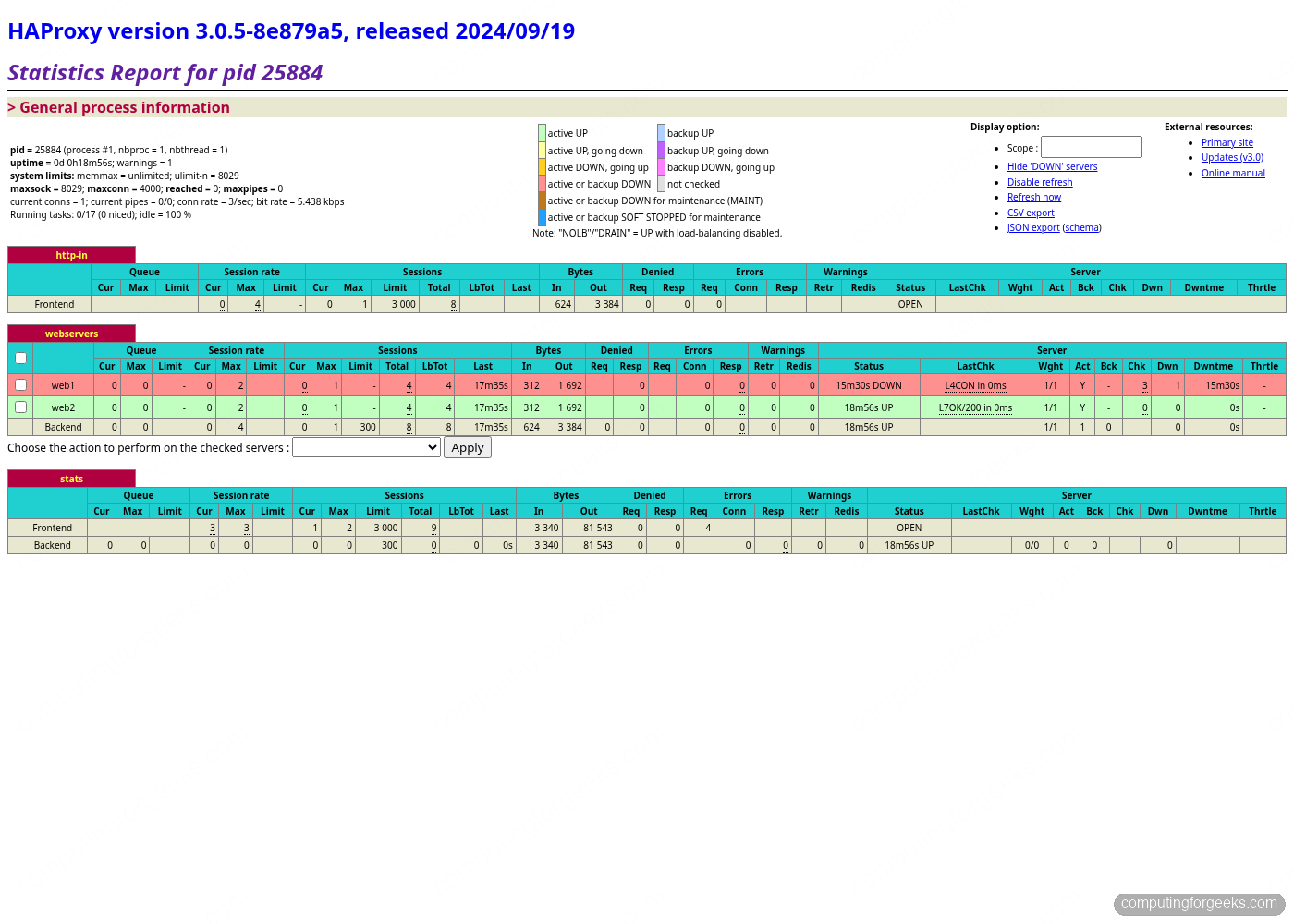
Curl the VIP and you only see web2 responses. There is no Connection refused for the client, no ALB target group churn, no retry storm. HAProxy quietly drops web1 from the rotation and traffic continues:
for i in 1 2 3 4 5; do curl -s http://${VIP} | grep -oE '<h1>[^<]+'; doneBring web1 back. After two successful health checks (rise 2, interval 2 seconds, so about four seconds), HAProxy reinstates it into the rotation:
ssh rocky@${WEB1_IP} "sudo systemctl start nginx"
sleep 6
ssh rocky@${LB1_IP} "curl -s -u ${STATS_USER}:${STATS_PASS} 'http://localhost:8404/stats;csv' | \
  awk -F, '/^webservers,(web1|web2|BACKEND),/ {print \$2,\$18}'"
Both backends UP again, traffic redistributed without operator intervention. A useful sanity capture of the cluster running clean:
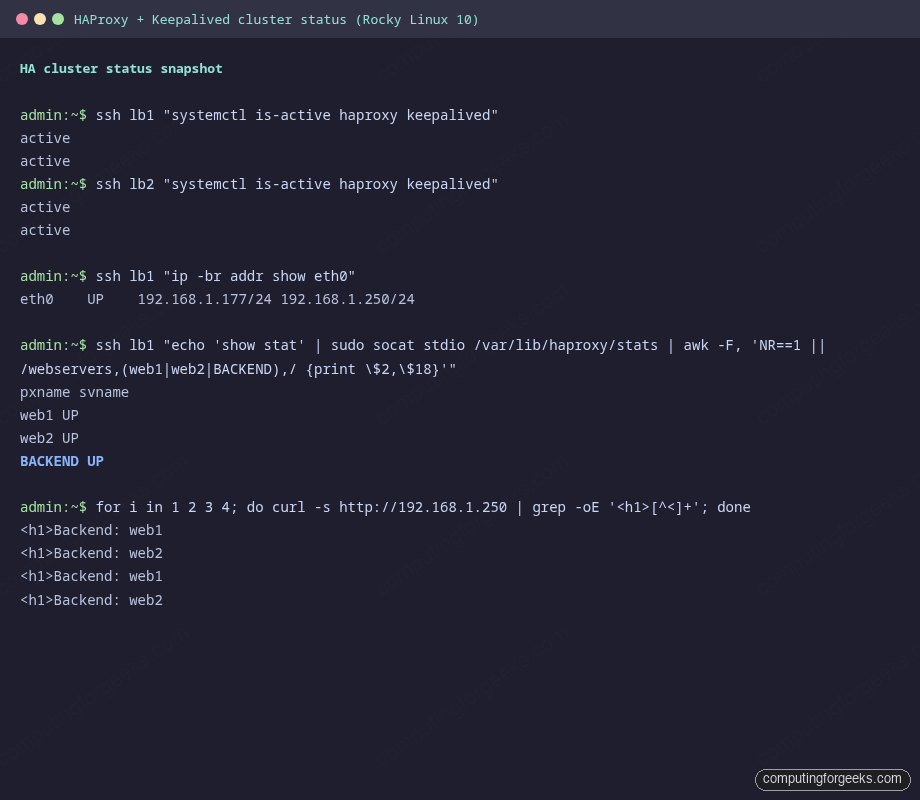
This is the steady state to monitor. Anything that deviates (VIP missing, only one HAProxy active, a backend stuck DOWN with rising LastChk timestamps) is a real alert.
Performance tuning for higher connection counts
The defaults from the install ship a maxconn 4000 in global and 3000 in defaults, which is fine for a homelab but tiny for any real workload. Three knobs determine how many simultaneous connections a single HAProxy instance can carry: the systemd unit’s file-descriptor limit, the kernel’s fs.file-max, and the HAProxy maxconn directive. All three must be raised together, the smallest one wins.
Push the systemd LimitNOFILE up to 200000 so HAProxy can open enough sockets:
for IP in ${LB1_IP} ${LB2_IP}; do
  ssh rocky@${IP} "sudo mkdir -p /etc/systemd/system/haproxy.service.d/ && \
    echo -e '[Service]\nLimitNOFILE=200000' | \
    sudo tee /etc/systemd/system/haproxy.service.d/override.conf >/dev/null && \
    sudo systemctl daemon-reload && sudo systemctl restart haproxy"
done
Bump the kernel knobs that throttle connection setup. net.core.somaxconn caps the listen backlog, tcp_max_syn_backlog caps half-open SYN queues, and the ephemeral port range determines how many outbound connections to the backends a single HAProxy can hold open at once:
cat <<'TUNING' | ssh rocky@${LB1_IP} "sudo tee /etc/sysctl.d/99-haproxy-tuning.conf >/dev/null && sudo sysctl -p /etc/sysctl.d/99-haproxy-tuning.conf"
net.core.somaxconn = 65535
net.core.netdev_max_backlog = 16384
net.ipv4.tcp_max_syn_backlog = 65535
net.ipv4.ip_local_port_range = 10240 65535
net.ipv4.tcp_tw_reuse = 1
net.ipv4.tcp_fin_timeout = 15
TUNING
Repeat the sysctl push for lb2. Then update /etc/haproxy/haproxy.cfg: change maxconn 4000 in global to maxconn 100000 and maxconn 3000 in defaults to maxconn 50000. Reload HAProxy with systemctl reload haproxy rather than restart, since reload preserves in-flight connections.
The health check interval also matters at higher backend counts. Two-second checks are fine with two backends, but with twenty backends each HAProxy is sending ten checks a second, which shows up in backend logs. Drop to inter 5000 for stable production pools, or use inter 2000 fastinter 1000 downinter 500 to check fast only when a backend is misbehaving. For a deeper look at HAProxy timeouts, the official HAProxy timeout reference documents every knob.
One last knob: nbthread. HAProxy 3.x defaults to a thread per CPU which is normally what you want, but on a 2-core VM with a single dominant frontend it sometimes helps to pin nbthread 1 to avoid lock contention on the connection table. Measure both with haproxy -vv and top -H, do not assume.
Once tuning is in place, the same VIP failover behaviour holds: lb2 still inherits the VIP within six seconds when lb1’s HAProxy dies, and traffic continues without changing the maxconn or the kernel backlog. The HA layer and the throughput layer are orthogonal, which is exactly the property you want when scaling a small lab into a real fleet. From here, layering Let’s Encrypt SSL termination, ACL-based routing, and rate limiting on the same HAProxy stack lets you replace a managed cloud load balancer at a fraction of the cost. The LVS guide on Rocky Linux 10 covers the kernel-level alternative if you outgrow HAProxy’s connection ceiling, and the Firewalld on Rocky Linux 10 reference is the place to harden the load balancer’s network surface beyond the basic rules used here. For full Rocky 10 baseline hardening that pairs naturally with this HA setup, see Harden Rocky Linux 10 with Ansible.