Production traffic rarely lands on a single web server. A load balancer in front of two or more backends is how small services survive traffic spikes and how large ones stay online when a node dies. HAProxy is the default answer on RHEL-family hosts because it ships in AppStream, costs nothing, and runs millions of requests per second on commodity hardware.
This guide shows how to install HAProxy on Rocky Linux and configure a working round-robin load balancer with health checks, a password-protected stats page, SELinux-aware firewalld rules, real log rotation, and a production-grade systemd hardening profile. Every command below was executed on a fresh Rocky Linux 10.1 VM and the output captured as-is. The same steps apply to AlmaLinux 10 and RHEL 10 without modification because all three share the AppStream module set.
Tested April 2026 on Rocky Linux 10.1 (Red Quartz), kernel 6.12.0-124, HAProxy 3.0.5 LTS, SELinux enforcing
Prerequisites
One Rocky Linux 10 host with root or sudo access. The same guide works on AlmaLinux 10 and RHEL 10 because HAProxy comes from AppStream on all three. If you are starting from a bare image, follow the Rocky Linux 10 installation guide first so the box has networking, a hostname, and a sudo user.
- Two HTTP backends to balance across. This guide uses Python’s built-in web server on localhost ports 8001 and 8002 so you can follow along on a single VM. In production the backends are real app servers on separate hosts.
- SELinux in enforcing mode (the Rocky default). Do not disable it. One boolean flip below makes HAProxy work with enforcing.
firewalldactive. Rocky 10 cloud images sometimes ship without it, so the first step below installs it if missing.
Step 1: Set reusable shell variables
Every command below uses shell variables so you change a handful of values once and paste the rest as-is. Export them at the top of your SSH session:
export FRONTEND_PORT="8080"
export STATS_PORT="8404"
export STATS_USER="admin"
export STATS_PASS="StrongStatsPass2026"
export BACKEND1_ADDR="127.0.0.1:8001"
export BACKEND2_ADDR="127.0.0.1:8002"
Confirm the values land in the shell before running anything destructive:
echo "Frontend:  :${FRONTEND_PORT}"
echo "Stats:     :${STATS_PORT} (${STATS_USER})"
echo "Backends:  ${BACKEND1_ADDR}, ${BACKEND2_ADDR}"
These hold for the current shell only. If you reconnect or jump into sudo -i, re-export them. Pick your own STATS_PASS. Avoid a # character in the password because HAProxy treats it as an inline comment marker in haproxy.cfg and silently truncates everything after it.
Step 2: Install HAProxy on Rocky Linux from AppStream
Rocky Linux 10 ships HAProxy 3.0 LTS in AppStream, which means no third-party repos and no copr module juggling. Install it in one line:
sudo dnf install -y haproxyConfirm the version and the status of the LTS branch:
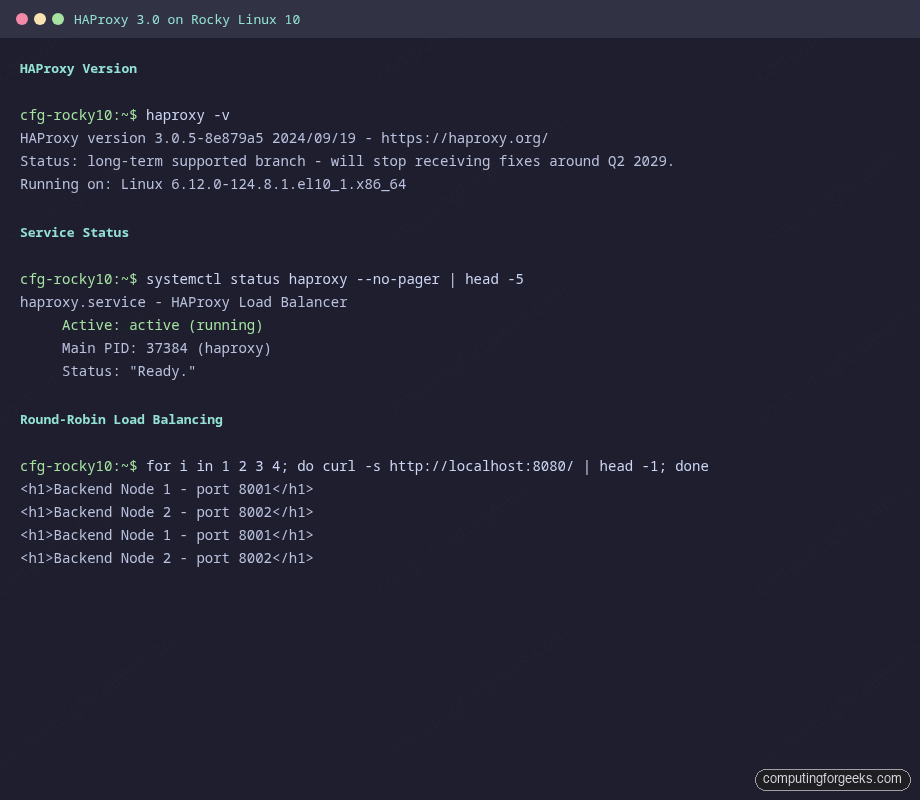
haproxy -vThe output should report the LTS branch and its planned support window:
HAProxy version 3.0.5-8e879a5 2024/09/19 - https://haproxy.org/
Status: long-term supported branch - will stop receiving fixes around Q2 2029.
Known bugs: http://www.haproxy.org/bugs/bugs-3.0.5.html
Running on: Linux 6.12.0-124.8.1.el10_1.x86_64
The 3.0 LTS line is a solid choice on RHEL 10 because both Red Hat and HAProxy Technologies back-port fixes into it. Newer features land in 3.1 and 3.2 (native HTTP/3 QUIC, for example) but those are not in AppStream yet. If you need the bleeding edge, the HAProxy community APT repo covers Debian/Ubuntu; on RHEL 10 you would build from source, which is rarely worth the maintenance cost for a load balancer.
Step 3: Spin up two backends for testing
HAProxy needs something to balance across. Two Python one-liners give you predictable HTTP responses on ports 8001 and 8002 so the round-robin behaviour is visible without spinning up a full Nginx or app-server stack:
mkdir -p /tmp/backend1 /tmp/backend2
echo '<h1>Backend Node 1 - port 8001</h1>' | sudo tee /tmp/backend1/index.html
echo '<h1>Backend Node 2 - port 8002</h1>' | sudo tee /tmp/backend2/index.html
nohup python3 -m http.server --directory /tmp/backend1 8001 >/tmp/b1.log 2>&1 &
nohup python3 -m http.server --directory /tmp/backend2 8002 >/tmp/b2.log 2>&1 &
Both backends should now be listening locally. Confirm with ss:
ss -tlnp | grep -E ':(8001|8002)\b'Expect two LISTEN rows, one per port, both owned by a python3 process. In real deployments these would be app servers, Nginx nodes, or container workloads. The HAProxy config treats them identically.
Step 4: Inspect the default haproxy.cfg
Rocky 10 installs a working example configuration at /etc/haproxy/haproxy.cfg. Before overwriting it, skim the first 30 lines to see what the distro ships:
head -30 /etc/haproxy/haproxy.cfgYou will see a global block with chroot /var/lib/haproxy, a maxconn of 4000, and a rsyslog hint that HAProxy expects log facility local2 on 127.0.0.1. Keep those pieces. The rest of the file contains an example HTTP frontend on port 5000 that you will replace.
Back up the shipped config so you have something to diff against:
sudo cp /etc/haproxy/haproxy.cfg /etc/haproxy/haproxy.cfg.distStep 5: Write a production-shaped haproxy.cfg
Open the config for editing:
sudo vi /etc/haproxy/haproxy.cfgReplace the contents with the following. It defines global tuning, sensible HTTP defaults, one frontend on the port you exported earlier, a round-robin backend pool with active health checks, and a separate stats listener with basic auth. The placeholders FRONTEND_PORT_HERE, STATS_PORT_HERE, STATS_USER_HERE, STATS_PASS_HERE, BACKEND1_HERE, and BACKEND2_HERE get substituted from your shell variables in the next step:
#---------------------------------------------------------------------
# Global settings
#---------------------------------------------------------------------
global
    log         127.0.0.1 local2
    chroot      /var/lib/haproxy
    maxconn     20000
    user        haproxy
    group       haproxy
    daemon
    stats socket /var/lib/haproxy/stats mode 660 level admin

    ssl-default-bind-ciphersuites TLS_AES_128_GCM_SHA256:TLS_AES_256_GCM_SHA384:TLS_CHACHA20_POLY1305_SHA256
    ssl-default-bind-ciphers ECDHE-ECDSA-AES128-GCM-SHA256:ECDHE-RSA-AES128-GCM-SHA256:ECDHE-ECDSA-AES256-GCM-SHA384:ECDHE-RSA-AES256-GCM-SHA384
    ssl-default-bind-options ssl-min-ver TLSv1.2 no-tls-tickets

#---------------------------------------------------------------------
# Default settings
#---------------------------------------------------------------------
defaults
    mode                    http
    log                     global
    option                  httplog
    option                  dontlognull
    option http-server-close
    option forwardfor       except 127.0.0.0/8
    option                  redispatch
    retries                 3
    timeout http-request    10s
    timeout queue           1m
    timeout connect         10s
    timeout client          1m
    timeout server          1m
    timeout http-keep-alive 10s
    timeout check           10s
    maxconn                 20000

#---------------------------------------------------------------------
# Frontend: public HTTP listener
#---------------------------------------------------------------------
frontend http_front
    bind *:FRONTEND_PORT_HERE
    default_backend app_back

#---------------------------------------------------------------------
# Backend: round-robin across two app servers
#---------------------------------------------------------------------
backend app_back
    balance     roundrobin
    option      httpchk GET /
    http-check  expect status 200
    server  app1 BACKEND1_HERE check inter 5s fall 3 rise 2
    server  app2 BACKEND2_HERE check inter 5s fall 3 rise 2

#---------------------------------------------------------------------
# Stats page (protected)
#---------------------------------------------------------------------
frontend stats_front
    bind *:STATS_PORT_HERE
    stats enable
    stats uri /stats
    stats realm HAProxy\ Stats
    stats auth STATS_USER_HERE:STATS_PASS_HERE
    stats refresh 10s
    stats admin if TRUE
The option httpchk GET / plus http-check expect status 200 pair tells HAProxy to mark a server DOWN the moment three consecutive 5-second health checks fail, and to bring it back after two consecutive passes. The option redispatch directive retries a request on a different server when the first one drops mid-connection, which hides short-lived backend restarts from users.
Substitute the placeholders from your shell variables using sed. Save and close the editor first, then run:
sudo sed -i \
  -e "s|FRONTEND_PORT_HERE|${FRONTEND_PORT}|g" \
  -e "s|STATS_PORT_HERE|${STATS_PORT}|g" \
  -e "s|STATS_USER_HERE|${STATS_USER}|g" \
  -e "s|STATS_PASS_HERE|${STATS_PASS}|g" \
  -e "s|BACKEND1_HERE|${BACKEND1_ADDR}|g" \
  -e "s|BACKEND2_HERE|${BACKEND2_ADDR}|g" \
  /etc/haproxy/haproxy.cfg
Verify that every placeholder was replaced. The grep below should return nothing:
grep -E '_HERE|BACKEND[12]_HERE' /etc/haproxy/haproxy.cfgStep 6: Validate the config before restarting
HAProxy has a config-check mode that parses the file without touching the running daemon. Run it before every restart because a typo in haproxy.cfg brings the whole load balancer down:
sudo haproxy -c -V -f /etc/haproxy/haproxy.cfgA clean config prints one line:
Configuration file is validIf the parser complains about an unknown keyword or a duplicate section, fix it and re-run the check. Never restart the service with a config that has not passed -c. The -V flag adds verbose output that helps pinpoint the line number in larger configs.
Step 7: Flip the SELinux boolean for HAProxy
Rocky 10 ships with SELinux in enforcing mode. The default policy lets HAProxy bind to a small set of well-known HTTP ports (80, 443, 8080, 8443) and connect to the same list. Anything outside that, including the 8404 stats listener in this guide, triggers a permission-denied error at startup. The fix is one boolean, not a policy rewrite and not setenforce 0:
sudo setsebool -P haproxy_connect_any onConfirm the boolean is on and persistent:
getsebool haproxy_connect_anyThe output should read haproxy_connect_any --> on. The -P flag makes it survive a reboot. If you skip this step the service fails to start with cannot bind socket (Permission denied) on whichever non-standard port you picked, and ausearch -m avc -ts recent shows the SELinux denial.
Step 8: Open firewalld ports
If firewalld is not yet installed (some minimal cloud images skip it), install and enable it first:
sudo dnf install -y firewalld
sudo systemctl enable --now firewalld
Allow the HAProxy frontend and stats ports in the default zone. See the firewalld primer for zone and service basics if you want deeper context:
sudo firewall-cmd --add-port=${FRONTEND_PORT}/tcp --permanent
sudo firewall-cmd --add-port=${STATS_PORT}/tcp --permanent
sudo firewall-cmd --reload
sudo firewall-cmd --list-ports
The final list should include both ports:
8080/tcp 8404/tcpFor a public load balancer you would normally bind to 80 and 443 instead. Those ports are already labelled http_port_t in SELinux and are in the default firewalld http/https services, so no extra steps are needed. The 8080/8404 pair here keeps the lab traffic off privileged ports.
Step 9: Start HAProxy and prove it serves traffic
Enable the unit so it comes back after reboot, and start it now:
sudo systemctl enable --now haproxyVerify the service is active and bound to the expected ports:
systemctl status haproxy --no-pagerThe output should report Active: active (running) with Status: "Ready.":
● haproxy.service - HAProxy Load Balancer
     Loaded: loaded (/usr/lib/systemd/system/haproxy.service; enabled; preset: disabled)
     Active: active (running) since Sat 2026-04-18 20:34:50 EAT; 2s ago
    Process: 37381 ExecStartPre=/usr/sbin/haproxy -f $CONFIG -f $CFGDIR -c -q $OPTIONS (code=exited, status=0/SUCCESS)
   Main PID: 37384 (haproxy)
     Status: "Ready."
      Tasks: 2 (limit: 10852)
     Memory: 9.4M (peak: 11.3M)
     CGroup: /system.slice/haproxy.service
             ├─37384 /usr/sbin/haproxy -Ws -f /etc/haproxy/haproxy.cfg
             └─37386 /usr/sbin/haproxy -Ws -f /etc/haproxy/haproxy.cfg
Now hit the frontend six times and watch HAProxy alternate between the two backends:
for i in 1 2 3 4 5 6; do curl -s http://localhost:${FRONTEND_PORT}/ | head -1; doneRound-robin prints nodes 1 and 2 in strict rotation:
<h1>Backend Node 1 - port 8001</h1>
<h1>Backend Node 2 - port 8002</h1>
<h1>Backend Node 1 - port 8001</h1>
<h1>Backend Node 2 - port 8002</h1>
<h1>Backend Node 1 - port 8001</h1>
<h1>Backend Node 2 - port 8002</h1>
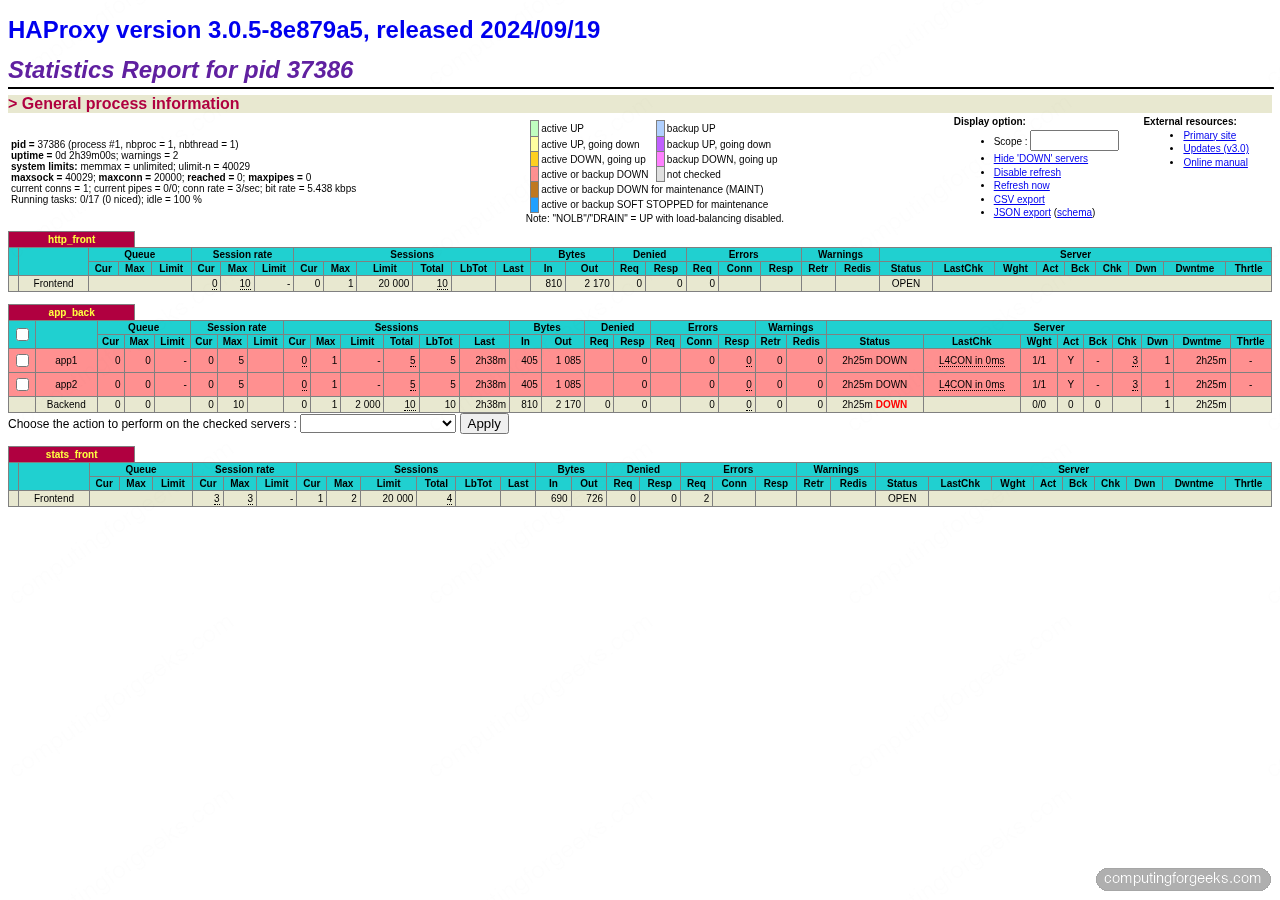
The alternating responses confirm the round-robin algorithm is splitting traffic evenly across app1 and app2. HAProxy also surfaces this visually on the stats dashboard, where per-server request counters tick up in lock-step:
Open the stats page in another terminal or a browser tab. Over HTTP from the box itself:
curl -s -u "${STATS_USER}:${STATS_PASS}" http://localhost:${STATS_PORT}/stats | head -5A successful response returns HAProxy’s HTML stats page. From a browser visiting http://SERVER_IP:8404/stats, authenticate as admin/StrongStatsPass2026 and you will see per-server request rates, sessions, queue lengths, and up/down state with a colour-coded grid. The page also acts as an admin console because of stats admin if TRUE, letting you drain, disable, or enable individual backends on the fly.
Rendered in a browser, the dashboard groups the frontend, backend pool, and stats listener into separate panels with live session counters, byte totals, and backend health state. This is the same page captured live on the test VM:
Step 10: Wire rsyslog for /var/log/haproxy.log
The shipped haproxy.cfg sends logs over UDP to 127.0.0.1:514 on facility local2, but rsyslog on Rocky 10 does not listen on UDP 514 by default. Add a drop-in to collect those messages:
sudo vi /etc/rsyslog.d/haproxy.confPaste the following snippet. It enables the UDP listener, binds it to localhost, and routes local2.* into a dedicated log file:
module(load="imudp")
input(type="imudp" port="514" address="127.0.0.1")

local2.* /var/log/haproxy.log
& stop
Reload rsyslog and hit the frontend a few times so the log file gets its first entries:
sudo systemctl restart rsyslog
for i in 1 2 3 4 5 6 7 8 9 10; do curl -s http://localhost:${FRONTEND_PORT}/ -o /dev/null; done
tail -6 /var/log/haproxy.log
Each line shows the client socket, the frontend/backend pair, the timing breakdown, the HTTP status, and the response size:
Apr 18 20:35:04 cfg-rocky10-refresh haproxy[37386]: 127.0.0.1:40136 [18/Apr/2026:20:35:04.823] http_front app_back/app1 0/0/0/0/0 200 217 - - ---- 1/1/0/0/0 0/0 "GET / HTTP/1.1"
Apr 18 20:35:04 cfg-rocky10-refresh haproxy[37386]: 127.0.0.1:40142 [18/Apr/2026:20:35:04.826] http_front app_back/app2 0/0/0/0/0 200 217 - - ---- 1/1/0/0/0 0/0 "GET / HTTP/1.1"
Apr 18 20:35:04 cfg-rocky10-refresh haproxy[37386]: 127.0.0.1:40148 [18/Apr/2026:20:35:04.829] http_front app_back/app1 0/0/0/0/0 200 217 - - ---- 1/1/0/0/0 0/0 "GET / HTTP/1.1"
Apr 18 20:35:04 cfg-rocky10-refresh haproxy[37386]: 127.0.0.1:40160 [18/Apr/2026:20:35:04.833] http_front app_back/app2 0/0/0/0/0 200 217 - - ---- 1/1/0/0/0 0/0 "GET / HTTP/1.1"
Apr 18 20:35:04 cfg-rocky10-refresh haproxy[37386]: 127.0.0.1:40174 [18/Apr/2026:20:35:04.836] http_front app_back/app1 0/0/0/0/0 200 217 - - ---- 1/1/0/0/0 0/0 "GET / HTTP/1.1"
Apr 18 20:35:04 cfg-rocky10-refresh haproxy[37386]: 127.0.0.1:40180 [18/Apr/2026:20:35:04.839] http_front app_back/app2 0/0/0/0/0 200 217 - - ---- 1/1/0/0/0 0/0 "GET / HTTP/1.1"
The HAProxy RPM already drops a working rotation policy into /etc/logrotate.d/haproxy. It rotates daily, keeps 10 compressed copies, and sends HUP to rsyslog so the file handle is reopened after each rotation. Nothing to tune for most setups.
Step 11: Swap round-robin for leastconn or sticky sessions
Round-robin is the right default when requests take roughly the same time. Two other algorithms come up often in production.
Least connections is the better choice when requests have uneven cost: some return in 10 ms, others in 5 seconds. HAProxy sends each new connection to the server with the lowest current count. Swap the backend line in /etc/haproxy/haproxy.cfg:
backend app_back
    balance     leastconn
    option      httpchk GET /
    http-check  expect status 200
    server  app1 127.0.0.1:8001 check inter 5s fall 3 rise 2
    server  app2 127.0.0.1:8002 check inter 5s fall 3 rise 2
Sticky sessions keep a client pinned to one backend across requests, which matters for apps that store session state in memory (legacy PHP, some Java frameworks). HAProxy writes a cookie named SRV on the first request and routes subsequent requests from that client to the same server:
backend app_back
    balance     roundrobin
    cookie      SRV insert indirect nocache
    option      httpchk GET /
    http-check  expect status 200
    server  app1 127.0.0.1:8001 check cookie s1 inter 5s fall 3 rise 2
    server  app2 127.0.0.1:8002 check cookie s2 inter 5s fall 3 rise 2
After editing, always re-run the config check and reload cleanly:
sudo haproxy -c -V -f /etc/haproxy/haproxy.cfg
sudo systemctl reload haproxy
systemctl reload triggers a zero-downtime config swap, unlike restart which drops in-flight connections.
Step 12: Add TLS termination with Let’s Encrypt
Serving HTTPS is non-negotiable for a public-facing load balancer. HAProxy terminates TLS natively, talks plain HTTP to the backends, and handles certificate renewal gracefully. The steps below sketch the Let’s Encrypt HTTP-01 path. They assume your real domain already has an A record pointing at this host and that port 80 is reachable from the Internet. For a deep walk-through of certificate issuance see the certbot SSL guide.
Install certbot from EPEL, then issue a certificate in standalone mode. Stop HAProxy briefly so certbot can bind port 80 during the challenge:
sudo dnf install -y epel-release
sudo dnf install -y certbot
sudo systemctl stop haproxy
sudo certbot certonly --standalone \
  -d lb.example.com \
  --non-interactive --agree-tos -m [email protected]
HAProxy expects the certificate and private key concatenated into a single PEM file. Build one, keep its permissions tight, and tell HAProxy where to find it:
sudo mkdir -p /etc/haproxy/certs
sudo cat /etc/letsencrypt/live/lb.example.com/fullchain.pem \
         /etc/letsencrypt/live/lb.example.com/privkey.pem \
         | sudo tee /etc/haproxy/certs/lb.example.com.pem > /dev/null
sudo chmod 600 /etc/haproxy/certs/lb.example.com.pem
sudo chown root:haproxy /etc/haproxy/certs/lb.example.com.pem
Add an HTTPS frontend to /etc/haproxy/haproxy.cfg that binds 443 with the PEM and redirects plain HTTP to HTTPS:
frontend https_front
    bind *:443 ssl crt /etc/haproxy/certs/lb.example.com.pem alpn h2,http/1.1
    http-request set-header X-Forwarded-Proto https
    default_backend app_back

frontend http_redirect
    bind *:80
    http-request redirect scheme https code 301
Open 443 in firewalld, start HAProxy again, and set up a renewal hook so the PEM rebuilds after each cert rotation. A /etc/letsencrypt/renewal-hooks/deploy/haproxy.sh script that concatenates fullchain + privkey, sets 600/root:haproxy, and reloads HAProxy keeps this hands-off:
sudo firewall-cmd --add-service=https --permanent
sudo firewall-cmd --reload
sudo systemctl start haproxy
sudo certbot renew --dry-run
On a private-network load balancer where port 80 is not Internet-reachable, switch to the DNS-01 challenge with python3-certbot-dns-cloudflare or the plugin for your DNS provider. The certificate output path and HAProxy bind directive stay identical.
Step 13: Harden the systemd unit
The stock HAProxy unit starts the daemon as haproxy:haproxy inside a chroot, which is a reasonable baseline. A drop-in override tightens the sandbox further without touching the package-owned unit file. Create the override directory and open an edit:
sudo systemctl edit haproxyPaste the following above the ### Lines below this comment will be discarded marker. Each directive removes a specific attack surface: no new privileges via setuid binaries, read-only file system, private /tmp, blocked kernel tuning calls:
[Service]
NoNewPrivileges=true
ProtectSystem=strict
ProtectHome=true
PrivateTmp=true
PrivateDevices=true
ProtectKernelTunables=true
ProtectKernelModules=true
ProtectControlGroups=true
RestrictNamespaces=true
RestrictRealtime=true
RestrictSUIDSGID=true
LockPersonality=true
MemoryDenyWriteExecute=true
SystemCallFilter=@system-service
SystemCallFilter=~@privileged @resources
ReadWritePaths=/var/lib/haproxy /var/log /run
Reload systemd, restart HAProxy, and check the sandbox report:
sudo systemctl daemon-reload
sudo systemctl restart haproxy
systemd-analyze security haproxy | head -20
The exposure score should drop into the medium/low band. If HAProxy fails to start after applying the override, comment out MemoryDenyWriteExecute=true first because some HAProxy builds use a JIT for ACL compilation.
Scale out: multiple load balancer nodes
A single HAProxy box is still a single point of failure. Two patterns solve that. Active/passive uses keepalived to float a virtual IP between two HAProxy nodes so a failed master yields the VIP in under a second. Active/active runs HAProxy behind a DNS round-robin or a cloud load balancer (AWS NLB, GCP LB) so both nodes handle traffic concurrently. Either pattern fits comfortably on two small VMs.
Hetzner Cloud charges under €5/mo for a CX22 instance (2 vCPU, 4 GB RAM) which is more than enough for an HAProxy node in front of a small fleet, and you get a free Hetzner private network to wire LB plus backends without exposing them on public IPs. Two nodes plus a floating IP cost roughly €10/mo all-in, well under the price of a comparable AWS or DigitalOcean setup at the same spec.
Production hardening checklist
Once the lab is green, harden for real traffic. The items below catch most of what breaks at 2 AM:
- Rate limiting per source IP. Add a stick-table in the frontend and reject traffic above a threshold:
stick-table type ip size 1m expire 10m store http_req_rate(10s), thenhttp-request deny if { src_http_req_rate(http_front) gt 100 }. Stops naive scrapers without touching the backends. - Separate stats page network. Bind the stats listener to 127.0.0.1 or a management VLAN, never the public interface. Pair with SSH port-forward for admin access.
- Use TLS 1.2 minimum and the HAProxy-recommended cipher list. The config above already sets
ssl-min-ver TLSv1.2and a strict cipher string. Verify withsudo sslscan lb.example.comor the SSL Labs test. - Tune maxconn based on real backend capacity. The default 20000 in this config is generous. A backend pool that can only handle 500 concurrent requests will drown if HAProxy queues 20K connections. Match HAProxy
maxconntosum(server maxconn)plus a queue buffer. - Monitor from the stats socket. A Prometheus exporter scrapes
/var/lib/haproxy/statsin one line and feeds Grafana. Mean time to detect a DOWN backend drops from minutes to seconds. - Swap plain stats auth for TLS client certs or OIDC once you have more than two admins. HTTP basic auth on the stats page is fine for a homelab, not for a production cluster.
When you layer a CDN in front of HAProxy, Cloudflare’s free plan covers edge caching, DDoS scrubbing, and WAF for a single domain at no cost, which offloads static traffic and shields the load balancer from volumetric attacks. HAProxy’s option forwardfor plus Cloudflare’s CF-Connecting-IP header let the backends see real client IPs even through the CDN.
For teams running HAProxy in front of Nginx application servers, pair this guide with the Nginx installation guide for the backend nodes and the FreeBSD HAProxy walkthrough if your LB fleet spans BSD and Linux. The companion HAProxy on Ubuntu 26.04 guide covers the same stack on Debian-family hosts if you run a mixed environment.