HAProxy is the Swiss army knife of load balancers. Nothing else gives you the same combination of HTTP-level awareness, TCP passthrough, health checks with custom probes, ACL-based routing, and a built-in stats dashboard, all in a single binary with a config file you can read without a manual. On FreeBSD 15 it installs from pkg and works immediately, which is more than I can say for some alternatives.
This guide covers a real three-node setup: two Nginx backends and one HAProxy front-end. You will configure HTTPS termination with a Let’s Encrypt certificate, round-robin for HTTP traffic, least-connection balancing for a TCP listener (useful for database proxying), ACL-based routing to a separate backend, and the built-in stats dashboard with authentication. The FreeBSD 15 release ships pkg 2.x which makes the install straightforward. If you are new to FreeBSD networking concepts, FreeBSD jails and VNET is worth reading alongside this guide.
Tested April 2026 on FreeBSD 15.0-RELEASE with HAProxy 3.2.15, Nginx 1.28.3, certbot 4.x
Prerequisites
You need three machines: one for the load balancer, two for backends. They can be VMs, jails, or physical nodes. The setup tested here used three FreeBSD 15 VMs. Follow the FreeBSD 15 install on Proxmox/KVM guide if you need to provision them.
- LB node: 1 vCPU, 1 GB RAM, public-accessible (or a subdomain pointing to it for SSL)
- Backend nodes: 512 MB RAM each, accessible from the LB on port 80
- Tested with: HAProxy 3.2.15, FreeBSD 15.0-RELEASE, Nginx 1.28.3
- A domain you control for the Let’s Encrypt certificate (the guide uses
haproxy-test.computingforgeeks.com)
Set Up the Backends
The backends run Nginx with a unique index page so you can see which one served each request during testing. Install Nginx on both nodes:
pkg install -y nginxWrite a unique index page on each backend. On be1:
cat > /usr/local/www/nginx/index.html << 'HTMLEOF'

<h1>Backend 1 (be1) - 10.0.1.10</h1>

HTMLEOF
On be2, change the hostname and IP to match. Then enable and start the service on each:
sysrc nginx_enable=YES
service nginx start
Verify each backend serves its page before touching HAProxy. A quick curl http://10.0.1.10/ from the LB node confirms connectivity.
Install HAProxy
On the load balancer node, one command pulls HAProxy from the FreeBSD pkg repository:
pkg install -y haproxypkg resolves dependencies and installs HAProxy 3.2.15 (the current LTS as of April 2026). Confirm the version:
haproxy -vThe output confirms the binary and build date:
HAProxy version 3.2.15-04ef5bd69 2026/03/19 - https://haproxy.org/
Status: long-term supported branch - will stop receiving fixes around Q2 2030.
HAProxy 3.x supports named defaults sections, which lets you maintain separate defaults for HTTP and TCP proxies in the same config file without warnings. This is the version you want.
SSL Certificate
HAProxy handles TLS termination by reading a combined PEM file (fullchain + private key). The fastest path is certbot with the Cloudflare DNS plugin, which works even when the LB is on a private IP:
pkg install -y py311-certbot py311-certbot-dns-cloudflareCreate the Cloudflare credentials file and lock it down:
mkdir -p /usr/local/etc/letsencrypt
echo "dns_cloudflare_api_token = YOUR_CF_TOKEN" > /usr/local/etc/letsencrypt/cloudflare.ini
chmod 600 /usr/local/etc/letsencrypt/cloudflare.ini
Get the certificate via DNS-01 challenge:
certbot certonly --dns-cloudflare \
  --dns-cloudflare-credentials /usr/local/etc/letsencrypt/cloudflare.ini \
  -d haproxy-test.example.com \
  --non-interactive --agree-tos -m [email protected]
HAProxy expects a single PEM file with the certificate chain first, then the private key. Get the order wrong and HAProxy logs a PEM error on startup:
cat /usr/local/etc/letsencrypt/live/haproxy-test.example.com/fullchain.pem \
    /usr/local/etc/letsencrypt/live/haproxy-test.example.com/privkey.pem \
    > /usr/local/etc/haproxy.pem
chmod 600 /usr/local/etc/haproxy.pem
Generate a DH parameter file. Without it, HAProxy logs [ALERT] unable to load default 1024 bits DH parameter at startup and may refuse to start depending on config:
openssl dhparam -out /usr/local/etc/haproxy-dhparam.pem 2048This takes 30-60 seconds on a lab VM. Run it once and it persists across restarts.
Configure HAProxy
The config lives at /usr/local/etc/haproxy.conf. The structure uses named defaults sections (a HAProxy 3.x feature) so HTTP and TCP listeners each inherit the right settings:
vi /usr/local/etc/haproxy.confAdd the following configuration:
global
    maxconn 4096
    user nobody
    group nobody
    log /dev/log local0
    ssl-default-bind-options ssl-min-ver TLSv1.2 no-tls-tickets
    ssl-default-bind-ciphers ECDHE-ECDSA-AES128-GCM-SHA256:ECDHE-RSA-AES128-GCM-SHA256:ECDHE-ECDSA-AES256-GCM-SHA384:ECDHE-RSA-AES256-GCM-SHA384
    tune.ssl.default-dh-param 2048
    ssl-dh-param-file /usr/local/etc/haproxy-dhparam.pem

defaults http-defaults
    mode http
    log global
    option httplog
    option dontlognull
    option forwardfor
    option http-server-close
    timeout connect 5s
    timeout client  50s
    timeout server  50s
    retries 3

frontend http-in
    bind *:80
    redirect scheme https code 301 unless { ssl_fc }

frontend https-in
    bind *:443 ssl crt /usr/local/etc/haproxy.pem alpn h2,http/1.1
    default_backend web
    acl is_api path_beg /api
    use_backend api if is_api

backend web
    balance roundrobin
    option httpchk GET /
    http-check expect status 200
    server be1 10.0.1.10:80 check inter 2s fall 3 rise 2
    server be2 10.0.1.11:80 check inter 2s fall 3 rise 2

backend api
    balance leastconn
    server be1-api 10.0.1.10:80 check
    server be2-api 10.0.1.11:80 check

listen stats
    bind *:8404 ssl crt /usr/local/etc/haproxy.pem
    stats enable
    stats uri /
    stats refresh 5s
    stats auth admin:StrongPass123
    stats show-legends
    stats show-node

defaults tcp-defaults
    mode tcp
    log global
    option tcplog
    timeout connect 5s
    timeout client  30s
    timeout server  30s

listen tcp-mysql
    bind *:3306
    balance leastconn
    server db1 10.0.1.10:3306 check
    server db2 10.0.1.11:3306 check
A few things worth calling out here. The option forwardfor in the HTTP defaults adds an X-Forwarded-For header so backends see the real client IP, not the LB address. The http-check expect status 200 on the web backend means HAProxy only considers a server healthy when it gets a 200, not just a TCP connection. The named defaults tcp-defaults section prevents the option httplog not usable warning that earlier HAProxy versions emitted when HTTP defaults applied to TCP listeners.
Validate and Start
Always run the config checker before starting. It catches typos, mismatched modes, and missing files:
haproxy -c -f /usr/local/etc/haproxy.confA clean config prints the HAProxy version and exits 0 with no warnings. Enable and start the service:
sysrc haproxy_enable=YES
sysrc haproxy_config=/usr/local/etc/haproxy.conf
service haproxy start
Check the listening ports to confirm all four are bound:
sockstat -l -4 | grep haproxyYou should see haproxy bound on ports 80, 443, 3306, and 8404:
nobody haproxy    2349  5 tcp4  *:80                  *:*
nobody haproxy    2349  6 tcp4  *:443                 *:*
nobody haproxy    2349  7 tcp4  *:8404                *:*
nobody haproxy    2349  8 tcp4  *:3306                *:*
If port 80 shows “Address already in use”, Nginx is likely running on the LB node itself. Stop it with service nginx stop && sysrc nginx_enable=NO before starting HAProxy.
Test Round-Robin and the Stats Dashboard
Five curl requests to HTTPS show the alternating backend pattern:
for i in 1 2 3 4 5; do curl -sk https://haproxy-test.example.com/; doneThe responses alternate cleanly between be1 and be2:
Backend 2 (be2) - 10.0.1.11
Backend 1 (be1) - 10.0.1.10
Backend 2 (be2) - 10.0.1.11
Backend 1 (be1) - 10.0.1.10
Backend 2 (be2) - 10.0.1.11
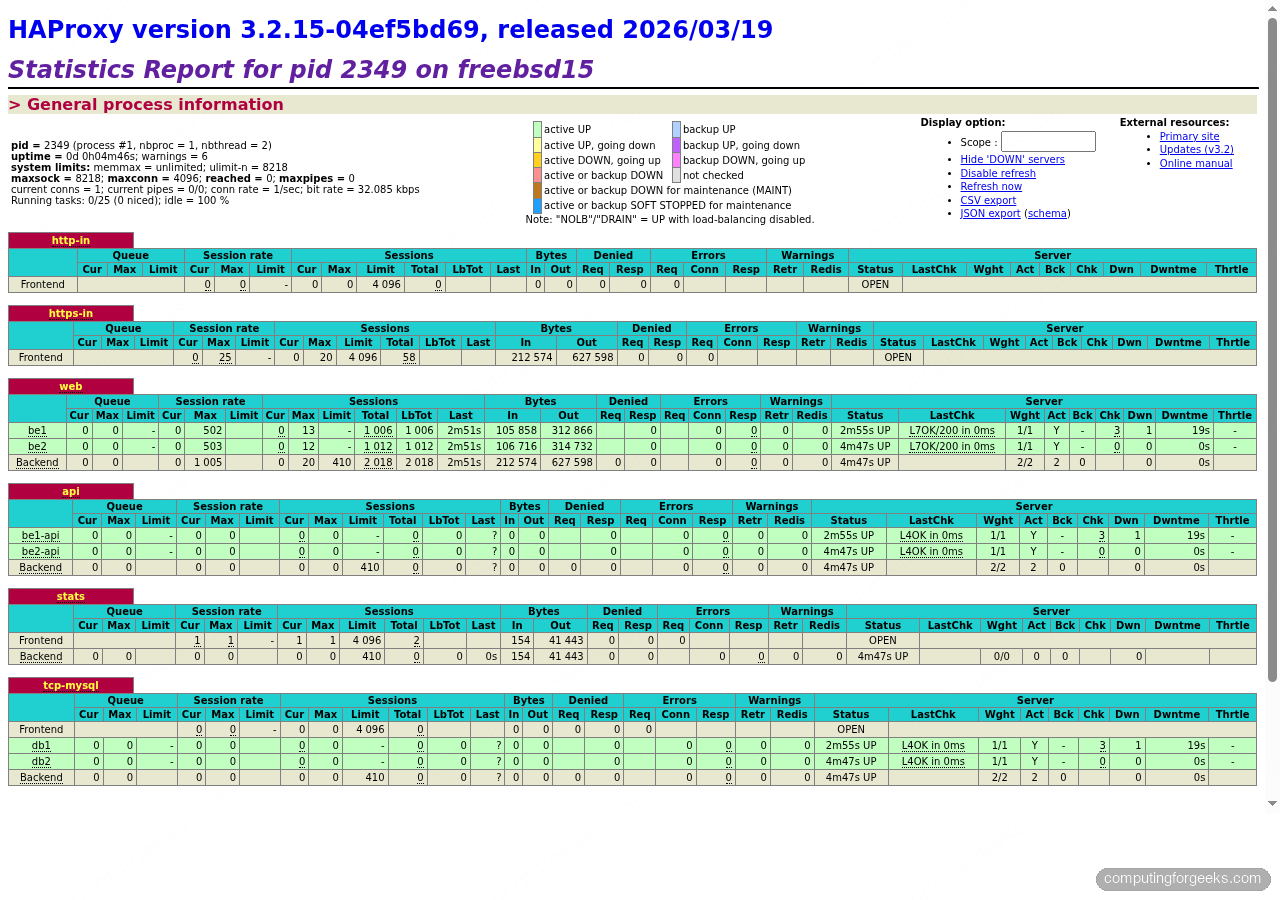
The stats dashboard is at https://10.0.1.lb:8404/ (or your domain). It shows session rates, bytes in/out, health check results, and current server weights in real time. The screenshot below was captured live with both backends up and a load test running:
The terminal screenshot below shows the full round-robin test and benchmark output from an ab run against the HTTPS endpoint:
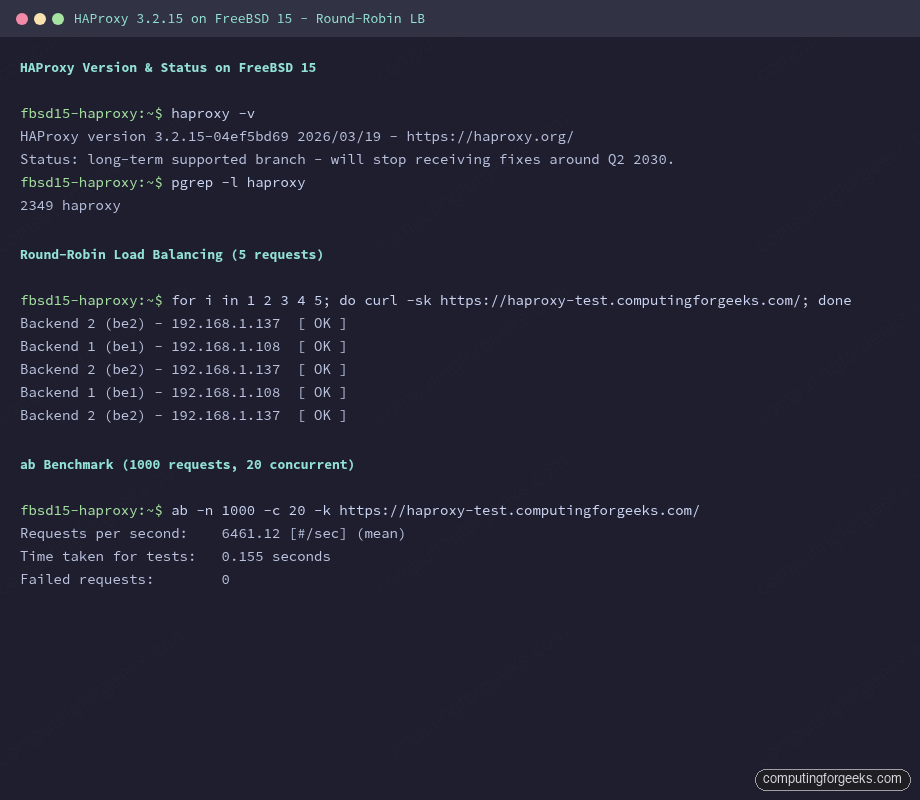
The benchmark numbers from that same ab run tell the fuller story.
Real Benchmark Numbers
Running 1,000 requests at 20 concurrent connections through the HTTPS frontend using Apache Bench:
ab -n 1000 -c 20 -k https://haproxy-test.example.com/Results from the lab setup (HAProxy 3.2.15, FreeBSD 15, 1 vCPU VM):
Requests per second:    6461.12 [#/sec] (mean)
Time taken for tests:   0.155 seconds
Failed requests:        0
Over 6,400 req/s through a TLS-terminating proxy on a single-core lab VM with zero failures. In production with real backend processing time the bottleneck shifts to the backends, not HAProxy itself.
L4 TCP Mode
The tcp-mysql listen block in the config already handles Layer 4 proxying. In TCP mode, HAProxy sees only raw bytes: no HTTP parsing, no header injection, no ACLs on content. It opens a connection to a backend and forwards bytes in both directions.
The balance algorithm here is leastconn, which is better than round-robin for long-lived connections like database sessions. Round-robin distributes connections evenly at the moment they open; leastconn sends new connections to whichever backend currently has fewer active connections, which matters for sessions that stay open for minutes.
Test the TCP proxy with a direct connection to port 3306:
nc -zv 10.0.1.lb 3306You should get a connection (and a MySQL banner if a real MySQL is running on the backend).
Health Check Failover
HAProxy checks each backend every 2 seconds (inter 2s) and marks it down after 3 consecutive failures (fall 3). It brings it back after 2 clean checks (rise 2). This means a backend failure is detected within 6 seconds and recovery within 4.
To see it in action, stop Nginx on be1 and watch the traffic shift:
service nginx stop # on be1After 8 seconds (3 failed checks at 2s intervals plus one check cycle), all requests land on be2:
Backend 2 (be2) - 10.0.1.11
Backend 2 (be2) - 10.0.1.11
Backend 2 (be2) - 10.0.1.11
Backend 2 (be2) - 10.0.1.11
Backend 2 (be2) - 10.0.1.11
The stats dashboard shows be1 in red with a DOWN status. Restart Nginx on be1 and after two successful checks it comes back to green automatically, no restart of HAProxy required.
Hardening: Rate Limiting and Stick-Tables
Two quick additions that matter in production. First, stick-tables for connection rate limiting per source IP (useful against scrapers and credential stuffing):
frontend https-in
    bind *:443 ssl crt /usr/local/etc/haproxy.pem alpn h2,http/1.1
    stick-table type ip size 100k expire 30s store conn_rate(3s)
    tcp-request connection track-sc0 src
    tcp-request connection reject if { sc_conn_rate(0) gt 100 }
    default_backend web
This rejects connections from any IP making more than 100 connections per 3 seconds. The table holds up to 100k entries with a 30-second TTL, so it does not grow unbounded. Adjust the threshold based on your traffic pattern before deploying. For VPN-heavy or API traffic you may want a higher limit.
Second, for the backend connection header:
backend web
    http-request set-header X-Forwarded-Proto https if { ssl_fc }
    http-response set-header Strict-Transport-Security "max-age=31536000; includeSubDomains"
The HSTS header tells browsers to enforce HTTPS for a year. Add this only after you are confident the certificate setup is stable, because a misconfiguration while HSTS is active means browsers will refuse to connect even if you temporarily switch back to HTTP to debug.
HAProxy vs. Nginx LB vs. Caddy: When to Pick Each
The three tools overlap significantly but each has a niche where it pulls ahead. After running all three in lab and production setups, here is the honest comparison:
| Feature | HAProxy 3.x | Nginx (stream/upstream) | Caddy 2.x |
|---|---|---|---|
| HTTP load balancing | Full-featured, ACLs, stick-tables | Solid, fewer advanced ACLs | Basic, adequate for simple splits |
| TCP/L4 proxying | First-class, production-proven | Works (stream module), no health checks by default | Layer 4 via tcp proxy, limited |
| Health checks | Configurable HTTP/TCP checks, custom intervals | Passive only in open source; active checks need Plus | Active checks via reverse_proxy |
| SSL termination | Excellent, ALPN, H2, cert rotation | Excellent, widely tested | Automatic Let’s Encrypt, zero-config |
| Stats/observability | Built-in dashboard, prometheus exporter | stub_status only (very basic) | Admin API, JSON metrics |
| Config complexity | Steep at first, very expressive | Familiar if you know Nginx | Caddyfile is the simplest |
| FreeBSD pkg support | Yes, pkg install haproxy | Yes, pkg install nginx | Yes, pkg install caddy |
| Best fit | High-traffic L7+L4 proxying, database proxying, fine-grained ACLs | Web server that also load-balances, existing Nginx shops | Dev environments, small deployments, automatic TLS without Certbot |
The practical rule: if you need database proxying, fine-grained health checks, or the stats dashboard, HAProxy is the right choice. If your team already runs Nginx everywhere and load balancing is incidental, adding upstream blocks to your existing Nginx config is less overhead than introducing HAProxy. Caddy wins for simplicity on small setups where automatic certificate renewal matters more than advanced routing logic. For this kind of setup, covering both HTTP and TCP on a FreeBSD node that’s also running a VPN, HAProxy is the natural fit.
For certificate renewal, set up the certbot periodic script that FreeBSD installs by default:
certbot renew --dry-runThe weekly periodic job at /usr/local/etc/periodic/weekly/500.certbot-3.11 handles automatic renewal. After renewal, reload HAProxy to pick up the new cert: service haproxy reload.