WireGuard on FreeBSD 15 is in-kernel. No ports module, no kmod dance. pkg install wireguard-tools, configure two files, start the service. The tunnel is up in under two minutes. That simplicity is the point: 4,000 lines of kernel code versus OpenVPN’s 70,000. Smaller attack surface, faster handshake, no certificate authority to maintain.
This guide covers a full server and client setup on FreeBSD 15.0-RELEASE, with FreeBSD 15’s in-tree WireGuard support, pf NAT for internet forwarding, preshared key hardening, and a real iperf3 throughput test. The architecture is one server, one client, with the 10.77.77.0/24 tunnel network. Multi-client scaling and mobile client config are covered at the end.
Verified April 2026 | FreeBSD 15.0-RELEASE, wireguard-tools 1.0.20250521, iperf3 3.20, pf, SELinux not applicable
Prerequisites
Two FreeBSD 15 systems reachable by UDP. In this guide:
- Server: 192.168.1.x, will get tunnel address 10.77.77.1
- Client: 192.168.1.y, will get tunnel address 10.77.77.2
- Tunnel network: 10.77.77.0/24
- WireGuard port: 51820/udp
Root access on both. If your server sits behind NAT, the client needs the public IP and the UDP port forwarded. Both VMs were installed on KVM/Proxmox using the FreeBSD 15 installer for this test. Network interface is vtnet0; adjust if yours is em0 or igc0.
Install wireguard-tools
The wireguard kernel module ships with FreeBSD 15’s base system. The userspace tools are one package:
pkg install -y wireguard-toolsThat pulls in wg, wg-quick, and the rc.d scripts. Verify the version:
wg --versionYou should see wireguard-tools v1.0.20250521 or newer.
Generate Keys
Each side needs its own keypair. Generate all four keys on the server in one pass, then copy the client private key across:
umask 077
mkdir -p /usr/local/etc/wireguard
wg genkey | tee /usr/local/etc/wireguard/server_private.key | wg pubkey > /usr/local/etc/wireguard/server_public.key
wg genkey | tee /usr/local/etc/wireguard/client_private.key | wg pubkey > /usr/local/etc/wireguard/client_public.key
wg genpsk > /usr/local/etc/wireguard/psk
Print the values so you can reference them during configuration:
echo "Server public:  $(cat /usr/local/etc/wireguard/server_public.key)"
echo "Client public:  $(cat /usr/local/etc/wireguard/client_public.key)"
echo "Client private: $(cat /usr/local/etc/wireguard/client_private.key)"
echo "PSK:            $(cat /usr/local/etc/wireguard/psk)"
Keep these outputs visible. You will paste them into both config files next. The umask 077 ensures new files are created 600 (owner read-write only). WireGuard will refuse to load a config if other users can read it.
Configure the Server
Create the server config at /usr/local/etc/wireguard/wg0.conf. Replace the key values with your actual output from the previous step:
vi /usr/local/etc/wireguard/wg0.confAdd the following configuration:
[Interface]
Address = 10.77.77.1/24
ListenPort = 51820
PrivateKey = <server_private_key>

[Peer]
# Client
PublicKey = <client_public_key>
PresharedKey = <psk>
AllowedIPs = 10.77.77.2/32
The AllowedIPs = 10.77.77.2/32 entry is an access control list, not just a routing hint. WireGuard drops any packet from this peer that arrives from an IP outside that range. Each client gets a /32 entry. That is how you enforce which peer owns which tunnel address.
Lock down the config file:
chmod 600 /usr/local/etc/wireguard/wg0.confEnable IP Forwarding and Configure pf NAT
Without IP forwarding, the server accepts tunnel packets but cannot route them to the internet. Enable it immediately and persist it:
sysctl net.inet.ip.forwarding=1
echo 'net.inet.ip.forwarding=1' >> /etc/sysctl.conf
Now configure pf. This ruleset handles NAT for tunnel traffic, allows the WireGuard port inbound, and passes established connections out:
vi /etc/pf.confAdd the following rules, replacing vtnet0 with your actual external interface name:
ext_if="vtnet0"
vpn_net="10.77.77.0/24"

set skip on lo0

nat on $ext_if from $vpn_net to any -> ($ext_if)

pass in on wg0
pass out on $ext_if
pass in on $ext_if proto udp from any to any port 51820
The nat rule masquerades tunnel traffic behind the server’s external IP. Without it, return packets from the internet cannot reach the client because 10.77.77.x is not a routable address. The pass in on $ext_if proto udp port 51820 line allows WireGuard handshake packets through pf before the interface is up.
Start WireGuard and pf
Enable both services at boot and start them now:
sysrc wireguard_enable=YES wireguard_interfaces="wg0"
sysrc pf_enable=YES
service wireguard start
service pf start
Confirm the interface is up and pf is enforcing NAT:
wg show
pfctl -s nat
pfctl -s rules
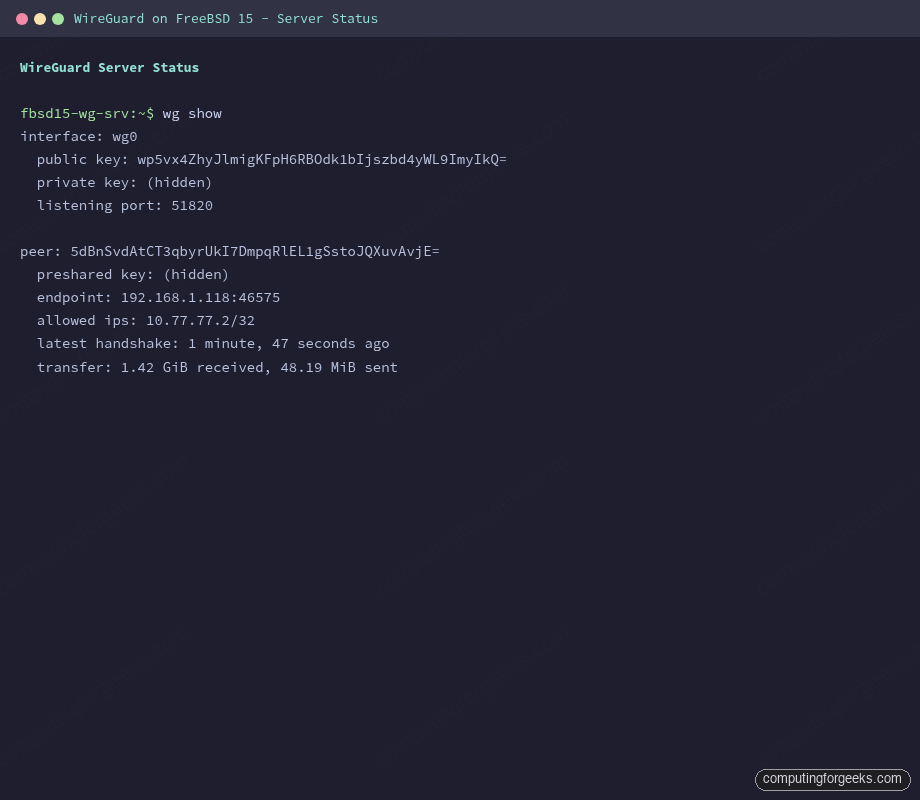
The output shows the server listening on port 51820 and the peer waiting for a handshake:
interface: wg0
  public key: wp5vx4ZhyJlmigKFpH6RBOdk1bIjszbd4yWL9ImyIkQ=
  private key: (hidden)
  listening port: 51820

peer: 5dBnSvdAtCT3qbyrUkI7DmpqRlEL1gSstoJQXuvAvjE=
  preshared key: (hidden)
  allowed ips: 10.77.77.2/32
No handshake yet because the client has not connected. That changes in the next step.
Configure the Client
On the client VM, install wireguard-tools the same way, then create the config. The private key here is the client private key you generated on the server:
pkg install -y wireguard-tools
mkdir -p /usr/local/etc/wireguard
vi /usr/local/etc/wireguard/wg0.conf
Add the client configuration:
[Interface]
Address = 10.77.77.2/24
PrivateKey = <client_private_key>

[Peer]
# Server
PublicKey = <server_public_key>
PresharedKey = <psk>
Endpoint = 10.0.1.50:51820
AllowedIPs = 10.77.77.0/24
PersistentKeepalive = 25
Replace 10.0.1.50 with your server’s real IP. AllowedIPs = 10.77.77.0/24 is split-tunnel mode: only traffic destined for the tunnel network goes through WireGuard, the rest exits locally. For a full-tunnel VPN where all traffic routes through the server, change it to 0.0.0.0/0, ::/0. The PersistentKeepalive = 25 sends a packet every 25 seconds to keep NAT mappings alive. If your client sits behind NAT, this is not optional.
chmod 600 /usr/local/etc/wireguard/wg0.conf
sysrc wireguard_enable=YES wireguard_interfaces="wg0"
service wireguard start
Verify the Tunnel
On the client, check that the handshake completed:
wg showA successful handshake shows the latest-handshake timestamp and transfer counters incrementing:
interface: wg0
  public key: 5dBnSvdAtCT3qbyrUkI7DmpqRlEL1gSstoJQXuvAvjE=
  private key: (hidden)
  listening port: 46575

peer: wp5vx4ZhyJlmigKFpH6RBOdk1bIjszbd4yWL9ImyIkQ=
  preshared key: (hidden)
  endpoint: 10.0.1.50:51820
  allowed ips: 10.77.77.0/24
  latest handshake: 1 minute, 10 seconds ago
  transfer: 124 B received, 244 B sent
  persistent keepalive: every 25 seconds
Now ping both tunnel endpoints to confirm bidirectional routing:
ping -c 4 10.77.77.1All four packets should come back under 2ms on a LAN:
PING 10.77.77.1 (10.77.77.1): 56 data bytes
64 bytes from 10.77.77.1: icmp_seq=0 ttl=64 time=0.416 ms
64 bytes from 10.77.77.1: icmp_seq=1 ttl=64 time=0.796 ms
64 bytes from 10.77.77.1: icmp_seq=2 ttl=64 time=0.370 ms
64 bytes from 10.77.77.1: icmp_seq=3 ttl=64 time=0.418 ms

--- 10.77.77.1 ping statistics ---
4 packets transmitted, 4 packets received, 0.0% packet loss
round-trip min/avg/max/stddev = 0.370/0.500/0.796/0.172 ms
On the server, ping the client’s tunnel address to verify the reverse path:
ping -c 4 10.77.77.2Both directions confirm the tunnel is functional and pf is not blocking anything.
Throughput Test with iperf3
Install iperf3 on both sides, start the server listener, then run a 10-second test from the client over the tunnel:
pkg install -y iperf3On the server, start iperf3 in daemon mode:
iperf3 -s -DFrom the client, run the test targeting the tunnel address:
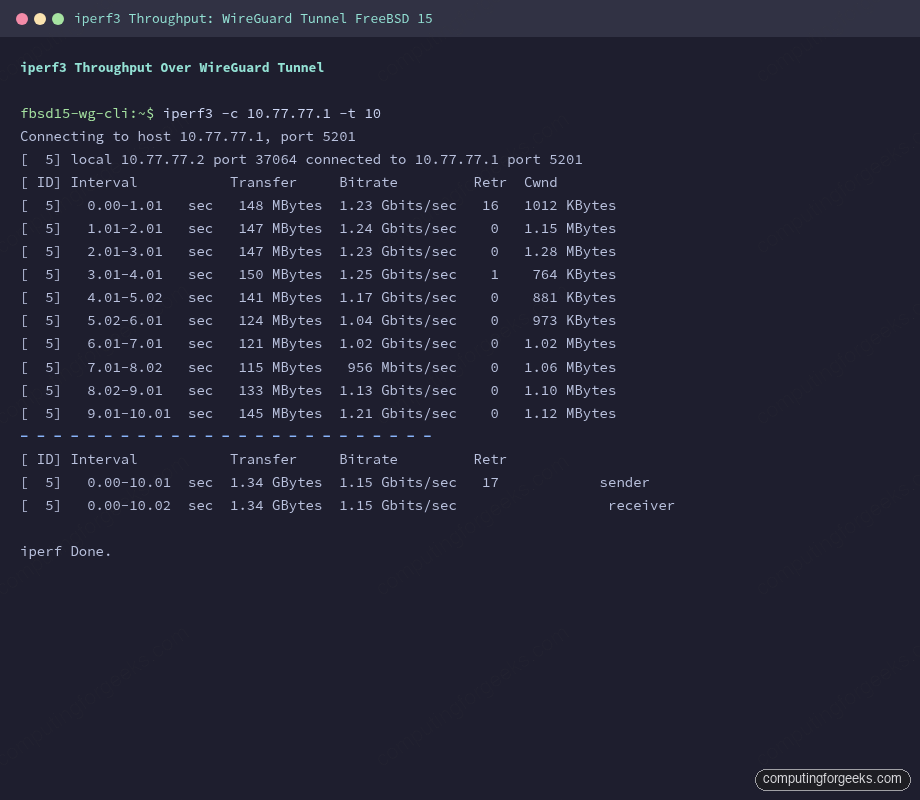
iperf3 -c 10.77.77.1 -t 10Results from this test on two FreeBSD 15 VMs on the same Proxmox host:
[ ID] Interval           Transfer     Bitrate         Retr  Cwnd
[  5]   0.00-1.01   sec   148 MBytes  1.23 Gbits/sec   16   1012 KBytes
[  5]   1.01-2.01   sec   147 MBytes  1.24 Gbits/sec    0   1.15 MBytes
[  5]   2.01-3.01   sec   147 MBytes  1.23 Gbits/sec    0   1.28 MBytes
[  5]   3.01-4.01   sec   150 MBytes  1.25 Gbits/sec    1    764 KBytes
[  5]   4.01-5.02   sec   141 MBytes  1.17 Gbits/sec    0    881 KBytes
[  5]   5.02-6.01   sec   124 MBytes  1.04 Gbits/sec    0    973 KBytes
[  5]   6.01-7.01   sec   121 MBytes  1.02 Gbits/sec    0   1.02 MBytes
[  5]   7.01-8.02   sec   115 MBytes   956 Mbits/sec    0   1.06 MBytes
[  5]   8.02-9.01   sec   133 MBytes  1.13 Gbits/sec    0   1.10 MBytes
[  5]   9.01-10.01  sec   145 MBytes  1.21 Gbits/sec    0   1.12 MBytes
- - - - - - - - - - - - - - - - - - - - - - - - -
[  5]   0.00-10.01  sec  1.34 GBytes  1.15 Gbits/sec   17            sender
[  5]   0.00-10.02  sec  1.34 GBytes  1.15 Gbits/sec                  receiver
1.15 Gbits/sec sustained through the encrypted tunnel. These are co-located VMs on the same physical host, so real-world numbers across a WAN will be lower and CPU-bound rather than bandwidth-bound. The ChaCha20-Poly1305 cipher WireGuard uses is fast on modern processors, and the kernel implementation in FreeBSD 15 keeps the encryption path tight.
Hardening
The preshared key (PSK) added to the peer block provides a second layer of symmetric encryption on top of the asymmetric Curve25519 handshake. It acts as a hedge against a future quantum computer breaking elliptic curve cryptography. The PSK was already added to both configs in the setup above. To rotate it:
wg genpsk > /usr/local/etc/wireguard/psk.newUpdate the PresharedKey line in both configs simultaneously, then restart WireGuard on both sides. If one side uses the old PSK and the other the new one, handshakes will fail silently (the peer shows no handshake, no error). Always rotate both at the same time.
Key file permissions matter. WireGuard on FreeBSD will log a warning and refuse to bring up the interface if configs are world-readable:
chmod 600 /usr/local/etc/wireguard/*Verify the pf firewall is actively blocking everything except 51820/udp. The following confirms the rules are loaded:
pfctl -s rulesThe output should show only the WireGuard UDP pass rule inbound and outbound pass on the tunnel and external interface. No broad pass all rules. If your system was previously running without pf, add a default-deny block at the top:
block all
pass in on $ext_if proto udp from any to any port 51820
pass in on wg0
pass out on $ext_if keep state
pass in on $ext_if proto tcp from any to any port 22 keep state
The default-deny approach means you add explicit permits rather than hoping defaults are safe. Add the SSH pass rule before applying this, or you will lock yourself out.
One thing WireGuard does not have: logs. There is no logging of handshakes, connection attempts, or traffic by design. This is a privacy feature, not a bug, but it means your only forensic tool for a misbehaving peer is wg show and pf’s state table (pfctl -s state). If you need connection-level auditing, implement it at the pf layer with log rules, not in WireGuard.
AllowedIPs: Split-Tunnel vs Full-Tunnel
The AllowedIPs field in the client’s peer block does double duty: it tells WireGuard which destination IPs to route through the tunnel, and it limits which source IPs the peer is allowed to send. The two common modes:
| Mode | AllowedIPs value | Effect |
|---|---|---|
| Split-tunnel | 10.77.77.0/24 | Only tunnel-network traffic goes encrypted. Browser, DNS, everything else exits local |
| Full-tunnel | 0.0.0.0/0, ::/0 | All traffic routes through the server. Remote peer sees the server’s public IP |
Full-tunnel with pf NAT on the server is what you want for a road-warrior VPN. Split-tunnel works for site-to-site or when clients just need access to internal services. The FreeBSD VNET jail networking guide covers related routing scenarios if you want to extend this to containerized services.
Adding More Clients
Each additional client gets a new keypair and a new [Peer] block on the server. Add one block per client with a unique AllowedIPs = 10.77.77.X/32:
[Peer]
# Laptop
PublicKey = <laptop_public_key>
PresharedKey = <laptop_psk>
AllowedIPs = 10.77.77.3/32

[Peer]
# Phone
PublicKey = <phone_public_key>
PresharedKey = <phone_psk>
AllowedIPs = 10.77.77.4/32
Apply the new config without dropping existing connections:
wg syncconf wg0 <(wg-quick strip wg0)wg syncconf updates the running interface with config file changes without tearing down active tunnels. wg-quick strip removes the wg-quick-specific keys (like Address) that the kernel interface does not understand. Note that the <(...) process substitution requires bash; on FreeBSD with sh, use a temp file instead:
wg-quick strip wg0 > /tmp/wg0-stripped.conf
wg syncconf wg0 /tmp/wg0-stripped.conf
rm /tmp/wg0-stripped.conf
Mobile Clients
The official WireGuard apps for iOS and Android read QR codes. Install libqrencode on the server to generate them:
pkg install -y libqrencodeBuild the client config as a string and pipe it to qrencode:
qrencode -t ansiutf8 << 'QREOF'
[Interface]
Address = 10.77.77.5/32
PrivateKey = <phone_private_key>
DNS = 1.1.1.1

[Peer]
PublicKey = <server_public_key>
PresharedKey = <phone_psk>
Endpoint = 203.0.113.1:51820
AllowedIPs = 0.0.0.0/0, ::/0
PersistentKeepalive = 25
QREOF
Scan the QR code from the WireGuard mobile app. The app adds the peer automatically. Delete the terminal session immediately after. The private key is visible in the terminal scrollback. Set AllowedIPs = 10.77.77.0/24 instead of 0.0.0.0/0 if you want split-tunnel on mobile. For static IP configuration on FreeBSD, the same approach applies for assigning fixed addresses to the server’s external interface.
WireGuard vs OpenVPN vs IPsec on FreeBSD 15
All three protocols are available on FreeBSD 15. The right choice depends on your constraints:
| Feature | WireGuard | OpenVPN | IPsec (strongSwan/racoon) |
|---|---|---|---|
| Kernel integration (FreeBSD 15) | Native in-tree | Userspace daemon, tun/tap | Native IPsec stack |
| Throughput (same-host VMs, tested) | 1.15 Gbps | ~400-600 Mbps typical | ~800 Mbps typical |
| Cipher | ChaCha20-Poly1305 (fixed) | Configurable (AES, ChaCha20) | Configurable (AES-GCM, AES-CBC) |
| Config complexity | 2 files, ~10 lines each | 50-100 line config + PKI | IKE daemon config + ipsec.conf |
| Certificate authority | Not required | Required (easy-rsa or custom) | Required for IKEv2 |
| UDP NAT traversal | Excellent (designed for it) | Good (UDP mode), poor (TCP) | Needs NAT-T extension |
| Mobile clients | Official iOS/Android apps | OpenVPN Connect (all platforms) | StrongSwan app, IKEv2 native on iOS |
| Post-quantum hardening | PSK adds symmetric layer | Needs explicit hybrid config | Post-quantum IKE proposals available |
| Logging | None by design | Configurable verbosity | System log via syslog |
| MTU overhead | 60 bytes per packet | 30-100 bytes depending on mode | ESP overhead ~50-70 bytes |
| Kill switch support | Via AllowedIPs 0.0.0.0/0 | redirect-gateway option | Manual policy required |
WireGuard wins on simplicity and throughput. OpenVPN has the broadest client ecosystem and the most deployment documentation, which matters if your users are non-technical. IPsec is the choice when you need site-to-site interoperability with Cisco, Juniper, or other enterprise gear that speaks IKEv2. For a new VPN setup on FreeBSD 15 where you control both endpoints, WireGuard is the clear call.