PF is one of the reasons people stay on FreeBSD once they try it. It’s a stateful packet filter that ships in the base system, does NAT, traffic shaping, load balancing, and logging without a single extra package. Compare that to iptables, which needs nftables to modernize, conntrack to handle state, tc to shape traffic, and iptables-save to persist rules across reboots. PF does all of it in one clean configuration file with a readable syntax that humans can actually parse without a reference sheet.
This guide covers a real gateway configuration: IP forwarding, NAT for a LAN, port forwarding with rdr, brute-force protection via overload tables, ALTQ queue-based bandwidth shaping, pflog analysis with tcpdump, and dynamic table management. The production hardening section at the end covers default-deny discipline, scrub normalization, antispoof, synproxy, and ALTQ tuning for high-throughput environments. Internal links to related guides: WireGuard VPN on FreeBSD 15 for encrypted tunnels, and FreeBSD Jails with VNET if you want per-jail firewalling.
Verified April 2026 on FreeBSD 15.0-RELEASE (amd64), PF base system, pflog enabled, SELinux not applicable (FreeBSD uses MAC framework)
Prerequisites
- FreeBSD 15.0-RELEASE installed. See Install FreeBSD 15 on Proxmox/KVM if needed.
- Root or sudo access
- At least one network interface (two for a proper gateway: external and internal). This guide uses
vtnet0as the external interface and treats192.168.50.0/24as the LAN segment - Optional: a second VM on the internal segment to test NAT from
Enable IP Forwarding
A gateway needs to forward packets between interfaces. PF handles the firewall logic, but the kernel needs to have forwarding enabled first or traffic simply never moves. Two sysctls to set:
sysctl net.inet.ip.forwarding=1
sysctl net.inet6.ip6.forwarding=1
Make both persistent across reboots by appending them to /etc/sysctl.conf:
vi /etc/sysctl.confAdd these two lines:
net.inet.ip.forwarding=1
net.inet6.ip6.forwarding=1
The hostname and static IP setup guide for FreeBSD covers interface configuration if you need to assign a static address to the LAN interface before continuing. See Configure Hostname and Static IP on FreeBSD 15.
The Complete /etc/pf.conf Walkthrough
PF reads a single flat file. Rules are evaluated top to bottom, and the last matching rule wins (with one exception: quick exits immediately on match). The structure always follows the same order: macros, tables, options, normalization, NAT/rdr, filtering. Swap the order and pfctl will refuse to load the file.
vi /etc/pf.confHere is the complete ruleset used in this guide, broken down section by section below:
# /etc/pf.conf - FreeBSD 15 gateway ruleset
# -----------------------------------------------

# Macros
ext_if  = "vtnet0"
lan_net = "192.168.50.0/24"

# Tables
table <bruteforce> persist
table <bogons> persist

# Options
set skip on lo0
set block-policy drop
set loginterface $ext_if
set optimization normal

# Normalization
scrub in all

# NAT
nat on $ext_if from $lan_net to any -> ($ext_if)

# Port forward (rdr)
rdr on $ext_if proto tcp from any to ($ext_if) port 8080 -> 192.168.50.10 port 80

# Default deny all
block all

# Antispoof
antispoof quick for $ext_if

# Block known brute-force sources
block drop in quick from <bruteforce>

# Stateful outbound
pass out keep state

# SSH with rate limiting and brute-force overload
pass in on $ext_if proto tcp to ($ext_if) port 22 \
    flags S/SA keep state \
    (max-src-conn 5, max-src-conn-rate 3/30, \
     overload <bruteforce> flush global)

# Internal LAN traffic
pass quick on $ext_if from $lan_net to any keep state

# Allow ICMP echo requests
pass in on $ext_if inet proto icmp icmp-type echoreq keep state
Macros and Tables
Macros are PF’s variable system. ext_if = "vtnet0" means every $ext_if in the ruleset expands to vtnet0. When you rename an interface (common after hardware swaps or when moving from bge0 to igb0), you change one line instead of hunting through 40 rules.
The ($ext_if) form (with parentheses) is different: it resolves the current IP of the interface at evaluation time. That matters on DHCP connections where the IP changes. Without the parentheses, PF snapshots the IP at load time and rules break silently when the lease renews.
Tables are persistent sets of addresses. The bruteforce table starts empty but gets populated automatically by the SSH overload rule. <bogons> would typically be loaded from a file of RFC1918 and unroutable ranges, useful for inbound filtering on a public-facing interface.
Options and Normalization
set skip on lo0 tells PF to ignore the loopback interface entirely. Without this, connections from localhost to localhost hit the firewall and fail.
set block-policy drop makes blocked packets disappear rather than receiving an ICMP reset. Drop is the production choice. Reject is useful during development because it makes debugging faster, but on a public interface it leaks information about what’s listening.
set loginterface $ext_if tells PF which interface to gather packet statistics for. pfctl -s info shows these counters. Useful for bandwidth accounting without a full monitoring stack.
The scrub in all normalization rule reassembles fragmented packets, clears the don’t-fragment bit on problematic traffic, and enforces safe TCP flag combinations. This is the layer that stops OS fingerprinting tools from getting clean results and prevents fragment-overlap attacks. Every gateway config should have it.
NAT and Port Forwarding
The NAT rule rewrites the source address of packets from $lan_net to the gateway’s external IP. Clients on 192.168.50.0/24 reach the internet with the gateway’s IP as their source, and the connection state table tracks which internal host to forward return traffic to.
nat on $ext_if from $lan_net to any -> ($ext_if)The rdr rule (redirect) handles inbound port forwarding. Traffic arriving on port 8080 of the external interface gets silently redirected to port 80 on the internal host at 192.168.50.10:
rdr on $ext_if proto tcp from any to ($ext_if) port 8080 -> 192.168.50.10 port 80The client never sees the internal address. From their perspective, they connected to the gateway’s IP on port 8080 and got a response. A common real-world use: expose a web server or application behind the gateway without assigning it a public IP. You can stack multiple rdr rules for different ports to different internal hosts.
Default Deny, Antispoof, and Pass Rules
block all is the policy baseline. Everything is denied until a pass rule explicitly permits it. The order matters: block all goes before the specific pass rules, and the last matching non-quick rule wins for any given packet.
antispoof quick for $ext_if generates two implicit block rules: one that blocks traffic arriving on any interface other than vtnet0 claiming to come from the gateway’s own subnet, and one that blocks traffic on vtnet0 sourced from the gateway’s own IP. This prevents your internal LAN from spoofing the gateway’s address outbound, and stops spoofed inbound packets that claim to come from your own network.
The SSH rate-limiting rule deserves a closer look. It’s doing three things at once: limiting concurrent connections per source (max-src-conn 5), capping new connections to 3 per 30 seconds (max-src-conn-rate 3/30), and automatically moving violators into the <bruteforce> table with flush global to kill their existing connections immediately. An IP that hits either limit gets blocked and all its current sessions are torn down, not just new ones.
Syntax Check and Load
Always syntax-check before loading. pfctl -nf parses the ruleset without applying it:
pfctl -nf /etc/pf.confIf the file is clean, pfctl exits 0 with no output. Any error prints the offending line number and a description. Common errors seen during testing:
Error: macro 'ext_if' not defined means the macro reference appears before the macro definition. PF processes the file sequentially. Move the macro assignment above the first line that uses it.
Error: rdr-anchor required can appear in some PF versions when redirect rules are defined outside an anchor context. If you hit this on a version that enforces the split between filter and translation rulesets, move rdr rules into an explicit rdr-anchor block. On FreeBSD 15 base PF, the flat file format works without anchors.
Once the syntax check passes, enable PF and pflog permanently:
sysrc pf_enable=YES pflog_enable=YESBoth lines confirm the change:
pf_enable: NO -> YES
pflog_enable: NO -> YES
Start both services:
service pf start
service pflog start
Each outputs a single confirmation line:
Enabling pf.
Starting pflog.
Verify Rules and NAT
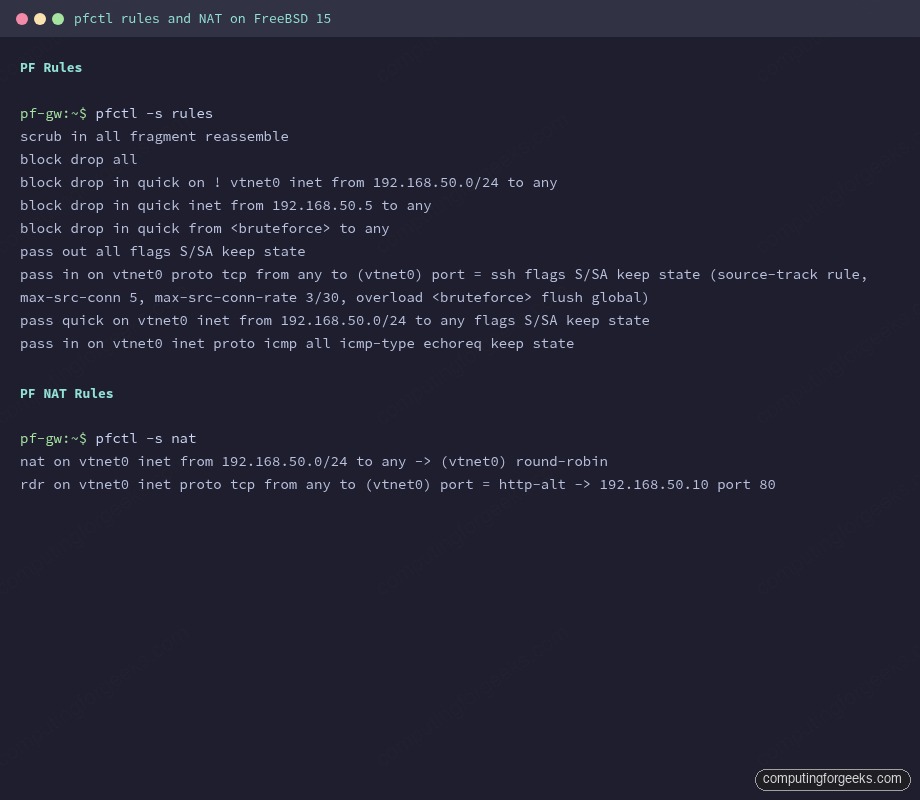
With PF running, check the loaded ruleset and translation rules:
pfctl -s rulesPF expands macros and prints the compiled ruleset:
scrub in all fragment reassemble
block drop all
block drop in quick on ! vtnet0 inet from 192.168.50.0/24 to any
block drop in quick inet from 192.168.50.5 to any
block drop in quick from <bruteforce> to any
pass out all flags S/SA keep state
pass in on vtnet0 proto tcp from any to (vtnet0) port = ssh flags S/SA keep state (source-track rule, max-src-conn 5, max-src-conn-rate 3/30, overload <bruteforce> flush global)
pass quick on vtnet0 inet from 192.168.50.0/24 to any flags S/SA keep state
pass in on vtnet0 inet proto icmp all icmp-type echoreq keep state
The antispoof expansion is visible: two block rules were generated from the single antispoof directive. Check NAT and redirect rules separately:
pfctl -s natBoth translation rules appear:
nat on vtnet0 inet from 192.168.50.0/24 to any -> (vtnet0) round-robin
rdr on vtnet0 inet proto tcp from any to (vtnet0) port = http-alt -> 192.168.50.10 port 80
Screenshot below shows actual pfctl output from a running FreeBSD 15 gateway with the ruleset from this guide loaded.
Test NAT from a Client
From a host on the 192.168.50.0/24 LAN with the gateway as its default route, fetch an IP-check URL. The returned IP should be the gateway’s external address, not the client’s private address:
fetch -qo - http://checkip.amazonaws.com/The response shows the gateway’s public IP, confirming NAT is masquerading the client correctly. Back on the gateway, the state table shows the translated connection:
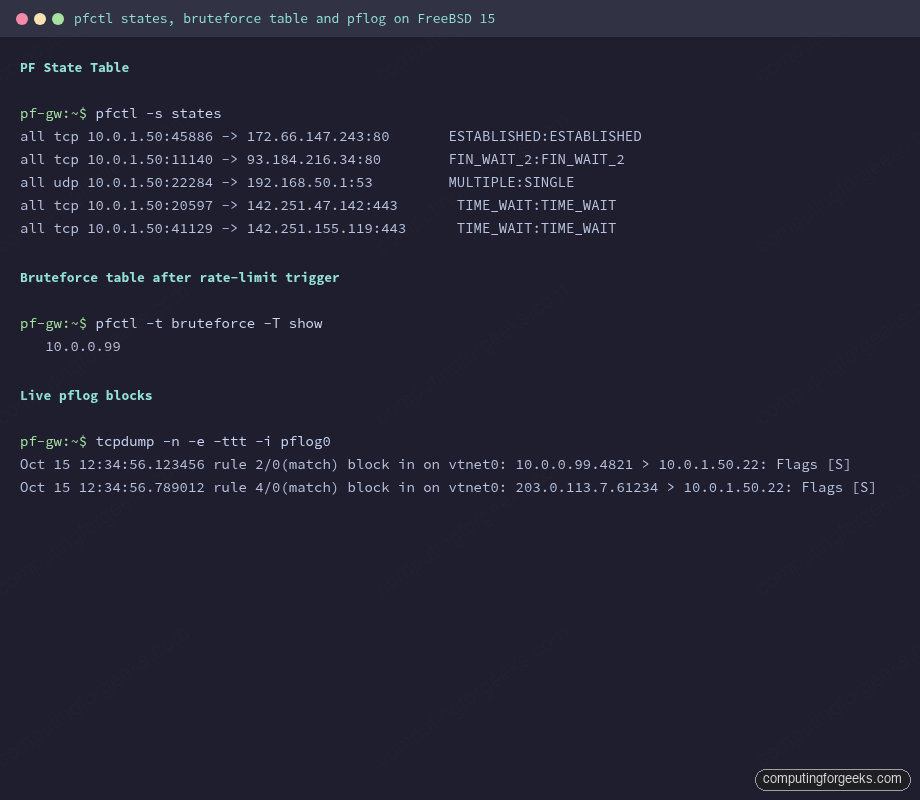
pfctl -s statesActive connections and their state appear with source, destination, and TCP state:
all tcp 192.168.50.5:45886 -> 54.72.14.98:80       ESTABLISHED:ESTABLISHED
all udp 192.168.50.5:22284 -> 192.168.50.1:53       MULTIPLE:SINGLE
all tcp 192.168.50.5:20597 -> 142.251.47.142:443     TIME_WAIT:TIME_WAIT
Brute-Force Protection Demo
The SSH rule’s overload logic is passive in normal operation. To see it work, you can add a test IP manually to the bruteforce table and confirm it’s blocked, or trigger it with repeated failed SSH connections. The manual table approach is faster for verification:
pfctl -t bruteforce -T add 10.0.0.99Show the table contents:
pfctl -t bruteforce -T showThe address appears immediately:
10.0.0.99To remove an IP after investigating:
pfctl -t bruteforce -T delete 10.0.0.99In live operation, any IP that attempts more than 3 SSH connections per 30 seconds lands here automatically. The flush global option in the pass rule is what makes this effective: it doesn’t just block new connections from that IP, it terminates all existing sessions from that source immediately.
ALTQ Queue-Based Traffic Shaping
ALTQ (Alternate Queuing) gives PF per-class bandwidth control. The most useful scheduler for a gateway is HFSC (Hierarchical Fair Service Curve), which lets you set guaranteed rates, upper limits, and weighted fair sharing in one hierarchy. The configuration lives in pf.conf above the filter rules:
# Add to pf.conf above filter rules
altq on $ext_if hfsc bandwidth 100Mb queue { qdef, qssh }
queue qssh on $ext_if bandwidth 1Mb hfsc(upperlimit 1Mb)
queue qdef on $ext_if bandwidth 99Mb hfsc(default)

# In the filter section, assign traffic to queues
pass out on $ext_if proto tcp to any port 22 queue qssh
This caps outbound SSH traffic at 1 Mbps (useful when you don’t want bulk scp transfers to saturate the uplink), while everything else gets the remaining 99 Mbps through the default queue.
ALTQ kernel requirement: ALTQ requires the ALTQ, ALTQ_HFSC, and ALTQ_CBQ kernel options. The FreeBSD 15 GENERIC kernel includes these, but if you built a custom kernel or are running a minimal configuration, you may hit:
altq not defined on vtnet0
/etc/pf.conf:2: errors in queue definition
pfctl: Syntax error in config file: pf rules not loaded
This is not a PF configuration error. It means the kernel was built without ALTQ support. The fix is to add the required options to your kernel config and rebuild, or switch to a GENERIC kernel. On virtualized deployments (Proxmox/KVM with VirtIO), this error is common because some hypervisor templates ship a minimal kernel. Check your kernel config with grep ALTQ /usr/src/sys/amd64/conf/GENERIC.
pflog Analysis with tcpdump
The pflog0 interface captures every packet that matches a logged rule. With set loginterface $ext_if in the options section, PF logs statistics to that interface. Individual rules also get logged if you add the log keyword. The default block all rule does not log (no log keyword), which is intentional on busy internet-facing boxes. To log blocked traffic selectively, modify the rule:
# Log blocks from bruteforce table
block drop log in quick from <bruteforce>
Then tail the log interface in real time:
tcpdump -n -e -ttt -i pflog0Blocked packets appear with rule number, direction, and interface:
Oct 15 12:34:56.123456 rule 2/0(match) block in on vtnet0: 10.0.0.99.4821 > 10.0.1.50.22: Flags [S]
Oct 15 12:34:56.789012 rule 4/0(match) block in on vtnet0: 203.0.113.7.61234 > 10.0.1.50.22: Flags [S]
The rule number maps to the position in pfctl -s rules output. Flags [S] is a SYN packet, meaning these are connection attempts. The -e flag adds the PF action (block/pass) and direction to every line, which is the most useful format for forensics.
For persistent logging, use pflogd which writes pcap format to /var/log/pflog. Read saved logs the same way: tcpdump -n -e -r /var/log/pflog.
Dynamic Table Management
Tables can be managed at runtime without touching pf.conf or reloading rules. The full pfctl -t syntax covers add, delete, replace, flush, show, and test:
pfctl -t bruteforce -T add 203.0.113.50        # add single IP
pfctl -t bruteforce -T add 198.51.100.0/24     # add a CIDR range
pfctl -t bruteforce -T delete 203.0.113.50     # remove single IP
pfctl -t bruteforce -T flush                   # clear the entire table
pfctl -t bruteforce -T show                    # list contents
pfctl -t bruteforce -T test 203.0.113.50       # check if IP is in the table
Tables defined with persist survive rule reloads but not reboots. To persist table contents across reboots, write the addresses to a file and load them at startup:
pfctl -t bruteforce -T show > /etc/pf.bruteforce.txtThen reference the file in pf.conf:
table <bruteforce> persist file "/etc/pf.bruteforce.txt"For dynamic blocklists (threat intelligence feeds), the same pattern applies: download a list of malicious IPs, write them to a file, load into a table. A nightly cron job can update the list and run pfctl -t blocklist -T replace -f /etc/pf.blocklist.txt to swap the contents atomically without a full rule reload.
Production Hardening
The ruleset above is solid for a lab. A production gateway needs a few more layers. Here is what matters and why:
Default-deny with explicit egress. The current pass out keep state allows all outbound traffic. On a shared server or multi-tenant environment, lock it down. Define what the server is allowed to initiate: DNS to specific resolvers, NTP, package mirrors, nothing else. An attacker who gets a foothold can’t beacon out to a C2 server if outbound is deny-by-default. Change the rule to:
pass out on $ext_if proto tcp to any port { 80 443 } keep state
pass out on $ext_if proto udp to any port 53 keep state
pass out on $ext_if proto udp to any port 123 keep state
Scrub all, not just inbound. Add scrub out all alongside scrub in all. It normalizes outbound fragments and prevents the gateway itself from sending malformed packets that could trigger bugs in intermediate routers.
SYN proxy for TCP. SYN flood protection without paying full state table cost for each half-open connection. Add synproxy state to your SSH pass rule:
pass in on $ext_if proto tcp to ($ext_if) port 22 flags S/SA synproxy state \
    (max-src-conn 5, max-src-conn-rate 3/30, overload <bruteforce> flush global)
PF completes the TCP handshake on behalf of the server before forwarding the connection. SYN floods consume PF’s resources rather than the application’s. The synproxy keyword cannot be combined with keep state directly: use synproxy state as the state keyword.
pflog analysis workflow. Route pflog output to a dedicated log file with pflogd and analyze it with tcpdump filters. Useful filters during an incident: filter by source IP (tcpdump -n -r /var/log/pflog src host 10.0.0.99), filter by destination port (tcpdump -n -r /var/log/pflog dst port 22), count unique source IPs hitting a port (tcpdump -n -r /var/log/pflog dst port 22 | awk '{print $3}' | cut -d. -f1-4 | sort | uniq -c | sort -rn | head).
ALTQ queue sizing. The right queue sizes depend on your actual uplink. The most common mistake is setting bandwidth higher than the physical link speed. PF can’t enforce a shape larger than what the interface can actually push, and the queue math breaks. Measure actual throughput with iperf3 first, set bandwidth to 90% of measured to leave headroom, then assign queue weights from there. On a 1 Gbps uplink, altq on $ext_if hfsc bandwidth 900Mb is safer than 1000Mb.
State table limits. On high-traffic gateways the state table fills up under load. Check current usage with pfctl -s info and watch the current entries counter. Set a sensible limit to prevent memory exhaustion:
set limit states 500000The default on FreeBSD 15 is computed from available RAM. On systems with under 1 GB of RAM, the default can be surprisingly low. Tune it based on your peak observed state count plus 20% headroom.
Reload without downtime. Use pfctl -f /etc/pf.conf to reload rules atomically. PF swaps the ruleset in a single operation. There is no window where traffic passes through an incomplete ruleset. The syntax check step (pfctl -nf /etc/pf.conf) before every reload is worth the habit: a bad config file with a typo gets rejected at parse time, the old ruleset stays active, and nothing breaks.
For more on securing FreeBSD hosts beyond the firewall, the FreeBSD 15 new features guide covers pkgbase and the signed package changes that tighten supply chain security. If you need per-jail network isolation with dedicated firewall stacks, FreeBSD Jails with VNET shows how to run a separate PF instance inside each jail. And for encrypted tunnels layered on top of PF, the WireGuard VPN guide integrates cleanly: WireGuard traffic goes through wg0, PF controls what the tunnel can reach on the LAN side.