Memcached is the caching layer behind most high-traffic PHP and Python applications. It stores key-value pairs in RAM, keeping database queries and API responses off the critical path. If your application hits the same data more than once, Memcached eliminates the repeated work.
This guide covers installing Memcached 1.6.40 on Ubuntu 26.04 LTS, configuring it for production use, and integrating with both PHP and Python clients. By the end, you will have a working cache layer ready for your application stack.
Verified working: April 2026 on Ubuntu 26.04 LTS, Memcached 1.6.40, PHP 8.5.4, Python 3.14.3
Prerequisites
Before starting, make sure you have:
- Ubuntu 26.04 LTS server with root or sudo access (initial server setup guide)
- Tested on: Ubuntu 26.04 LTS (Resolute Raccoon), kernel 6.x, Memcached 1.6.40
- At least 512 MB RAM (Memcached defaults to 64 MB cache allocation)
Install Memcached on Ubuntu 26.04
Memcached is available in the default Ubuntu 26.04 repositories. Install it along with the libmemcached-tools package, which provides command-line utilities for testing and managing Memcached.
sudo apt update
sudo apt install -y memcached libmemcached-tools
Confirm the installed version:
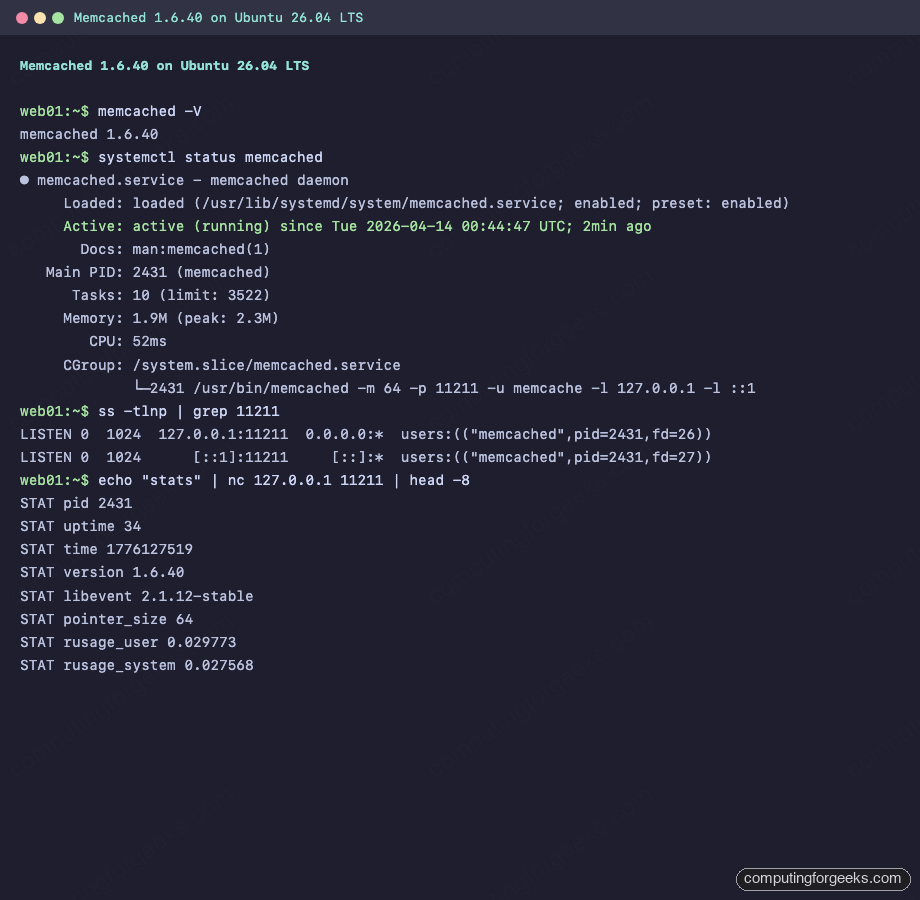
memcached -VThe output shows the version number:
memcached 1.6.40Ubuntu 26.04 enables and starts the service automatically after installation. Verify it is running:
sudo systemctl status memcachedYou should see active (running) in the output:
● memcached.service - memcached daemon
     Loaded: loaded (/usr/lib/systemd/system/memcached.service; enabled; preset: enabled)
     Active: active (running) since Tue 2026-04-14 00:44:47 UTC; 2min ago
       Docs: man:memcached(1)
   Main PID: 2431 (memcached)
      Tasks: 10 (limit: 3522)
     Memory: 1.9M (peak: 2.3M)
        CPU: 52ms
     CGroup: /system.slice/memcached.service
             └─2431 /usr/bin/memcached -m 64 -p 11211 -u memcache -l 127.0.0.1 -l ::1
The process flags confirm Memcached is running with 64 MB memory (-m 64), listening on port 11211 (-p 11211), bound to localhost only (-l 127.0.0.1).
Configure Memcached
The main configuration file controls memory allocation, network binding, and connection limits. Open it for editing:
sudo vi /etc/memcached.confKey settings to adjust for your workload:
# Memory allocation in MB (default: 64)
# Set based on your available RAM and cache needs
-m 256

# TCP port (default: 11211)
-p 11211

# Run as memcache user (do not change)
-u memcache

# Listen on localhost only (recommended for single-server setups)
-l 127.0.0.1
-l ::1

# Max simultaneous connections (default: 1024)
-c 2048

# Log file location
logfile /var/log/memcached.log
For a production web server running WordPress or Laravel, 256 MB is a solid starting point. If your application caches sessions and full page output, consider 512 MB or more. The connection limit of 2048 handles most mid-traffic sites comfortably.
Restart the service to apply changes:
sudo systemctl restart memcachedVerify the port is listening:
ss -tlnp | grep 11211The output confirms Memcached is bound to both IPv4 and IPv6 loopback addresses:
LISTEN 0  1024  127.0.0.1:11211  0.0.0.0:*  users:(("memcached",pid=2431,fd=26))
LISTEN 0  1024      [::1]:11211     [::]:*  users:(("memcached",pid=2431,fd=27))
Test Memcached with Command-Line Tools
The libmemcached-tools package includes several utilities for interacting with Memcached from the shell. These are useful for health checks and debugging.
Check Server Stats with memcstat
Pull the full statistics from a running Memcached instance:
memcstat --servers=127.0.0.1This returns all server metrics, including uptime, connection counts, hit/miss ratios, and memory usage. Here is a summary view from the test server:
Key fields from the full output:
Server: 127.0.0.1 (11211)
	pid: 2431
	uptime: 24
	time: 1776127509
	version: 1.6.40
	libevent: 2.1.12-stable
	pointer_size: 64
	max_connections: 1024
	curr_connections: 2
	total_connections: 3
	rejected_connections: 0
	cmd_get: 0
	cmd_set: 0
	get_hits: 0
	get_misses: 0
	bytes: 0
	curr_items: 0
	total_items: 0
	evictions: 0
	limit_maxbytes: 67108864
The get_hits and get_misses counters are what you want to monitor in production. A healthy cache should have a hit ratio above 90%. The evictions counter tracks how often Memcached had to remove items to make room for new ones. If evictions climb steadily, increase the memory allocation.
Store and Retrieve Data via Netcat
For a quick connectivity test, use nc (netcat) to speak the Memcached text protocol directly. Store a value:
echo -e "set testkey 0 900 11\r\nhello_world\r\nquit" | nc 127.0.0.1 11211A successful store returns STORED:
STOREDRetrieve the value back:
echo -e "get testkey\r\nquit" | nc 127.0.0.1 11211The response includes the key metadata and stored value:
VALUE testkey 0 11
hello_world
END
In the set command, the parameters are: key name (testkey), flags (0), expiration in seconds (900), and byte count (11).
PHP Memcached Extension
Most PHP applications (WordPress, Laravel, Drupal) use the php-memcached extension to communicate with Memcached. If you already have a LAMP or LEMP stack running, install the extension for your PHP version:
sudo apt install -y php8.5-memcachedVerify the module loaded correctly:
php -m | grep memcachedThe output should show memcached in the list of active modules. Test it with a quick script that stores and retrieves a value:
php -r '
$m = new Memcached();
$m->addServer("127.0.0.1", 11211);
$m->set("php_test", "Hello from PHP 8.5", 300);
echo $m->get("php_test") . PHP_EOL;
echo "Result code: " . $m->getResultCode() . PHP_EOL;
'
A result code of 0 means success:
Hello from PHP 8.5
Result code: 0
If you are running PHP-FPM behind Nginx, restart the FPM service after installing the extension:
sudo systemctl restart php8.5-fpmPython Memcached Client
Python applications can connect to Memcached using the pymemcache library, which is available as a system package on Ubuntu 26.04.
sudo apt install -y python3-pymemcacheTest the connection with a store and retrieve operation:
python3 -c '
from pymemcache.client.base import Client
client = Client(("127.0.0.1", 11211))
client.set("python_test", "Hello from Python 3")
result = client.get("python_test")
print(result.decode("utf-8"))
print("Connection successful")
'
You should see both lines printed:
Hello from Python 3
Connection successful
For production Django or Flask applications, pymemcache supports connection pooling, retry logic, and serialization. The python3-pylibmc package is an alternative that wraps the C libmemcached library for better performance under heavy load.
Firewall Configuration
Memcached should never be exposed to the public internet. The default configuration already binds to 127.0.0.1, which prevents remote access. If you need to allow connections from other servers on a private network (for example, a separate application server at 10.0.1.51), update the bind address in /etc/memcached.conf and add a UFW rule:
sudo ufw allow from 10.0.1.51 to any port 11211 proto tcp comment "Memcached from app server"Never run ufw allow 11211 without restricting the source. Memcached has no authentication by default, so an open port means anyone can read, write, and flush your cache. There have been real-world DDoS amplification attacks exploiting exposed Memcached instances.
For single-server setups where the application and Memcached run on the same host, no firewall rule is needed. Localhost binding is sufficient.
Production Tuning Tips
The defaults work for development, but production deployments benefit from a few adjustments.
Memory sizing: allocate based on your working set, not total RAM. If your application caches 500 MB of data but only 200 MB is accessed frequently, -m 256 might be enough. Watch the evictions counter with memcstat to know if you need more.
Connection limits: each PHP-FPM worker or Python process maintains its own connection. If you run 50 FPM workers, set -c to at least 100 (workers plus headroom for CLI tools and monitoring).
Max item size: the default maximum value size is 1 MB. If your application caches large objects (serialized API responses, rendered page fragments), increase it with -I 2m in the config file. Going above 4 MB is rarely justified.
Thread count: Memcached defaults to 4 worker threads. On machines with 8+ cores handling heavy cache traffic, increase to -t 8. Each thread handles I/O independently, so more threads improve throughput on multi-core systems.
After tuning, verify your changes took effect:
memcstat --servers=127.0.0.1 | grep -E "limit_maxbytes|max_connections|threads"This confirms the runtime values match your configuration.
Memcached vs Redis: When to Use Which
Memcached and Redis both solve caching, but they target different use cases.
Choose Memcached when you need a pure key-value cache with predictable latency. Memcached is multi-threaded out of the box, which means it scales vertically on multi-core machines without any configuration. It uses a slab allocator that avoids memory fragmentation, making it ideal for workloads with uniform object sizes (session data, query results, rendered HTML fragments). Memcached also uses less memory per key than Redis because it stores raw bytes with minimal metadata overhead.
Choose Redis when you need data structures beyond simple key-value (sorted sets, lists, hashes, streams), persistence across restarts, pub/sub messaging, or Lua scripting. Redis is single-threaded for command execution (though Redis 7+ offloads I/O to threads), which simplifies its consistency model but limits single-instance throughput on multi-core systems.
For a typical WordPress or PHP application that just needs object caching to reduce database load, Memcached is the lighter choice. For a job queue, leaderboard, or rate limiter that needs atomic operations on complex data types, Redis is the better fit.
Many production stacks run both: Memcached for high-volume, ephemeral object caching and Redis for persistent state and messaging.