Replication keeps a second MariaDB server in lockstep with your main one. Every write on the primary streams to a replica in near real time, so you get a hot copy to read from, fail over to, or back up without touching production traffic. This guide builds a working primary and replica from scratch using GTID, the replication method MariaDB recommends and the one that makes failover a single command instead of a manual hunt through binary log offsets.
You will set up MariaDB replication on two servers, configure the primary for binary logging, create a dedicated replication account, seed the replica from a consistent snapshot, and wire the two together with GTID. By the end you will have a live primary/replica pair, proof that data propagates, and a read-only replica that refuses stray application writes. Everything below was tested in June 2026 on MariaDB 11.8 LTS running on Ubuntu 26.04 and Debian 13; the same steps apply unchanged on Ubuntu 24.04 and Debian 12.
How MariaDB replication works
MariaDB replication is asynchronous by default. The primary records every change to its binary log. Each replica opens a connection, pulls those events, writes them to a local relay log, and replays them against its own copy of the data. The replica stays a few milliseconds behind under normal load and catches up automatically after a burst.
There are two ways a replica can track its place in the stream. The old way is by binary log file name and byte offset. The modern way is the Global Transaction ID (GTID), a cluster-wide identifier of the form domain-server-sequence (for example 0-1-9). GTID has been available since MariaDB 10.0 and is the right default for any new setup.
| GTID (this guide) | Binary log file + position | |
|---|---|---|
| Replica points at | MASTER_USE_GTID=slave_pos | MASTER_LOG_FILE + MASTER_LOG_POS |
| Failover | Repoint a replica with one statement | Find the new file and offset by hand |
| Adding a replica | Seed, set one GTID value, start | Read exact offset at snapshot time |
| Drift risk | Low, IDs are global | Higher, offsets are per log file |
One thing replication is not: a backup. A bad DELETE on the primary replicates to every replica in milliseconds. Keep real off-site MariaDB backups and consider point-in-time recovery alongside this setup, not instead of it.
Lab layout and prerequisites
This guide uses two servers on the same private network. The primary accepts reads and writes; the replica is a read-only copy.
| Role | Hostname | IP | server-id |
|---|---|---|---|
| Primary | mariadb-primary | 10.0.1.10 | 1 |
| Replica | mariadb-replica | 10.0.1.11 | 2 |
You need root or sudo on both machines, network reachability between them on TCP port 3306, and MariaDB installed on each (covered next). The two servers must have different server-id values, which is the single most common cause of replication that silently refuses to start.
Set reusable shell variables
Every command in this guide reads from a handful of shell variables so you edit one block and paste the rest as-is. Export these at the top of your SSH session on the server you are working on. Use a real, strong replication password.
export PRIMARY_IP="10.0.1.10"
export REPLICA_IP="10.0.1.11"
export REPL_USER="replicator"
export REPL_PASS="Repl!c4-Strong-2026"
Confirm they are set before running anything else. These values live only in the current shell, so re-export them if you reconnect or switch to a root shell with sudo -i.
echo "Primary: ${PRIMARY_IP} Replica: ${REPLICA_IP} User: ${REPL_USER}"Install MariaDB on both servers
Run the install on the primary and the replica. The distro repositories are the simplest path and already ship the current LTS on the newest releases. Update the package index and pull the server and client:
sudo apt update
sudo apt install -y mariadb-server mariadb-client
What version you land on depends on the release. Ubuntu 26.04 and Debian 13 already package the current LTS; the older LTS releases ship the previous one. The replication steps are identical on both, since GTID has been stable since MariaDB 10.0.
| Release | Distro-repo MariaDB | To get the latest LTS instead |
|---|---|---|
| Ubuntu 26.04 (Resolute) | 11.8 LTS | Already current, use the distro repo |
| Ubuntu 24.04 (Noble) | 10.11 LTS | Official MariaDB repo (below) |
| Debian 13 (Trixie) | 11.8 LTS | Already current, use the distro repo |
| Debian 12 (Bookworm) | 10.11 LTS | Official MariaDB repo (below) |
If you are on Ubuntu 24.04 or Debian 12 and want the newest 11.8 LTS, add the official MariaDB repository, pinning the LTS series so the URL keeps working when the next point release ships:
curl -LsS https://r.mariadb.com/downloads/mariadb_repo_setup | sudo bash -s -- --mariadb-server-version="mariadb-11.8" #https://mariadb.org/download/
sudo apt update
sudo apt install -y mariadb-server mariadb-client
The official setup script keys on the release codename and does not yet recognize Ubuntu 26.04 (resolute). That is fine, because 26.04 already ships 11.8 in its own repository. Stick with the distro repo there. For step-by-step single-node installs see the dedicated guides for installing MariaDB on Ubuntu and on Debian.
Run the hardening script on both servers. On Debian and Ubuntu the root account authenticates through the unix socket, so keep that when asked, then remove the anonymous users, the test database, and remote root login:
sudo mariadb-secure-installationConfirm the service is up and enabled on boot on each node:
systemctl is-active mariadb
systemctl is-enabled mariadb
Configure the primary
The default config listens only on localhost and keeps binary logging off. Replication needs both changed. Rather than editing the shipped files, drop a dedicated config into /etc/mysql/mariadb.conf.d/, which both Ubuntu and Debian read on startup. The ${PRIMARY_IP} variable expands as the file is written, so this lands the real address:
echo "[mariadbd]
server-id                  = 1
log_bin                    = /var/log/mysql/mariadb-bin
binlog_format              = ROW
bind-address               = ${PRIMARY_IP}
gtid_strict_mode           = 1
binlog_expire_logs_seconds = 604800" | sudo tee /etc/mysql/mariadb.conf.d/60-replication.cnf
Each line earns its place. server-id = 1 uniquely names this node. log_bin turns on the binary log replicas read from. binlog_format = ROW records actual row changes, the safest format for replication. gtid_strict_mode = 1 makes MariaDB reject out-of-order GTIDs instead of silently diverging. binlog_expire_logs_seconds = 604800 prunes binary logs after seven days so they do not fill the disk.
Restart MariaDB to apply the config:
sudo systemctl restart mariadbVerify the server picked up the settings. Binary logging should read 1 and the bind address should be the primary IP:
sudo mariadb -e "SELECT @@server_id, @@log_bin, @@binlog_format, @@gtid_strict_mode, @@bind_address"The version banner, the active service, and the live binary log position confirm the primary is ready to stream:
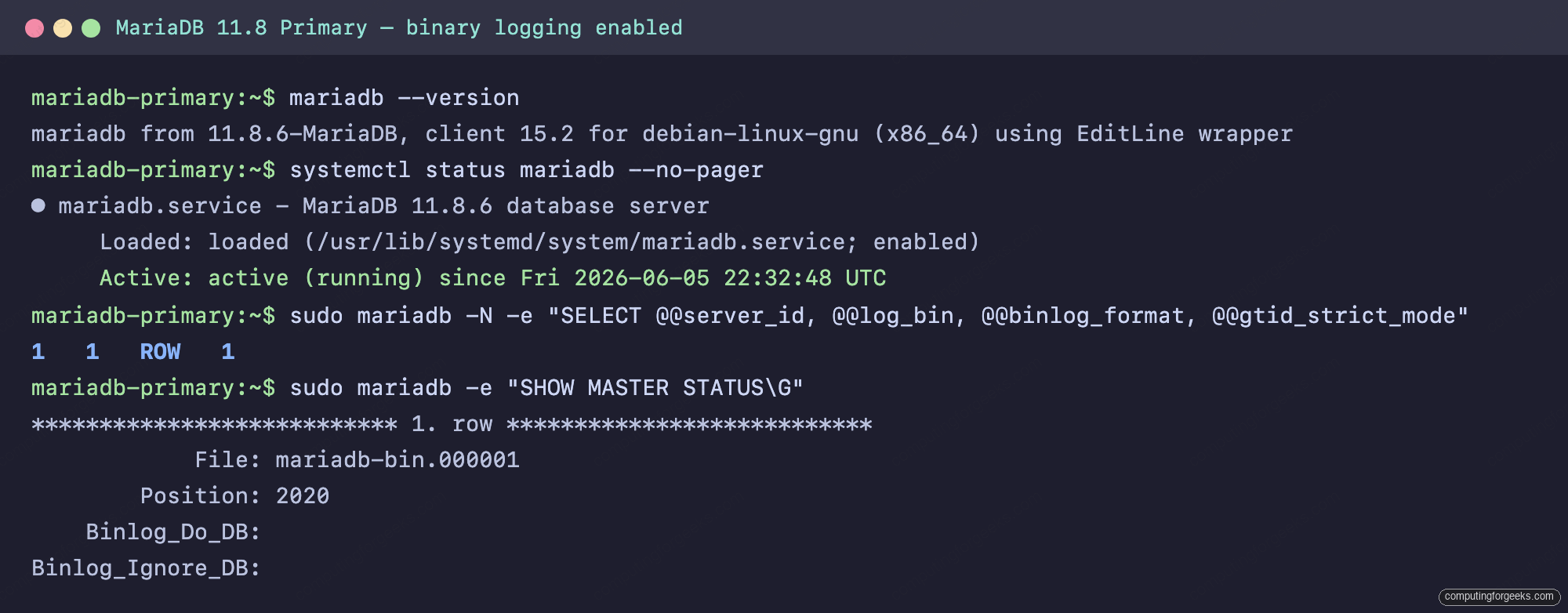
If a firewall is active on the primary, allow the replica to reach port 3306. Scope the rule to the replica address rather than opening the database port to the whole network:
sudo ufw allow from ${REPLICA_IP} to any port 3306 proto tcpCreate the replication user
The replica connects to the primary as a dedicated account that can do exactly one thing: read the replication stream. Create it on the primary and grant only the replication privilege. Scoping the host to the replica IP keeps the account from logging in anywhere else.
sudo mariadb -e "CREATE USER '${REPL_USER}'@'${REPLICA_IP}' IDENTIFIED BY '${REPL_PASS}';
GRANT REPLICATION REPLICA ON *.* TO '${REPL_USER}'@'${REPLICA_IP}';
FLUSH PRIVILEGES;"
REPLICATION REPLICA is the current spelling. MariaDB still stores it internally under the legacy name, so SHOW GRANTS echoes it back as REPLICATION SLAVE. Both refer to the same privilege; the modern keyword is just an alias. This account deliberately has no SELECT, so it can pull the binary log but cannot read your tables directly.
Seed the replica from the primary
A replica must start from an exact copy of the primary’s data plus the GTID that copy corresponds to. mariadb-dump captures both atomically. Run this on the primary. --single-transaction gives a consistent snapshot without locking, and --gtid records the matching GTID position in the dump header. The example database here is shop; list your own databases instead, or use --all-databases.
sudo mariadb-dump --databases shop --single-transaction --gtid --master-data=2 > /tmp/primary-snapshot.sqlThe dump records the GTID it is consistent with as a comment near the top. This value is what the replica starts from:
grep gtid_slave_pos /tmp/primary-snapshot.sqlYou will see a single commented line carrying the position, for example:
-- SET GLOBAL gtid_slave_pos='0-1-1';Copy the snapshot to the replica. From the primary, push it over SSH:
scp /tmp/primary-snapshot.sql ${REPL_USER}@${REPLICA_IP}:/tmp/Configure the replica
Switch to the replica. It needs its own server-id, a relay log, and read-only mode so applications cannot accidentally write to it. Write the drop-in with the replica’s address:
echo "[mariadbd]
server-id                  = 2
log_bin                    = /var/log/mysql/mariadb-bin
relay_log                  = /var/log/mysql/relay-bin
binlog_format              = ROW
read_only                  = 1
gtid_strict_mode           = 1
bind-address               = ${REPLICA_IP}
binlog_expire_logs_seconds = 604800" | sudo tee /etc/mysql/mariadb.conf.d/60-replication.cnf
The server-id = 2 must differ from the primary. read_only = 1 blocks writes from normal accounts while still allowing the replication thread to apply changes. Keeping log_bin on means this replica can itself be promoted or chained later. Restart to apply:
sudo systemctl restart mariadbImport the snapshot to load the primary’s data:
sudo mariadb < /tmp/primary-snapshot.sqlBefore pointing the replica at the primary, confirm it can actually reach it with the replication account. A successful connection here rules out firewall and password problems before they show up as a cryptic replication error:
mariadb -h ${PRIMARY_IP} -u ${REPL_USER} -p"${REPL_PASS}" -e "SELECT 'connected to primary' AS status"Start replication on the replica
Pull the GTID value out of the snapshot into a variable so you do not have to copy it by hand:
GTID=$(grep -oP "gtid_slave_pos='\K[^']+" /tmp/primary-snapshot.sql)
echo "Seeding from GTID: ${GTID}"
Now tell the replica where it is in the stream, point it at the primary, and start it. Because this replica has its own binary log, importing the snapshot advanced its local GTID, so clear that first with RESET MASTER or the next step fails (see troubleshooting). MASTER_USE_GTID=slave_pos is what makes this GTID replication rather than file-and-offset:
sudo mariadb -e "STOP REPLICA;
RESET MASTER;
SET GLOBAL gtid_slave_pos = '${GTID}';
CHANGE MASTER TO
  MASTER_HOST     = '${PRIMARY_IP}',
  MASTER_USER     = '${REPL_USER}',
  MASTER_PASSWORD = '${REPL_PASS}',
  MASTER_PORT     = 3306,
  MASTER_USE_GTID = slave_pos;
START REPLICA;"
Verify replication is working
Check the replica's status. The two threads that matter are Slave_IO_Running (pulling events from the primary) and Slave_SQL_Running (applying them). Both must read Yes:
sudo mariadb -e "SHOW REPLICA STATUS\G"A healthy replica reports both threads running, Seconds_Behind_Master: 0, and Using_Gtid: Slave_Pos. The legacy aliases SHOW SLAVE STATUS, START SLAVE, and STOP SLAVE still work if you prefer them.
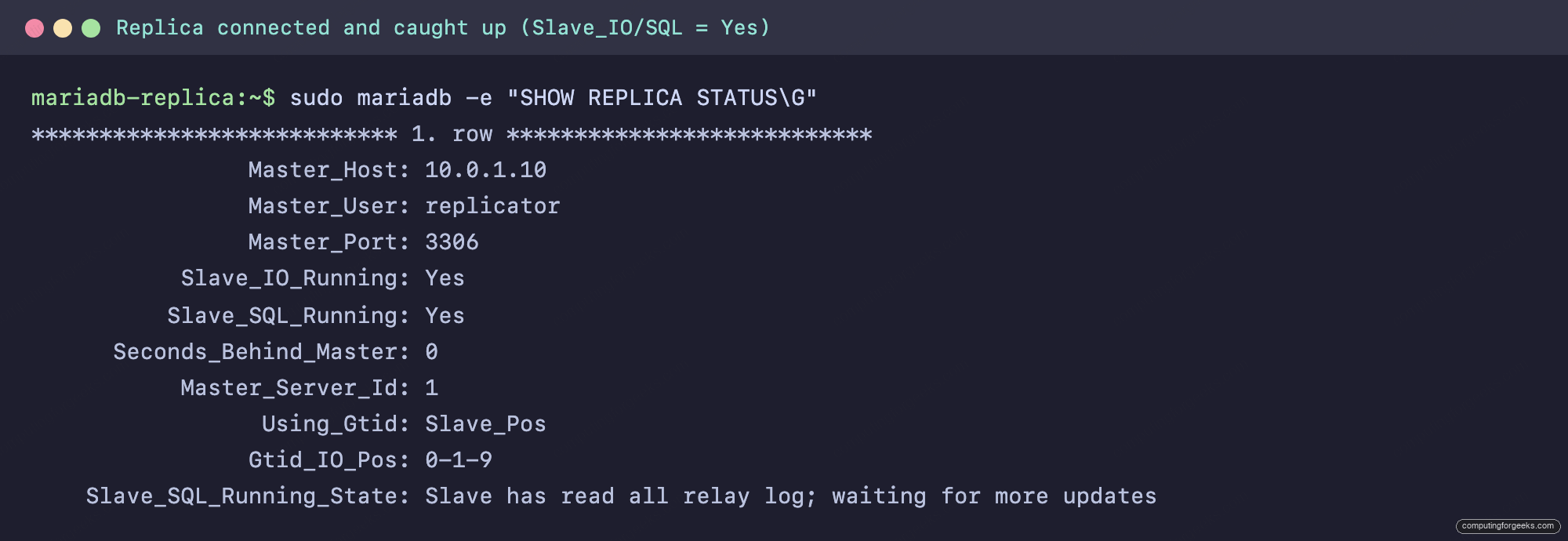
Status output proves the link is up. To prove data actually moves, write on the primary and read on the replica. Insert a row on the primary:
sudo mariadb -e "INSERT INTO shop.products (name, price) VALUES ('Standing desk', 420.00)"Read it back on the replica a moment later. The new row is already there, and a write attempt from a normal application user is rejected because the replica is read-only:
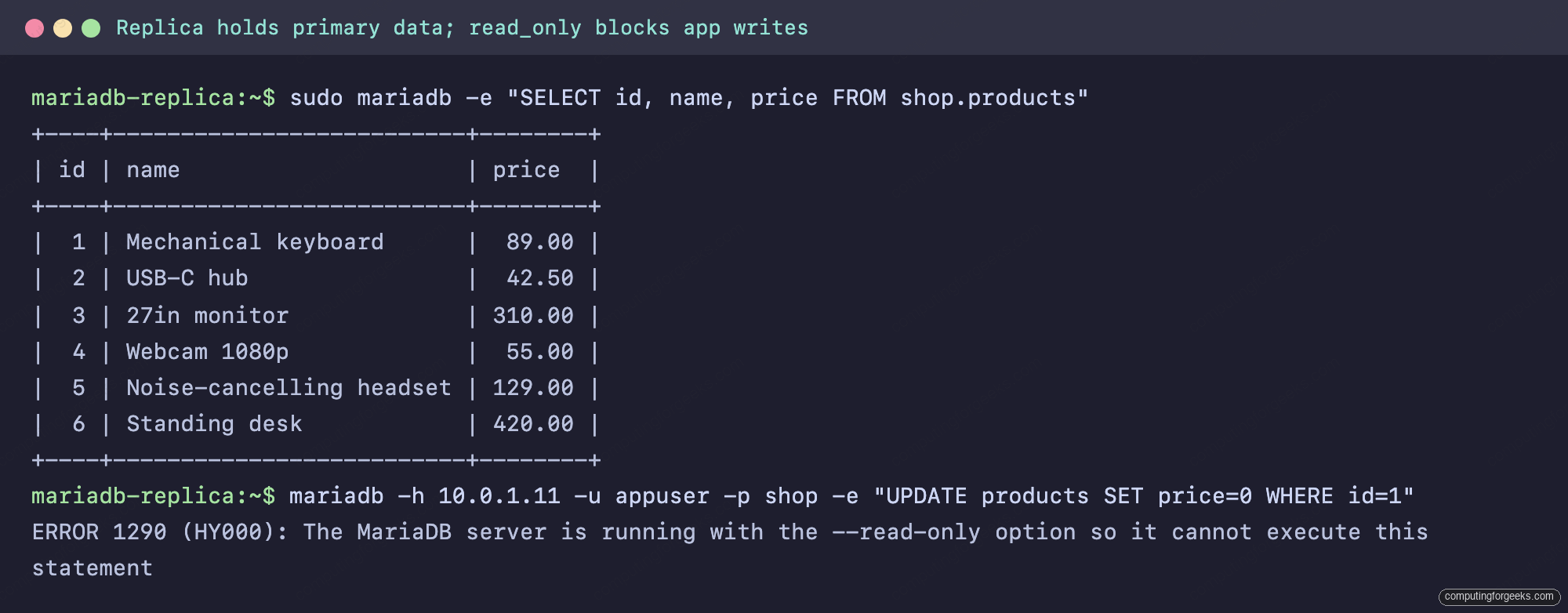
That is a working primary/replica pair. Replication also survives a reboot: the CHANGE MASTER settings and the GTID position are persisted, so the replica reconnects and resumes on its own when MariaDB starts back up. From here, point a monitoring stack at the replica to track lag in real time with the MySQL/MariaDB exporter for Prometheus and Grafana, and send read-heavy traffic from your web stack to the replica to take load off the primary.
Common errors and fixes
These are the failures you are most likely to hit, with the exact message and the fix.
ERROR 1947: Specified GTID conflicts with the binary log
When the replica has its own binary log enabled, importing the seed snapshot writes those rows to the replica's binlog under its own server-id, advancing its GTID. Setting gtid_slave_pos to an earlier value from the primary then conflicts under strict mode. Run RESET MASTER on the replica first to clear its local binary log and GTID state, then set the position. The start sequence in this guide already does this in the right order.
ERROR 1290: server is running with the --read-only option
This is expected, not a fault. A normal account trying to write to the replica gets ERROR 1290 (HY000): The MariaDB server is running with the --read-only option so it cannot execute this statement. That is exactly what read_only is for. Note that accounts with administrative privilege (the socket-authenticated root included) bypass read_only, so never run manual writes against a replica as root. They will not block, and they will break replication the moment the same primary key arrives from the primary.
Slave_IO_Running: Connecting (stuck, never reaches Yes)
The replica cannot connect to the primary. Three things to check, in order: the primary's bind-address is the reachable IP and not 127.0.0.1; port 3306 is open from the replica (the scoped ufw rule above); and the replication account host and password are correct. The connectivity test in the configure step catches all three before they reach this state.
Replication stopped on a duplicate-key or missing-row error
If Slave_SQL_Running reads No with an error about a row that already exists or cannot be found, the replica drifted from the primary, usually because something wrote to it directly. The clean fix is to re-seed it from a fresh snapshot. To skip a single known-harmless event and move on, set the slave to skip one transaction, then restart it:
sudo mariadb -e "STOP REPLICA; SET GLOBAL sql_slave_skip_counter = 1; START REPLICA;"Skipping events hides the symptom, not the cause. If a replica needs it more than once, re-seed it instead of papering over the drift.
Promote a replica to primary (manual failover)
The point of a replica is that you can turn it into the primary when the original dies or needs maintenance. With GTID this is short. On the replica, stop replication, drop the replication configuration entirely, and lift read-only so it accepts writes:
sudo mariadb -e "STOP REPLICA;
RESET REPLICA ALL;
SET GLOBAL read_only = 0;"
After RESET REPLICA ALL, SHOW REPLICA STATUS returns an empty result: this node is no longer a replica. It now accepts writes and is your new primary. Repoint your application at its address. To make the change permanent across reboots, remove the read_only line from its 60-replication.cnf and set server-id appropriately for its new role.
The old primary, once recovered, becomes a replica of the new one by running through the seed-and-start steps in reverse. Because every node tracks a global GTID, the new replica knows exactly which transactions it still needs, with no manual log-offset bookkeeping. That single property is why GTID replication is worth setting up this way from day one.