Claude Code is Anthropic’s CLI for its Claude models, from Opus 4.8 up to the Mythos-class Claude Fable 5, the same family that powers Claude.ai, but with full repository awareness, hooks, sub-agents, and MCP server support that the chat interface does not give you. On Ubuntu 26.04 LTS the install is one apt step plus one npm step. Everything else is auth, config, and the small handful of conventions that turn the CLI into a real engineering tool.
This guide walks the install on a fresh 26.04 server, runs through the OAuth and API-key auth paths, registers Claude Code’s settings file, and connects an MCP server so the CLI can pull live data from your stack. Tested with Claude Code 2.1.138 on Node.js 24, the current LTS.
Tested May 2026 on Ubuntu 26.04 (Resolute Raccoon) server, kernel 7.0.0-15-generic, Node.js 24.15.0, npm 11.12.1, Claude Code 2.1.138
Prerequisites
- Ubuntu 26.04 LTS server or workstation with sudo access
- An Anthropic account (free signup at console.anthropic.com) for either OAuth login or an API key
- Outbound HTTPS to
api.anthropic.comandclaude.ai - Optional: an existing project directory you want Claude to work against
Step 1: Install Node.js 24 from NodeSource
Claude Code is a Node CLI and needs Node 18 or newer. Ubuntu 26.04’s default nodejs apt package is fine, but the NodeSource setup_24.x script gives you the current LTS line which Anthropic tests against:
curl -fsSL https://deb.nodesource.com/setup_24.x | sudo bash -
sudo apt install -y nodejs
node --version
npm --version
You should see v24.15.0 or newer for Node and 11.x for npm. The NodeSource installer added an apt source under /etc/apt/sources.list.d/nodesource.list so future apt upgrade runs pick up Node 24 patch releases.
Step 2: Install Claude Code globally
Anthropic publishes the CLI as @anthropic-ai/claude-code on the public npm registry. A global install puts the claude binary on your PATH:
sudo npm install -g @anthropic-ai/claude-code
which claude
claude --version
The version stamp confirms a working install:
2.1.138 (Claude Code)The captured terminal below shows the full chain end to end on a fresh 26.04 box, from the NodeSource bootstrap through the version stamp:
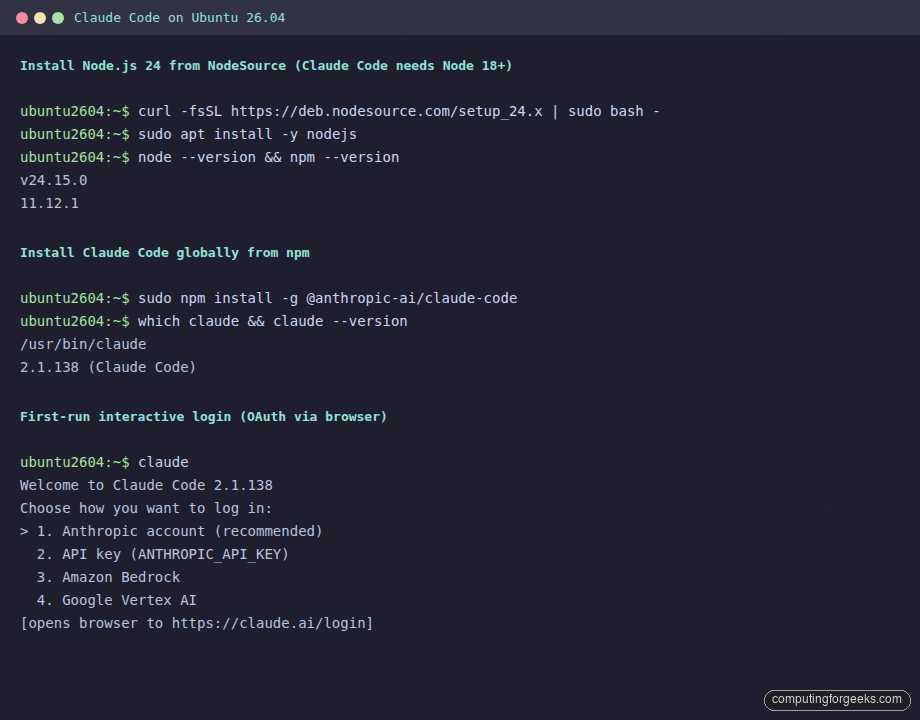
The screenshot above captures the full chain on a fresh 26.04 box: NodeSource bootstrap, apt install, npm global install, and the claude --version probe. From this point forward the CLI is callable as claude from any directory.
Step 3: Pick an auth path
Claude Code accepts four auth backends. Pick the one that matches your billing arrangement:
| Backend | Best for | Setup |
|---|---|---|
| Anthropic account (OAuth) | Pro / Max / Team subscribers, individuals | Browser flow on first claude launch |
| API key | Console.anthropic.com pay-per-token, CI runners | ANTHROPIC_API_KEY env var |
| Amazon Bedrock | AWS-hosted Claude billing | CLAUDE_CODE_USE_BEDROCK=1 + AWS creds |
| Google Vertex AI | GCP-hosted Claude billing | CLAUDE_CODE_USE_VERTEX=1 + ADC |
Path A: OAuth login (Anthropic account)
Run the CLI in any directory. The first launch opens an interactive setup that asks for an auth backend; pick option 1 (Anthropic account). The CLI prints a URL plus a one-time code:
claudeOpen the URL in any browser, sign in to your Anthropic account, paste the code into the CLI when it prompts, and the CLI writes a refresh token to ~/.claude/credentials.json. From the next launch onwards there is no prompt; the CLI uses the stored refresh token automatically.
Path B: API key (best for servers)
For headless servers, CI runners, and anything that should not pop a browser, generate an API key at console.anthropic.com/settings/keys and export it:
echo 'export ANTHROPIC_API_KEY="your-anthropic-api-key-here"' >> ~/.bashrc
source ~/.bashrc
claude --print "say hello in one sentence"
The --print flag (alias -p) runs the CLI non-interactively and dumps the model’s reply to stdout. Useful for confirming auth works and as the building block for shell scripting Claude into pipelines.
Step 4: First interactive session
The interactive REPL is where Claude Code is most useful. Open it inside a project directory:
cd ~/projects/my-app
claude
The CLI prints the Claude Code prompt, reads any CLAUDE.md in the current directory or its parents, and waits for instructions. A first useful turn:
> What does this repo do? Walk me through the main entry points.Claude reads your README, package.json (or pyproject.toml, Cargo.toml, etc.), and the file tree, then answers in your terminal. From here you can ask it to write features, fix bugs, run commands, and edit files. Every change goes through a permission prompt the first time you use a new tool category.
Type /help at the prompt to see the slash commands (skills, plugins, sessions). Type /model to swap between Opus 4.7 (default for hardest reasoning) and Sonnet 4.6 (faster, cheaper). Press Ctrl+C twice to exit.
Step 5: settings.json and CLAUDE.md
Two files turn Claude Code from a chat UI into a configurable agent. ~/.claude/settings.json holds global preferences (default model, hooks, MCP servers). CLAUDE.md holds project-specific instructions and lives at any level of your repo:
mkdir -p ~/.claude
cat > ~/.claude/settings.json <<'EOF'
{
  "model": "claude-opus-4-7",
  "permissions": {
    "allow": [
      "Bash(git:*)",
      "Bash(npm:*)",
      "Bash(pytest:*)",
      "Read",
      "Edit",
      "Write"
    ],
    "deny": [
      "Bash(rm -rf:*)"
    ]
  }
}
EOF
chmod 600 ~/.claude/settings.json
The permissions block is the safety net. allow lists tool patterns that skip the permission prompt; deny lists patterns the agent will refuse even if you approve them at runtime. Lock the file at mode 600 because it can hold tokens for hooks and MCP servers.
Drop a CLAUDE.md at the root of any project to give Claude project-specific instructions:
cat > CLAUDE.md <<'EOF'
# Project context

Stack: FastAPI + Postgres + Redis behind Caddy.
Run tests with `pytest -x`. Lint with `ruff check .`.
Keep changes under 200 lines per PR. Prefer dataclasses over dicts.
EOF
Claude reads this file on session start, follows the conventions, and keeps the rules in context across multi-turn work. The companion Claude Code cheat sheet covers the full slash-command and flag surface, and the routines guide explains how to wire scheduled agent runs.
Step 6: Add an MCP server
MCP (Model Context Protocol) servers let Claude pull live data from your stack: read a database, hit an API, browse a Notion workspace. Anthropic and the community ship dozens; the install pattern is the same for all of them. The filesystem MCP server is the simplest example. Wire it via claude mcp add:
claude mcp add filesystem \
  --command "npx" \
  --args "-y,@modelcontextprotocol/server-filesystem,$HOME/projects"
claude mcp list
The next interactive session knows how to read and search any file under ~/projects through the MCP filesystem tool. To remove it later: claude mcp remove filesystem.
For a real production wire-up, swap the filesystem example for the Postgres MCP, GitHub MCP, or your own. The Claude Code in GitHub Actions guide shows the same pattern in CI; the Kubernetes integration wires Claude into kubectl on a cluster.
Step 7: Useful command flags
The CLI surface is large. The flags worth knowing on day one:
| Flag | What it does |
|---|---|
-p, --print | Non-interactive: print Claude’s reply and exit |
-c, --continue | Resume the most recent conversation in this directory |
--add-dir DIR | Allow tool access to additional directories |
--model claude-sonnet-4-6 | Override the default model for this session |
--dangerously-skip-permissions | Skip every permission prompt; sandbox-only |
--mcp-config PATH | Load an extra MCP server config |
-d, --debug api,hooks | Verbose debug to stderr, filter by category |
--bare | Skip auto-memory, hooks, plugins (CI-friendly) |
Combine them. A nightly cron that asks Claude to scan a repo and open a PR:
cd ~/projects/site && \
  claude --bare --model claude-sonnet-4-6 \
         --print "review the diff in the last 7 days and write a CHANGELOG entry"
Common errors and what they mean
Error: EACCES: permission denied, mkdir '/usr/lib/node_modules/...'
You ran npm install -g without sudo. The fix is either to use sudo (the route this guide takes) or to set up an unprivileged npm prefix:
mkdir -p ~/.npm-global
npm config set prefix ~/.npm-global
echo 'export PATH=~/.npm-global/bin:$PATH' >> ~/.bashrc
source ~/.bashrc
npm install -g @anthropic-ai/claude-code
Error: Authentication failed: invalid_grant
The OAuth refresh token expired or got rotated. Force a fresh login: claude /logout from the REPL, then claude to redo the OAuth flow. If you are on the API-key path, double-check echo $ANTHROPIC_API_KEY | head -c 20 matches the prefix in the console.
Error: MCP server failed to start
The npx command in the MCP definition could not resolve the package. Run the same npx invocation in your shell to see the underlying error; usually a missing Node version or a typo in the args list. Re-add with claude mcp remove NAME followed by claude mcp add.
Error: Tool 'Bash' is not allowed
The settings.json permissions block did not include the command pattern Claude is trying to run. Add a more specific pattern (such as Bash(git status:*)) or a broader one (Bash(git:*)) and reload by exiting and re-entering the REPL.
Update and uninstall
Update to the current release with the same npm command:
sudo npm install -g @anthropic-ai/claude-code@latest
claude --version
Pin a specific build instead of latest by appending @2.1.138 (or whichever release you tested against). Clean uninstall:
sudo npm uninstall -g @anthropic-ai/claude-code
rm -rf ~/.claude
unset ANTHROPIC_API_KEY
The Node 24 install stays in place and can be removed separately with sudo apt remove --purge nodejs if you no longer need it.
For a deeper look at the Claude family of models, the Claude Opus 4.7 release notes cover the model behind the default. The token-reduction guide shows the patterns that cut your monthly Claude bill in half. Pair this install with the Node.js install reference for runtime details and the Ansible install if you plan to wrap Claude Code around configuration management.
That is the full path: Node 24 in place, Claude Code 2.1.138 globally installed, OAuth or API-key auth wired, settings.json with sane permissions, project-specific CLAUDE.md, and an MCP server attached. From here, every Claude session knows about your stack, your conventions, and the data sources you have chosen to expose.