The browser tab is optional. Pull requests, issues, releases, CI runs, secrets, and even artifact signature checks all work from the terminal with gh, and most of them are faster there. This GitHub CLI cheat sheet covers the commands that do real work: the everyday lifecycle, the GitHub Actions controls, the gh api scripting layer, and the newer subcommands most references skip entirely.
Every command here was run for real in July 2026 with gh 2.86.0 (the newer subcommands re-checked on 2.96.0), against a live lab repository (c4geeks/gh-lab-app) built for this guide: real pull requests, a deliberately broken CI run, real secrets consumed by a real workflow. The output blocks are pasted from those sessions, including the errors. If you still need gh itself, the GitHub CLI install guide covers every OS; the short version is below.
Install and authenticate
One command per platform:
brew install ghOn Debian and Ubuntu, GitHub publishes a single apt repository that is not tied to a release codename, so the same lines work on every current version:
sudo mkdir -p -m 755 /etc/apt/keyrings
wget -qO- https://cli.github.com/packages/githubcli-archive-keyring.gpg | sudo tee /etc/apt/keyrings/githubcli-archive-keyring.gpg > /dev/null
sudo chmod go+r /etc/apt/keyrings/githubcli-archive-keyring.gpg
echo "deb [arch=$(dpkg --print-architecture) signed-by=/etc/apt/keyrings/githubcli-archive-keyring.gpg] https://cli.github.com/packages stable main" | sudo tee /etc/apt/sources.list.d/github-cli.list > /dev/null
sudo apt update && sudo apt install gh -y
RHEL, Rocky, and Fedora use sudo dnf install gh after adding the repo from the same page. Then log in once:
gh auth loginThe interactive flow offers a browser device code or a pasted token. For automation, feed a token on stdin instead:
gh auth login --with-token < token.txtgh keeps multiple accounts side by side, which matters the moment you split personal and work identities. gh auth status shows every stored login and masks the tokens:
gh auth statusTwo accounts on this machine, one active:
github.com
  ✓ Logged in to github.com account c4geeks (keyring)
  - Active account: true
  - Git operations protocol: ssh
  - Token: ghp_************
  - Token scopes: 'admin:org', 'codespace', 'copilot', 'delete_repo', 'gist', 'notifications', 'project', 'repo', 'user', 'workflow'

  ✓ Logged in to github.com account jmutai (keyring)
  - Active account: false
  - Git operations protocol: ssh
  - Token: gho_************
  - Token scopes: 'gist', 'read:org', 'repo'
Switching is instant and affects every later command:
gh auth switch --user c4geeksThree auth behaviors worth knowing cold, because all three bit during testing:
- A
GH_TOKENorGITHUB_TOKENenvironment variable silently overrides the active keyring account. Ifghacts as the wrong user in a script or CI job, check the environment first. gh auth tokenprints the active account’s token, which is the clean way to hand credentials to other tools (export GH_TOKEN=$(gh auth token)) without pasting secrets into files. Tools like Flux bootstrap consume it directly.- Fine-grained and classic tokens differ in what they unlock. The newer
gh agent-taskcommand refused a classic personal access token outright during testing and demanded the OAuth login flow.
Rounding out account plumbing: gh auth logout --user NAME removes a stored account, and gh auth refresh -s delete_repo --hostname github.com re-runs the device code flow to add scopes (--remove-scopes drops them). The refresh works even when the original login used a pasted token; it hands you a one-time code and replaces the stored credential once you finish the browser flow. The tool’s own settings live under gh config: gh config list prints everything (git protocol, editor, pager, browser), and gh config set git_protocol https changes a default without touching any file by hand.
Repositories
The commands you will actually type:
| Command | What it does |
|---|---|
gh repo create NAME --public --source . --push | Create on GitHub from the current directory and push |
gh repo clone OWNER/REPO | Clone with the origin remote wired for gh |
gh repo fork OWNER/REPO --clone | Fork to your account, optionally clone with upstream remote set |
gh repo view --json name,visibility,defaultBranchRef | Repo metadata as JSON |
gh repo list OWNER --limit 20 | List an owner’s repositories |
gh repo edit --add-topic TOPIC --description "..." | Change metadata without the settings page |
gh repo rename NEW-NAME | Rename, remote URL updates automatically |
gh repo sync | Pull the remote default branch into the local clone; gh repo sync OWNER/FORK updates a fork from its parent |
gh repo set-default OWNER/REPO | Pin which repo gh targets from this directory (forks make it ambiguous) |
gh repo delete OWNER/REPO --yes | Delete (token needs the delete_repo scope) |
Creating a repository straight from a local project is the fastest path from code to remote:
gh repo create c4geeks/gh-lab-app --public --source . --push --description "Lab app for the GitHub CLI cheat sheet"It prints the new URL and pushes the current branch:
https://github.com/c4geeks/gh-lab-appOne gotcha from the real session: if your default SSH key belongs to a different GitHub account than the one gh is using, the repo creation succeeds but the push dies with a permission error. Either load the right key or flip the repo to HTTPS and let gh supply credentials (gh auth setup-git wires that up globally).
Forking uses someone else’s repo as the source and lands a copy under your account:
gh repo fork octocat/Spoon-Knife --clone=falseThe fork URL comes back on stdout:
https://github.com/c4geeks/Spoon-Knifegh browse deserves more credit than it gets. With -n it prints the URL instead of opening a browser, which turns it into a link generator for chat and docs:
gh browse 5 -nIssue 5’s URL, no browser launched:
https://github.com/c4geeks/gh-lab-app/issues/5Pipe that into your clipboard tool and you have a permalink generator. The inverse habit works across the whole CLI: almost every view and list command accepts --web (gh pr view 3 --web, gh issue list --web, gh repo view --web) when a page beats a terminal render, so you rarely need to construct a GitHub URL by hand in either direction.
Issues
| Command | What it does |
|---|---|
gh issue create --title "..." --body "..." --label bug --assignee @me | Create with labels and assignee in one shot |
gh issue list --label bug --state all | Filter by label, state, assignee, author |
gh issue view 1 --comments | Read an issue and its thread |
gh issue comment 1 --body "..." | Reply from the terminal |
gh issue edit 1 --add-label X --remove-label Y | Retriage without the web UI |
gh issue develop 1 --checkout | Create a linked branch for the issue and switch to it |
gh issue close 1 / gh issue reopen 1 | State changes |
gh issue status | Your assigned, mentioned, and opened issues |
Filing a complete issue is one line:
gh issue create --title 'greet() crashes on empty string input' --body 'Calling greet("") returns hello, instead of falling back to the default.' --label bug --assignee @meGitHub answers with the new issue URL:
Creating issue in c4geeks/gh-lab-app

https://github.com/c4geeks/gh-lab-app/issues/1
The underrated one is gh issue develop. It creates a branch on the remote, names it after the issue, links the two so the issue closes when the branch’s PR merges, and checks it out locally:
gh issue develop 5 --checkoutYou land on the new branch immediately:
github.com/c4geeks/gh-lab-app/tree/5-track-node-24-runner-migration
 * [new branch]      5-track-node-24-runner-migration -> origin/5-track-node-24-runner-migration
Push commits, open the PR, and the issue tracks the whole thing without a manual link.
Pull requests
This is where gh pays for itself daily.
| Command | What it does |
|---|---|
gh pr create --fill | PR with title and body taken from your commits |
gh pr create --draft then gh pr ready | Draft first, flip when CI is green |
gh pr list / gh pr status | Open PRs; yours, for review, on this branch |
gh pr view 3 | Summary, labels, checks state |
gh pr diff 3 --name-only | Changed files (there is no --stat flag) |
gh pr checkout 3 | Fetch and switch to the PR’s branch locally |
gh pr checks 3 --watch | Live CI status for the PR |
gh pr comment 3 --body "..." | Comment on the thread without filing a review |
gh pr edit 3 --title "..." --add-label X | Retitle and relabel after the fact |
gh pr close 3 --comment "..." / gh pr reopen 3 | Close with a parting note, reopen when it is back on |
gh pr review 3 --approve --body "..." | Approve, comment, or request changes |
gh pr merge 3 --squash --delete-branch | Merge and clean both branches |
gh pr merge 3 --auto --squash | Auto merge when required checks pass |
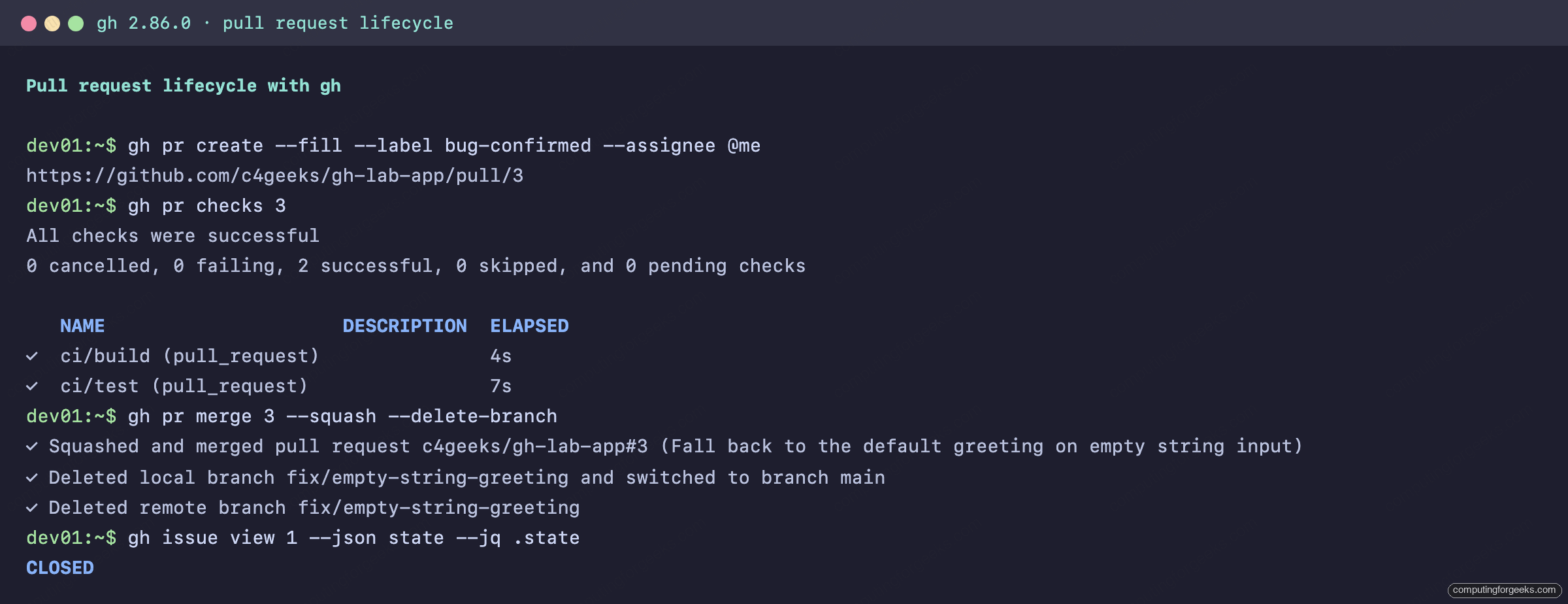
--fill builds the PR from your commit messages, so a well written commit becomes a well written PR for free:
gh pr create --fill --label bug-confirmed --assignee @meStraight back with the PR URL:
https://github.com/c4geeks/gh-lab-app/pull/3The whole flow end to end, from a real session: create from commits, checks green, squash merge, linked issue closed.
Reviewing someone else’s PR without touching your working branch is a two step habit. From any clone:
gh pr checkout 7
gh pr diff
The checkout tracks the contributor’s branch, and the diff renders in your pager:
Switched to a new branch '5-track-node-24-runner-migration'
branch '5-track-node-24-runner-migration' set up to track 'origin/5-track-node-24-runner-migration'.
One error you will hit sooner or later, captured verbatim from the lab:
gh pr review 3 --approve --body "LGTM, default now covers empty input."GitHub refuses, by design:
failed to create review: GraphQL: Review Can not approve your own pull request (addPullRequestReview)You cannot approve your own PR from the CLI any more than from the web. On solo repos, merge without a review or relax the ruleset instead. Merging with cleanup is the flag combination worth memorizing:
gh pr merge 3 --squash --delete-branchIt squashes, deletes the remote branch, deletes the local branch, and returns you to an updated main:
✓ Squashed and merged pull request c4geeks/gh-lab-app#3 (Fall back to the default greeting on empty string input)
✓ Deleted local branch fix/empty-string-greeting and switched to branch main
✓ Deleted remote branch fix/empty-string-greeting
Because the PR body said Fixes #1, issue 1 closed itself on merge. Title, body, labels, linked issues, merge, and cleanup: the whole lifecycle without leaving the shell.
GitHub Actions
CI control from the terminal is the single strongest reason to learn gh, and it goes far deeper than gh workflow list.
| Command | What it does |
|---|---|
gh workflow list | Workflows and their state |
gh workflow view ci | One workflow’s recent runs and ID; --yaml prints the file |
gh workflow disable ci / gh workflow enable ci | Pause and resume a workflow without touching the YAML (disabled ones hide from list unless you add --all) |
gh workflow run deploy -f key=value | Trigger a workflow_dispatch with typed inputs |
gh run list --workflow=ci --limit 5 | Recent runs for one workflow |
gh run watch RUN_ID --exit-status | Follow a run live; exit code mirrors the run |
gh run view RUN_ID | Jobs, annotations, artifacts for a run |
gh run view RUN_ID --log-failed | Logs from failed steps only |
gh run rerun RUN_ID --failed | Re-run only the failed jobs |
gh run cancel RUN_ID | Stop an in-progress run (queued or running only) |
gh run download RUN_ID --name ARTIFACT | Pull a build artifact locally |
gh cache list / gh cache delete KEY | Inspect and evict Actions caches |
Dispatch a workflow with typed inputs exactly as the web form would:
gh workflow run deploy -f environment=staging -f dry_run=trueThe event is accepted immediately:
✓ Created workflow_dispatch event for deploy.yml at main

To see runs for this workflow, try: gh run list --workflow="deploy.yml"
Now the part every team needs on a bad day: a red X on a PR. The lab CI failed on purpose (a missing pair of parentheses shipped a function reference instead of a string), and the debugging flow looks like this. First, which run failed:
gh run list --workflow=ci --limit 3The X marks the culprit and gives you its ID:
STATUS  TITLE                    WORKFLOW  BRANCH                EVENT         ID           ELAPSED  AGE
X       Add shout() to upper...  ci        feat/shout-flag       pull_request  29412433670  9s       about 1 minute ago
✓       Fall back to the def...  ci        main                  push          29412391269  17s      about 1 minute ago
Then skip straight to the failing step’s log. No scrolling through green jobs:
gh run view 29412433670 --log-failedThe assertion that broke the build, exactly as the runner saw it:
test	Run unit tests	not ok 4 - shout uppercases the greeting
test	Run unit tests	  location: '/home/runner/work/gh-lab-app/gh-lab-app/index.test.js:17:1'
test	Run unit tests	  error: |-
test	Run unit tests	    Expected values to be strictly equal:
test	Run unit tests	    + actual - expected
test	Run unit tests	    + [Function: toUpperCase]
test	Run unit tests	    - 'HELLO, OPS TEAM'
test	Run unit tests	  code: 'ERR_ASSERTION'
The full debugging round trip fits in one terminal:
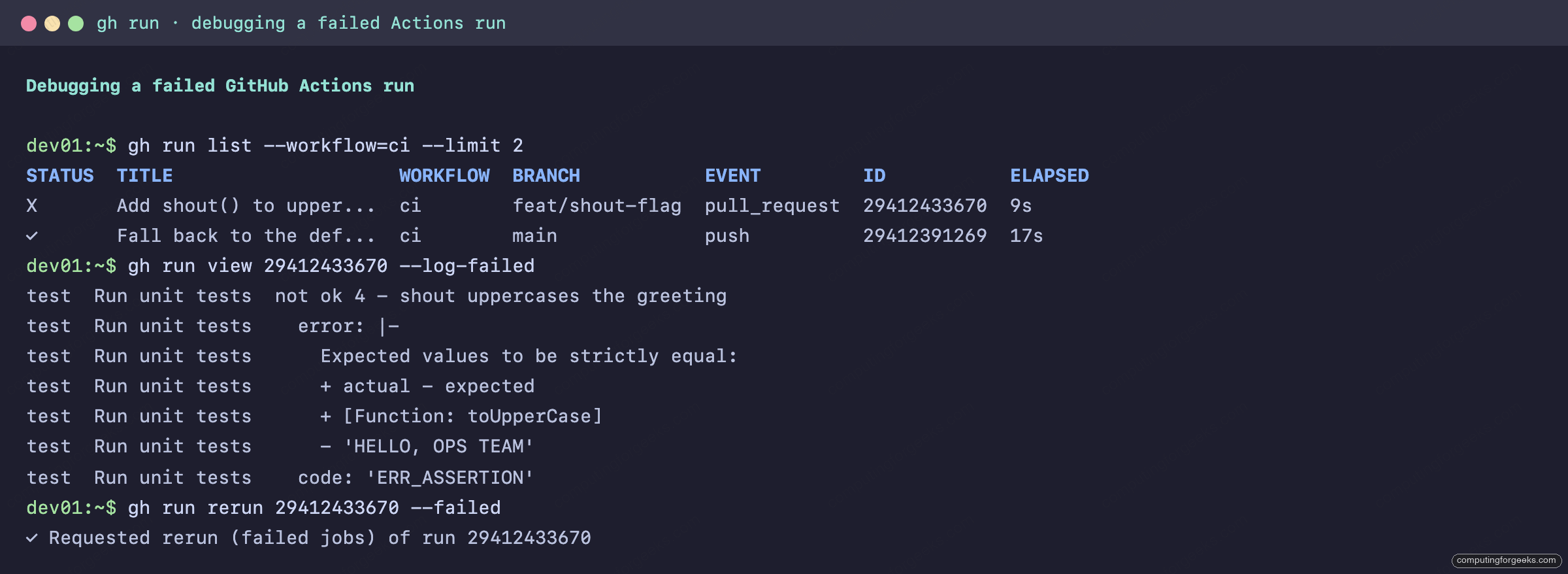
gh run rerun 29412433670 --failed re-queues only the broken jobs, which is the honest way to separate flaky from deterministic: this one failed again identically, so it was a real bug, not the runner. Push the fix, then watch the checks flip from the same terminal:
gh pr checks 4 --watchThe watch blocks until CI settles:
All checks were successful
0 cancelled, 0 failing, 2 successful, 0 skipped, and 0 pending checks

   NAME                     DESCRIPTION  ELAPSED  URL
✓  ci/build (pull_request)               3s       https://github.com/c4geeks/gh-lab-app/actions/runs/...
✓  ci/test (pull_request)                8s       https://github.com/c4geeks/gh-lab-app/actions/runs/...
Caches have their own subcommand, useful when a poisoned cache keeps feeding stale dependencies to your builds. This is also the mechanism behind portable CI pipelines that treat Actions as a dumb runner:
gh cache listEvery cache entry with its key and size:
Showing 1 of 1 cache in c4geeks/gh-lab-app

ID          KEY                                                    SIZE   CREATED                 ACCESSED
5763909845  dist-Linux-7140239b605ff42ac27a5f79673fb91296ec971...  431 B  less than a minute ago  less than a minute ago
gh cache delete --all evicts everything when you would rather rebuild than trust it.
Secrets and variables
Actions secrets and repo variables are both first class. Pipe a secret in so it never lands in shell history:
head -c 20 /dev/urandom | xxd -p | gh secret set APP_API_TOKEN
gh variable set APP_LOG_LEVEL --body "info"
Both confirm and both list cleanly. Note that secret values are write-only from this point:
✓ Set Actions secret APP_API_TOKEN for c4geeks/gh-lab-app
✓ Created variable APP_LOG_LEVEL for c4geeks/gh-lab-app
The proof it works is in the workflow log of the deploy run that consumed them:
APP_API_TOKEN is set (40 chars)
Log level from repo variable: info
Scope flags cover the other levels: --env production targets an environment, --org with --visibility selected shares a secret across chosen repos, and gh secret set --app dependabot feeds Dependabot instead of Actions. For cloud credentials specifically, prefer short-lived OIDC federation over long-lived secrets; the workload identity federation setup for GitHub Actions shows that pattern end to end on GCP.
Releases
Tag, changelog, and binary uploads in one command:
gh release create v0.1.0 gh-lab-app-0.1.0.tar.gz checksums.txt --title "v0.1.0" --generate-notes--generate-notes writes the changelog from merged PRs since the last tag, and every uploaded asset gets a SHA-256 digest on the release page:
## What's Changed

• Fall back to the default greeting on empty string input by @c4geeks in c4geeks/gh-lab-app#3
• Add shout() to uppercase the greeting by @c4geeks in c4geeks/gh-lab-app#4

Assets
NAME                     DIGEST                                                                   SIZE
checksums.txt            sha256:d1938d86bf3f684a6dc9cb18379f7436b48230406f7dfce80ed0791681028528  90 B
gh-lab-app-0.1.0.tar.gz  sha256:178f06b694349405c19da5129236f13a2325794a48c6f79fd29cf6becdfa73ee  618 B
The consumer side is just as short. --pattern filters assets by glob:
gh release download v0.1.0 --repo c4geeks/gh-lab-app --pattern '*.tar.gz'gh release list, gh release view TAG, gh release edit TAG --draft=false, and gh release delete TAG round out the lifecycle.
Script anything with gh api
When no subcommand exists for what you need, gh api talks to the REST and GraphQL APIs with your existing login. This one command replaces a pile of curl boilerplate: auth headers, JSON accept headers, pagination.
A GET with server-side filtering through the built-in --jq:
gh api repos/c4geeks/gh-lab-app --jq '{name: .name, default_branch: .default_branch, open_issues: .open_issues_count}'Clean JSON, nothing else:
{
  "default_branch": "main",
  "name": "gh-lab-app",
  "open_issues": 0
}
--paginate walks every page of a list endpoint for you. Combined with --jq and @tsv, it turns the API into shell-friendly rows:
gh api 'repos/c4geeks/gh-lab-app/issues?state=all' --paginate --jq '.[] | [.number, .state, .title] | @tsv'Issues and PRs both come back (the REST issues endpoint includes PRs):
4	closed	Add shout() to uppercase the greeting
3	closed	Fall back to the default greeting on empty string input
2	closed	Add a --shout flag to uppercase the greeting
1	closed	greet() crashes on empty string input
Writes use -f for string fields and -F for typed ones; the method is inferred as POST when fields are present, or set explicitly:
gh api repos/c4geeks/gh-lab-app/issues -f title="Track Node 24 runner migration" -f body="setup-node emits a deprecation annotation on every run." --jq .number
gh api -X PATCH repos/c4geeks/gh-lab-app/issues/5 -f state=closed --jq '{number: .number, state: .state}'
Create returns the new number, PATCH confirms the state change:
5
{"number":5,"state":"closed"}
For deeply nested payloads, -f flags run out of road. Feed a JSON body with --input instead; a file path or - for stdin both work. GraphQL gets its own endpoint with variables passed the same way:
gh api graphql -f query='query($owner: String!, $name: String!) { repository(owner: $owner, name: $name) { nameWithOwner stargazerCount pullRequests(states: MERGED) { totalCount } } }' -f owner=c4geeks -f name=gh-lab-app --jq .data.repositoryOne round trip, three answers:
{"nameWithOwner":"c4geeks/gh-lab-app","pullRequests":{"totalCount":2},"stargazerCount":0}Before writing a loop that hammers the API, check your budget. gh api rate_limit --jq .rate printed 4,946 of 5,000 requests remaining during this session, so the whole lab cost 54 calls.
Search
gh search covers repositories, code, issues, PRs, and commits, with the same qualifiers the web search accepts:
gh search repos monitoring --language=go --stars=">30000" --limit 5Star-filtered and ranked:
Showing 3 of 3 repositories

NAME                   DESCRIPTION                                                      VISIBILITY  UPDATED
prometheus/prometheus  The Prometheus monitoring system and time series database.       public      about 4 minutes ago
glanceapp/glance       A self-hosted dashboard that puts all your feeds in one place    public      about 27 minutes ago
netdata/netdata        The fastest path to AI-powered full stack observability, eve...  public      about 40 minutes ago
Issue and code search follow the same shape:
gh search issues --repo cli/cli --label bug --state open --limit 3
gh search code "GH_FORCE_TTY" --repo cli/cli --limit 3
Two honest caveats from testing. Code search only covers repositories GitHub has indexed, and a repository created minutes ago returns nothing even for exact matches; give new repos time. And an empty result often means your qualifiers are wrong rather than the data missing: searching PRs in cli/cli for --label bug returns zero because that project labels issues, not pull requests.
Rulesets and attestation
Two governance subcommands that almost no reference covers. Rulesets are the successor to classic branch protection, and gh reads them directly:
gh ruleset check mainEvery rule that would apply to a push on main, with its source:
3 rules apply to branch main in repo c4geeks/gh-lab-app

- deletion
  (configured in ruleset 18991680 from repository c4geeks/gh-lab-app)

- non_fast_forward
  (configured in ruleset 18991680 from repository c4geeks/gh-lab-app)

- pull_request: [allowed_merge_methods: [squash merge]] [dismiss_stale_reviews_on_push: true] [required_approving_review_count: 0]
  (configured in ruleset 18991680 from repository c4geeks/gh-lab-app)
Creating a ruleset has no dedicated subcommand yet, which makes it a perfect gh api --input job: write the JSON body to a file and POST it to repos/OWNER/REPO/rulesets. That exact call created the ruleset above.
gh attestation verify checks build provenance on artifacts, the supply chain question everyone is suddenly required to answer. Verifying the GitHub CLI’s own Linux tarball against its source repo:
gh attestation verify gh_2.86.0_linux_amd64.tar.gz --repo cli/cliThe verdict names the exact workflow that built the file:
Loaded digest sha256:f3b08bd6a28420cc2229b0a1a687fa25f2b838d3f04b297414c1041ca68103c7 for file://gh_2.86.0_linux_amd64.tar.gz
Loaded 1 attestation from GitHub API

✓ Verification succeeded!

- Attestation #1
  - Build repo:..... cli/cli
  - Build workflow:. .github/workflows/deployment.yml@refs/heads/trunk
If a vendor publishes attestations, this one command proves a binary came from the repo and workflow it claims, before you run it on anything that matters.
Projects, orgs, and gists
Projects v2 boards are scriptable, which turns sprint hygiene into shell loops:
gh project create --owner c4geeks --title "gh-lab roadmap"
gh project item-add 1 --owner c4geeks --url https://github.com/c4geeks/gh-lab-app/issues/5
gh project item-list 1 --owner c4geeks
The board fills without a single drag and drop:
TYPE   TITLE                           NUMBER  REPOSITORY          ID
Issue  Track Node 24 runner migration  5       c4geeks/gh-lab-app  PVTI_lAHOEHPrsc4Bdeifzgy62Y8
One quirk observed live: item-add confirms instantly but item-list can lag a few seconds behind it. gh org list shows your memberships, and gists handle the snippets that do not deserve a repo:
gh gist create checksums.txt --desc "gh-lab-app release checksums"Secret by default, public with --public:
✓ Created secret gist checksums.txt
https://gist.github.com/c4geeks/167d939891be518aa372508a2bbdb19d
gh gist view ID, gh gist edit ID, and gh gist delete ID manage them afterwards.
Aliases
Two flavors. Plain aliases expand into gh subcommands; shell aliases (prefixed !) run anything:
gh alias set bugs 'issue list --label bug'
gh alias set watchci '!gh run watch $(gh run list --limit 1 --json databaseId --jq ".[0].databaseId")' --shell
The second one is the alias worth stealing: gh watchci attaches to whatever run started most recently, no ID hunting. Aliases also accept extra flags at call time, appended to the expansion:
gh bugs --state allThe alias expands to issue list --label bug and your --state all rides along:
Showing 1 of 1 issue in c4geeks/gh-lab-app that matches your search

ID  TITLE                                  LABELS              UPDATED
#1  greet() crashes on empty string input  bug, bug-confirmed  about 9 minutes ago
gh alias delete NAME removes one, and gh alias list audits what you have accumulated.
Extensions
Extensions are repos named gh-* that plug in as subcommands. Discovery, install, and management are built in:
gh extension search dash --limit 3
gh extension install dlvhdr/gh-dash
gh extension list
Installed extensions appear beside native commands:
NAME     REPO               VERSION
gh dash  dlvhdr/gh-dash     v4.25.2
gh poi   seachicken/gh-poi  v0.18.1
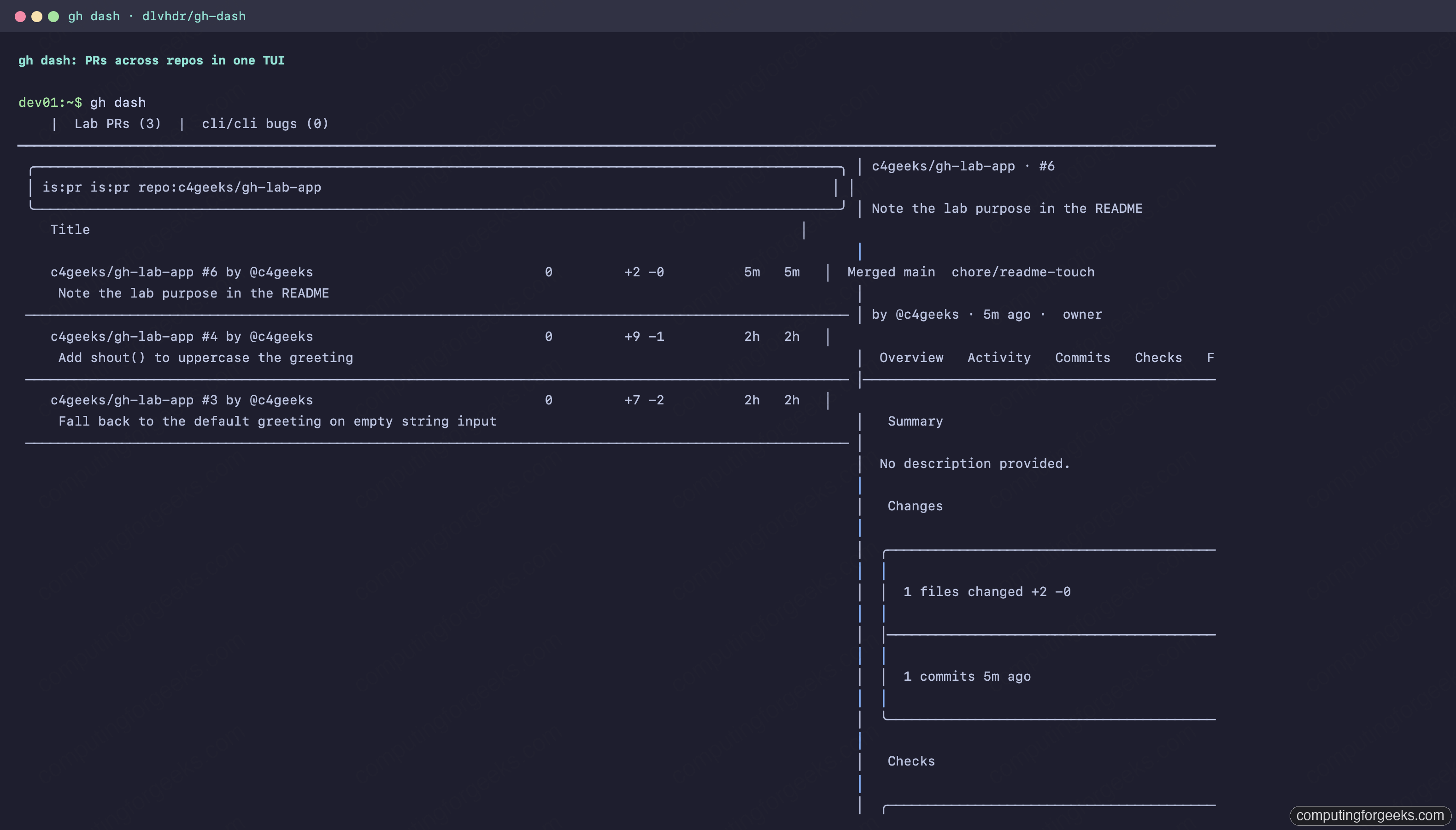
gh dash is the one to try first: a terminal dashboard of PRs and issues across any repos you configure, with checks, diffs, and actions bound to single keys.
Here it is pointed at the lab repo, with the PR list on the left and the selected PR’s detail pane on the right:
gh poi earns its slot the first week you use it. It finds local branches whose PRs already merged and deletes them, with a dry run mode:
gh poi --dry-runIt matched a stale local branch to its merged PR and marked it deletable:
== DRY RUN ==
✔ Fetching pull requests...

Deleted branches
  chore/readme-touch
    └─ #6  https://github.com/c4geeks/gh-lab-app/pull/6 c4geeks

Branches not deleted
* main
Treat extensions like any third party code: they run with your credentials, so read the repo before installing. gh extension upgrade --all keeps them current and gh extension remove NAME uninstalls.
The newer commands, honestly
Recent gh releases added several commands most cheat sheets have never heard of. Tested state on 2.86.0 and re-checked on a 2.96.0 binary, no marketing:
| Command | Tested behavior |
|---|---|
gh copilot | On 2.86.0 it printed “Copilot CLI not installed”; from the 2.9x line gh wraps the standalone GitHub Copilot CLI, running it from PATH or auto-downloading it (preview), and it needs an active Copilot subscription. The old github/gh-copilot extension was deprecated in October 2025, so skip it |
gh agent-task | Manages Copilot coding agent tasks; on both tested versions it refused a personal access token and demanded the browser OAuth login (this command requires an OAuth token) |
gh preview | Gateway for experimental commands; its own help calls them “for testing, demonstrative, and development purposes only” and unstable |
gh skill | Absent in 2.86.0, present from the 2.90 line; on 2.96.0 gh skill list showed the agent skills installed on this machine and the command installs new ones from GitHub repos (preview) |
gh codespace | Full lifecycle (create, ssh, ports, cp), subject to your account’s Codespaces quota and policy; gh codespace list returned no codespaces found on a free account rather than an error |
gh status | Cross-repo view of your assigned issues, review requests, and mentions; works everywhere |
The pattern to remember: when a new AI-era subcommand misbehaves, check the auth type first. The classic token that drives everything else in this article was not enough for gh agent-task.
The one-page reference
The commands this guide ran, condensed. Same table as the PDF above.
| Task | Command |
|---|---|
| Log in / switch account | gh auth login · gh auth switch --user NAME |
| Token for scripts | export GH_TOKEN=$(gh auth token) |
| New repo from local dir | gh repo create OWNER/NAME --public --source . --push |
| Clone / fork | gh repo clone OWNER/REPO · gh repo fork OWNER/REPO --clone |
| File an issue | gh issue create --title "..." --label bug --assignee @me |
| Branch from an issue | gh issue develop N --checkout |
| PR from commits | gh pr create --fill |
| Review someone’s PR | gh pr checkout N · gh pr diff N · gh pr review N --approve |
| Merge and clean up | gh pr merge N --squash --delete-branch |
| Trigger a workflow | gh workflow run NAME -f key=value |
| Debug a red build | gh run list · gh run view ID --log-failed · gh run rerun ID --failed |
| Watch CI live | gh pr checks N --watch · gh run watch ID --exit-status |
| Set a secret / variable | gh secret set NAME · gh variable set NAME --body VALUE |
| Ship a release | gh release create vX.Y.Z FILES --generate-notes |
| Raw API + jq | gh api PATH --paginate --jq 'FILTER' |
| GraphQL | gh api graphql -f query='...' -f var=value |
| Search anything | gh search repos|code|issues|prs QUERY --limit N |
| Verify artifact provenance | gh attestation verify FILE --repo OWNER/REPO |
| Which rules guard a branch | gh ruleset check BRANCH |
| Print URL, skip browser | gh browse -n |
| Prune merged local branches | gh poi (extension) |
| Shortcut anything | gh alias set NAME 'EXPANSION' |
That’s the whole toolbox. If you live in other CLIs too, the Codex CLI and Gemini CLI references follow the same tested format, and the official gh manual documents every flag this page had no room for.