So you have ParrotOS installed and you want to actually use it for security work. Good news: most of the hard setup is already done for you. ParrotOS ships with the same penetration testing toolkit as Kali, so the tools you read about in every hacking tutorial are already on the machine, no extra installs needed. What is usually missing is a sense of where to start and how the pieces fit together.
This is a starting map for penetration testing on ParrotOS, not a single tool tutorial. We will look at what comes preinstalled, run a real first scan to prove the toolkit works, then walk the main categories of tools by the phase of an assessment they belong to, linking out to the full step-by-step guide for each one.
Everything below was run on a real ParrotOS 7.3 install in June 2026, including the Nmap scan output.
The toolkit is already installed
The Security Edition of ParrotOS bundles hundreds of preinstalled tools covering reconnaissance, scanning, exploitation, password attacks, wireless, web, and forensics. They are grouped in the application menu by category, which is the fastest way to discover what is available when you do not yet know the name of the tool you need. If you have not installed the system yet, the step-by-step ParrotOS install guide gets you to this point.
Because the toolkit overlaps almost completely with Kali, the existing Kali tool guides on this site apply directly to ParrotOS. The commands, flags, and workflows are identical; only the wallpaper changes. That is what the rest of this article links into.
Rule zero: only touch systems you are allowed to
This matters more than any tool. Scanning, probing, or exploiting a system you do not own or have written permission to test is illegal in most countries, full stop. There is no grey area for “I was just curious.” Before you run anything against a real host, you need a target that is yours.
The clean way to get one is an isolated lab. Stand up a couple of deliberately vulnerable virtual machines on a network that cannot reach the internet, and attack those. The isolated pentest lab on Proxmox walkthrough builds exactly that, and you can drop a DVWA target into it for web-application practice. Everything you learn applies the same whether the box you are hitting is in your lab or a real client engagement; only the authorization changes.
Run your first scan with Nmap
Reconnaissance comes first in every assessment, and Nmap is the tool you will reach for most. The Nmap project runs a host called scanme.nmap.org specifically so people can practice scanning against something they are allowed to hit. ParrotOS ships a recent Nmap, so confirm the version first:
nmap --versionThen run a fast scan of the top ports against the sanctioned target:
nmap -Pn -F scanme.nmap.orgThe -Pn flag skips the ping check (useful when a host drops ICMP) and -F limits the scan to the 100 most common ports so it finishes quickly. On the test run it came back in well under ten seconds with the open and filtered ports laid out:
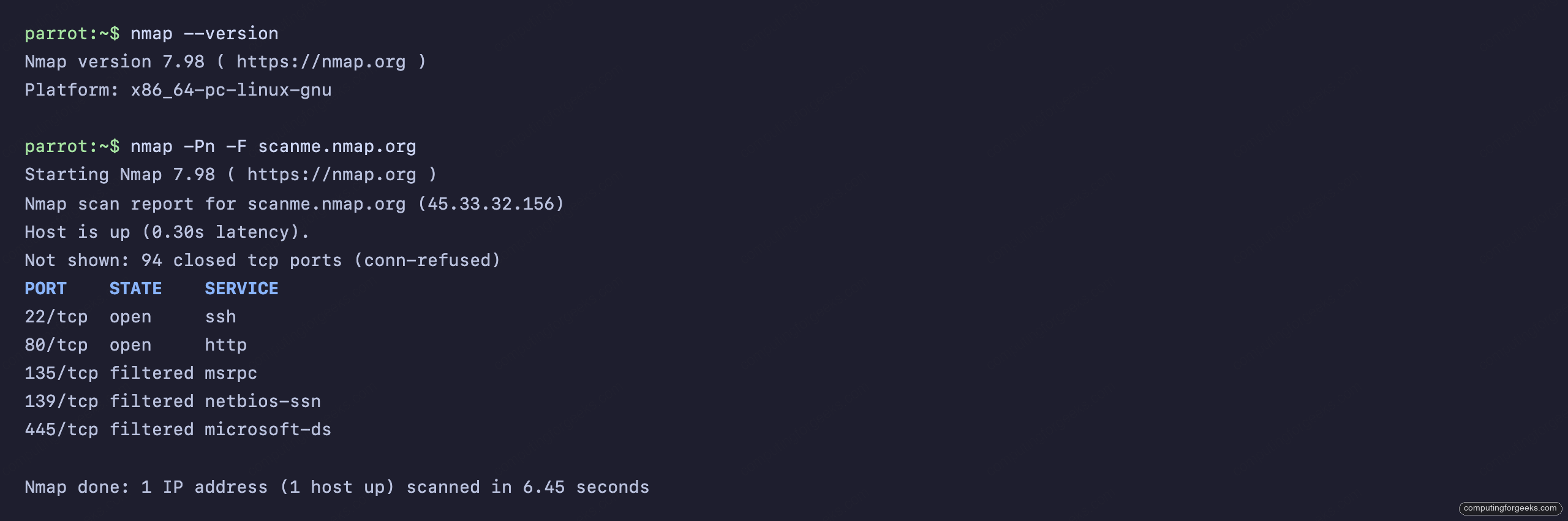
Port 22 open for SSH and port 80 open for HTTP, with a few Windows ports filtered by a firewall upstream. That is reconnaissance in a nutshell: find what is listening, then decide what is worth a closer look. The full Nmap scanning guide covers service and version detection, OS fingerprinting, and the scripting engine.
The toolkit by phase of an assessment
An assessment moves through rough phases, and the tools line up with them. Knowing which phase you are in tells you which tool to grab. Here is the map, with the full guide for each.
Scanning and recon. After Nmap maps the attack surface, you start poking at the services it found. For a web server that means a vulnerability scan and content discovery before anything else.
Web applications. This is where a lot of real findings live. Burp Suite is the proxy you run everything through to inspect and tamper with requests. For WordPress specifically, WPScan enumerates plugins and users, and when you suspect a database is reachable through the app, sqlmap automates SQL injection testing.
Exploitation. Once you have found a weakness, the Metasploit Framework is the workhorse for turning it into access. It ships with ParrotOS and carries thousands of exploit and payload modules.
Passwords and access. Captured a hash or hit a login form? Hashcat and John the Ripper crack hashes offline, while Hydra handles online brute-force against live services. After you land on a box, the Linux privilege escalation guide covers turning a low-privilege foothold into root.
Stay anonymous while you work
One thing ParrotOS gives you that a plain Kali install does not is anonsurf, a tool that pushes all system traffic through Tor with a single command. It is not a substitute for authorization, and it is overkill for lab work, but for legitimate research where you do not want your source address logged everywhere, it is genuinely handy. Start it with sudo anonsurf start and check your state with sudo anonsurf status. Run it from the desktop, not a remote SSH session, because it will reroute and drop your connection the moment it starts.
Put together, the flow is always the same shape: get permission or use your lab, map the target with Nmap, dig into the services you find with the web and exploitation tools, escalate, and document everything as you go. ParrotOS hands you every tool on that list preinstalled. Pick a target you are allowed to break, start with a scan, and follow the guides above one phase at a time.



![Install Kali Linux 2026.1 Step by Step [Full Guide]](https://computingforgeeks.com/wp-content/uploads/2026/03/install-kali-linux-20261-step-by-step-768x403.png "Install Kali Linux 2026.1 Step by Step [Full Guide] 4")