

This guide shows how to install RethinkDB on Ubuntu 24.04 LTS and Debian 13 from the official apt repository, then configures a real instance, fronts the admin console with Nginx and Let’s Encrypt, and exercises the Python and Node.js drivers end-to-end. Every command was run fresh on an Ubuntu 24.04 OpenStack VM for this 2026 refresh. The same steps work unchanged on Ubuntu 22.04 LTS, Debian 12 (Bookworm), and Debian 13 (Trixie) because the repo publishes per-codename packages for all four.
If you have never touched it: RethinkDB is an open-source NoSQL JSON document database whose claim to fame is server-pushed changefeeds. You subscribe to a query, and the database streams live updates whenever matching rows change. That’s exactly the feature that makes it worth keeping around in 2026 even with all the other document stores in the market. We’ll exercise it in the Node.js driver step below.
Tested April 2026 on Ubuntu 24.04 LTS (kernel 6.8) with RethinkDB 2.4.4 from the official apt repo. Repo also publishes 2.4.5 for the newer codenames (plucky, trixie) and 2.4.4 for noble, jammy, bookworm.
A note on project health before you commit: RethinkDB joined the Linux Foundation, relicensed under Apache 2.0, and the community ships sporadic bug-fix releases. If you are on the RHEL side of the house, the RethinkDB on RHEL/Rocky/Alma guide covers the parallel install path. The latest tagged release was 2.4.4 “Night of the Living Dead” in December 2024, with 2.4.5 builds now in the newer distro repos. It’s stable software but it’s not getting new features, and you should treat it as such when picking it for a greenfield project. For sustained heavy-realtime workloads it still works well; we’ll call out the production caveats in the hardening section at the end.
Prerequisites
- A fresh Ubuntu 24.04 / 22.04 LTS or Debian 13 / 12 server with sudo access.
- 2 GB RAM and 10 GB free disk. Cache is tuned from free RAM at start, so more is better.
- Port 80 reachable from the internet if you want a real Let’s Encrypt cert (HTTP-01 challenge). A subdomain with an A record pointing at the server.
- Ability to reach the driver port (28015) from wherever your app runs.
Set reusable shell variables
Every command below uses shell variables so you change one block at the top and paste the rest unchanged. Export these at the start of your SSH session:
export RDB_INSTANCE="cfg01"
export RDB_DOMAIN="rethinkdb.example.com"
export RDB_ADMIN_USER="cfgadmin"
export RDB_ADMIN_PASS="ChangeThisStrong2026!"
export RDB_ADMIN_EMAIL="[email protected]"
Swap in your real domain, pick a real admin password, and confirm the variables are set before running anything destructive:
echo "instance: ${RDB_INSTANCE}"
echo "domain:   ${RDB_DOMAIN}"
echo "email:    ${RDB_ADMIN_EMAIL}"
These variables hold only for the current shell. Re-export them if you reconnect or jump into sudo -i. Do not add RDB_ADMIN_PASS to /root/.bashrc; the Nginx htpasswd file below is the only place it needs to live.
Add the RethinkDB apt repository
RethinkDB’s Ubuntu and Debian binaries live at https://download.rethinkdb.com/repository/. The path suffix is the distro family plus the codename, and the repo ships separate trees per release, so one lsb_release -cs call picks the right one automatically on all four supported codenames.
Install the prerequisite packages first:
sudo apt update
sudo apt install -y curl gpg ca-certificates apt-transport-https lsb-release
Import the RethinkDB signing key into the modern /usr/share/keyrings/ location. The old apt-key add flow still works but prints deprecation warnings on 22.04 and above, and fails silently on some minimal images:
wget -qO- https://download.rethinkdb.com/repository/raw/pubkey.gpg | \
  sudo gpg --dearmor -o /usr/share/keyrings/rethinkdb-archive-keyring.gpg
Add the repository. The same line works on Ubuntu and Debian because the repo naming convention embeds the family (ubuntu- vs debian-) plus the codename:
DISTRO=$(. /etc/os-release; echo "$ID")
CODENAME=$(lsb_release -cs)
echo "deb [signed-by=/usr/share/keyrings/rethinkdb-archive-keyring.gpg] https://download.rethinkdb.com/repository/${DISTRO}-${CODENAME} ${CODENAME} main" | \
  sudo tee /etc/apt/sources.list.d/rethinkdb.list
You should see the line printed back with the correct distro and codename:
deb [signed-by=/usr/share/keyrings/rethinkdb-archive-keyring.gpg] https://download.rethinkdb.com/repository/ubuntu-noble noble mainFor reference, the codenames currently served with RethinkDB 2.4.4 or 2.4.5 packages are:
| Distribution | Codename | Package version |
|---|---|---|
| Ubuntu 25.04 | plucky | 2.4.5~0plucky |
| Ubuntu 24.04 LTS | noble | 2.4.4~0noble |
| Ubuntu 22.04 LTS | jammy | 2.4.4~0jammy |
| Debian 13 | trixie | 2.4.5~0trixie |
| Debian 12 | bookworm | 2.4.4~0bookworm |
Install the RethinkDB package
Refresh the apt cache and pull RethinkDB down:
sudo apt update
sudo apt install -y rethinkdb
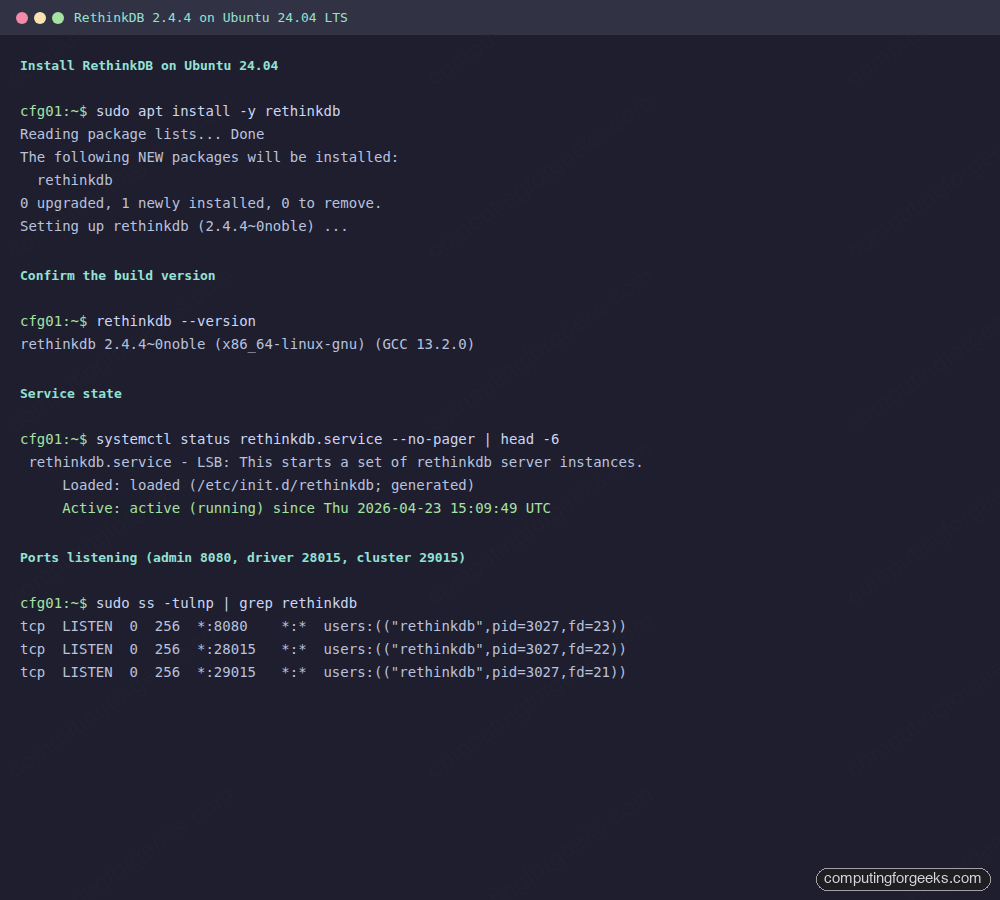
Confirm the build version. This also doubles as a sanity check that the binary is in $PATH:
rethinkdb --versionOn Ubuntu 24.04 LTS at the time of writing you get:
rethinkdb 2.4.4~0noble (x86_64-linux-gnu) (GCC 13.2.0)Note that the service is not started automatically. The packaging ships a template init script at /etc/init.d/rethinkdb that spins up one process per config file it finds under /etc/rethinkdb/instances.d/, and that directory is empty by default. That behaviour is intentional, not a bug; it lets you run multiple instances on the same host with independent data directories.
Create and start a RethinkDB instance
Copy the shipped sample config into instances.d/. The filename without the .conf extension becomes the instance name, which in turn becomes the data directory name and the systemd log suffix. Keep it short:
sudo cp /etc/rethinkdb/default.conf.sample /etc/rethinkdb/instances.d/${RDB_INSTANCE}.confTune three settings before the first start. Bind to all interfaces (or just localhost if you’re fronting with Nginx on the same box), expose the admin console on 8080, and give the server a stable name so systemd journal logs stay readable:
sudo sed -i \
  -e "s/^# bind=.*/bind=all/" \
  -e "s/^# http-port=.*/http-port=8080/" \
  -e "s/^# server-name=.*/server-name=${RDB_INSTANCE}/" \
  /etc/rethinkdb/instances.d/${RDB_INSTANCE}.conf
Verify the three lines are set (uncommented) before restarting the service:
sudo grep -E "^(bind|server-name|http-port)=" /etc/rethinkdb/instances.d/${RDB_INSTANCE}.confThe three lines should print without a leading #, matching the values you just set:
bind=all
http-port=8080
server-name=cfg01
Start and enable the service. The generated systemd unit wraps the init script, so the same systemctl commands work as with any native unit:
sudo systemctl enable --now rethinkdb
sudo systemctl status rethinkdb --no-pager | head -15
A healthy start looks like this. Note the three /usr/bin/rethinkdb processes under cgroup control and the active (running) line:
● rethinkdb.service - LSB: This starts a set of rethinkdb server instances.
     Loaded: loaded (/etc/init.d/rethinkdb; generated)
     Active: active (running) since Thu 2026-04-23 15:09:49 UTC; 3s ago
       Docs: man:systemd-sysv-generator(8)
    Process: 2919 ExecStart=/etc/init.d/rethinkdb start (code=exited, status=0/SUCCESS)
      Tasks: 71 (limit: 4658)
     Memory: 21.0M (peak: 21.3M)
     CGroup: /system.slice/rethinkdb.service
             ├─3027 /usr/bin/rethinkdb --daemon --config-file /etc/rethinkdb/instances.d/cfg01.conf ...
             └─3028 /usr/bin/rethinkdb --daemon --config-file /etc/rethinkdb/instances.d/cfg01.conf ...
The three listener sockets you care about are 8080 (admin HTTP), 28015 (client driver), and 29015 (intra-cluster). Confirm all three are up:
sudo ss -tulnp | grep rethinkdbAll three sockets should appear, each owned by the rethinkdb process:
tcp LISTEN 0 256 *:8080  *:* users:(("rethinkdb",pid=3027,fd=23))
tcp LISTEN 0 256 *:28015 *:* users:(("rethinkdb",pid=3027,fd=22))
tcp LISTEN 0 256 *:29015 *:* users:(("rethinkdb",pid=3027,fd=21))
If a listener is missing, check the per-instance log first: sudo tail -40 /var/lib/rethinkdb/${RDB_INSTANCE}/data/log_file. The most common cause is a stale data directory from a previous instance; RethinkDB won’t auto-recreate it if a version mismatch is detected.
Lock the admin console down with UFW
Here is the sharp edge you have to know about: RethinkDB’s admin console has no built-in authentication. Anyone who can reach port 8080 can create and drop databases. The project’s official position is that 8080 is never meant to be exposed directly to the internet. If UFW is not already running, install and enable it first. UFW’s syntax is covered in more depth in common UFW firewall commands, but the rules you want here are:
sudo apt install -y ufw
sudo ufw allow OpenSSH
sudo ufw allow "Nginx Full"
sudo ufw allow from 10.0.0.0/8 to any port 28015 proto tcp comment 'RethinkDB driver from internal LAN only'
sudo ufw --force enable
sudo ufw status verbose
Swap 10.0.0.0/8 for whatever CIDR your app servers live in. The driver port should never be open to Anywhere; the wire protocol authenticates but is trivially fingerprinted. Port 29015 is only needed when you scale to multiple nodes, and then only between cluster members, not from clients.
Put the admin console behind Nginx with HTTPS and basic auth
The default apt setup installs Nginx and certbot’s nginx plugin. If you do not already have a working Nginx, the Nginx + Let’s Encrypt install guide covers the base setup. This flow uses the HTTP-01 challenge, which works with any DNS provider as long as port 80 resolves to the server, so Cloudflare is not required. If your box is on a private LAN or behind NAT, skip to the DNS-01 alternative at the end of this section.
sudo apt install -y nginx apache2-utils certbot python3-certbot-nginxCreate a password file for the admin user. Keep the file mode tight; only root and the www-data group need to read it:
sudo mkdir -p /etc/nginx/auth
sudo htpasswd -cb /etc/nginx/auth/rethinkdb.htpasswd "${RDB_ADMIN_USER}" "${RDB_ADMIN_PASS}"
sudo chmod 640 /etc/nginx/auth/rethinkdb.htpasswd
sudo chown root:www-data /etc/nginx/auth/rethinkdb.htpasswd
Drop a server block that proxies to 127.0.0.1:8080. The placeholder RDB_DOMAIN_HERE gets rewritten with sed right after so the file itself stays static:
sudo tee /etc/nginx/sites-available/rethinkdb >/dev/null <<'NGINX'
server {
    listen 80;
    server_name RDB_DOMAIN_HERE;
    location / { return 301 https://$host$request_uri; }
}

server {
    listen 443 ssl http2;
    server_name RDB_DOMAIN_HERE;

    # certbot will rewrite ssl_certificate/ssl_certificate_key paths below
    ssl_certificate     /etc/ssl/certs/ssl-cert-snakeoil.pem;
    ssl_certificate_key /etc/ssl/private/ssl-cert-snakeoil.key;

    auth_basic "RethinkDB Admin";
    auth_basic_user_file /etc/nginx/auth/rethinkdb.htpasswd;

    location / {
        proxy_pass http://127.0.0.1:8080;
        proxy_http_version 1.1;
        proxy_set_header Host $host;
        proxy_set_header X-Real-IP $remote_addr;
        proxy_set_header X-Forwarded-For $proxy_add_x_forwarded_for;
        proxy_set_header X-Forwarded-Proto $scheme;
        proxy_read_timeout 300s;
    }
}
NGINX

sudo sed -i "s/RDB_DOMAIN_HERE/${RDB_DOMAIN}/g" /etc/nginx/sites-available/rethinkdb
sudo ln -sf /etc/nginx/sites-available/rethinkdb /etc/nginx/sites-enabled/rethinkdb
sudo rm -f /etc/nginx/sites-enabled/default
sudo nginx -t && sudo systemctl reload nginx
The reference to the snakeoil cert is a placeholder so Nginx can start. Certbot overwrites those two lines when it issues the real cert:
sudo certbot --nginx \
  -d "${RDB_DOMAIN}" \
  --non-interactive --agree-tos --redirect \
  -m "${RDB_ADMIN_EMAIL}"
Certbot prints the cert path and expiry, schedules auto-renewal via a systemd timer, and reloads Nginx. You can confirm both sides with a curl round trip. The no-auth request should return 401, the authenticated one should return 200 and a chunk of the admin HTML:
curl -s -o /dev/null -w "%{http_code}\n" "https://${RDB_DOMAIN}/"
curl -s -o /dev/null -w "%{http_code}\n" -u "${RDB_ADMIN_USER}:${RDB_ADMIN_PASS}" "https://${RDB_DOMAIN}/"
Both codes confirm Nginx is proxying correctly and basic auth is enforced:
401
200
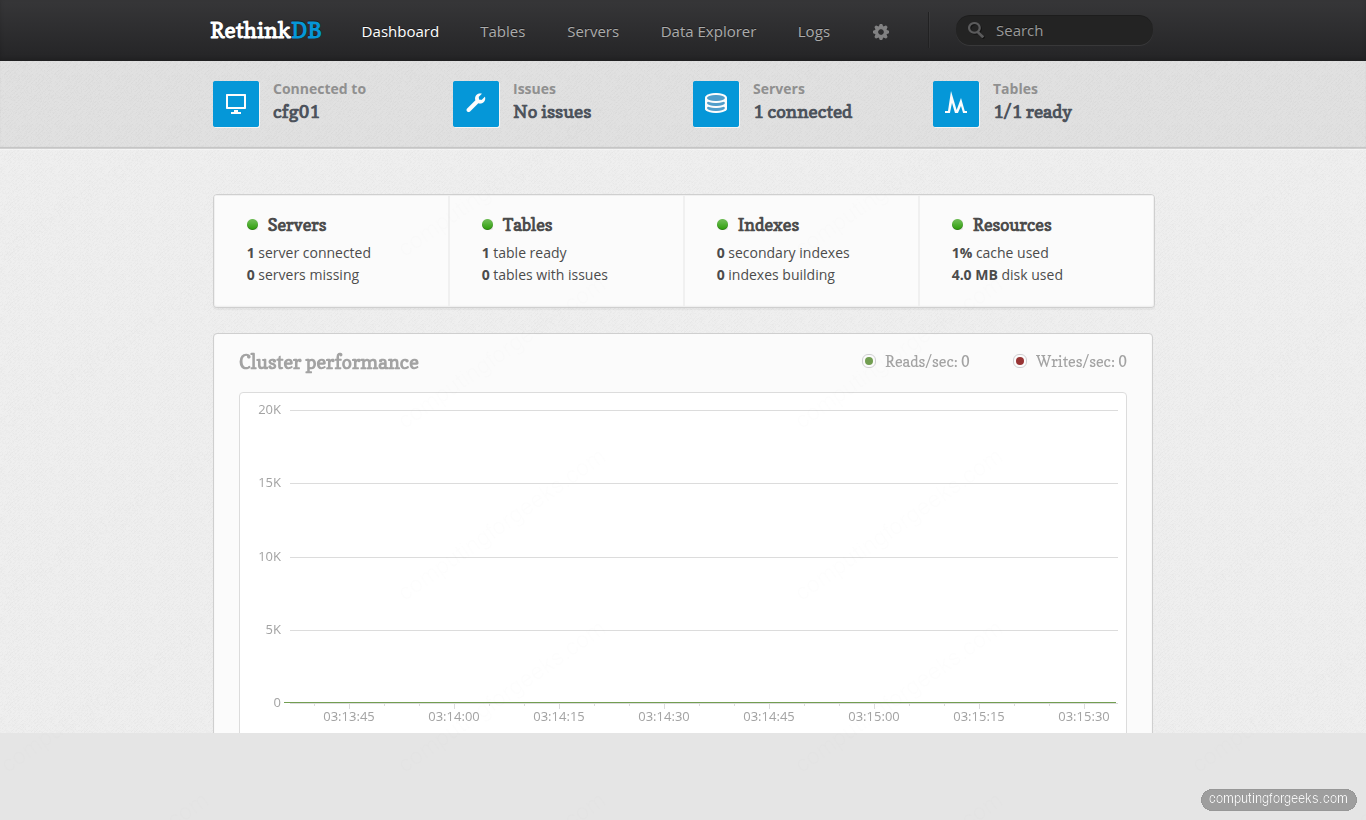
Open the URL in a browser and log in with the admin credentials you set in the Step 1 variables. You get a real-time cluster dashboard with connection status, table counts, cache usage, and a reads/writes graph:
Alternative: DNS-01 for private or NAT’d servers
If port 80 is not reachable from the internet (home lab, VPN, strict security group), use the DNS-01 challenge instead. Certbot ships plugins for Cloudflare, Route 53, DigitalOcean, Google Cloud DNS, Linode, and OVH; apt search python3-certbot-dns- lists what’s packaged on your distro. The Cloudflare plugin is the shortest to demo, but swap in your provider’s plugin and credential file format:
sudo apt install -y python3-certbot-dns-cloudflare
echo "dns_cloudflare_api_token = YOUR_TOKEN_HERE" | sudo tee /etc/letsencrypt/cloudflare.ini
sudo chmod 600 /etc/letsencrypt/cloudflare.ini
sudo certbot certonly --dns-cloudflare \
  --dns-cloudflare-credentials /etc/letsencrypt/cloudflare.ini \
  -d "${RDB_DOMAIN}" \
  --non-interactive --agree-tos -m "${RDB_ADMIN_EMAIL}"
After DNS-01 issues, point the Nginx ssl_certificate pair at /etc/letsencrypt/live/${RDB_DOMAIN}/fullchain.pem and privkey.pem manually, then reload. The auto-renewal timer picks up the DNS-01 plugin the same way as HTTP-01.
Connect to RethinkDB with the Python driver
The official Python driver is on PyPI as rethinkdb. It’s pure Python and works on any 3.x you have installed; for a clean setup guide see install Python 3.13 on Ubuntu. Use a virtualenv so you do not fight the system’s PEP 668 “externally-managed” lock:
sudo apt install -y python3-venv python3-pip
mkdir -p ~/rtest && cd ~/rtest
python3 -m venv venv
source venv/bin/activate
pip install rethinkdb
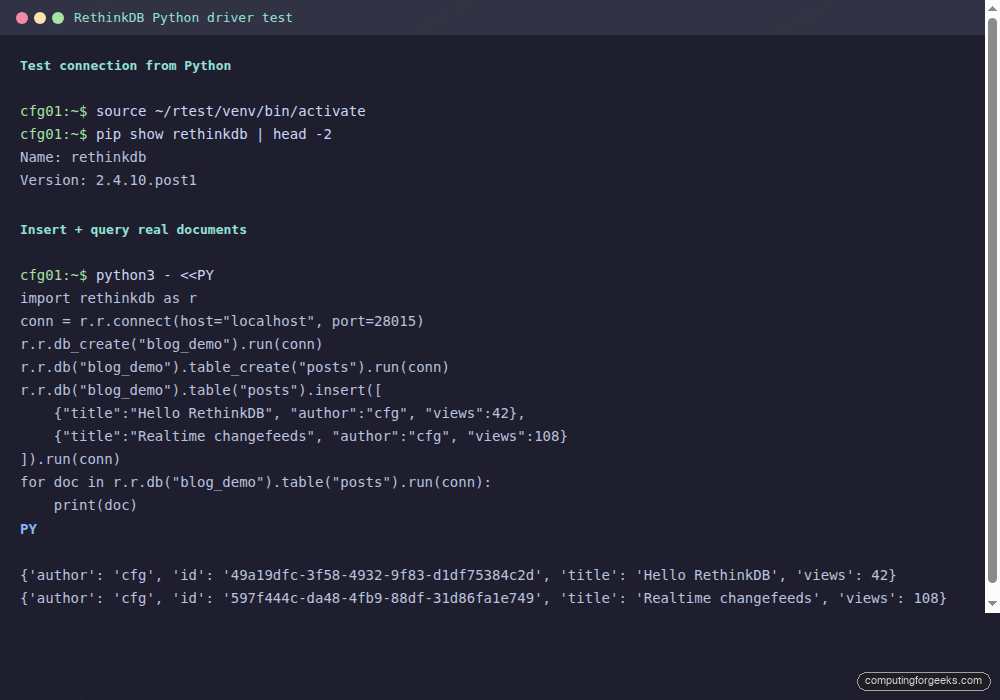
Run a full round trip: connect, create a database and table, insert documents, query them back, and print them. Save this as demo.py:
import rethinkdb as r
conn = r.r.connect(host="localhost", port=28015)

r.r.db_create("blog_demo").run(conn)
r.r.db("blog_demo").table_create("posts").run(conn)

r.r.db("blog_demo").table("posts").insert([
    {"title": "Hello RethinkDB", "author": "cfg", "views": 42},
    {"title": "Realtime changefeeds", "author": "cfg", "views": 108},
]).run(conn)

for doc in r.r.db("blog_demo").table("posts").run(conn):
    print(doc)
Run it:
python3 demo.pyYou get back the two rows you just inserted, each with a generated UUID primary key:
{'author': 'cfg', 'id': '49a19dfc-3f58-4932-9f83-d1df75384c2d', 'title': 'Hello RethinkDB', 'views': 42}
{'author': 'cfg', 'id': '597f444c-da48-4fb9-88df-31d86fa1e749', 'title': 'Realtime changefeeds', 'views': 108}
Here is the same sequence captured from the terminal so you can match it against your own output:
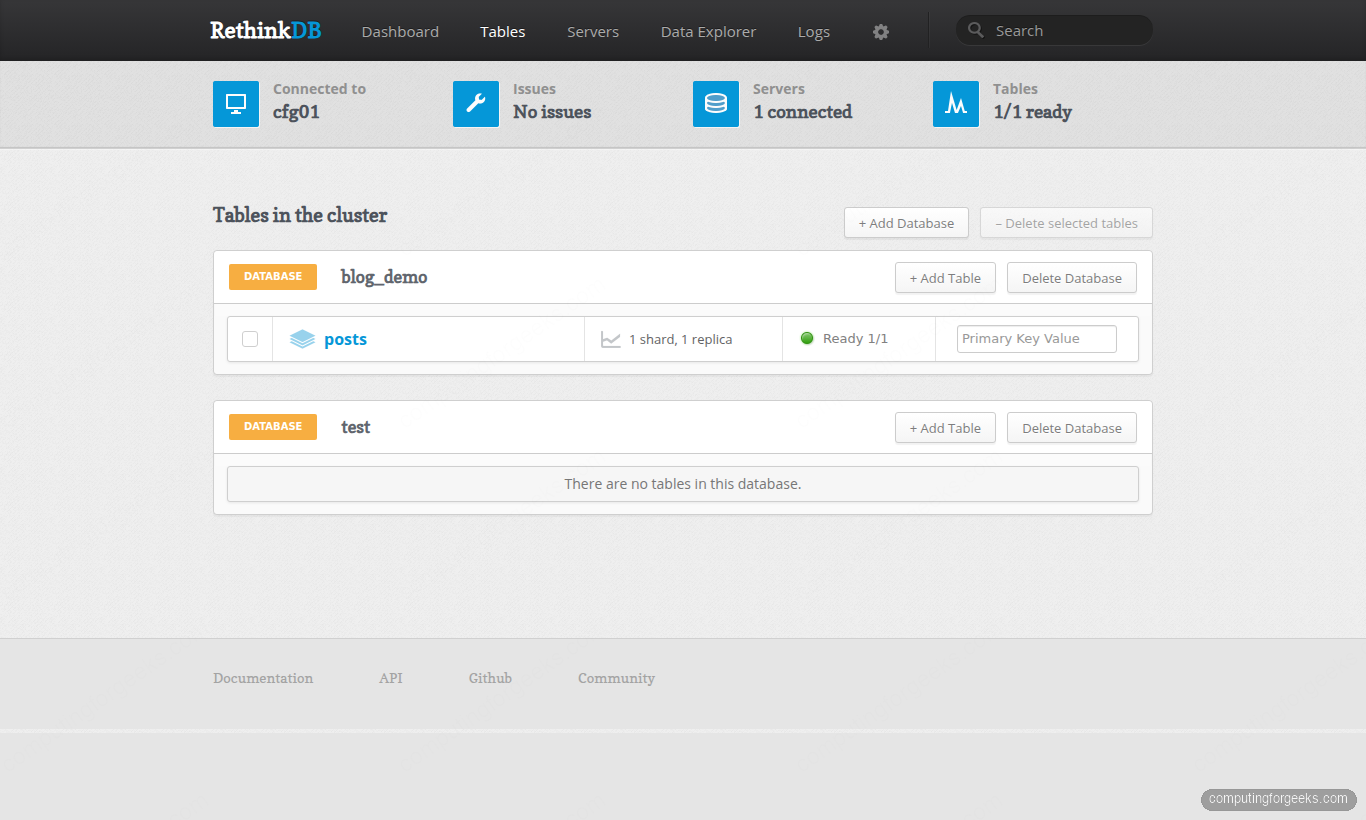
Open the admin console’s Tables tab and the new blog_demo database appears with its posts table, 1 shard and 1 replica (single-node defaults), shown as Ready:
Connect with the Node.js driver and consume a changefeed
Changefeeds are the one feature you cannot replicate easily with other NoSQL document stores. The Node.js driver’s .changes() call subscribes to a query and streams every insert, update, and delete as they happen. Install Node 20 LTS from NodeSource, then pin the official driver:
curl -fsSL https://deb.nodesource.com/setup_20.x | sudo -E bash -
sudo apt install -y nodejs
node --version
cd ~/rtest
npm init -y
npm install rethinkdb
Save this as realtime.js. It subscribes to the posts table, then inserts a fresh row after one second. The subscriber logs the change event and exits:
const r = require("rethinkdb");

async function main() {
  const conn = await r.connect({ host: "localhost", port: 28015 });
  const change = await r.db("blog_demo").table("posts").changes().run(conn);
  console.log("subscribed to changefeed");

  setTimeout(() => {
    r.db("blog_demo").table("posts").insert({
      title: "New post from Node driver",
      author: "cfg",
      views: 1,
    }).run(conn);
  }, 1000);

  change.each((err, row) => {
    if (err) throw err;
    console.log("change event:", JSON.stringify(row));
    conn.close();
    process.exit(0);
  });
}

main().catch((e) => { console.error(e); process.exit(1); });
Running it prints the subscribe message, then a single change event containing the new row. old_val is null because this is an insert, not an update:
subscribed to changefeed
change event: {"new_val":{"author":"cfg","id":"af9fb10f-29ea-445b-b0ff-9bf1a0a656cf","title":"New post from Node driver","views":1},"old_val":null}
Update instead of insert and you’d see both old_val and new_val. That is the entire contract: you plug a socket into any query and the database tells you what changed.
Troubleshooting real errors from this build
Error: “E: The repository ‘https://download.rethinkdb.com/repository/… noble Release’ does not have a Release file.”
You ran apt update before importing the GPG key, or the key landed in the wrong path. Confirm the key file exists and the signed-by= path in /etc/apt/sources.list.d/rethinkdb.list matches exactly. The older /etc/apt/trusted.gpg.d/ pattern is deprecated on 22.04 and up; use /usr/share/keyrings/.
Error: “instance1: Failed to start. Log: could not create directory ‘/var/lib/rethinkdb/instance1/data'”
The rethinkdb Unix user (created by the package) does not own the parent directory. This happens when you extract a backup or move the data directory manually. Fix with:
sudo chown -R rethinkdb:rethinkdb /var/lib/rethinkdb/Error: “rethinkdb.errors.ReqlDriverError: Could not connect to localhost:28015”
Usually the service did not start (check systemctl status rethinkdb) or it’s bound to a non-default port. The config file’s driver-port= setting must match the client’s port. Also check that the firewall is not dropping local 28015 traffic on hosts with strict lo rules, though this is rare on Ubuntu.
Error: “rethinkdb: server name contains invalid characters”
The server-name= value only accepts lowercase letters, digits, and underscores. Hyphens and dots are rejected. Rename the instance to cfg01, db_node_1, or similar, then restart.
Error: “rethinkdb admin UI shows 405 Method Not Allowed behind Nginx”
Harmless for HEAD requests (the admin SPA doesn’t implement HEAD). Fetch with curl -sG or open the URL in a browser; you’ll see the real HTML with a 200 status.
Production hardening checklist
Everything above is enough to stand up a working RethinkDB node. Before you put it under real traffic, walk this list:
- Never expose 8080 to the internet directly. The admin console has no native auth. Nginx + basic auth + Let’s Encrypt is the minimum; fronting it with a VPN or SSO proxy is better.
- Enable driver-level auth:
rethinkdb set-passwdinside the admin console’s Data Explorer sets anadminaccount password that drivers must supply withr.connect({user:"admin", password:"..."}). The default is empty, which is an automated ransom attack waiting to happen. - Back up the data directory, not just a dump. The directory under
/var/lib/rethinkdb/${RDB_INSTANCE}/datais the source of truth. A stopped-instancetaris the simplest backup;rethinkdb dumpproduces a.tar.gzbut can stall on large tables. - Cap cache size in
rethinkdb.conf withcache-size=1024(megabytes) if the server shares RAM with other services. The automatic value is ~50% of free RAM at start, which is aggressive. - Set
no-update-check=truein the config. The upstream update pinger is on by default and sends your hostname and version toupdate.rethinkdb.com. Not a security issue, but not what you want on a private host. - Plan for the project’s cadence. RethinkDB ships bug fixes a few times a year and no major new features. If you need maturity without active feature development, that’s fine; if you need vendor-backed evolution, look at ArangoDB, RavenDB, or Dgraph as alternatives with different trade-offs.
- Monitor the three listener ports. A Prometheus node_exporter with the
textfilecollector plus ass -tulnpcron job is the dumbest thing that works. If any of 8080, 28015, or 29015 disappear, page the on-call.
That’s the short list that actually matters in 2026. Harden it, back it up, and RethinkDB will sit there and do its job for years.






You don’t seem to have listed the driver for the Perl language: https://metacpan.org/pod/Rethinkdb