

In today’s guide we will walk you through the steps required to install Kali Linux 2023.x. Kali Linux 2023.x is ready for download with lots of DE updates, NetHunter updates and support for VMs on Apple Silicon. Kali Linux is a widely used operating system created for Security professionals and Linux enthusiasts. This Linux distribution is a rolling release with updates for its releases available on the fly.
The Kali Linux 2023.x release made things even better. By default, Kali uses Xfce, but during the setup process, allows for GNOME, KDE, or no GUI to be selected. There are pre-configurations for Enlightenment, i3, LXDE, and MATE as well.
What is new in Kali Linux 2023.4
Some of the major changes are:
- Cloud ARM64 – Now Amazon AWS and Microsoft Azure marketplaces have an ARM64 option
- Vagrant Hyper-V – Our Vagrant offering now supports Hyper-V
- Raspberry Pi 5 – Kali on the latest Raspberry Pi foundation device
- GNOME 45 – Kali theme is on the latest versions
- Internal Infrastructure – Peak at what is going on behind the scenes with mirrorbits
- New Tools – As always, various new & updated packages
Install Kali Linux 2023.4 – Step by Step with Screenshots
In the next sections we show you how to download Kali Linux ISO image, make it bootable and initiate the installation of Kali Linux on your Laptop or Desktop machine.
Step 1: Download Kali Linux installer ISO
Visit the downloads page and pull the latest release of Kali Linux. You can also browse the ISO images link.
### With wget ###
wget https://cdimage.kali.org/kali-2023.4/kali-linux-2023.4-installer-amd64.iso
If you have torrent application, you can use the Torrent link instead. There are ready to boot images for VirtualBox and VMware. If you want the Live image, pull it under the Kali Linux (Live) section.
Step 2: Create bootable USB drive
If installing on a Laptop, Desktop or server, you’ll need to create a bootable medium for installation.
On Linux, use dd command:
sudo dd if=kali-linux-2023.4-installer-amd64.iso of=/dev/sdX bs=512kWhere:
- /dev/sdX is your USB device
If on Windows or macOS, user Etcher.

Select image, USB device and hit the Flash button to get started.
Step 3: Boot Kali Linux installer image
Insert bootable USB Drive to your computer and boot from it to start installation process. Once booted:
Select graphical installation method – Recommended for new users.

Choose the language to use during installation process – English for me.

Select a country for the correct timezone to be set for your machine during installation.

Configure Keyboard keymap.

Wait for the installation components to be loaded.

Set your machine hostname.

Set domain name, this will be part of FQDN – <hostname>.<domain_name>

Create a user for non-administrative activities – set full name and username.


Set password for the user.

Set desired timezone

Choose disk partitioning method – If you’re not sure, go with “Guided – use entire disk“.

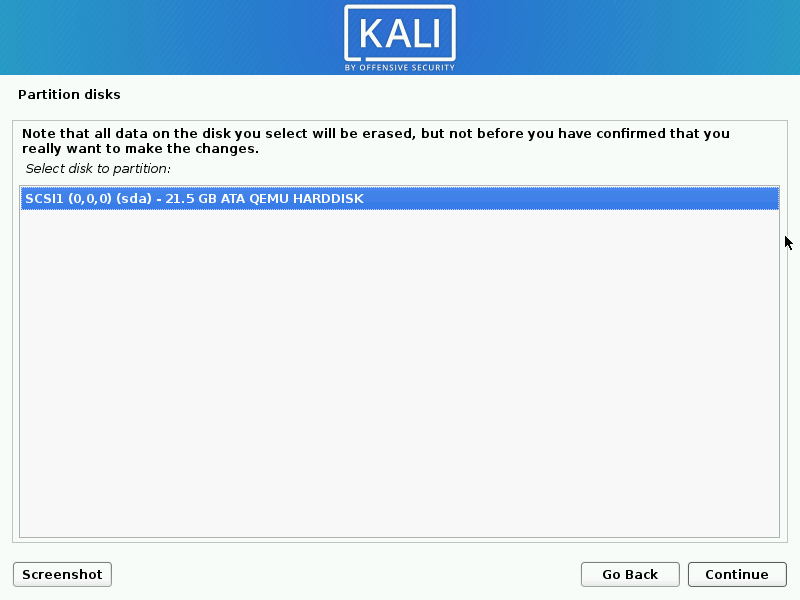
Select disk for installation.
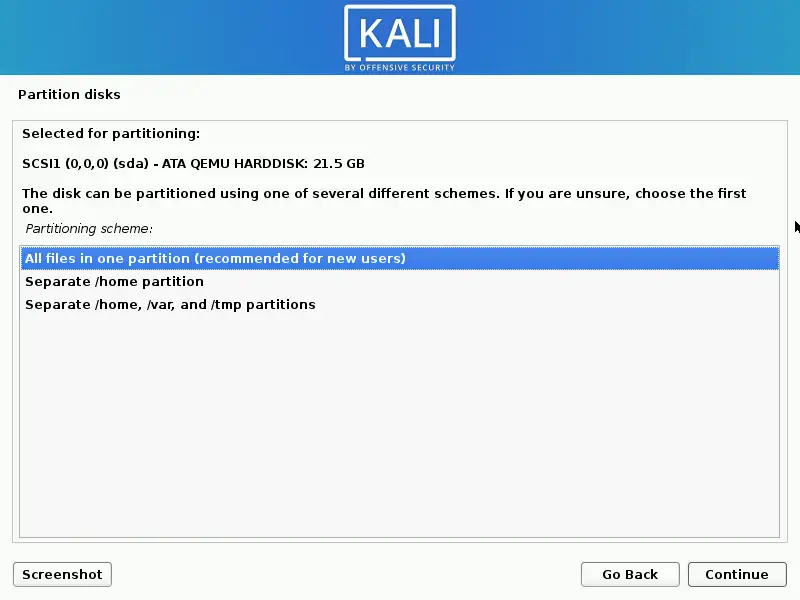
Select how partitioning should be done. For new users, All files in one partition should work fine. If you have enough installation disk size, you can go with separate /home, /var, /tmp partitions. This may require doing custom partitioning in the previous steps for accurate disk allocation.
Write changes to disk.

If you chose LVM, set size of volume group to be created.

Commit changes to disk

Wait for the installation to start – it should take few minutes.

If you have a network proxy for external access then configure it in the next screen.

Package manager apt configuration will start.

Choose software applications and Kali desktop environment to install.

You can choose tools based on your Kali Linux use case – Purpose for installation.

Install the GRUB boot loader to the master boot record so you can boot your Kali Linux image.

Select target disk for GRUB installation – Mostly the first disk.

Your installation completed successful if you don’t see any error messages.

Validate installed OS release:
$  grep VERSION /etc/os-release
VERSION="2023.4"
VERSION_ID="2023.4"
VERSION_CODENAME="kali-rolling"

# Kernel release
$ uname -r
You can perform a system upgrade after the instalallation:
sudo apt update && sudo apt -y full-upgradeIf packages repository is not working add with the commands below:
echo "deb http://http.kali.org/kali kali-rolling main non-free contrib" | sudo tee /etc/apt/sources.listCheck if reboot is required:
[ -f /var/run/reboot-required ] && sudo reboot -fFor more information on this release visit Kali Linux Documentation and Kali Linux Tools pages.
Recommended Security Books to read:
- Best Penetration Testing Books
- Best Cybersecurity Books To Read
- Best CompTIA Security+ (SY0-601) Certification Books
- Best Books To Learn Data Security & Encryption
- Top Certified Information Security Manager (CISM) study books
Recommended Linux Books to read:
- Best Linux Books for Beginners & Experts
- Best Linux Kernel Programming Books
- Best Linux Bash Scripting Books
- Top RHCSA / RHCE Certification Study Books
- Best Top Rated CompTIA A+ Certification Books
- Best LPIC-1 and LPIC-2 certification study books
More articles on Kali Linux:
