Every homelab thread eventually lands on the same argument: do you need ECC RAM, or is it a waste of money on a box that runs a few VMs in your basement? The honest answer is that it depends entirely on what the machine holds, and most of the internet muddies it by mixing up two completely different things that both get called “ECC” in 2026.
Here is the short version. ECC (error-correcting code) memory catches and fixes the random single-bit flips that cosmic rays, heat, and marginal DIMMs cause, before a corrupt bit reaches your data or crashes a service. On a server you trust with something you cannot re-download, it is cheap insurance and worth it. On a throwaway lab node you rebuild for fun, it is optional. The harder question, and the one that actually trips people up, is which platforms can even run real ECC, and which kind of module drops into which board. That is what this guide sorts out. The ECC checks below were run in July 2026 on real machines: two consumer-board Proxmox nodes and a Hetzner server with genuine ECC.
On-die ECC is not the ECC you are thinking of
This is the misconception behind half the bad advice online. Every DDR5 module made, including plain gaming RAM, has on-die ECC. JEDEC made it mandatory because DDR5 chips are so dense they flip bits on their own, and the on-die logic quietly patches errors inside a single chip. That sounds like the protection you want, but it is not.
On-die ECC never tells the operating system anything, and it does nothing for a bit that flips while data travels across the bus between the DIMM and the CPU. The protection homelab builders actually mean is sideband (or “full”) ECC: a wider module with an extra memory chip, on a platform that wires and reports the correction, so a flipped bit anywhere in the path gets caught, fixed, and logged where you can see it. A stick sold as “DDR5, on-die ECC” is regular non-ECC RAM with a marketing line. Real ECC needs an ECC module and a board that supports it. Do not let a product title decide it for you.
Which platforms actually support ECC
ECC is a whole-platform feature. The CPU, the motherboard traces, and the BIOS all have to cooperate, so the module is only ever half the story. Here is where the common homelab platforms stand.
| Platform | Real (sideband) ECC? | Module type |
|---|---|---|
| AMD Ryzen (AM4) | Yes on non-APU chips, on boards that wire and validate it (many ASRock and ASUS) | DDR4 ECC UDIMM |
| AMD Ryzen (AM5) | Yes, unofficial and board-dependent. Workstation boards (ASUS ProArt, ASRock Rack) validate it; cheap boards often do not | DDR5 ECC UDIMM |
| AMD Threadripper / EPYC | Yes, always | DDR4/DDR5 ECC RDIMM |
| Intel Core, consumer chipsets (Z890, B860, and the older consumer LGA1700 boards) | No | n/a |
| Intel Core with a workstation chipset (W680 for 12th to 14th Gen, W880 for Core Ultra 200) | Yes | DDR5 ECC UDIMM |
| Intel Xeon (W, Scalable) | Yes, always | ECC UDIMM or RDIMM by model |
| N100 / N305 mini PCs and most SFF boxes | No | SO-DIMM, non-ECC only |
Two things catch people out here. On AMD, the Ryzen memory controller has ECC logic built in, but AMD does not officially validate it on the desktop, so whether it actually works comes down to the specific board and BIOS. Check the manufacturer’s page for an explicit “ECC supported” line and, ideally, its memory QVL before you buy. On Intel, no amount of good intentions gets you ECC on a normal Core build. You need the workstation chipset, which is why our mid-tier Proxmox host build leans on an AM5 workstation board rather than a cheaper consumer one.
The mini PC line matters for anyone eyeing an N100 box as a quiet always-on node. Those use laptop-style SO-DIMM slots and do not do ECC, full stop. If ECC is non-negotiable for a workload, a mini PC is the wrong chassis, and you want a real tower or rackmount board instead. We cover that trade-off in the homelab mini PC guide.
UDIMM vs RDIMM: buy the wrong one and it will not post
ECC comes in two physical flavours that are not interchangeable, and mixing them up is the most expensive mistake in this whole topic.
Unbuffered ECC (UDIMM) is what consumer and workstation platforms take: AM4, AM5, Intel W680/W880, and entry Xeon. It is a standard-looking DIMM with the extra ECC chip. Registered ECC (RDIMM) adds a register that buffers the address and command lines so a board can carry far more memory, and it is what servers use: EPYC, Xeon Scalable, and Threadripper. An RDIMM will not work in an AM5 desktop board, and a UDIMM will not work in an EPYC server. The board’s manual and the module’s spec both state which one they are, so match them before you order.
The practical read: if you are building on a Ryzen or a workstation Intel board, you want ECC UDIMM. If you scored a used EPYC or Xeon server, you want ECC RDIMM, and the cheap used-server RDIMM market is one of the best-value ways to get a lot of ECC memory.
Does ZFS require ECC? The “scrub of death” myth
If you run TrueNAS or ZFS, you have seen the claim that ZFS without ECC will eat your pool, the so-called scrub of death. It is overblown. One of ZFS’s own developers has said plainly that ZFS is no more dangerous without ECC than any other filesystem, and that ECC is simply good advice for any machine you trust with important data, ZFS or not.
So ECC is recommended for a storage box holding data you cannot replace, because a bit flip in RAM can be written to disk as “correct” and no checksum saves you from bad data that was already wrong in memory. But a non-ECC homelab node running ZFS is not a ticking bomb. Plenty of people run ZFS on non-ECC boxes for years. The right framing is that ECC protects the one place ZFS’s checksums cannot reach, and on a serious NAS that is worth paying for, which is why our ZFS storage server build specs ECC on every tier.
How to check whether ECC is actually working
Buying ECC modules is not the same as running ECC. The board has to enable it and the OS has to see it, and it is common to find a build where ECC was silently disabled in BIOS. The first check reads what the firmware reports:
sudo dmidecode -t memory | grep -E "Error Correction Type|Total Width|Data Width"On one of our consumer-board Proxmox nodes, the answer is blunt. The width numbers are equal and the correction type is None:
	Error Correction Type: None
	Total Width: 64 bits
	Data Width: 64 bits
That is the tell. On a non-ECC stick the total width equals the data width, because every bit carries data. On a real ECC module the total width is wider than the data width, since the extra bits carry the correction code. A server with genuine ECC reports it directly:
Error Correction Type: Multi-bit ECCSide by side, the difference is obvious. The non-ECC node reports equal widths and no correction, while the ECC server names its correction type outright:
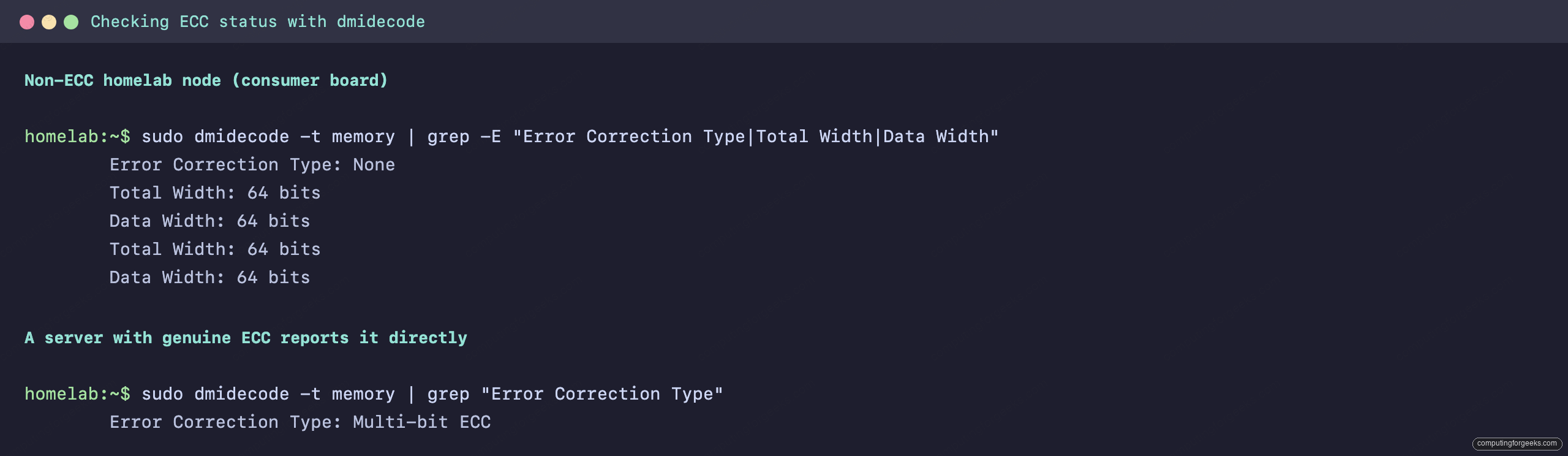
Firmware reporting ECC is a good sign, but the stronger proof is the kernel’s EDAC subsystem actually counting and correcting errors at runtime. Install the tools and query the memory controllers:
sudo apt install edac-utils
sudo edac-util -v
A healthy ECC system lists its memory controllers with a correctable-error count of zero that climbs only slowly. One caveat matters on exactly the boards most homelabbers use: on consumer AM5 and Intel client platforms the kernel often ships no EDAC driver for the memory controller, so edac-util can report no memory controllers found even when ECC is genuinely enabled and working. Treat that as inconclusive, not proof ECC is off. The authoritative checks are the dmidecode correction type above and the ECC toggle in the BIOS, so confirm both before you trust the machine with anything important.
What actually drops in, by platform
Once you know your platform and whether it takes UDIMM or RDIMM, the buying part is short. These are the modules that fit the common homelab paths. The 2026 DRAM shortage has pushed all memory prices around and ECC parts move in and out of stock, so treat the figures as bands and check the live price before you commit.
- AM5 or Intel W680/W880 workstation board: a DDR5 ECC UDIMM such as this Nemix 32GB DDR5-5600 ECC UDIMM. Expect roughly $140 to $230 a module in the current market. Confirm your board lists ECC support and that the module is on its QVL.
- AM4 or an older Intel workstation board: a DDR4 ECC UDIMM like this Nemix 32GB DDR4-3200 ECC UDIMM, usually the cheapest route to a solid 64GB or 128GB of ECC on a homelab tower.
- Used EPYC or Xeon Scalable server: registered ECC, such as this Nemix 32GB DDR4-3200 ECC RDIMM. Used-market RDIMM is where you get the most ECC memory for the money, which is exactly why a secondhand server is such a strong homelab value.
If you are on the newest EPYC or Threadripper Pro, you will want DDR5 RDIMM instead, and the same rule applies: match the module type to the board, never the other way round. For the wider picture on sizing and speed on a desktop platform, the DDR5 RAM guide and the how much RAM a Proxmox host needs breakdown carry the rest.
So should you buy ECC? A build-by-build call
Skip the argument and match it to the machine. A play lab you rebuild on a whim does not need ECC; spend the money on more RAM or an SSD instead. A Proxmox host running services your household actually depends on is a strong yes, and it is worth choosing a board that supports ECC even if you populate it later. A ZFS or TrueNAS box holding photos, backups, or anything irreplaceable is the clearest case of all, because ECC covers the one gap ZFS’s own checksums cannot. And a used server already comes with ECC RDIMM, so the decision is made for you. Pick the module type your platform takes, confirm the board enables it, and verify with dmidecode and edac-util once it is running.