If you are setting up Frigate for local object detection today, the Google Coral is no longer the accelerator to reach for. Frigate’s own hardware documentation now says so directly, and the practical replacement is a Hailo accelerator. Here is the exact wording from the project:
The Coral is no longer recommended for new Frigate installations, except in deployments with particularly low power requirements or hardware incapable of utilizing alternative AI accelerators for object detection.
Frigate hardware documentation
This guide explains what actually changed (it is the software, not the silicon), which Hailo accelerator to buy and why, the one config change that moves Frigate from a Coral to a Hailo detector, and the cases where keeping your existing Coral is still the right call. Every command and config block here was checked against the current Frigate release in June 2026.
Why Frigate stopped recommending the Coral
The Coral Edge TPU is still a fast, power-efficient chip. What’s actually happening is that the software stack around it on Linux has been abandoned upstream, and that breaks new installs on any current kernel.
Two specific failures drive this. The Gasket PCIe driver that the M.2 and PCIe Coral modules depend on does not build against Linux 6.4 or newer, and the tflite-runtime the USB Coral relies on has not been patched for Coral in years, so recent versions segfault. The Frigate maintainers documented both in the issue that proposed removing the Coral recommendation (issue #10056), which was closed as not planned precisely because the upstream dependencies are no longer maintained. This matters because a reader following an older tutorial on a fresh Debian or Raspberry Pi OS install hits a driver wall that has no clean fix.
Be precise about the hardware status, because plenty of forum posts overstate it. Google issued a formal end-of-life notice in mid-2024 for the Coral Dev Board and SoM, citing material supply, but the USB Accelerator and the bare TPU modules do not carry that same notice. The Coral is not “dead” as a product. It is the maintained Linux driver and runtime that are gone, and that is enough reason for a project like Frigate to stop pointing new users at it.
What Frigate recommends instead
Frigate supports several object detectors, and the right one depends on the box you already run it on. The key insight is that you may not need to buy anything at all.
| Detector | Hardware | New cost | Best for |
|---|---|---|---|
| Hailo-8 / Hailo-8L | M.2 module or Raspberry Pi AI HAT+ | Around $70 to $110 | The drop-in replacement for a Coral on a low-power or Raspberry Pi NVR |
| OpenVINO | Intel integrated GPU or NPU you already own | $0 | Anyone already running Frigate on an Intel mini PC |
| TensorRT / ONNX | NVIDIA GPU | Reuse existing card | Boxes that already have a discrete NVIDIA GPU |
| Google Coral | USB or M.2 Edge TPU | Legacy | An existing, already-working install (see the last section) |
If your Frigate host is an Intel mini PC, switch the detector to OpenVINO and use the integrated GPU for free before spending a cent. For a dedicated low-power NVR, a small Raspberry Pi appliance, or any box without a usable iGPU, the Hailo is the closest equivalent to what the Coral used to be: a tiny, cheap, low-watt accelerator that Frigate supports first-class.
Hailo-8 vs Hailo-8L: which one to buy
The Hailo comes in two tiers. The inference times below are the figures Frigate documents for each, running its default YOLOv6n model. The TOPS ratings come from the chip vendors. Treat the inference numbers as the project’s published figures, not a benchmark we ran on a bench.
| Accelerator | Compute | Frigate-documented inference (yolov6n) | Approx price | Best for |
|---|---|---|---|---|
| Hailo-8 | 26 TOPS | ~7 ms | ~$110 | Several cameras, headroom for larger models |
| Hailo-8L | 13 TOPS | ~11 ms | ~$70 | A handful of cameras on a tight budget |
| Google Coral | 4 TOPS | Not listed by Frigate | Legacy | Keeping an install that already works |
Both numbers are well under the frame budget for typical home cameras, so for two or three streams either tier is fine. The reason to pay for the Hailo-8 is not raw speed on one camera, it is the headroom to run more streams or a heavier model later without the detector becoming the bottleneck.
Best overall: Raspberry Pi AI HAT+ (Hailo-8, 26 TOPS)
The simplest way to get a Hailo onto a Raspberry Pi 5 is the official AI HAT+. The Hailo chip is soldered onto the board, so there is no separate module to seat, and the 26 TOPS version uses the Hailo-8.
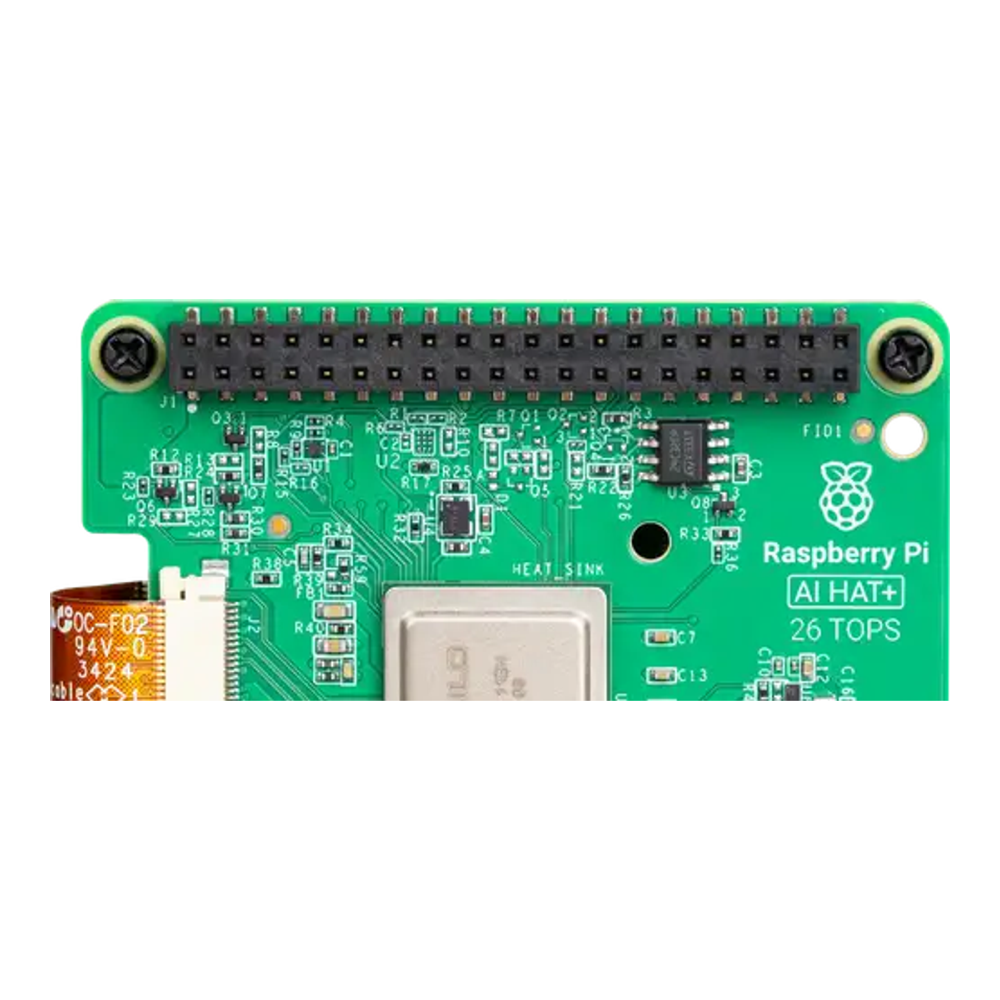
Who it’s for: anyone running Frigate on a Raspberry Pi 5 who wants the cleanest supported path and room to add cameras (around $110, check the live price). Skip it if: your Frigate box is an x86 mini PC, in which case a bare Hailo-8 M.2 module is cheaper and fits the same slot a Coral M.2 used. The 13 TOPS sibling (the Hailo-8L AI HAT+, around $70, check the live price) is the value choice when you only have a couple of cameras.
Legacy option: Google Coral USB Accelerator
The Coral USB Accelerator still works on systems that already have a compatible runtime, and it remains the most power-frugal option. We list it only for readers extending an existing setup, not for a new build, for the driver reasons covered above. If you are starting fresh, buy a Hailo instead.
The two hardware paths: Raspberry Pi 5 or an x86 mini PC
There are two sensible ways to give Frigate a Hailo, and the choice is mostly about what chassis you want the NVR to live in.
The Raspberry Pi 5 path uses the AI HAT+ above and makes a quiet, low-power appliance that sits on a shelf alongside the rest of an open-source homelab. The x86 path drops a bare Hailo-8 M.2 module (sold by vendors like Waveshare and Yahboom) into a mini PC, which gives you more CPU for recordings and more cameras. The mechanism to watch on the x86 side is the M.2 slot: on a single-slot mini PC the Hailo competes with your NVMe drive, so pick a box with two M.2 slots or plan to boot from USB or SATA. Our guide to choosing a mini PC for a homelab covers which models have the spare slots and lanes for this.
Switch the detector in your Frigate config
The migration itself is small. Frigate selects a detector from config.yml, so moving from a Coral to a Hailo is a config edit plus a device passthrough, not a reinstall. Open your Frigate config file:
sudo vim ~/frigate/config/config.ymlThe old Coral detector block looked like this. Remove it:
detectors:
  coral:
    type: edgetpu
    device: usb
In its place, add the Hailo detector and a matching model block. Use hailo8l for the 13 TOPS part or hailo8 for the 26 TOPS part:
detectors:
  hailo:
    type: hailo8l
    device: PCIe

model:
  width: 320
  height: 320
  input_tensor: nhwc
  input_pixel_format: rgb
  input_dtype: int
  model_type: yolo-generic
  labelmap_path: /labelmap/coco-80.txt
You do not need to supply or train a model. When no custom model path is set, Frigate auto-downloads a Hailo-compatible YOLOv6n by default, so the detector comes up with working weights on first start.
Frigate also needs access to the Hailo device inside its container. Edit your Compose file:
sudo vim ~/frigate/docker-compose.ymlPass the Hailo device through to the container:
services:
  frigate:
    devices:
      - /dev/hailo0
One host-side prerequisite: on Raspberry Pi OS Bookworm you install the HailoRT driver and firmware and disable the built-in kernel driver so Frigate’s version is the one in use. Frigate’s installation documentation covers both steps and provides an install script for the driver. Once /dev/hailo0 exists on the host and the Compose change is in, recreate the container and the Hailo detector takes over. If you are still building the base stack, our Frigate on Docker install guide covers the rest. Frigate then slots neatly into a Home Assistant setup for notifications and automations, whether you run Home Assistant on Ubuntu or in Docker.
When keeping the Coral still makes sense
The recommendation against the Coral is for new installs. Frigate has been clear that it is not dropping support, noting it “will continue to provide support for the Coral TPU for as long as practicably possible given it’s still one of the most power-efficient devices for executing object detection models.”
So keep your Coral if it is already working and your host kernel predates the driver breakage, if power draw is your single hardest constraint, or if your hardware genuinely cannot take a Hailo M.2 or HAT. The one thing to avoid is starting a brand-new install on a current kernel around a Coral, because that is exactly the combination that hits the unmaintained Gasket driver and the tflite-runtime segfaults.
Common misconceptions about the switch
A few ideas come up repeatedly in homelab threads that are worth correcting before you buy or rip anything out.
- “The Coral is dead.” The product still exists and Frigate still supports it. What is gone is the maintained Linux driver and runtime on current kernels, which is a software problem, not a discontinued chip.
- “Hailo is faster, so my detection gets better.” Below a handful of cameras the detector is not your bottleneck. The real win is a maintained driver and the headroom to add streams or a bigger model later.
- “I will have to retrain or convert a model.” No. Frigate auto-downloads a Hailo-compatible YOLOv6n by default, so the detector works on first start with no model wrangling.
- “I have to buy a Raspberry Pi for this.” No. A Hailo-8 M.2 module works in an x86 mini PC, and if that box has an Intel iGPU you can switch to OpenVINO and spend nothing.
The mental model to carry away is simple: the Coral recommendation ended because of a maintenance gap on Linux, not a performance one. Match the replacement to the box you already have. An Intel iGPU you own beats hardware you buy, and where you do need an accelerator, a Hailo is the supported, low-power successor that drops into the same role the Coral used to fill.