TCP and UDP are the two transport protocols that carry almost all network traffic, and the choice between them is a trade-off, not a ranking. TCP spends time and header space setting up a reliable, ordered connection. UDP skips all of that and fires datagrams with almost no overhead. Knowing which one an application uses, and why, is a core networking skill, and what trips people up is the handshake, windowing, and port numbers rather than the dictionary definitions.
This guide compares the two protocols where it counts: the connection model, the three-way handshake, reliable delivery, flow control, the header layouts, and the port table. Every capture below was taken with tshark, the command-line build of Wireshark, on a Linux host in June 2026, so the sequence numbers and header sizes are the real values off the wire. It builds on the OSI and TCP/IP layer model, since TCP and UDP both sit at Layer 4 and ride on top of IP at Layer 3.
Connection-oriented vs connectionless
TCP is connection-oriented: it establishes state on both hosts before a single byte of application data moves. That state is the sequence and acknowledgment numbers each side tracks, which is what lets TCP notice a missing segment and resend it. UDP is connectionless: the sender emits datagrams with no setup, no state, and no expectation of a reply. In practice this means TCP trades latency and overhead for reliability, and UDP trades reliability for speed and simplicity.
The cost of TCP is concrete: the handshake spends a full round trip before any application data moves, and every TCP header is at least 20 bytes against UDP’s 8. On one web page load that overhead is invisible. On millions of tiny DNS lookups, or on real-time voice packets where a late retransmit is useless, that same overhead is exactly what pushes the workload to UDP.
The whole comparison fits in one table worth committing to memory:
| Aspect | TCP | UDP |
|---|---|---|
| Connection model | Connection-oriented (handshake first) | Connectionless (no setup) |
| Reliability | Acknowledged and retransmitted | None |
| Ordering | Reordered by sequence number | None |
| Flow control | Windowing | None |
| Header size | 20 bytes minimum | 8 bytes fixed |
| Typical uses | HTTP, HTTPS, SSH, FTP, SMTP | DNS, DHCP, TFTP, NTP, SNMP, VoIP |
The TCP three-way handshake
Before TCP sends data, the two hosts exchange three segments to agree on starting sequence numbers and confirm both directions work. The client sends a SYN, the server replies with a SYN-ACK, and the client returns an ACK. Three steps are needed because each side has to confirm it can both send and receive: the SYN and SYN-ACK prove one direction each, and the final ACK closes the loop.
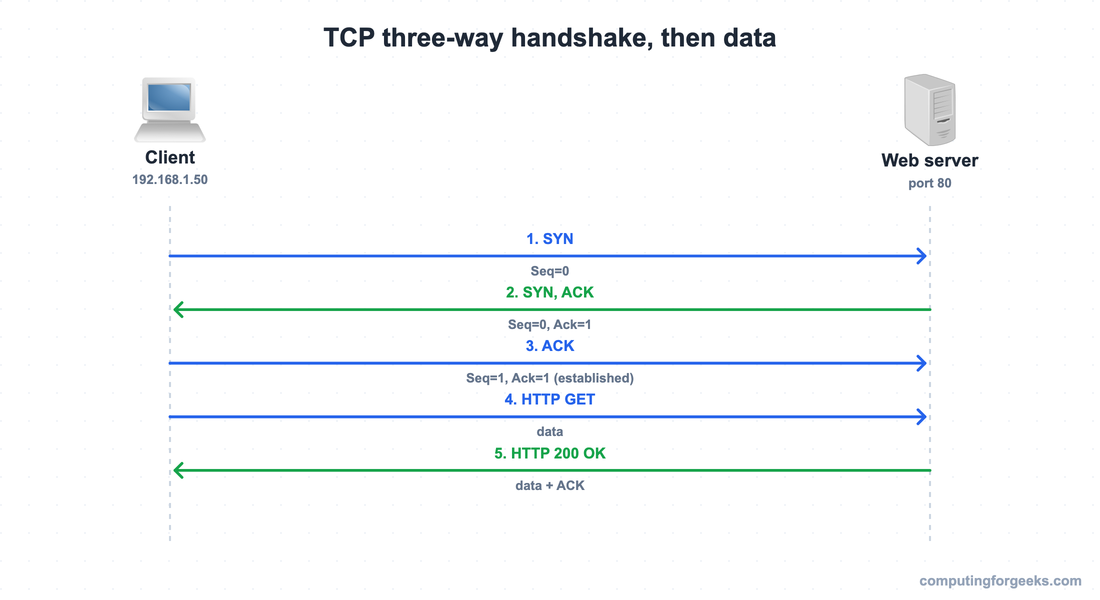
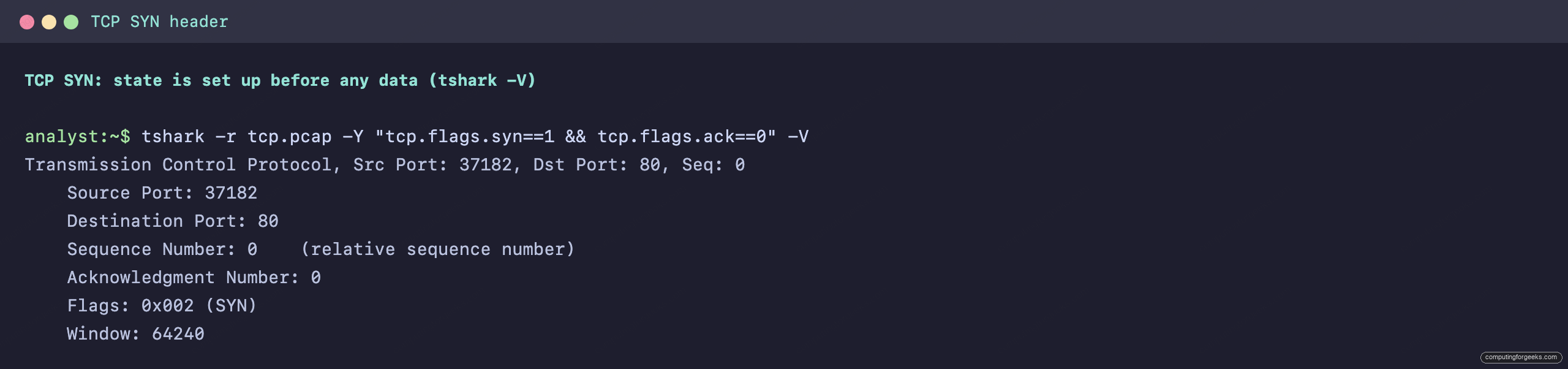
Captured on the wire, the first segment is the bare SYN. Its TCP header already carries a sequence number, the SYN flag, and a window size, which is the state UDP never sets up:
Closing a connection takes four steps, not three: each side sends its own FIN and waits for an ACK, because either side can still have data to flush. The sequence is FIN, ACK from the receiver, FIN from that side, and a final ACK. Setup is three-way; teardown is four-way.
Reliable delivery: sequence numbers, acknowledgments, and retransmission
Reliability is the job those sequence numbers do. The sender numbers each byte stream, and the receiver acknowledges by returning the next sequence number it expects, which is a cumulative ACK. If a segment goes missing, the receiver keeps acknowledging the last in-order byte it has, and when the sender’s retransmission timer expires without a fresh acknowledgment, it resends the missing data. UDP does none of this: a dropped datagram is gone, and any recovery is left to the application.
A concrete walk-through makes the mechanism clear. The receiver acknowledges by naming the next byte it expects, not the last one it received. If it holds bytes 1 through 1000 and the segment carrying 1001 through 1500 is lost, it keeps acknowledging 1001, which signals the gap. The sender sees the repeated acknowledgments, or its timer for that segment expires, and resends from 1001. Anything that arrived above the gap is held until the missing piece is filled, because TCP hands data to the application in order. That ordering guarantee is exactly what UDP gives up for its smaller header.
Flow control: the TCP window
Flow control stops a fast sender from overrunning a slow receiver. The receiver advertises a window size in its TCP header, the number of bytes it can accept before it must acknowledge. The SYN capture above shows a window of 64240 bytes. The sender may have that many bytes outstanding before it has to wait for an ACK. If the receiver’s buffer fills, it advertises a window of zero, and the sender pauses until the window reopens. Keep two terms separate, because they are easy to confuse: windowing is flow control, and retransmission is error recovery. UDP has neither.
TCP and UDP headers side by side
The header sizes tell the whole story. A TCP header is at least 20 bytes because it carries the machinery for reliability and flow control. A UDP header is a fixed 8 bytes: two ports, a length, and a checksum, and nothing else.
The “at least” matters. A real SYN from a Linux host also carries TCP options (maximum segment size, selective acknowledgment, window scaling, and a timestamp), which push the header past the 20-byte minimum. Those options are negotiated during the handshake and tune the connection. UDP has no options field and no room for any of this, which is the point: its header is fixed and minimal by design.
| Field | TCP header (20 bytes min) | UDP header (8 bytes) |
|---|---|---|
| Source port | 16 bits | 16 bits |
| Destination port | 16 bits | 16 bits |
| Sequence number | 32 bits | not present |
| Acknowledgment number | 32 bits | not present |
| Flags (SYN, ACK, FIN, RST, PSH, URG) | present | not present |
| Window size | 16 bits | not present |
| Length | not present | 16 bits |
| Checksum | 16 bits | 16 bits |
A UDP DNS lookup makes the difference visible. There is no handshake, only one query datagram out and one response datagram back, and the UDP header carries the four fields above:
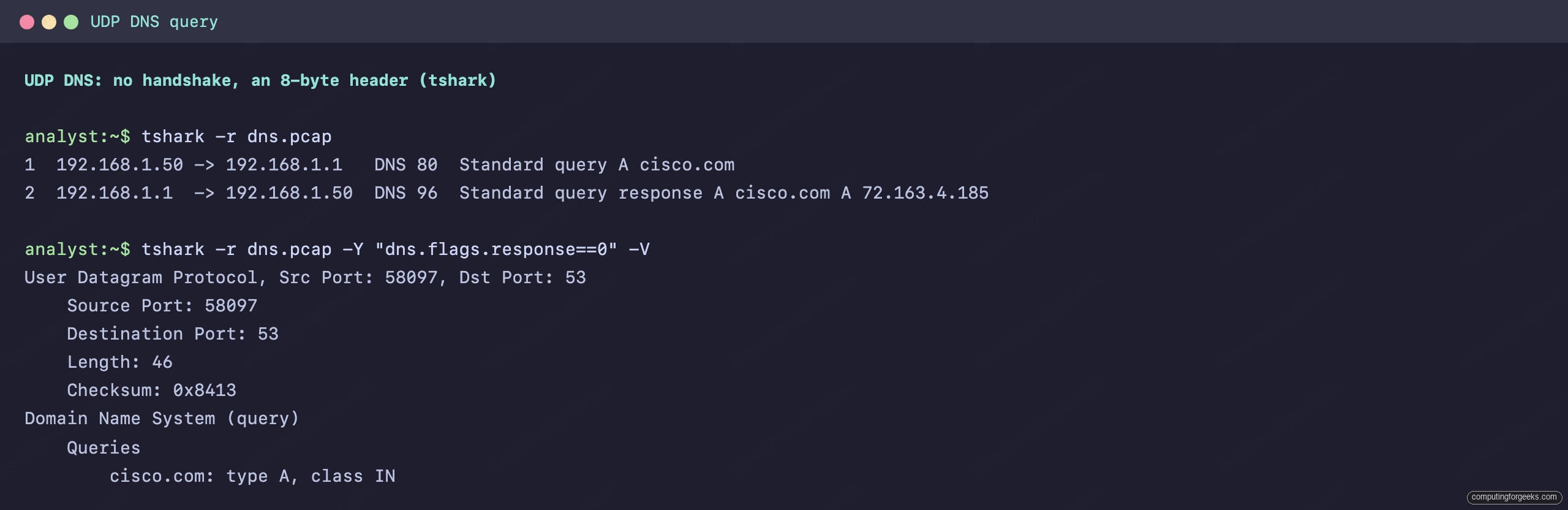
The checksum is the only error-detection field UDP has, and it only detects corruption, it does not correct it. That single capture, two datagrams with an 8-byte header, is the reason DNS, DHCP, and other quick request-response protocols pick UDP over TCP.
Which protocol uses which port
Both protocols use 16-bit port numbers to identify the receiving application, and an IP address (the kind you plan with subnetting) plus a port number is a socket. These well-known ports come up constantly in firewall rules, troubleshooting, and the Cisco CCNA 200-301 exam, so the table is worth committing to memory. SSH on port 22, for example, is the TCP service behind the base device configuration you log into.
| Port | Application | Transport |
|---|---|---|
| 20, 21 | FTP (data, control) | TCP |
| 22 | SSH | TCP |
| 23 | Telnet | TCP |
| 25 | SMTP | TCP |
| 53 | DNS | UDP (TCP for zone transfers) |
| 67, 68 | DHCP (server, client) | UDP |
| 69 | TFTP | UDP |
| 80 | HTTP | TCP |
| 123 | NTP | UDP |
| 161 | SNMP | UDP |
| 443 | HTTPS | TCP |
Two details worth knowing: DNS uses UDP 53 for ordinary name resolution but switches to TCP 53 for zone transfers that are too large for a single datagram, and DHCP uses two ports because a client with no IP address yet cannot receive a normal unicast reply.
Practice TCP and UDP
Drill the handshake, the header sizes, and the port table with the flashcards, then test the trade-offs on the quiz. The deck is a downloadable Anki package for spaced repetition.
Now check yourself:
Choosing between TCP and UDP
The decision comes down to what the application cannot tolerate. If losing or reordering data would break it, the application uses TCP and pays for the handshake, the acknowledgments, and the larger header. Web traffic, file transfer, remote shells, and mail all fall here, which is why HTTP, HTTPS, FTP, SSH, and SMTP run on TCP. Both ends ride on top of IP, the same Layer 3 that routing moves around the network.
If low latency or low overhead matters more than guaranteed delivery, the application uses UDP and either accepts the loss or handles recovery itself. DNS and DHCP are short request-response exchanges where a TCP handshake would cost more than retrying. TFTP, NTP, and SNMP are small and frequent. Voice and video would rather drop a packet than wait for a retransmit that arrives too late to play. The rule of thumb: reach for TCP by default, and choose UDP deliberately when the workload is latency-sensitive or the application owns its own reliability. The CCNA 200-301 roadmap shows where transport fits among the other Domain 1 topics.