

Ladybird is the browser project that started as a side experiment inside SerenityOS and is now an independent non-profit aiming for an alpha release in 2026. It has its own engine (LibWeb), its own JavaScript implementation (LibJS), no Chromium, no Blink, no WebKit fork. There is no apt package, no Homebrew bottle, no AppImage. If you want to drive it today, you compile it from source.
This guide walks through that on Ubuntu 26.04, Fedora 44, and macOS, with the exact toolchain Ladybird’s maintainers expect: clang for C++23, CMake with Ninja, vcpkg fetching the C++ third-party graph, a Rust toolchain for a couple of subcomponents, and Qt 6 for the Linux UI shell. We also cover what to do when the build trips, how to keep your tree current, and what the multi-process architecture looks like once the binary starts.
Verified working: May 2026 on Fedora 44 (kernel 7.0.8) with clang 22.1.5, CMake 4.3, Ninja 1.13, and Qt 6.11.1. Ubuntu 26.04 LTS and macOS Sequoia (Apple Silicon) follow the same flow with their native package managers.
What Ladybird actually is
Ladybird is a browser written from scratch in C++23, governed by the Ladybird Browser Initiative non-profit and funded by Andreas Kling, Jim Simons, and a growing list of donors. The headline pieces:
- LibWeb: the rendering engine, written against the WHATWG and W3C specifications directly rather than forked from Blink or WebKit
- LibJS: an independent ECMAScript 2024 implementation, passing more than 90% of test262 at the time of writing
- LibCrypto / LibTLS: an in-tree TLS stack, with optional OpenSSL on the network path
- Multi-process model: separate WebContent, RequestServer, ImageDecoder, and Compositor processes per tab, so a renderer crash never takes the chrome down
- BSD 2-Clause license: permissive, not GPL or MPL
The project targets a public alpha in 2026 for early-adopter developers. It is not your daily driver yet. It is, however, the most credible attempt at a fully independent browser engine since Servo, and reading its source is the easiest way to actually understand how a modern browser is laid out. If you have been on a tour of Chromium-free browsers recently and used Zen Browser on Ubuntu, the Arc Browser on macOS and Windows, or the Dia browser on macOS, Ladybird is the first one on that list that doesn’t share an engine with anything else shipping.
Prerequisites
- At least 8 GB of RAM. The build links large C++ translation units; 4 GB swaps hard, 16 GB is comfortable.
- At least 30 GB of free disk. A clean Build tree lands around 5.7 GB; vcpkg’s downloads and intermediate objects push the working set higher.
- 4 CPU cores or more. Ninja parallelises aggressively; a 2-core box still works but the wall clock doubles.
- A working network. The build pulls vcpkg ports from upstream and downloads Rust nightlies the first time around.
- A C++23 compiler. On Linux that is clang 18 or newer (gcc 14 ships pieces of C++23, but the Ladybird tree currently relies on clang-specific behavior in LibWasm). On macOS that is Homebrew’s llvm@21; Apple Clang shipped with Xcode is too old as of May 2026.
Step 1: Install build dependencies for your OS
The Linux dependency story is the same shape on every distro: a C++23 clang, lld, CMake, Ninja, a Rust toolchain, autoconf/automake/pkg-config, nasm, and the Qt 6 devel kit. The macOS path swaps in Homebrew for the system bits and pulls Qt 6 the same way. Pick the subsection that matches your machine and skip the others.
Ubuntu 26.04 LTS
Ubuntu 26.04 ships clang 21 in its default repos, which is new enough. The list below covers compiler, build tooling, and the runtime libraries vcpkg expects to find on the host.
sudo apt update
sudo apt install -y build-essential clang lld cmake ninja-build \
    git rustup pkg-config autoconf autoconf-archive automake nasm \
    qt6-base-dev qt6-tools-dev-tools qt6-wayland qt6-multimedia-dev \
    libgl1-mesa-dev libglu1-mesa-dev libpulse-dev libssl-dev zip unzip tar curl
If you have never used rustup before, initialise the toolchain so vcpkg can fetch the Rust crates Ladybird depends on for a few media components:
rustup default stable
rustc --version
That gives you the Ubuntu side of the dependency story. Continue at Step 2.
Fedora 44
Fedora 44 ships clang 22.1.5 in updates, which is the version this guide was built against. The dependency set is the same shape as Ubuntu, just renamed for dnf.
sudo dnf install -y cmake ninja-build clang lld git rust cargo \
    qt6-qtbase-devel qt6-qtwayland-devel qt6-qttools-devel \
    qt6-qtmultimedia-devel autoconf-archive perl-FindBin perl-IPC-Cmd \
    mesa-libGL-devel mesa-libGLU-devel pulseaudio-libs-devel openssl-devel \
    nasm zip unzip tar
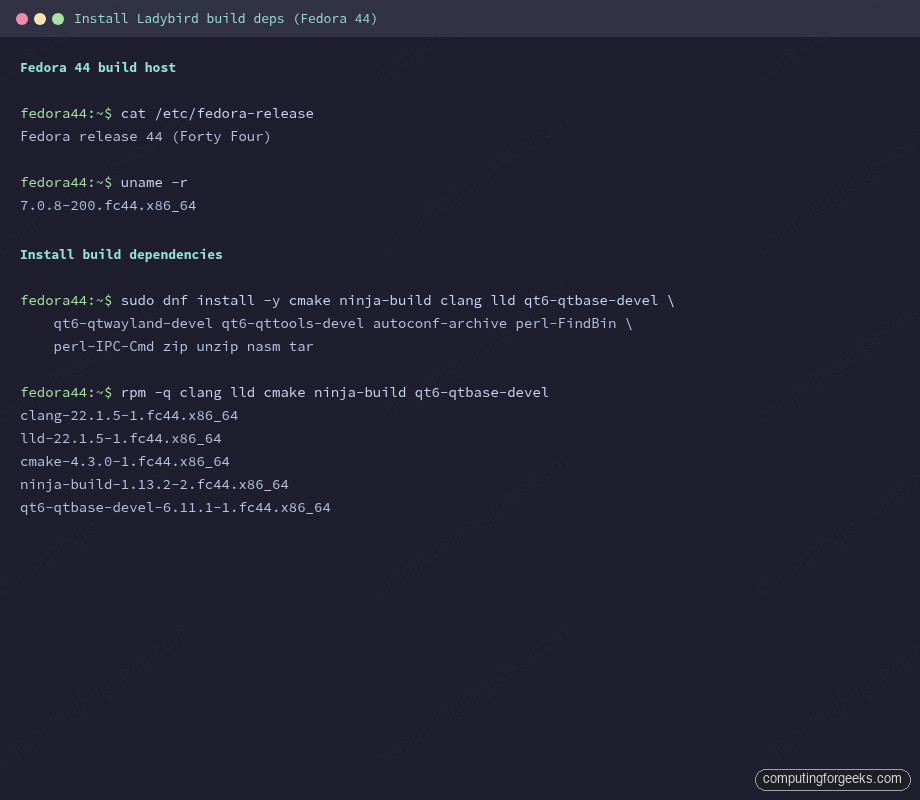
A spot check confirms the right versions land on the box. Compiler, linker, build generator, and Qt are the four that matter most when something later complains.
rpm -q clang lld cmake ninja-build qt6-qtbase-develThe screenshot below is the dependency-install step running on a fresh Fedora 44 clone with all the right packages landing from the official repos.
Once dnf finishes, continue at Step 2.
macOS
macOS needs Homebrew. The Apple Clang that ships with Xcode 16 does not handle the C++23 features Ladybird uses, so install Homebrew’s llvm@21 alongside Xcode’s command-line tools.
xcode-select --install || true
brew install llvm@21 cmake ninja autoconf autoconf-archive automake \
    nasm pkg-config qt rustup
rustup default stable
Export the Homebrew clang into your shell before running the build so Ladybird’s helper script picks it up instead of Apple Clang.
echo 'export PATH="/opt/homebrew/opt/llvm@21/bin:$PATH"' >> ~/.zshrc
echo 'export CC=/opt/homebrew/opt/llvm@21/bin/clang' >> ~/.zshrc
echo 'export CXX=/opt/homebrew/opt/llvm@21/bin/clang++' >> ~/.zshrc
source ~/.zshrc
clang --version | head -1
On Apple Silicon you should see a Homebrew Clang version string, not the Apple variant. With the toolchain pinned, continue at Step 2.
Step 2: Clone the Ladybird repo
Pull the canonical GitHub repo. The tree carries its own Toolchain submodule (vcpkg, Rust glue) so a recursive clone is unnecessary; the build script handles checkouts itself.
git clone https://github.com/LadybirdBrowser/ladybird.git
cd ladybird
This drops you on the master branch, which is where Ladybird’s developers cut releases from today. There is no stable branch yet because there has been no public stable release.
Step 3: Build Ladybird with clang
The official entry point is the Python helper at Meta/ladybird.py. It wraps CMake, Ninja, and vcpkg into a single command, and it knows how to seed the toolchain on first run. Tell it to use clang explicitly because the script will otherwise pick whatever cc resolves to on the host.
CC=clang CXX=clang++ ./Meta/ladybird.py buildFirst-run output walks through three phases. The script downloads and bootstraps vcpkg under Toolchain/Tarballs/vcpkg, builds every third-party dependency vcpkg pulls (OpenSSL, ICU, SDL, harfbuzz, skia, and friends), then drops into the Ladybird CMake configure step and finally a 5,000-plus target Ninja run. Expect 40 to 90 minutes the first time depending on cores, and around 5 minutes for incremental rebuilds afterwards.
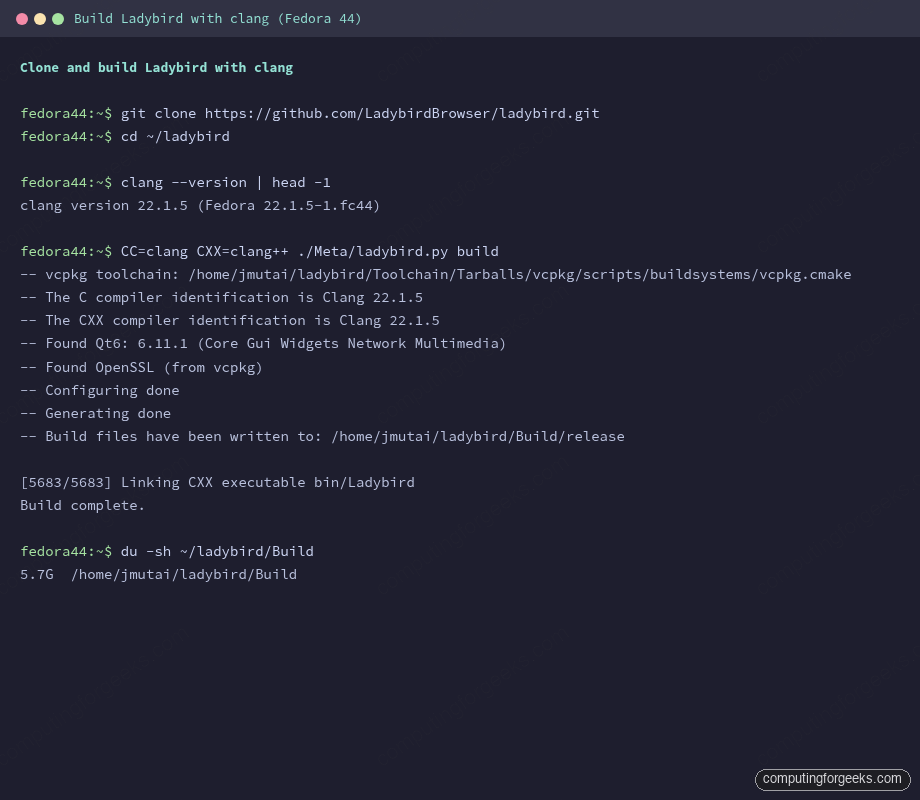
When the linker finishes, the helper prints “Build complete.” The binary lands at Build/release/bin/Ladybird.
Step 4: Verify and launch
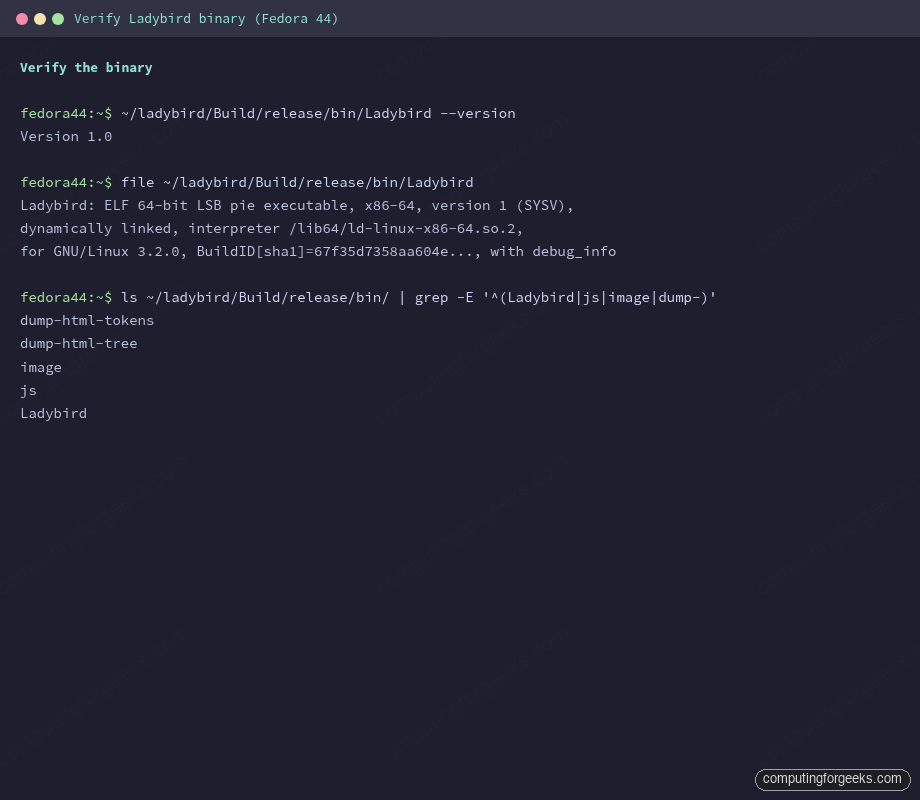
Sanity-check the binary before you start it. The version string today reports Version 1.0 because the project has not minted any other tag for the master line yet; the real recency signal is the build clock plus the git commit hash.
./Build/release/bin/Ladybird --version
file ./Build/release/bin/Ladybird
You should see an ELF executable on Linux or a Mach-O bundle on macOS. The screenshot below shows the verification step from the same Fedora build, with the ELF signature and the version string Ladybird emits today.
Launch the browser. On Linux, the Qt 6 chrome opens a window with a single new-tab. On macOS, the AppKit shell lives at Build/release/bundle/Ladybird.app and opens the same way.
./Build/release/bin/LadybirdThe first time you visit a real page, the network stack negotiates TLS through the in-tree LibTLS plus vcpkg’s OpenSSL, the HTML tokeniser hands the parsed tree to LibWeb, and LibJS drives any scripts the page ships. Performance is honest about its stage: simple pages render snappy, complex JS-heavy apps are visibly slow, and a non-trivial fraction of the web still trips a renderer bug. The point of a 2026 build is not parity; it is to see the engine drive a real page at all.
Step 5: Rebuild after upstream changes
The master branch moves fast, often a dozen commits per day. Pulling and rebuilding does not require a fresh clone; the helper script reuses the configured CMake tree.
cd ~/ladybird
git pull
CC=clang CXX=clang++ ./Meta/ladybird.py build
Ninja figures out which translation units actually changed. Most incremental rebuilds touch 50 to 300 files and finish in well under five minutes. The exception is anything that touches the IDL bindings generator, which forces a regeneration of the LibWeb interfaces; those incrementals can climb to fifteen minutes.
Running Ladybird’s test suite
Ladybird ships its own test runner that exercises LibJS against test262, LibWeb against WPT subset, and the C++ side via in-tree gtest-style suites. The same Meta script knows the targets.
./Meta/ladybird.py testThat runs the C++ unit tests. To run the JavaScript conformance set, point at the test262 driver in the build tree.
./Build/release/bin/test262-runner \
    --test262 ./Tests/LibJS/test262 \
    --shell ./Build/release/bin/js
Expect a high but non-100% pass rate. The project tracks the delta against ECMAScript 2024 and posts daily numbers to a public dashboard at wpt.fyi and the Ladybird-specific reports under Tests/.
The multi-process architecture, in one ps output
Open a second terminal once Ladybird is running and look at the process tree:
pgrep -lf "Ladybird|WebContent|RequestServer|ImageDecoder"You will see at least four siblings. Ladybird is the chrome process holding the Qt window and the tab UI. WebContent is a sandboxed renderer per tab, talking to chrome over UNIX-domain IPC. RequestServer handles network IO so the renderer never touches sockets directly. ImageDecoder handles untrusted image bytes inside its own sandbox so a malformed PNG cannot corrupt the renderer’s memory. This is the same separation Chromium and Firefox use, and it is the security backbone that lets the project hold a straight face about running untrusted JS.
Troubleshooting
Error: “use of deleted function” in LibWasm BytecodeInterpreter
This is what gcc 14 and gcc 16 currently emit when they hit the LibWasm interpreter on a fresh master tree. The compile fails with an unused-value pattern that clang accepts and gcc rejects under -Werror. The fix is to use clang on Linux, not gcc. If you must use gcc, patch Meta/CMake/compile_options.cmake to drop -Werror, but the build will still fail on a separate template syntax issue under gcc 16. Clang is the supported path.
Error: “Apple Clang 17 is too old”
Xcode 16’s bundled clang ships C++23 features partially. The Ladybird tree exercises modules and ranges code that the Apple fork has not picked up yet. Install Homebrew’s llvm@21 as shown under macOS in Step 1 and export CC and CXX before invoking the helper. Apple Clang stays installed for normal Xcode work; Ladybird just looks elsewhere.
Error: vcpkg “could not download” during the first build
vcpkg pulls ports over HTTPS from upstream mirrors. Corporate proxies or rate-limited connections occasionally break a port mid-download and the build dies pointing at Toolchain/Tarballs/vcpkg/buildtrees/PORT/install-x64-linux-dynamic-dbg.log. Delete the half-downloaded tarball under Toolchain/Tarballs/vcpkg/downloads, re-run the build, and the script picks up where it left off.
Error: “Could not find Qt6Wayland” on Fedora
The package name on Fedora is qt6-qtwayland-devel, not qt6-wayland-devel. Install the right one. If you are on a non-Wayland session and want the X11 backend, the same package still works because Qt 6 carries both platform plugins in one devel kit.
Error: “C compiler does not support C++23”
The CMake configure step probes the compiler before doing anything else. If you forgot to export CC and CXX, the script picks up the system cc, which is gcc on Linux. Run the build under CC=clang CXX=clang++ as shown in Step 3; the error vanishes.
Disk cleanup
The Build tree weighs in around 5.7 GB after a successful release build. vcpkg’s downloads add another 2 to 3 GB under Toolchain/Tarballs. If you want to reclaim space without losing the configured CMake tree:
cd ~/ladybird
./Meta/ladybird.py clean
du -sh Build Toolchain
That drops the compiled objects while keeping the vcpkg cache, so the next rebuild only pays for the C++ link, not the third-party rebuild. To wipe everything and start over from a clone-equivalent state, rm -rf Build Toolchain/Tarballs and re-run the build from Step 3.
Where Ladybird goes from here
The project’s public roadmap puts the first alpha in 2026, with macOS and Linux as the supported targets and Windows arriving later via a port the team is happy to accept patches for. Day-to-day, the master branch is where the action is: LibWeb closes WPT failures, LibJS chips at test262 deltas, and the network stack picks up things like brotli, HTTP/2, and TLS 1.3 hardening.
If you came here to use Ladybird as a daily browser, you came too early. If you came to read C++23 code that implements the web platform without leaning on any existing engine, you came at the right time. The same compile-from-source flow used here also gets you a working js shell, the LibWeb test harness, and a Wasm interpreter you can poke at, which is more than most browser projects let you do without building all of Chromium first. For more reading on the Fedora side of the toolchain, the Fedora 44 step-by-step install guide covers the host you just built on, and the Ubuntu 26.04 LTS install guide does the same for the Ubuntu side. If you would rather use a browser that is shipping today, the Brave install guide on Ubuntu Linux covers the privacy end of the Chromium spectrum.
