Stand up a forward proxy on your LAN and you get a single chokepoint for outbound HTTP and HTTPS, a cache that takes load off slow upstream links, and an audit trail of where your hosts are talking. Squid has been the open-source proxy of choice for two decades, and the current Ubuntu 26.04 LTS repo ships the latest stable release.
This guide installs Squid on Ubuntu 26.04 (Resolute Raccoon), opens it to the LAN with sane access rules, layers username and password authentication on top, and gives you the awk one-liners to make sense of access.log on a busy proxy. The setup is small and fast, so plan on about ten minutes from apt install to a fully authenticated client connection. If you have not yet finished the initial server setup, run that first so you are working from a hardened base.
Tested April 2026 on Ubuntu 26.04 LTS (Resolute Raccoon, kernel 7.0), Squid 7.2-2ubuntu2
Prerequisites
- Ubuntu 26.04 LTS server with sudo access
- 2 GB RAM and 20 GB disk minimum (cache grows over time)
- Inbound TCP/3128 reachable from the clients you want to proxy
- A second machine on the same LAN for client testing
Step 1: Set reusable shell variables
Several values repeat across the install: the proxy port, the LAN range you allow, an admin email for cache reports, and the basic-auth username. Export them once at the top of the SSH session and reference the variables in every subsequent step.
export PROXY_PORT="3128"
export ALLOWED_NET="192.168.1.0/24"
export PROXY_USER="alice"
export PROXY_PASS="StrongPass123"
export ADMIN_EMAIL="[email protected]"
Confirm the values are set before you run anything destructive:
echo "Port:    ${PROXY_PORT}"
echo "Network: ${ALLOWED_NET}"
echo "User:    ${PROXY_USER}"
If any of those echo blank, re-run the corresponding export before moving on. Empty variables silently break later sed substitutions and htpasswd calls.
Step 2: Install Squid from the Ubuntu repo
The package is in the default main repository on 26.04, so no PPAs or third-party sources. Pull in apache2-utils at the same time because htpasswd ships in that package and you need it for basic auth in Step 4.
sudo apt update
sudo apt install -y squid apache2-utils
The post-install hook starts the service automatically. Check the version and confirm the daemon is up:
squid -v | head -3
sudo systemctl status squid --no-pager | head -8
The first command prints the Squid cache version line, and the second confirms an active (running) unit. The daemon listens on TCP/3128 by default.
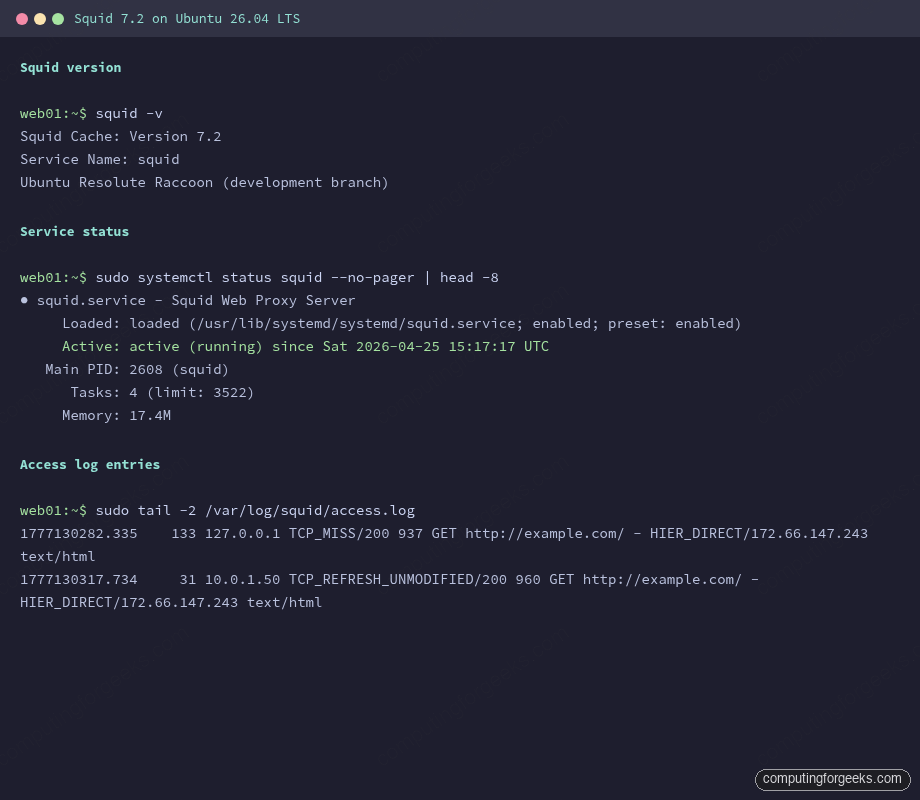
The screenshot above is what you should see on a fresh box. Memory under 20 MB and four worker tasks is the idle baseline before any clients connect.
Step 3: Configure ACLs and access rules
The default Ubuntu config only allows localhost through. It does pre-define a useful localnet ACL covering every RFC1918 range, but the matching http_access allow localnet directive is commented out. Uncommenting that one line turns Squid into a working LAN proxy.
sudo cp /etc/squid/squid.conf /etc/squid/squid.conf.orig
sudo sed -i 's|^# http_access allow localnet|http_access allow localnet|' /etc/squid/squid.conf
If your LAN does not match any of the RFC1918 ranges Squid pre-defines, add a custom ACL. Open the config:
sudo vi /etc/squid/squid.confPlace the following lines near the top, above the http_access rules. The placeholder ALLOWED_NET_HERE gets replaced by the variable you set in Step 1:
acl mylan src ALLOWED_NET_HERE
acl business_hours time MTWHF 09:00-18:00
acl blocked_sites dstdomain .facebook.com .x.com .reddit.com

http_access deny blocked_sites
http_access allow mylan business_hours
http_access deny all

cache_mgr ADMIN_EMAIL_HERE
visible_hostname proxy.lan
Save and substitute the placeholders with your real values:
sudo sed -i "s|ALLOWED_NET_HERE|${ALLOWED_NET}|" /etc/squid/squid.conf
sudo sed -i "s|ADMIN_EMAIL_HERE|${ADMIN_EMAIL}|" /etc/squid/squid.conf
Validate the configuration before reloading. Squid does not roll back on a bad config; a typo will leave you with a stopped service and angry users.
sudo squid -k parse 2>&1 | tail -5
sudo systemctl reload squid
The parse output ends with a final refresh_pattern line and no errors. If the reload fails, run journalctl -u squid -n 30 for the line number and column of the syntax error.
Step 4: Add basic authentication
LAN-only access is fine for a small office, but the moment the proxy needs to be reachable across VPNs or from coffee-shop laptops you want auth. Squid ships basic_ncsa_auth, which reads htpasswd-style files. Create the credentials file:
sudo htpasswd -bc /etc/squid/passwd "${PROXY_USER}" "${PROXY_PASS}"
sudo chown proxy:proxy /etc/squid/passwd
sudo chmod 640 /etc/squid/passwd
The -c flag creates the file. Drop it on subsequent htpasswd calls or the file is overwritten and you lose every other user. Add a second user with no -c:
sudo htpasswd -b /etc/squid/passwd bob "AnotherPass456"Now wire the helper into Squid. Edit the config:
sudo vi /etc/squid/squid.confAdd the following block above the existing http_access rules. The auth helper path is fixed by the Ubuntu package layout, so you can paste it as-is:
auth_param basic program /usr/lib/squid/basic_ncsa_auth /etc/squid/passwd
auth_param basic realm Proxy authentication required
auth_param basic credentialsttl 2 hours
auth_param basic casesensitive off

acl authenticated proxy_auth REQUIRED

http_access allow authenticated
http_access deny all
Replace the earlier http_access allow mylan business_hours rule because authenticated access supersedes it. Validate and reload:
sudo squid -k parse 2>&1 | tail -3
sudo systemctl reload squid
The reload picks up the new auth helper without dropping any in-flight tunnels. Existing clients will be re-prompted for credentials on their next request.
Step 5: Test the proxy from a client
From any Linux or macOS box on the LAN, point curl at the proxy. Replace 10.0.1.50 with your Squid host’s IP. The first call without credentials should return HTTP 407 (Proxy Authentication Required):
curl -s -o /dev/null -w "HTTP %{http_code}\n" -x http://10.0.1.50:3128 https://example.com/The expected output is a single line:
HTTP 407Repeat with credentials. Use the -U flag for proxy auth (note the capital U; lowercase -u is for the destination, not the proxy):
curl -s -o /dev/null -w "HTTP %{http_code}\n" -x http://10.0.1.50:3128 -U alice:StrongPass123 https://example.com/You should now see HTTP 200. Behind the scenes, Squid issued a CONNECT tunnel for the TLS connection, validated Alice against the htpasswd file, and forwarded the request unchanged. Tail the log on the proxy host to confirm the entries arrived with the username field populated:
sudo tail -3 /var/log/squid/access.logThe username sits in the seventh field of each access-log row. A blocked destination shows up as TCP_DENIED/403 with the user still attributed.
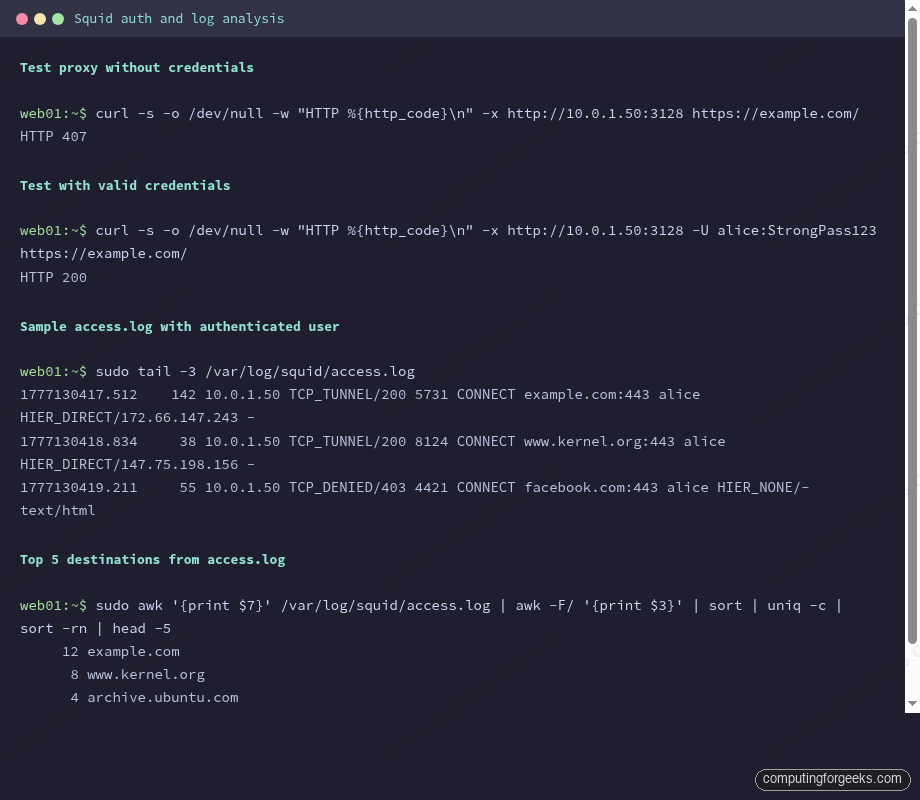
The screenshot shows the 407 challenge, the successful authenticated 200, and the resulting log lines. Notice how each tunneled request shows up as CONNECT host:443 rather than the full URL, because TLS hides the path from the proxy.
Step 6: Analyze the access log
Squid logs every request as a single space-separated line. The fields are: epoch timestamp, response time in milliseconds, client IP, cache result and HTTP status, response bytes, request method, URL, username, peer hierarchy, and content type. A handful of awk one-liners cover 90% of routine analysis.
Top destinations across all clients:
sudo awk '{print $7}' /var/log/squid/access.log | awk -F/ '{print $3}' | sort | uniq -c | sort -rn | head -10Top users by request count:
sudo awk '$8 != "-" {print $8}' /var/log/squid/access.log | sort | uniq -c | sort -rnCache hit ratio (the ratio of TCP_HIT to total requests is the headline number for whether your cache is earning its keep):
sudo awk '{tot++; if ($4 ~ /HIT/) hit++} END {printf "Hits: %d / %d (%.1f%%)\n", hit, tot, hit*100/tot}' /var/log/squid/access.logFor longer-term analysis, install sarg or squid-analyzer; both consume the access log and emit HTML reports broken down by user, site, and time window. The CLI awk pipelines stay useful for ad-hoc questions like “what is bob hitting at 3am?” without spinning up a report tool.
Step 7: Performance and cache tuning
The default cache settings on Ubuntu use 256 MB of memory and a 100 MB disk store. That is fine for a five-user setup; for anything larger, bump both up. Edit the config:
sudo vi /etc/squid/squid.confFind the cache_mem and cache_dir lines (or add them if absent) and set values that match your hardware:
cache_mem 1024 MB
maximum_object_size_in_memory 1 MB

cache_dir ufs /var/spool/squid 10000 16 256
maximum_object_size 256 MB

logfile_rotate 7
The cache_dir values are: storage type, path, total MB on disk, level-1 directories, level-2 directories. The 10000 here gives Squid 10 GB of disk to work with. Stop the service, rebuild the cache index, and restart:
sudo systemctl stop squid
sudo squid -z
sudo systemctl start squid
The squid -z step initializes the directory hierarchy. Skip it and the daemon refuses to start with a “no such directory” error.
Step 8: Open the firewall
Ubuntu 26.04 ships ufw disabled. If you have already enabled it as part of your firewall setup, allow the proxy port from the LAN range only. Public exposure of an authenticated proxy is fine, but most sites should keep it LAN-bound:
sudo ufw allow from "${ALLOWED_NET}" to any port "${PROXY_PORT}" proto tcp comment 'squid-proxy'
sudo ufw status verbose | grep "${PROXY_PORT}"
If you publish the proxy beyond the LAN, pair this with Fail2ban watching /var/log/squid/access.log for repeated 407 responses from the same IP. Squid does not have built-in rate limiting on auth failures, so brute-force protection lives outside the proxy. For sites that already run an HAProxy load balancer in front of internal services, Squid handles a different layer (outbound vs inbound) so the two coexist without conflict.
Squid configuration cheat sheet
The config file in /etc/squid/squid.conf is over 8000 lines once you count comments, but day-to-day operation only touches a handful of directives. Keep this open in another tab while you tune:
| Directive | What it does | Common value |
|---|---|---|
http_port | TCP port the daemon listens on | 3128 (default), 8080 (corporate) |
cache_mem | RAM used to hold hot objects | 512 MB small, 4096 MB busy |
cache_dir | Disk store: type, path, size, dir layout | ufs /var/spool/squid 10000 16 256 |
maximum_object_size | Largest object Squid will cache to disk | 256 MB (raise for ISO mirroring) |
acl | Named match rule (source, dest, time, port, user) | acl mylan src 192.168.1.0/24 |
http_access | Allow or deny based on one or more ACLs | http_access allow authenticated |
auth_param | Wire an auth helper into the request flow | auth_param basic program …basic_ncsa_auth |
refresh_pattern | How long matching URLs stay cached | Use the defaults unless you know better |
cache_peer | Forward to an upstream proxy (parent or sibling) | cache_peer parent.example.com parent 3128 0 |
visible_hostname | Name shown in error pages and logs | proxy.lan |
cache_mgr | Email address shown on error pages | Your sysadmin contact |
logfile_rotate | Number of rotated access.log files to keep | 7 for weekly retention |
Two flags are worth committing to muscle memory. squid -k parse validates the config without touching the running daemon, and squid -k reconfigure reloads a live daemon without dropping in-flight connections. Use both together: parse first, then reconfigure when parse is clean. For deeper tuning of timeouts, peer hierarchies, and SSL bumping, the upstream Squid wiki remains the canonical reference. With Squid handling the LAN proxying, the next step on most boxes is to lock down SSH on the proxy host itself with key-only authentication so a stolen htpasswd file does not also hand over root.