

Config files are where most Ansible complexity lives. A static copy module works until you need different ports per host, different firewall commands per OS, or dynamic service discovery entries. Jinja2 templates solve this by embedding variables, conditionals, and loops directly into configuration files that Ansible renders at deploy time.
This guide covers the practical Jinja2 patterns you’ll use most: variable substitution, conditional blocks for cross-OS configs, loops for generating repetitive sections, filters for data transformation, and the validate parameter that catches config errors before they hit production. We test three real templates (Nginx, SSHD, and a firewall script) on Rocky Linux 10.1 and Ubuntu 24.04 with Ansible 13.5.0. If you haven’t covered Ansible variables yet, read that first because templates consume variables heavily.
Verified working: April 2026 on Rocky Linux 10.1 and Ubuntu 24.04 LTS, ansible-core 2.20.4, Jinja2 3.1.6
Prerequisites
Before starting:
- Ansible installed on a control node (Install Ansible on Rocky Linux 10 / Ubuntu 24.04)
- At least one managed host with SSH access
- Tested on: ansible-core 2.20.4, Jinja2 3.1.6, Rocky Linux 10.1, Ubuntu 24.04
- Understanding of Ansible variables and control flow
Templates live in a templates/ directory alongside your playbook or inside a role’s structure. Ansible automatically searches this directory when you use the template module.
How Templates Work
The ansible.builtin.template module reads a Jinja2 file (ending in .j2 by convention), replaces all {{ variable }} placeholders with their values, evaluates {% if %} and {% for %} blocks, then writes the result to the remote host. Unlike the copy module which transfers files verbatim, template processes the content through the Jinja2 engine first.
Jinja2 uses three tag types:
| Tag | Purpose | Example |
|---|---|---|
{{ }} | Output a variable value | {{ http_port }} |
{% %} | Logic (if, for, set) | {% if ssl_enabled %} |
{# #} | Comments (not rendered) | {# TODO: add rate limiting #} |
Building an Nginx Config Template
Start with a practical example. This Nginx template uses variables for tuning, conditionals for optional SSL, and loops for dynamic proxy locations.
Create templates/nginx.conf.j2:
vi templates/nginx.conf.j2Add the following template content:
# Managed by Ansible - Do not edit manually
# Generated for {{ inventory_hostname }} on {{ ansible_facts['distribution'] }} {{ ansible_facts['distribution_version'] }}

worker_processes {{ nginx_worker_processes | default('auto') }};

events {
    worker_connections {{ nginx_worker_connections | default(1024) }};
}

http {
    include       /etc/nginx/mime.types;
    default_type  application/octet-stream;

    sendfile    on;
    tcp_nopush  on;
    keepalive_timeout {{ keepalive_timeout | default(65) }};

    server {
        listen {{ http_port }};
        server_name {{ server_name | default('_') }};
        root /usr/share/nginx/html;

{% if ssl_enabled | default(false) %}
        listen 443 ssl;
        ssl_certificate     {{ ssl_cert_path }};
        ssl_certificate_key {{ ssl_key_path }};
{% endif %}

{% for location in custom_locations | default([]) %}
        location {{ location.path }} {
            proxy_pass {{ location.backend }};
            proxy_set_header Host $host;
            proxy_set_header X-Real-IP $remote_addr;
        }
{% endfor %}
    }
}
The default() filter on nearly every variable means the template works even if some values aren’t defined. SSL blocks only render when explicitly enabled. The for loop generates as many proxy locations as the variable list contains.
Deploying the Template
The playbook that renders and deploys this template:
---
- name: Deploy Nginx Config
  hosts: all
  become: true
  vars:
    nginx_worker_processes: auto
    nginx_worker_connections: 1024
    keepalive_timeout: 65
    server_name: app.example.com
    ssl_enabled: false
    custom_locations:
      - path: /api
        backend: "http://127.0.0.1:8080"
      - path: /metrics
        backend: "http://127.0.0.1:9090"

  tasks:
    - name: Deploy Nginx config from template
      ansible.builtin.template:
        src: templates/nginx.conf.j2
        dest: /etc/nginx/nginx.conf
        owner: root
        group: root
        mode: "0644"
      notify: Reload nginx

  handlers:
    - name: Reload nginx
      ansible.builtin.systemd:
        name: nginx
        state: reloaded
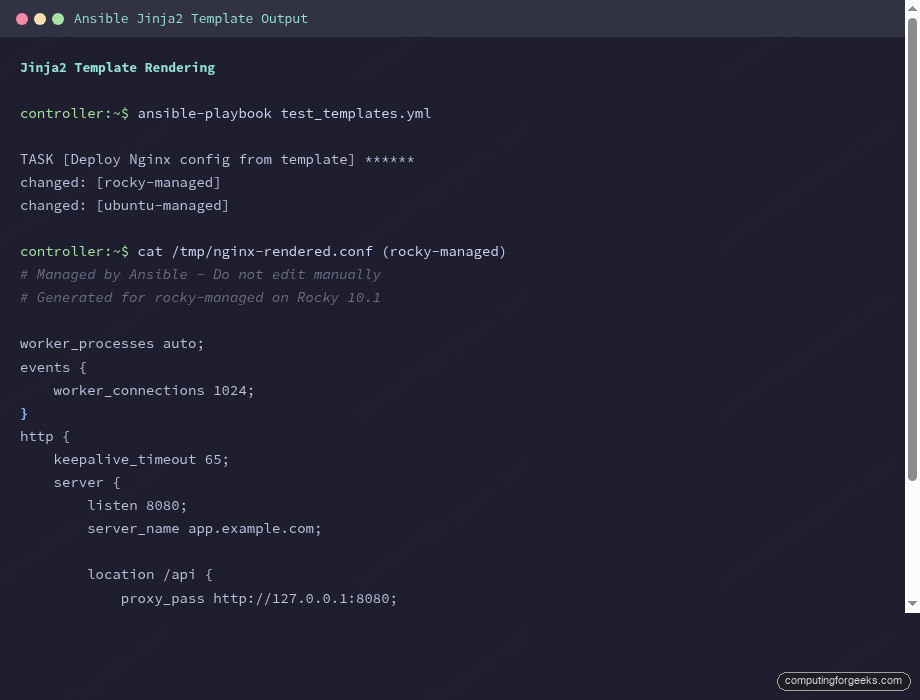
Each host gets a config customized with its own http_port from host_vars. Rocky (port 8080) and Ubuntu (port 9090) receive different rendered configs from the same template:
# Rendered on rocky-managed:
    server {
        listen 8080;
        server_name app.example.com;

        location /api {
            proxy_pass http://127.0.0.1:8080;
        }
        location /metrics {
            proxy_pass http://127.0.0.1:9090;
        }
    }

# Rendered on ubuntu-managed:
    server {
        listen 9090;
        server_name app.example.com;
        ...
The handler only fires when the template actually changes the file. On subsequent runs where nothing changed, Ansible reports ok and skips the reload.
Template Validation
The validate parameter on the template module runs a command against the rendered file before it replaces the real config. If validation fails, the original file stays untouched. This prevents a bad template from breaking a running service.
For SSHD, the validation command is sshd -t -f %s where %s is replaced with the path to the rendered temporary file:
    - name: Render SSHD config with validation
      ansible.builtin.template:
        src: templates/sshd_config.j2
        dest: /etc/ssh/sshd_config
        mode: "0600"
        validate: "/usr/sbin/sshd -t -f %s"
Tested with our SSHD template, the validation passes and shows the key rendered values:
ok: [rocky-managed] => {
    "msg": [
        "Port 22",
        "PermitRootLogin prohibit-password",
        "PasswordAuthentication no",
        "AllowUsers root deploy ansible",
        "LogLevel VERBOSE"
    ]
}
Common validation commands by service:
| Service | Validate Command |
|---|---|
| SSHD | /usr/sbin/sshd -t -f %s |
| Nginx | /usr/sbin/nginx -t -c %s |
| Apache | /usr/sbin/httpd -t -f %s |
| Sudoers | /usr/sbin/visudo -cf %s |
| Chrony | /usr/sbin/chronyd -p -f %s |
Jinja2 Filters in Templates
Filters transform values inline using the pipe (|) syntax. Templates use many of the same filters available in playbooks, plus a few that are especially useful for config file generation.
Essential Filters for Templates
The filters you’ll reach for most often:
| Filter | What It Does | Example |
|---|---|---|
default(value) | Fallback if undefined | {{ port | default(8080) }} |
join(sep) | Combine list into string | {{ users | join(' ') }} |
upper / lower | Case conversion | {{ level | upper }} |
trim | Remove whitespace | {{ input | trim }} |
replace(old,new) | String replacement | {{ name | replace(' ','_') }} |
truncate(n) | Limit string length | {{ desc | truncate(30) }} |
to_yaml / to_json | Serialize data | {{ config | to_yaml }} |
map(attribute) | Extract from list of dicts | {{ rules | map(attribute='port') }} |
"%-16s" | format(val) | Padded formatting | Align columns in generated files |
Cross-OS Templates with Conditionals
One template generating OS-specific output is a powerful pattern. This firewall rules template produces firewall-cmd commands for RHEL and ufw commands for Debian, from the same source file:
vi templates/firewall_rules.j2Add the template content:
# Firewall Rules for {{ inventory_hostname }}
# Generated: {{ ansible_facts['date_time']['date'] }}
# OS: {{ ansible_facts['distribution'] }} {{ ansible_facts['distribution_version'] }}

{% for rule in firewall_rules %}
# {{ rule.description | default('No description') }}
{% if ansible_facts['os_family'] == 'RedHat' %}
firewall-cmd --permanent --add-port={{ rule.port }}/{{ rule.protocol | default('tcp') }}
{% elif ansible_facts['os_family'] == 'Debian' %}
ufw allow {{ rule.port }}/{{ rule.protocol | default('tcp') }} comment "{{ rule.description | default('') | truncate(30) }}"
{% endif %}
{% endfor %}

{% if ansible_facts['os_family'] == 'RedHat' %}
firewall-cmd --reload
{% endif %}

# Total rules: {{ firewall_rules | length }}
# Ports opened: {{ firewall_rules | map(attribute='port') | join(', ') }}
The playbook passes a list of firewall rules as variables:
  vars:
    firewall_rules:
      - { port: 22, protocol: tcp, description: "SSH access" }
      - { port: 80, protocol: tcp, description: "HTTP web traffic" }
      - { port: 443, protocol: tcp, description: "HTTPS encrypted web traffic" }
      - { port: 5432, protocol: tcp, description: "PostgreSQL database" }
      - { port: 9090, protocol: tcp, description: "Prometheus metrics" }
On Rocky Linux (RHEL family), the template renders firewall-cmd syntax:
# Firewall Rules for rocky-managed
# Generated: 2026-04-14
# OS: Rocky 10.1

# SSH access
firewall-cmd --permanent --add-port=22/tcp
# HTTP web traffic
firewall-cmd --permanent --add-port=80/tcp
# HTTPS encrypted web traffic
firewall-cmd --permanent --add-port=443/tcp
# PostgreSQL database
firewall-cmd --permanent --add-port=5432/tcp
# Prometheus metrics
firewall-cmd --permanent --add-port=9090/tcp

firewall-cmd --reload

# Total rules: 5
# Ports opened: 22, 80, 443, 5432, 9090
The same template on Ubuntu generates ufw syntax instead:
# Firewall Rules for ubuntu-managed
# Generated: 2026-04-14
# OS: Ubuntu 24.04

# SSH access
ufw allow 22/tcp comment "SSH access"
# HTTP web traffic
ufw allow 80/tcp comment "HTTP web traffic"
# HTTPS encrypted web traffic
ufw allow 443/tcp comment "HTTPS encrypted web traffic"
# PostgreSQL database
ufw allow 5432/tcp comment "PostgreSQL database"
# Prometheus metrics
ufw allow 9090/tcp comment "Prometheus metrics"

# Total rules: 5
# Ports opened: 22, 80, 443, 5432, 9090
Same data, same template, two completely different outputs. The map(attribute='port') filter at the bottom extracts just the port numbers from the list of dictionaries for a summary line.
Generating /etc/hosts from Inventory
Templates that reference groups and hostvars can generate files from your entire inventory. This hosts file template populates cluster entries dynamically:
# /etc/hosts - Managed by Ansible
# Last updated: {{ ansible_facts['date_time']['iso8601'] }}

127.0.0.1   localhost localhost.localdomain
::1         localhost localhost.localdomain

# Cluster hosts (auto-generated from inventory)
{% for host in groups['all'] %}
{{ hostvars[host]['ansible_host'] }}   {{ host }} {{ host }}.{{ domain | default('local') }}
{% endfor %}

{% if extra_hosts is defined %}
# Additional hosts
{% for entry in extra_hosts %}
{{ "%-16s" | format(entry.ip) }}{{ entry.hostname }}
{% endfor %}
{% endif %}
The rendered output on both hosts includes every machine from the inventory, plus any additional static entries:
# /etc/hosts - Managed by Ansible
# Last updated: 2026-04-14T08:41:59Z

127.0.0.1   localhost localhost.localdomain
::1         localhost localhost.localdomain

# Cluster hosts (auto-generated from inventory)
192.168.1.61   rocky-managed rocky-managed.example.com
192.168.1.62   ubuntu-managed ubuntu-managed.example.com

# Additional hosts
10.0.1.100      db01.example.com
10.0.1.101      cache01.example.com
10.0.1.102      lb01.example.com
The "%-16s" | format() pattern left-pads the IP addresses so the hostnames align in clean columns. Adding a new host to your inventory automatically adds it to every machine’s hosts file on the next playbook run.
Whitespace Control
Jinja2 blocks leave blank lines in the output where {% if %} and {% for %} tags are. Adding a dash inside the tag strips whitespace: {%- if -%} strips before and after, {%- if %} strips only before.
For config files where blank lines matter (like sudoers or systemd units), use the trim blocks and lstrip settings at the top of your template:
#jinja2: trim_blocks: True, lstrip_blocks: True
# Config file starts here
{% if feature_enabled %}
feature_setting = on
{% endif %}
With trim_blocks, the newline after a block tag is removed. With lstrip_blocks, leading whitespace before block tags is stripped. Together they produce clean output without manual dash placement on every tag.
Template Best Practices
After building templates across production environments, these patterns consistently prevent problems:
- Always add a managed-by header with the hostname and generation timestamp. When someone SSHs in and sees a config file, they should know immediately that Ansible manages it and manual edits will be overwritten
- Use
default()on every optional variable. Templates that fail on missing variables are fragile. Set sensible defaults so the template renders even with minimal input - Use
validatefor every service config. A broken sshd_config can lock you out of a server. A broken nginx.conf kills the web server. Let Ansible check before deploying - Keep templates close to the playbook or role. The
templates/directory convention exists for a reason. Don’t scatter.j2files across the project - Use
ansible_factsdictionary syntax. The top-level fact injection (ansible_hostname) is deprecated in ansible-core 2.20 and will be removed in 2.24. Useansible_facts['hostname']instead - Combine with Ansible Vault for templates that contain secrets. Encrypt the vars file, not the template itself
Quick Reference
| Syntax | Purpose | Example |
|---|---|---|
{{ var }} | Variable output | {{ http_port }} |
{{ var | filter }} | Filtered output | {{ name | upper }} |
{% if condition %} | Conditional block | {% if ssl_enabled %} |
{% for x in list %} | Loop | {% for rule in rules %} |
{# comment #} | Template comment | Not rendered in output |
{%- tag -%} | Whitespace control | Strips surrounding whitespace |
validate: "cmd %s" | Pre-deploy validation | validate: "nginx -t -c %s" |
For the complete learning path, see the Ansible Automation Guide. Templates combine naturally with Ansible roles, where each role packages its templates alongside tasks and defaults. The Ansible Cheat Sheet covers quick template syntax references.
