Behind the lens is a family photo, a captured memory, a candid shot, and a reminder of a special moment. Camera technology keeps on revolutionizing, making photography or videography accessible to everyone globally. In this fascinating digital era, there is a notable increasing demand for cameras in every sector. And with the rising innovation and technology, we now have high-resolution sensors and more advancements in this field. We can’t ignore the fact that tiny cameras are integrated into our daily devices, such as smartphones, laptops, or tablets. From ancient times when the camera obscura was introduced to today’s tech cameras, this market has come a long way and is fueling remarkable gadgets. Therefore, this article will delve into the top-rated 4K webcams to buy in 2024.
What is a Webcam?
In this modern world, there is a sheer dominance of digital content creation, and people strive to share information through the internet. Also, many organizations have embraced remote work due to the pandemic’s aftermath and technological advancements. All this calls for webcams, which help when you constantly stream videos and images, have video conferencing, or an online meeting. Thus, a web camera, often known as a webcam device, either a built-in or standalone device, is mainly attached to or integrated into a laptop, computer, and other electronic gadgets. Note that there are internal webcams, which you see as a small, primarily circular dot at the top of your computer screen. But, for the external ones, you connect them to a laptop/computer using a USB or wirelessly. A web camera is commonly used in video telephony, online learning, live streaming, security, etc. These devices don’t support onboard memory for storage and have no physical control; most have a modest resolution of 720p 1080p, and the modern ones support 4k.
Why Should You Consider Buying a 4K Webcam?
- Remote working: You are probably familiar with the term WFM (Work From Home), which has become common nowadays. Since most people work away from their offices, the quickest and easiest way to communicate and meet up face-to-face is online. Webcam allows companies, businesses, or professionals to hold virtual meetings, video conferences, and collaborations within teams. Participation is much better when you can see your colleagues and freely present your ideas, knowing they are paying attention, unlike through emails or phone calls. With high-resolution web cameras, you can show the results of the project in progress in real time and have a brainstorming session in the comfort of your home. Additionally, when you get online, through a webcam, you can showcase your communication skills, qualifications, and the required expertise and leave a positive impression on your employers.
- Online classes: For online learners, a webcam is required when attending lectures, presenting projects or assignments, engaging with classmates, or interacting with your instructor. Remember that attendance is vital; a webcam lets you confirm that you are in the class and actively participating. It will let you transform your space into a virtual classroom, let you solve any academic doubts, and enjoy the seminars and lectures created by the teachers. Lecturers also benefit from this gadget as they can thoroughly explain concepts in sketches and diagrams and enhance the student’s understanding.
- Better Content creation experience: Live streamers, vloggers, and any other content creator should consider having a webcam. Most of the webcams have high frame rates that allow smooth streaming and prevent freezing on live videos. Therefore, you can freely record yourself, demonstrate your expertise, and present information while engaging with your audience. Webcams have provided a better experience for anyone creating content on YouTube, Snapchat, TikTok, Instagram, and more, and they are making it convenient to deliver information in real time or by recording.
- Stay connected with your friends and family: Webcams enhance social interactions and allow you to maintain smooth communication with your loved ones. If you are separated by distance, you can contact them from anywhere, all thanks to the internet and devices like webcams. You can see their faces from the video call, share beautiful stories and experiences, and strengthen your relationship. Seeing their expressions while hearing their life updates will brighten your days and kill the FOMO(Fear Of Missing Out).
- Better video quality: While laptops come with an inbuilt camera, a webcam has a better resolution than the internal one and lets you and the audience enjoy quality pictures or videos. Thus, having it is an added advantage as it makes your videos look professional, detailed, and clear. Additionally, they have top-notch lighting technology that illuminates your face in rooms with inadequate natural lighting.
7 Recommended 4K Webcams in 2024
Here are the top-rated webcams to buy in this digital content creation era:
1. Logitech Brio 4K Webcam
A top-notch 4K webcam will elevate your online videos. Note that the high resolution will transform your content and produce pro-level videos. Let your audience, employer, colleagues, and anyone viewing your content or watching you live enjoy a sharp and clear image. You can use this gadget for video conferences, live streaming, vlogging, or video calling with friends or family. If you need a 4K web camera to satisfy all these and more, consider buying the Logitech Brio webcam. Brio from Logitech is your ultimate solution with unmatched clarity. It supports a variety of apps, including Microsoft Teams, Zoom, and more.
Using the provided cable, you will quickly get started with Logitech Brio by plugging the webcam into your PC’s USB port. Required drivers will automatically download and install, making the installation seamless. Notably, immediately after plugging it into your computer, it becomes available for video recording in the camera in your Windows Camera application. With the HDR (High Dynamic Range) technology, Logitech Brio lets you create vibrant videos in areas where lighting is challenging by enhancing contrast and color accuracy. It has a high frame rate, which is perfect for high-quality recording and situations requiring smooth streaming or slow motion. This webcam has the optics and autofocus features for clear and professional-looking video footage, ensuring you always have an outstanding recording.
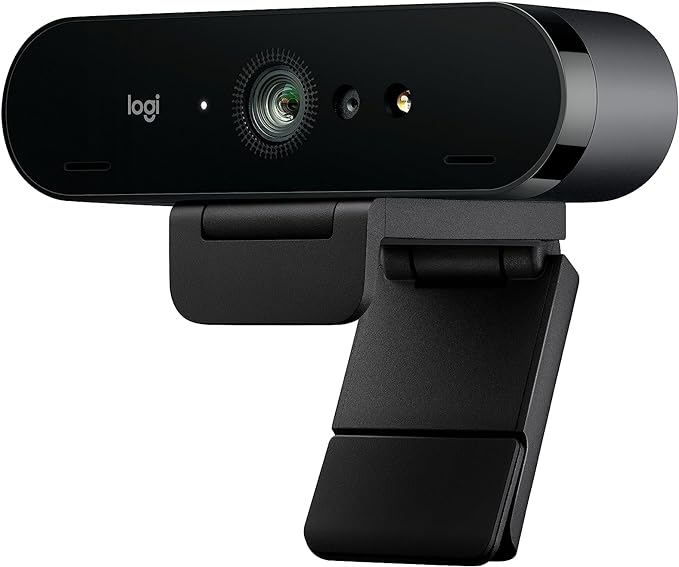
More Logitech Brio 4K Webcam features:
- Ultra 4K HD resolution: It has a four times better resolution than a typical HD webcam.
- It supports remote working with SYNC: Sync device management software allows you to stay connected regardless of where you are. Sync ensures the employees’ Logitech video collaboration personal devices are being used and updated.
- Noise-canceling technology: Includes dual omnidirectional mics that suppress background sound and ensure you are heard clearly.
- Up to 90 fps: You can produce high-quality video recording or streaming in any light condition.
- It includes 3 fields of view: 90°, 78°, or 65° dFOV, which you can choose via Logi Tune to narrow the focus on you or create a different environment.
- Windows Hello integration lets you securely sign into your computer without a password.
- Privacy shade: Feel free to flip up or down to cover or expose the lens.
- Works with Windows, Mac, or ChromeOS and the well-known calling and streaming platforms.
2. EMEET C960 4K Webcam for PC
A web camera has various applications, especially in this digital era. You can use it as a surveillance equipment for your security system. Also, many professionals, including those in nature parks or weather stations, use this gadget to let you watch live feeds. In most cases, individuals use a web camera to make video recordings, live stream an event, and then share the content on their social feeds. A 4K webcam is your best solution if you want a high-resolution video. Consider the EMEET C960 4K webcam, which will meet your demands and allow you to achieve high-class video production at any setup.
EMEET C960 offers good value for your money with top-notch features and usability. It is a plug-and-play device, meaning you are not required to install drivers to function. Whether you are using it for online learning, remote working, or video calling, this webcam has reliable performance, and the 4K feature ensures you have high-resolution output. Most users have appreciated the dual stereo microphones with built-in noise reduction technology that lets your audience enjoy a natural sound in your video calls or recordings. With the autofocus correction, the EMEET C960 4K webcam adjusts to different lighting conditions to ensure you have a clear image for your remote party.
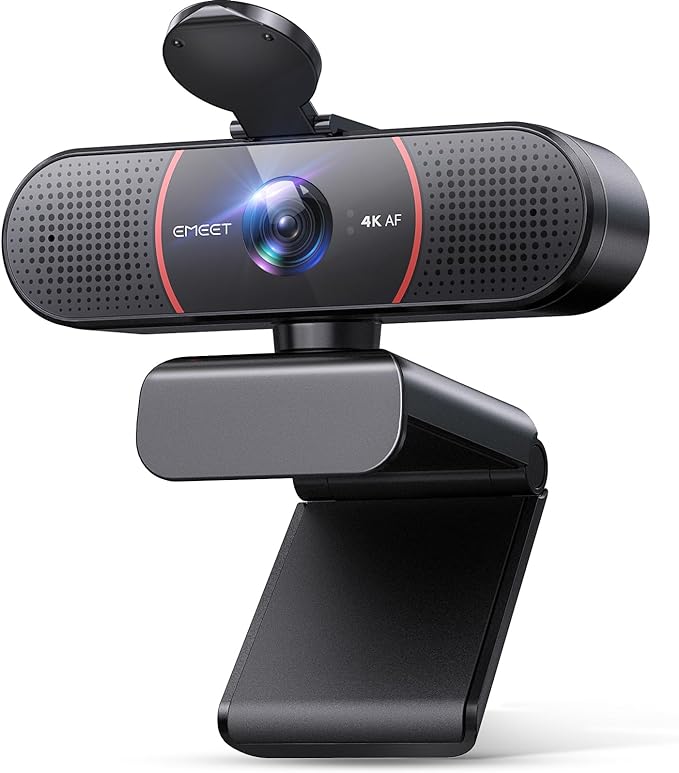
Additional details on EMEET C960 4K Webcam:
- Outstanding clarity with 4K resolution: Using the EMEET SmartCam C960 4K CMOS sensor, you will experience an ultra-clear visual without false upscaling. Thus, it is ideal for business meetings, online classes, or any audience where details matter.
- Dual AI noise-cancelling mics: The EMEET C960 4K Webcam has built-in dual microphones with noise-suppressing algorithms for crisp, natural audio.
- TOF focus and auto light correction: It ensures clear and stable focus for anyone having a business conference, educational lectures, and more. Adjusting the lighting settings allows you to record your video in low- or over-exposed environments.
- Plug and play plus privacy assured: With the USB interface, you will be up and running in no time, regardless of your tech expertise.
- Compatibility: Works effortlessly across multiple platforms, including Windows (Win 7,10,11), macOS (10.10 and above), Linux, Android TV V7.0 and above. It is ideal for popular communication software, including Zoom, Teams, and Skype.
3. Insta360 Link
Some laptops and desktops have built-in webcams, but sometimes they don’t suit our needs and preferences. In most cases, you will want a web camera that is more advanced than that from an older laptop or desktop. Some situations will require your image or video to be high quality; hence, you will need a tool that elevates the recordings, video calls, or online meetings. Before you purchase, you will check on the specs to ensure they match your requirements. Some of the things you should consider are the resolution, versatility, frame rate, and more. If you are looking for a 4K webcam to help you carry out your online activities and clear recordings, Insta360 Link should be at the top of the list.
Insta360 Link has impressed many with its excellent features and functionalities. If you plan on buying it, you will appreciate that it is a 4K webcam, AI-powered, waterproof, and can shoot 360 degrees. Additionally, the provided brightness and colors will make you look crystal clear and sharp in either a well-lit scene or darker spaces since you can tweak the lighting to your liking. Being a smart device, you don’t have to struggle with buttons as you try to navigate through the settings, which makes the whole experience refreshing. It masters your head movement using the automatic lens and tracks hand gestures while still capturing the best image. Overall, this webcam has checked many boxes and is among the top-rated gadgets you should own if you want professional-looking videos.
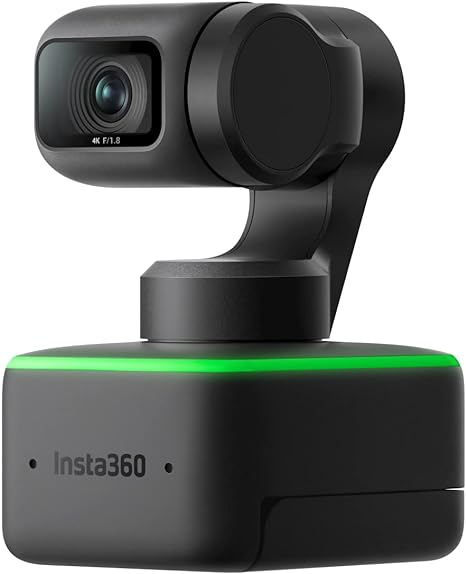
More features found in the Insta360 Link webcam:
- Ultra HD 4K resolution with 1/2″ Sensor: It has a stunning 4K resolution with an impressive 1/2″ sensor that captures the best images and videos.
- Dual Noise-Canceling Microphones: They reduce background noise and amplify your voice. Also, it delivers clear and crisp audio for enhanced communication.
- AI Tracking: Insta360 Link’s lens uses a gimbal design and a robust AI tracking algorithm, rotating to follow your movements. Also, automatic zooming and framing are applied to ensure your image is at the center.
- Versatile modes: it has the whiteboard mode, overhead mode, desk view mode, and portrait mode, which lets you communicate better with your audience.
4. OBSBOT Tiny 2 Webcam
Webcams are designed uniquely to offer a seamless and effective way to capture, record, and transmit footage in real time. They use exceptional technology that lets you video chat with friends and family when distance is a barrier. As a live streamer, you can virtually transport your audience anywhere by recording and showcasing some places worldwide. With the current and feature-rich webcams, the game of video calling, streaming, online classes, and remote working has leveled up. OBSBOT Tiny 2 is among the webcams that have changed this field with its outstanding features and functionalities.
Obsbot Tiny 2 has a plethora of unique features and is a perfect option for anyone seeking to elevate their video quality while live streaming or recording in real-time. It is a beautiful combination of top-notch performance and convenience, hence a tremendous travel-friendly webcam. You will appreciate this smart device with intelligent tracking capabilities and gesture control without forgetting the easy setup procedure that makes it stand out among other webcams. With the 4K resolution and 60 frames per second, you can capture crystal clear content and ultimately get a vibrant, sharp, and top-grade video. One of the exciting features that will let you enjoy using this webcam is the built-in background blur, which comes in handy with any applications, including those that don’t have the blur option.
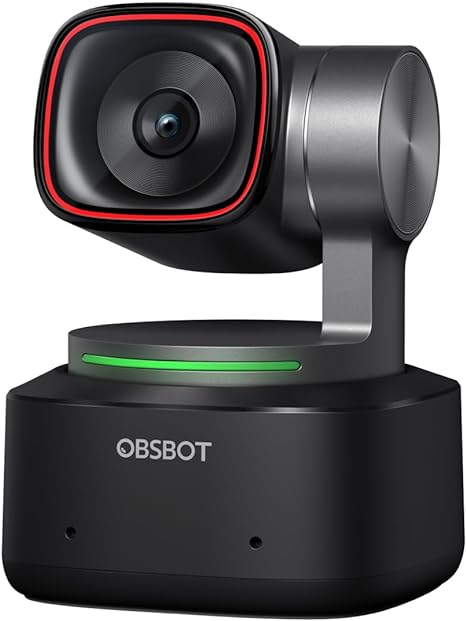
Here are more details on OBSBOT Tiny 2 Webcam :
- Equipped with a 1/1.5″ CMOS Sensor: It is one of the largest and most advanced sensors in the webcam industry, and it significantly improves image quality and light sensitivity, letting you become visible even in dark environments.
- Superior AI-Tracking: It has comprehensively upgraded the AI algorithm to make the auto-tracking smooth and fast. It quickly captures your moves with a reaction speed exceeding 99% of the peers. There are four additional automatic tracking modes: upper body, close-up, hand tracking, and zone tracking.
- Breakthrough voice and gesture control: With the OBSBOT Tiny 2 microphone, you will experience groundbreaking voice control features, and the webcam’s gesture control has been upgraded to version 2.0 to make it more responsive and effective.
- Industry Leading Auto Focus: This webcam takes only 0.3 seconds to capture images, making it 4X faster than other webcams.
- Customization: It has different modes, including beauty mode, desktop mode, whiteboard mode, portrait mode, and group mode, which enables you to customize your videos to your taste and preference.
5. Jabra PanaCast 20
Image quality is essential when starting your live stream, video conferencing, online lecture, and more. How your videos or images look can make or break your content while live or recording. Thus, you must consider a webcam that elevates your videos and paints a good picture of a consummate professional. Many manufacturers are entering the space of making streaming gear; thus, it is crucial to go through the available options and choose the one that best suits you. However, to avoid the hustle of browsing and the cumbersomeness of selecting the right web camera, pick the Jabra PanaCast 20. Without regrets, you will enjoy this feature-rich gadget with a 4K resolution, which is necessary when shooting personal and professional content.
With a 4K video feed and smart integrated features, Jabra Panacast 20 is undoubtedly one of the top-notch webcams in the market. It can zoom on objects automatically while maintaining a full HD image; thus, you can use this webcam for video calls or any other platform that requires real-time recording. Additionally, it uses Artificial Intelligence to adjust lighting in bright and dark rooms. With a high-quality and unique metal build, this web camera is excellent for conference rooms and personal use. Jabra Panacast 20 is a top-tier option for anyone who wants the best results, as it lets you create outstanding videos with a touch of a natural feeling. Being a plug-and-play device, it is hassle-free and straightforward to set it up. You will use a USB cable that connects directly to your computer and lets you start video recording immediately after the setup.
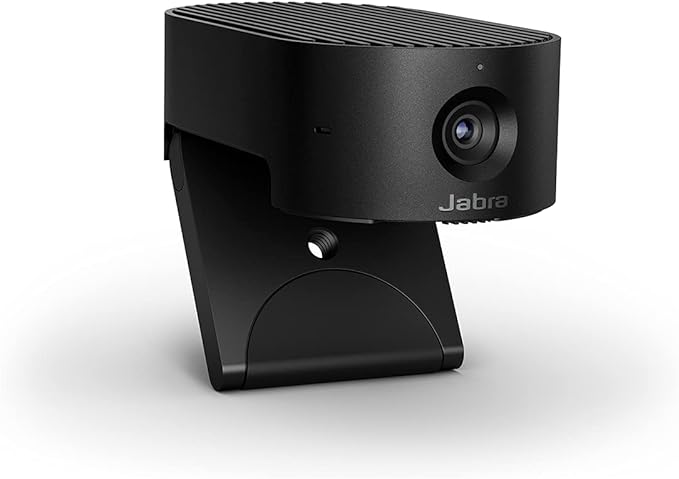
Jabra PanaCast 20 additional features:
- Picture Perfect: It includes powerful built-in AI and an impressive 13-megapixel camera to help you produce crystal-clear 4K Ultra-HD images in real time and without latency.
- Intelligent Zoom: Jabra PanaCast 20 webcams use AI-driven intelligent zoom to follow your movements automatically and ensure you or your images stay at the center and remain perfectly framed.
- Seamless UC connectivity: This webcam works well with all leading UC platforms; you can use it on Zoom and Microsoft Teams.
- You will find a Jabra PanaCast 20 Streaming Webcam, USB-A to USB-C Cable 1.5 m/4.9 ft, and a protective carry case in the box.
6. DEPSTECH 4K Webcam
Webcams are a technology that has been important to many, especially after the coronavirus pandemic. These gadgets have changed the face of work, allowing you to experience quality video performance while attending online meetings at home or in the office. As a content creator, you can up your game by considering a webcam with standard video calling features. DEPSTECH is a top manufacturer committed to producing top-grade yet affordable products to delight customers’ interests worldwide. They offer high-quality webcams for live streaming, online classes, remote work, and video conferencing.
The DEPSTECH 4K webcam lets you record clear, detailed, and smooth videos on your Mac, laptop, or PC. Its budget-friendly feature makes it a solid option for anyone looking to boost their video quality without breaking the bank. Apart from the 4K resolution, this webcam will let you enjoy the autofocus feature, dual-cancelling microphones, and auto light correction. DEPSTECH 4K webcam is easy to set up, and with the remote control capability, you can adjust the brightness, saturation, or contrast to achieve the desired image quality. It has two mounting options: attaching it to your screen or using the provided mini tripod. Overall, it is well-rated, the sound is superb, and the clarity will take your video recording to the next level.
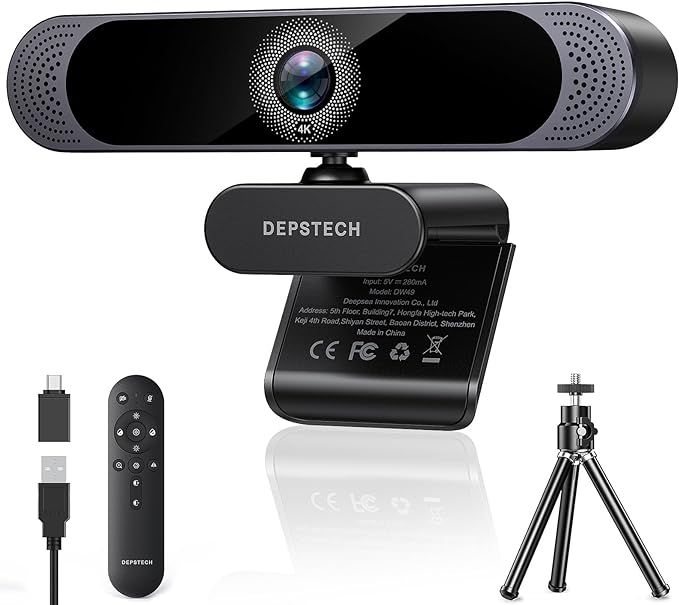
Interesting features on the DEPSTECH 4K Webcam:
- 4K Resolution and 1/2.55″ Sony Sensor: Includes a built-in 4K 30fps ultra HD resolution that brings sharp clarity picture without lagging. It also has an upgraded 1/2.55″ CMOS Sony sensor, making the images more transparent and realistic.
- Dual Noise Canceling Microphones: DEPSTECH DW49 Pro webcam with microphone enhances the sound quality of live videos or online meetings. It maintains clear and high-quality audio output even in noisy environments.
- Auto-focus and auto-light adjustment: A webcam utilizes advanced technology to capture and focus on objects intelligently. Also, the auto light correction feature allows the web camera to adapt to lighting environments that include low lights.
- Remote control with 3X Zoom: During video calls, you can easily control the webcam using a remote despite its angle.
- Compatibility: It works well with USB A and Type-C ports, and being a plug-and-play device, no additional drivers are needed. It is compatible with applications like Zoom, YouTube, Microsoft Teams, Skype, Facetime and Facebook. Also, it works well with multiple operating systems, that includes Windows XP/7/8/10/11 and Mac OS.
- Tripod and privacy cover: By closing the cover, your privacy is fully protected when the webcam is unused. Also, a tripod is included to let you adjust and position the webcam to your preferred height.
7. Razer Kiyo Pro Ultra 4K Webcam
Webcams have become standard for professionals, students, or users interested in recording videos. When you connect these gadgets to your computer, you can use them in video conferencing with special programs, including Google Meet, Zoom, Microsoft Teams, or other apps. For live streamers, webcams are crucial in ensuring the audience can see your content clearly. Investing in a good web camera will pay off by elevating your images and videos and giving your content a professional look. One of the webcams you should consider is the Razer Kiyo Pro Ultra 4K Webcam, which works best with OBS, Xsplit, PC, and Teams or Zoom.
Razer Kiyo Pro Ultra delivers impressive image quality with incredible auto-exposure, superb depth of field, and white balancing. It has a large sensor and a 4K resolution, which lets you produce videos with detail and clarity. A well-built, lightweight webcam looks nice when perched on your computer. Aside from allowing you to look your best in your videos, it protects you with the integrated privacy shutter. Additionally, you can play around with the camera settings and customize the contrast, brightness, saturation, and white balance to get the desired video effects and quality.
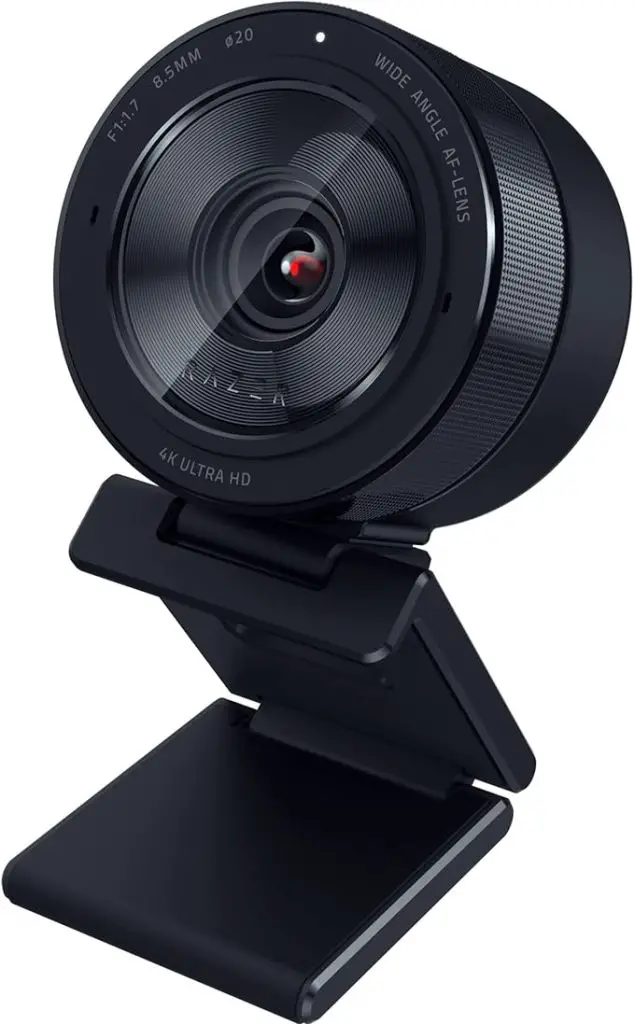
Unique Razer Kiyo Pro Ultra 4K Webcam features:
- 4K quality: It features a bigger sensor with a 2.9 μm pixel size and 1/1.2″ Sony STARVIS 2 Sensor that lets you capture more light and image data in every pixel. Also, this webcam makes sure it produces stunning detail and colour for pro-grade content creation and live streaming.
- AI-powered video imaging: Here is a webcam that will track your face while still holding a steady focus and automatically keep the face perfectly exposed and well-lit.
- Customization: You can tweak and fine-tune shots or shoot using the last saved configurations from the available customizable settings.
- Pure and uncompressed optics: The Razer Kiyo Pro Ultra 4K Webcam is powered by a cutting-edge processor and can convert raw 4K 30 FPS footage into uncompressed 4K 24FPS, 1440P 30 FPS, or 1080P 60 FPS video directly to a live stream.
Final Thoughts
There have been tremendous and incremental changes in technology and innovation, and the effort to improve equipment has made web cameras much more transparent and shapeful. We now have 4K webcams that produce high-resolution images and videos in seconds. If you want a remarkable experience while streaming, video conferencing, learning online, or working from home, consider one of the above webcams. Also, the plug-and-play setup makes it simple to install, and no prior knowledge is required to start using the gadgets. Notably, you can make your purchase by clicking on the Buy Now button and enjoy the advanced features of these web cameras.
Additional Resources:
- Affordable Digital Cameras with 4K Resolution to Buy In 2024
- Best Home Security Cameras with Smart Motion Detection
- Best accessories to start game-streaming like a pro