Before you can design a network, you have to know which shape it should take, and that shape depends almost entirely on scale and on the direction the traffic mostly flows. A single building does not need the same layout as a data center full of servers talking to each other, and neither looks anything like the box on the wall in a home office. There are six named network architectures worth knowing, and the useful skill is not memorizing their definitions but knowing which one belongs where.
This guide walks through all six: two-tier and three-tier campus designs, spine-leaf in the data center, the WAN options that connect sites, the SOHO setup, and the on-premises-versus-cloud decision that cuts across all of them. Every topology figure below was generated from our own lab tooling in June 2026, so the node counts, link patterns, and addressing are consistent with how these designs are actually drawn.
The six architectures and where each one belongs
Start with the map. Each row is a different design, and the rest of the article expands one row at a time. The column that does the most work is the last one: get the traffic direction right and the choice of architecture usually follows.
| Architecture | Use case | Scale | Main traffic direction |
|---|---|---|---|
| Two-tier (collapsed core) | Single-building campus | Small to medium | North-south (user to server) |
| Three-tier | Multi-building campus | Large enterprise | North-south (user to server) |
| Spine-leaf | Data center | Scalable | East-west (server to server) |
| WAN | Connecting sites | Any | Site to site |
| SOHO | Home or small office | Very small | North-south (user to internet) |
| On-premises / cloud | Where resources live | Any | Depends on placement |
North-south traffic is the classic pattern: users at the edge reaching servers or the internet, traffic moving up and down the hierarchy. East-west traffic is servers talking to each other across a data center, which is a different problem and the reason spine-leaf exists. Keep that distinction in mind and the rest falls into place.
The two-tier collapsed-core campus
The two-tier design has two layers: an access layer where user devices plug in, and a distribution layer above it. It is called collapsed core because the core layer’s job, high-speed forwarding between distribution blocks, is folded into the distribution switches rather than given its own dedicated tier. For a single building or a small campus, that is plenty.
The trade-off is redundancy versus cost. Each access switch uplinks to both distribution switches, and the two distribution switches connect to each other, so any single link or distribution switch can fail without taking the building down. You pay for that with the extra links and the second distribution switch, which is an easy call in a campus and overkill in a closet.
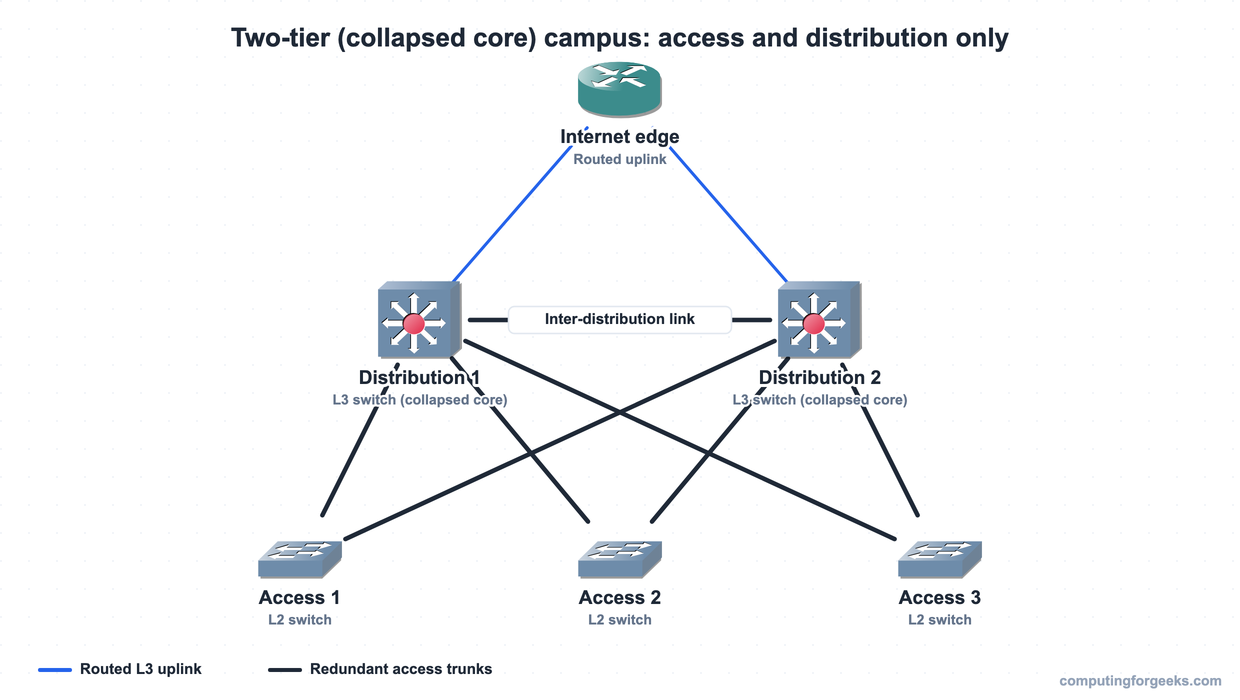
The distribution switches are Layer 3 (multilayer) switches: they route between the VLANs the access layer hands them, which is why the per-segment IPv4 addressing and subnetting planning happens at this tier. The access switches stay simple, switching frames at Layer 2.
The three-tier campus
When a campus grows past one building, the distribution layer starts to become the bottleneck for traffic between buildings, and that is the signal to add a core layer. The result is the three-tier design built from the same routers and switches, now in three layers: access, distribution, and core. The core’s only job is to forward packets between distribution blocks as fast as possible. It carries no user devices and enforces no security policy, because anything that slows the core slows everything.
In practice this means each building keeps its own access and distribution layers, and the distribution switches in every building connect up to a shared pair of core switches. We reach for three-tier when there are multiple buildings or when inter-building traffic justifies a dedicated high-speed backbone.
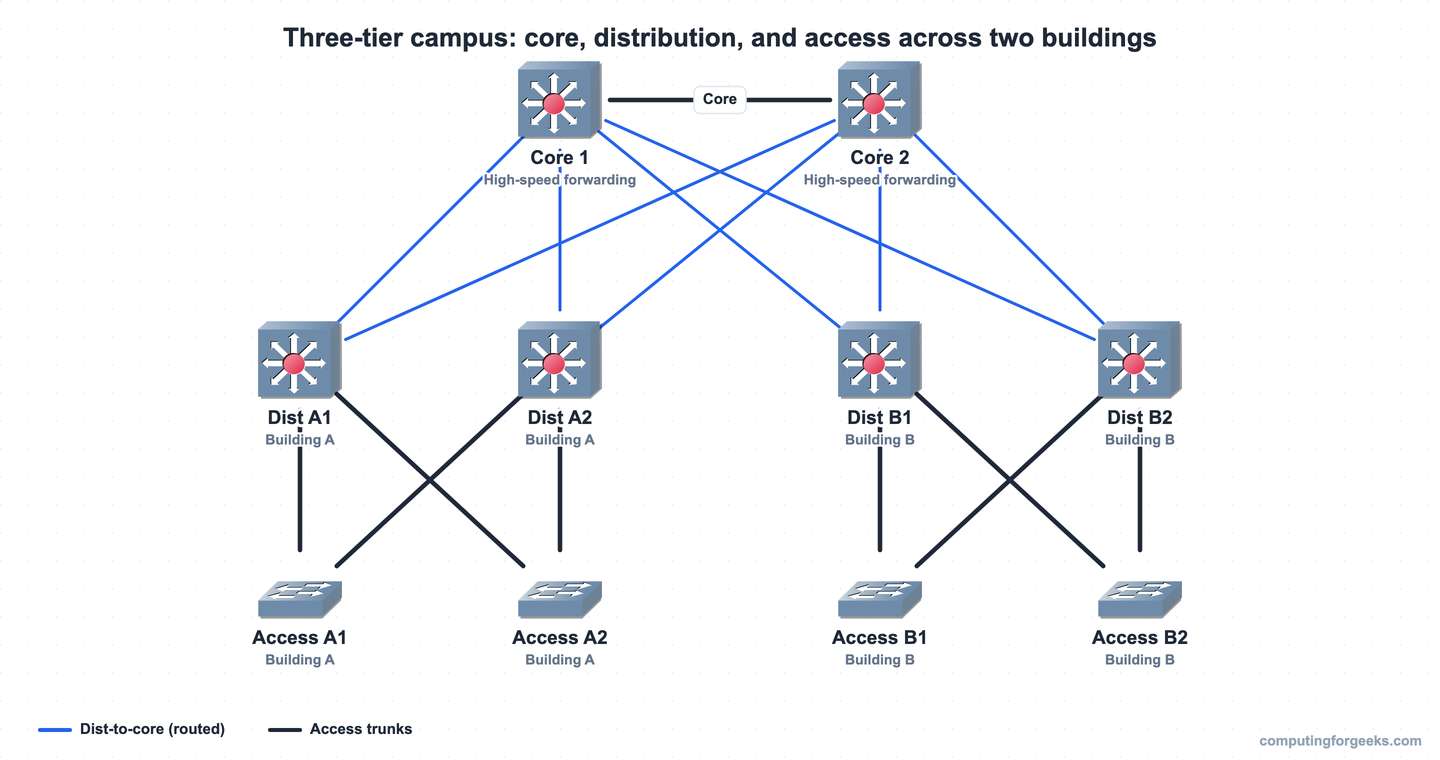
One reason the core stays small is the cost of connecting everything to everything. A full mesh of N nodes needs N times (N minus 1), divided by two, links. With 42 distribution switches that is 861 links, which is why real designs use a partial mesh: distribution switches connect to the core, not to each other. The core aggregates them, and the link count stays manageable.
Spine-leaf in the data center
Spine-leaf is the odd one out because it is a data center design, not a campus LAN, and it exists for a specific reason: east-west traffic. Inside a data center, servers spend most of their time talking to other servers (application tier to database, compute to storage), and a tall campus hierarchy would force that traffic up and back down through several hops. Spine-leaf flattens it to two layers and makes every server the same distance from every other server.
There are only two layers. Leaf switches sit at the top of each rack, where the servers connect. Spine switches form the backbone. The rule that defines the design: every leaf connects to every spine, and there are no leaf-to-leaf links and no spine-to-spine links. Because every path is one hop across a spine, traffic between any two leaves takes the same number of hops, and the network can spread load across all the spine uplinks at once using equal-cost paths.
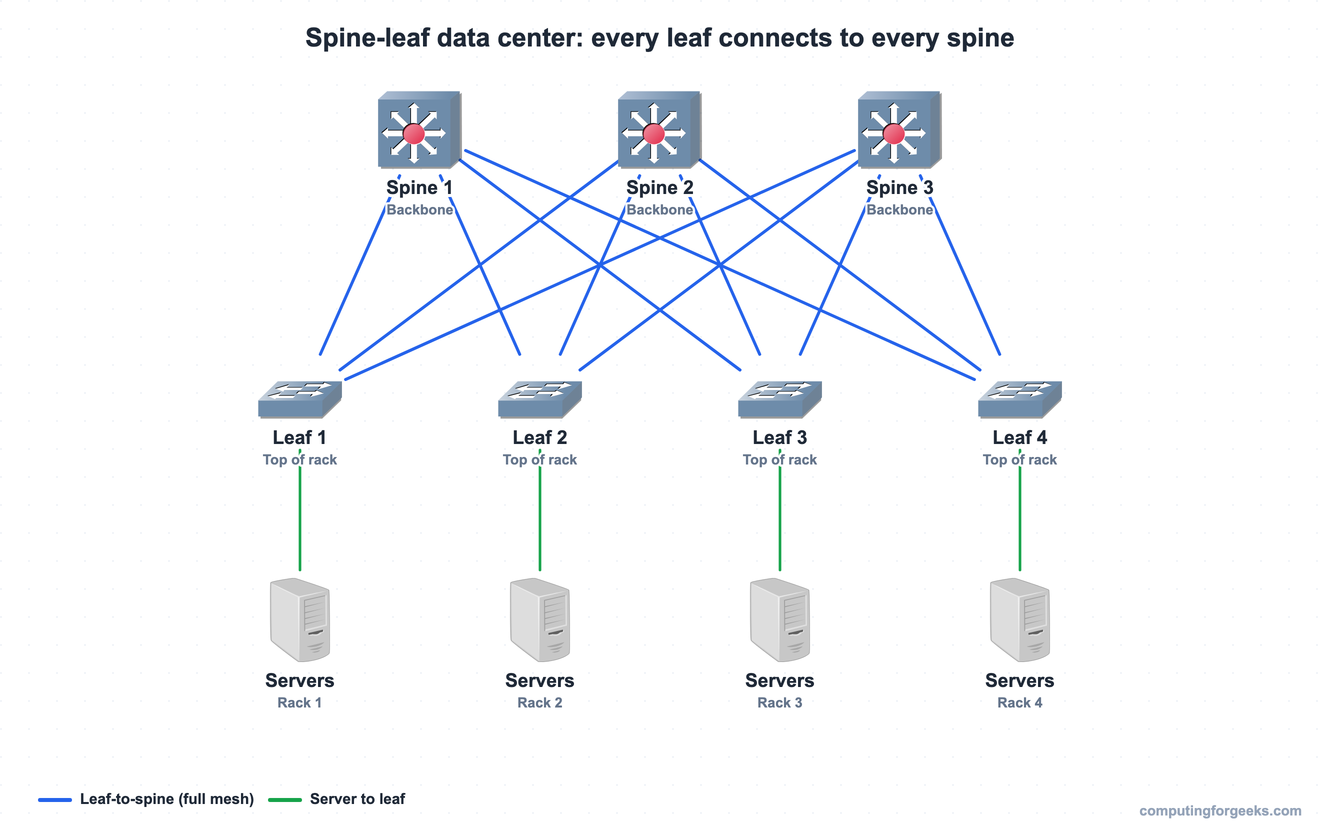
Scaling is the elegant part. Need more ports for more servers? Add a leaf, and wire it to every spine. Need more bandwidth between leaves? Add a spine, and wire every leaf to it. The rule to remember is the connection pattern: a leaf attaches to all spines, not to a single one.
WAN architecture
A WAN connects sites that are too far apart for a LAN, and the choice comes down to a private circuit versus a shared provider network. A leased line is a dedicated point-to-point circuit, classically running PPP or HDLC, with fixed bandwidth (a T1 is 1.544 Mbps) that is yours alone. It is predictable and expensive.
The common modern option is Ethernet WAN, where the service provider runs MPLS inside its own network but presents the connection to you as an ordinary Ethernet segment. Your router (the customer premises equipment, or CPE) connects over fiber to the nearest provider point of presence, and from your side it looks like the two sites are on the same Ethernet link.
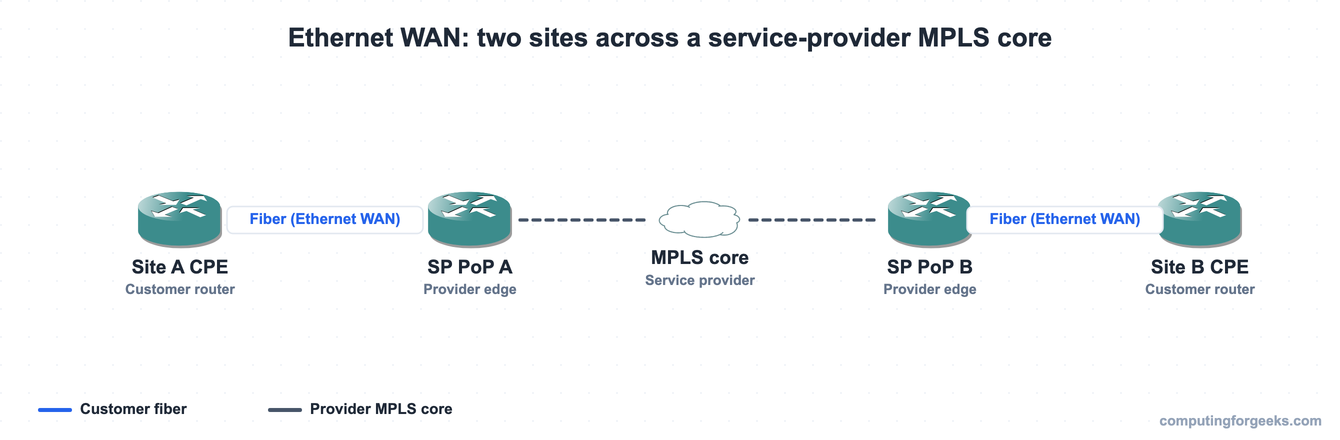
The cost-cutting alternative is the public internet plus a VPN tunnel between sites. The trade-off is sharp: you give up the provider’s bandwidth and latency guarantees in exchange for a much cheaper link. Private WAN still wins where it matters, for voice, real-time replication, and anything that needs a guaranteed service level. The IP routing between sites is the same job regardless of which transport carries it.
The SOHO network
The small office or home office network is the simplest architecture there is, and you are almost certainly sitting on one. It is a single combined device, usually sold as a “wireless router”, that packs three roles into one box: a small Ethernet switch for the wired ports, a router for the internet uplink, and a wireless access point for Wi-Fi. There is no distribution or core layer because there is nothing to distribute.
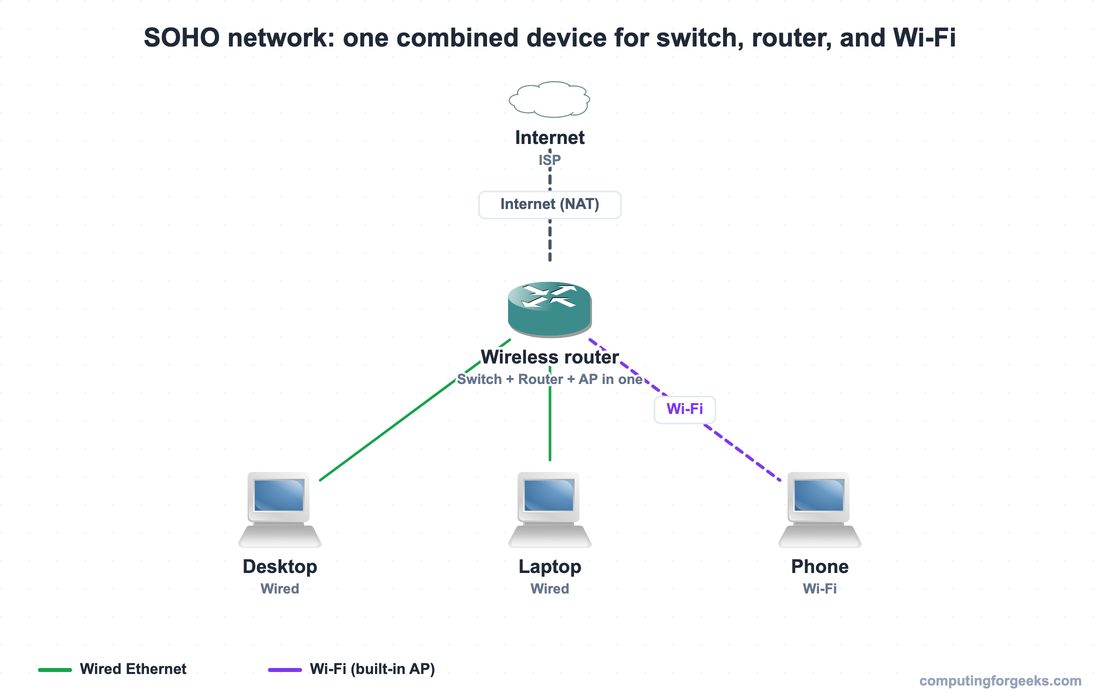
Internally the access point hangs off the built-in switch, and the router performs NAT so all the private addresses behind it share one public address. It is the same building blocks as an enterprise network, only collapsed into a single unit.
On-premises, cloud, and hybrid
Where the servers physically live is a separate decision that cuts across every design above. On-premises means you own the hardware and run it in your own space, with full control and a capital-expense model but fixed capacity. Public cloud (AWS, Azure, Google Cloud) hosts the virtualized resources for you, scales on demand, and bills as an operating expense. A private cloud is your own data center run with cloud-like automation, or rack space leased in someone else’s facility (co-location). Hybrid cloud uses both at once, often keeping sensitive systems on-premises while bursting or replicating into a public cloud.
The network angle is what changes: the more you lean on cloud, the more your design shifts toward internet breakout and SD-WAN at each site, and the less you invest in a dedicated private WAN back to a central data center. Once the layout is chosen, the next step is to configure the devices themselves, and the CCNA 200-301 study roadmap lays out where this fits in the bigger picture.
A decision tree for picking an architecture
The choice is usually quick once you frame it by scale and traffic. Use this as a starting point.
One building, users reaching servers and the internet? Start with a two-tier collapsed-core campus. It gives you redundancy without paying for a core layer you do not need yet.
Multiple buildings, or inter-building traffic outgrowing the distribution layer? Add the core and move to three-tier. The dedicated backbone keeps cross-building traffic fast.
Designing a data center where servers mostly talk to each other? Use spine-leaf. The east-west pattern and equal-hop design are exactly what it is built for.
Connecting sites across a city or country? That is the WAN, and the real decision is a private circuit or Ethernet WAN for guaranteed performance versus internet-plus-VPN for cost.
A home or a one-room office? A single SOHO wireless router is the whole network.
Whether any of this runs on-premises, in a public cloud, or split across both is an independent question layered on top of the design you pick, so settle the shape first, then decide where it lives.
Practice network architectures
Run the cards to fix each design and its use case in memory, then take the quiz to test the details that catch people out, like the spine-leaf connection rule and which functions belong to the core layer.