FreeRADIUS is the RADIUS server that quietly authenticates most of the world’s Wi-Fi, VPN, and switch-port access. It speaks the AAA trio (Authentication, Authorization, Accounting), scales from a home lab to a national ISP, and reads its users from flat files, LDAP, or a SQL database. Pair it with a MariaDB backend and you get user records you can query, report on, and edit without touching a config file.
That editing is where daloRADIUS comes in. It is a PHP web interface that sits on top of the same database, so you manage users, NAS clients, hotspots, and billing from a browser instead of hand-writing SQL. This guide installs FreeRADIUS and daloRADIUS on a RHEL-family server: MariaDB for storage, FreeRADIUS for authentication, and daloRADIUS for the web UI, with SELinux left enforcing throughout.
Every command below was run on Rocky Linux 10 and Rocky Linux 9 in June 2026, with FreeRADIUS 3.2.8 on 10 and 3.0.27 on 9, MariaDB, PHP 8.3, and daloRADIUS 2.3. AlmaLinux behaves identically, and the same steps apply to CentOS Stream 10 and 9. The one real difference between the two releases is how you install PHP, and it is called out where it matters.
Prerequisites
You need a freshly installed RHEL-family server and a user with sudo rights. If you are starting from scratch, the Rocky Linux base install walkthrough gets you to that point. This guide was tested on:
- Rocky Linux 10.1 and Rocky Linux 9.7 (AlmaLinux 10/9 and CentOS Stream 10/9 are identical)
- FreeRADIUS 3.2.8 (EL10) and 3.0.27 (EL9), with the MySQL/MariaDB driver from CRB
- MariaDB 10.11 (EL10) / 10.5 (EL9), PHP 8.3, Apache httpd, daloRADIUS 2.3
SELinux stayed in enforcing mode on both boxes. Nothing here asks you to disable it. If you would rather compile a newer FreeRADIUS than the repositories ship, the build FreeRADIUS from source guide covers that path instead.
Step 1: Set the values you will reuse
The database name, user, and password show up in the FreeRADIUS module config, the daloRADIUS config, and several commands. Export them once so you can paste the rest of the guide unchanged, and so you only pick a password in a single place:
export DB_NAME="radius"
export DB_USER="radius"
export DB_PASS="StrongRadiusPass2026"
These variables live only in the current shell, so re-run the block if you reconnect or switch to a root session. The two configuration files you edit later are not shell contexts, so you will type the same DB_PASS value into them by hand. Confirm the values are set before continuing:
echo "DB: ${DB_NAME} / user ${DB_USER}"Step 2: Enable the CRB repository
This is the step that trips people coming from older CentOS guides. The FreeRADIUS SQL driver, freeradius-mysql, no longer lives in the default repositories. On current Rocky Linux and AlmaLinux it ships from CRB (CodeReady Builder). Enable it first, then refresh the metadata:
sudo dnf config-manager --set-enabled crb
sudo dnf -y update
On RHEL itself the repository is named codeready-builder-for-rhel-10-x86_64-rpms and is enabled with subscription-manager repos --enable. Without CRB, the freeradius-mysql install in Step 5 fails with “No match for argument”, which is the single most common reason these setups stall.
Step 3: Install Apache and PHP
daloRADIUS is a PHP application served by Apache. This is the one place Rocky Linux 10 and Rocky Linux 9 genuinely differ, because PHP packaging changed between the releases.
On Rocky Linux 10 and AlmaLinux 10 there are no DNF modules. PHP 8.3 is a plain package, so install it directly:
sudo dnf -y install httpd php php-cli php-fpm php-mysqlnd php-gd php-mbstring php-xml php-curl php-zip php-pdoOn Rocky Linux 9 and AlmaLinux 9 the default php package is still the end-of-life 8.0 stream. Reset the module and enable a current one before installing, otherwise you land on an unsupported PHP:
sudo dnf -y module reset php
sudo dnf -y module enable php:8.3
sudo dnf -y install httpd php php-cli php-fpm php-mysqlnd php-gd php-mbstring php-xml php-curl php-zip php-pdo
Confirm the interpreter version, then start Apache and PHP-FPM:
php -v
sudo systemctl enable --now httpd php-fpm
The version line should report 8.3 on both releases:
PHP 8.3.29 (cli) (built: Dec 16 2025 14:32:42) (NTS gcc x86_64)Step 4: Install and configure MariaDB
Install the database server and bring it online. For a deeper walkthrough of tuning and securing the server, see the dedicated MariaDB on Rocky Linux and AlmaLinux guide; the essentials are below.
sudo dnf -y install mariadb-server
sudo systemctl enable --now mariadb
Run the hardening script to set a root password and drop the anonymous accounts. Answer yes to the defaults:
sudo mariadb-secure-installationCreate the database and a dedicated user. Modern MariaDB wants CREATE USER and GRANT as separate statements, not the old inline IDENTIFIED BY on the grant. The variables from Step 1 fill themselves in:
sudo mariadb -e "CREATE DATABASE ${DB_NAME};
CREATE USER '${DB_USER}'@'localhost' IDENTIFIED BY '${DB_PASS}';
GRANT ALL PRIVILEGES ON ${DB_NAME}.* TO '${DB_USER}'@'localhost';
FLUSH PRIVILEGES;"
Verify the new user can log in to its database before moving on:
mariadb -u "${DB_USER}" -p"${DB_PASS}" -e "SELECT CURRENT_USER();"Step 5: Install FreeRADIUS
With CRB enabled, install the server, its utilities, and the MariaDB driver in one command:
sudo dnf -y install freeradius freeradius-utils freeradius-mysqlBefore you start the service, generate the test TLS certificates. The current packages no longer create them automatically, and the EAP module refuses to load without server.pem. Build them, then hand the certs to the radiusd group so the daemon can read them after it drops privileges:
sudo bash -c 'cd /etc/raddb/certs && make'
sudo chown -R root:radiusd /etc/raddb/certs
That ownership step matters. radiusd starts as root, reads its config, then switches to the radiusd user. If the freshly generated server.pem stays owned by root only, the daemon cannot read it and the service dies on start. Now enable and start it:
sudo systemctl enable --now radiusdCheck that it came up and confirm the version:
systemctl is-active radiusd
radiusd -v
RADIUS listens on UDP 1812 (authentication) and 1813 (accounting). Open them, along with the web ports you will need for daloRADIUS, in firewalld:
sudo firewall-cmd --add-service={radius,http,https} --permanent
sudo firewall-cmd --add-port=8000/tcp --permanent
sudo firewall-cmd --reload
Step 6: Connect FreeRADIUS to the MariaDB backend
FreeRADIUS ships the schema for its SQL tables. Load it into the radius database. The raddb directory is readable only by root, so run the redirection inside a root shell:
sudo bash -c "mariadb ${DB_NAME} < /etc/raddb/mods-config/sql/main/mysql/schema.sql"Confirm the tables landed:
sudo mariadb ${DB_NAME} -e "SHOW TABLES;"You should see the standard RADIUS tables:
nas
nasreload
radacct
radcheck
radgroupcheck
radgroupreply
radpostauth
radreply
radusergroup
Now point the SQL module at MariaDB. Open the module file:
sudo nano /etc/raddb/mods-available/sqlChange four things. Set the dialect to mysql and point the driver at it (the default ships as rlm_sql_null, which connects to nothing):
dialect = "mysql"
driver = "rlm_sql_${dialect}"
Uncomment and fill the connection block with the same values from Step 1:
server = "localhost"
port = 3306
login = "radius"
password = "StrongRadiusPass2026"
radius_db = "radius"
The mysql subsection ships with an active tls block that points at certificate files that do not exist, which breaks the connection. Comment the whole block out:
	mysql {
#		tls {
#			ca_file = "/etc/ssl/certs/my_ca.crt"
#			ca_path = "/etc/ssl/certs/"
#			certificate_file = "/etc/ssl/certs/private/client.crt"
#			private_key_file = "/etc/ssl/certs/private/client.key"
#			cipher = "DHE-RSA-AES256-SHA:AES128-SHA"
#			tls_required = yes
#			tls_check_cert = no
#			tls_check_cert_cn = no
#		}
		warnings = auto
	}
Finally, let FreeRADIUS read NAS clients from the database by uncommenting this line further down the file:
read_clients = yesSave the file. The module only loads when it is linked into mods-enabled, and the symlink must belong to the radiusd group:
sudo ln -s /etc/raddb/mods-available/sql /etc/raddb/mods-enabled/sql
sudo chown -h root:radiusd /etc/raddb/mods-enabled/sql
sudo systemctl restart radiusd
Prove the chain works end to end. Add a user straight into the SQL radcheck table:
sudo mariadb ${DB_NAME} -e "INSERT INTO radcheck (username,attribute,op,value) VALUES ('testuser','Cleartext-Password',':=','TestPass123');"Then authenticate against the local server with radtest, using the default testing123 client secret:
radtest testuser TestPass123 127.0.0.1 0 testing123An Access-Accept means FreeRADIUS read the user from MariaDB and authenticated it:
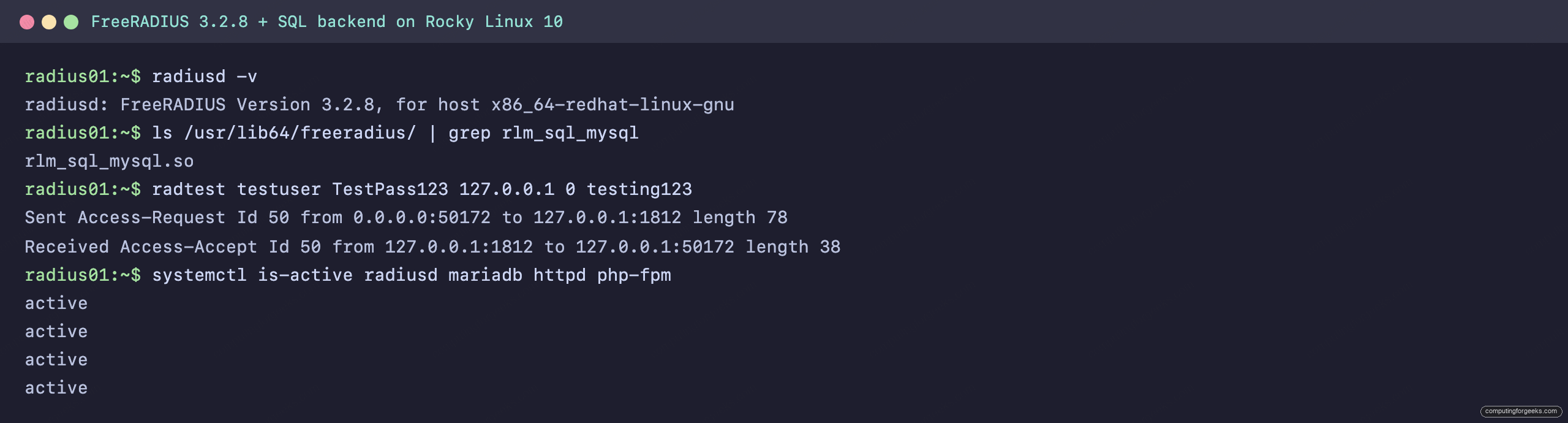
If you only needed FreeRADIUS with a SQL backend, you are done. The next step adds the web interface on top.
Step 7: Install the daloRADIUS web interface
daloRADIUS 2.3 still connects to the database through the PEAR DB abstraction layer, so install PEAR and the DB package first. Skip this and the login page loads but the login itself returns a 500 error:
sudo dnf -y install php-pear git
sudo pear install DB
Clone the 2.3 release tag. Do not use the default branch, it tracks development and pulls in a different schema:
git clone --branch 2.3 https://github.com/lirantal/daloradius.git #https://github.com/lirantal/daloradius/tagsdaloRADIUS ships two SQL files. The first adds any FreeRADIUS tables that are missing (it uses IF NOT EXISTS, so it is safe over the schema you already loaded), and the second creates the daloRADIUS tables for operators, billing, and hotspots:
sudo bash -c "mariadb ${DB_NAME} < daloradius/contrib/db/fr3-mariadb-freeradius.sql"
sudo bash -c "mariadb ${DB_NAME} < daloradius/contrib/db/mariadb-daloradius.sql"
Move the application into the web root:
sudo cp -r daloradius /var/www/daloradiusCreate the configuration file from the sample:
cd /var/www/daloradius/app/common/includes/
sudo cp daloradius.conf.php.sample daloradius.conf.php
sudo nano daloradius.conf.php
Set the database user, password, and name to match Step 1 (the sample ships with raduser / radpass / raddb):
$configValues['CONFIG_DB_HOST'] = 'localhost';
$configValues['CONFIG_DB_PORT'] = '3306';
$configValues['CONFIG_DB_USER'] = 'radius';
$configValues['CONFIG_DB_PASS'] = 'StrongRadiusPass2026';
$configValues['CONFIG_DB_NAME'] = 'radius';
Set ownership to the Apache user and create the directories daloRADIUS writes to:
sudo chown -R apache:apache /var/www/daloradius
cd /var/www/daloradius
sudo mkdir -p var/{log,backup}
sudo chown -R apache:apache var
daloRADIUS serves two separate apps: an operators portal for admins and a users portal for self-service. Give each its own Apache virtual host. Create the operators host first:
sudo nano /etc/httpd/conf.d/daloradius-operators.confAdd the operators virtual host on port 8000:
Listen 8000
<VirtualHost *:8000>
    ServerName localhost
    DocumentRoot /var/www/daloradius/app/operators

    <Directory /var/www/daloradius/app/operators>
        Options -Indexes +FollowSymLinks
        AllowOverride None
        Require all granted
    </Directory>

    ErrorLog /var/log/httpd/daloradius-operators-error.log
    CustomLog /var/log/httpd/daloradius-operators-access.log combined
</VirtualHost>
Then create the users portal on port 80:
sudo nano /etc/httpd/conf.d/daloradius-users.confAdd the users virtual host:
<VirtualHost *:80>
    ServerName localhost
    DocumentRoot /var/www/daloradius/app/users

    <Directory /var/www/daloradius/app/users>
        Options -Indexes +FollowSymLinks
        AllowOverride None
        Require all granted
    </Directory>

    ErrorLog /var/log/httpd/daloradius-users-error.log
    CustomLog /var/log/httpd/daloradius-users-access.log combined
</VirtualHost>
Remove the default Apache welcome page so it does not shadow the users portal on port 80:
sudo rm -f /etc/httpd/conf.d/welcome.confSELinux is enforcing, so it needs three adjustments: label the writable var directory, register port 8000 as an HTTP port, and let Apache talk to the database. Install the policy tools first:
sudo dnf -y install policycoreutils-python-utils
sudo semanage fcontext -a -t httpd_sys_rw_content_t "/var/www/daloradius/var(/.*)?"
sudo restorecon -Rv /var/www/daloradius
sudo semanage port -a -t http_port_t -p tcp 8000
sudo setsebool -P httpd_can_network_connect_db on
Restart the web stack so every change takes effect:
sudo systemctl restart httpd php-fpm radiusdOpen the operators portal at http://SERVER_IP:8000/ and you land on the daloRADIUS login screen:
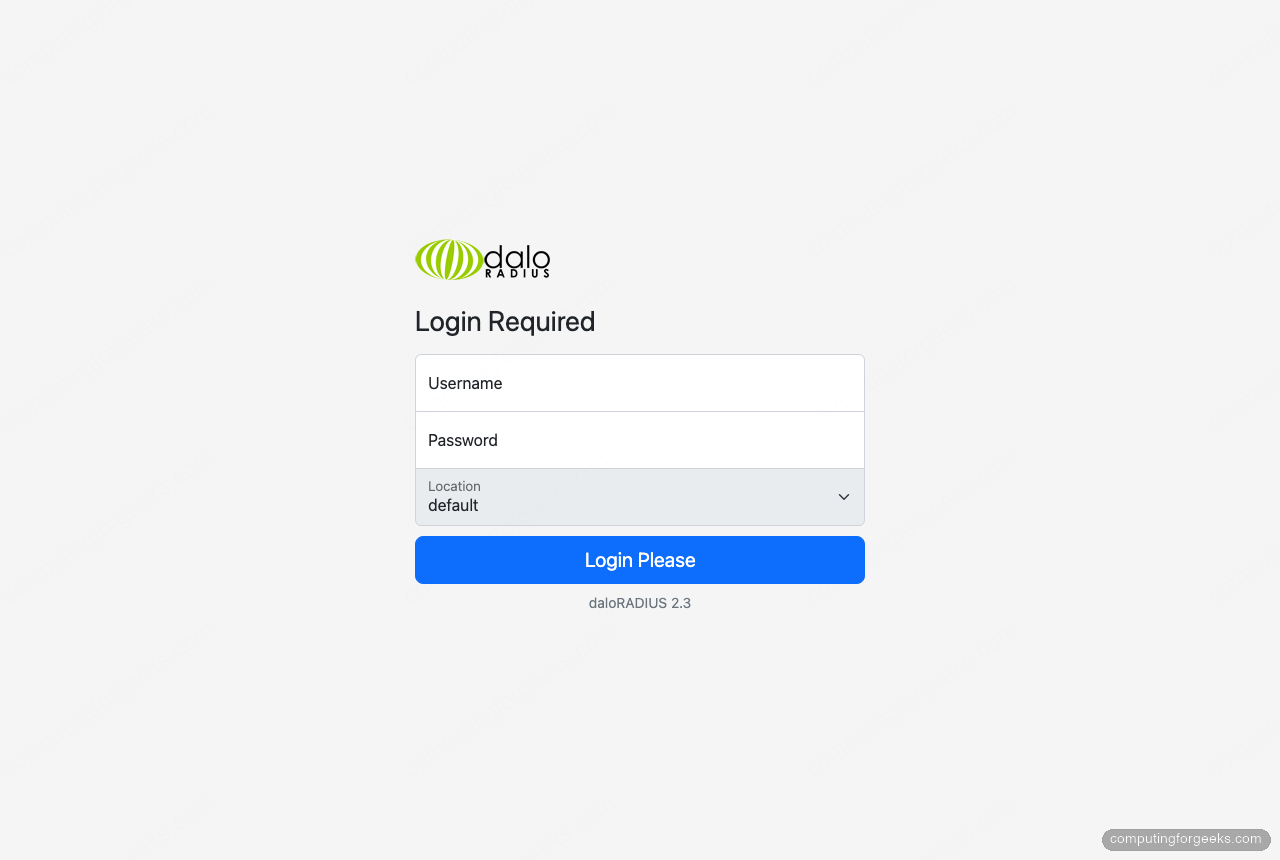
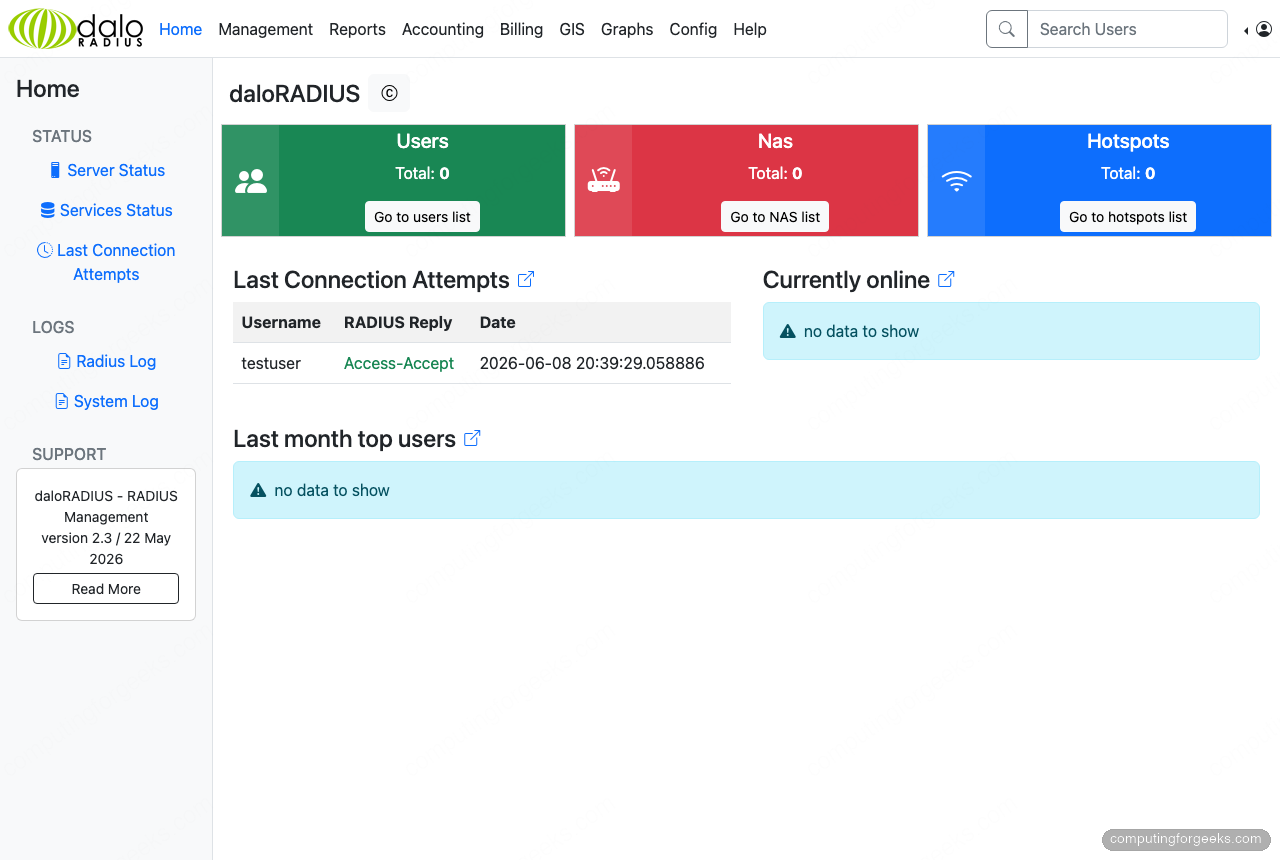
The default credentials are administrator with password radius. Change that password immediately after your first login from the Config menu. Once inside, the dashboard reads straight from the database, so the test login from Step 6 already shows up under recent connection attempts:
Step 8: Secure daloRADIUS with HTTPS
The operators portal carries admin credentials and RADIUS secrets, so it should never run over plain HTTP outside a closed lab. Put a real certificate on it with Let's Encrypt. Point a DNS A record at the server, make sure port 80 is reachable, then install certbot and the Apache plugin:
sudo dnf -y install certbot python3-certbot-apacheIssue and install the certificate in one command. certbot edits the virtual host, adds the TLS configuration, and sets up the HTTP-to-HTTPS redirect:
sudo certbot --apache -d radius.example.com --non-interactive --agree-tos --redirect -m [email protected]This HTTP-01 flow works with any DNS provider. If the server sits on a private network with no public port 80, switch to a DNS-01 challenge instead with the plugin for your provider (Cloudflare, Route 53, DigitalOcean, and others are supported), which proves ownership through a DNS record rather than an inbound request. The renewal timer is installed automatically; confirm it works with a dry run:
sudo certbot renew --dry-runFor the full set of certbot options, including wildcard certificates, the Let's Encrypt on Linux guide goes further.
Troubleshooting
These are the three failures that actually came up while building this on a clean Rocky Linux box, with the fix for each.
No match for argument: freeradius-mysql
The MariaDB driver lives in CRB, which is disabled by default. Enable it and retry the install:
sudo dnf config-manager --set-enabled crb
sudo dnf -y install freeradius-mysql
radiusd fails to start: "Failed reading certificate file server.pem"
The full error is a permission-denied on /etc/raddb/certs/server.pem. The daemon runs as the radiusd user but the generated certificates are owned by root only. Fix the group ownership and restart:
sudo chown -R root:radiusd /etc/raddb/certs
sudo systemctl restart radiusd
daloRADIUS login returns HTTP 500
The login page renders but submitting credentials throws a 500. The Apache log shows Uncaught Error: Class "DB" not found. daloRADIUS needs the PEAR DB package, which is not installed by default:
sudo dnf -y install php-pear
sudo pear install DB
sudo systemctl restart php-fpm httpd
With the stack running, the same flow works on Debian-family hosts too. If you manage a mixed fleet, the matching guides for FreeRADIUS and daloRADIUS on Ubuntu and FreeRADIUS and daloRADIUS on Debian follow the same database-backed pattern with distro-specific package names.