The stock Ubuntu archive will happily hand you a GitHub CLI that is more than two years old. On a fresh Ubuntu 26.04 box, apt install gh without any extra setup pulls a 2.46 build from universe while the current release sits fifty versions ahead in GitHub’s own repository. That gap is the whole reason this guide exists: where you install gh from matters as much as the command you run.
This guide covers installing GitHub CLI on every platform you are likely to touch: Ubuntu and Debian through the official apt repository, RHEL, Rocky Linux and AlmaLinux through dnf, Fedora and Arch from their native repos, direct package downloads for locked-down servers, Homebrew on macOS, and winget on Windows. Every command below was run for real in July 2026 on Ubuntu 26.04 and 24.04, Debian 13, Rocky Linux 10, Fedora 44, Arch Linux, Windows Server 2025, and macOS, and the errors you will see are the ones the lab actually produced. Once gh is on the box, the GitHub CLI cheat sheet covers everything you can do with it.
Ubuntu and Debian
GitHub publishes a single apt repository that is not tied to a release codename, so the same five lines work on Ubuntu 26.04, 24.04, and Debian 13 unchanged. Add the signing key and repo definition, then install:
sudo mkdir -p -m 755 /etc/apt/keyrings
wget -qO- https://cli.github.com/packages/githubcli-archive-keyring.gpg | sudo tee /etc/apt/keyrings/githubcli-archive-keyring.gpg > /dev/null
sudo chmod go+r /etc/apt/keyrings/githubcli-archive-keyring.gpg
echo "deb [arch=$(dpkg --print-architecture) signed-by=/etc/apt/keyrings/githubcli-archive-keyring.gpg] https://cli.github.com/packages stable main" | sudo tee /etc/apt/sources.list.d/github-cli.list > /dev/null
sudo apt update && sudo apt install gh -y
The chmod go+r line is not decoration. If the keyring file is not world-readable, apt’s unprivileged fetch process cannot verify signatures and the repo fails with a NO_PUBKEY error. Confirm the binary landed and where it came from:
gh --versionThe version string points at the matching upstream release:
gh version 2.96.0 (2026-07-02)
https://github.com/cli/cli/releases/tag/v2.96.0
To see the stale-archive problem from the intro with your own eyes, ask apt where each candidate comes from:
apt-cache policy ghThe GitHub repo wins with the current release, and the distro archive trails far behind:
gh:
  Installed: 2.96.0
  Candidate: 2.96.0
  Version table:
 *** 2.96.0 500
        500 https://cli.github.com/packages stable/main amd64 Packages
     2.46.0-4 500
        500 http://archive.ubuntu.com/ubuntu resolute/universe amd64 Packages
The universe build is more than two years behind, which means no newer subcommands and none of the recent fixes. Always add the official repository on Ubuntu and Debian.
RHEL, Rocky Linux, and AlmaLinux
The RHEL family uses GitHub’s rpm repository. Add it with dnf’s config-manager, which ships as a plugin you may need to install first:
sudo dnf install -y 'dnf-command(config-manager)'
sudo dnf config-manager --add-repo https://cli.github.com/packages/rpm/gh-cli.repo
sudo dnf install -y gh
GitHub’s documentation used to append --repo gh-cli to that last command, and plenty of older guides still copy it. On a minimal Rocky Linux 10 install it fails. Captured verbatim from the lab:
Error:
 Problem: cannot install the best candidate for the job
  - nothing provides git needed by gh-2.96.0-1.x86_64 from gh-cli
The flag restricts dependency resolution to the gh-cli repository alone, and gh depends on git, which lives in AppStream. A minimal server image has no git yet, so the transaction dies. Dropping --repo gh-cli (as in the command block above) lets dnf pull git from AppStream and gh from the GitHub repo in one transaction. Installing git first works too. Either way, verify:
gh --versionThe same repo file and commands apply on AlmaLinux and RHEL itself, since all three share dnf4 and the AppStream layout.
Fedora
Fedora carries GitHub CLI in its own repositories, so the install is one command with zero repo setup:
sudo dnf install -y ghThe trade-off is freshness. On the Fedora 44 lab VM the native package trailed the official repository by two releases:
gh version 2.94.0 (2026-06-11)
https://github.com/cli/cli/releases/tag/v2.94.0
For most work a release or two behind is fine. If you want the newest features on Fedora, add GitHub’s repo with dnf5’s addrepo syntax and upgrade from it:
sudo dnf install -y dnf5-plugins
sudo dnf config-manager addrepo --from-repofile=https://cli.github.com/packages/rpm/gh-cli.repo
sudo dnf upgrade -y gh
Note the syntax difference from the RHEL family: Fedora’s dnf5 keeps config-manager in the separate dnf5-plugins package and uses addrepo --from-repofile=, while Rocky and Alma on dnf4 use --add-repo. Running dnf install gh again after adding the repo does nothing, because dnf sees the package as already installed; the upgrade command is what actually moves you to the newer build, picking the highest version across enabled repos.
Arch Linux
Arch packages it in the official repos under a different name, github-cli:
sudo pacman -Syu --noconfirm github-cliBecause Arch is a rolling release, the packaged version matched the newest upstream release the day this was tested. The binary is still invoked as gh, only the package name differs.
Direct download when you cannot add a repo
Air-gapped hosts, containers you build once, and servers where policy forbids third-party repos can install from the release artifacts directly. GitHub publishes .deb, .rpm, and tarball builds for every release. Detect the latest version and grab the .deb in one go:
GH_VER=$(curl -sL https://api.github.com/repos/cli/cli/releases/latest | grep tag_name | head -1 | sed 's/.*"v\([^"]*\)".*/\1/')
echo "Detected: $GH_VER"
curl -sLO "https://github.com/cli/cli/releases/download/v${GH_VER}/gh_${GH_VER}_linux_amd64.deb"
sudo dpkg -i "gh_${GH_VER}_linux_amd64.deb"
The detection pipeline was run on the Debian 13 lab VM and printed a clean version string before fetching a 15 MB package:
Detected: 2.96.0
Setting up gh (2.96.0) ...
gh version 2.96.0 (2026-07-02)
Swap the filename pattern for .rpm on the RHEL family (sudo rpm -i) or the linux_amd64.tar.gz tarball anywhere else; the tarball just needs its bin/gh copied onto your PATH. The catch with any direct install: nothing upgrades it. You own the version bump, so pin a reminder or script the same detection in your image build. All artifacts live on the cli/cli releases page.
macOS
Homebrew is the path of least resistance:
brew install ghHomebrew had the newest release bottled the same week it shipped:
✔︎ Bottle gh (2.96.0)
🍺  /opt/homebrew/Cellar/gh/2.96.0: 238 files, 38.7MB
zsh completions have been installed to:
  /opt/homebrew/share/zsh/site-functions
Shell completions come along for free, which is a genuine quality-of-life win given how many subcommands gh has. MacPorts and Conda also package it if Homebrew is not your thing, and Nix users get it as pkgs.gh.
Windows
winget is the built-in package manager on current Windows and the cleanest install path:
winget install --id GitHub.cli -e --source wingetThe run on Windows Server 2025, end to end, with the hash verification winget does on every package:
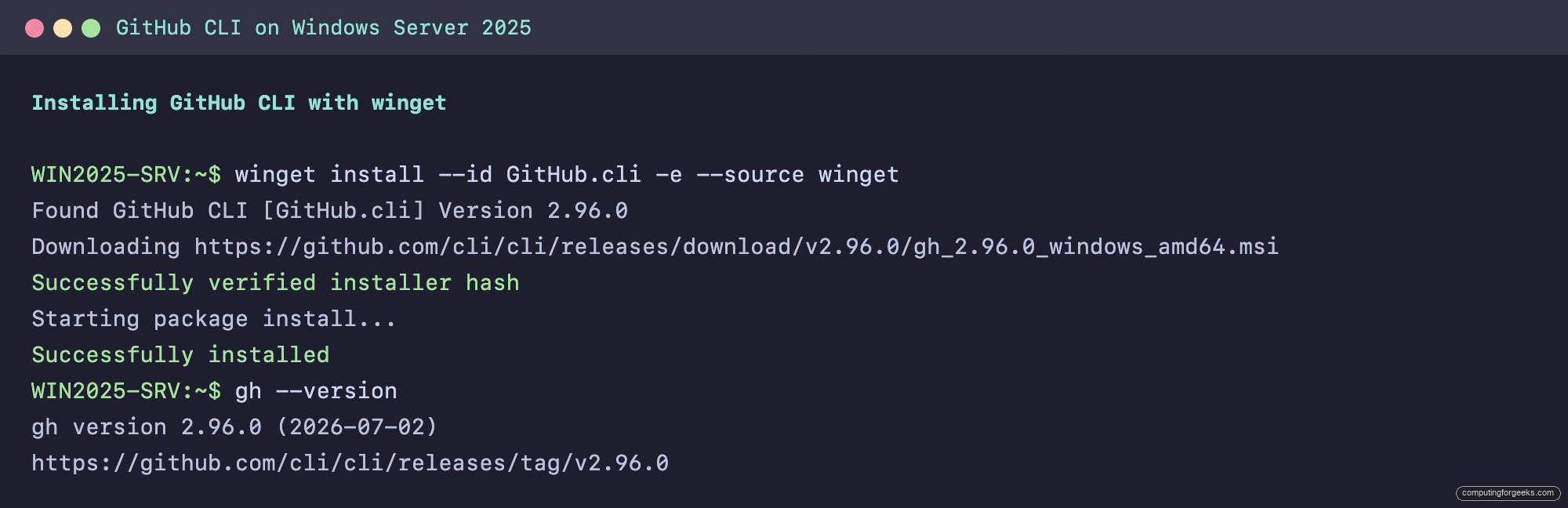
Open a new terminal after the install so PATH picks up the binary. One gotcha from the lab worth knowing: on a freshly provisioned Windows Server 2025, winget can refuse every operation with this error:
0x8a15000f : Data required by the source is missingThat means the winget source catalog package is broken or missing, and winget source reset --force does not fix it. Registering the catalog package directly does:
Add-AppxPackage 'https://cdn.winget.microsoft.com/cache/source.msix'Run that in PowerShell, and the install command above works immediately afterward. If you already manage machines with Chocolatey or Scoop, both package gh as well (choco install gh and scoop install gh), and GitHub also publishes a signed MSI on the releases page for GPO-style deployment.
Verify and authenticate
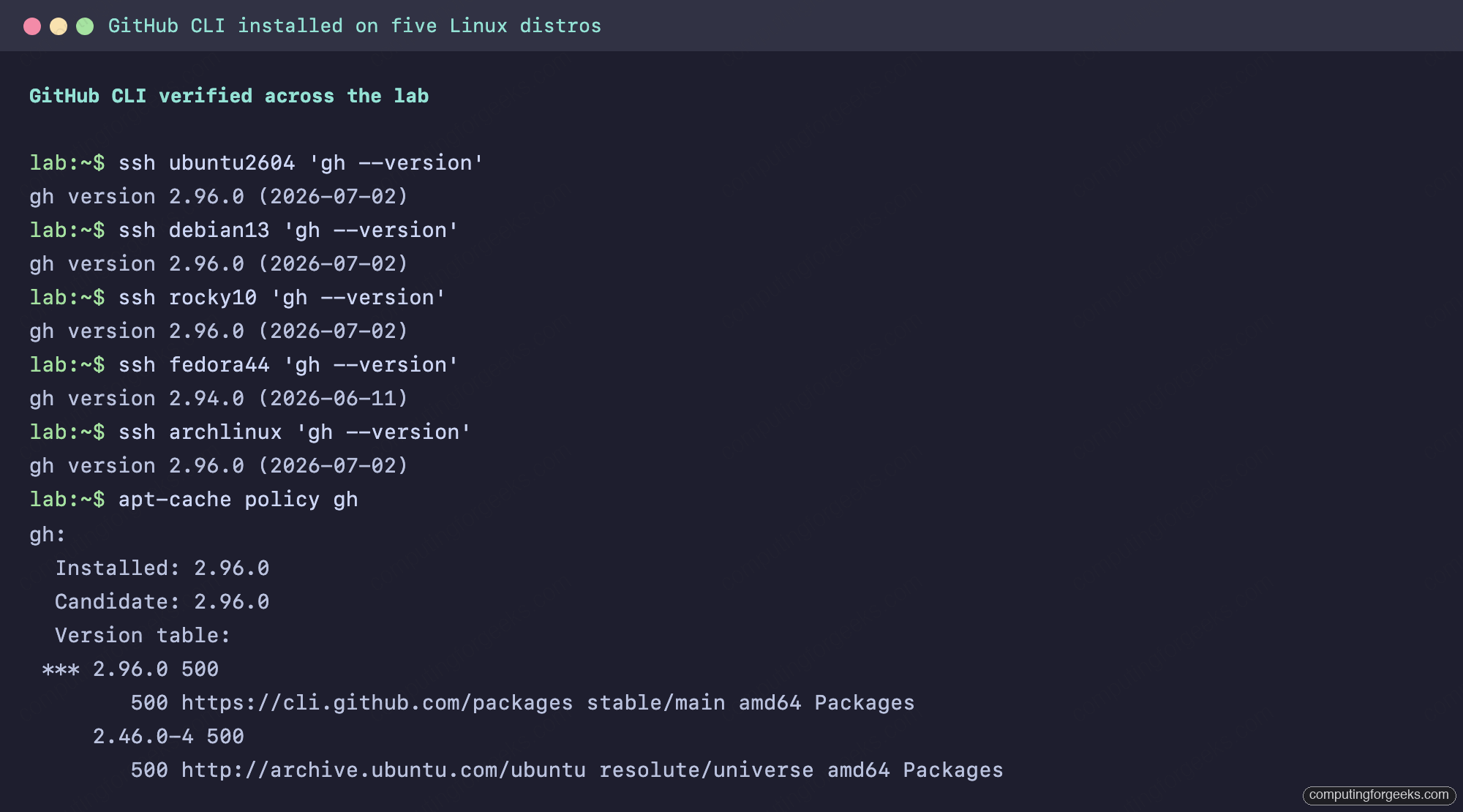
Whatever the platform, the check is the same. Here is the whole lab in one pass, five distros reporting in, plus the apt policy view showing exactly which repo the Ubuntu build came from:
Then log in once and gh stores the credential for every later command:
gh auth loginThe interactive flow offers a browser device code or a pasted token, and gh auth status confirms which account is active. From here the tool fans out into repos, pull requests, Actions debugging, secrets, and API scripting; the tested gh command reference walks through all of it with real output, and the official manual documents every flag. If your next stop is CI, gh handles the token plumbing for tools like Flux bootstrap, feeds Dagger pipelines on GitHub Actions, and pairs with Workload Identity Federation when your workflows need cloud access without stored keys.
Keeping gh current everywhere
GitHub CLI ships a release roughly every two to three weeks, so the install method you picked determines your upgrade command. On the repo-based installs it rides your normal patch cycle: sudo apt update && sudo apt install gh on Debian and Ubuntu, sudo dnf upgrade gh on the RHEL family, sudo pacman -Syu on Arch. Homebrew users run brew upgrade gh, and Windows takes winget upgrade GitHub.cli. The one setup that never upgrades itself is the direct .deb/.rpm/tarball install, so if you went that route, re-run the version detection block from that section on a schedule. A stale gh mostly works, which is exactly why it lingers; the newer subcommands simply do not exist on old builds, and the first sign is usually an unknown command error on something a teammate just used.