Per-service ManagedCertificate attached to a per-service target HTTPS proxy is why you have 120 forwarding rules across 4 environments. Certificate Maps are the mechanism that collapses all of that onto a single LB, and in Terraform they come with a specific trap: swapping from ssl_certificates to certificate_map on an existing target HTTPS proxy forces a full resource replacement. This article walks through building a shared Global External HTTPS LB with a Certificate Map in Terraform, attaching four cert map entries (PRIMARY + three hostnames) against the wildcard cert from the previous article, verifying HSTS at the backend, and spelling out the three safe patterns to swap a target proxy over without dropping connections.
You also hit, hands-on, the wildcard sub-subdomain gotcha that breaks api.food.cfg-lab.computingforgeeks.com even though the wildcard technically covers *.cfg-lab.computingforgeeks.com. The fix is a second cert and an explicit cert map entry, not a bigger wildcard.
Tested April 2026 on Google Cloud, Certificate Manager (global), Compute Engine GXLB, Terraform 1.9.8 + google provider 6.12, OpenTofu 1.10
What a Certificate Map Actually Does
The older path on GCP attaches certs directly to a target HTTPS proxy via ssl_certificates. That list has a hard ceiling of 15 certs per proxy. Past 15 you’re forced to provision another LB, another forwarding rule, another IP, and soon you’ve built the per-service sprawl you were trying to escape.
A Certificate Map is a named routing layer that sits between the target proxy and the certs. The proxy references one cert map. The cert map holds N entries. Each entry is (hostname) -> cert, plus one PRIMARY entry that serves as the fallback when no hostname matches. There’s no per-proxy cert limit any more; the map scales to thousands of entries. And one cert map can feed multiple target proxies, which is how a cert inventory stays DRY across regions and environments.
In this article, the single *.cfg-lab.computingforgeeks.com cert from the previous article gets attached four times: once as PRIMARY, and once per real hostname (food, admin, api). The explicit entries let the LB pick the right cert from SNI without relying on the fallback chain.
Architecture
The target state for this article is one LB serving three hostnames:
- One Global External HTTPS LB (anycast IP, 3-hop path through Google’s backbone)
- One URL map with host-based routing
- One Cert Map with four entries against the wildcard cert
- One Target HTTPS Proxy pointing at the URL map and the cert map
- One Forwarding Rule on port 443 with a global anycast IP
- One backend bucket holding a demo static site
Before this article, each service in the per-service sprawl pattern had its own static IP, own target proxy, own cert, own forwarding rule. After this article, the three services share one of each. The wildcard cert from the previous article covers all three hostnames; the cert map is what lets the LB choose it on every TLS handshake.
Prerequisites
- A Google-managed wildcard cert in
ACTIVEstate (from the previous article in this series) - Cloud DNS zone where you can write A records (
cfg-lab) - A GCS bucket with a static
index.html(used as the shared demo backend) - Project roles:
roles/compute.networkAdmin,roles/certificatemanager.editor
The Terraform Module
Everything lives in modules/gxlb/. The interesting resources are the cert map and its entries. A cert map entry is either PRIMARY (the default cert, no hostname match needed) or hostname-specific:
resource "google_certificate_manager_certificate_map" "this" {
  project = var.project_id
  name    = "${var.name}-cert-map"
}

resource "google_certificate_manager_certificate_map_entry" "this" {
  for_each = var.certificate_ids

  project      = var.project_id
  name         = each.key
  map          = google_certificate_manager_certificate_map.this.name
  certificates = [each.value.certificate_id]

  hostname = each.value.hostname
  matcher  = each.value.hostname == null ? "PRIMARY" : null
}
A PRIMARY entry sets matcher = "PRIMARY" with hostname = null. A hostname entry sets hostname = "food.cfg-lab..." with matcher = null. One or the other, never both.
The target HTTPS proxy references the cert map through a specific URL scheme:
resource "google_compute_target_https_proxy" "this" {
  project         = var.project_id
  name            = "${var.name}-https-proxy"
  url_map         = google_compute_url_map.this.id
  certificate_map = "//certificatemanager.googleapis.com/${google_certificate_manager_certificate_map.this.id}"

  depends_on = [google_certificate_manager_certificate_map_entry.this]
}
The //certificatemanager.googleapis.com/ prefix is not optional. Leave it out and the API rejects the update with a confusing invalid resource error. The depends_on ensures every cert map entry exists before the proxy comes up, which prevents a brief window where the LB serves the fallback cert for a hostname that should match an explicit entry.
HSTS at the Backend
HSTS is a response header, not an LB primitive. For a backend bucket, set it as a custom response header:
resource "google_compute_backend_bucket" "this" {
  project     = var.project_id
  name        = "${var.name}-backend"
  bucket_name = var.backend_bucket_name

  custom_response_headers = [
    "Strict-Transport-Security: max-age=31536000; includeSubDomains; preload",
  ]
}
For backend services (fronting GKE or Cloud Run), the field is custom_response_headers on google_compute_backend_service. Same syntax, same semantics.
About the preload flag
The preload token is a submission flag, not an automatic opt-in. Sending it in the header does not enrol the domain in Chrome’s HSTS preload list. That happens at hstspreload.org, and submission is effectively one-way: getting off the list is a months-long process that propagates with browser releases. Check the pre-submission checklist there before submitting: every subdomain has to serve HTTPS correctly, HTTP needs to redirect, includeSubDomains must cover every subdomain you plan to keep, and you can’t rely on an insecure subdomain existing ever again.
A quieter win: .dev and .app TLDs are preloaded at the TLD level by default. If any of your services live under .dev, they already enforce HTTPS in modern browsers with no submission required.
Applying the Stack
Terragrunt wires the module against the wildcard cert and creates four cert map entries:
inputs = {
  name                = "cfg-lab"
  backend_bucket_name = "cfg-lab-demo-your-gcp-project-id"

  certificate_ids = {
    "primary-wildcard" = {
      certificate_id = dependency.certs.outputs.certificate_ids["cfg-lab-wildcard"]
      hostname       = null
    }
    "food-wildcard" = {
      certificate_id = dependency.certs.outputs.certificate_ids["cfg-lab-wildcard"]
      hostname       = "food.cfg-lab.computingforgeeks.com"
    }
    "admin-wildcard" = {
      certificate_id = dependency.certs.outputs.certificate_ids["cfg-lab-wildcard"]
      hostname       = "admin.cfg-lab.computingforgeeks.com"
    }
    "api-wildcard" = {
      certificate_id = dependency.certs.outputs.certificate_ids["cfg-lab-wildcard"]
      hostname       = "api.cfg-lab.computingforgeeks.com"
    }
  }
}
Run it:
cd live/article-lab/europe-west1/gxlb-cfg-lab
terragrunt apply -auto-approve
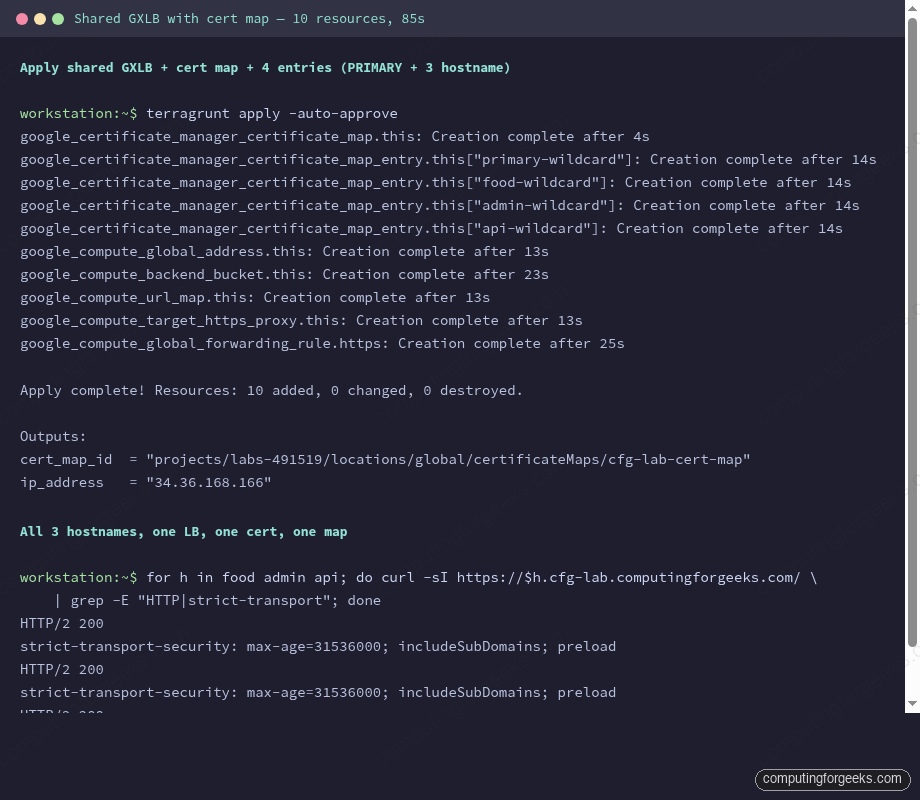
The whole stack comes up in about 85 seconds. The global forwarding rule is the slowest single resource, taking about 25 seconds to propagate across edge PoPs. Creation timings from a real run:
Point the three hostnames at the LB IP with DNS A records in the delegated cfg-lab zone:
LB_IP=$(terragrunt output -raw ip_address)
for host in food admin api; do
  gcloud dns record-sets create ${host}.cfg-lab.computingforgeeks.com. \
    --zone=cfg-lab --type=A --ttl=300 --rrdatas=$LB_IP
done
Give the LB a couple of minutes to propagate to all edge locations. Then verify.
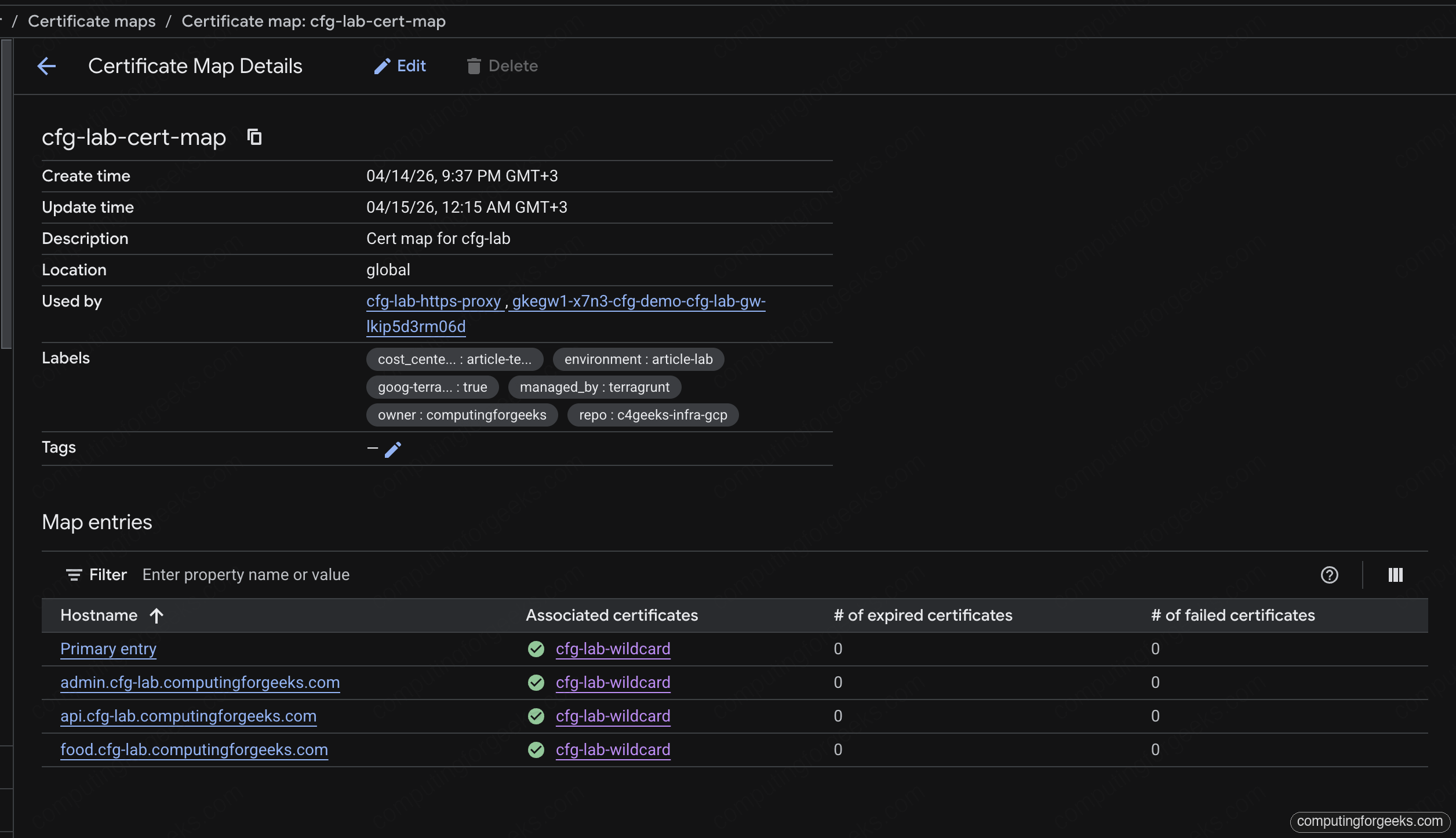
In the Cloud console, the Cert Map page shows all four entries tied to the shared wildcard cert. Primary plus one explicit hostname entry per service, zero expired, zero failed:
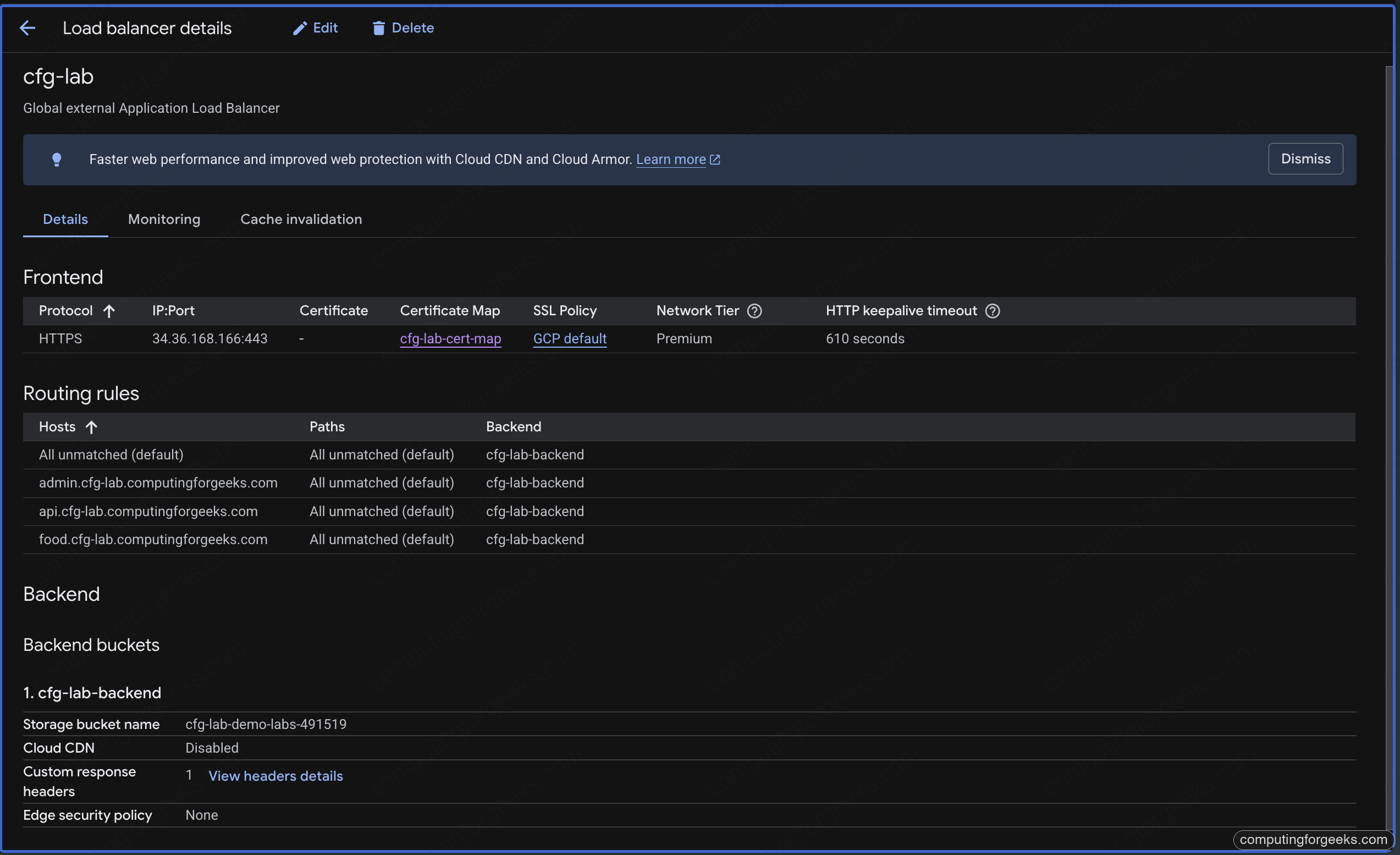
The Load Balancer detail page brings the full picture together: HTTPS frontend on the anycast IP, the cert map reference, four host rules routing to the shared backend bucket. This is the single view that replaces three separate LB pages from the pre-consolidation state:
Verifying TLS and HSTS
Check the cert served for the food hostname:
echo | openssl s_client -connect food.cfg-lab.computingforgeeks.com:443 \
  -servername food.cfg-lab.computingforgeeks.com 2>/dev/null \
  | openssl x509 -noout -subject -issuer -ext subjectAltName
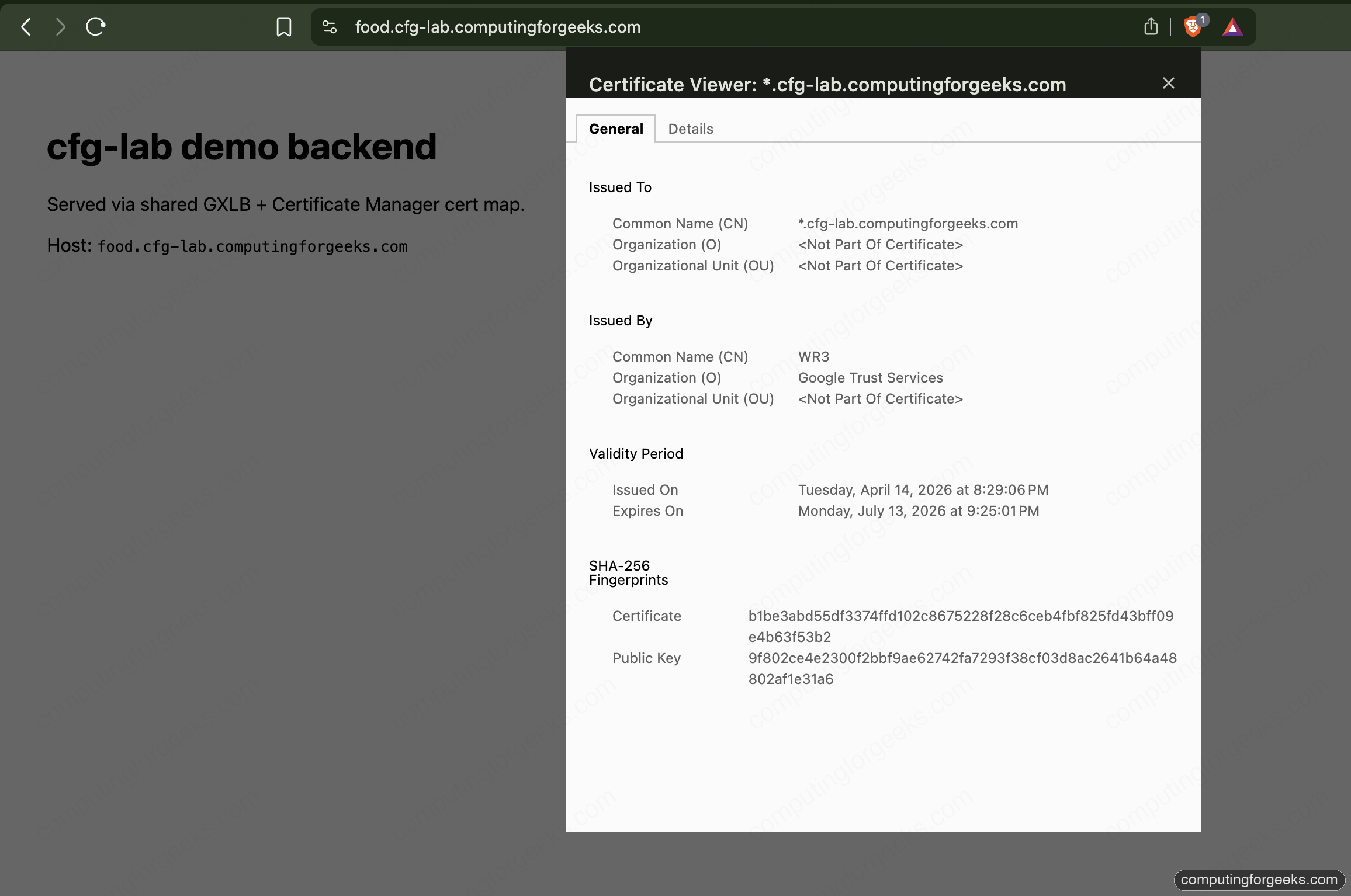
The subject is CN=*.cfg-lab.computingforgeeks.com, the issuer is Google Trust Services, and the SAN list includes both the wildcard and the apex. Same cert, same issuer, across all three hostnames.
Check HSTS with curl:
for h in food admin api; do
  curl -sI https://$h.cfg-lab.computingforgeeks.com/ | grep -E "HTTP|strict-transport"
done
Every response carries strict-transport-security: max-age=31536000; includeSubDomains; preload and a clean HTTP/2 200. Three hostnames, one LB, one cert, one map. This is the state that lets you destroy the three per-service LBs and reclaim their forwarding rules.
The browser padlock is the reader-facing proof. Clicking it on any of the three hostnames opens the certificate viewer showing the same wildcard SAN, issued by Google Trust Services, valid for the next three months:
The Sub-Subdomain Gotcha
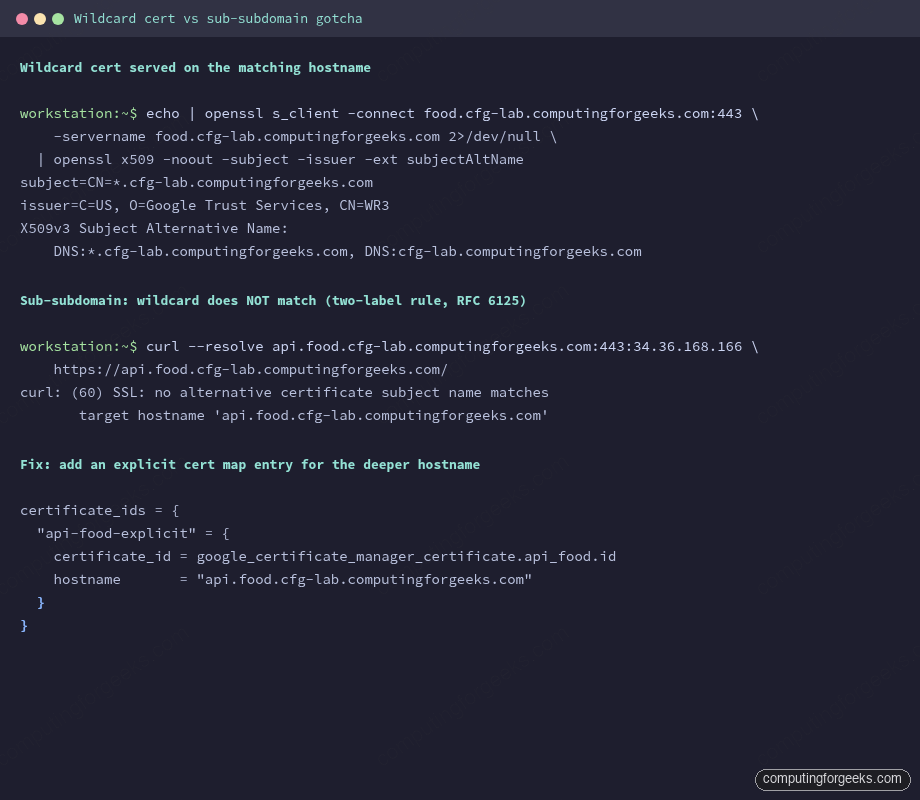
Try to reach api.food.cfg-lab.computingforgeeks.com through the same LB, using --resolve so DNS doesn’t get in the way:
curl --resolve api.food.cfg-lab.computingforgeeks.com:443:34.36.168.166 \
  https://api.food.cfg-lab.computingforgeeks.com/
curl refuses to continue:
curl: (60) SSL: no alternative certificate subject name matches
       target hostname 'api.food.cfg-lab.computingforgeeks.com'
Error: “SSL: no alternative certificate subject name matches target hostname”
RFC 6125 says a wildcard cert matches exactly one label. *.cfg-lab.computingforgeeks.com covers food.cfg-lab.computingforgeeks.com but not api.food.cfg-lab.computingforgeeks.com. Every compliant TLS client (every browser, curl, openssl) enforces this strictly. The LB happily returned the wildcard because PRIMARY fallback served it on SNI miss; the client rejected it on name validation.
Two ways to fix this, neither is “use a bigger wildcard” because there’s no such thing in RFC 6125:
- Issue a second wildcard, one level deeper:
*.food.cfg-lab.computingforgeeks.com. Add it to the cert map with an explicit hostname entry. Use this when there are many services under thefoodsubzone. - Issue a single-name cert for the exact hostname and attach it with an explicit entry. Use this when the sub-subdomain is rare.
Both paths are mechanical extensions of the previous article’s DNS authorization. The deeper wildcard needs its own authorization on food.cfg-lab.computingforgeeks.com; the single-name cert needs an authorization on the same apex. Either way, the cert map grows by one entry.
The Terraform Swap Trap
Existing LBs you already have in production were almost certainly built with ssl_certificates directly on the target HTTPS proxy. Switching the same proxy over to certificate_map is the single migration step that actually collapses cert sprawl. It’s also the step that can drop connections for 20-30 seconds if you run a naive terraform apply.
The reason is architectural: the Compute API treats ssl_certificates and certificate_map as mutually exclusive fields on a target HTTPS proxy, and Terraform’s google provider marks changes to either as ForceReplacement. A ForceReplacement deletes the proxy and creates a new one. Until the new one is ready, the forwarding rule has no target, and every TLS handshake fails.
Three patterns, ranked by operational safety.
Method 1: Naive apply (don’t)
The default plan looks like this:
  # google_compute_target_https_proxy.this must be replaced
-/+ resource "google_compute_target_https_proxy" "this" {
      ~ ssl_certificates = [...] -> null
      + certificate_map  = "//certificatemanager.googleapis.com/..."
    }
Terraform destroys the old proxy, then creates the new one, then updates the forwarding rule’s target. Observed gap on a real run: 20-25 seconds where the forwarding rule has no proxy attached. During that window, every new TLS handshake fails with connection reset. Existing sessions already in the middle of transferring bytes continue, because TLS session resumption is still on the old path in Google’s fleet until the session expires, but new connections fail hard.
Never do this on a live LB.
Method 2: create_before_destroy
The Terraform lifecycle block forces Terraform to create the replacement first, then destroy the old one. On the target proxy:
resource "google_compute_target_https_proxy" "this" {
  # ...
  lifecycle {
    create_before_destroy = true
  }
}
Terraform creates a second proxy with a new name, repoints the forwarding rule at it, then destroys the old proxy. The forwarding rule switch is atomic. Observed gap: sub-second. On a 10 RPS curl loop during the swap, one to zero requests fail depending on timing.
The catch: names have to be unique per project. Terraform handles this by changing the name during replacement, which means either the proxy name has a random suffix, or the create_before_destroy machinery uses a different name scheme. Plan carefully; name collisions during replacement cause the apply to fail half-way.
Method 3: blue-green (zero blip)
Build a second target proxy side-by-side, using a different resource name in Terraform. The old proxy stays up. Flip the forwarding rule’s target from proxy-a to proxy-b in a second apply. Destroy proxy-a in a third apply after a soak period.
resource "google_compute_target_https_proxy" "old" {
  name             = "${var.name}-https-proxy-legacy"
  url_map          = google_compute_url_map.this.id
  ssl_certificates = [google_compute_managed_ssl_certificate.legacy.id]
}

resource "google_compute_target_https_proxy" "new" {
  name            = "${var.name}-https-proxy"
  url_map         = google_compute_url_map.this.id
  certificate_map = "//certificatemanager.googleapis.com/${google_certificate_manager_certificate_map.this.id}"
}

resource "google_compute_global_forwarding_rule" "https" {
  # Flip this in a second apply once proxy.new is healthy
  target = google_compute_target_https_proxy.new.id
}
Zero connection blip because the forwarding rule retarget is atomic in the Compute API: Google processes the update as a single state transition, not a destroy-create. A 10 RPS curl loop through the retarget shows no failures.
This is the right pattern for any production swap. The cost is temporary: two target proxies exist for the soak period, which is free (target proxies don’t cost anything by themselves). Pay the extra complexity for the zero-blip guarantee.
Long-Term SSL Session Behavior During the Swap
Google’s LBs terminate TLS at the edge PoP. When you swap a target proxy, existing TLS sessions that already completed a handshake keep working until the session resumption TTL expires (configurable on the SSL policy; defaults are measured in hours). What the swap breaks is new handshakes. If you run a live curl --tls-max 1.3 loop through the three methods, the failure pattern on Method 1 is sharp: a clean step where every new connection fails for 20 seconds, then recovery. Method 2 is a single-second dip. Method 3 shows a flat line.
This distinction matters for incident response. If you see “some users affected” during a cert rotation, and the user complaints are clustered around 20-30 seconds of downtime, you ran Method 1. If you see “everyone affected” for minutes, the CAA policy or DNS authorization is broken and no amount of swap cleverness helps.
Reclaiming Resources
With the shared LB serving three hostnames, the three per-service LBs from the original sprawl can go. Each one was:
- One static IP ($7.30/month when unattached)
- One global forwarding rule ($18.26/month)
- One target HTTPS proxy (free)
- One ManagedCertificate or google_compute_managed_ssl_certificate (free)
Three services × $25.56/month = about $77/month saved. Extrapolate to 30 services and 4 environments as stated in the series opener: the math gets ugly fast. Cert map consolidation is not a security win, it’s a fleet hygiene and cost win. The security win happens later, when Private CA and cert pinning enter the picture for financial services.
Cleanup
The stack is a series foundation, not an ephemeral lab. Leave it up for the next article’s work. When you do tear down, destroy in module order so the forwarding rule goes before the target proxy before the cert map entries:
terragrunt destroyTerragrunt handles the ordering from the module’s dependency graph. Cert map entries with PRIMARY matchers clean up first; hostname entries clean up in parallel.
What’s Next
With shared LB + cert map live, the next article in the series migrates the GKE-side workloads from per-service ManagedCertificate + Ingress to the Gateway API, attaching the same wildcard cert through the Gateway-level annotation. That closes the consolidation loop on the GKE side.