On GKE, per-service Ingress plus per-service ManagedCertificate is the path of least resistance. It also scales badly: every service is its own LB, its own IP, its own cert, its own rotation lifecycle. The Gateway API plus Certificate Manager is the replacement pattern that GKE now steers new workloads toward, and unlike the older Ingress path, a single Gateway can share one wildcard cert across any number of routes and namespaces.
This article walks a live migration on a real GKE Autopilot cluster in europe-west1, starting with three sprawl-pattern Ingresses + ManagedCertificates, deleting them, deploying a Gateway attached to the wildcard cert map from the previous article via the networking.gke.io/certmap annotation, and bringing the services up under HTTPRoute with the same wildcard answering for every host. Before/after output is captured from the real cluster.
Tested April 2026 on GKE Autopilot 1.35.1-gke.1396002 in europe-west1, Gateway API v1 (GA), Certificate Manager global, kubectl 1.35
Why the Migration Matters
Ingress with ManagedCertificate is not deprecated, but the GKE docs now lead every new recipe with Gateway API. Three reasons the shift is worth making:
- Cert sharing. A single Gateway attaches one cert map (via annotation) and every HTTPRoute under that Gateway inherits it. One wildcard covers dozens of services. With Ingress, every service needs its own ManagedCertificate.
- Cross-namespace routing. HTTPRoute can reference backend services across namespaces through
ReferenceGrant. Ingress is namespace-local. - Clean separation of concerns. GatewayClass + Gateway is infra. HTTPRoute is app. Platform teams own the first, product teams own the second. The Ingress model glued both together.
For this series the cert-sharing property is the killer feature. The wildcard *.cfg-lab.computingforgeeks.com from the previous articles, living in Certificate Manager, gets pulled into the cluster through a single annotation. Every route under the Gateway serves from that cert with zero per-service cert lifecycle.
GatewayClasses on GKE
GKE ships with a pile of GatewayClasses, each backing a different LB type:
kubectl get gatewayclassgke-l7-global-external-managed: Global External HTTPS LB, the modern equivalent of the default Ingressgke-l7-regional-external-managed: Regional External ALB, covered in the next article of this seriesgke-l7-rilb: Regional Internal LB for private servicesgke-l7-gxlb: Legacy global LB, kept for compatibility; prefer the-managedvariant
This article uses gke-l7-global-external-managed, which is the like-for-like replacement for the default kubernetes.io/ingress.class: gce that Ingress would have used.
GCP API Gateway is a different product
A quick disambiguation because the names collide. Kubernetes Gateway API (what this article covers) is a CRD-based set of resources: Gateway, HTTPRoute, ReferenceGrant: running inside a cluster and backed by cluster-installed controllers. GCP API Gateway is a managed API proxy product for Cloud Run and Cloud Functions, priced per call, targeting API lifecycle management. Same words, completely different products. Do not mix up the two.
Prerequisites
- A GKE Autopilot cluster with Gateway API enabled. Autopilot has it on by default as of 1.28+.
- The wildcard cert from the previous article in this series, attached to a Certificate Map named
cfg-lab-cert-map(global). - Cloud DNS A records for the hostnames you intend to expose.
kubectlauthenticated against the cluster.
Verify Gateway API is on the cluster:
gcloud container clusters describe cfg-lab-gke \
  --region=europe-west1 \
  --format="value(addonsConfig.gatewayApiConfig.channel,autopilot.enabled)"
Channel should be CHANNEL_STANDARD (the Gateway API v1 GA channel). For clusters pre-dating GA, enable it: gcloud container clusters update cfg-lab-gke --gateway-api=standard --region=europe-west1.
The “Before” State: Per-Service Sprawl
Three simple demo services, each with its own Ingress + ManagedCertificate + static IP. This is the world before Gateway API. The cluster already has this state from earlier in the series:
kubectl get ingress,managedcertificate -n defaultThree ingresses, three ManagedCertificates, three global forwarding rules. Each rule has its own IP, which at $7.30/mo for the static IP plus $18.26/mo for the rule totals $25.56/mo per service in LB overhead alone. Three services is $77/mo of LB sprawl before a single byte of user traffic.
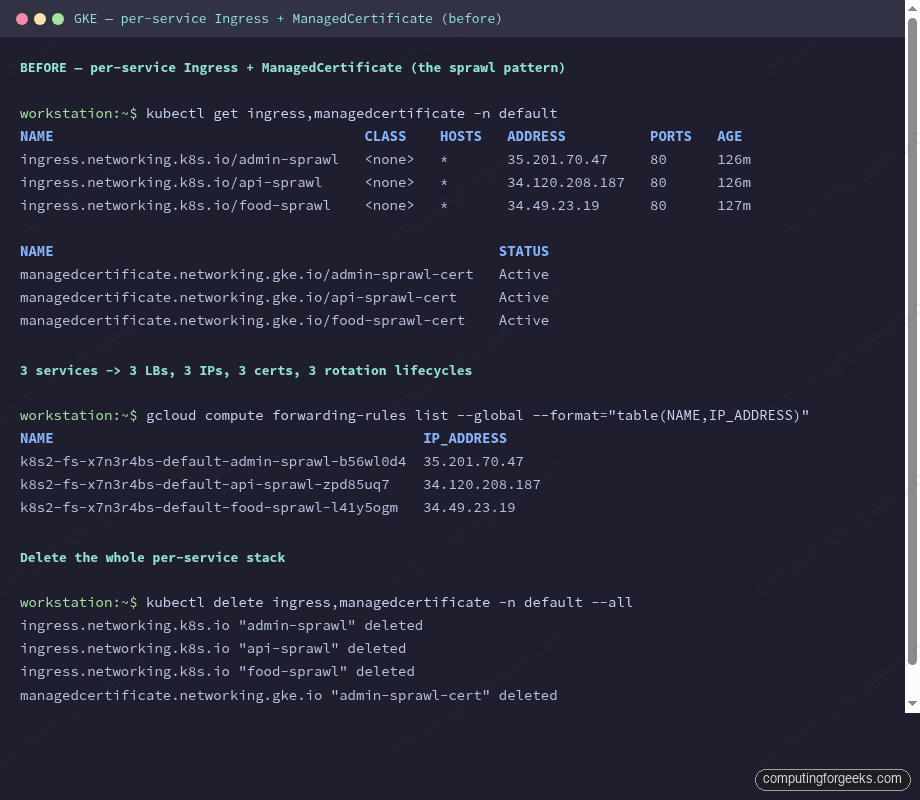
The Certificate Manager wildcard in global can’t plug into these Ingresses directly. ManagedCertificate is its own CRD with its own cert-provisioning loop; it doesn’t know about Certificate Manager at all. To share a wildcard, you migrate off Ingress.
Deleting the Ingresses
The old LBs have to come down before the new Gateway’s LB can come up. GCP imposes a per-project quota on in-use global IP addresses (default 4). With three Ingresses holding three IPs and the gxlb from the previous article holding one, there’s zero room for the Gateway to reserve its IP. The first symptom is:
Message: error cause: gceSync: generic::permission_denied:
         Insert: QUOTA_EXCEEDED - Quota 'IN_USE_ADDRESSES' exceeded.
         Limit: 4.0 globally.
Error: “Quota ‘IN_USE_ADDRESSES’ exceeded. Limit: 4.0 globally”
This is not an infrastructure bug; it’s the default project quota. Either request a higher quota from the console (slow, requires a business reason), or free up IPs by deleting unused LBs before migrating. In this migration the Ingresses are exactly the LBs getting replaced, so the fix is to delete them first:
kubectl delete ingress,managedcertificate -n default --allGive the sprawl teardown a minute or two. GKE’s Ingress controller reconciles the delete, which in turn releases the forwarding rules and static IPs. Once the IP count drops, the Gateway reserves its own IP and the migration proceeds.
The Gateway Resource
One Gateway in the cfg-demo namespace. It listens on 443 for HTTPS and 80 for HTTP (the latter purely to redirect, or for a plaintext health check; you wouldn’t serve real traffic on it).
apiVersion: gateway.networking.k8s.io/v1
kind: Gateway
metadata:
  name: cfg-lab-gw
  namespace: cfg-demo
  annotations:
    networking.gke.io/certmap: cfg-lab-cert-map
spec:
  gatewayClassName: gke-l7-global-external-managed
  listeners:
  - name: https
    protocol: HTTPS
    port: 443
    tls:
      mode: Terminate
      options:
        networking.gke.io/pre-shared-certs: ""
  - name: http
    protocol: HTTP
    port: 80
Two things worth walking through.
The networking.gke.io/certmap annotation is the whole mechanism. It points at a Certificate Manager cert map in the same project, global scope. The GKE Gateway controller reads the annotation at Gateway reconciliation, looks up the cert map, and wires the resulting LB’s target HTTPS proxy to that map. No TLS secrets in the cluster. No ManagedCertificate. No cert rotation to manage.
The tls.options block has networking.gke.io/pre-shared-certs: "" empty. When you use the cert-map annotation, the TLS options stay empty because the cert comes from the map, not from a Kubernetes Secret or from a pre-shared cert name. The empty string tells the controller “TLS is handled via the annotation, don’t expect certs here.”
HTTPRoute Per Service
Each application service gets its own HTTPRoute pointing at its Kubernetes Service. Hostnames are set per-route, which means the Gateway fans out host-based routing without the URL-map complexity you’d see in raw Terraform:
apiVersion: gateway.networking.k8s.io/v1
kind: HTTPRoute
metadata:
  name: food-web
  namespace: cfg-demo
spec:
  parentRefs: [{name: cfg-lab-gw}]
  hostnames: ["food-gw.cfg-lab.computingforgeeks.com"]
  rules:
  - backendRefs: [{name: food-web, port: 80}]
---
apiVersion: gateway.networking.k8s.io/v1
kind: HTTPRoute
metadata:
  name: admin-web
  namespace: cfg-demo
spec:
  parentRefs: [{name: cfg-lab-gw}]
  hostnames: ["admin-gw.cfg-lab.computingforgeeks.com"]
  rules:
  - backendRefs: [{name: admin-web, port: 80}]
A route’s hostnames is the SNI it matches on. The Gateway’s cert map, via the annotation, picks up a cert for each hostname. Because the wildcard covers every name under *.cfg-lab.computingforgeeks.com, all routes share the same cert. Add a fourth service, a fifth, a twentieth; the cert map answers for every one without a cluster-side change.
Underlying Service Requirements
GKE’s Gateway controller uses container-native load balancing (Network Endpoint Groups, NEGs) rather than iptables + NodePort. The Service needs the NEG annotation to tell GKE to create a NEG per exposed port:
apiVersion: v1
kind: Service
metadata:
  name: food-web
  namespace: cfg-demo
  annotations:
    cloud.google.com/neg: '{"exposed_ports":{"80":{}}}'
spec:
  selector: {app: food-web}
  ports: [{port: 80, targetPort: 80}]
  type: ClusterIP
Type ClusterIP is correct. The Gateway does not go through a NodePort; the LB talks directly to pod IPs through the NEG. This is what gives Gateway API one hop less than the old Ingress-with-NodePort path and makes health checks cheaper (per-pod instead of per-node).
Applying and Verifying
Apply every manifest:
kubectl apply -f gateway.yaml
kubectl apply -f httproutes.yaml
kubectl apply -f services-deployments.yaml
The Gateway takes 3-4 minutes on a cold apply: the controller has to reserve an IP, create the target HTTPS proxy, wire the cert map, stand up backend services per NEG, and register each NEG with the URL map. Watch the state with:
kubectl get gateway,httproute -n cfg-demo -o wideYou want PROGRAMMED=True and an ADDRESS populated. Until both are present, DNS records pointed at that IP will silently fail. Add the A records after the Gateway is programmed:
GW_IP=$(kubectl get gateway cfg-lab-gw -n cfg-demo -o jsonpath='{.status.addresses[0].value}')
for host in food-gw admin-gw; do
  gcloud dns record-sets create ${host}.cfg-lab.computingforgeeks.com. \
    --zone=cfg-lab --type=A --ttl=300 --rrdatas=$GW_IP
done
Test every route:
for h in food-gw admin-gw; do
  curl -sI -o /dev/null -w "$h: HTTP %{http_code}\n" \
    https://$h.cfg-lab.computingforgeeks.com/
done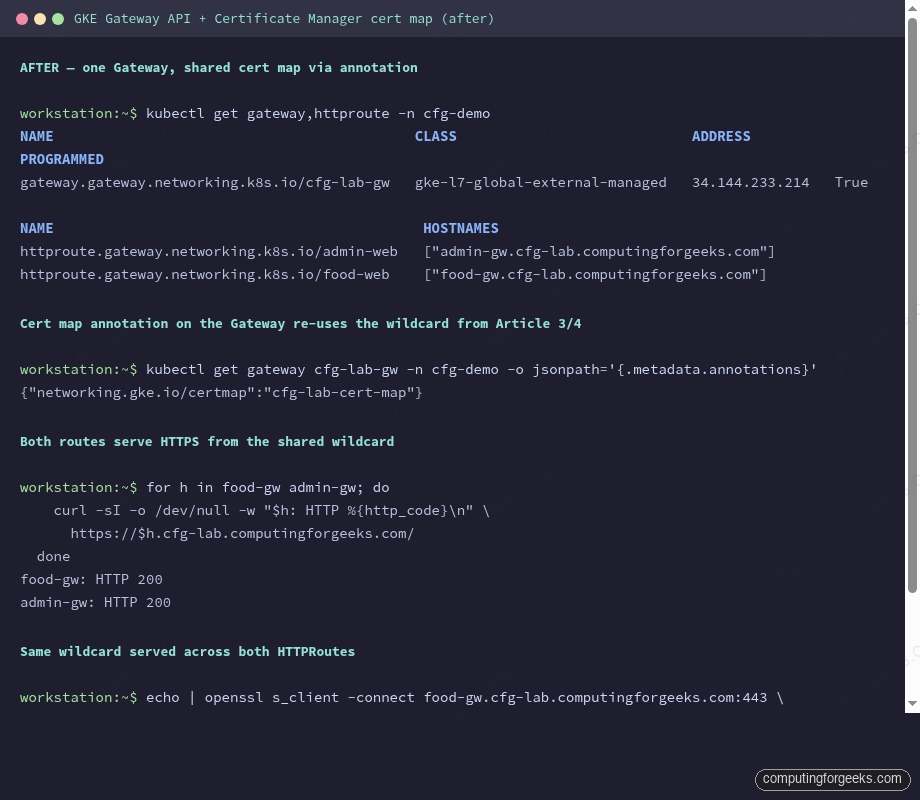
Both routes return HTTP/2 200 from the shared Gateway IP. The same wildcard cert answers both hostnames, served through the same cert map that feeds the non-GKE shared LB from the previous article. Two classes of consumers: the raw compute LB and the GKE Gateway: share one cert, one CA, one rotation lifecycle.
Cross-Namespace Routing
One genuine capability Ingress doesn’t have. An HTTPRoute in namespace shared-infra can reference a Service in namespace team-platform via ReferenceGrant:
apiVersion: gateway.networking.k8s.io/v1beta1
kind: ReferenceGrant
metadata:
  name: shared-infra-to-team-platform
  namespace: team-platform
spec:
  from:
  - group: gateway.networking.k8s.io
    kind: HTTPRoute
    namespace: shared-infra
  to:
  - group: ""
    kind: Service
This matters for platform-engineering teams: the Gateway lives in a platform-owned namespace, application routes live in app-owned namespaces, neither side leaks RBAC into the other. With Ingress you were forced to duplicate either the Gateway or the backend into every namespace.
Rolling Back
The migration is reversible during the article-lab phase. Keep the Ingresses + ManagedCertificates in version control, not just in the cluster. If the Gateway rollout misbehaves, delete the Gateway + HTTPRoutes, re-apply the old manifests, and the old LBs come back within a few minutes. DNS stays pointed at the old IPs for the rollback window, flips to the new IP once the Gateway is stable.
In production, do this migration service-by-service, not all at once. One Gateway per environment, one HTTPRoute added at a time, with DNS flipping in 5-minute TTLs between cutover windows. Large-batch migrations of everything to Gateway API in one shot rarely go smoothly.
What This Leaves You With
After migration: one Gateway, one IP, one cert map, N HTTPRoutes. Adding a new service is three files: a Deployment, a Service with the NEG annotation, and an HTTPRoute. No new cert. No new LB. No DNS authorization to walk through. The cert map is already there, the Gateway is already there, the wildcard covers the new hostname.
This is what the consolidation outcomes matrix in the series opener means by “zero per-project Google-managed certs.” Once every cluster migrates, the cert inventory collapses to however many wildcards you issue at the Certificate Manager layer. The rest of the series pushes that further: regional LBs for latency-critical services, Private CA for financial isolation, SPKI pinning, and the cert inventory module that enforces the pattern in CI.
Cleanup
The Gateway + HTTPRoutes are part of the series lab and stay up for the next article’s work. When you do tear down, delete the HTTPRoutes first (they’re the shallow layer), then the Gateway, then the Services and Deployments:
kubectl delete httproute -n cfg-demo --all
kubectl delete gateway -n cfg-demo cfg-lab-gw
kubectl delete -n cfg-demo deployment/food-web deployment/admin-web service/food-web service/admin-web
Wait for the Gateway controller to release the IP before moving on; re-using the IP quota too fast hits the same IN_USE_ADDRESSES error from earlier.
What’s Next
The next article in the series flips the LB class to regional. Same cert map logic, same Gateway API resources, different tradeoffs around latency, cost, and cross-region failover. That’s where the “global vs regional” decision for a given service gets made.