Zabbix has one of the strongest pkg footprints on FreeBSD. While Linux users wrestle with repo keys and GPG pinning, a single pkg install on FreeBSD 15 pulls in Zabbix 7.0 LTS, all its PHP dependencies, and the agent in one pass. The FreeBSD ports tree ships zabbix7-server compiled against MySQL 8.0 by default, so this guide uses MySQL as the backend. If you need PostgreSQL, you can build from ports with the PGSQL option enabled, but for most deployments the MySQL-backed binary is ready to go.
This guide covers the complete stack: MySQL 8.0, Zabbix Server 7.0.24, the PHP 8.3 frontend, Nginx with a valid Let’s Encrypt certificate, and the local agent. By the end you’ll have a working Zabbix instance monitoring its own host, with the frontend served over HTTPS. The final section covers performance tuning for production, from poller counts to cache sizes.
Tested April 2026 on FreeBSD 15.0-RELEASE with Zabbix 7.0.24, MySQL 8.0.45, Nginx 1.26.3, PHP 8.3.30
Prerequisites
Before starting, confirm you have:
- FreeBSD 15.0-RELEASE, root access
- At least 4 GB RAM and 2 vCPUs (MySQL + Zabbix server + PHP-FPM together need headroom)
- A public DNS subdomain pointing to the server for the Let’s Encrypt certificate
- Outbound internet access for pkg and certbot
- Cloudflare-managed DNS (for the DNS-01 certificate challenge used here, which works even from private IPs)
If you’re running this on a Proxmox VM, the FreeBSD 15 Proxmox/KVM install guide covers the initial setup including the post-install steps that make pkg work out of the box.
Stack Architecture
The components and how they connect:
| Component | Package | Port |
|---|---|---|
| Zabbix Server | zabbix7-server | 10051 (trapper) |
| MySQL 8.0 | mysql80-server | 3306 (localhost only) |
| PHP 8.3 + FPM | php83, zabbix7-frontend-php83 | 127.0.0.1:9000 |
| Nginx | nginx | 80 → 443 (SSL) |
| Zabbix Agent | zabbix7-agent | 10050 |
Nginx proxies PHP requests to PHP-FPM, which serves the Zabbix frontend. The frontend talks to both MySQL (for data) and the Zabbix Server socket (port 10051) for real-time operations. All database traffic stays on loopback.
Step 1: Install Packages
Update the package catalogue first, then install everything in one pass:
pkg updateThen install the full stack in one pass:
pkg install -y zabbix7-server zabbix7-frontend-php83 zabbix7-agent \
  nginx php83 php83-extensions php83-session php83-gettext php83-mbstring \
  php83-sockets php83-bcmath mysql80-server py311-certbot py311-certbot-dns-cloudflare
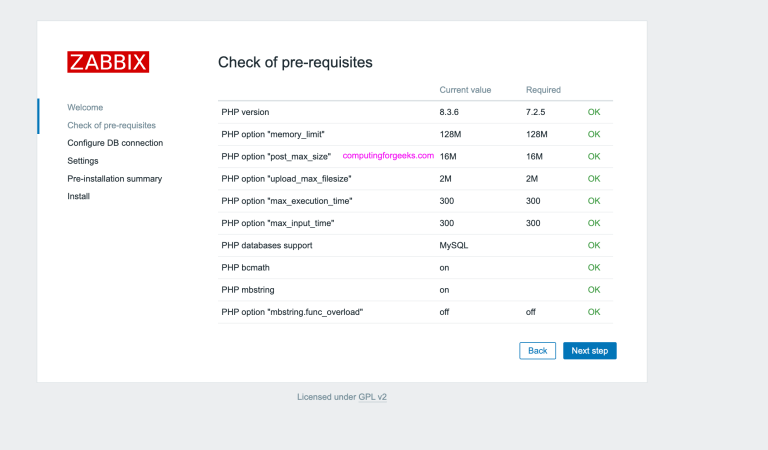
The zabbix7-frontend-php83 package pulls in all required PHP extensions automatically, including php83-mysqli, php83-gd, php83-xml, php83-xmlwriter, and php83-ctype. Note that zabbix7-server from the FreeBSD binary repo is compiled with MySQL support (PGSQL: off). This is the standard binary available via pkg. To use PostgreSQL, you’d need to build from ports with make config and toggle the PGSQL option.
When the install finishes, the post-install message confirms the release details:
Release name:           Zabbix 7.0 LTS
Release date:           2024-06-04
End of Full Support:    2027-06-30
End of Limited Support: 2029-06-31
Zabbix 7.0 LTS carries three years of full support followed by two years of security-only maintenance, making it the right choice for production deployments that won’t upgrade frequently.
Step 2: Set Up MySQL
Enable MySQL in rc.conf and initialise the data directory:
sysrc mysql_enable=YESStart MySQL for the first time. On FreeBSD the service name matches the package, so use the full rc.d path:
service mysql-server startIf the service command doesn’t find the rc script, call it directly:
/usr/local/etc/rc.d/mysql-server startMySQL 8.0 on FreeBSD starts without a root password on first boot. Create the Zabbix database and user before doing anything else:
mysql -u root -e "
  SET GLOBAL log_bin_trust_function_creators = 1;
  CREATE DATABASE zabbix CHARACTER SET utf8mb4 COLLATE utf8mb4_bin;
  CREATE USER 'zabbix'@'localhost' IDENTIFIED BY 'StrongZabbixPass1!';
  GRANT ALL PRIVILEGES ON zabbix.* TO 'zabbix'@'localhost';
  FLUSH PRIVILEGES;
"
The log_bin_trust_function_creators flag is required because the Zabbix schema creates stored functions and binary logging is enabled by default in MySQL 8.0 on FreeBSD. Without it, the schema import fails at line 2494 with ERROR 1419: You do not have the SUPER privilege and binary logging is enabled.
Step 3: Import the Zabbix Schema
The schema files ship with the server package under /usr/local/share/zabbix7/server/database/mysql/. Import them in order: schema first, then images, then initial data:
cd /usr/local/share/zabbix7/server/database/mysql/

mysql -u zabbix -p zabbix < schema.sql
mysql -u zabbix -p zabbix < images.sql
mysql -u zabbix -p zabbix < data.sql
Each import runs silently on success. The data.sql import takes the longest since it loads all default templates, host groups, and map icons. The final few lines confirm the commit:
DELETE 98798
COMMIT
Step 4: Configure Zabbix Server
Open the server configuration file:
vi /usr/local/etc/zabbix7/zabbix_server.confThe default config has most database parameters commented out. Uncomment and set these lines:
DBHost=localhost
DBName=zabbix
DBUser=zabbix
DBPassword=StrongZabbixPass1!
Enable and start the server:
sysrc zabbix_server_enable=YES
service zabbix_server start
Confirm it connected to MySQL and started its worker threads:
service zabbix_server statusThe service reports its PID immediately:
zabbix_server is running as pid 8407.The log at /var/log/zabbix/zabbix_server.log shows the feature summary on start, including SNMP, IPMI, SSH, VMware, and TLS support:
  4887:20260415:173554.586 Starting Zabbix Server. Zabbix 7.0.24 (revision 36bdd34b378).
  4887:20260415:173554.586 SNMP monitoring:           YES
  4887:20260415:173554.586 IPMI monitoring:           YES
  4887:20260415:173554.586 SSH support:               YES
  4887:20260415:173554.586 TLS support:               YES
Step 5: Configure PHP-FPM
Copy the production PHP ini template and adjust three settings Zabbix requires:
cp /usr/local/etc/php.ini-production /usr/local/etc/php.iniSet the timezone and adjust request limits for Zabbix:
sed -i '' 's/;date.timezone =/date.timezone = UTC/' /usr/local/etc/php.ini
sed -i '' 's/post_max_size = 8M/post_max_size = 16M/' /usr/local/etc/php.ini
sed -i '' 's/max_execution_time = 30/max_execution_time = 300/' /usr/local/etc/php.ini
sed -i '' 's/max_input_time = 60/max_input_time = 300/' /usr/local/etc/php.ini
Create the PHP-FPM pool config and set it to listen on a TCP socket (Nginx will connect to this):
cp /usr/local/etc/php-fpm.d/www.conf.default /usr/local/etc/php-fpm.d/www.confSet the listen address to a TCP socket:
sed -i '' 's|listen = .*|listen = 127.0.0.1:9000|' /usr/local/etc/php-fpm.d/www.confOn FreeBSD, the PHP-FPM service is named php_fpm (underscore, not hyphen):
sysrc php_fpm_enable=YES
service php_fpm start
Confirm PHP-FPM is running:
php_fpm is running as pid 8655.Step 6: Obtain TLS Certificate
This guide uses the Cloudflare DNS-01 challenge, which works from any IP including private ranges. Create the credentials file on the server:
echo "dns_cloudflare_api_token = YOUR_CLOUDFLARE_API_TOKEN" > /usr/local/etc/cloudflare.ini
chmod 600 /usr/local/etc/cloudflare.ini
Create a DNS A record for your subdomain pointing to the server IP, then request the certificate:
certbot certonly \
  --dns-cloudflare \
  --dns-cloudflare-credentials /usr/local/etc/cloudflare.ini \
  --dns-cloudflare-propagation-seconds 30 \
  -d zabbix.example.com \
  --non-interactive --agree-tos -m [email protected]
On success, certbot writes the certificate chain and key to /usr/local/etc/letsencrypt/live/zabbix.example.com/. The paths differ from Linux (/etc/letsencrypt/) because FreeBSD keeps everything under /usr/local/etc/. This is a gotcha that trips up anyone copying config from a Linux guide.
Step 7: Configure Nginx
The Zabbix frontend lives at /usr/local/www/zabbix7/. Create an Nginx config that redirects HTTP to HTTPS and proxies PHP to FPM:
vi /usr/local/etc/nginx/nginx.confReplace the default content with:
worker_processes auto;
events {
    worker_connections 1024;
}
http {
    include mime.types;
    default_type application/octet-stream;
    sendfile on;
    keepalive_timeout 65;

    server {
        listen 80;
        server_name zabbix.example.com;
        return 301 https://$host$request_uri;
    }

    server {
        listen 443 ssl;
        http2 on;
        server_name zabbix.example.com;

        ssl_certificate /usr/local/etc/letsencrypt/live/zabbix.example.com/fullchain.pem;
        ssl_certificate_key /usr/local/etc/letsencrypt/live/zabbix.example.com/privkey.pem;

        root /usr/local/www/zabbix7;
        index index.php;

        location / {
            try_files $uri $uri/ /index.php?$args;
        }

        location ~ \.php$ {
            fastcgi_pass 127.0.0.1:9000;
            fastcgi_index index.php;
            fastcgi_param SCRIPT_FILENAME $document_root$fastcgi_script_name;
            include fastcgi_params;
        }
    }
}
Note the http2 on; directive. Nginx 1.26+ on FreeBSD uses the standalone http2 directive instead of the old listen 443 ssl http2; syntax. Using the old form still works but generates a deprecation warning in the log.
nginx -tThe test should come back clean:
nginx: the configuration file /usr/local/etc/nginx/nginx.conf syntax is ok
nginx: configuration file /usr/local/etc/nginx/nginx.conf test is successful
Enable and start Nginx:
sysrc nginx_enable=YES
service nginx start
Step 8: Create the Frontend Config
The Zabbix web installer wizard can write the config for you (which is shown in the next step), but you can also create it manually. Either way, the file lives at /usr/local/www/zabbix7/conf/zabbix.conf.php:
mkdir -p /usr/local/www/zabbix7/confWrite the configuration file:
vi /usr/local/www/zabbix7/conf/zabbix.conf.phpPaste this content into the file:
If you skip this step and let the wizard create the file, it works the same way. The wizard just writes this same structure after walking you through each field.
Step 9: Configure and Start the Agent
Edit the agent config to set the hostname and server address:
vi /usr/local/etc/zabbix7/zabbix_agentd.confSet these values (uncomment as needed):
Server=127.0.0.1
ServerActive=127.0.0.1
Hostname=freebsd15-zabbix
Enable and start the agent daemon:
sysrc zabbix_agentd_enable=YES
service zabbix_agentd start
Verify the agent is up:
zabbix_agentd is running as pid 9036.Step 10: First Login and Host Setup
Navigate to https://zabbix.example.com/. If you created the zabbix.conf.php file manually, you'll land directly on the login page. If not, the setup wizard runs first and asks for the database credentials before showing login.
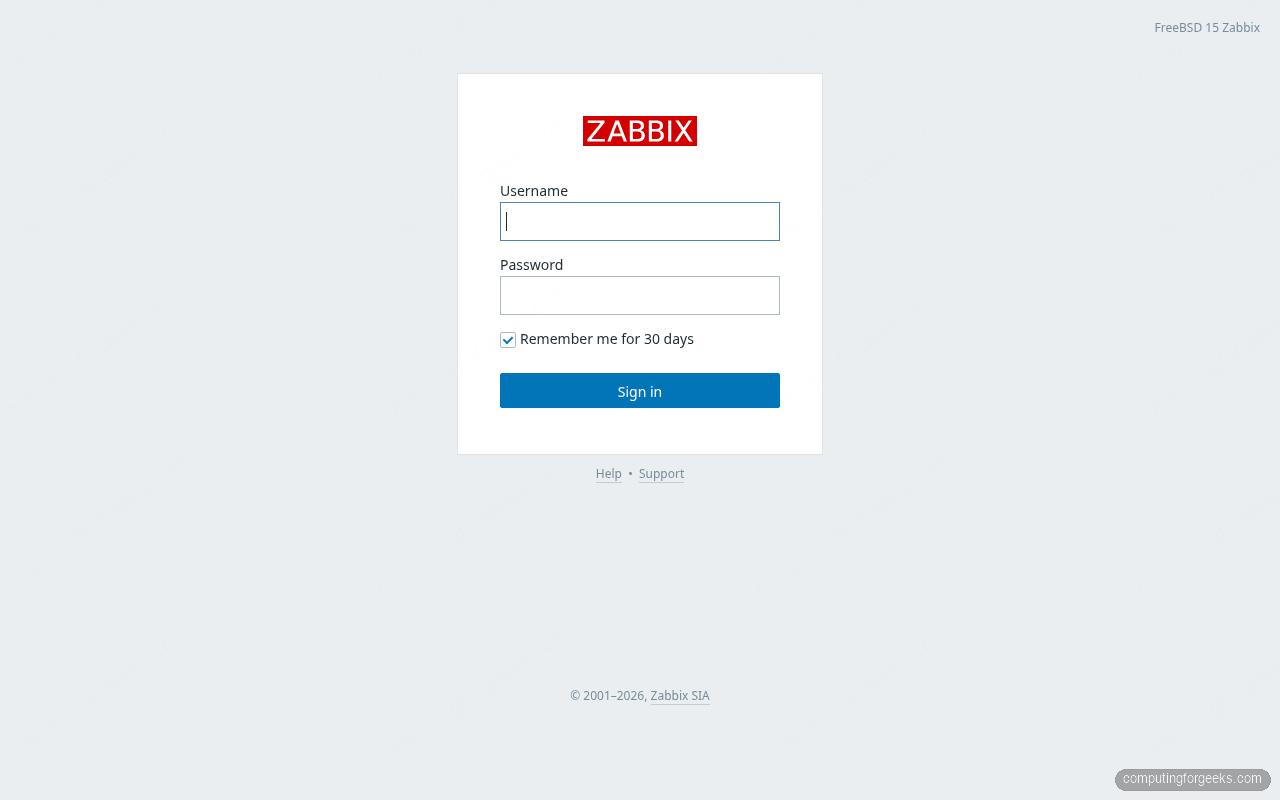
Log in with Admin / zabbix (the default credentials). Zabbix will prompt you to change the password immediately on first login. Do it.
The Global View dashboard shows system information, host availability widgets, and the problem summary. On a fresh install with only the local host configured, most widgets show zero problems:
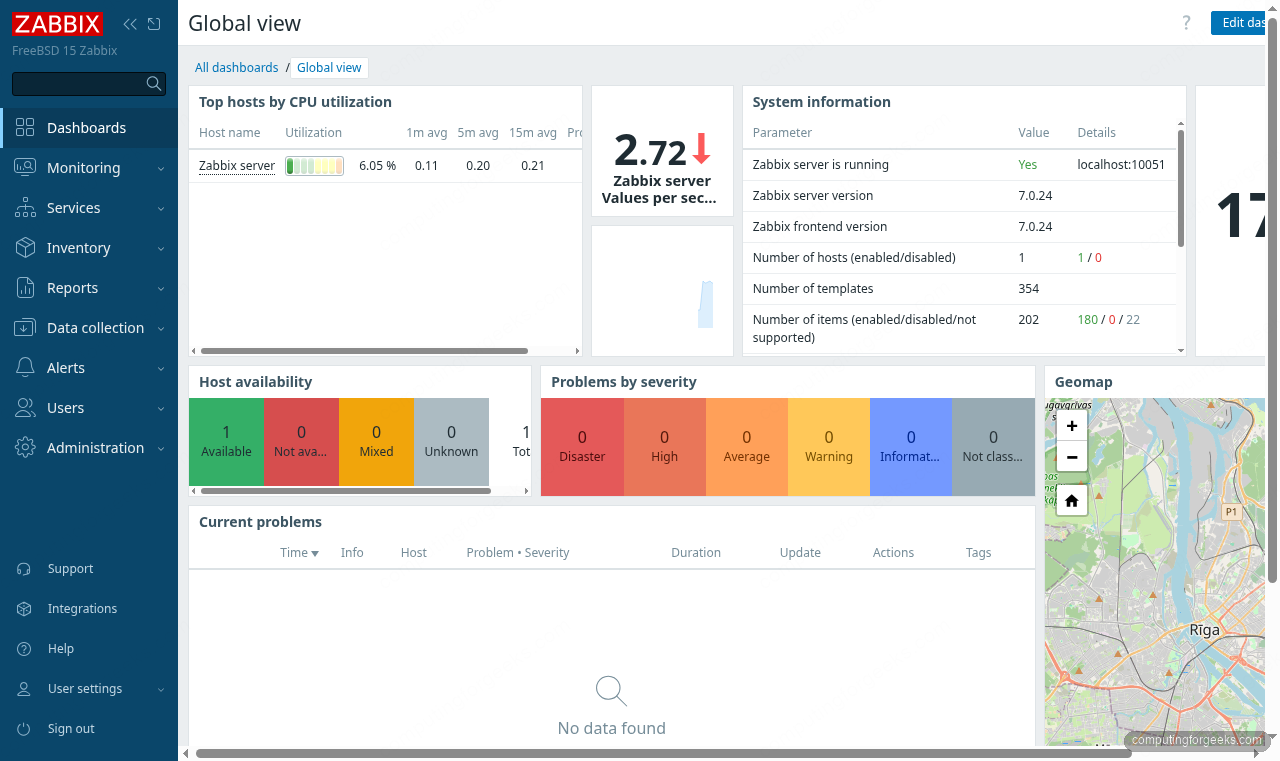
To add the local FreeBSD host for monitoring, go to Data collection > Hosts and click Create host. Set the hostname to match what you put in zabbix_agentd.conf, add 127.0.0.1 as the Agent interface, and link the FreeBSD by Zabbix agent template. Zabbix ships this template by default; it covers CPU, memory, disk, and network interfaces for FreeBSD.
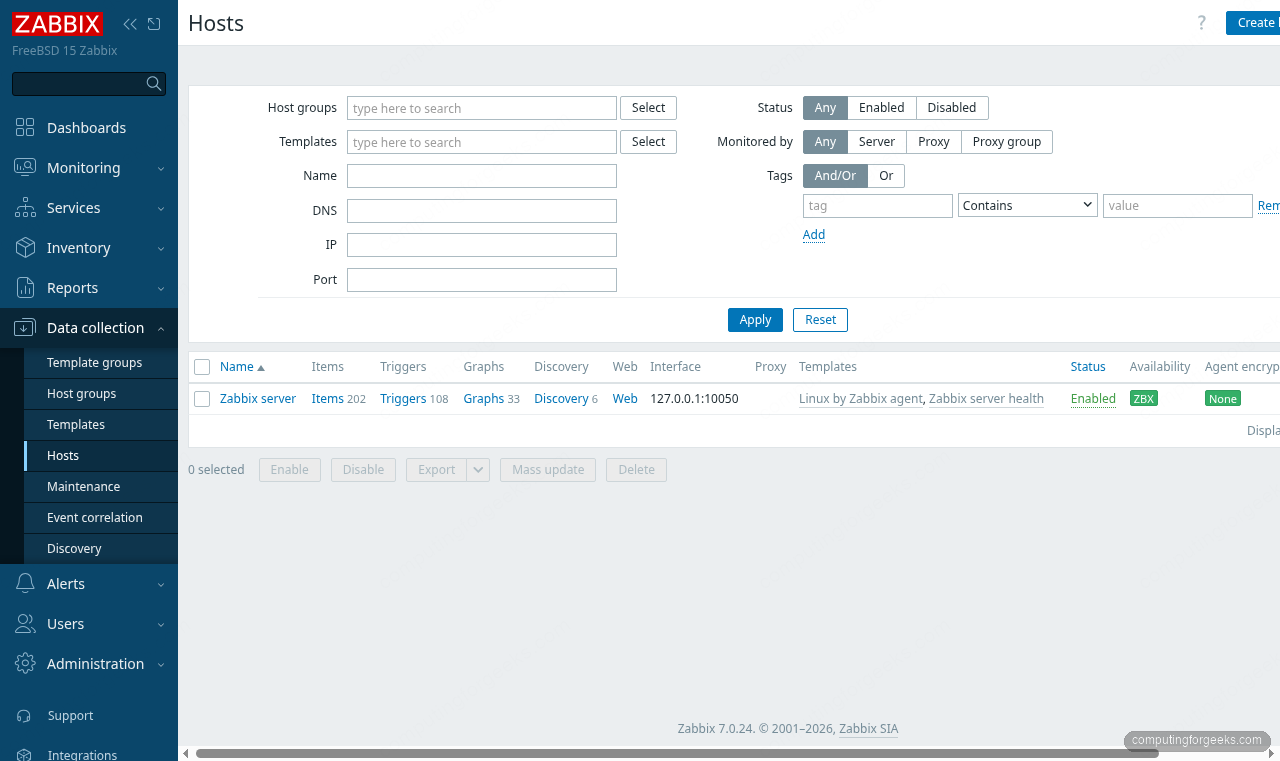
After saving, the host status turns green within a minute as the agent starts responding to checks.
OS Comparison: Zabbix 7.0 Install Across Platforms
The install procedure differs meaningfully across operating systems. Here's what changes:
| Item | FreeBSD 15 | Rocky Linux 10 | Ubuntu 24.04 |
|---|---|---|---|
| Package manager | pkg install zabbix7-server | dnf install zabbix-server-mysql | apt install zabbix-server-mysql |
| Repo required | No (in base ports) | Yes (zabbix.repo) | Yes (zabbix.list) |
| Config path | /usr/local/etc/zabbix7/ | /etc/zabbix/ | /etc/zabbix/ |
| Web root | /usr/local/www/zabbix7/ | /usr/share/zabbix/ | /usr/share/zabbix/ |
| Certificate path | /usr/local/etc/letsencrypt/ | /etc/letsencrypt/ | /etc/letsencrypt/ |
| Service name (server) | zabbix_server | zabbix-server | zabbix-server |
| Service name (FPM) | php_fpm (underscore) | php-fpm | php8.3-fpm |
| MySQL default DB | Compiled in (MYSQL: on) | Must specify package | Must specify package |
| PostgreSQL option | Build from ports with PGSQL | zabbix-server-pgsql package | zabbix-server-pgsql package |
| SELinux/AppArmor | Not applicable | setsebool/semanage required | AppArmor profile adjustment |
The FreeBSD install skips the repo setup step entirely since Zabbix 7.0 is in the official ports tree. That's a meaningful operational advantage: no external repo keys to rotate, no third-party signing chains to trust. On Rocky Linux 10, you'd add the Zabbix repository first, then install the -pgsql or -mysql variant explicitly depending on your database choice.
For a comparison of monitoring tools on FreeBSD, see Netdata on FreeBSD (lightweight per-host metrics) and Prometheus with Grafana on FreeBSD (pull-based metrics with powerful dashboards). Zabbix covers use cases neither tool handles well: SNMP traps, IPMI, active agent checks, and network device autodiscovery.
Verify Services
Check that all four daemons are running before tuning:
service mysql-server status
service zabbix_server status
service zabbix_agentd status
service php_fpm status
service nginx status
The terminal output from a working install:
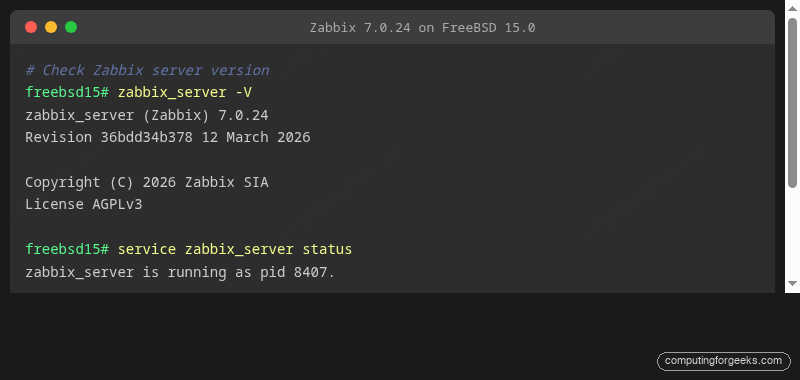
If any daemon isn't running, check /var/log/zabbix/zabbix_server.log for the server and /var/log/nginx/error.log for Nginx. The most common issue after a clean install is the MySQL socket not being ready when Zabbix starts. Zabbix reconnects automatically every 10 seconds, so it usually self-corrects within 30 seconds of MySQL finishing initialisation.
Performance Tuning for Production
The default Zabbix Server configuration targets low-resource setups. For production monitoring of 50+ hosts, the defaults leave performance on the table. All these parameters live in /usr/local/etc/zabbix7/zabbix_server.conf.
Open the file and add or update the following block after the database parameters:
vi /usr/local/etc/zabbix7/zabbix_server.confTuned values for a host monitoring 50-200 devices:
### Pollers and collectors
StartPollers=20
StartPollersUnreachable=4
StartPingers=4
StartDiscoverers=5
StartHTTPPollers=5
StartTimers=2

### Caches (adjust based on your dataset size)
CacheSize=128M
HistoryCacheSize=64M
HistoryIndexCacheSize=16M
TrendCacheSize=32M
ValueCacheSize=64M

### Housekeeping
HousekeepingFrequency=1
MaxHousekeeperDelete=5000

### Timeout settings
Timeout=15
TrapperTimeout=300
What each setting does in practice:
StartPollers=20 sets the number of Zabbix passive agent poller processes. The default is 5. With 100 monitored hosts each running 50 items, you're pushing 5,000 checks per polling cycle. Twenty pollers spread that load so items stay on their configured intervals without queuing.
StartDiscoverers=5 controls network discovery worker processes. The default is 1. If you're running regular network sweeps, a single discoverer serialises all scan jobs. Five discoverers let multiple subnets scan in parallel.
CacheSize=128M is the configuration cache that Zabbix uses to store host, item, and trigger data in memory. The default is 32M. Once your host count grows past 100, cache misses against MySQL become a measurable bottleneck. Watch the zabbix[rcache,buffer,pfree] internal metric; if it drops below 20%, double the cache size.
HistoryCacheSize=64M and ValueCacheSize=64M buffer incoming values before they're flushed to the database. Larger caches mean fewer small writes to MySQL, which is the primary source of I/O pressure at scale. The value cache also serves the most recent history directly from memory to the frontend, eliminating database reads for live graphs.
HousekeepingFrequency=1 tells the housekeeper to run once per hour (the default is 1, but set it explicitly). The housekeeper deletes expired history and trends. MaxHousekeeperDelete=5000 caps how many rows it removes per run, preventing long table-lock operations on busy MySQL tables. On a large dataset, aggressive housekeeping can cause MySQL to lock the history table for minutes at a time; capping at 5000 rows per pass keeps it manageable.
Restart the server to apply:
service zabbix_server restartMySQL tuning to match. The Zabbix tuning above only helps if MySQL can keep up. Add these to /usr/local/etc/mysql/my.cnf in the [mysqld] section:
vi /usr/local/etc/mysql/my.cnfAdd the following in the [mysqld] section:
[mysqld]
innodb_buffer_pool_size = 1G
innodb_buffer_pool_instances = 2
innodb_flush_log_at_trx_commit = 2
innodb_log_file_size = 256M
innodb_flush_method = O_DIRECT
tmp_table_size = 64M
max_heap_table_size = 64M
query_cache_type = 0
query_cache_size = 0
innodb_buffer_pool_size = 1G is the most impactful single setting. It controls how much InnoDB caches in memory. For a 4 GB server running only MySQL and Zabbix, 1 GB is a reasonable starting point. Set it to roughly 60-70% of available RAM on a dedicated database host.
innodb_flush_log_at_trx_commit = 2 trades strict ACID durability for write performance. Instead of flushing the transaction log on every commit, MySQL flushes it once per second. For monitoring data, losing one second of metric writes on a power failure is an acceptable tradeoff. The performance gain is substantial on spinning disks and even noticeable on SSDs under write-heavy Zabbix loads.
query_cache_type = 0 and query_cache_size = 0 disable MySQL's query cache entirely. Zabbix's write pattern invalidates the query cache constantly, meaning it consumes memory and CPU time managing a cache that's almost never useful. Disabling it typically improves Zabbix performance.
Restart MySQL after changing my.cnf:
service mysql-server restartTimescaleDB as a future option. The Zabbix 7.0 server supports TimescaleDB as a PostgreSQL extension, which offers significant advantages for time-series data: automatic chunking, native compression, and faster range queries for trending. If your dataset grows to millions of items or you need years of history, migrating from MySQL to PostgreSQL + TimescaleDB is the standard scale-up path. The Zabbix documentation covers the timescaledb_tune setup and the timescaledb extension scripts that ship alongside the standard schema files under /usr/local/share/zabbix7/server/database/postgresql/timescaledb/. On FreeBSD, you'd rebuild zabbix7-server from ports with the PGSQL option enabled to use this path.
For a deep dive into PostgreSQL on FreeBSD, see Install and Configure PostgreSQL 17 on FreeBSD. To pair Zabbix with a second monitoring tool for richer dashboarding, the Prometheus and Grafana guide for FreeBSD shows how to run both alongside each other. If you're new to FreeBSD 15's feature set, the FreeBSD 15 new features overview covers what changed in this release, including pkgbase and ZFS 2.4 improvements that matter for production deployments.