FreeBSD 15’s pkg repository ships Go 1.25.9, and getting a working Go environment takes about two minutes. This guide walks through installation, configuring GOPATH and PATH, writing and building a binary, cross-compiling for Linux, installing third-party tools, and basic module setup.
For related runtime setups on FreeBSD 15, see the Node.js 22 LTS install guide and Python 3 and pip setup. If you haven’t set up the system yet, start with installing FreeBSD 15 on Proxmox/KVM or read the FreeBSD 15 feature overview.
Tested April 2026 on FreeBSD 15.0-RELEASE with Go 1.25.9 (go125 pkg). Default shell: csh/tcsh.
Prerequisites
- FreeBSD 15.0-RELEASE (amd64)
- Root or sudo access
- Working internet connection for pkg
- Tested with:
go version go1.25.9 freebsd/amd64
Install Go via pkg
The go meta-package always points to the current stable version. On FreeBSD 15, that resolves to go125 (Go 1.25.9 at time of writing):
pkg install -y gopkg installs both go (the meta-package) and go125-1.25.9. If you need a specific older release instead, install it directly:
pkg install -y go124Available versions in the repo as of April 2026:
pkg search go1 | grep "^go[0-9]"Five versions were available at the time of testing:
go122-1.22.12_4                Go programming language
go123-1.23.12                  Go programming language
go124-1.24.13                  Go programming language
go125-1.25.9                   Go programming language
go126-1.26.2                   Go programming language
Confirm the install worked:
go versionYou should see the installed version confirmed:
go version go1.25.9 freebsd/amd64Configure GOPATH and PATH
The Go toolchain is in /usr/local/go125 (set as GOROOT automatically). What you need to set manually is GOPATH, the directory where go install puts downloaded binaries, and ensure ~/go/bin is in your PATH so those binaries are reachable.
Check the defaults first:
go env GOPATH GOROOT GOVERSION GOOS GOARCHOn a fresh FreeBSD 15 install with root as the user:
/root/go
/usr/local/go125
go1.25.9
freebsd
amd64
The default GOPATH is ~/go, which is fine for most setups. You only need to add ~/go/bin to PATH so installed tools are found. FreeBSD’s default login shell is csh/tcsh. Add to ~/.cshrc:
echo 'setenv GOPATH $HOME/go' >> ~/.cshrc
echo 'setenv PATH ${PATH}:${HOME}/go/bin' >> ~/.cshrc
For sh/bash users, add to /etc/profile or ~/.profile instead:
echo 'export GOPATH=$HOME/go' >> ~/.profile
echo 'export PATH=$PATH:$HOME/go/bin' >> ~/.profile
After editing the rc file, reload it to apply the changes in the current session. In csh/tcsh: source ~/.cshrc. A common gotcha: if you edit .cshrc and try to run a binary you just installed, it won’t be found until you run source ~/.cshrc or open a new shell. The rehash command also updates the shell’s command cache after new binaries appear in PATH.
Hello World and Building a Binary
Create a minimal Go program:
vi hello.goAdd the following:
package main

import "fmt"

func main() {
    fmt.Println("Hello, FreeBSD!")
}
Run it directly without compiling:
go run hello.goOutput from the live VM:
Hello, FreeBSD!Build an optimized static binary (stripped of debug info, smaller size):
go build -ldflags="-s -w" -o hello hello.go
ls -lh hello
file hello
The file output confirms a native FreeBSD ELF binary:
-rwxr-xr-x  1 root wheel  1.4M Apr 15 21:37 hello
hello: ELF 64-bit LSB executable, x86-64, version 1 (FreeBSD), statically linked, for FreeBSD 12.3, FreeBSD-style, stripped
Cross-Compilation
Go’s built-in cross-compilation support is one of its practical strengths. To build a Linux amd64 binary from FreeBSD, set GOOS and GOARCH as environment variables on the same line as the build command:
GOOS=linux GOARCH=amd64 go build -o hello-linux hello.go
file hello-linux
The output is a proper Linux ELF, no cross-compiler toolchain required:
hello-linux: ELF 64-bit LSB executable, x86-64, version 1 (SYSV), statically linked, BuildID[sha1]=3ff40b584369c6426f7385436e70830af6709cd8, with debug_info, not strippedThe same approach covers other targets: GOOS=darwin GOARCH=arm64 for Apple Silicon, GOOS=windows GOARCH=amd64 for Windows. No additional packages needed.
Installing Third-Party Tools
go install fetches, compiles, and installs a binary from any public Go module in one step. Here it is with fzf, a fuzzy finder written in Go:
go install github.com/junegunn/fzf@latestThe download and build output shows all dependencies being fetched:
go: downloading github.com/junegunn/fzf v0.71.0
go: downloading github.com/charlievieth/fastwalk v1.0.14
go: downloading github.com/junegunn/go-shellwords v0.0.0-20250127100254-2aa3b3277741
go: downloading github.com/rivo/uniseg v0.4.7
go: downloading golang.org/x/sys v0.35.0
go: downloading golang.org/x/term v0.34.0
go: downloading github.com/mattn/go-isatty v0.0.20
The binary lands in ~/go/bin/. Once PATH is configured as above, run it directly:
fzf --versionVersion 0.71 was the latest at time of testing:
0.71 (devel)If fzf: not found appears after install, ~/go/bin is not in PATH. Run source ~/.cshrc (or rehash in tcsh) and try again.
Module Workflow
Every non-trivial Go project should use modules. Initialize a new module in a fresh directory:
mkdir testapp && cd testapp
go mod init example.com/testapp
The generated go.mod records the module path and minimum Go version:
module example.com/testapp

go 1.25.9
When you add external imports and build, Go writes a go.sum file with cryptographic hashes for each dependency. If you see go: missing go.sum entry, run go mod tidy to download missing modules and regenerate the lockfile.
The test runner is built in. A minimal test file:
go test ./...All tests pass with a sub-second run time on the test VM:
ok example.com/testapp 0.003sScreenshot
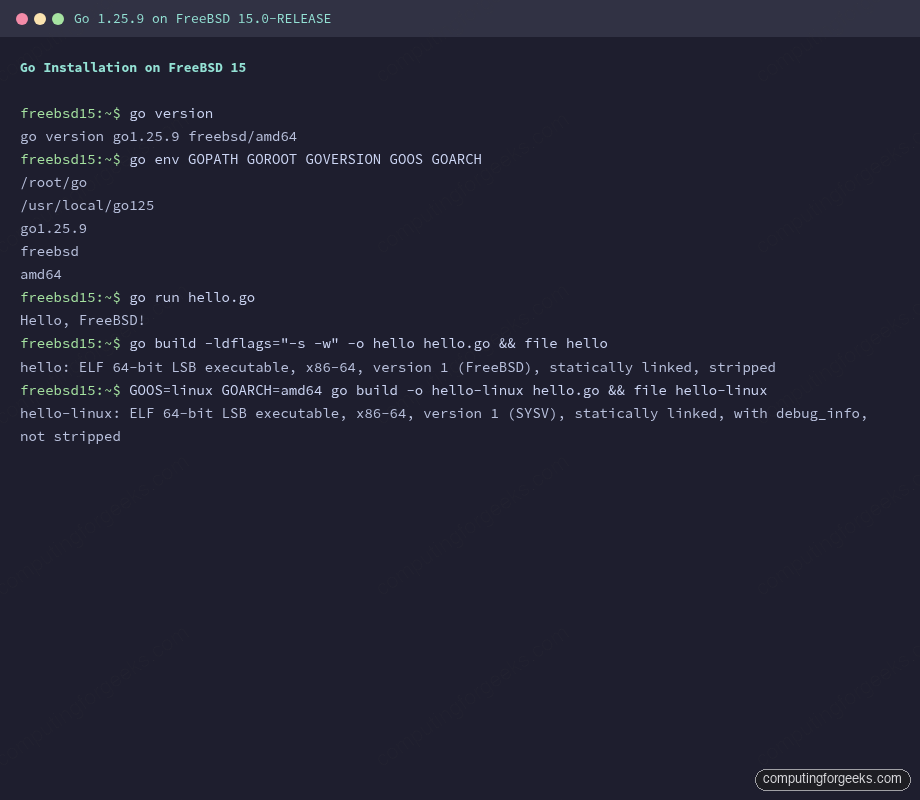
The terminal below shows the full workflow: version check, environment, hello world run, FreeBSD binary build, and Linux cross-compile, all on a live FreeBSD 15.0-RELEASE VM.
Updating and Pinning Go Versions
Updating Go follows the normal pkg workflow:
pkg upgrade goTo stay on a specific version, pin it with pkg lock:
pkg lock go125Locked packages are skipped during pkg upgrade. To unpin later: pkg unlock go125. FreeBSD’s ports tree (via portupgrade or poudriere) is an alternative if you need to build Go with custom compile flags, but for most workloads the binary pkg packages are fine. Unlike Linux, there’s no official gvm-style Go version manager for FreeBSD, so multiple versions means installing multiple pkg packages (go124 + go125) and switching via the GOROOT env var or explicit paths.
As a real-world build benchmark: building the go-chi/chi router (cloned with --depth=1) takes about 14 seconds real time on a 2-core KVM VM with 2GB RAM.
Summary
Go 1.25.9 installs cleanly from pkg on FreeBSD 15. The workflow is: pkg install -y go, add ~/go/bin to your PATH in .cshrc or .profile, then use go build, go install, and go mod init as you would on any other platform. Cross-compilation to Linux requires no extra toolchain. For Python or Node.js setups on the same system, the pkg-based approach is identical.