You buy a fanless N100 or N305 mini-PC, load OPNsense onto it, and everything looks perfect until the WAN drops for a few seconds in the middle of a video call. It comes back on its own, so you blame the ISP. Then it happens again, and again, always on one of the Intel 2.5GbE ports. The culprit is almost always the Intel i226-V, and it is the single most common complaint on cheap 2.5-gig firewall boxes.
The good news is that it is fixable in software in about five minutes, and the fix is well understood. This guide walks through why the i226-V flaps its link, how to confirm that is what you are seeing, and the exact settings that stop it. Every step below was applied on OPNsense 26.1.6 in June 2026, and the same approach carries over to pfSense because both run the same FreeBSD driver.
Why the Intel i226-V drops its link
The i225-V and i226-V share a power-management bug that has followed the chip since launch. Under light traffic the NIC negotiates a low-power state, and on many early steppings and early NIC firmware revisions it fails to wake the link cleanly, so the port renegotiates from scratch. To the OS that looks like the cable was unplugged and plugged back in. The behavior is worst on Raptor Lake and Alder Lake-N boards (the N100, N200, N305 mini-PCs everyone uses for routers), and it shows up under FreeBSD, Linux, and Windows alike, which is how you know it is the silicon and not OPNsense.
Three things drive it: Energy Efficient Ethernet (EEE), aggressive PCIe Active State Power Management (ASPM), and stale NIC firmware. The OPNsense and Netgate forums are full of solved threads tracing intermittent drops to exactly these causes. The fixes below disable the power-saving paths and lean on a current firmware to keep the link pinned up.
Confirm the i226 is what is dropping
Before changing anything, prove the NIC is the problem. Open an SSH session to the firewall (if you have not turned it on yet, enable SSH on OPNsense first) and grep the system log for the interface driver:
grep -i igc /var/log/system/latest.logA flapping i226 leaves a clear fingerprint. The exact line reported across the forum threads is a pair that repeats every few minutes, naming the port that dropped:
igc0: link state changed to DOWN
igc0: link state changed to UP
If you see that pair cycling on its own while traffic is light, you have the i226 issue. A genuine cable or ISP fault usually drops once and stays down, or correlates with something you did. The i226 drop is rhythmic and unprompted. Check which physical port maps to igc0 through igc3 under Interfaces, then move on to the fix.
Fix 1: Disable hardware offloading
This is the easiest lever to try first, and it is a few checkboxes. It will not cure a hardware power-management flaw on its own (the BIOS and firmware step below does that), but the i226 driver mishandles these offloads under load, so clearing them removes a whole class of stalls while you work through the rest. In the web UI go to Interfaces, then Settings. Tick all three offloading options and leave VLAN hardware filtering at its default:
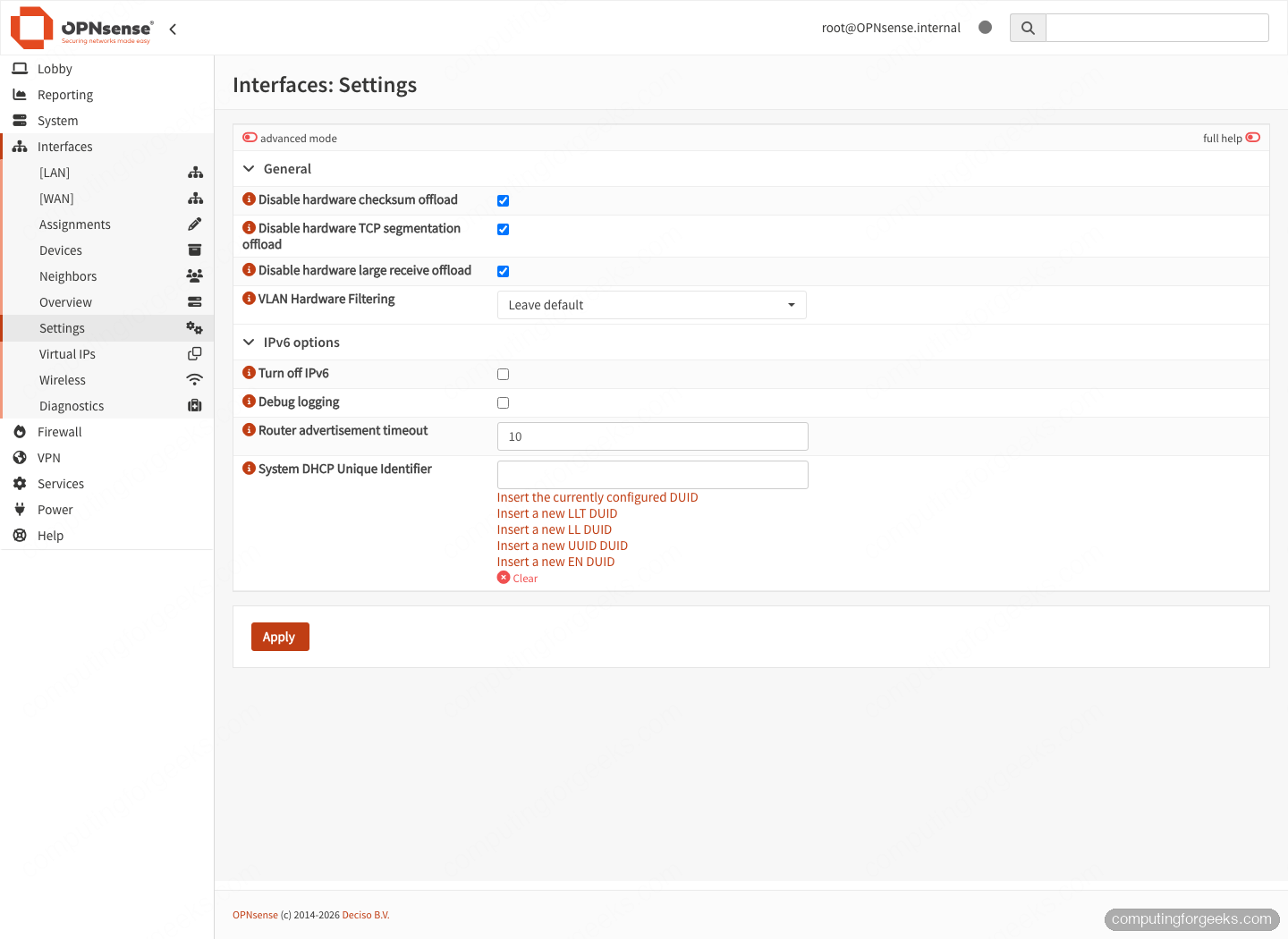
The three boxes that matter are Disable hardware checksum offload, Disable hardware TCP segmentation offload, and Disable hardware large receive offload. OPNsense ships with these checked by default for good reason, so the first thing to confirm is that an earlier tweak did not turn them back on. Click Apply, then reboot the firewall so the driver reloads cleanly.
One honest caveat: a handful of N100 users have measured slightly lower routed throughput with hardware checksum offload disabled. On a 2.5GbE WAN you will not notice it, but if you are pushing multi-gig between VLANs, benchmark before and after so you know the trade you are making.
Fix 2: Turn off flow control with tunables
If drops survive the offload change, kill flow control on each i226 port. Go to System, then Settings, then Tunables, and add one tunable per i226 interface. A four-port box gets four entries:
dev.igc.0.fc=0
dev.igc.1.fc=0
dev.igc.2.fc=0
dev.igc.3.fc=0
Set the value to 0 for each port you actually use. Leave Energy Efficient Ethernet alone while you are here. It is controlled by the loader tunable hw.igc.eee_setting, which already defaults to off in the FreeBSD igc driver, so there is usually nothing to add. Its built-in description is inverted, so do not be fooled into enabling it. Save the tunables and reboot once more.
Fix 3: Update the NIC firmware and BIOS
Software workarounds mask the bug. A current NIC firmware and a BIOS power-management change fix it at the source, and this is the step that turns a twitchy box into a stable one. Intel shipped revised i226 firmware (NVM) that corrects the link-flap, and reputable vendors fold it into their BIOS updates, so check your mini-PC maker’s support page for the latest BIOS and flash it. While you are in the BIOS, disable ASPM (PCIe Active State Power Management). On the boards where the i226 flaps, setting every ASPM option to disabled is the single most reliable cure users report. Protectli, for example, validates and documents the i226 NVM update for its boxes, which is part of what you pay for over a no-name unit. If you are still shopping, choosing the right mini-PC firewall hardware with an active firmware story saves you this entire headache.
After flashing, recheck the system log. On a box with good firmware plus the offload change, the igc link-state churn disappears entirely.
Extra tunables if drops still persist
Most boxes are stable after the first two fixes. A stubborn one benefits from a wider set of network tunables that the community has settled on for i226 builds. Add these the same way, under System, Settings, Tunables:
net.inet.icmp.drop_redirect=1
net.isr.bindthreads=1
net.isr.maxthreads=-1
net.isr.dispatch=deferred
hw.intr_storm_threshold=10000
net.inet.ip.intr_queue_maxlen=3000
These spread interrupt handling across CPU cores and raise the queue limits so a brief burst does not stall the driver. Set the firewall optimization to conservative under Firewall, Settings, Advanced as well, which keeps states alive a little longer across a momentary blip. Treat this section as optional. Apply it only if the NIC still misbehaves after offloading and flow control are handled.
The same fix on pfSense
pfSense runs the identical FreeBSD igc driver, so the cure is the same with different menu names. Disable the offloads under System, Advanced, Networking (Hardware Checksum, TSO, and LRO Offloading), and add the dev.igc.N.fc=0 tunables under System, Advanced, System Tunables. The firmware advice is identical. If you run both firewalls, the BIND, VPN, and load-balancer guides for pfSense and OPNsense share the same pattern.
When the NIC itself is the problem
If the link still drops after offloading, tunables, and a firmware flash, you have likely hit an early i226 stepping that no software setting fully tames, or a physical fault wearing the i226 mask. Swap in a known-good Cat6 cable, move the link to a different port, and try locking the speed and duplex instead of autonegotiating. If a single port is the only one that misbehaves on an otherwise current-firmware box, that port is suspect and the unit is worth an RMA. For a new build, the cheapest fix is buying a box whose vendor actually maintains i226 firmware in the first place, which is the difference between an evening of log-watching and a router that just works.