Wireless design comes down to one question: who controls the access points? The answer splits Cisco wireless into a few distinct architectures, and it decides how you configure, scale, and troubleshoot the whole network. An AP that runs itself is a different animal from one that takes orders from a controller, and the gap between them is the heart of this objective.
This covers the Cisco wireless architectures (autonomous, centralized, cloud, and FlexConnect), the split-MAC model and CAPWAP that make a controller work, what the WLC does for you, and the lightweight AP modes. It assumes you already know the RF side. If channels, SSIDs, and WPA are still fuzzy, read the wireless networking fundamentals first. The architectures and AP modes here match Cisco’s current WLC and IOS-XE wireless deployment models, reviewed in June 2026.
Autonomous APs: every access point on its own
An autonomous AP is self-contained. It holds its own configuration, makes its own decisions, and connects straight into the switched network. Because it serves its SSIDs and maps them to VLANs by itself, its switchport is usually a trunk, carrying every VLAN the AP advertises.
That independence is also the problem. There is no controller, so you configure each AP by hand, one at a time. Nothing coordinates RF across them, so two neighbors can fight over the same channel, and roaming between them is clumsy. For three APs in a small office it is fine. For three hundred across a campus it does not work, which is why enterprise wireless moved to a controller.
Centralized control with a WLC
The centralized model pairs lightweight APs with a Wireless LAN Controller (WLC). The two share the work through what Cisco calls split-MAC: the 802.11 MAC functions are divided between the AP and the controller. The AP keeps the real-time, time-sensitive jobs; the WLC takes the management jobs.
| The AP handles (real-time) | The WLC handles (management) |
|---|---|
| Beacons and probe responses | Client association and reassociation |
| Packet acknowledgements | Authentication |
| Frame encryption and decryption | RF management (channel and power, RRM) |
| MAC-layer data queuing and transmit | Roaming, security, and QoS policy |
The AP reaches the controller through CAPWAP (Control And Provisioning of Wireless Access Points), which builds two tunnels: control on UDP 5246, encrypted with DTLS, and data on UDP 5247 (data-plane encryption is optional and off by default). CAPWAP runs over IP, so the AP and the WLC can sit in different subnets and the tunnel crosses Layer 3 between them. It replaced the older LWAPP.
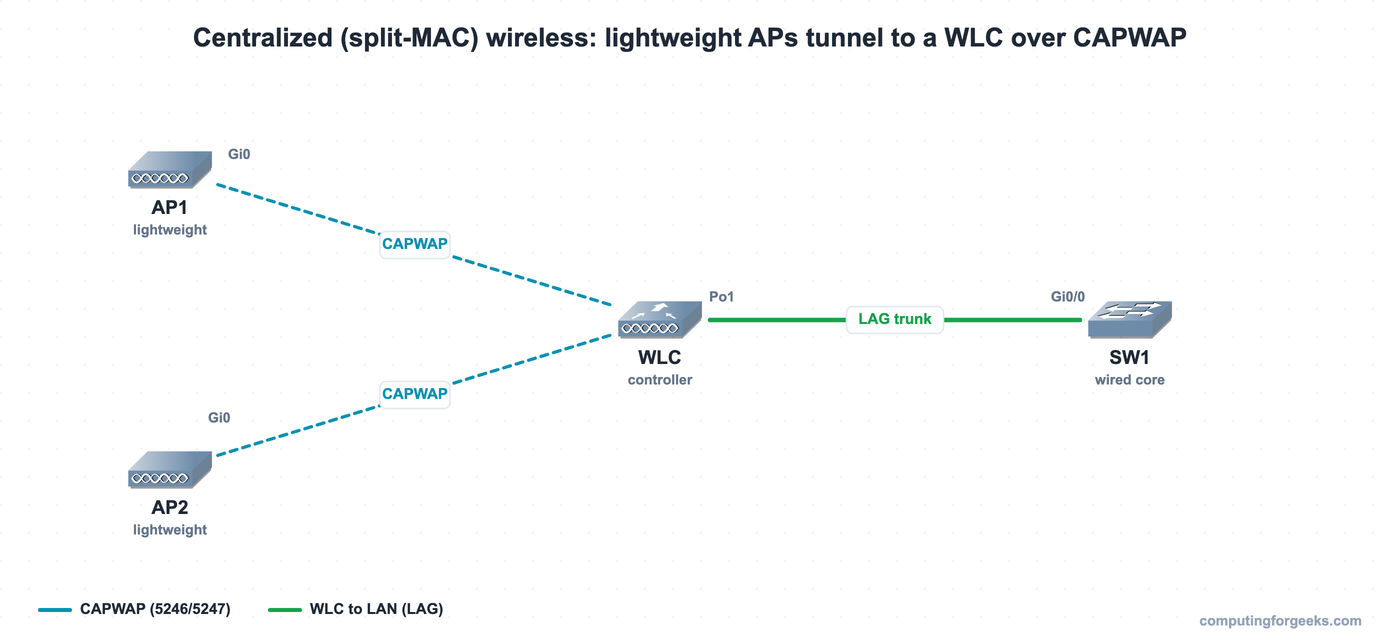
In local mode, every client frame is tunneled inside CAPWAP back to the WLC, so the AP’s own switchport only carries the AP management VLAN and is typically an access port. The wired complexity moves to one place: the controller.
Cloud-managed and FlexConnect
Two variations bend the centralized model for different needs. A cloud-managed deployment (Meraki is the common example) moves the management plane to a cloud dashboard instead of an on-premises controller. You administer the APs from the cloud; the client data plane still stays local on the LAN.
FlexConnect solves the branch problem. Lightweight APs at a remote site are still managed by a WLC at headquarters over the WAN, but client traffic is switched locally at the branch rather than dragged all the way back through the tunnel. The payoff shows up when the WAN link dies: local clients keep working because their data never depended on reaching the controller.
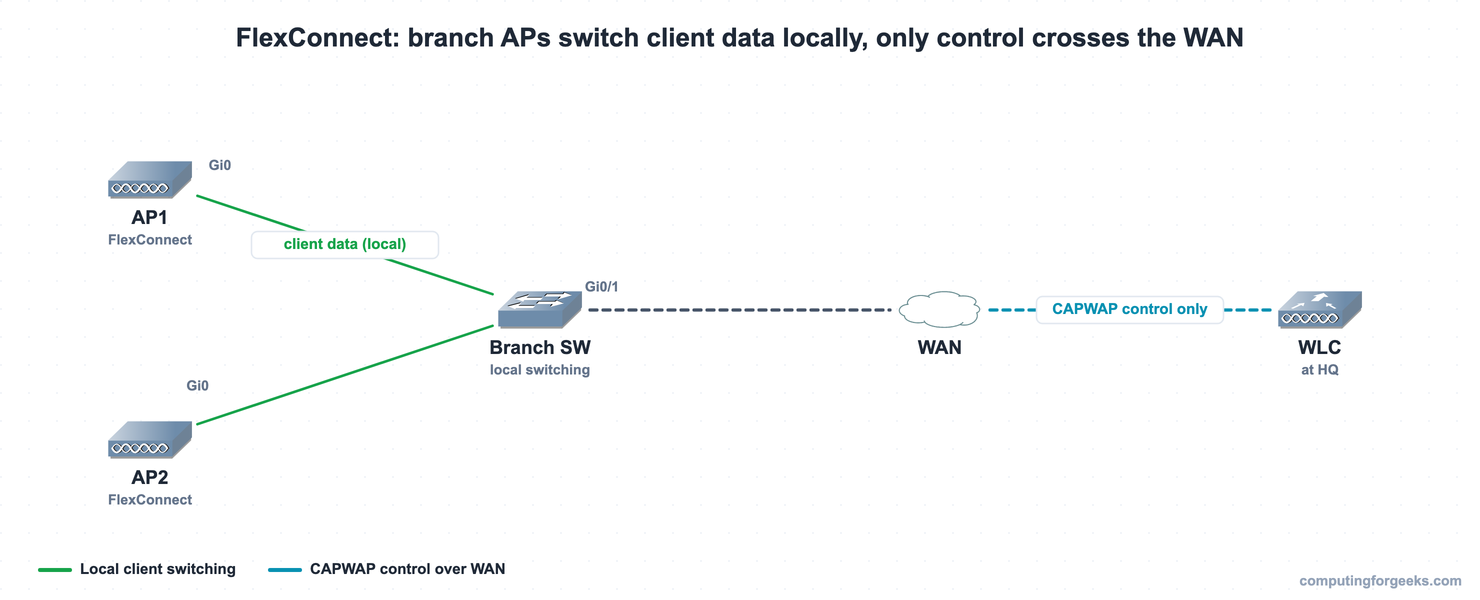
The four architectures line up like this:
| Architecture | Controller | Config lives | Client data path | Best for |
|---|---|---|---|---|
| Autonomous | None | On each AP | Straight to the local switch | A handful of APs |
| Centralized | On-prem WLC | On the WLC | Tunneled to the WLC (local mode) | Campus and enterprise |
| Cloud | Cloud dashboard | In the cloud | Local | Distributed sites, no on-prem box |
| FlexConnect | WLC at HQ | On the WLC | Switched locally at the branch | Branches over a WAN |
What the WLC centralizes
The reason the controller model scales is that it does the per-AP work once, centrally, for every AP joined to it. Push a configuration or a security policy and it lands on all of them. Radio Resource Management (RRM) tunes channel and power across the whole site so APs stop interfering with each other. Roaming is coordinated, so a client walking down a hallway hands off cleanly. The controller also pushes AP images, handles guest access, and watches for rogue APs. A device type many people meet for the first time here, the WLC sits alongside the router, switch, and firewall in the network device lineup.
Lightweight AP modes
A lightweight AP joined to a WLC runs in one mode at a time. Most APs sit in local mode serving clients, but several other modes turn an AP into a dedicated tool.
| AP mode | What it does |
|---|---|
| Local | Default. Serves clients, and goes off-channel periodically to scan. |
| FlexConnect | Branch AP that switches client data locally and survives WAN loss. |
| Monitor | Serves no clients. Dedicated scanning for rogues, IDS/IPS, and location. |
| Sniffer | Captures 802.11 frames and forwards them to a packet analyzer. |
| Rogue Detector | Watches the wired side (ARP) for rogue MAC addresses. Uses no radio. Legacy: Wave 1 APs only, dropped on Catalyst 9800. |
| SE-Connect | Dedicated RF spectrum analysis (Spectrum Expert). |
| Bridge / Mesh | Acts as a wireless bridge (point-to-point or multipoint) or a mesh node. |
How the APs and WLC connect
The physical wiring follows the architecture. An autonomous AP needs a trunk port because it carries several VLANs itself. A local-mode lightweight AP usually sits on an access port, since its client traffic is tunneled to the controller and the wire only needs the AP management VLAN. The WLC connects to the wired network through a link aggregation group (LAG), bundling several ports into one logical trunk for bandwidth and resilience. This is the wireless half of the wider network architecture picture.
Practice Cisco wireless architectures
This is a describe objective with no device configuration, so there is no downloadable lab for it. Test the architectures, CAPWAP ports, and AP modes with the quiz instead:
Then drill the split-MAC split, the deployment models, and the AP modes with the flashcards, or load the deck into Anki:
Which architecture fits
The choice is mostly about scale and where the sites are. A few APs in one office can stay autonomous; the controller overhead is not worth it. A campus or any building with dozens of APs wants a centralized WLC, for the central config, RF management, and clean roaming that autonomous APs cannot give you. Sites scattered across many locations with no appetite for an on-prem controller fit the cloud model. And branches hanging off a WAN want FlexConnect, so a dropped link to headquarters does not take the local wireless down with it. Pick the architecture first, because it dictates how every AP after it is deployed and managed.