An access control list is the packet filter built into every Cisco router and switch. It is an ordered list of permit and deny rules that the device checks against traffic, top to bottom, and the first rule that matches decides whether the packet lives or dies. ACLs are how you stop one subnet from reaching another, lock management access to a single host, or allow only the protocols a server actually needs.
This guide configures and verifies the two ACL types the CCNA cares about, standard and extended, in both numbered and named form, with wildcard masks, correct placement, and real hit counters from a lab. The traffic tests at the end prove each rule fired exactly as written.
Verified on Cisco IOS 15.2 in June 2026.
Standard and extended ACLs
There are two kinds of IPv4 ACL, and the difference is how much of the packet they can see. A standard ACL matches on the source address only. An extended ACL matches on source, destination, protocol, and port, which is almost always what you want.
| Property | Standard ACL | Extended ACL |
|---|---|---|
| Number ranges | 1 to 99, 1300 to 1999 | 100 to 199, 2000 to 2699 |
| Matches on | Source IP address only | Source, destination, protocol, and port |
| Typical placement | Close to the destination | Close to the source |
| Use it for | Simple source-based filtering, VTY access | Granular control over which traffic is allowed |
Both types can be numbered or named. Named ACLs read better and let you edit individual lines, so they are the modern default, but numbered standard ACLs are still common for quick jobs like restricting who may log in to the device.
Wildcard masks
ACLs match addresses with a wildcard mask, which is the inverse of a subnet mask. A 0 bit means the matching bit must be checked, and a 1 bit means ignore it. If you can read a subnet mask, you already know wildcards: subtract each octet from 255.
| Wildcard | Keyword | Matches |
|---|---|---|
| 0.0.0.0 | host | One exact address |
| 0.0.0.255 | A whole /24, the first three octets must match | |
| 0.0.255.255 | A whole /16, the first two octets must match | |
| 255.255.255.255 | any | Every address |
The keywords are shorthand. host 10.0.0.10 is the same as 10.0.0.10 0.0.0.0, and any is the same as 0.0.0.0 255.255.255.255. Use them; they read better and are what the device stores anyway.
The lab topology
The lab is one router filtering traffic between a host and a server. R1 routes between PC1 on 192.168.1.0/24 and SRV on 10.0.0.0/24, and an extended ACL named FILTER is applied inbound on the interface facing PC1.
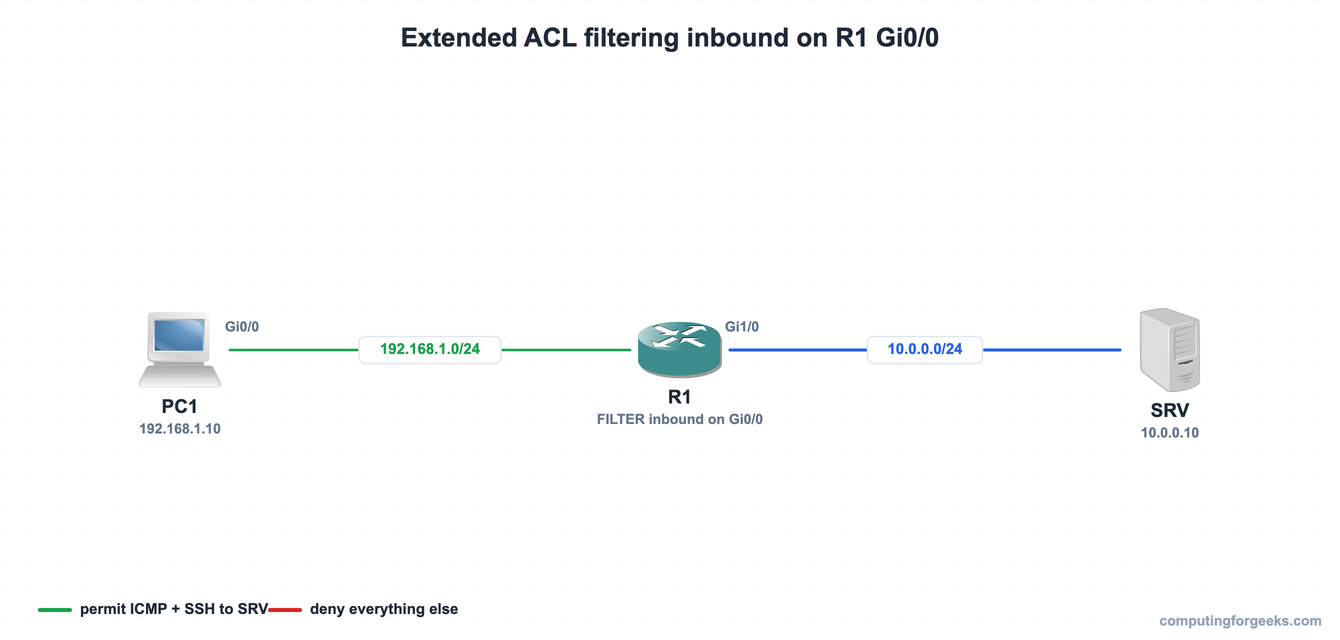
The same three nodes built in GNS3, where the configuration below was applied and tested on real Cisco IOS:
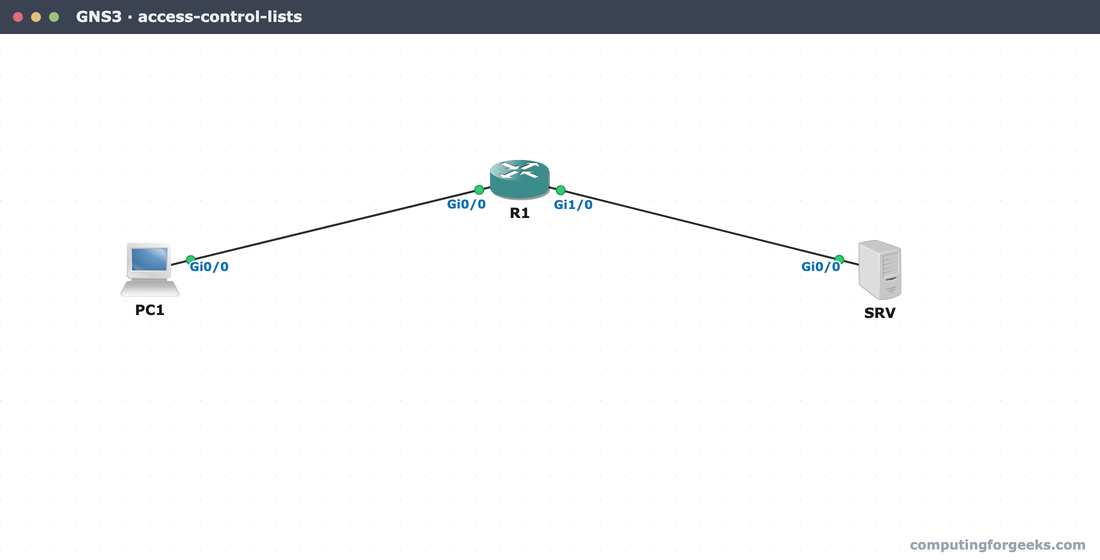
With the topology in place, start with the simpler of the two ACL types.
Configure a standard ACL
A standard ACL filters on the source. The classic use is restricting which host may manage the device, applied to the VTY lines with access-class rather than to a data interface. Create a numbered standard ACL that permits one admin host:
access-list 10 permit host 192.168.1.10Then apply it inbound on the VTY lines so only that host can open an SSH session to the router:
line vty 0 4
 access-class 10 in
 exit
The same list as a named standard ACL is easier to extend later. Both forms behave identically:
ip access-list standard MGMT
 permit host 192.168.1.10
 exit
Source-only filtering is all a standard ACL can do. To control traffic by destination and protocol, you need an extended ACL.
Configure an extended ACL
An extended ACL is where the real control lives. This one permits only ping and SSH from the PC1 subnet to the server, then denies everything else. Build it as a named list so each rule is clear:
ip access-list extended FILTER
 permit icmp 192.168.1.0 0.0.0.255 host 10.0.0.10
 permit tcp 192.168.1.0 0.0.0.255 host 10.0.0.10 eq 22
 deny ip any any
 exit
An ACL does nothing until it is attached to an interface in a direction. Apply FILTER inbound on the interface facing PC1, so traffic is checked the moment it enters the router:
interface GigabitEthernet0/0
 ip access-group FILTER in
 exit
The final deny ip any any is written out on purpose. Every ACL already ends with an invisible implicit deny that drops anything not explicitly permitted, but making it explicit gives you a hit counter on the denied traffic, which is the difference between guessing and knowing.
Verify and test the ACL
The single most useful command is show access-lists, because it prints each rule with a running match count. After sending some traffic through, the counters tell you exactly which rules fired:
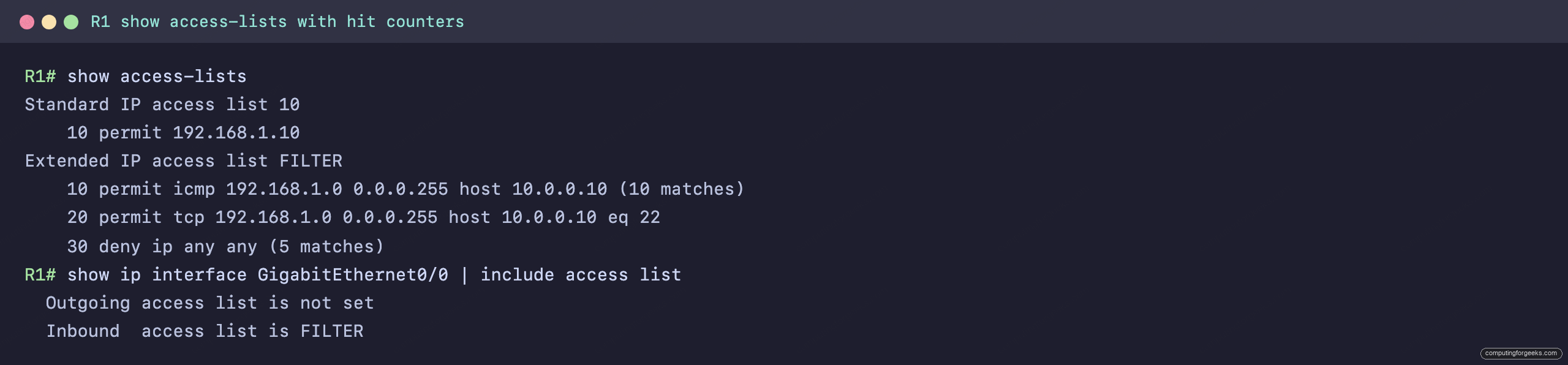
The permit icmp rule shows 10 matches and the deny shows 5, and show ip interface confirms FILTER is the inbound list on the interface. The numbers come from the traffic test below: two successful pings of five packets each made ten permitted ICMP matches, and a third ping to a different address made five denied matches. Run the tests from PC1:
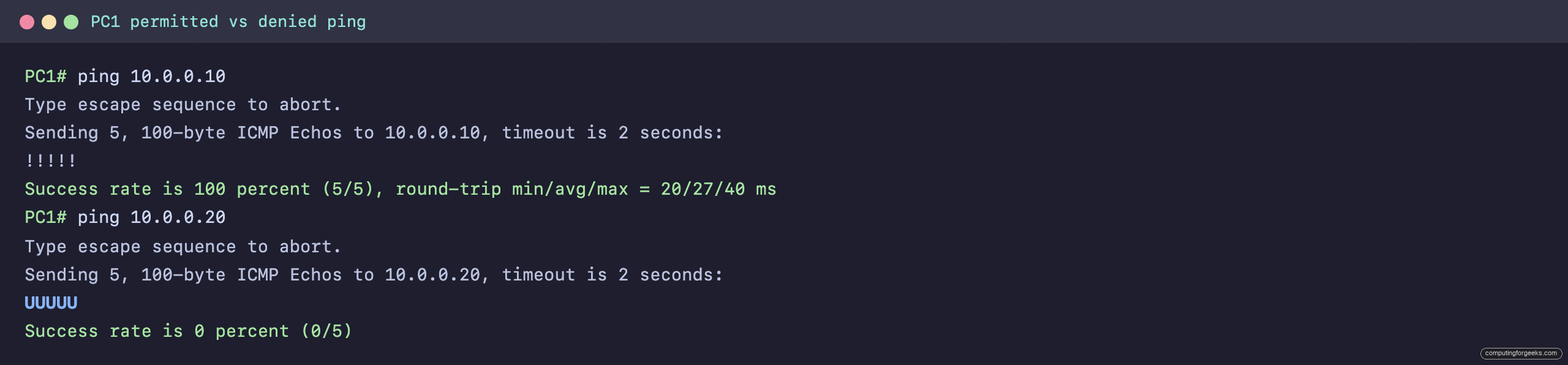
The ping to 10.0.0.10 succeeds because it matches the permit icmp rule. The ping to 10.0.0.20 returns U for every packet, an ICMP unreachable the router sends back when the ACL denies the traffic. That message is on by default; a router with no ip unreachables would drop the packet silently and the ping would simply time out with dots instead. The U on the host and the climbing deny counter on the router are the same event seen from both ends, which is the proof the ACL is doing its job.
ACL placement and the rules that always apply
Where you apply an ACL matters as much as what is in it. A standard ACL sees only the source, so it goes close to the destination to avoid blocking traffic the source still needs elsewhere. An extended ACL can match the exact source and destination, so it goes close to the source to drop unwanted traffic before it crosses the network.
Three rules hold for every ACL. Rules are read top to bottom and the first match wins, so a broad permit above a specific deny makes the deny dead code. Every ACL ends with an implicit deny, so a list with only permit rules still blocks everything else. And you can apply only one ACL per interface, per direction, per protocol, so inbound and outbound are separate and you cannot stack two IPv4 ACLs on the same interface in the same direction.
Practice Cisco ACLs
Run the questions to lock in standard versus extended, wildcard masks, placement, and the implicit deny, then use the flashcards for quick recall.
Flip through the deck until the number ranges, wildcards, and placement rules are automatic, or grab the Anki pack to review them anywhere:
Standard or extended, and where to put it
Reach for a standard ACL when you only need to filter on the source, like locking down who may manage the device, and place it near the destination. Reach for an extended ACL for anything that depends on the destination or the protocol, and place it near the source so denied traffic never travels further than it must. Whichever you build, read it the way the router does, top to bottom until the first match, and remember the implicit deny waiting at the end. ACLs are also the foundation for the Layer 2 protections that come next; the CCNA 200-301 study roadmap shows where port security, DHCP snooping, and the rest of the router and firewall toolkit fit.