IPv6 static routes look like their IPv4 cousins until you hit the parts that are genuinely different, and those parts are where marks get lost in Domain 3. The command is ipv6 route instead of ip route, but there is more to it: the router will not forward IPv6 at all until you turn routing on, a link-local next hop is rejected unless you name the interface with it, and the default route is written ::/0. This guide configures each IPv6 static route type on a live two-router lab and demonstrates the floating static failing over.
If you have not already, read the IPv4 static routes guide first. The concepts (next hop, default route, floating static, administrative distance) carry straight over, and every route here still lands in the table you learned to read in the routing table guide. This article focuses on what IPv6 does differently.
Verified June 2026 on Cisco IOS 15.2.
Enable IPv6 routing first
This is the step people skip, and nothing works until it is done. A Cisco router accepts IPv6 addresses by default but does not forward IPv6 between interfaces until you enable it globally:
configure terminal
ipv6 unicast-routing
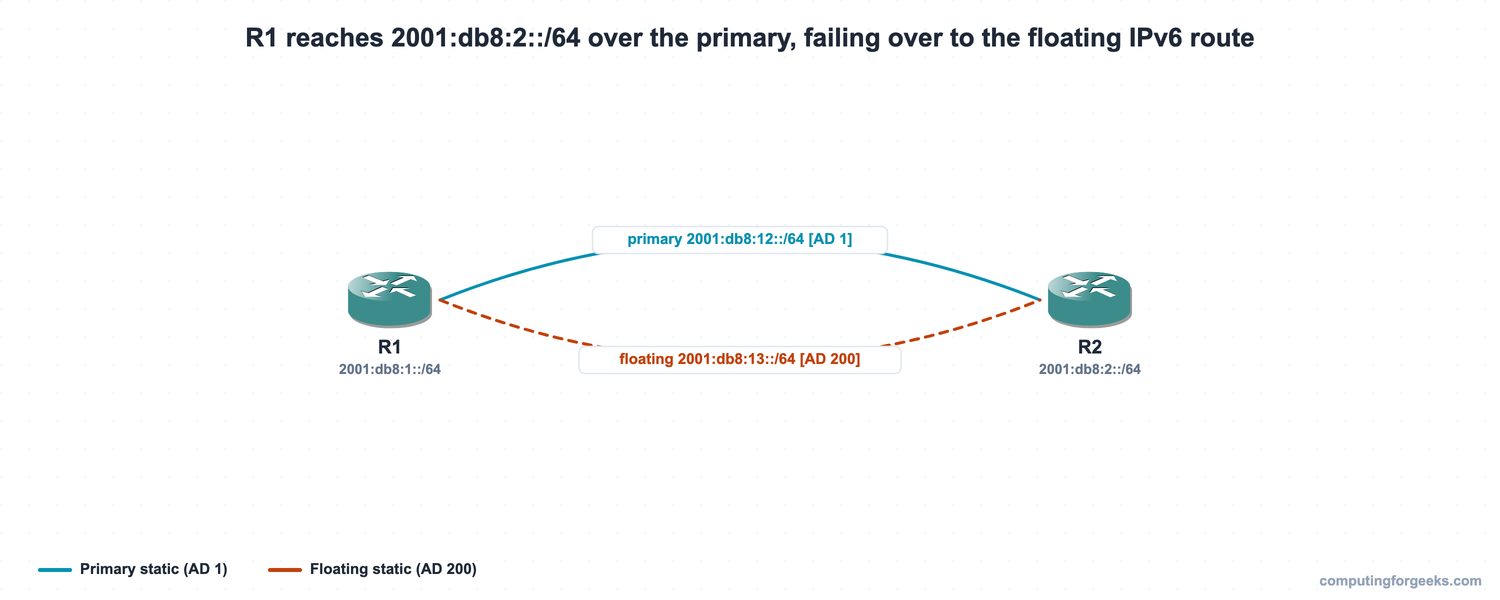
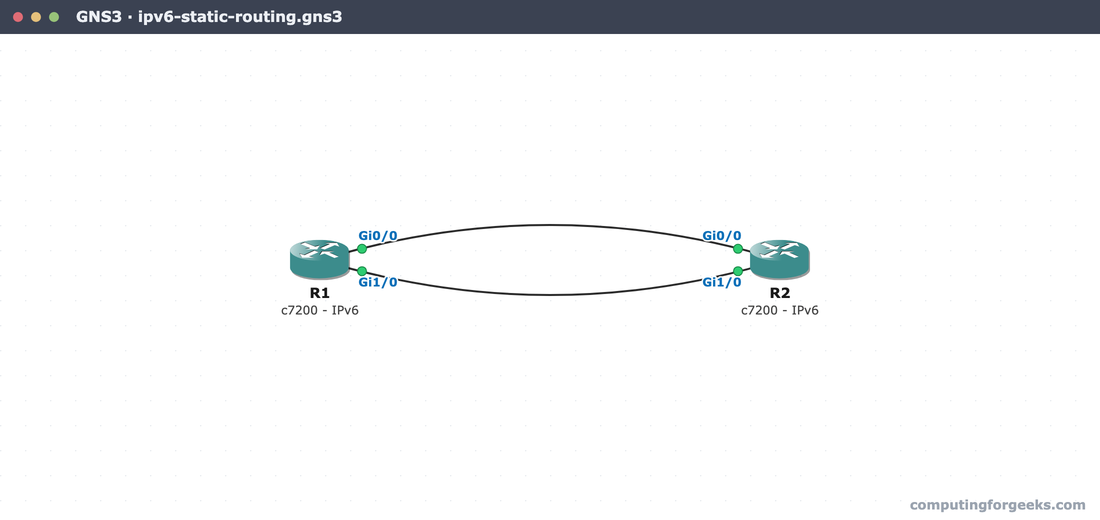
The lab is two routers with two links between them: a primary on 2001:db8:12::/64 and a backup on 2001:db8:13::/64. R1 owns 2001:db8:1::/64, R2 owns 2001:db8:2::/64, and R1 needs to reach R2’s network over the primary, falling back to the backup automatically.
Write an IPv6 static route
The syntax mirrors IPv4 but uses a prefix length instead of a dotted mask:
ipv6 route <prefix>/<length> <next-hop | exit-interface | exit-interface next-hop> [AD]A static route to R2’s network through a global next hop needs no interface, because a global unicast address is unambiguous:
ipv6 route 2001:DB8:2::/64 2001:DB8:12::2Confirm it with show ipv6 route. Static routes appear with an S code and the familiar [1/0] bracket. The capture below is the finished lab, where the route to R2 actually uses the fully-specified link-local form from the next section; a global-next-hop route reads the same way, with the global address in place of the link-local next hop:
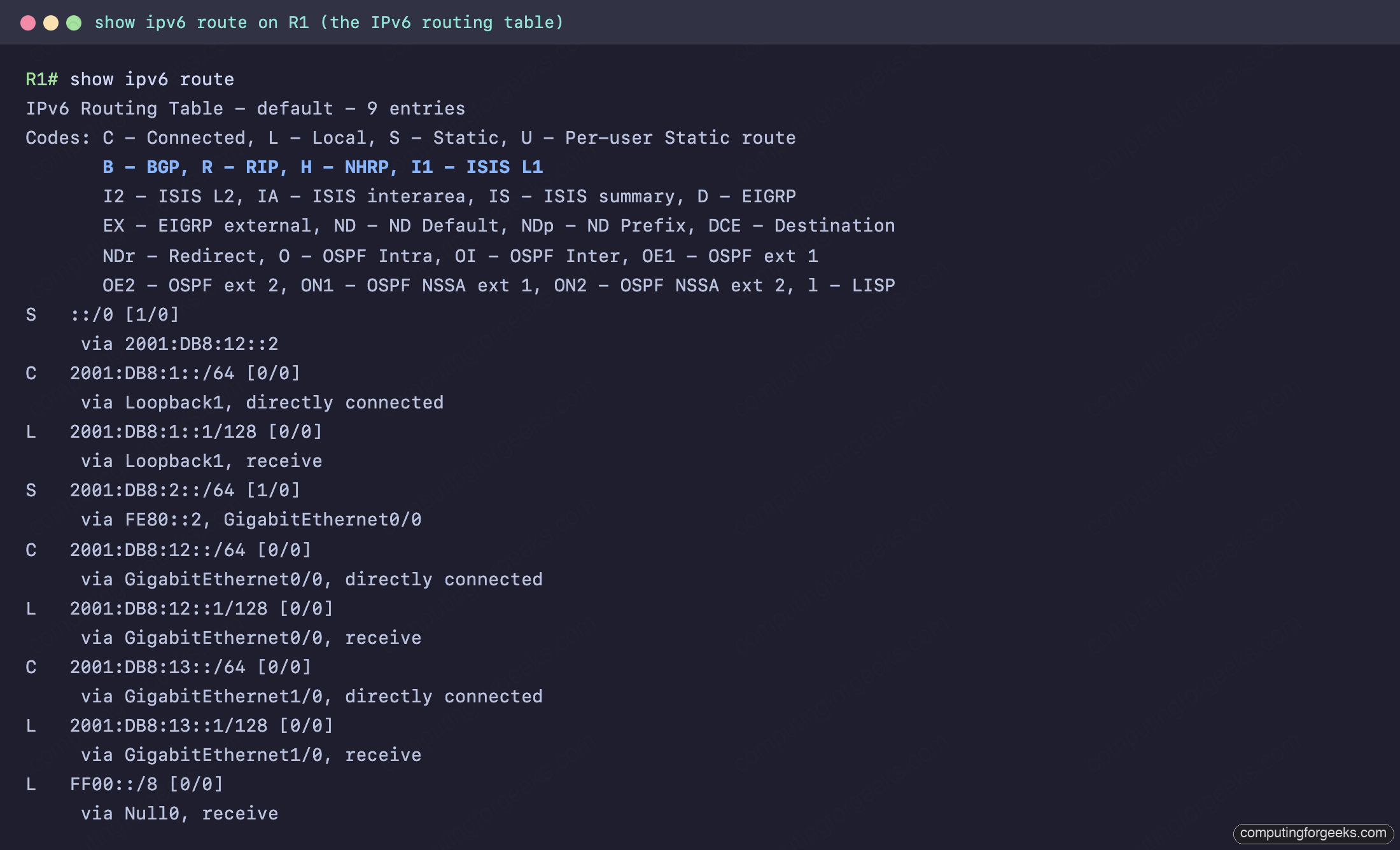
Two IPv6 details stand out in that table. The local (L) routes are /128, not the IPv4 /32, and there is an L FF00::/8 multicast entry via Null0 that IPv4 has no equivalent for. The whole lab runs on a clean GNS3 canvas, two c7200 routers joined on both Gi0/0 and Gi1/0:
The link-local next-hop rule
This is the IPv6 trap. On IPv6 point-to-point links it is common to route through the neighbor’s link-local (FE80::) address, but a link-local address is only unique on a single link, so the router cannot tell which interface to send out. Try it without an interface and IOS refuses:

The fix is the fully-specified form: name the exit interface and the link-local next hop together. To find the neighbor’s link-local, show ipv6 interface brief lists it next to each global address:
ipv6 route 2001:DB8:2::/64 GigabitEthernet0/0 FE80::2In the table this reads S 2001:DB8:2::/64 [1/0] via FE80::2, GigabitEthernet0/0. The next hop and the exit interface sit together on the route, which is exactly what the fully-specified form guarantees.
Add a default route
The IPv6 default route uses ::/0, a prefix length of zero, so it matches every destination and is used only when nothing more specific does:
ipv6 route ::/0 2001:DB8:12::2It shows in the table as S ::/0 [1/0]. There is no separate “gateway of last resort” banner the way IPv4 prints one; in IPv6 the ::/0 entry simply is the default.
Floating static route and failover
A floating IPv6 static works exactly like its IPv4 counterpart: give the backup a higher administrative distance so it loses to the primary until the primary disappears. Point R1’s backup at the second link with AD 200:
ipv6 route 2001:DB8:2::/64 GigabitEthernet1/0 FE80::20 200IPv6 is more talkative about this than IPv4. While the primary is up, show ipv6 route 2001:DB8:2::/64 names the standby directly with a Backup from "static [200]" line, so you can confirm the floating route is registered without digging through the running config. Shut the primary interface on both routers and the backup takes over:
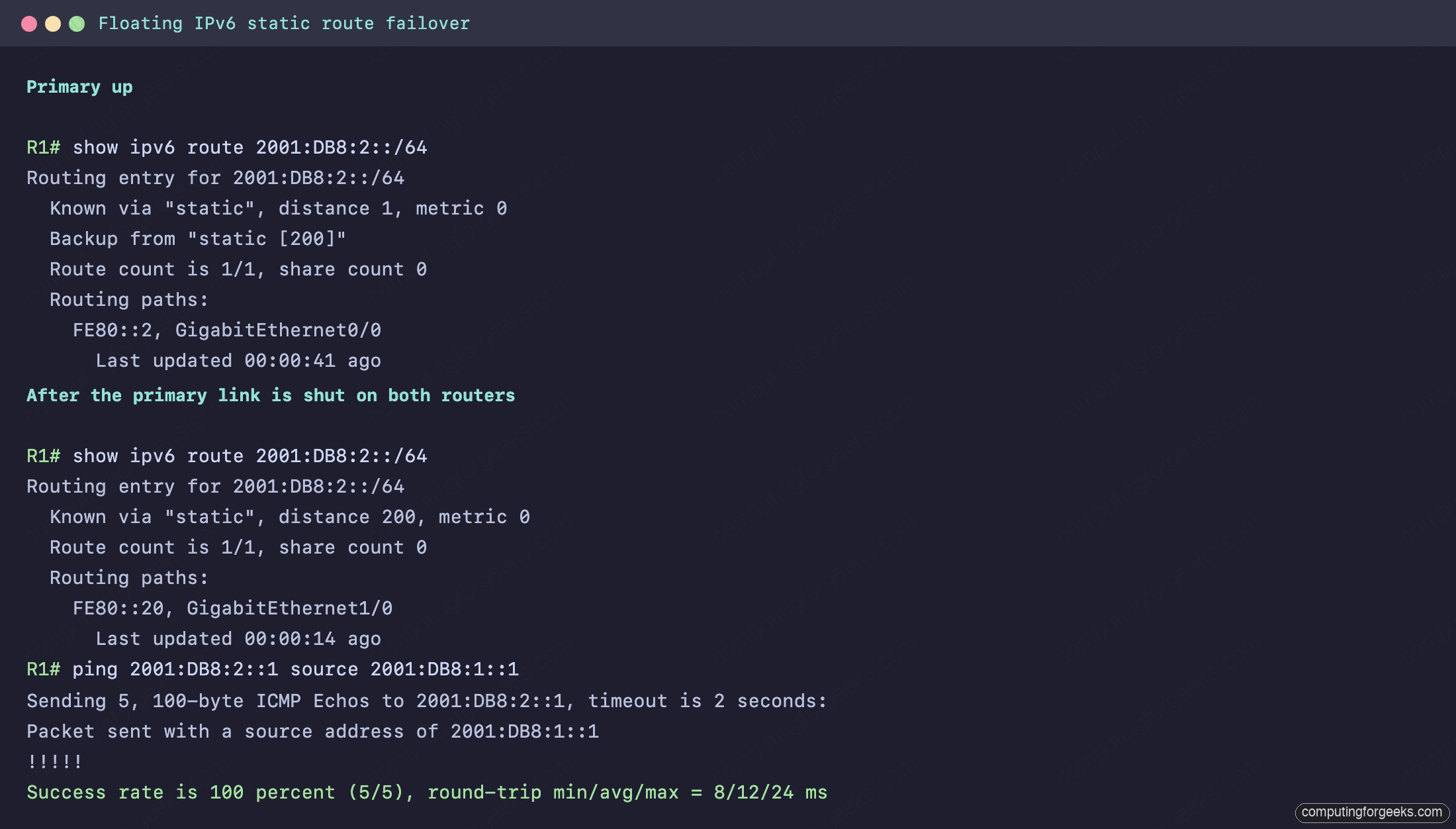
After the failover the route reads distance 200 via FE80::20, GigabitEthernet1/0, and the ping across the IPv6 networks still succeeds over the backup link. For a deeper walk through the failover mechanism itself, the IPv4 static routes guide covers it step by step; it behaves identically here.
Verify IPv6 static routes
The verification commands parallel the IPv4 set, with ipv6 in place of ip:
| Command | What it tells you |
|---|---|
show ipv6 route | The full IPv6 table: code, prefix, [AD/metric], next hop and exit interface. |
show ipv6 route static | Only the static entries, including the ::/0 default. |
show ipv6 route 2001:DB8:2::/64 | One route’s detail, including any Backup from "static [200]" standby. |
show ipv6 interface brief | Each interface’s link-local and global addresses, to find the FE80:: next hop. |
As with IPv4, finish by pinging from the source network to confirm the path forwards, not just that the route is present.
Practice on your own lab
Paste-ready R1 and R2 configurations, including the failover steps, are in the ccna-labs repository. Build the two routers with both links, enable ipv6 unicast-routing, load the configs, then shut the primary interface on each side and watch the floating route install. The CCNA 200-301 study roadmap places IPv6 routing in Domain 3, and the network devices guide covers the router’s role.
What IPv6 static routing changes from IPv4
The mechanics are the same, so the differences are what is worth holding onto. Routing has to be switched on with ipv6 unicast-routing before anything forwards. A link-local next hop is rejected unless you pair it with an exit interface, which is the single most common IPv6 static-route mistake. The default route is ::/0, local routes show as /128, and the route detail even names the floating backup for you. Everything else, next hop, administrative distance, floating failover, you already know from IPv4.
| Aspect | IPv4 | IPv6 |
|---|---|---|
| Command | ip route | ipv6 route |
| Destination | network + dotted mask | prefix/length |
| Routing enabled | on by default | ipv6 unicast-routing required |
| Link-local next hop | n/a | must name the exit interface |
| Default route | 0.0.0.0 0.0.0.0 | ::/0 |
| Local route length | /32 | /128 |
| Floating static | higher AD | higher AD (identical) |
Keep that short list in mind and IPv6 static routing stops feeling like a separate skill. It is IPv4 static routing with a few rules of its own, and the lab above shows every one of them on real output.