Building a NAS yourself comes down to two decisions: what box to put it on, and whether to run TrueNAS or Unraid. Get those two right and a DIY NAS gives you more bays, more compute, and full hardware transcoding for a fraction of what a turnkey unit with the same specs costs. Get them wrong and you fight driver quirks, USB drop-outs, and a pool that rebuilds for a week. A UPS with graceful shutdown keeps a power cut off that list.
2026 makes the case stronger than it has been in years. A wave of small x86 NAS boxes (Aoostar, CWWK, Topton) now ship with Intel or Ryzen silicon, multiple SATA bays, 2.5GbE or 10GbE, and an open BIOS, so they run TrueNAS or Unraid out of the gate. At the same time Synology pulled the Intel GPU driver from DSM on its 2025 models, so those boxes can no longer hardware-transcode Plex or Jellyfin on stock DSM, which is exactly the gap a DIY build fills. This guide ranks the hardware worth buying, settles the TrueNAS vs Unraid question, and walks through a TrueNAS install we ran end to end on 25.10 “Goldeye” in June 2026, with the Unraid 7.3 details checked against current docs.
Quick picks
If you want the verdict before the reasoning, here it is. Every box below has an open BIOS and runs TrueNAS or Unraid; the drives and the OS are separate choices covered further down.
- Best overall, easiest to live with: Aoostar WTR Pro. A finished 4-bay box with hot-swap trays, dual 2.5GbE, and two NVMe slots. Around $400 for the barebones, check the live price.
- Best value, most bays per dollar: CWWK i3-N305 6-bay board. An ITX motherboard with six SATA ports and four 2.5GbE NICs for about $220. You supply the case and PSU.
- Best powerhouse, real ZFS machine: Aoostar WTR Max. Eight Ryzen cores, ECC support, dual 10GbE SFP+, and eleven drive positions. Around $650, check the live price.
- Best when you already own a mini PC: a TerraMaster D4-320 USB enclosure bolts four bays onto any machine for about $170. Read the USB caveat below before you point ZFS at it.
- The OS: run TrueNAS if data integrity is the priority and your drives are matched; run Unraid if you have mismatched drives or want to add one disk at a time. Both are excellent in 2026.
How we built and tested this
The hardware picks were checked against each manufacturer’s spec sheet and a live retailer listing, and every Amazon link here was confirmed against the exact model before it went in. Prices move weekly during the 2026 storage and memory shortage, so each one is a band with a link to the live listing rather than a number that ages badly.
The software half is hands-on. We installed TrueNAS 25.10 “Goldeye” (build 25.10.4) on a fresh machine, carved four disks into a RAIDZ1 pool, created datasets, shared one over SMB, and opened the app catalog. The screenshots later in this guide are from that build, not from marketing pages. Unraid 7.3 was used for the comparison facts and licensing; both projects shipped a current stable release within the last few weeks.
TrueNAS vs Unraid: which OS to run
This is the decision that shapes everything else, because it dictates how your drives are organized and how you grow later. Both are mature and both run Docker apps and VMs. They differ on filesystem and flexibility.
TrueNAS (the free Community Edition, formerly called SCALE) is built on ZFS. You get end-to-end checksums, scheduled scrubs that catch silent corruption, snapshots, and replication. The cost of that safety is rigidity: a RAIDZ group treats every disk as the size of the smallest, so you want matched drives, and although you can now expand a RAIDZ group one disk at a time, the older data keeps its original parity ratio until you rewrite it.
Unraid takes the opposite stance. Its array is a set of independent disks protected by one or two parity drives, so you can mix a 8TB, a 12TB, and a 20TB drive in the same array and add another whenever you like, as long as no data disk is larger than your parity disk. That flexibility is why it owns the “I bought drives over five years and none of them match” crowd. The trade-off is that the default XFS array has no block checksums (you can opt into btrfs or ZFS per disk), and Unraid is paid software.
| Factor | TrueNAS (Community Edition) | Unraid 7.3 |
|---|---|---|
| Cost | Free, open source | $49 / $109 / $249 one time, optional $36/yr updates |
| Filesystem | ZFS only | XFS (default), btrfs, or ZFS per disk |
| Mixed drive sizes | Penalized (vdev = smallest disk) | Yes, freely |
| Add one disk at a time | Yes (RAIDZ expansion, with a parity-ratio caveat) | Yes, native |
| Data integrity | Strongest (checksums, scrub, snapshots) | Parity rebuild, optional btrfs/ZFS checksums |
| RAM | 8 GB minimum, ECC recommended | Lighter, no ZFS RAM demand unless you choose ZFS |
| Plex/Jellyfin transcoding | Yes, pass the iGPU into the container | Yes, pass the iGPU into the container |
| Best for | Maximum safety, matched disks, snapshots | Mixed disks, easy growth, media servers |
For most people the split is simple. If you are buying a matched set of drives and you care most about your data surviving a bad disk or bit rot, run TrueNAS. If your drives are a mixed bag or you plan to add capacity a disk at a time, Unraid earns its license fee. One note worth pulling out: a frequent point of confusion is ECC RAM on TrueNAS. TrueNAS strongly recommends it, but the docs are explicit that it is not required, and plenty of home pools run fine without it.
1. Aoostar WTR Pro: best overall
The WTR Pro is the box we point most people at because it removes the part beginners dread: there is no case to source, no PSU to match, no drive cage to wire. It arrives as a finished 4-bay enclosure with hot-swap trays, and you add RAM, an NVMe boot drive, and your disks.
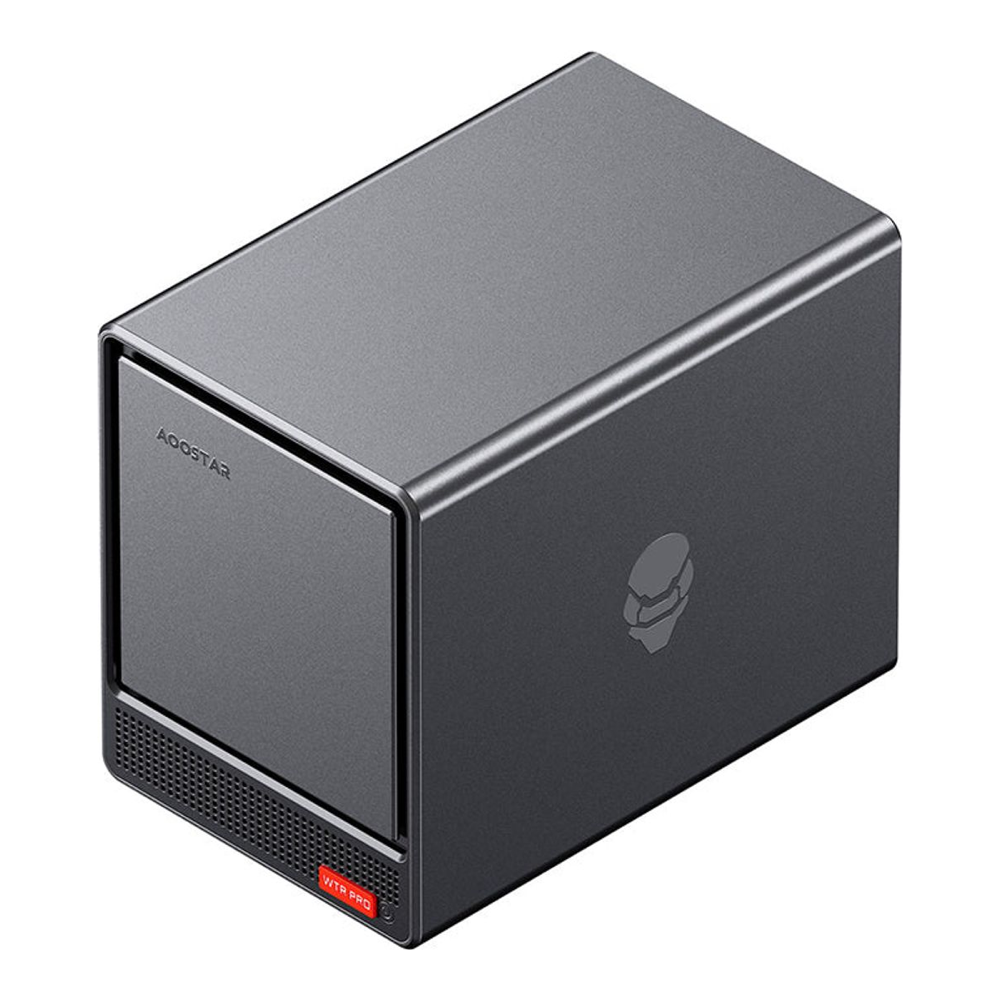
The pick to buy is the AMD Ryzen 7 5825U barebones model. Eight cores handle a stack of containers and a Plex library without breaking a sweat, the two M.2 NVMe slots let you mirror a boot drive or run a fast cache pool, and the four SATA bays take drives up to 22TB each. Hardware transcoding runs through the Radeon iGPU over VA-API, which Jellyfin and Plex both support.
Who it is for: anyone who wants a NAS that looks and behaves like an appliance but runs the OS they choose. Skip it if: you want more than four spinning disks, or you specifically need Intel QuickSync, in which case the Intel N150 version of the WTR Pro is the cheaper, lower-power, QuickSync-equipped alternative (check its live availability). The one real limitation on the Pro is the single RAM slot, which caps you at 32GB.
2. CWWK i3-N305 6-bay board: best value
If you are comfortable putting parts in a case, nothing touches the price per bay of a CWWK N305 motherboard. It is a mini-ITX board with the CPU soldered on, six SATA ports, two NVMe slots, and four 2.5GbE NICs, and it sells for around the price of an empty 4-bay turnkey chassis.
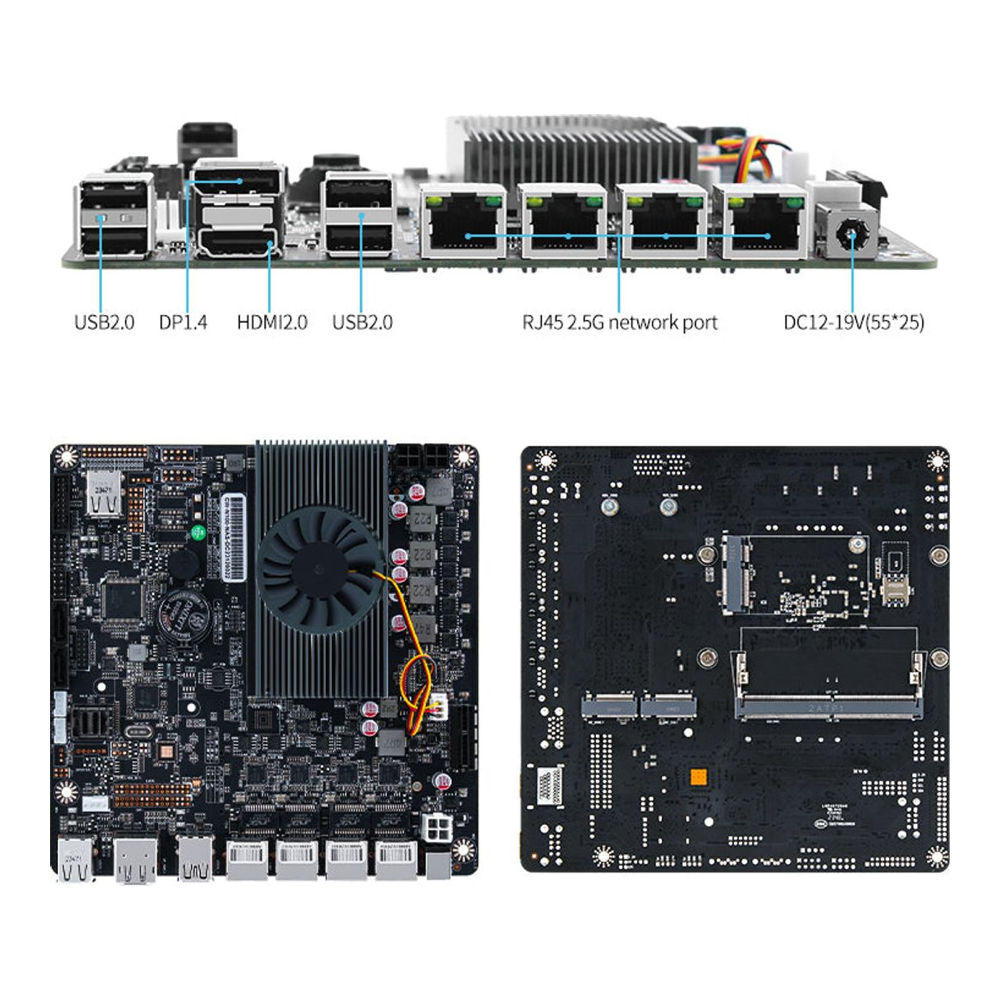
The i3-N305 is an 8-core Alder Lake-N chip with a 32-EU Intel iGPU, so QuickSync transcoding is on the table and it has enough headroom for a busy app stack. About $220 for six bays is the standout number here; the cheaper N100 sibling drops to four efficient cores if your workload is lighter. CWWK also sells the board directly if Amazon stock is thin.
Who it is for: the builder who wants the most drives per dollar and already has a small case and an SFX power supply, or is happy to buy them. Skip it if: you want a plug-and-play box. Two honest gotchas to plan for: the SATA controller keeps the CPU out of its deepest sleep states, so idle power sits a few watts higher than the chip alone would suggest, and the small DC barrel input can be marginal spinning up six drives at once, so use a quality SATA-power breakout and stagger spin-up where you can.
The one part the board does not include is a home for the drives. The Jonsbo N3 is the case most builders pair it with: a mini-ITX NAS cube with eight 3.5-inch bays (two more than the board’s six ports, so you have headroom), two built-in fans, and room for an SFX power supply. It runs around $130 to $160, check the live price.
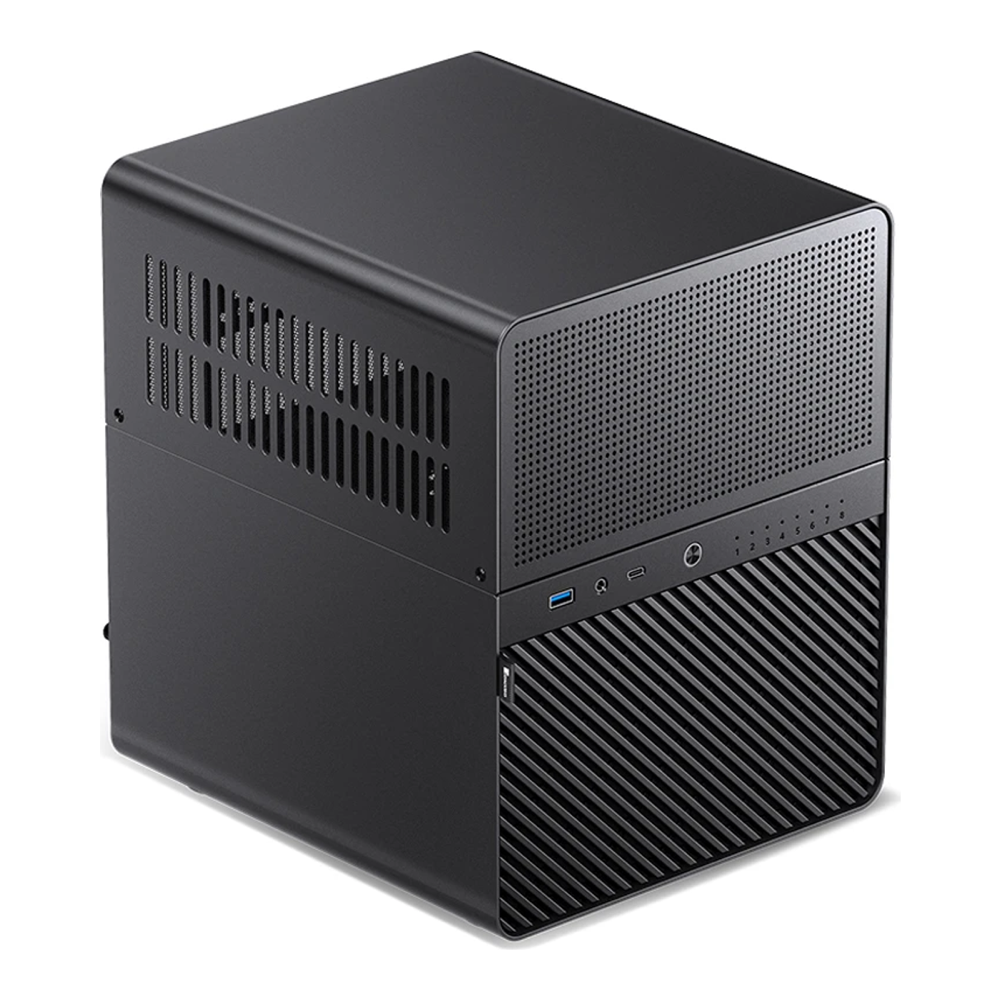
Add the case, a stick of RAM, and a small boot SSD and you have a six-bay NAS for less than a finished four-bay appliance costs.
3. Aoostar WTR Max: best powerhouse
The WTR Max is what you buy when the NAS is also going to be your virtualization host and you want to run ZFS the way it is meant to be run. It is built around the Ryzen 7 PRO 8845HS, eight cores and sixteen threads, and crucially it supports ECC memory up to 128GB across two DDR5 slots.
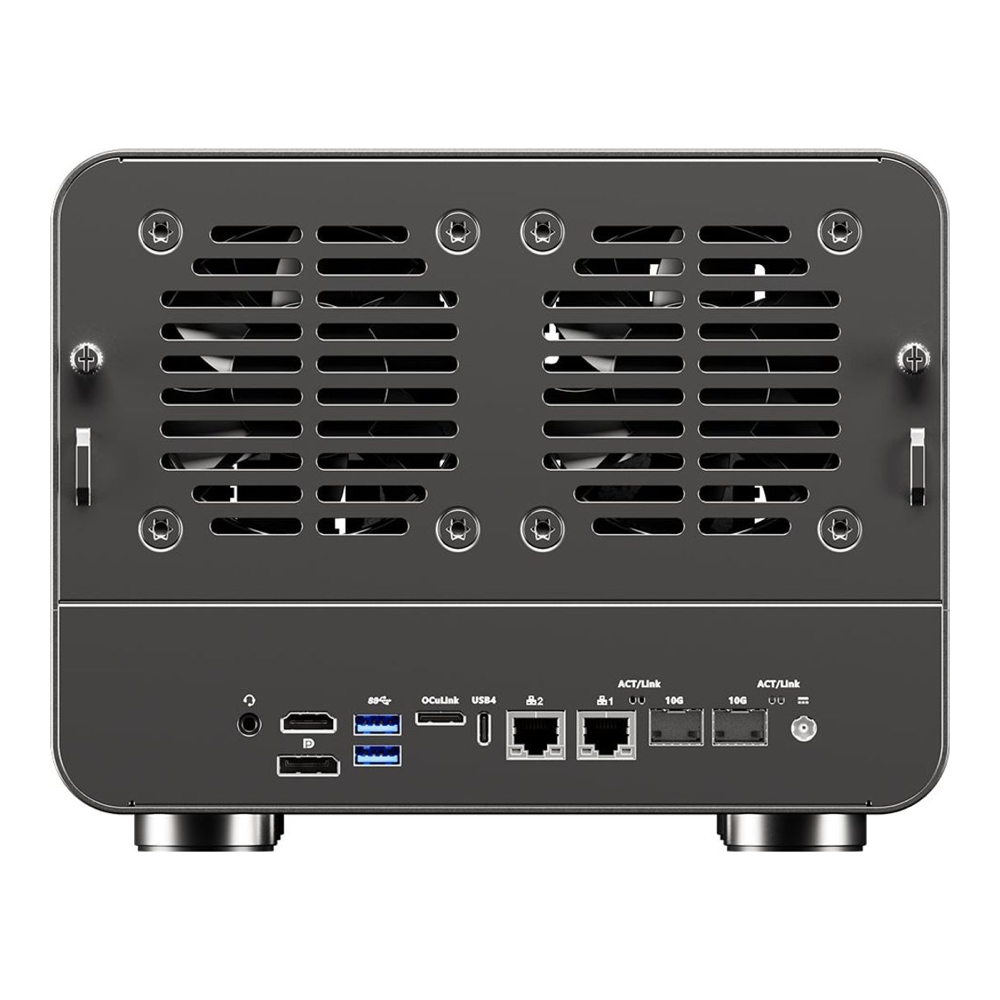
The connectivity is the headline. Two 10GbE SFP+ ports plus two 2.5GbE, USB4, and an OCuLink port for external PCIe, with six SATA bays and five NVMe slots for eleven drive positions in total. ECC plus 10GbE plus that many bays is territory Synology and UGREEN simply do not sell at this price, which lands around $650 for the barebones (check the live price). Transcoding runs on the Radeon 780M through VA-API, strong on HEVC if a touch behind Intel QuickSync on the newest codecs.
Who it is for: the ZFS builder who wants ECC, 10GbE, and room to grow into a real homelab. Skip it if: you only need file storage; the extra cores, ECC, and 10GbE are wasted money if nothing will use them. For the layout choices that make the most of this many bays, our ZFS RAID levels guide covers how mirrors and RAIDZ trade capacity against rebuild safety.
4. A mini PC plus a TerraMaster D4-320: if you already own a mini PC
If there is already an Intel mini PC on your desk doing light duty, the cheapest way into a NAS is to hang drives off it. The TerraMaster D4-320 is a 4-bay USB 3.2 Gen2 enclosure that connects over a single 10Gbps Type-C cable, and at around $170 it turns any machine into a four-disk NAS.
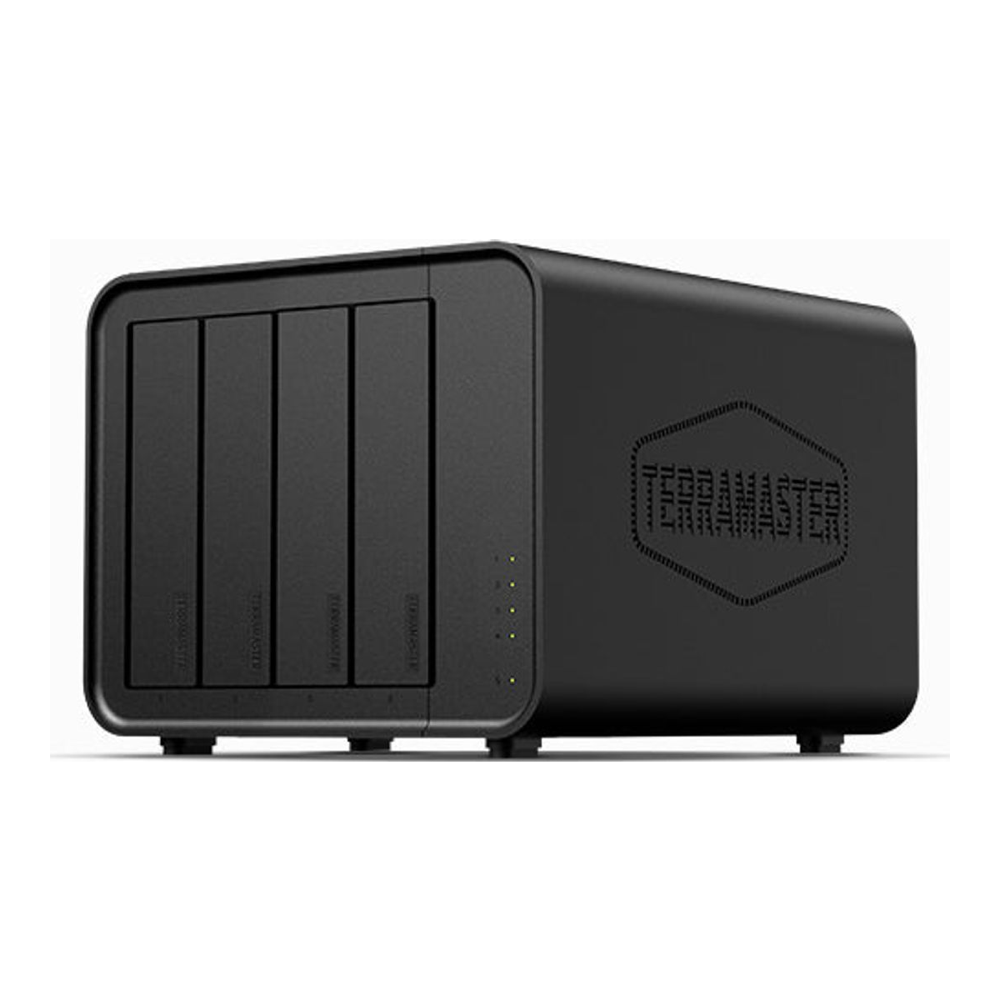
There is a caveat that has to be stated plainly: USB-attached disks are not a good home for ZFS. USB-to-SATA bridges can drop or renumber devices and hide drive serials and SMART data, which is exactly the information ZFS relies on to handle errors, and a dropped device mid-write can fault a pool. The D4-320 is actually the safer style of enclosure for this because it does pure JBOD passthrough with no RAID firmware in the way, but treat it as a budget or Unraid-array path for non-critical data, not as the foundation for an important TrueNAS pool.
Who it is for: the person with a capable mini PC already running and a tolerance for the USB caveat. If you want a deeper look at the small machines that pair well here, our homelab mini PC roundup covers the boxes worth basing this on. Skip it if: this is your primary copy of anything you cannot lose.
5. UGREEN NASync DXP4800 Plus: buy turnkey, run DIY
There is a middle path between building from parts and accepting a locked-down appliance: buy a turnkey x86 box that ships with an open BIOS, then wipe its OS and install TrueNAS or Unraid. The UGREEN NASync DXP4800 Plus is the box that made this popular. It is a finished four-bay unit with a built-in 10GbE port alongside 2.5GbE, two NVMe slots, a 128GB internal SSD, and an Intel iGPU that keeps QuickSync. Its BIOS is open, which is why the DXP4800 Plus became a favorite box to flash TrueNAS or Unraid onto. UGREEN’s position on whether a third-party OS affects the hardware warranty has been inconsistent, so confirm that with UGREEN before you wipe the stock system.
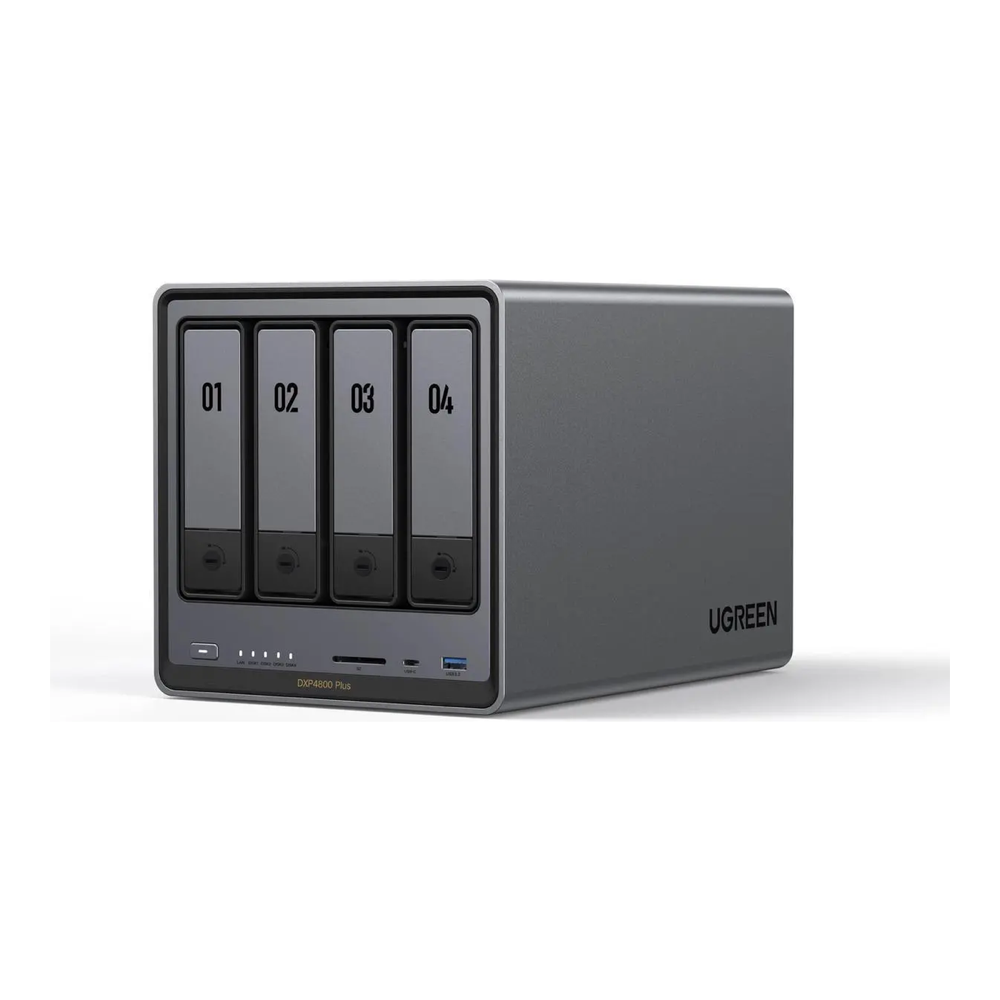
Who it is for: the reader who wants appliance fit and finish, built-in 10GbE, and Intel transcoding, but not Synology’s software lock-in or a parts list. It sells for around $620, check the live price. Skip it if: you want the most bays per dollar, which the CWWK board still wins. And if you would rather keep a polished vendor OS and not flash anything at all, the best NAS for home and self-hosting roundup weighs the DXP4800 Plus against Synology and the rest as turnkey units.
The rest of the parts: drives, boot SSD, and RAM
The box is half the build. Three more decisions finish it.
Drives are where the money goes and where mistakes hurt. Buy CMR NAS drives and avoid drive-managed SMR, which can stall a RAID or ZFS rebuild for days; our CMR vs SMR breakdown explains why, and the best NAS hard drives guide lists the safe models by capacity. HDD prices climbed 30 to 50 percent through 2026, so buy the capacity you need now rather than waiting for a dip that is not coming this year.
A small NVMe drive handles the OS and apps. TrueNAS wants a dedicated boot device (modern versions write to it enough that USB sticks are discouraged), and a WD Blue SN580 500GB is plenty for boot plus an app or cache pool. Unraid is the exception: it traditionally boots from a USB flash drive (newer releases added an optional internal-boot mode), with the license tied to the boot device.
RAM sizing follows the OS. TrueNAS wants 8GB as a floor and is happier with 16 to 32GB once apps are running; Unraid is content with less. A single 32GB DDR4 SO-DIMM maxes out the single-slot boxes. Fair warning: the 2026 memory shortage has pushed RAM prices up sharply, so check the live price before you budget.
Install TrueNAS and create your first pool
Once the parts are together, TrueNAS is the faster of the two to get running, so it is the one we walk through. The installer is a short text menu: pick the boot SSD as the destination, set a password for the truenas_admin account, choose legacy or EFI boot to match your firmware, and reboot. The console then prints the web address to open in a browser.
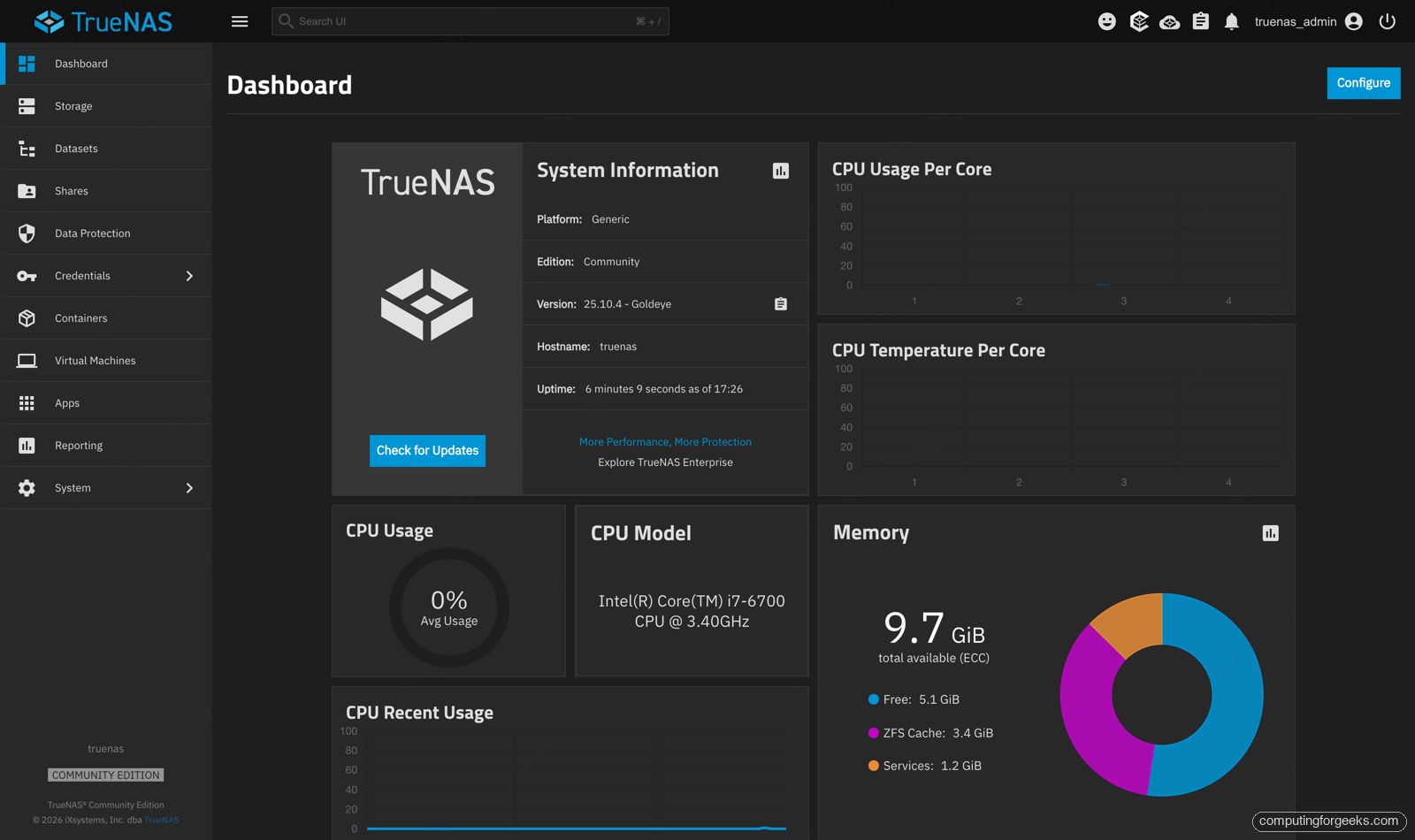
The dashboard is the landing page. It confirms the version, the CPU and memory, and the health of everything at a glance.
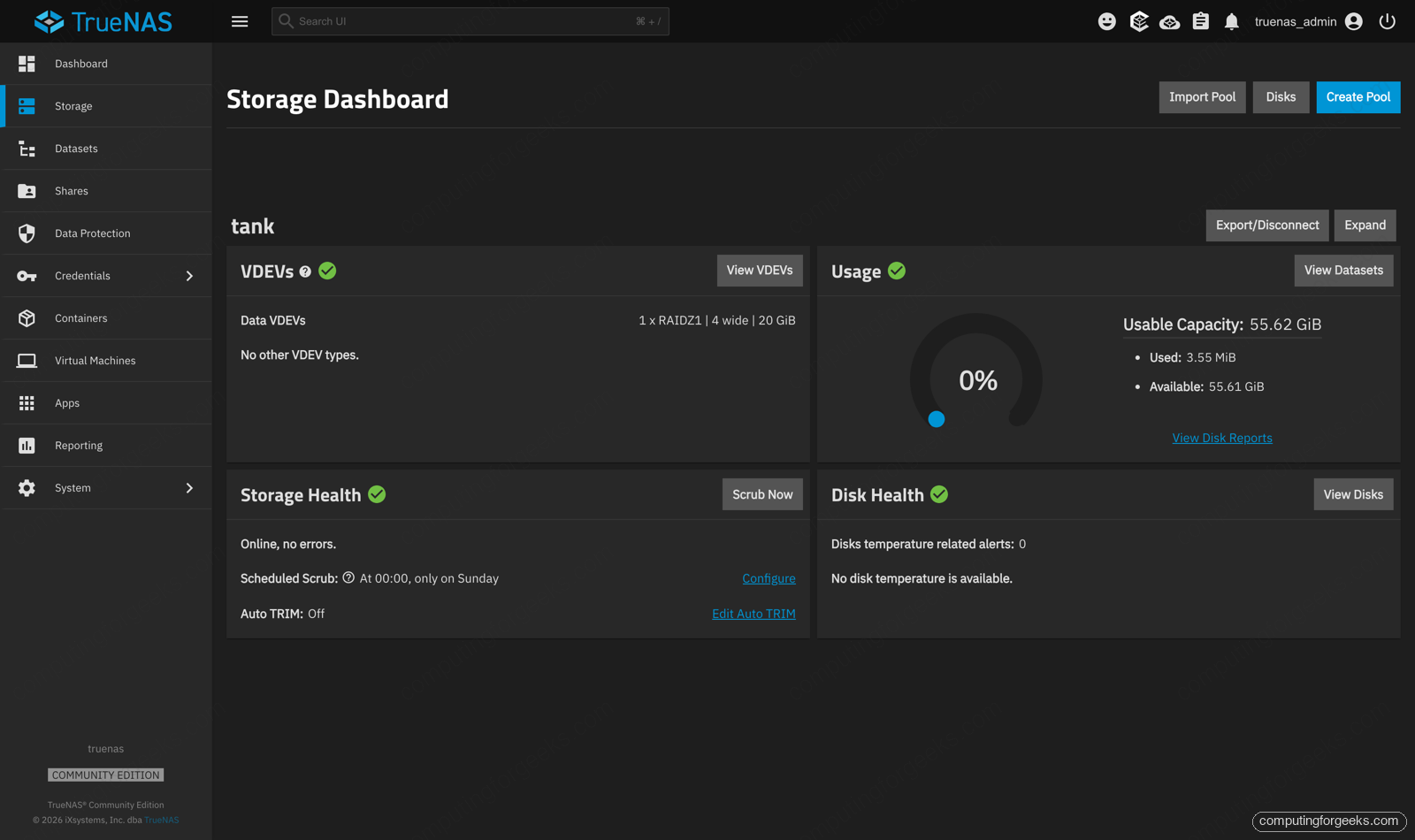
The first real task is the storage pool. Under Storage, the Create Pool wizard lists the disks it can use; we selected the four data drives and chose RAIDZ1, which keeps the array alive through a single disk failure. The result is a healthy pool named tank, reported here as one RAIDZ1 group, four wide.
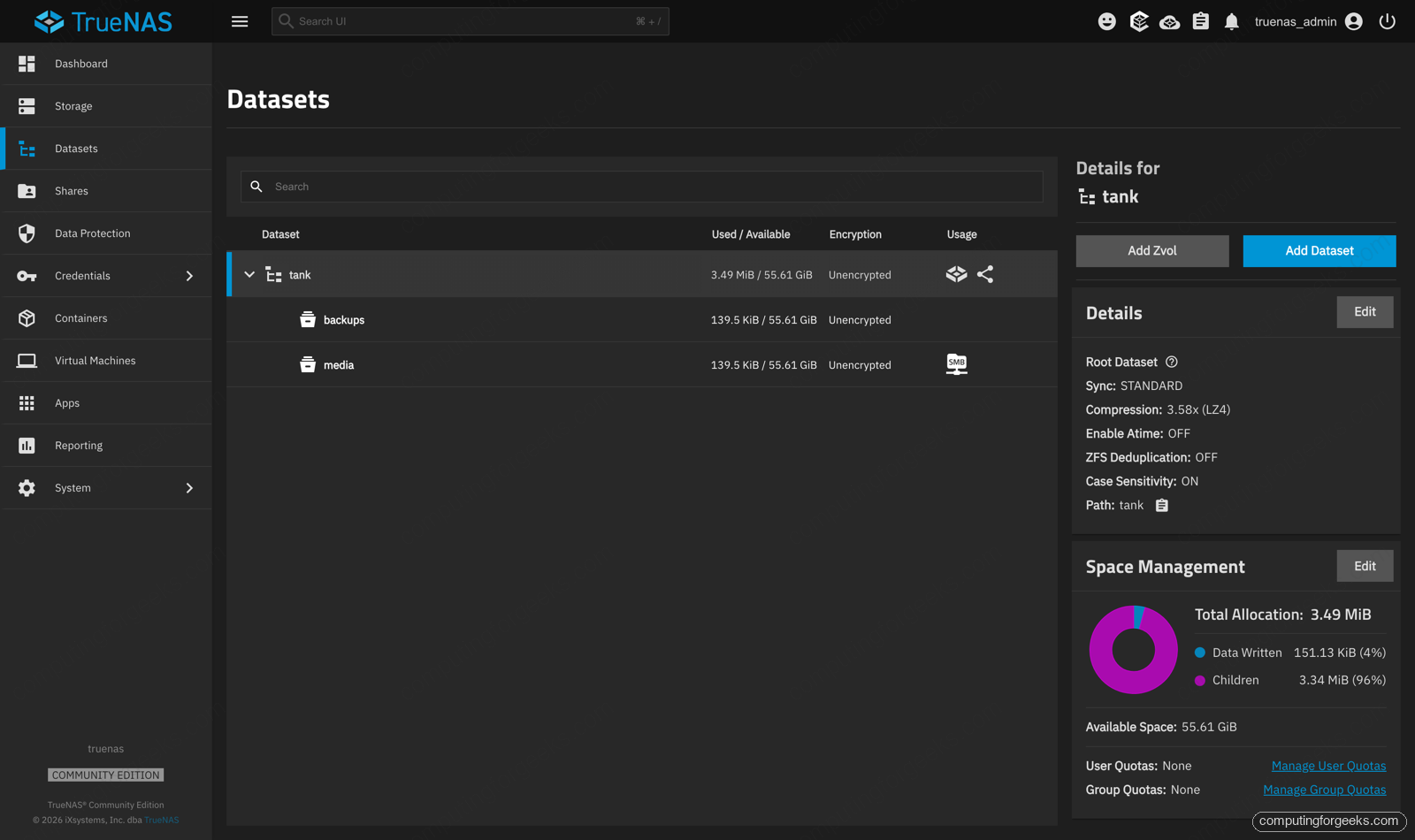
A pool on its own is just space. You carve it into datasets, which are the unit you snapshot, share, and set quotas on. We created a media dataset and a backups dataset under the pool.
To reach a dataset from other machines, you share it. An SMB share is the right default for a mixed network of Windows, macOS, and Linux clients. We shared the media dataset and started the SMB service, which the Shares page shows running.
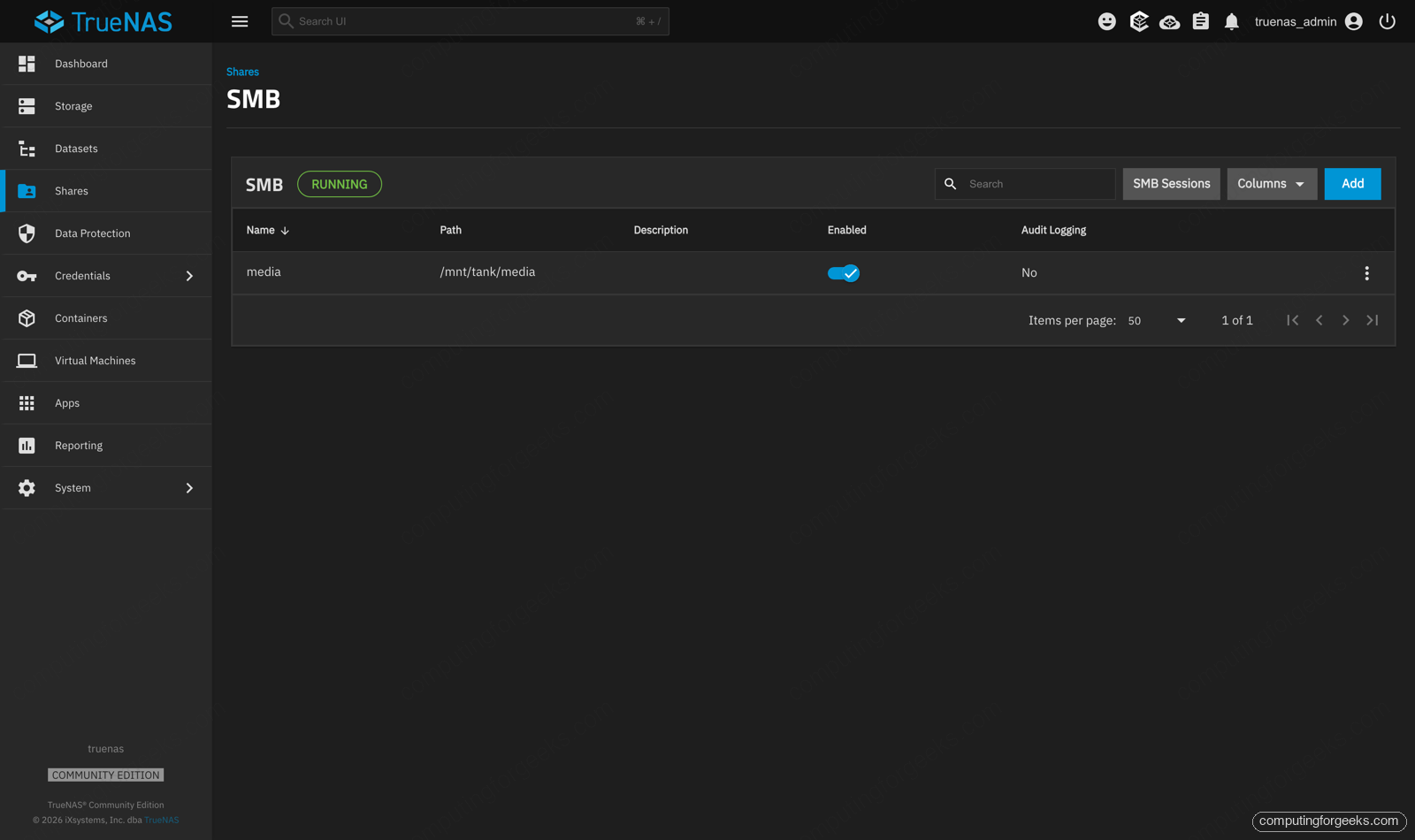
From a Linux client you can mount that share directly to confirm it works:
sudo mount -t cifs //192.168.1.50/media /mnt/media -o username=truenas_adminThe last piece that makes a DIY NAS worth more than an appliance is the app catalog. TrueNAS moved to Docker-based apps, and the Discover page lists around 385 of them, Plex and Jellyfin and Immich and Nextcloud among them, each a few clicks to deploy onto your pool.
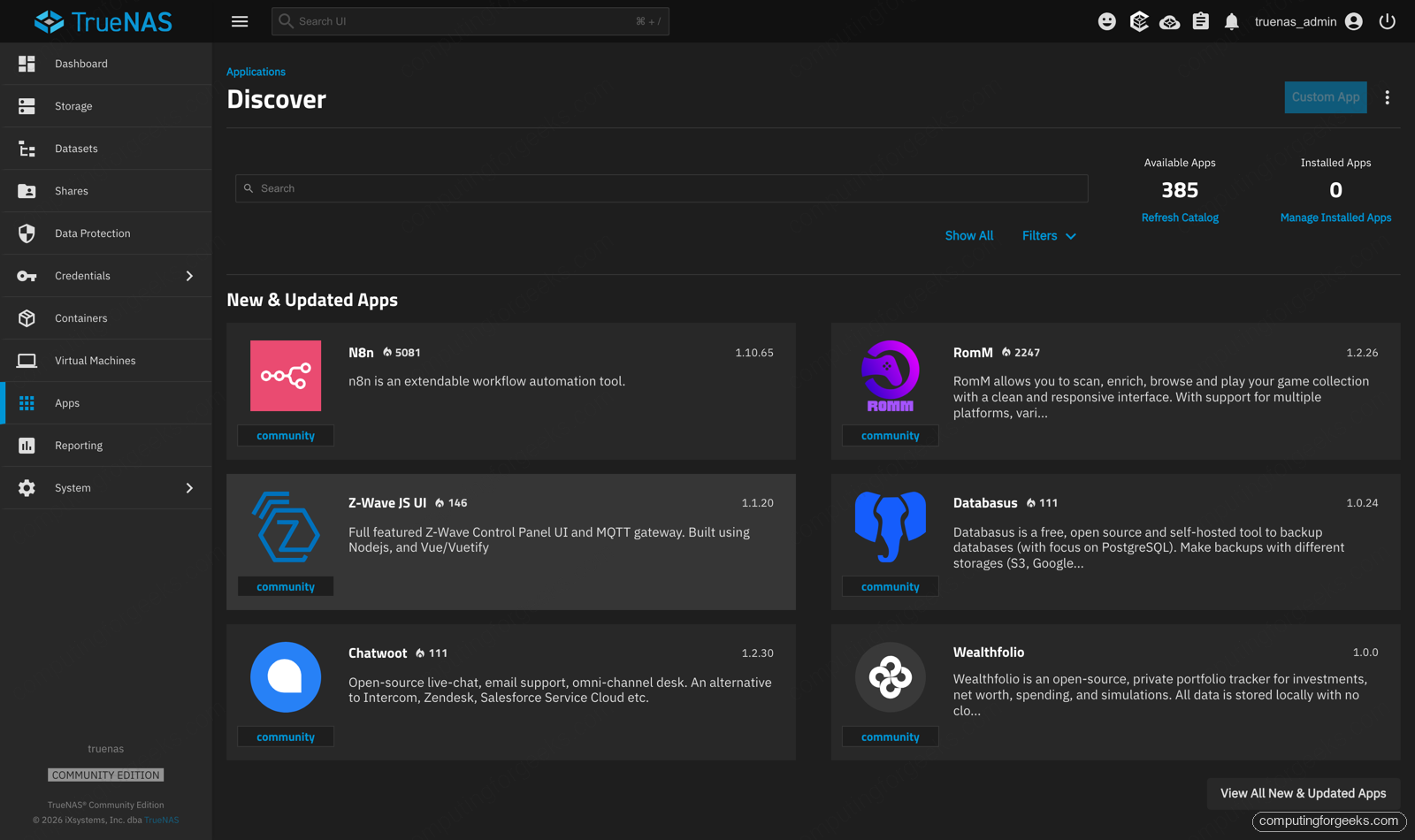
That is the whole loop: install, pool, dataset, share, apps. Everything after that, the snapshots, the replication jobs, the containers, builds on those same five screens.
What to get right before you buy
A few decisions matter more than the brand on the box.
Match bays to a five-year plan, not today. A 4-bay box feels roomy until a media library outgrows it, and adding bays later means a new chassis. If you can see yourself wanting more than four drives, start with six or buy the WTR Max.
CMR drives, never drive-managed SMR. This is the one non-negotiable. SMR drives can take days to rebuild into an array and sometimes drop out mid-rebuild, turning one failed disk into a data-loss event. Stay inside the NAS-branded lines and you are safe.
Decide on ECC honestly. ECC adds a layer of protection against memory errors corrupting data on the way to disk. TrueNAS recommends it but does not require it, and only the WTR Max on this list takes it, and only with true ECC SO-DIMMs rather than standard memory. For irreplaceable data it is worth the box that takes it; for a media server it is a nice-to-have.
Confirm transcoding if you run Plex or Jellyfin. Hardware transcoding turns a 4K stream from an 80 percent CPU pin into a 10 percent one. Every Intel box here has QuickSync; the Ryzen boxes transcode through VA-API. Either works, but you have to pass the GPU device into the container, which both TrueNAS and Unraid support.
Right-size RAM and the network. 2.5GbE is the floor in 2026 and saturates a couple of spinning drives; 10GbE only pays off with NVMe or a wide array and a switch to match. Give TrueNAS 16GB or more once you add apps.
Protect it and connect it. A ZFS pool hates an abrupt power cut, so put the NAS on a pure sine wave UPS such as the CyberPower CP1500PFCLCD, which TrueNAS reads over USB and uses to shut the pool down cleanly when the battery runs low. To actually use those 2.5GbE or 10GbE ports you also need a switch that speaks the same speed, like the TP-Link 8-port 2.5G. Check the live price on both.
Plan for noise and power. The spinning drives, not the CPU, set both the idle wattage and the sound. A four-drive box idles quietly, but pack six or eight disks and the spin-up surge and the steady hum become real, so a case with decent fans and staggered spin-up earns its place.
Remember that RAID is not a backup. A RAIDZ pool survives a dead disk. It does not survive ransomware, a fat-fingered delete, or a house fire. Keep to the 3-2-1 rule: three copies, on two kinds of media, one of them off-site. ZFS snapshots and replication cover the on-box layer nicely, but something still has to leave the building.
Which one should you build?
Strip away the detail and three clear paths remain. If you want the least friction, buy the Aoostar WTR Pro, drop in matched CMR drives, and run TrueNAS; it behaves like an appliance and protects your data properly. If you are counting every dollar and do not mind assembly, the CWWK N305 board gives you six bays for the price of an empty enclosure. If the NAS is also your homelab, the Aoostar WTR Max with ECC and 10GbE is the one you will not outgrow.
On software, let your drives decide: matched disks and a low tolerance for data loss point to TrueNAS, a pile of mismatched drives points to Unraid. And if a finished, supported box still sounds better than building one, the best NAS for home and self-hosting roundup covers the turnkey options worth buying instead.