PostgreSQL 19 hit beta on June 4, 2026, and the PGDG repositories already carry packages for Ubuntu, Debian and the RHEL family. That means you can install PostgreSQL 19 today with the same package managers you already use, no source builds. Five minutes to a running cluster, then the fun part: graph queries in plain SQL, an atomic get-or-create, and GROUP BY ALL.
Everything here was built and run on fresh Ubuntu 26.04, Ubuntu 24.04, Debian 13 and Rocky Linux 10 servers in June 2026. Keep beta builds away from production data; GA is expected around September/October per the official announcement. If you need a production cluster today, the PostgreSQL 18 install is the one to follow.
What’s new in PostgreSQL 19
The release notes are long. These are the items that change how you write SQL and run clusters:
- SQL/PGQ property graph queries:
CREATE PROPERTY GRAPHover ordinary tables, thenGRAPH_TABLEwith match patterns. Graph traversal without a graph database. INSERT ... ON CONFLICT DO SELECT ... RETURNING: get-or-create in one atomic statement. The conflicting row comes back, optionally locked withFOR UPDATE.GROUP BY ALL: groups by every non-aggregate column in the target list. No more repeating column lists.UPDATE/DELETE FOR PORTION OF: temporal updates that split range rows for you.IGNORE NULLSfor window functions:lead,lag,first_value,last_valueandnth_valuecan finally skip gaps.REPACK: one command replacingVACUUM FULLandCLUSTER, with a nonblockingCONCURRENTLYoption.- Online data checksums: enable or disable checksums on a running cluster, no offline
pg_checksumswindow. - Operational wins: asynchronous I/O workers that auto-scale, parallel autovacuum, logical replication of sequences, and switching to logical replication without a restart.
Defaults moved too. JIT is now off by default, TOAST compression defaults to lz4, and max_locks_per_transaction doubled to 128. The comparison table at the end has the full list, verified live on the beta.
Install PostgreSQL 19 on Ubuntu 26.04 / 24.04
Ubuntu’s own archive stops at PostgreSQL 18, so the packages come from PGDG. Start with the repo helper:
sudo apt update
sudo apt install -y postgresql-common
sudo /usr/share/postgresql-common/pgdg/apt.postgresql.org.sh -y
The helper writes /etc/apt/sources.list.d/pgdg.sources keyed to your release codename, resolute on 26.04 or noble on 24.04. Pre-release majors live in a separate 19 repo component, one edit away:
sudo sed -i 's/^Components: main$/Components: main 19/' /etc/apt/sources.list.d/pgdg.sourcesRefresh and install:
sudo apt update
sudo apt install -y postgresql-19
Debian packaging creates and starts a cluster during install. Confirm it:
pg_lsclustersThe cluster reports online on port 5432:
Ver Cluster Port Status Owner    Data directory              Log file
19  main    5432 online postgres /var/lib/postgresql/19/main /var/log/postgresql/postgresql-19-main.log
One more check straight from the server:
sudo -u postgres psql -c 'SELECT version();'You get the full beta build string:
PostgreSQL 19beta1 (Ubuntu 19~beta1-1.pgdg26.04+1) on x86_64-pc-linux-gnu, compiled by gcc (Ubuntu 15.2.0-16ubuntu1) 15.2.0, 64-bitHere is the whole flow on the 26.04 box, end to end:
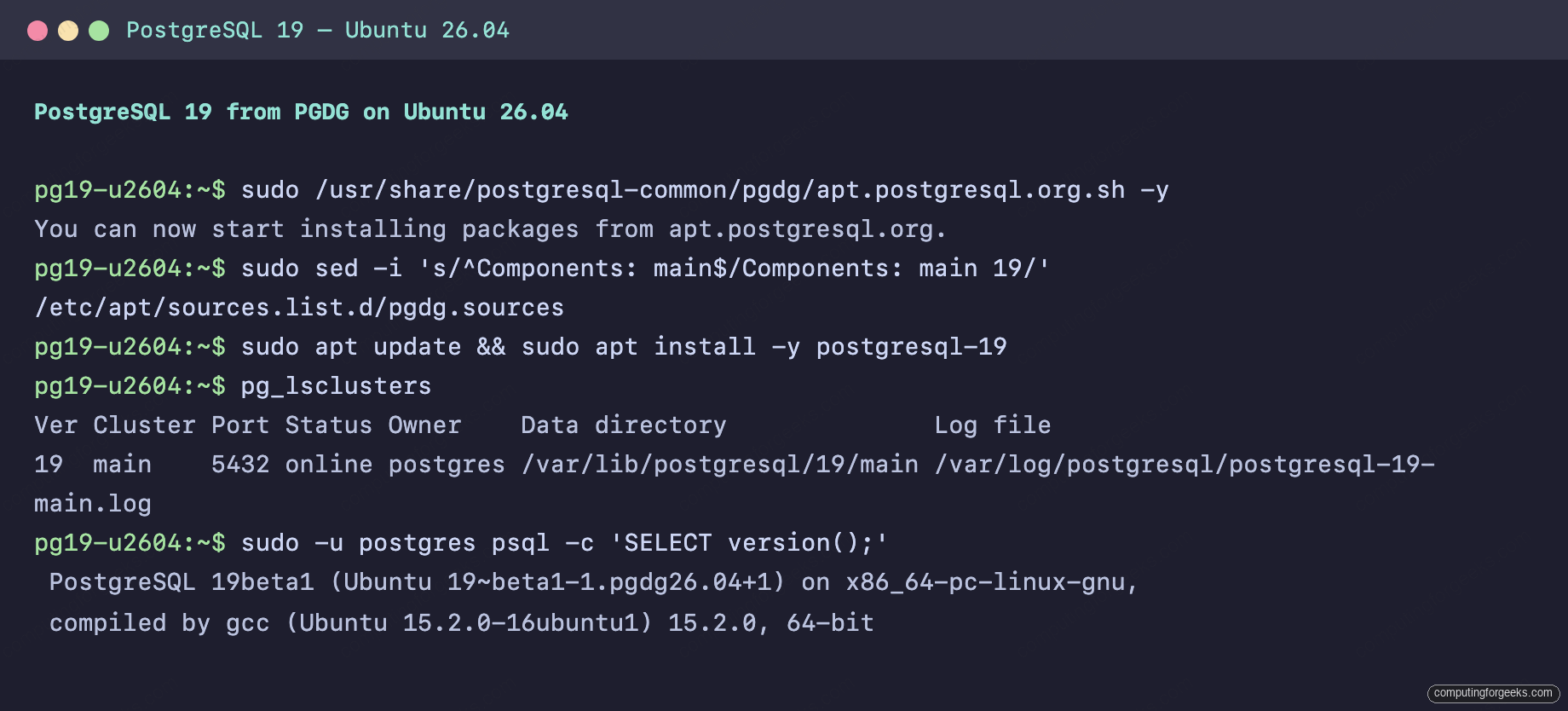
Ubuntu 24.04 takes the exact same commands; the only difference is the pgdg24.04 suffix in the version string.
Install on Debian 13 / 12
Debian rides the same PGDG flow, with the codename swapped automatically (trixie on 13, bookworm on 12). The whole sequence, identical to Ubuntu:
sudo apt update
sudo apt install -y postgresql-common
sudo /usr/share/postgresql-common/pgdg/apt.postgresql.org.sh -y
sudo sed -i 's/^Components: main$/Components: main 19/' /etc/apt/sources.list.d/pgdg.sources
sudo apt update && sudo apt install -y postgresql-19
The cluster comes up on its own here too, and the version check shows the Debian build:
PostgreSQL 19beta1 (Debian 19~beta1-1.pgdg13+1) on x86_64-pc-linux-gnu, compiled by gcc (Debian 14.2.0-19) 14.2.0, 64-bitThe run on the trixie box, start to finish:
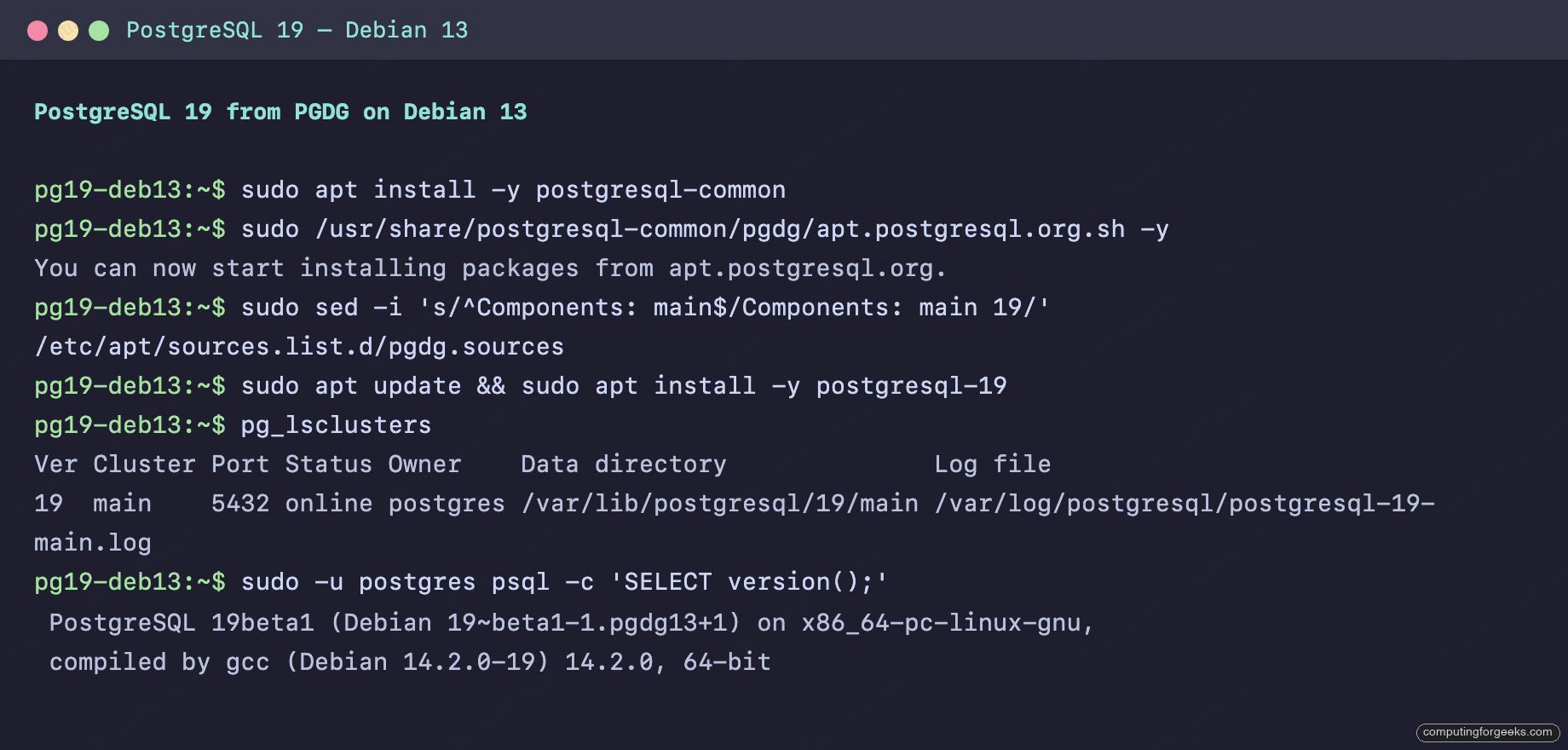
PGDG publishes the same 19 component for bookworm (19~beta1-1.pgdg12+1 at the time of writing), so Debian 12 follows along with zero changes. That closes out the apt side; the RHEL family works a little differently.
Install on Rocky Linux 10 / AlmaLinux 10
The RHEL family pulls from the PGDG yum repos. One thing you can drop from muscle memory: EL10 has no modularity, so the dnf module disable postgresql step that every EL9 guide carries is gone. Add the repo RPM:
sudo dnf install -y https://download.postgresql.org/pub/repos/yum/reporpms/EL-10-x86_64/pgdg-redhat-repo-latest.noarch.rpmUntil GA there is no plain pgdg19 repo; beta packages sit in pgdg19-updates-testing, which ships disabled. Enable it just for this install:
sudo dnf install -y postgresql19-server --enablerepo=pgdg19-updates-testingRHEL packaging initializes nothing on its own. Create the cluster and start the service:
sudo /usr/pgsql-19/bin/postgresql-19-setup initdb
sudo systemctl enable --now postgresql-19
Then verify the build:
sudo -u postgres psql -c 'SELECT version();'The Red Hat build string confirms 19beta1:
PostgreSQL 19beta1 on x86_64-pc-linux-gnu, compiled by gcc (GCC) 14.3.1 20251022 (Red Hat 14.3.1-4), 64-bitSELinux stayed enforcing the whole time. On the default port and data directory, PostgreSQL 19 runs without a single boolean or context change. AlmaLinux 10 uses the same EL-10 repo RPM and identical commands.
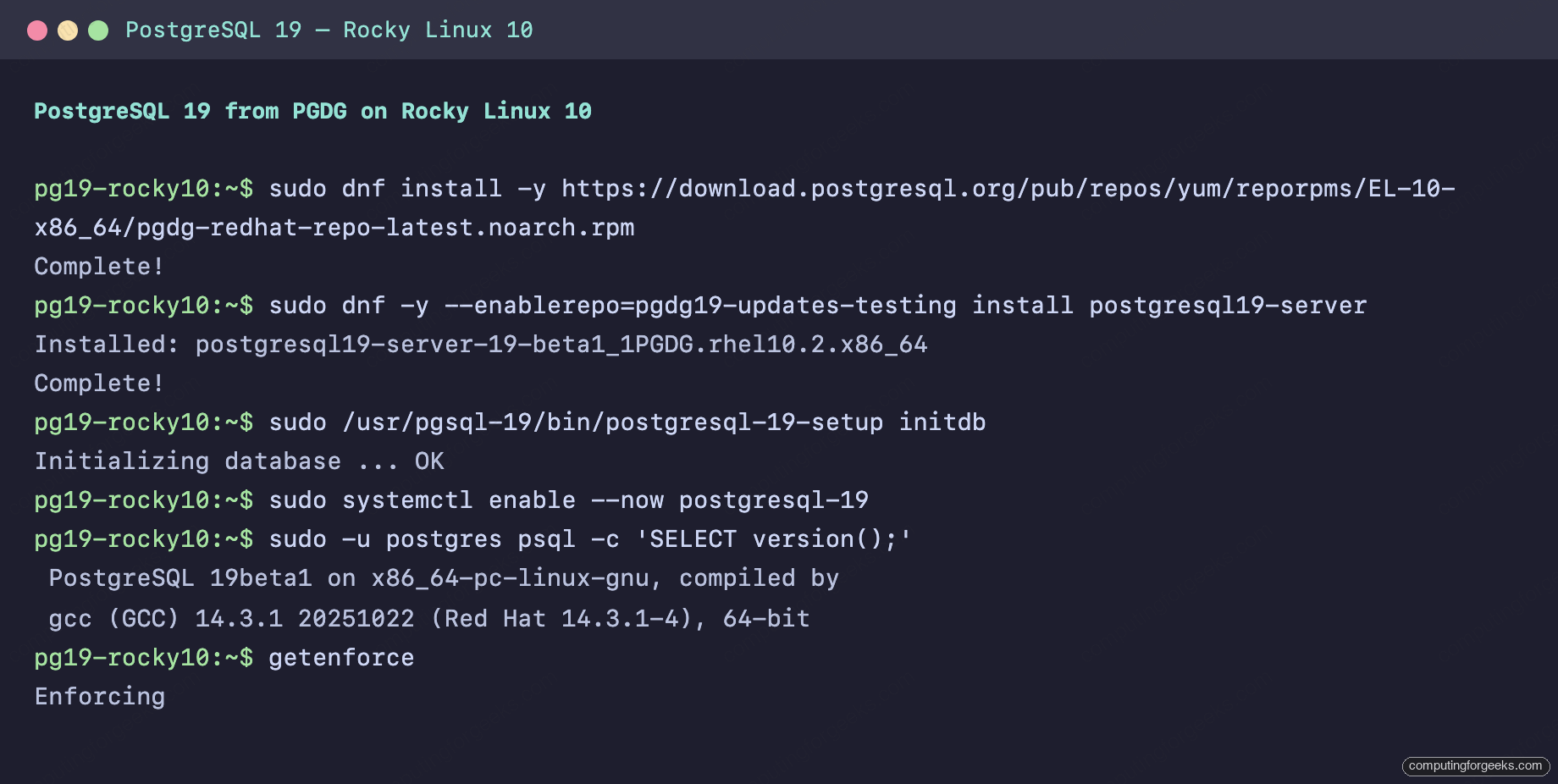
Both families are now on the same beta build. Time to see what it can do.
Take the new SQL for a spin
Straight to it. The atomic get-or-create first, since every app has one. Create a table and insert a user:
CREATE TABLE users (id serial PRIMARY KEY, email text UNIQUE, created_at timestamptz DEFAULT now());
INSERT INTO users (email) VALUES ('[email protected]') RETURNING id;
That returns id 1. Run the same insert again, and instead of a conflict error or a silent no-op, ask for the existing row back:
INSERT INTO users (email) VALUES ('[email protected]')
  ON CONFLICT (email) DO SELECT RETURNING id, email, created_at;
One statement, no race window, the original row comes back:
 id |       email       |          created_at
----+-------------------+-------------------------------
  1 | [email protected] | 2026-06-11 22:04:23.728454+00
(1 row)
Before 19 this took DO UPDATE SET email = excluded.email hacks or a second query. Next, GROUP BY ALL on a small deployments table:
CREATE TABLE deploys (env text, app text, duration_ms int);
INSERT INTO deploys VALUES ('prod','api',420),('prod','web',310),('staging','api',95),('staging','web',88);
SELECT env, app, avg(duration_ms) FROM deploys GROUP BY ALL;
Every non-aggregate column joins the grouping automatically:
   env   | app |         avg
---------+-----+----------------------
 staging | api |  95.0000000000000000
 prod    | api | 420.0000000000000000
 staging | web |  88.0000000000000000
 prod    | web | 310.0000000000000000
(4 rows)
The session below also shows IGNORE NULLS carrying the last known sensor value across gaps, a pattern that used to need a correlated subquery:
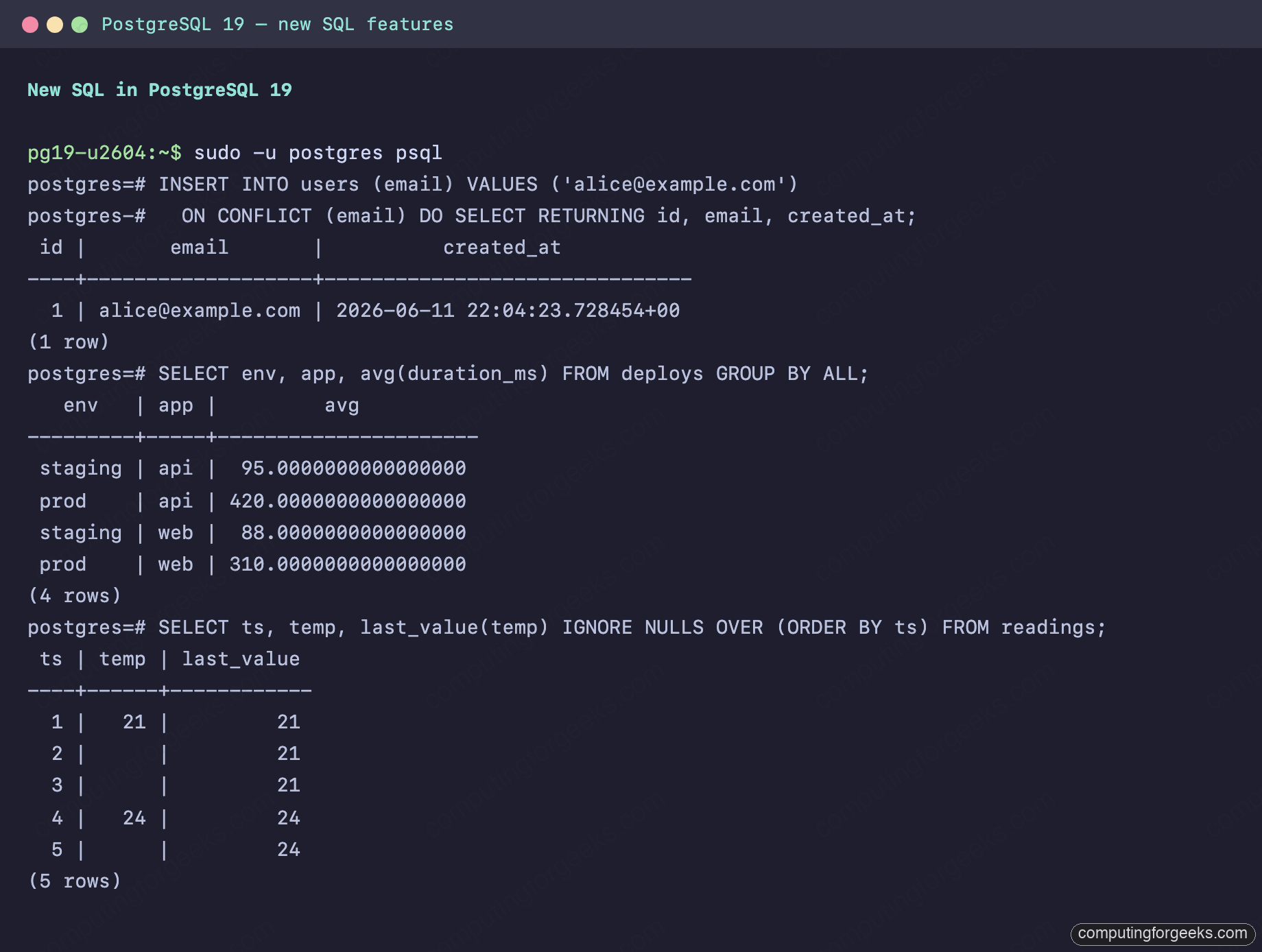
Now the headline act: property graphs. Model a service mesh as two ordinary tables, declare a graph over them, and query reachability:
CREATE TABLE services (id int PRIMARY KEY, name text);
CREATE TABLE calls (caller int REFERENCES services(id), callee int REFERENCES services(id), PRIMARY KEY (caller, callee));
INSERT INTO services VALUES (1,'frontend'),(2,'api'),(3,'auth'),(4,'db');
INSERT INTO calls VALUES (1,2),(2,3),(2,4),(3,4);

CREATE PROPERTY GRAPH service_map
  VERTEX TABLES (services KEY (id) LABEL service PROPERTIES (name))
  EDGE TABLES (
    calls KEY (caller, callee)
      SOURCE KEY (caller) REFERENCES services (id)
      DESTINATION KEY (callee) REFERENCES services (id)
      LABEL calls
  );
Which services talk to the database directly? Match the pattern:
SELECT * FROM GRAPH_TABLE (service_map
  MATCH (a IS service)-[IS calls]->(b IS service WHERE b.name = 'db')
  COLUMNS (a.name AS caller)
) ORDER BY caller;
Two callers, found by graph pattern instead of joins:
 caller
--------
 api
 auth
(2 rows)
One real limit found in testing: variable-length paths are not in the beta yet. A quantified pattern like -[IS calls]->{1,2} fails with ERROR: element pattern quantifier is not supported, so multi-hop traversal still needs a recursive CTE for now. Single-hop matching works, and since graphs are processed like views, the planner treats them as regular relational queries. If you are building retrieval pipelines, this pairs nicely with pgvector and the self-hosted RAG stack already running on PostgreSQL.
Two more worth a try while you are in the session: COPY (SELECT * FROM deploys) TO STDOUT WITH (FORMAT json) emits one JSON object per row, and REPACK deploys; rebuilds the table where you would have reached for VACUUM FULL.
Allow remote connections
The beta listens on localhost only, like every PostgreSQL before it. For LAN access, flip listen_addresses without touching a config file:
sudo -u postgres psql -c "ALTER SYSTEM SET listen_addresses = '*';"Then add a client rule. On Ubuntu and Debian the access file lives under /etc/postgresql/19/main/; append your subnet and restart:
echo 'host all all 10.0.1.0/24 scram-sha-256' | sudo tee -a /etc/postgresql/19/main/pg_hba.conf
sudo systemctl restart postgresql@19-main
On Rocky and AlmaLinux the file sits in the data directory:
echo 'host all all 10.0.1.0/24 scram-sha-256' | sudo tee -a /var/lib/pgsql/19/data/pg_hba.conf
sudo systemctl restart postgresql-19
Open TCP port 5432. Ubuntu ships ufw, and Debian can use the same after an apt install ufw:
sudo ufw allow 5432/tcpThe RHEL family uses firewalld, which ships a ready-made service definition:
sudo firewall-cmd --add-service=postgresql --permanent
sudo firewall-cmd --reload
That’s it. For anything beyond a test box, put real HA underneath with the Patroni cluster guide and wire up point-in-time recovery before you trust it with data.
PostgreSQL 19 vs PostgreSQL 18 at a glance
Every value in the 19 column was read live off the beta cluster with SHOW, not copied from docs:
| Setting / behavior | PostgreSQL 18 | PostgreSQL 19 |
|---|---|---|
| JIT compilation | on by default | jit = off |
| TOAST compression | pglz | lz4 |
max_locks_per_transaction | 64 | 128 |
| I/O workers | fixed io_workers | auto-scaling, io_min_workers=2 to io_max_workers=8 |
| Data checksums | on at initdb, offline to change | on, toggleable on a running cluster |
| Table rebuild | VACUUM FULL / CLUSTER | REPACK, with CONCURRENTLY |
| Get-or-create | ON CONFLICT DO UPDATE workaround | ON CONFLICT DO SELECT |
| Graph queries | recursive CTEs | SQL/PGQ GRAPH_TABLE |
| md5 passwords | warns when setting one; login is silent | deprecation warning on login too |
| RADIUS auth | supported | removed |
When GA lands, the packages have historically moved into the default repo components, so a plain apt upgrade or dnf upgrade carries these same installs forward. Until then, this beta is the cheapest way to find out whether the JIT default flip or the md5 warnings will touch your stack before they reach production.