A fresh Proxmox VE install points apt at the enterprise repository. Without a subscription key, every apt update ends in 401 Unauthorized and the package lists never refresh. Nothing installs, nothing upgrades.
The fix is the no-subscription repository: the same Proxmox packages, no key required, fine for home labs and test clusters. This guide disables the enterprise repositories and enables the no-subscription repositories for both Proxmox VE and Ceph on Proxmox VE 9, from the command line and from the web UI. A fresh Proxmox VE install is the only prerequisite. The steps below were run on Proxmox VE 9 in June 2026.
Step 1: Confirm the version and the failing repository
Proxmox VE 9 moved apt to the deb822 .sources format, so the repository files look nothing like the one-line sources.list entries from Proxmox VE 8 and earlier. This is one of several base-system changes in the 9 release. Check the running version first:
pveversionThe output names the manager version and the running kernel:
pve-manager/9.2.2/b9984c6d90a4bd80 (running kernel: 7.0.2-6-pve)The repository definitions live as deb822 files under /etc/apt/sources.list.d/. List them:
ls /etc/apt/sources.list.d/A default install ships three:
ceph.sources debian.sources pve-enterprise.sourcesBoth pve-enterprise.sources and ceph.sources point at enterprise.proxmox.com, which is gated behind a paid key. Run an update and apt rejects both:
apt updateThe Debian mirrors hit fine; the two Proxmox enterprise repositories return 401 Unauthorized, which leaves the package index stale:
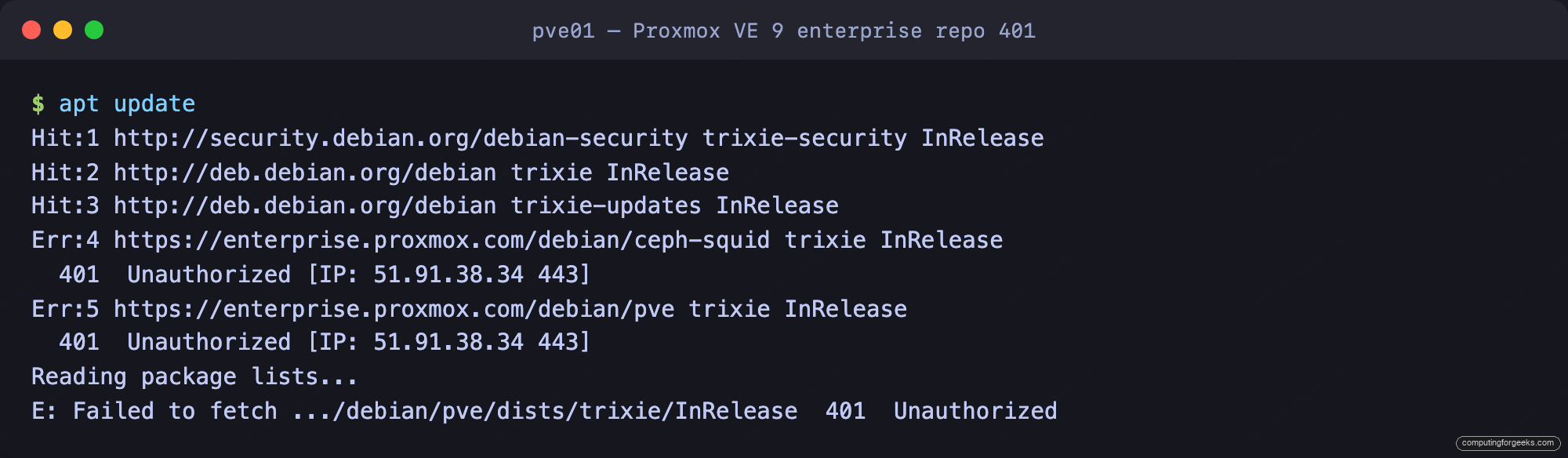
Step 2: Disable the enterprise repository
Disabling a deb822 source means adding an Enabled: false line to it. Append it to the Proxmox VE enterprise file:
echo 'Enabled: false' >> /etc/apt/sources.list.d/pve-enterprise.sourcesThe file keeps its definition but apt now skips it:
Types: deb
URIs: https://enterprise.proxmox.com/debian/pve
Suites: trixie
Components: pve-enterprise
Signed-By: /usr/share/keyrings/proxmox-archive-keyring.gpg
Enabled: false
The enterprise Ceph repository in ceph.sources gets handled in the next step, where its file is swapped for the no-subscription version outright.
Step 3: Add the no-subscription repositories
Create a new source file for the Proxmox VE no-subscription repository:
nano /etc/apt/sources.list.d/pve-no-subscription.sourcesAdd these five lines:
Types: deb
URIs: http://download.proxmox.com/debian/pve
Suites: trixie
Components: pve-no-subscription
Signed-By: /usr/share/keyrings/proxmox-archive-keyring.gpg
The Suites value tracks the Debian base. Proxmox VE 9 sits on Debian 13, so it reads trixie. On Proxmox VE 8 the same line would read bookworm. Get this wrong and apt reports the release as not found.
Ceph carries its own repository. Rather than disabling the enterprise Ceph source and adding a second file, overwrite ceph.sources with the no-subscription definition:
nano /etc/apt/sources.list.d/ceph.sourcesReplace the contents with the no-subscription Ceph repository. This build shipped the Squid release of Ceph, so the path reads ceph-squid:
Types: deb
URIs: http://download.proxmox.com/debian/ceph-squid
Suites: trixie
Components: no-subscription
Signed-By: /usr/share/keyrings/proxmox-archive-keyring.gpg
The Ceph codename tracks the Ceph release your Proxmox version bundles. This node shipped Squid, so the path reads ceph-squid. Newer Proxmox VE 9 builds moved to Tentacle, where it reads ceph-tentacle. Match whatever the existing ceph.sources already references, and skip the Ceph repository entirely on nodes that do not run Ceph.
Step 4: Refresh the package index
Reload apt so it reads the new sources:
apt updateapt now fetches from download.proxmox.com, the 401 is gone, and the index rebuilds cleanly:
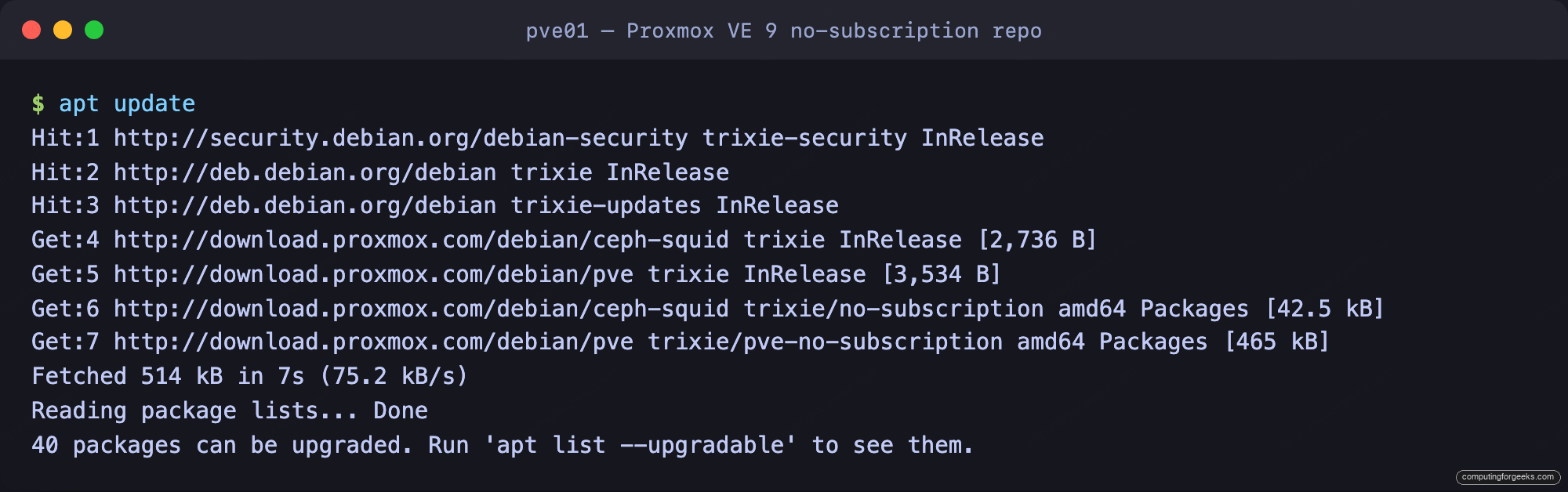
With the index current, apply the pending updates:
apt full-upgradeOn the test box that pulled 40 packages, including a kernel point release. When the kernel changes, reboot the node so it runs the new build. Use full-upgrade rather than apt upgrade: the plain upgrade holds back any package that needs a new dependency, and on Proxmox that means the kernel and the pve-manager stack get left behind.
Step 5: Do the same in the web UI
The web UI edits the exact same files. Open the console at https://10.0.1.50:8006, select the node in the Server View tree, then open Updates followed by Repositories:
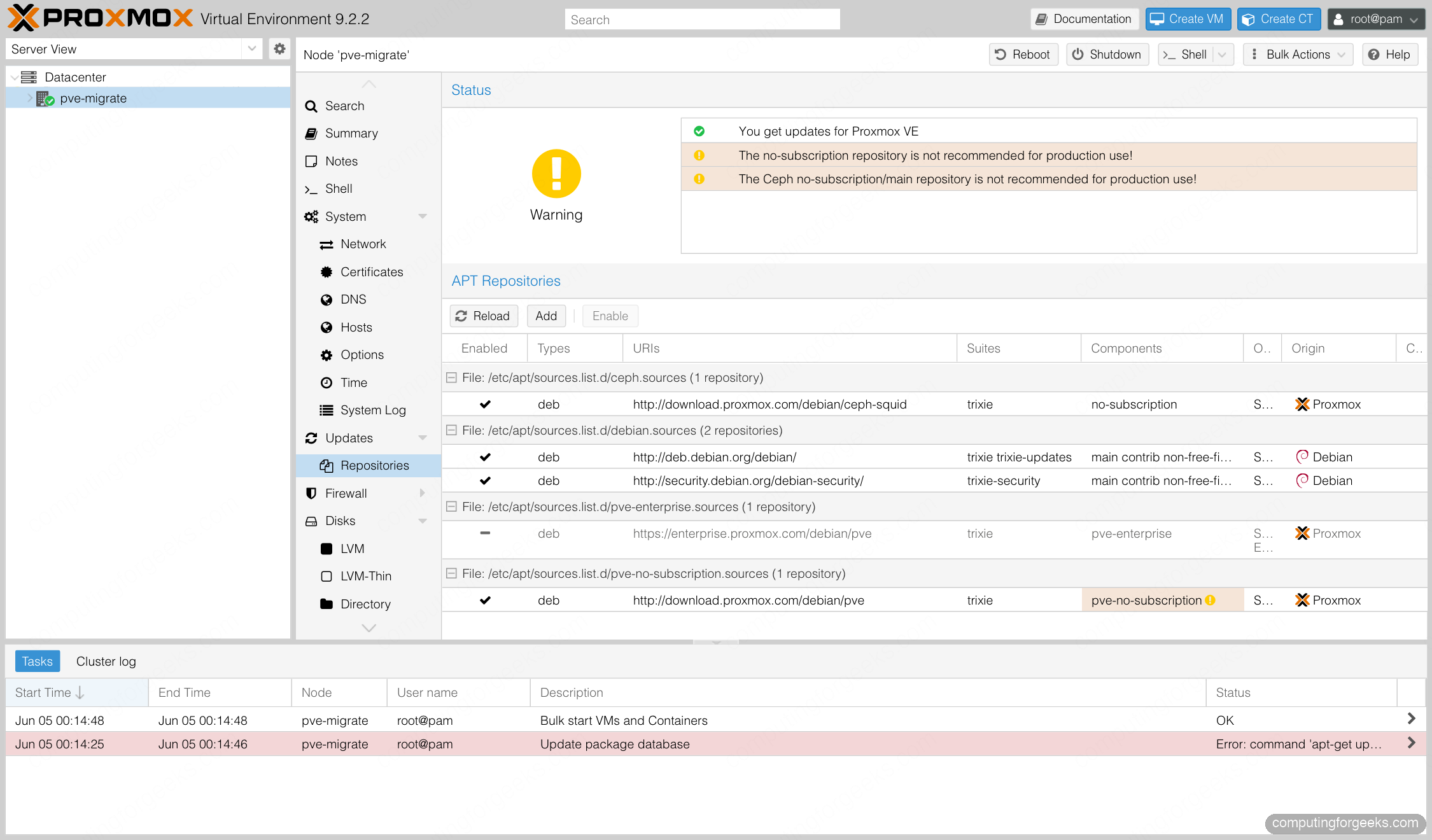
Every source shows up in the grid with an Enabled column. The Add button writes a new .sources file from a dropdown of known repositories, and selecting the enterprise row then clicking Disable writes the Enabled: false flag for you. The status box at the top flips to a green You get updates for Proxmox VE once a no-subscription repository is active. The orange note that the no-subscription repository is not recommended for production is expected, and safe to ignore on a lab node.
Which Proxmox VE 9 repository to use
The packages in the no-subscription repository are the same builds as enterprise. The difference is release cadence and the support contract, not the binaries. Pick by where the node runs:
| Repository | URL | Key required | Use for |
|---|---|---|---|
| pve-enterprise | enterprise.proxmox.com/debian/pve | Yes (paid) | Production clusters with a support contract |
| pve-no-subscription | download.proxmox.com/debian/pve | No | Home labs, test clusters, non-critical hosts |
| pvetest | download.proxmox.com/debian/pve (pvetest) | No | Trying unreleased packages, never production |
| ceph-squid (enterprise) | enterprise.proxmox.com/debian/ceph-squid | Yes (paid) | Production Ceph with support |
| ceph-squid (no-subscription) | download.proxmox.com/debian/ceph-squid | No | Lab and test Ceph |
For anything that is not a paid production cluster, the no-subscription repository is the right default. It keeps the node patched without a key, and the enterprise repository is one toolbar click away the day a support contract gets added. If this node is the target of a VMware ESXi migration, set the repository before the first import so the helper packages install cleanly.