

Every internal Kubernetes service needs TLS, every TLS cert needs to renew, and every renewal needs to happen without anyone touching a YAML file at 2 AM. The combination most teams reach for is cert-manager with Let’s Encrypt, which works beautifully for public services. It works less well when your cluster is on an air-gapped lab, behind corporate DNS, or serving internal-only hosts that should never have a public DNS record. The fix is to point cert-manager at your own ACMEv2 server. FreeIPA 4.12 ships one out of the box, and three commands turn it on.
This walkthrough builds a 3-node k3s cluster, installs cert-manager v1.17 with an nginx ingress, registers a ClusterIssuer against the FreeIPA ACME directory, and lets cert-manager provision a TLS certificate for a demo workload via HTTP-01 challenge. Every cert chains to the IPA CA, every renewal goes through the same loop, and every node in the cluster trusts the issuer automatically. The article also documents the four gotchas you will hit: Rocky 10 k3s incompatibility, missing CA trust bundles, the ECDSA-vs-RSA profile rejection, and the CoreDNS forward zone that has to exist before the ClusterIssuer can register.
If you have not built the underlying FreeIPA realm yet, start with the server install guide and the FreeIPA ACME setup article. The certbot and acme.sh patterns in that piece carry over here, just running inside the cert-manager controller instead of on a bare host.
Why FreeIPA ACME for internal Kubernetes services
The default cert-manager pattern uses Let’s Encrypt as the upstream ACME server. For internal-only DNS names, that has three problems: Let’s Encrypt requires the domain to be publicly resolvable for HTTP-01 challenges, the issued cert is logged to public Certificate Transparency, and the rate limits cap you at 50 certs per registered domain per week. None of those constraints fit a real production cluster that wants to issue per-service certs.
Pointing cert-manager at FreeIPA’s ACME directory flips all three. The ACME endpoint runs inside your realm, the certs come from your own Dogtag CA, no CT log gets a record, and there are no rate limits beyond what your Dogtag instance can sign per minute. The certs work identically: same RFC 8555 protocol, same HTTP-01 and DNS-01 challenges, same renewal semantics. The cert-manager controller has no idea the upstream is private.
The trade-off is trust. Public CAs are baked into every browser and OS. Your IPA CA is not. The fix is to install /etc/ipa/ca.crt into the trust stores of everything that talks to your internal services. For pods inside the cluster, that means injecting the CA into the container images or mounting it via a ConfigMap. For developer laptops, the pattern is the same one you use for any internal PKI: distribute the CA once, trust it everywhere.
The lab
Four Virtual Machines used in our setup:
- ipa.cfg-lab.local at 192.168.1.141, Rocky Linux 10.1, 4 GB RAM, full FreeIPA 4.12.2 with integrated DNS and ACME enabled
- k3s01.cfg-lab.local at 192.168.1.142, Ubuntu 24.04.4, 2.5 GB RAM, k3s control plane with embedded etcd
- k3s02.cfg-lab.local at 192.168.1.143, Ubuntu 24.04.4, 2.5 GB RAM, k3s server, joins via cluster token
- k3s03.cfg-lab.local at 192.168.1.144, Ubuntu 24.04.4, 2.5 GB RAM, k3s server, third etcd member for quorum
Three k3s nodes is the minimum for HA with embedded etcd because Raft needs odd-numbered quorum. All three nodes have the IPA CA cert in their system trust store at /usr/local/share/ca-certificates/ipa-ca.crt, all three resolve cfg-lab.local through the IPA DNS at 192.168.1.141, and all three run an nginx ingress controller pod with hostNetwork so port 80 and 443 are reachable on every node IP.
Why not Rocky Linux 10 for the k3s nodes
The first version of this lab put Rocky Linux 10.1 on the k3s nodes. It did not work. Rocky 10 ships kernel 6.12 with a minimal netfilter footprint: br_netfilter, ip_tables, iptable_nat, and xt_comment are simply not present, even with kernel-modules-extra installed. The kernel is nftables-only.
k3s’s kube-proxy can be switched to proxy-mode=nftables and the service mesh part works. The CNI portmap plugin used by k3s’s servicelb cannot. It hard-calls iptables -t nat -C ... -m comment --comment ... -j MARK --set-xmark 0x2000/0x2000, which fails on Rocky 10 with “Extension comment revision 0 not supported, missing kernel module”. svclb-traefik pods stay in ContainerCreating forever, the LoadBalancer external IP never resolves, and nothing on port 80 or 443 actually serves.
Ubuntu 24.04 ships every iptables-legacy module the CNI plugins expect. k3s drops in and runs without any kernel module gymnastics. The lab pivoted to Ubuntu 24.04 on the k3s nodes after burning an hour on the Rocky 10 path. AlmaLinux 9 or RHEL 9 would also work because they keep the legacy modules. The IPA server stays on Rocky 10.1 because FreeIPA does not need any of those modules and benefits from the LMDB-backed RSNv3 default.
Install the k3s cluster
One node bootstraps the cluster with --cluster-init, two more join with --server pointing back at the first. We disable the built-in servicelb and traefik because we run nginx ingress instead, which gives more control over the HTTP-01 challenge solver path:
# On k3s01
sudo modprobe br_netfilter ip_tables iptable_nat xt_comment
curl -sfL https://get.k3s.io | INSTALL_K3S_VERSION=v1.32.3+k3s1 sh -s - server
  --cluster-init
  --tls-san=k3s.cfg-lab.local
  --disable=servicelb
  --disable=traefik

# Capture the node token
sudo cat /var/lib/rancher/k3s/server/node-token

# On k3s02 and k3s03
sudo modprobe br_netfilter ip_tables iptable_nat xt_comment
curl -sfL https://get.k3s.io | INSTALL_K3S_VERSION=v1.32.3+k3s1
  K3S_TOKEN=$NODE_TOKEN sh -s - server
  --server https://192.168.1.142:6443
  --tls-san=k3s.cfg-lab.local
  --disable=servicelb
  --disable=traefik
The version pin is deliberate. cert-manager v1.17 is tested against k8s 1.32, and pinning the k3s version makes the lab reproducible. After all three nodes finish, kubectl get nodes should report three Ready control-plane / etcd / master nodes within about a minute.
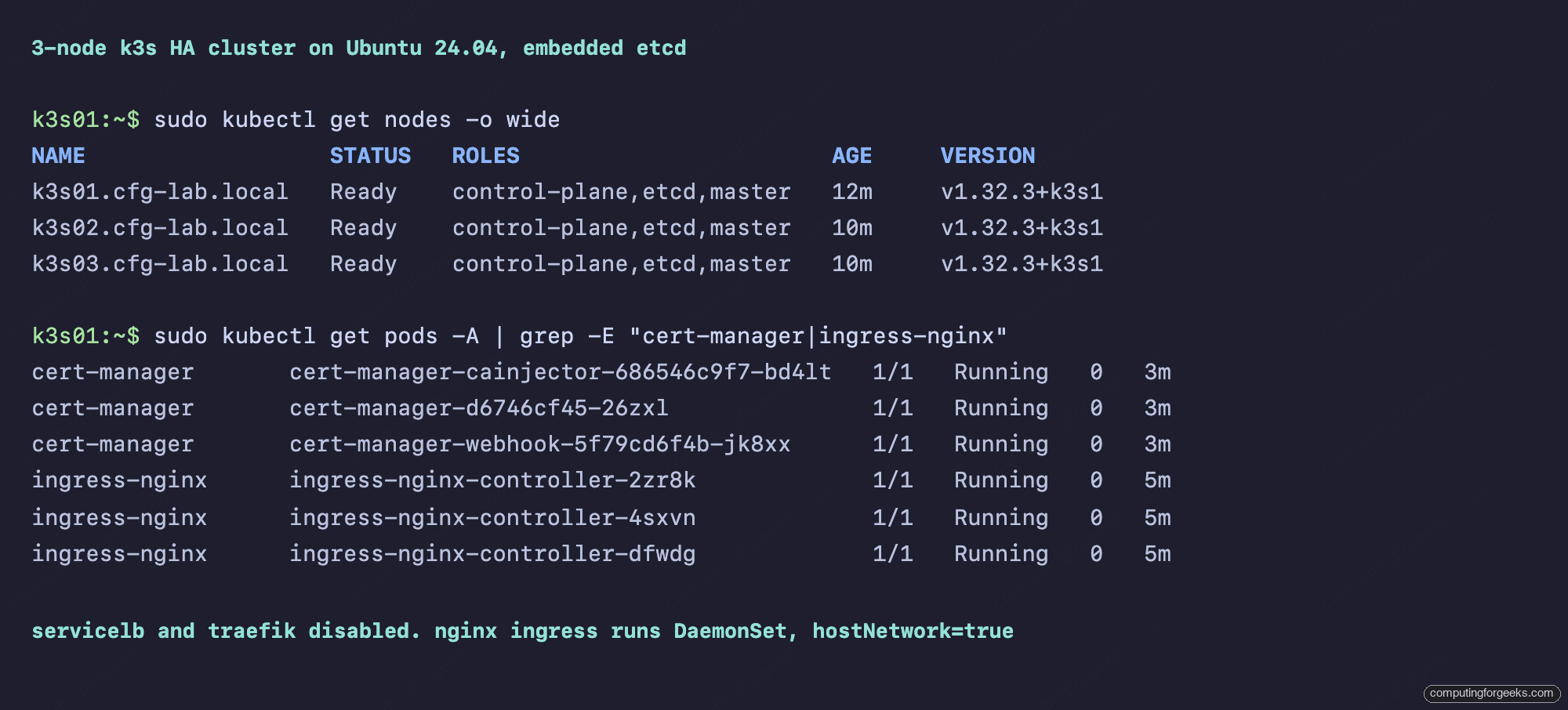
Once the cluster is up, install the IPA CA into the system trust store on every node with curl -sk https://ipa.cfg-lab.local/ipa/config/ca.crt -o /usr/local/share/ca-certificates/ipa-ca.crt followed by update-ca-certificates. This is what lets the cert-manager controller’s outbound connection to the ACME directory succeed.
Install nginx ingress as a DaemonSet on host network
The HTTP-01 challenge requires port 80 to be reachable on the ingress controller. The classic LoadBalancer approach uses an external load balancer to forward port 80 to the cluster, which we do not have. The alternative is to run nginx ingress as a DaemonSet with hostNetwork: true, so each pod claims port 80 and 443 directly on the host where it runs. Three pods, three nodes, three IPs that serve TLS.
helm repo add ingress-nginx https://kubernetes.github.io/ingress-nginx
helm repo update

helm install ingress-nginx ingress-nginx/ingress-nginx
  --namespace ingress-nginx --create-namespace
  --set controller.kind=DaemonSet
  --set controller.hostNetwork=true
  --set controller.hostPort.enabled=true
  --set controller.dnsPolicy=ClusterFirstWithHostNet
  --set controller.service.type=ClusterIP
  --set controller.ingressClassResource.default=true
The dnsPolicy: ClusterFirstWithHostNet is the second non-obvious flag. By default a hostNetwork pod inherits the host’s resolver, which on these nodes points at the IPA DNS at 192.168.1.141. That works for external lookups but breaks for service-to-service traffic inside the cluster, because the IPA DNS does not know about kubernetes.default.svc. Switching to ClusterFirstWithHostNet forces nginx to query CoreDNS first.
Install cert-manager and wire the CoreDNS forward
cert-manager v1.17 installs with one Helm command, but the ClusterIssuer that follows will only register if the cert-manager pods can resolve ipa.cfg-lab.local. CoreDNS in a fresh k3s cluster does not know how. Add a forward zone via the coredns-custom ConfigMap convention that k3s honors:
helm repo add jetstack https://charts.jetstack.io
helm repo update

helm install cert-manager jetstack/cert-manager
  --namespace cert-manager --create-namespace
  --version v1.17.1
  --set crds.enabled=true

cat <<YAML | kubectl apply -f -
apiVersion: v1
kind: ConfigMap
metadata:
  name: coredns-custom
  namespace: kube-system
data:
  cfg-lab.server: |
    cfg-lab.local:53 {
        errors
        cache 30
        forward . 192.168.1.141
    }
YAML

kubectl rollout restart -n kube-system deployment coredns
The cfg-lab.server key name is significant. k3s’s CoreDNS Corefile contains import /etc/coredns/custom/*.server, so any ConfigMap key ending in .server gets pulled in as an extra zone block. The forward target is the IPA DNS server, which means cert-manager pods now resolve internal IPA hostnames through your authoritative source.
The ClusterIssuer with caBundle and RSA
The ClusterIssuer is one YAML resource. Three things it needs that are easy to forget: a caBundle field with the base64-encoded IPA CA cert (so cert-manager trusts the ACME endpoint without relying on the pod’s system trust store), an http01.ingress.ingressClassName matching whatever ingress controller you installed, and a privateKeySecretRef name where the ACME account key gets stashed:
CA_B64=$(base64 -w0 /usr/local/share/ca-certificates/ipa-ca.crt)

cat <<YAML | kubectl apply -f -
apiVersion: cert-manager.io/v1
kind: ClusterIssuer
metadata:
  name: freeipa-acme
spec:
  acme:
    server: https://ipa.cfg-lab.local/acme/directory
    caBundle: $CA_B64
    email: [email protected]
    privateKeySecretRef:
      name: freeipa-acme-account-key
    solvers:
      - http01:
          ingress:
            ingressClassName: nginx
YAML
The caBundle field is base64 of the PEM, no headers stripped. The cert-manager controller decodes it at runtime and uses it as the only trusted CA for the ACME connection, completely bypassing the pod’s system trust store. This is the cleanest path because it keeps the trust scoped to this one issuer.
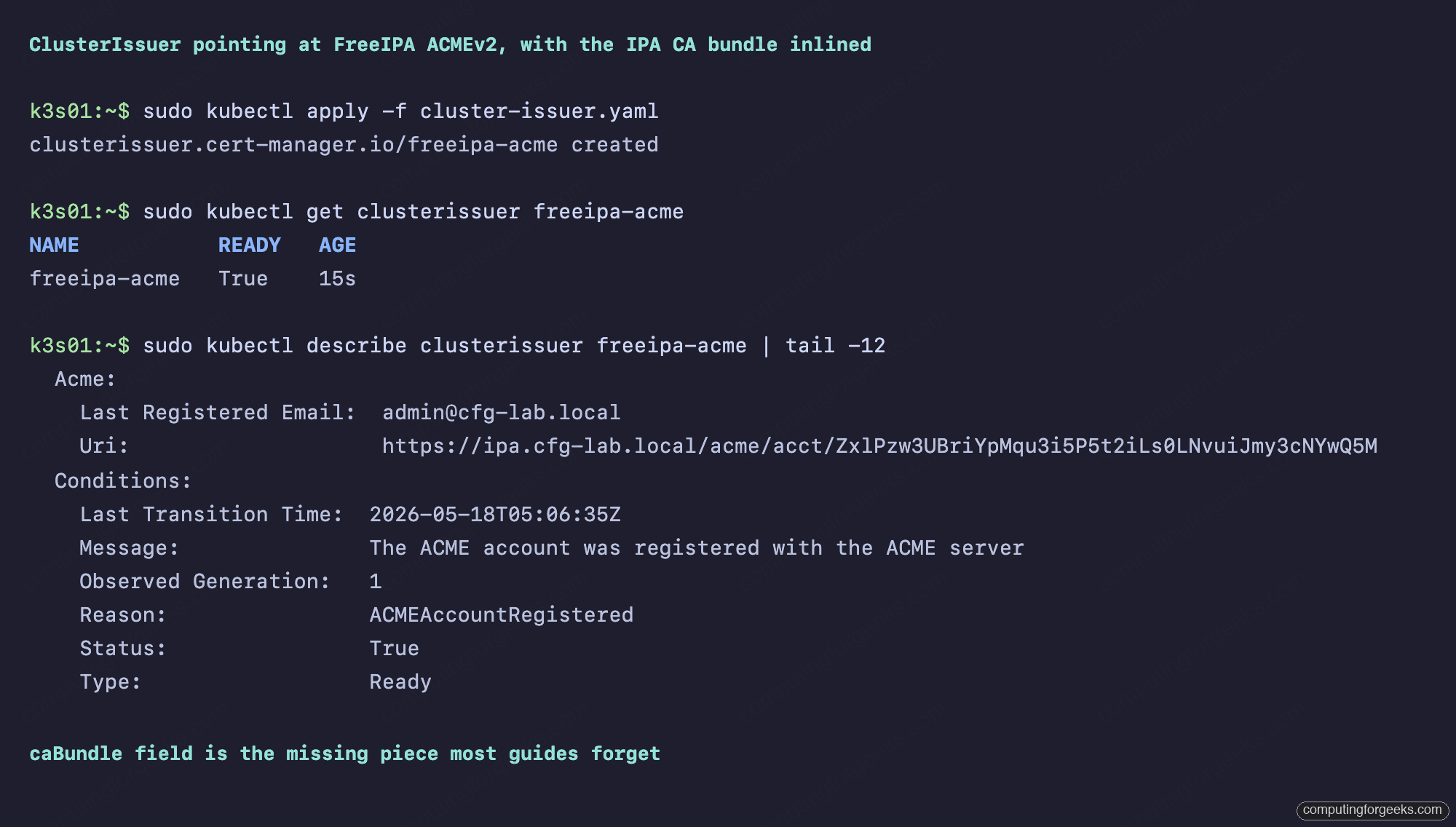
If the ClusterIssuer stays in Ready=False, the message field of the Ready condition tells you which gotcha you hit. x509: certificate signed by unknown authority means the caBundle is wrong or missing. dial tcp: lookup ipa.cfg-lab.local: i/o timeout means the CoreDNS forward zone never landed. dial tcp 192.168.1.141:443: connect: connection refused means the IPA server isn’t running, isn’t bound to the right IP, or has firewalld blocking port 443.
Annotate an Ingress to provision a cert
The fastest way to test the end-to-end flow is an Ingress with the cert-manager.io/cluster-issuer annotation and a tls block. cert-manager’s ingress-shim watches every Ingress, sees the annotation, and creates a matching Certificate resource that triggers the ACME flow:
apiVersion: networking.k8s.io/v1
kind: Ingress
metadata:
  name: hello
  namespace: demo
  annotations:
    cert-manager.io/cluster-issuer: freeipa-acme
    cert-manager.io/private-key-algorithm: RSA
    cert-manager.io/private-key-size: "2048"
spec:
  ingressClassName: nginx
  tls:
    - hosts:
        - hello.cfg-lab.local
      secretName: hello-tls
  rules:
    - host: hello.cfg-lab.local
      http:
        paths:
          - path: /
            pathType: Prefix
            backend:
              service:
                name: hello
                port:
                  number: 80
The two private-key-* annotations are mandatory. The FreeIPA ACME profile acmeIPAServerCert only accepts RSA 2048, 3072, 4096, or 8192. cert-manager defaults to ECDSA P-256 if you do not say otherwise, the CSR gets rejected at finalization with an HTTP 500, and the Certificate stuck in Issuing never moves. Setting the algorithm to RSA and the size to 2048 fixes it.
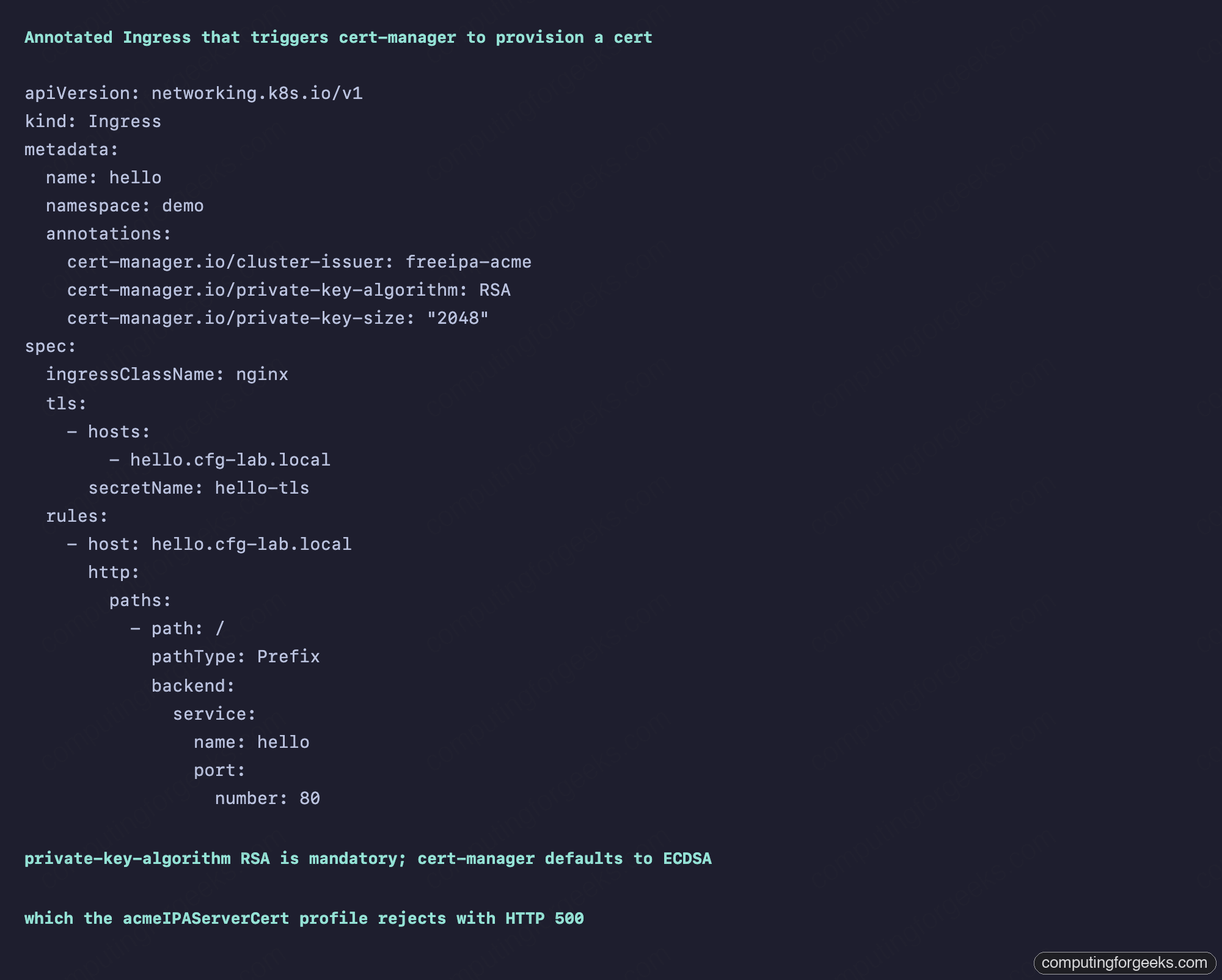
Behind the scenes, cert-manager creates a Certificate resource, which creates a CertificateRequest, which creates an Order against the ACME directory, which creates a Challenge for each domain. The Challenge resource provisions a temporary Ingress with the same host but a path of /.well-known/acme-challenge/<token> pointing at a small solver pod that returns the expected key authorization string. FreeIPA fetches the URL, sees the match, marks the authorization valid, and the Order finalizes.
Watch the cert land in a Kubernetes Secret
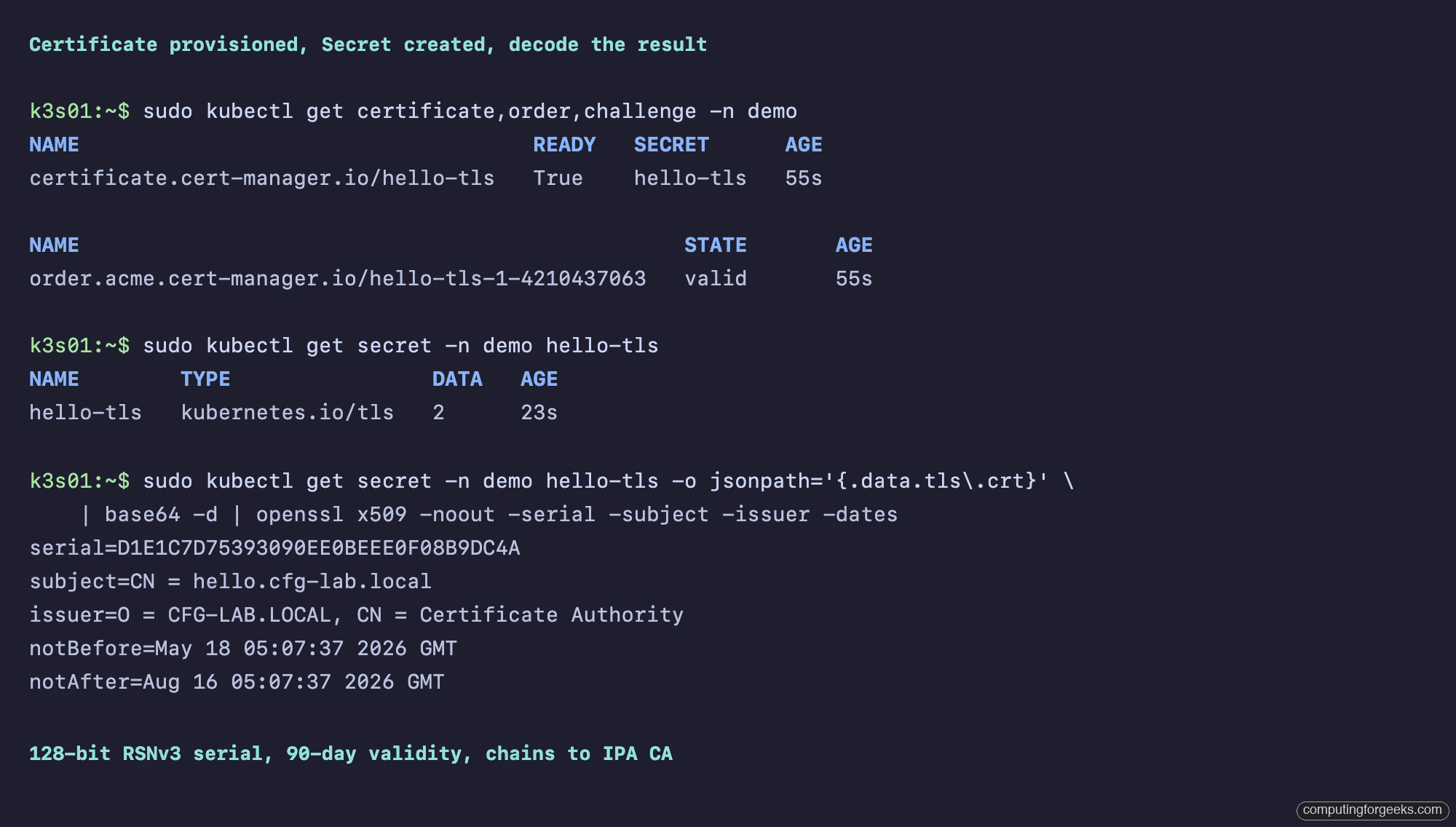
Inside a minute, the Certificate flips to Ready=True and a Secret named hello-tls appears in the demo namespace with the cert and key:
kubectl get certificate,order,challenge -n demo

kubectl get secret -n demo hello-tls -o jsonpath='{.data.tls.crt}'
  | base64 -d
  | openssl x509 -noout -serial -subject -issuer -dates
The decoded cert has a 128-bit hex serial (FreeIPA’s RSNv3 default on the LMDB backend), a CN matching the hostname, an issuer of O=CFG-LAB.LOCAL, CN=Certificate Authority, and a 90-day validity window. The Secret has two keys, tls.crt and tls.key, that the nginx ingress controller picks up automatically and uses for the TLS termination on the hello.cfg-lab.local route.
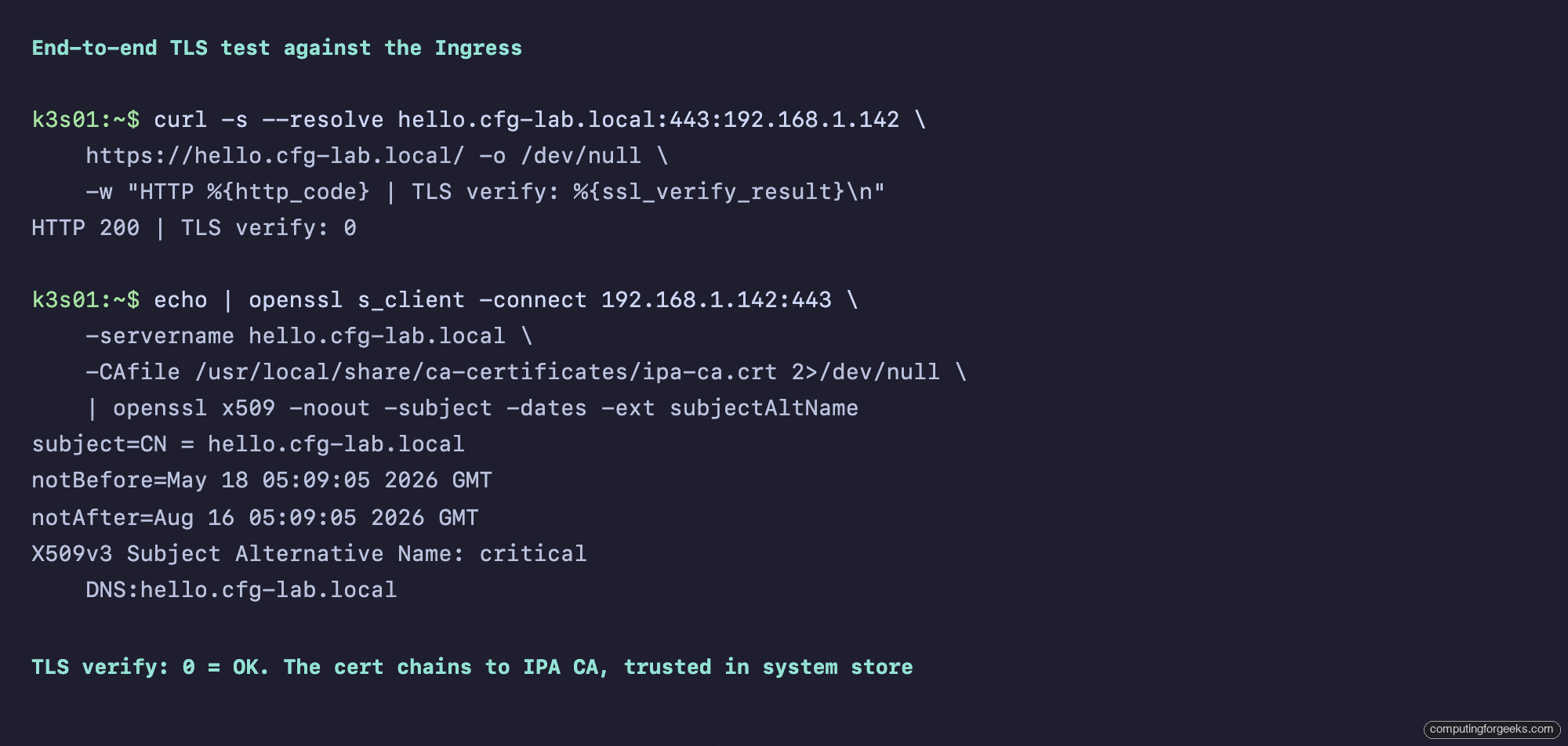
End-to-end test with curl, pinning the host header to the ingress IP so DNS resolution stays out of scope:
curl -s --resolve hello.cfg-lab.local:443:192.168.1.142
  https://hello.cfg-lab.local/ -o /dev/null
  -w "HTTP %{http_code} | TLS verify: %{ssl_verify_result}n"

echo | openssl s_client -connect 192.168.1.142:443
  -servername hello.cfg-lab.local
  -CAfile /usr/local/share/ca-certificates/ipa-ca.crt 2>/dev/null
  | openssl x509 -noout -subject -dates -ext subjectAltName
The first call reports HTTP 200 | TLS verify: 0. Zero from ssl_verify_result means OpenSSL successfully validated the chain against the system trust store, which has the IPA CA. The second call inspects the cert nginx is actually serving, which should match the Subject from the kubectl secret decode.
Force a renewal with cmctl
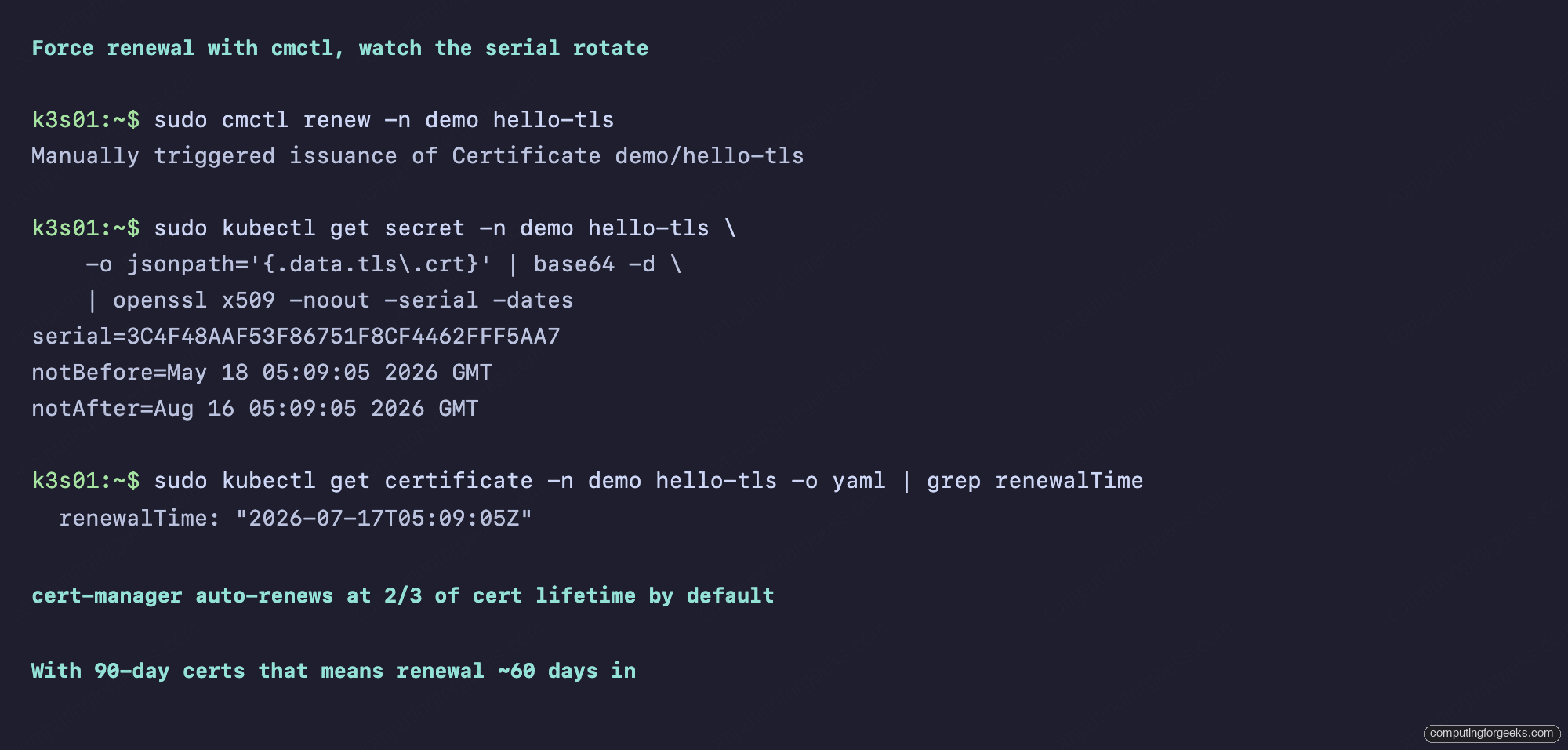
cert-manager renews automatically at two-thirds of the cert lifetime by default, which for a 90-day cert means around day 60. To prove the renewal loop works without waiting two months, use cmctl to force one:
curl -sLO https://github.com/cert-manager/cmctl/releases/download/v2.1.1/cmctl_linux_amd64
sudo install cmctl_linux_amd64 /usr/local/bin/cmctl

# Capture the current serial
OLD=$(kubectl get secret -n demo hello-tls
  -o jsonpath='{.data.tls.crt}' | base64 -d
  | openssl x509 -noout -serial | cut -d= -f2)
echo "Old serial: $OLD"

# Trigger immediate renewal
cmctl renew -n demo hello-tls

# Watch the Secret rotate
NEW=$(kubectl get secret -n demo hello-tls
  -o jsonpath='{.data.tls.crt}' | base64 -d
  | openssl x509 -noout -serial | cut -d= -f2)
echo "New serial: $NEW"
The new serial is a different 128-bit value (each ACME order is an independent random draw on the Dogtag side). The Secret in the namespace is updated in place, the nginx ingress controller picks up the new TLS material on its next config reload, and pods consuming the Secret as a mount get the new file content within their kubelet sync interval. No pod restart needed.
Watching from the FreeIPA WebUI
Every cert issued through cert-manager appears in the regular IPA Certificates view, indistinguishable from a cert issued by ipa cert-request or by certbot. Log in at https://ipa.cfg-lab.local/ipa/ui/, navigate to Authentication, Certificates, and look for the hostnames you annotated on your Ingresses:
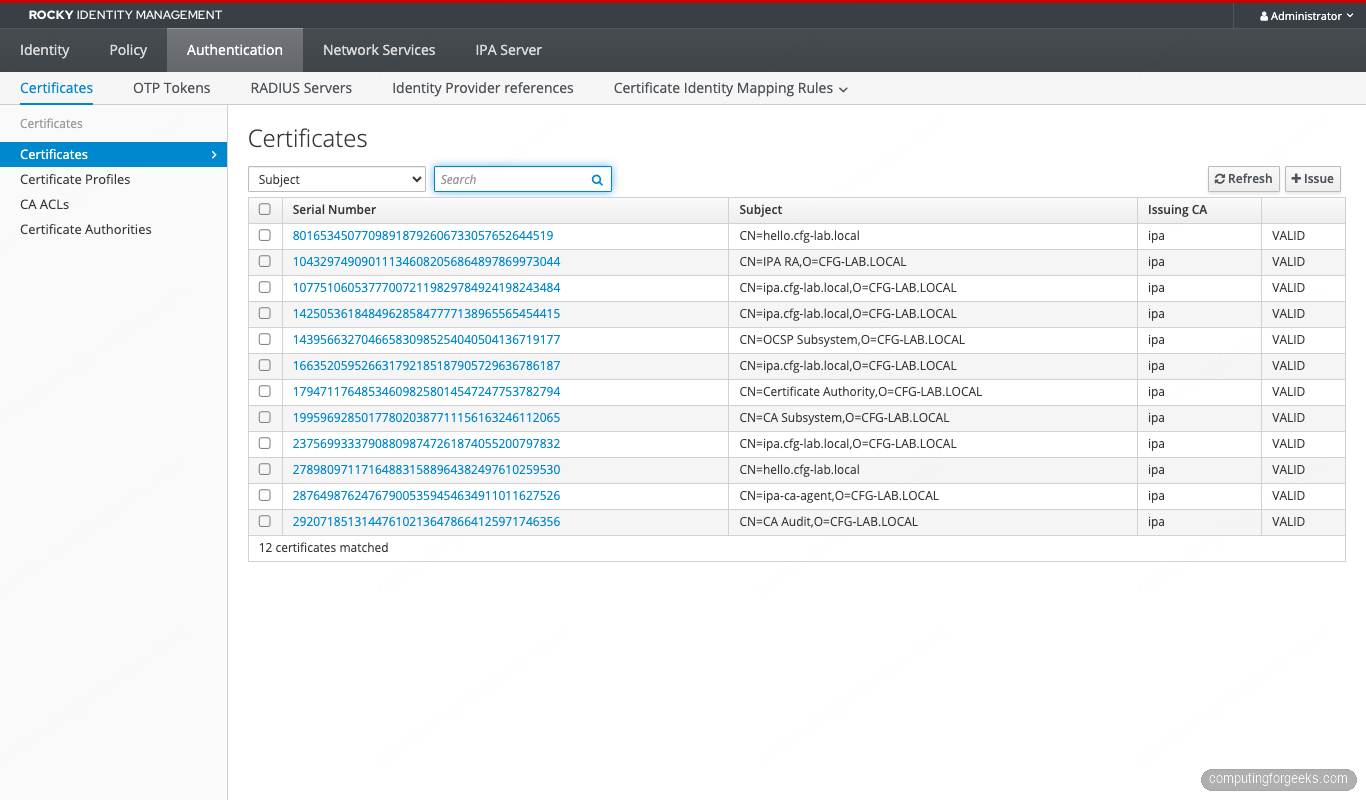
The renewal shows up as a second cert with the same Subject. The original cert is still listed until its notAfter hits, which is the standard ACME pattern. If you want to revoke a superseded cert immediately rather than letting it expire, use the decimal form of the serial and call ipa cert-revoke <decimal> --revocation-reason=4 on the IPA host.
Operational notes: HA, multi-cluster, namespace policies
A single ClusterIssuer is enough for one cluster, but a real production setup has nuances.
HA on the ACME side. If your IPA realm has multiple replicas, enable ACME on each (it is a per-server flag, ipa-acme-manage enable). Then point the ClusterIssuer at a DNS name that resolves to all replicas, or front them with an HAProxy. The ACME protocol is stateful per-account, so any account registered against one replica is replicated via LDAP and works against the others.
Per-namespace Issuers. A ClusterIssuer issues for any namespace. If you want stricter isolation, use a per-namespace Issuer resource with the same spec block. Different namespaces can then use different ACME accounts, different email contacts, different rate limits if you ever add them on the IPA side.
Multi-cluster. Every k8s cluster you run can register its own ACME account against the same FreeIPA realm. The accounts are independent. The certs are not, in the sense that two clusters can issue for the same hostname if you let them, which you probably should not. RBAC and ingress admission policies are the lever.
Trust distribution. Pods that do not consume the cert through an Ingress (mesh-internal mTLS, sidecar proxies) still need to trust the IPA CA. The two patterns are mounting /etc/ipa/ca.crt from a ConfigMap, or using cert-manager’s trust-manager sub-project that distributes CA bundles to namespaces declaratively. trust-manager is the cleaner long-term answer.
When the Certificate stays Ready=False
Six common failure modes, ranked by frequency:
SEVERE: Invalid key type: RSA on the IPA side. Your Ingress is missing the cert-manager.io/private-key-algorithm: RSA annotation, so cert-manager submitted an ECDSA CSR. The Dogtag log path is /var/log/pki/pki-tomcat/ca/debug.$(date +%Y-%m-%d).log on the IPA server.
503 on the HTTP-01 challenge self-check. The challenge solver pod registered an Ingress, but the controller did not pick it up yet. Wait 10 seconds, the next reconcile loop usually resolves it. If it persists, check the nginx ingress controller logs for sync errors.
connection refused on port 80. The ingress controller is not listening on port 80 on the host, usually because controller.hostNetwork was not set to true in the helm install, or because hostPort.enabled is off. Confirm with ss -tlnp | grep :80 on a node.
x509: certificate signed by unknown authority. The caBundle is missing or wrong. Re-base64 the cert with base64 -w0 and re-apply the ClusterIssuer.
lookup ipa.cfg-lab.local: i/o timeout. The CoreDNS forward zone is missing or has the wrong upstream. Check the coredns-custom ConfigMap and confirm CoreDNS pods got restarted after the ConfigMap landed.
Pods stuck in CrashLoopBackOff on Rocky 10 nodes. You ignored the warning at the top and tried to run k3s on Rocky 10. The kernel does not have the iptables modules CNI needs. Rebuild the nodes on Ubuntu 24.04, AlmaLinux 9, or Debian 12.
Where this fits in the FreeIPA series
This article extends the FreeIPA ACME setup from bare hosts to Kubernetes workloads. The serial format you see in every cert is documented in the RSNv3 article. The IPA realm itself is built per the server install and clients lab guides. For access control on the workloads you protect with these certs, the HBAC and sudo rules articles handle the user-facing side.
The next article in the series tackles cert-manager renewals at scale, including the trust-manager flow for distributing the IPA CA across namespaces and the kubelet client cert path for joining new nodes against an IPA realm. That moves cert-manager from “issuing certs for Ingresses” into “every cert in the cluster comes from the IPA CA”, which is where the architecture actually gets interesting.
