Stateful workloads on Kubernetes need persistent storage that survives node failure, scales horizontally, and gets out of the way during routine maintenance. The cloud answers this with managed disks (EBS, Persistent Disk, Azure Disk). On bare metal and Proxmox, the answer is a CNCF storage project you run yourself. Longhorn is the lightest of the production-grade options: a DaemonSet, a control-plane deployment, a CSI driver, and a small UI. No Ceph cluster to operate, no separate hardware, no specialised expertise.
This guide deploys Longhorn 1.11 on a 4-node Kubernetes 1.34 cluster running on Proxmox VMs, provisions a real PostgreSQL StatefulSet against it, watches three replicas spread across three workers, and demonstrates the failover behaviour that makes Longhorn worth running. Every output below is captured from the test cluster.
Tested April 2026 on Kubernetes 1.34.7 (kubeadm), Longhorn 1.11.1, Ubuntu 24.04 workers on Proxmox VE 8 with local-lvm storage, Cilium 1.19.3 as the CNI.
What Longhorn actually is
Longhorn ships three things into your cluster. The longhorn-manager DaemonSet runs one pod per node and owns volume creation, scheduling, and replica placement. The longhorn-engine is the per-volume data plane: when a workload writes to a Longhorn PVC, the workload’s host runs an engine process that fans the write out to N replica processes (one per replica node) before acknowledging. The CSI plugin glues all of this to the Kubernetes Storage interface so PVCs work like any other StorageClass.
Two design choices matter for operators. First, Longhorn replicates synchronously at the block layer. Every write to a 3-replica volume waits for all three replicas to ack before returning success; that gives strict consistency at the cost of write latency proportional to your slowest replica node. Second, Longhorn uses local node disks (any path you point it at) rather than a dedicated storage network. There is no separate storage tier, which is what makes it simple, but it also means storage capacity scales linearly with the number of worker nodes you add.
Compared to alternatives:
- Ceph (Rook): more powerful, far more complex. Ceph wins on multi-PB scale, RBD performance, and feature breadth (object, file, block in one cluster). It loses on operator overhead. If your cluster is <500TB and your team does not have Ceph expertise, Longhorn wins on time-to-production.
- OpenEBS: similar shape, more storage engine choices. Useful when you want LVM-backed local volumes or NVMe-direct paths. Longhorn wins on UI maturity and backup/snapshot ergonomics.
- NFS provisioner: dead simple, but a single NFS server is a SPOF. Useful for non-critical RWX workloads, not a replacement for Longhorn’s replicated block storage.
- hostPath / local volumes: zero infrastructure overhead, no replication. Workload pinned to a node, fails when the node dies. Acceptable for caches, never for databases.
Step 1: Set reusable shell variables
Three values repeat through the guide. Export them once and the rest of the commands paste as-is:
export LH_VERSION="1.11.1" #https://github.com/longhorn/charts/releases
export LH_NS="longhorn-system"
export DEMO_NS="longhorn-test"
export LH_UI_IP="10.0.1.205"   # any free MetalLB IP
The UI IP comes from a free LoadBalancer pool address. The MetalLB on Kubernetes guide covers IP pool setup; on managed clusters the cloud LoadBalancer assigns one for you.
Step 2: Install the Longhorn prerequisites on every worker
Longhorn talks to local disks via iSCSI (the legacy v1 engine, which is what 1.11 ships by default). Every worker node needs open-iscsi installed and the iscsid service running. On Ubuntu/Debian:
sudo apt-get install -y open-iscsi nfs-common
sudo systemctl enable --now iscsid
Run that on every worker before installing Longhorn, not after. If you forget a node, Longhorn schedules pods there, the manager attaches a replica, and then the kubelet errors with iscsid: not found at PVC mount time. The error message is unmistakable but the recovery requires draining the node and reinstalling, so do it up front.
For RHEL-family workers (Rocky 10, AlmaLinux 10):
sudo dnf install -y iscsi-initiator-utils nfs-utils
sudo systemctl enable --now iscsid
Longhorn’s longhornctl check preflight command also runs the prerequisite check from the workstation; useful in CI before applying the Helm chart.
Step 3: Install Longhorn via Helm
The official Helm chart is the canonical install path. Pin the chart version to the Longhorn release you want; --version on the chart matches the Longhorn app version line for line:
helm repo add longhorn https://charts.longhorn.io
helm repo update
helm install longhorn longhorn/longhorn --version ${LH_VERSION} \
  --create-namespace -n ${LH_NS} \
  --set defaultSettings.defaultReplicaCount=3 \
  --set defaultSettings.defaultDataPath=/var/lib/longhorn
Three settings matter at install time:
defaultReplicaCount=3: every new volume gets 3 replicas spread across 3 different nodes. Below 3 you lose write quorum; above 3 you waste capacity. 3 is the right floor.defaultDataPath=/var/lib/longhorn: where Longhorn stores replica data on each worker. On Proxmox, give every worker an extra LVM-backed disk mounted at/var/lib/longhorn; Longhorn fills the path and ignores the rest of the root filesystem.storageOverProvisioningPercentage(default 100): the percentage of physical disk Longhorn allows itself to allocate. The default keeps 1:1 between requested and physical, which is conservative but predictable.
Wait for the rollout. Longhorn brings up ~25 pods (three per node DaemonSet plus six core deployments), so the install is slower than most charts:
kubectl -n ${LH_NS} rollout status deploy longhorn-ui --timeout=10m
kubectl -n ${LH_NS} get pods --no-headers | awk '{print $3}' | sort | uniq -c
Healthy output looks like one Status value (Running) with the expected count:
22 RunningVerify the StorageClass landed:
kubectl get scThe chart creates two StorageClasses, one of them flagged as cluster default:
NAME                 PROVISIONER          RECLAIMPOLICY   VOLUMEBINDINGMODE   ALLOWVOLUMEEXPANSION   AGE
longhorn (default)   driver.longhorn.io   Delete           Immediate           true                   12m
longhorn-static      driver.longhorn.io   Delete           Immediate           true                   12m
The (default) annotation on the longhorn class means any PVC without an explicit storageClassName uses Longhorn. To opt out (e.g., for a hostPath workload), set storageClassName: "" on the PVC.
Step 4: Expose the Longhorn UI
The Longhorn UI is the primary debug interface. The Helm chart creates a ClusterIP Service by default; switch it to LoadBalancer so MetalLB hands it an IP:
kubectl -n ${LH_NS} patch svc longhorn-frontend \
  -p '{"spec":{"type":"LoadBalancer","loadBalancerIP":"'${LH_UI_IP}'"}}'
kubectl -n ${LH_NS} get svc longhorn-frontend
Open http://${LH_UI_IP}/ in a browser. The dashboard shows volume health, total schedulable storage, and the node list:
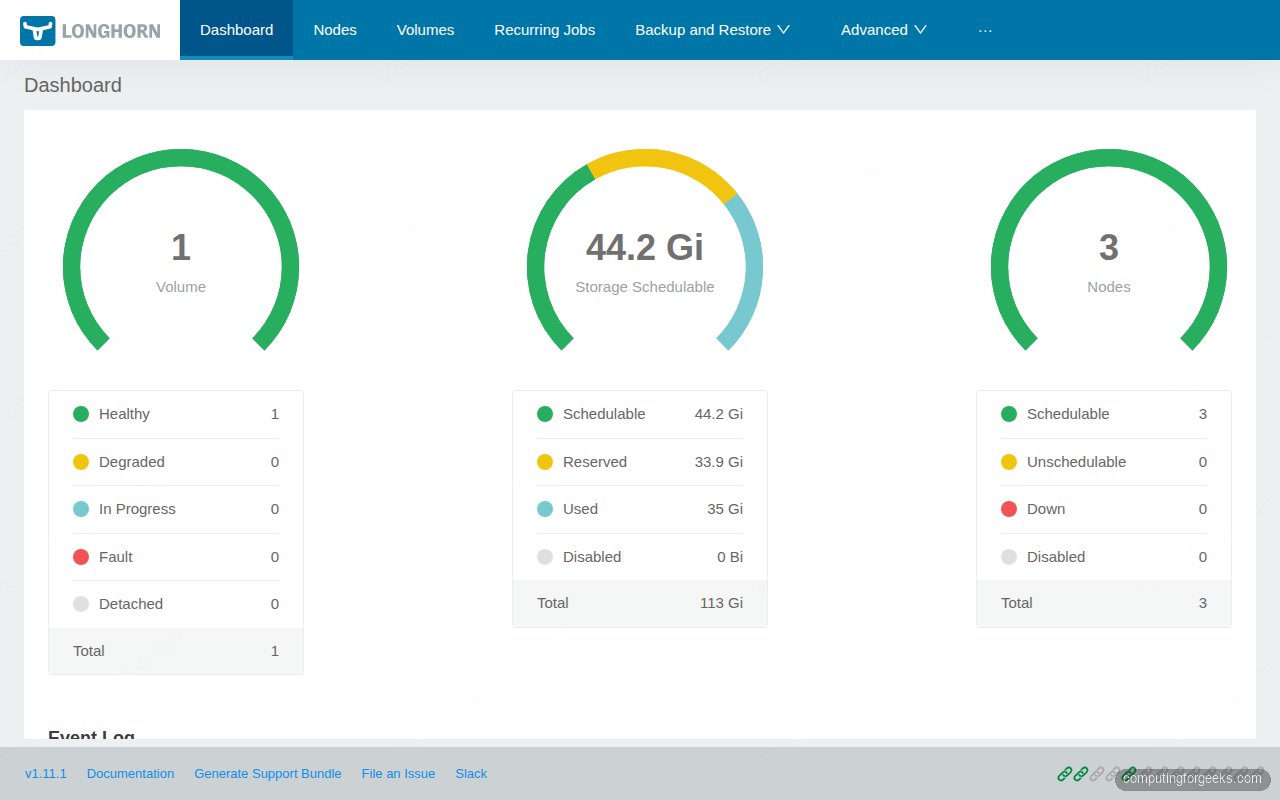
For production, the Longhorn UI ships with no built-in authentication. Put it behind an Ingress with basic auth or oauth2-proxy; it gives anyone who reaches it full storage admin rights including the ability to detach volumes from running pods.
Step 5: Provision a Longhorn PVC with a real workload
The simplest meaningful test is a PostgreSQL StatefulSet with one replica, backed by a 1Gi Longhorn volume. The StatefulSet’s volumeClaimTemplates creates the PVC automatically, and Postgres exercises the volume with real fsync workloads:
kubectl create namespace ${DEMO_NS}
cat > postgres.yaml <<'YAML'
apiVersion: apps/v1
kind: StatefulSet
metadata:
  name: postgres
  namespace: longhorn-test
spec:
  serviceName: postgres
  replicas: 1
  selector:
    matchLabels: {app: postgres}
  template:
    metadata:
      labels: {app: postgres}
    spec:
      containers:
        - name: postgres
          image: postgres:16
          env:
            - {name: POSTGRES_PASSWORD, value: "demo123"}
            - {name: PGDATA, value: /var/lib/postgresql/data/pgdata}
          ports: [{containerPort: 5432}]
          volumeMounts:
            - {name: data, mountPath: /var/lib/postgresql/data}
  volumeClaimTemplates:
    - metadata:
        name: data
      spec:
        accessModes: ["ReadWriteOnce"]
        resources:
          requests:
            storage: 1Gi
        storageClassName: longhorn
YAML

kubectl apply -f postgres.yaml
kubectl -n ${DEMO_NS} rollout status sts postgres --timeout=3m
Confirm the PVC is bound and the volume is healthy:
kubectl -n ${DEMO_NS} get pod,pvc,pv
kubectl -n ${LH_NS} get volumes.longhorn.io
The pod, PVC, PV, and Longhorn volume CR all show Bound/attached/healthy with the correct 1Gi capacity:
NAME             READY   STATUS    RESTARTS   AGE   IP           NODE
pod/postgres-0   1/1     Running   0          85s   10.0.0.116   k8s-w03

NAME                                    STATUS   VOLUME                                     CAPACITY   ACCESS MODES   STORAGECLASS
pvc/data-postgres-0                     Bound    pvc-0cb62e4d-e0e9-4916-9b79-186e5d2f83dc   1Gi        RWO            longhorn

NAME                                       CAPACITY   ACCESS MODES   RECLAIM POLICY   STATUS   STORAGECLASS
pv/pvc-0cb62e4d-e0e9-4916-9b79-186e5d2f83dc   1Gi        RWO            Delete           Bound    longhorn

NAME                                       DATA ENGINE   STATE      ROBUSTNESS   SCHEDULED   SIZE         NODE      AGE
pvc-0cb62e4d-e0e9-4916-9b79-186e5d2f83dc   v1            attached   healthy                  1073741824   k8s-w03   85s
The volume is attached + healthy on k8s-w03 (where the postgres pod is running). The data plane runs on the node hosting the workload; replicas live on other nodes.
Step 6: Verify replicas spread across the cluster
The Longhorn volume CRD shows the engine, but replica detail lives in a separate CRD. List them:
kubectl -n ${LH_NS} get replicas.longhorn.io \
  -o custom-columns=NAME:.metadata.name,NODE:.spec.nodeID,STATE:.spec.desireState,SIZE:.spec.volumeSize
Three replicas, one per worker node. This is what makes Longhorn distributed: the engine on k8s-w03 (where the workload runs) writes to all three replicas synchronously, so a node failure on any one of them does not lose data:
NAME                                                  NODE      STATE     SIZE
pvc-0cb62e4d-e0e9-4916-9b79-186e5d2f83dc-r-052f3615   k8s-w03   running   1073741824
pvc-0cb62e4d-e0e9-4916-9b79-186e5d2f83dc-r-170c85e2   k8s-w02   running   1073741824
pvc-0cb62e4d-e0e9-4916-9b79-186e5d2f83dc-r-32ee5e80   k8s-w01   running   1073741824
Write some data to verify the volume actually works:
kubectl -n ${DEMO_NS} exec postgres-0 -- psql -U postgres -c \
  "CREATE TABLE demo (id serial, msg text);
   INSERT INTO demo (msg) VALUES ('hello longhorn'), ('persistent storage works');"
kubectl -n ${DEMO_NS} exec postgres-0 -- psql -U postgres -c "SELECT * FROM demo;"
The select returns the rows that just landed on the Longhorn volume:
 id |           msg
----+--------------------------
  1 | hello longhorn
  2 | persistent storage works
(2 rows)
Step 7: Take a snapshot
Longhorn snapshots are point-in-time copies of the volume that share blocks with the source until the source diverges. They are local to the cluster (no S3 round-trip) and take seconds even for large volumes. Create one through the UI Volume → Take Snapshot button, or via the CRD:
VOL=$(kubectl -n ${DEMO_NS} get pvc data-postgres-0 \
  -o jsonpath='{.spec.volumeName}')

cat <<YAML | kubectl apply -f -
apiVersion: longhorn.io/v1beta2
kind: Snapshot
metadata:
  name: postgres-pre-migration
  namespace: ${LH_NS}
spec:
  volume: ${VOL}
YAML
Snapshots show up on the volume detail page and you can revert to one with a single click. Do not use snapshots as your only backup, though; they live on the same nodes as the volume and disappear if you lose the cluster. Backups (next step) push a copy off-cluster.
Step 8: Configure off-cluster backups to S3
Backups are full volume images written to an S3-compatible target. They are the disaster-recovery story. Any S3-compatible endpoint works: AWS S3, MinIO, Cloudflare R2, Backblaze B2. For the lab, install MinIO in-cluster:
helm repo add minio https://charts.min.io
helm install minio minio/minio --create-namespace -n minio \
  --set rootUser=minio --set rootPassword=miniodemo123 \
  --set replicas=1 --set persistence.size=10Gi \
  --set service.type=LoadBalancer \
  --set service.loadBalancerIP=10.0.1.206 \
  --set buckets[0].name=longhorn-backup \
  --set buckets[0].policy=none
Create a Kubernetes Secret with the MinIO credentials and the endpoint URL, then point Longhorn at it:
kubectl -n ${LH_NS} create secret generic minio-creds \
  --from-literal=AWS_ACCESS_KEY_ID=minio \
  --from-literal=AWS_SECRET_ACCESS_KEY=miniodemo123 \
  --from-literal=AWS_ENDPOINTS=http://10.0.1.206:9000

# Point Longhorn at the bucket via the BackupTarget setting
kubectl -n ${LH_NS} patch settings.longhorn.io backup-target \
  --type=merge -p '{"value":"s3://longhorn-backup@us-east-1/"}'
kubectl -n ${LH_NS} patch settings.longhorn.io backup-target-credential-secret \
  --type=merge -p '{"value":"minio-creds"}'
The settings live as Kubernetes resources, which means they are GitOps-friendly. Use the ArgoCD on Kubernetes guide to manage Longhorn settings declaratively in production.
Trigger a backup of the postgres volume (UI: Volume → Backup, or via the CRD):
cat <<YAML | kubectl apply -f -
apiVersion: longhorn.io/v1beta2
kind: Backup
metadata:
  name: postgres-daily
  namespace: ${LH_NS}
spec:
  snapshotName: postgres-pre-migration
YAML

kubectl -n ${LH_NS} get backup postgres-daily -w
The Backup status moves through InProgress to Completed, and the data lands in the MinIO bucket. From there, restoring to a fresh cluster is a single Restore click on the bucket page in any Longhorn UI pointed at the same backup target.
Step 9: Schedule recurring backups
One-shot backups prove the path works; production needs a schedule. Longhorn’s RecurringJob CRD is a per-volume cron that takes snapshots and backups on a fixed cadence with retention policies:
cat <<'YAML' | kubectl apply -f -
apiVersion: longhorn.io/v1beta2
kind: RecurringJob
metadata:
  name: daily-backup
  namespace: longhorn-system
spec:
  cron: "0 3 * * *"     # 03:00 every day
  task: backup
  groups: ["default"]
  retain: 7             # keep last 7 backups, prune the rest
  concurrency: 2
YAML

kubectl -n ${LH_NS} get recurringjobs
Volumes with the label recurring-job-group.longhorn.io/default=enabled automatically get the daily backup. Apply that label to the postgres PVC and forget about it:
kubectl -n ${DEMO_NS} label pvc data-postgres-0 \
  recurring-job-group.longhorn.io/default=enabled
Step 10: The node-failure drill
This is the test that decides whether you trust Longhorn in production. Cordon and drain a worker that holds a replica, watch what happens, then power-cycle the VM.
Pick the worker that does NOT host the postgres pod (the one running on k8s-w03 stays put; we drain a replica node):
kubectl cordon k8s-w01
kubectl drain k8s-w01 --ignore-daemonsets --delete-emptydir-data \
  --grace-period=30 --timeout=2m
The replica on k8s-w01 goes into stopped state and Longhorn schedules a new replica on k8s-w02 or wherever has free capacity. Watch the rebuild in the UI Volumes page; the volume goes Degraded for the duration of the rebuild and comes back to Healthy once the new replica catches up. On a 1Gi volume with no traffic, this takes seconds; on a 100Gi volume with active writes, it takes longer because the engine has to copy and apply ongoing writes simultaneously.
Power off the VM to simulate hardware failure rather than graceful drain. From your Proxmox host:
ssh root@proxmox-host "qm stop 8502" # whatever VMID hosts k8s-w01Postgres keeps serving reads and writes; the engine on k8s-w03 degrades to 2 active replicas, then auto-rebuilds a 3rd on a healthy node. Bring the VM back and Longhorn re-uses the existing replica data on its disk if still consistent, falls back to a fresh sync if not.
Operational tuning that matters
- Replica anti-affinity: by default Longhorn schedules replicas to different nodes. For multi-AZ clusters, also enable the
Replica Zone Soft Anti-Affinitysetting so replicas spread across failure domains. - StaleReplicaTimeout: how long Longhorn waits before declaring a replica failed and starting rebuild. Default is 30 minutes; lower it to 5-10 minutes if your nodes are reliable but you want fast self-healing.
- Replica disk pinning: in production, give every worker an extra LVM volume mounted at
/var/lib/longhorn. Do not let Longhorn share the root filesystem; one fully-allocated volume can fill /var and panic the kubelet. - Volume backup target health: Longhorn does not refresh the backup connection until you Apply on the settings page. After rotating S3 credentials, hit the Apply button or the next backup will silently fail until the next setting change.
- Upgrade path: minor version bumps (1.10 → 1.11) are tested. Skip-version upgrades are not. Always go through the intermediate versions one at a time and run the official pre-upgrade checks first.
Troubleshooting common PVC issues
- PVC stuck in
Pendingwithno available nodes: replica scheduling cannot find 3 distinct schedulable nodes. Checkkubectl get nodesfor cordon, then check the Longhorn UI Node page for nodes markedUnschedulable. The most common cause is taints; add a toleration or untaint the node. - Volume detaches mid-flight with
Engine and replica are in unknown state: thelonghorn-manageron the engine’s node lost track of the engine. Often a kubelet OOM-kill on the manager pod. Runkubectl -n longhorn-system describe pod longhorn-manager-X; if you see OOMKilled, raise the manager’s memory limit in the Helm values. - Slow writes inside the pod, fast on raw disk: the iSCSI target is sometimes pinned to a single CPU on older kernels. Set
iscsiBeaconthreadCount higher in the Longhorn settings, or upgrade to kernel 6.6+ which handles iSCSI multi-queue better. iscsid: command not foundat mount time: prerequisite step skipped on a worker. Drain, install, restore.
Cleaning up
Drop the demo workloads first, then uninstall Longhorn. The order matters; Longhorn refuses to uninstall while any volumes are still attached:
kubectl delete ns ${DEMO_NS}
kubectl -n ${LH_NS} patch -p '{"value":"true"}' --type=merge \
  settings.longhorn.io deleting-confirmation-flag
helm uninstall longhorn -n ${LH_NS}
kubectl delete ns ${LH_NS}
Distributed storage is the foundation; the next layer is ensuring you can recover from disasters that take the whole cluster. The Velero on Kubernetes guide covers cluster-level backup with CSI snapshots that pair naturally with Longhorn. The Kubernetes storage on K3s and RKE2 guide covers the StorageClass landscape on lighter clusters, the Kubernetes on Proxmox guide is the bare-metal foundation this article runs on, and the kubeadm HA cluster guide builds the same shape with a multi-master control plane for production durability.