Pod Security Policies were retired in Kubernetes 1.25 and replaced by Pod Security Standards. The replacement is built into the API server, has three named levels (Privileged, Baseline, Restricted) and three modes (enforce, audit, warn), and turns into actual policy via two namespace labels you set with kubectl. There is no controller to install. There are also no second chances when you flip enforce on a namespace whose pods do not comply.
This guide walks the full Pod Security Standards (PSS) workflow on a real Kubernetes 1.34 cluster: the three levels and what they each block, namespace-scoped enforcement with real denied pods, the dry-run check that tells you which existing workloads would break before you flip enforce, cluster-wide defaults via AdmissionConfiguration, and the audit-then-warn-then-enforce migration pattern that ships PSS without breaking production.
Tested April 2026 on Kubernetes 1.34.7 (kubeadm), Cilium 1.19.3 CNI, Ubuntu 24.04 LTS workers. All denial messages and audit-mode warnings below are verbatim from the test cluster.
From PodSecurityPolicy to Pod Security Standards
PodSecurityPolicy (PSP) was deprecated in 1.21 and removed in 1.25. The reasons were never about the security model. PSP was hard to roll out (RBAC binding to the policy resource, not the pod), easy to bypass (a permissive policy in the wrong place silently overrode a strict one), and impossible to retrofit (turning enforcement on broke clusters that had been running fine for months).
Pod Security Standards take a different shape. The three named levels are baked into the API server. You opt in by labelling the namespace; there is no Role binding, no PolicyTemplate, no controller. The same three levels apply everywhere, so a workload that runs under Restricted on cluster A will run under Restricted on cluster B without modification.
Teams still on PSP need to migrate before upgrading past 1.25. The Kubernetes project ships an official PSP migration guide; the audit-mode pattern in this article is the conservative path to follow it.
The three Pod Security Standards levels
Each level is cumulative: Restricted enforces everything Baseline enforces, plus more. Pick by where the workload lands on the trust spectrum, not by what looks impressive in a security audit.
| Level | What it allows | Use it for |
|---|---|---|
| Privileged | Anything. No restrictions. Equivalent to no PSS at all. | kube-system, CNI plugins, storage drivers, anything that legitimately needs hostPath, privileged, or hostNetwork. |
| Baseline | Blocks the obvious foot-guns: privileged: true, hostNetwork, hostPID, hostIPC, hostPath volumes, hostPorts, dangerous capabilities (SYS_ADMIN, NET_ADMIN, etc.), AppArmor/SELinux overrides, sysctls outside the safe set. | The default for tenant or application namespaces. Most third-party Helm charts run cleanly under Baseline. |
| Restricted | Everything Baseline blocks plus: must run as non-root, must drop ALL capabilities, must set seccompProfile: RuntimeDefault, must set allowPrivilegeEscalation: false, restricted volume types only (no hostPath, persistentVolumeClaim only, etc.). | Greenfield application namespaces and anywhere you can dictate the workload shape. Strict, but achievable. |
The official rule list is intentionally narrow. Anything beyond Restricted is policy territory, which is where Kubernetes RBAC and admission controllers like OPA Gatekeeper or Kyverno take over. PSS is the floor, not the ceiling.
The three modes: enforce, audit, warn
Each level can be applied in three modes, set independently per namespace via labels:
enforce: rejects the pod create/update at admission. The pod never starts. The kubectl command shows the violation reason.warn: allows the pod and prints a warning to the kubectl client during the create call. Useful for letting devs see what would break under stricter enforcement without actually breaking them.audit: allows the pod and writes a violation entry to the kube-apiserver audit log. No client-side warning. Useful for collecting telemetry without touching developer workflow.
The migration pattern that works on every team: start with audit=restricted, leave it for two weeks, scrape the audit log for violations, fix the worst offenders, then upgrade to warn=restricted for another two weeks (now developers see the warnings during their normal kubectl flow), then finally flip enforce=baseline as the floor and leave warn=restricted on top to keep nudging towards Restricted.
Step 1: Set reusable shell variables
Three values repeat throughout this guide. Export them once and the rest pastes as-is:
export PSS_BASELINE_NS="pss-baseline"
export PSS_RESTRICTED_NS="pss-restricted"
export PSS_AUDIT_NS="pss-audit"
export PSS_VERSION="v1.34" #https://kubernetes.io/releases/
Pin PSS_VERSION to the cluster minor version, not latest. New Kubernetes minor releases occasionally tighten Restricted (a new CVE class lands, a previously-allowed pattern gets blocked), and “latest” picks up those changes the moment you upgrade the control plane. Pinning the version means upgrades do not silently turn pods that were passing yesterday into pods that fail today.
Step 2: Create the test namespaces
Three namespaces, one for each level pattern: pure Baseline enforce, full Restricted enforce, and audit-only Restricted (no enforcement, just logging):
kubectl create namespace ${PSS_BASELINE_NS}
kubectl create namespace ${PSS_RESTRICTED_NS}
kubectl create namespace ${PSS_AUDIT_NS}

kubectl label --overwrite ns ${PSS_BASELINE_NS} \
  pod-security.kubernetes.io/enforce=baseline \
  pod-security.kubernetes.io/enforce-version=${PSS_VERSION}

kubectl label --overwrite ns ${PSS_RESTRICTED_NS} \
  pod-security.kubernetes.io/enforce=restricted \
  pod-security.kubernetes.io/enforce-version=${PSS_VERSION} \
  pod-security.kubernetes.io/warn=restricted \
  pod-security.kubernetes.io/audit=restricted

kubectl label --overwrite ns ${PSS_AUDIT_NS} \
  pod-security.kubernetes.io/audit=restricted \
  pod-security.kubernetes.io/warn=restricted
Verify the labels are in place. The kube-apiserver picks them up immediately; no controller restart needed:
kubectl get ns -L \
  pod-security.kubernetes.io/enforce,\
pod-security.kubernetes.io/warn,\
pod-security.kubernetes.io/audit | grep -E "NAME|pss-"
The output should show enforce on baseline, full enforce + warn + audit on restricted, and warn + audit only (no enforce) on the audit namespace:
NAME             STATUS   AGE   ENFORCE      WARN         AUDIT
pss-audit        Active   52s                 restricted   restricted
pss-baseline     Active   53s   baseline
pss-restricted   Active   52s   restricted   restricted   restricted
Step 3: Watch enforce reject a privileged pod
The fastest way to confirm Baseline is working is to try the simplest violation: privileged: true. Save this manifest:
cat > privileged-test.yaml <<'YAML'
apiVersion: v1
kind: Pod
metadata:
  name: privileged-test
spec:
  containers:
    - name: app
      image: nginx:1.27
      securityContext:
        privileged: true
YAML
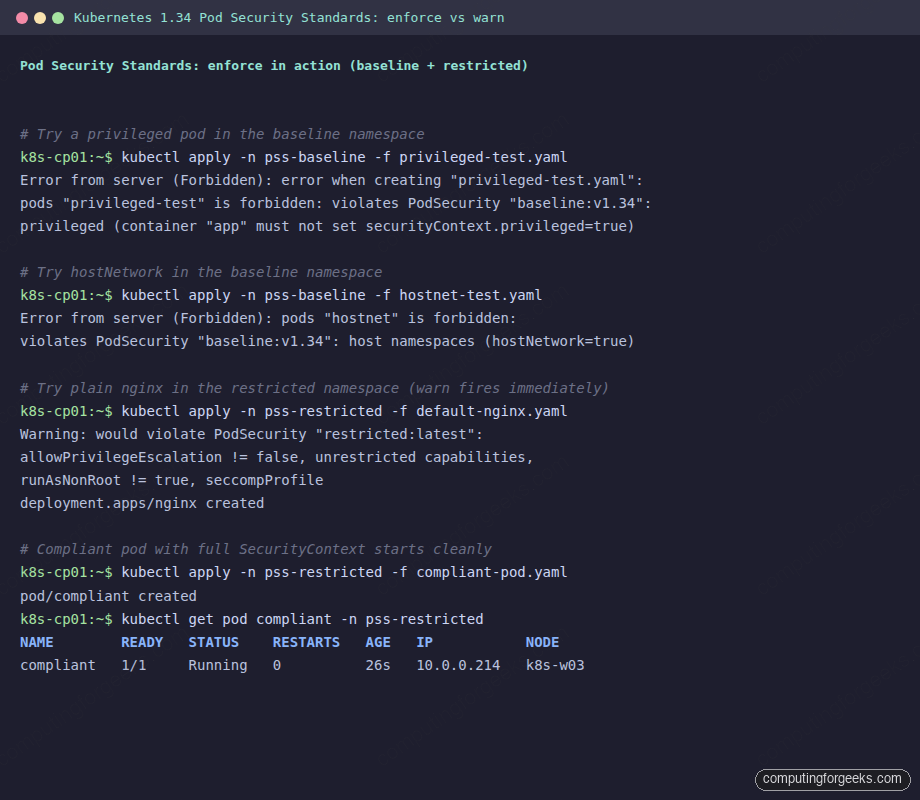
Apply it into the Baseline namespace:
kubectl apply -n ${PSS_BASELINE_NS} -f privileged-test.yamlThe API server rejects the pod with the exact rule that fired:
Error from server (Forbidden): error when creating "privileged-test.yaml":
pods "privileged-test" is forbidden: violates PodSecurity "baseline:v1.34":
privileged (container "app" must not set securityContext.privileged=true)
Two things to read here. The level (baseline:v1.34) tells you which policy fired and at which version. The bracketed reason (privileged) is the rule name; the parenthetical is the human-readable fix. That format is consistent across every PSS denial; copy the rule name verbatim into a search and you land on the exact rule definition in the Kubernetes docs.
Step 4: Watch hostNetwork get blocked at Baseline
Baseline blocks more than just privileged. The other category most workloads hit is host namespaces. Try a pod with hostNetwork: true:
cat > hostnet-test.yaml <<'YAML'
apiVersion: v1
kind: Pod
metadata:
  name: hostnet
spec:
  hostNetwork: true
  containers:
    - name: app
      image: nginx:1.27
YAML

kubectl apply -n ${PSS_BASELINE_NS} -f hostnet-test.yaml
The denial reason this time is the host namespaces rule:
Error from server (Forbidden): error when creating "hostnet-test.yaml":
pods "hostnet" is forbidden: violates PodSecurity "baseline:v1.34":
host namespaces (hostNetwork=true)
This catches the most common reason teams ask for an exception: an app that wants to bind to a host port for service discovery, or one that uses node-local DNS. Almost always the right answer is to use a Service of type LoadBalancer with the MetalLB load balancer instead of host networking, and to put DNS through CoreDNS rather than the host resolver.
Step 5: Watch Restricted block plain nginx
This is where teams trip up. A vanilla nginx:1.27 Deployment runs fine under Baseline but fails under Restricted because the upstream image runs as root, leaves capabilities at the default set, and does not pin a seccomp profile. Apply a stock nginx Deployment to the Restricted namespace:
cat > default-nginx.yaml <<'YAML'
apiVersion: apps/v1
kind: Deployment
metadata:
  name: nginx
spec:
  replicas: 1
  selector:
    matchLabels: {app: nginx}
  template:
    metadata:
      labels: {app: nginx}
    spec:
      containers:
        - name: nginx
          image: nginx:1.27
          ports: [{containerPort: 80}]
YAML

kubectl apply -n ${PSS_RESTRICTED_NS} -f default-nginx.yaml
Two things happen at once. The Deployment is created (because the Deployment object itself does not run a pod), but kubectl prints a warn message immediately because the namespace also has warn=restricted:
Warning: would violate PodSecurity "restricted:latest": allowPrivilegeEscalation != false
(container "nginx" must set securityContext.allowPrivilegeEscalation=false),
unrestricted capabilities (container "nginx" must set securityContext.capabilities.drop=["ALL"]),
runAsNonRoot != true (pod or container "nginx" must set securityContext.runAsNonRoot=true),
seccompProfile (pod or container "nginx" must set securityContext.seccompProfile.type
to "RuntimeDefault" or "Localhost")
deployment.apps/nginx created
The ReplicaSet then tries to create a Pod, and that is where enforce rejects:
kubectl get deploy nginx -n ${PSS_RESTRICTED_NS}
kubectl get rs -n ${PSS_RESTRICTED_NS} \
  -o jsonpath='{range .items[*]}{.metadata.name}{"\t"}{.status.conditions[*].message}{"\n"}{end}'
The Deployment shows zero ready replicas and the ReplicaSet condition spells out which Restricted rules the would-be pod hit:
NAME    READY   UP-TO-DATE   AVAILABLE   AGE
nginx   0/1     0            0           5s

nginx-7489fb554f    pods "nginx-7489fb554f-lgsvn" is forbidden:
  violates PodSecurity "restricted:v1.34":
  allowPrivilegeEscalation != false (container "nginx" must set
    securityContext.allowPrivilegeEscalation=false),
  unrestricted capabilities (container "nginx" must set
    securityContext.capabilities.drop=["ALL"]),
  runAsNonRoot != true (pod or container "nginx" must set
    securityContext.runAsNonRoot=true),
  seccompProfile (pod or container "nginx" must set
    securityContext.seccompProfile.type to "RuntimeDefault" or "Localhost")
Four separate Restricted rules fired in one denial. This is the typical experience the first time you flip Restricted on an existing namespace; nothing dramatic happens at the Deployment level, the ReplicaSet just sits at 0/1 forever and the violation only surfaces when you look at kubectl describe rs.
Step 6: A Restricted-compliant pod that actually starts
The fix is a SecurityContext at both the pod and container level. The pod-level runAsNonRoot + seccompProfile covers the cluster, and the container-level allowPrivilegeEscalation + capabilities.drop covers the rest. Use an unprivileged image variant so you do not have to fight nginx for permission to bind port 80:
cat > compliant-pod.yaml <<'YAML'
apiVersion: v1
kind: Pod
metadata:
  name: compliant
spec:
  securityContext:
    runAsNonRoot: true
    runAsUser: 1000
    seccompProfile:
      type: RuntimeDefault
  containers:
    - name: app
      image: nginxinc/nginx-unprivileged:1.27
      ports:
        - containerPort: 8080
      securityContext:
        allowPrivilegeEscalation: false
        capabilities:
          drop: ["ALL"]
YAML

kubectl apply -n ${PSS_RESTRICTED_NS} -f compliant-pod.yaml
kubectl get pod compliant -n ${PSS_RESTRICTED_NS}
The pod admits cleanly with no warnings, and the kubelet schedules it onto a worker node:
pod/compliant created
NAME        READY   STATUS    RESTARTS   AGE   IP           NODE
compliant   1/1     Running   0          26s   10.0.0.214   k8s-w03
That is the SecurityContext template every Restricted-compliant workload needs. The five fields (runAsNonRoot, runAsUser, seccompProfile, allowPrivilegeEscalation, capabilities.drop) are a copy-paste block; the only thing that changes per workload is the image and the user ID.
Step 7: Audit-only mode for migrations
The audit-only namespace lets non-compliant workloads run. The same default nginx Deployment that failed under Restricted enforce starts up cleanly here, but the warning still fires in the kubectl client because warn=restricted is set:
kubectl apply -n ${PSS_AUDIT_NS} -f default-nginx.yaml
kubectl get deploy nginx -n ${PSS_AUDIT_NS}
The warn message still fires because warn=restricted is on the namespace, but the Deployment scales to 1/1 because no enforce label is set:
Warning: would violate PodSecurity "restricted:latest": allowPrivilegeEscalation != false ...
deployment.apps/nginx created
NAME    READY   UP-TO-DATE   AVAILABLE   AGE
nginx   1/1     1            1           5s
The pod is up. The audit entry lands in the kube-apiserver audit log if one is configured. The combination of audit=restricted + warn=restricted with no enforce label is the production-safe way to start tightening: developers see warnings, security gets log entries, and nothing breaks for end users.
Step 8: The dry-run check that should be mandatory before flipping enforce
The biggest gap in PSS adoption is teams that flip enforce=restricted on a namespace without first checking what the existing pods would do. The kubectl label --dry-run=server command runs the namespace label change through the API server validation chain without persisting it, and the API server reports back exactly which pods would violate the new policy:
kubectl label --dry-run=server --overwrite ns kube-system \
  pod-security.kubernetes.io/enforce=restricted
On a typical kube-system namespace this produces a warning per offending pod with the exact rule list:
Warning: existing pods in namespace "kube-system" violate the new PodSecurity
  enforce level "restricted:latest"
Warning: cilium-4g58k (and 3 other pods): forbidden AppArmor profile,
  host namespaces, hostPort, probe or lifecycle host, privileged, seLinuxOptions,
  allowPrivilegeEscalation != false, unrestricted capabilities, restricted
  volume types, runAsNonRoot != true, seccompProfile
Warning: cilium-envoy-fhklr (and 3 other pods): forbidden AppArmor profile,
  host namespaces, hostPort, probe or lifecycle host, seLinuxOptions,
  allowPrivilegeEscalation != false, unrestricted capabilities, restricted
  volume types, runAsNonRoot != true, seccompProfile
Warning: cilium-operator-6d94db55f5-xf7qw: host namespaces, hostPort,
  probe or lifecycle host, runAsNonRoot != true
Warning: coredns-66bc5c9577-hnxkx (and 1 other pod): runAsNonRoot != true,
  seccompProfile
Warning: etcd-k8s-cp01 (and 3 other pods): host namespaces, hostPort,
  probe or lifecycle host, allowPrivilegeEscalation != false, unrestricted
  capabilities, restricted volume types, runAsNonRoot != true
namespace/kube-system labeled (server dry run)
The same check against Baseline is much shorter because Baseline is much less strict:
kubectl label --dry-run=server --overwrite ns kube-system \
  pod-security.kubernetes.io/enforce=baseline
The Baseline-level dry-run lists fewer offenders and shorter rule lists per pod, because Baseline only blocks the dangerous defaults rather than every hardening rule:
Warning: existing pods in namespace "kube-system" violate the new PodSecurity
  enforce level "baseline:latest"
Warning: cilium-4g58k (and 3 other pods): forbidden AppArmor profile,
  non-default capabilities, host namespaces, hostPath volumes, hostPort,
  probe or lifecycle host, privileged, seLinuxOptions, seccompProfile
Warning: cilium-operator-6d94db55f5-xf7qw: host namespaces, hostPort,
  probe or lifecycle host
Warning: etcd-k8s-cp01 (and 3 other pods): host namespaces, hostPath
  volumes, hostPort, probe or lifecycle host
namespace/kube-system labeled (server dry run)
The same dry-run output captured from the test cluster, side by side:
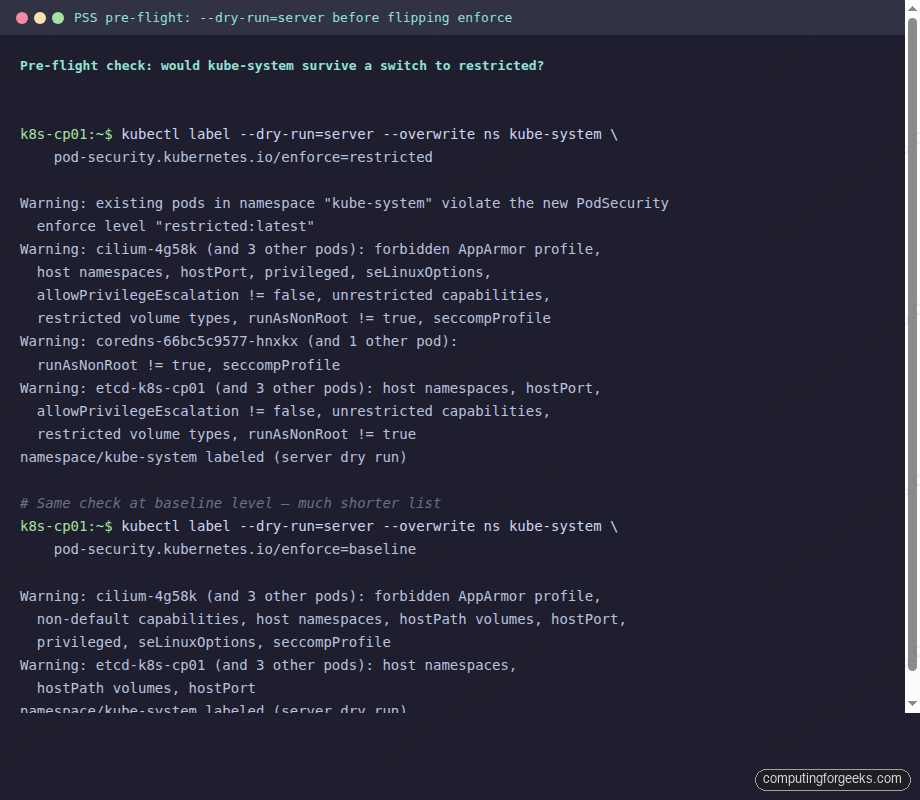
This is why kube-system stays at Privileged in nearly every cluster. Cilium, etcd, and the kube-proxy / kube-apiserver static pods all need host namespaces and hostPath volumes; rewriting them would mean rebuilding the cluster. The same pattern applies to monitoring (kube-prometheus-stack uses host networking for node-exporter), CSI drivers (hostPath for the kubelet plugin socket), and ingress controllers running with hostPort.
The right move is to keep system namespaces at Privileged or Baseline-with-exemptions, and reserve Restricted for application namespaces you control end-to-end. Use the dry-run check on every namespace before flipping enforce.
Step 9: Cluster-wide defaults via AdmissionConfiguration
Per-namespace labels are great for explicit control, but they leave a gap: any newly created namespace has no PSS enforcement at all unless a label is set. The cluster-wide default closes that gap. It is configured at kube-apiserver startup via an AdmissionConfiguration file passed with --admission-control-config-file.
Create the configuration on the control plane node:
sudo mkdir -p /etc/kubernetes/pss
sudo tee /etc/kubernetes/pss/admissionconfig.yaml <<'YAML'
apiVersion: apiserver.config.k8s.io/v1
kind: AdmissionConfiguration
plugins:
  - name: PodSecurity
    configuration:
      apiVersion: pod-security.admission.config.k8s.io/v1
      kind: PodSecurityConfiguration
      defaults:
        enforce: "baseline"
        enforce-version: "latest"
        audit: "restricted"
        audit-version: "latest"
        warn: "restricted"
        warn-version: "latest"
      exemptions:
        usernames: []
        runtimeClasses: []
        namespaces: ["kube-system", "kube-public"]
YAML
Edit /etc/kubernetes/manifests/kube-apiserver.yaml on the control plane and add two lines to the kube-apiserver command:
spec:
  containers:
    - command:
        - kube-apiserver
        - --admission-control-config-file=/etc/kubernetes/pss/admissionconfig.yaml
        # ... existing flags ...
      volumeMounts:
        - name: pss-config
          mountPath: /etc/kubernetes/pss
          readOnly: true
  volumes:
    - name: pss-config
      hostPath:
        path: /etc/kubernetes/pss
        type: DirectoryOrCreate
The kubelet detects the manifest change and restarts kube-apiserver. After ~30 seconds, every namespace without explicit PSS labels picks up the default: enforce=baseline, with audit=restricted and warn=restricted on top. The kube-system and kube-public namespaces are exempted entirely so cluster components keep working.
Verify by creating a fresh namespace and trying a privileged pod:
kubectl create ns pss-default-test
kubectl apply -n pss-default-test -f privileged-test.yaml
The new namespace inherits the cluster default and rejects the pod just as the explicitly-labelled pss-baseline namespace did.
The migration playbook that actually works
Flipping enforce on a live namespace without a migration plan is the fastest way to take down a production cluster. The conservative pattern that ships in real teams looks like this:
- Week 0: inventory. Run the
--dry-run=servercheck from Step 8 on every namespace. Build a spreadsheet of which namespaces would fail at Baseline and which would fail at Restricted. The numbers are usually surprising; teams expect “everything will fail Restricted” and find half their app namespaces would pass Baseline cleanly today. - Week 1: audit only. Add
pod-security.kubernetes.io/audit=restricted+pod-security.kubernetes.io/warn=restrictedto every application namespace. Noenforcelabel yet. Nothing breaks. Developers start seeing warnings on their kubectl applies. - Weeks 2-3: triage. Scrape the kube-apiserver audit log (or use a tool like
kube-policy-advisor) for the most-violated rules. Most teams find a small set of repeat offenders: third-party Helm charts that ship with insecure defaults, legacy apps that need explicit SecurityContext, and CronJobs that nobody owns. - Week 4: enforce baseline. Add
pod-security.kubernetes.io/enforce=baselineto the application namespaces. Anything that fails Baseline is genuinely dangerous and should not be running. Keepwarn=restricted+audit=restrictedon top. - Weeks 5-12: chip away at Restricted. Per namespace, fix the warnings until nothing fires. When a namespace is clean for two weeks, flip it to
enforce=restricted.
The whole sequence takes about a quarter for a mid-size cluster. The Week 0 inventory is the single highest-leverage step; do not skip it.
Workloads that need an exemption (and how to grant one)
Some workloads genuinely need hostPath, hostNetwork, or privileged containers. CSI drivers, monitoring node-exporters, log shippers, and CNI plugins all qualify. PSS handles this with two patterns:
For application workloads that legitimately need elevated privileges (a debugging container, an init job that touches the host filesystem), the right pattern is to put them in their own namespace at Baseline and apply RBAC restrictions on who can deploy there. PSS does not do per-pod exceptions; the namespace is the unit of trust.
Common workload fixes
The same five issues come up in 90% of Restricted denials. The fixes:
| Violation | Fix |
|---|---|
runAsNonRoot != true | Add securityContext.runAsNonRoot: true + runAsUser: 1000 at pod level. For images that hardcode root, switch to an unprivileged variant (e.g., nginxinc/nginx-unprivileged, cgr.dev/chainguard/nginx). |
allowPrivilegeEscalation != false | Add allowPrivilegeEscalation: false in container securityContext. Required even for non-root containers. |
unrestricted capabilities | Add capabilities.drop: ["ALL"] in container securityContext. Add specific caps back via capabilities.add only if the app genuinely needs them. |
seccompProfile | Add seccompProfile: {type: RuntimeDefault} at pod level. |
restricted volume types | Switch hostPath to persistentVolumeClaim, configMap, secret, emptyDir, or projected. The full allowed list is in the PSS spec. |
For Helm charts that do not pin SecurityContext correctly, most published charts now expose podSecurityContext and containerSecurityContext values. Set them in your values file rather than patching the rendered manifests.
The PSS admission denial error message index
Every PSS denial has the same shape: violates PodSecurity "<level>:<version>": <rule> (<fix>). Searching for the rule name is the fastest path to the official rule definition. The most-seen messages, with the exact YAML fix:
privileged (container “X” must not set securityContext.privileged=true)
The container declares privileged: true. Almost never legitimately needed. Remove the field or set it to false. If the app needs a specific capability, drop ALL and add only the one capability:
securityContext:
  privileged: false   # or just delete the field
  capabilities:
    drop: ["ALL"]
    add: ["NET_BIND_SERVICE"]   # only if needed
host namespaces (hostNetwork=true / hostPID=true / hostIPC=true)
The pod requests one of the host namespaces. The fix is almost always a Service or a SidecarContainer instead of host networking. If the app genuinely needs it (DNS server, network monitor), put it in a Privileged-level namespace.
runAsNonRoot != true (pod or container “X” must set securityContext.runAsNonRoot=true)
The container can run as UID 0 (root). Even if it does not, PSS Restricted requires the declaration. Add at the pod level:
spec:
  securityContext:
    runAsNonRoot: true
    runAsUser: 1000   # any non-zero UID
allowPrivilegeEscalation != false (container “X” must set securityContext.allowPrivilegeEscalation=false)
Even non-root processes can call setuid binaries to escalate. Restricted requires this be explicitly disabled per container:
containers:
  - name: app
    securityContext:
      allowPrivilegeEscalation: false
unrestricted capabilities (container “X” must set securityContext.capabilities.drop=[“ALL”])
The container has the default Linux capability set. Restricted requires explicitly dropping ALL and adding back only what is needed:
containers:
  - name: app
    securityContext:
      capabilities:
        drop: ["ALL"]
seccompProfile (pod or container “X” must set securityContext.seccompProfile.type to “RuntimeDefault” or “Localhost”)
The pod has no seccomp profile set. RuntimeDefault uses the container runtime’s default, which is fine for nearly everything. Set at pod level so all containers inherit:
spec:
  securityContext:
    seccompProfile:
      type: RuntimeDefault
forbidden AppArmor profile
The pod or container annotates an AppArmor profile that PSS does not recognize. Either remove the annotation (the runtime default is acceptable) or set it explicitly to RuntimeDefault:
spec:
  securityContext:
    appArmorProfile:
      type: RuntimeDefault
restricted volume types (volume “X” uses restricted volume type “hostPath”)
The pod mounts a hostPath, nfs, iscsi, or other volume type not in Restricted’s allowlist. Replace with a persistentVolumeClaim backed by a CSI driver, or move the workload to a Baseline-level namespace.
Cleaning up
Drop the three test namespaces and the local manifests when you are done with the lab:
kubectl delete ns ${PSS_BASELINE_NS} ${PSS_RESTRICTED_NS} ${PSS_AUDIT_NS}
rm -f privileged-test.yaml hostnet-test.yaml default-nginx.yaml compliant-pod.yaml
Pod Security Standards is the floor. The next layer is policy-as-code, which is where Kubernetes RBAC for who can deploy where, plus admission controllers like OPA Gatekeeper or Kyverno for what they can deploy, take over. PSS handles the static rules every workload should obey; policy engines handle the rules that depend on labels, image registries, or business context. Pair them; do not pick one over the other.
For the broader cluster hardening surface, the Cilium CNI guide covers eBPF-based network policy, the Velero backup guide covers disaster recovery, and the kubeadm install on Ubuntu guide is the foundation cluster this article was tested on. The ArgoCD ApplicationSet and kubectl cheat sheet guides cover the day-two ergonomics that make PSS migrations less painful when you have hundreds of namespaces to triage.