Ubuntu 26.04 LTS is the first Ubuntu release where the initramfs on disk was built by dracut, not by the legacy initramfs-tools. Both packages are still installed for compatibility, but every kernel install on a fresh 26.04 server runs through dracut hooks under /etc/kernel/install.d. If you upgraded a fleet from 24.04, you have probably already noticed the boot output looks different and update-initramfs is no longer the right command to run.
This guide covers what dracut is, why Canonical made the switch, the file layout it imposes, how to regenerate the initramfs the right way on 26.04, what hostonly mode does, the modules system, kernel cmdline behaviour, and the small set of gotchas that bite admins migrating from initramfs-tools.
Verified May 2026 on Ubuntu 26.04 (Resolute Raccoon) server, kernel 7.0.0-10-generic, dracut 110-7, systemd 259
What dracut is and why 26.04 ships it
dracut is an initramfs generator. Its job is to build the small filesystem the kernel mounts before it can read your real root partition. Red Hat has shipped dracut for over a decade; SUSE, Fedora, and Arch use it; and Debian/Ubuntu were the holdouts.
The reasons Ubuntu finally switched are practical. dracut is event-driven via udev (faster boots, better device probing on slow hardware), it has first-class support for systemd-in-initramfs (units, generators, journald), and it has the existing module ecosystem for things like LUKS unlock, NVDIMM, NFS root, iSCSI root, FIPS mode, and TPM-backed full disk encryption that initramfs-tools either lacked or implemented as bespoke shell scripts. When 26.04 introduced general-availability TPM-backed FDE, the underlying support naturally landed on dracut.
Confirm dracut is the active generator
The fastest sanity check on any 26.04 box. Both dracut and initramfs-tools are installed for ABI reasons; only one of them is actually wired into the kernel install path:
dpkg -l dracut dracut-core | tail -2
ls /etc/kernel/install.d/
The presence of 50-dracut.install and 51-dracut-rescue.install in /etc/kernel/install.d/ is the giveaway. systemd’s kernel-install framework iterates that directory in lexicographic order whenever a kernel package gets installed or removed, and the dracut hook is what builds the matching /boot/initrd.img-VERSION.
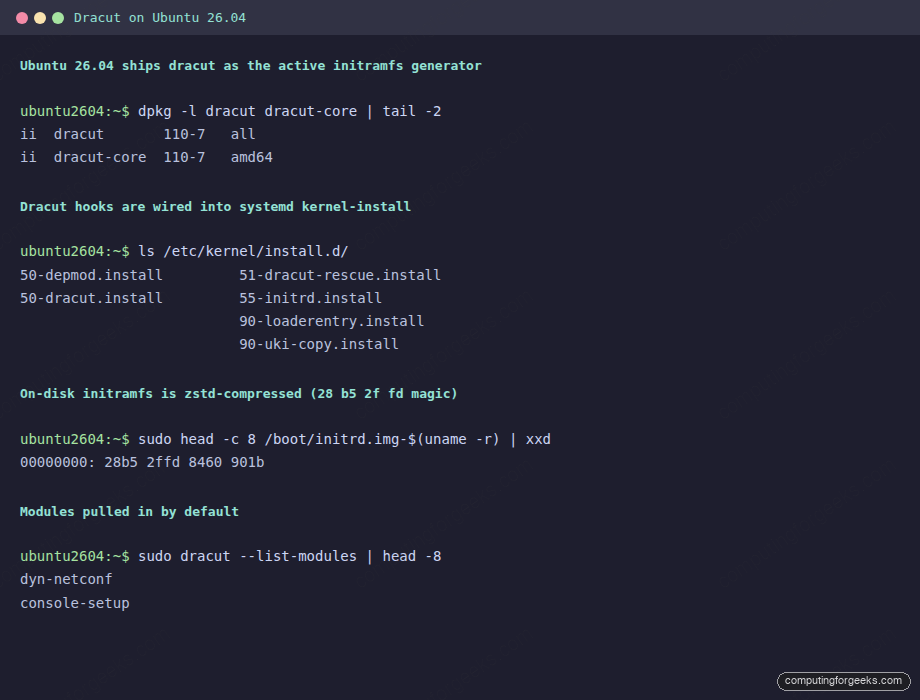
Confirm the binary signature on the active initramfs file. dracut compresses with zstd by default on 26.04, which produces the 28 b5 2f fd magic at offset 0:
sudo head -c 8 /boot/initrd.img-$(uname -r) | xxdAn initramfs-tools image would start with 1f 8b (gzip) or fd 37 7a (xz). If you see one of those instead of zstd magic, the file was either left over from a prior 24.04 install or the dracut hook failed and initramfs-tools wrote a fallback.
File layout: where dracut config lives
Three locations are read in order, last write wins:
/usr/lib/dracut/dracut.conf.d/   # vendor defaults, do not edit
/etc/dracut.conf.d/              # admin overrides, your files go here
/etc/dracut.conf                 # legacy single-file config, empty by default
List what is currently shipping:
ls /usr/lib/dracut/dracut.conf.d/
ls /etc/dracut.conf.d/
sudo grep -hv '^[[:space:]]*#' /usr/lib/dracut/dracut.conf.d/*.conf | grep -v '^$'
Each line in the vendor configs is a directive: add_dracutmodules+=" systemd-pcrlock " pulls in a module, compress="zstd" picks the compressor, hostonly="yes" changes generation mode. Always make changes in /etc/dracut.conf.d/ with a numeric prefix to control merge order:
sudo tee /etc/dracut.conf.d/99-local.conf <<'EOF'
# Local overrides
compress="zstd"
EOF
The modules system
dracut’s modules are not kernel modules. They are shell-script bundles that contribute hooks, binaries, and configuration to the initramfs. List the ones available on 26.04:
sudo dracut --list-modules | wc -l
sudo dracut --list-modules | head -15
26.04 ships 133 modules out of the box. Notable ones:
| Module | What it adds |
|---|---|
systemd-initrd | Boots the initramfs as a real systemd instance with units and journald |
dyn-netconf | cloud-init style network config from kernel cmdline (used in cloud images) |
fips / fips-crypto-policies | FIPS mode kernel boot, required for some compliance regimes |
systemd-cryptsetup | LUKS unlock at boot via systemd-cryptenroll keyfiles or TPM |
nfs / iscsi | Network root filesystem support |
plymouth | Splash screen during boot |
tpm2-tss | TPM 2.0 sealing/unsealing for FDE |
warpclock | Sets initial RTC from cmdline rtc= when no battery |
Force-include or force-omit a module by editing /etc/dracut.conf.d/99-local.conf:
# Always include FIPS module (compliance build)
add_dracutmodules+=" fips fips-crypto-policies "

# Strip plymouth from server images
omit_dracutmodules+=" plymouth "
The leading and trailing spaces inside the quotes are required. dracut concatenates the additions across config files, and a missing space turns two distinct entries into one mash-up.
Regenerate the initramfs the 26.04 way
The single biggest muscle-memory change for 24.04 admins. update-initramfs -u still exists on disk for compatibility but should NOT be the command you reach for. Use dracut directly or trigger it through kernel-install:
# Regenerate for the running kernel
sudo dracut --force /boot/initrd.img-$(uname -r) $(uname -r)

# Regenerate for every installed kernel
sudo dracut --regenerate-all --force
A regeneration on a stock 26.04 server takes 12-15 seconds and produces a 42 MB image:
sudo time dracut --force /tmp/test-initrd.img $(uname -r)
ls -lh /tmp/test-initrd.img
rm /tmp/test-initrd.img
The output should match the size of the live initramfs in /boot. A wildly different size means a config drop-in is changing something. That is fine, just make sure the change was intentional.
Hostonly mode (smaller images, less portable)
By default 26.04 builds a generic initramfs that boots on any hardware: a wide net of storage drivers, network cards, RAID controllers, and crypto modules. The flip side is image size. hostonly mode tells dracut to include only the modules the current host actually uses, producing a smaller initrd that will refuse to boot on different hardware:
sudo tee /etc/dracut.conf.d/05-hostonly.conf <<'EOF'
hostonly="yes"
hostonly_cmdline="yes"
EOF
sudo dracut --regenerate-all --force
Compare image sizes before and after:
ls -lh /boot/initrd.img-$(uname -r)Use hostonly on bare-metal servers or VMs that never migrate. Skip it on cloud images, golden images, and any host that might get its disk pulled and dropped into a different chassis. The error after a wrong-host boot is a kernel panic with “unable to mount rootfs”, which is recoverable but tedious. hostonly_cmdline="yes" additionally bakes the current kernel cmdline into the initramfs, which is useful with TPM-sealed PCRs but locks you out of changing the cmdline without a regen.
Inspect what is in the image
The dracut equivalent of lsinitramfs is, conveniently, lsinitramfs (the same command, repackaged):
sudo lsinitramfs /boot/initrd.img-$(uname -r) | head -20
sudo lsinitramfs /boot/initrd.img-$(uname -r) | grep -E '\.ko' | wc -l
For more structure, dracut ships a dedicated tool that groups output by module:
sudo /usr/lib/dracut/dracut-init.sh 2>/dev/null
sudo dracut --print-cmdline 2>&1 | head -5
The --print-cmdline output reveals which root, resume, and rd.* parameters dracut would push if you let it own the kernel cmdline. Compare to what is currently active:
cat /proc/cmdlineKernel cmdline directives that matter under dracut
dracut reads its own rd.* namespace from the kernel cmdline. The ones worth knowing:
| Directive | Effect |
|---|---|
rd.break | Drop to an emergency shell at the named hook (cmdline, pre-mount, mount, pre-pivot): debugging gold |
rd.shell | Spawn a shell on boot failure instead of looping |
rd.debug | Verbose dracut logging to journal |
rd.luks.uuid=UUID | Unlock named LUKS volume by UUID |
rd.systemd.unit=emergency.target | Boot to emergency target if normal boot fails |
rd.driver.blacklist=mod1,mod2 | Blacklist modules in the initramfs phase |
Add them by editing GRUB:
sudo sed -i 's/GRUB_CMDLINE_LINUX_DEFAULT="quiet splash"/GRUB_CMDLINE_LINUX_DEFAULT="quiet splash rd.shell rd.debug"/' /etc/default/grub
sudo update-grub
sudo reboot
Once the boot completes, the journal will have a verbose dracut trace under the dracut-pre-pivot.service unit.
Adding files to the initramfs
The legacy initramfs-tools workflow of dropping scripts in /etc/initramfs-tools/scripts/ does not work under dracut. The replacement is to ship a custom dracut module or to use the install_items directive for one-off binaries:
sudo tee /etc/dracut.conf.d/10-extras.conf <<'EOF'
install_items+=" /usr/local/bin/my-debug-tool /etc/myapp/early.conf "
EOF
sudo dracut --regenerate-all --force
Verify the file landed inside the new image:
sudo lsinitramfs /boot/initrd.img-$(uname -r) | grep my-debug-toolFor anything more complex than a single binary, write a proper module under /usr/lib/dracut/modules.d/. The dracut documentation has the boilerplate; the short version is each module is a directory with a module-setup.sh that declares dependencies and the install function.
Migration tripwires from initramfs-tools
/etc/initramfs-tools/conf.d snippets are silently ignored
If you carried over a snippet that set MODULES=most or BUSYBOX=y, dracut never reads it. Translate the intent into a dracut directive (compress=, add_dracutmodules+=) and place it under /etc/dracut.conf.d/.
Custom hooks in /etc/initramfs-tools/scripts/
Same story. Hooks under local-top, init-bottom, etc. do not run. Convert each hook to a dracut module with the right hook name (pre-trigger, pre-mount, mount, pre-pivot, cleanup). The dracut hook timing maps closely to initramfs-tools timing, but the wiring is different.
update-initramfs -u completed instantly
The legacy command still exists and exits 0, but on 26.04 it is a no-op shim that prints a deprecation note. The real regen happens through the dracut tool. If you have automation hardcoded to update-initramfs, point it at kernel-install add instead, which calls all the install hooks including dracut.
Boot fails after kernel upgrade with “unable to mount rootfs”
Almost always a hostonly mode that was migrated to different hardware. Boot from the rescue initramfs (the 51-dracut-rescue.install hook builds a generic fallback at /boot/initrd.img-VERSION-rescue), then regenerate with hostonly disabled:
sudo sed -i '/hostonly/d' /etc/dracut.conf.d/05-hostonly.conf
sudo dracut --no-hostonly --regenerate-all --force
Annotated config reference
A complete /etc/dracut.conf.d/99-local.conf with every directive worth touching on a 26.04 server, annotated so you can pick what to keep:
# /etc/dracut.conf.d/99-local.conf

# Compression: zstd is fastest decompress, gzip is widely supported,
# xz is smallest. Default on 26.04 is zstd.
compress="zstd"

# hostonly=yes shrinks the image but locks it to current hardware.
# Leave commented out for portability.
# hostonly="yes"
# hostonly_cmdline="yes"

# Force-include modules. Add any that the boot path needs but
# auto-detection might miss (TPM, NVDIMM, exotic NICs).
# add_dracutmodules+=" tpm2-tss systemd-cryptsetup "

# Force-omit modules. Strip plymouth on server images, omit
# bluetooth on hardware that never uses it.
# omit_dracutmodules+=" plymouth bluetooth "

# Extra binaries / files to ship inside the initramfs.
# install_items+=" /usr/local/bin/early-debug "

# Generic image: pull every storage and network driver Ubuntu ships.
# This is the default on 26.04.
# add_drivers+=" ahci nvme virtio_blk virtio_net "

# Show progress in the boot log instead of the silent splash.
# stdloglvl="3"
# fileloglvl="6"
After any change, regenerate and verify:
sudo dracut --regenerate-all --force
sudo lsinitramfs /boot/initrd.img-$(uname -r) | head -10
The first lines of the listing should match the directives you set: extra binaries appear under usr/local/bin/, omitted modules drop their hook scripts, and the kernel module set under usr/lib/modules/.../kernel/ shrinks if you switched to hostonly mode.
Pair this guide with the Rust coreutils guide and the cgroup v2 migration walkthrough for the full picture of what 26.04 changed under the hood. Newcomers stepping up from 24.04 should also read the upgrade guide for the release-upgrade flow.
The dracut switch matters most on day one: when you regenerate the initramfs after a kernel patch, when LUKS unlock breaks because a hook script did not migrate, or when a TPM-sealed FDE setup fails to find systemd-cryptenroll. Once the muscle memory shifts from update-initramfs -u to dracut --regenerate-all --force, the new tool fades into the background and stays out of the way.