

Locking yourself out of the FreeIPA admin account is one of those incidents that feels catastrophic at 2 a.m. and is actually a 5-minute fix if you still hold the Directory Manager password. Most production FreeIPA servers I’ve inherited have either a forgotten admin password, a single admin (no backup account), or both. This guide walks through the three real ways to reset it on a running FreeIPA 4.12 server on Rocky Linux 10, with every command captured from a live test box.
The recovery paths covered below map to the three situations you’ll hit in practice: you have a valid Kerberos ticket from another IPA admin, you have the Directory Manager password but no admin ticket, and you’re starting from nothing but root SSH on the IPA server itself. We’ll also reset the Directory Manager password through dse.ldif because that is the prerequisite for path two when the DM password is also gone. Internal links go to the FreeIPA install guide, the Let’s Encrypt TLS walkthrough, and the FreeIPA user management reference.
Tested April 2026 on FreeIPA 4.12.2 running on Rocky Linux 10.1 (kernel 6.12) with 389 Directory Server 3.1.
Prerequisites
- A running FreeIPA server you can SSH into as
root(or a user withsudo). The server needs to be healthy enough that 389 Directory Server starts. - At least one of: another IPA user in the
adminsgroup, the Directory Manager password, or the ability to edit/etc/dirsrv/slapd-REALM/dse.ldifas root. - Basic familiarity with
kinit,ldappasswd, and the FreeIPA CLI. - Tested on: FreeIPA 4.12.2, 389-ds-base 3.1.1, Rocky Linux 10.1.
Step 1: Set reusable shell variables
Every command in this guide references shell variables so you swap the realm and hostname once. Export them before touching any password:
export IPA_HOST="ipa.example.internal"
export IPA_REALM="EXAMPLE.INTERNAL"
export IPA_DOMAIN="example.internal"
export IPA_BASE_DN="dc=example,dc=internal"
export IPA_INSTANCE="EXAMPLE-INTERNAL"
export NEW_ADMIN_PASS="NewAdminPass#2026"
The instance name is the realm with dots converted to hyphens, which is also the directory name under /etc/dirsrv/. Confirm the values resolve correctly before proceeding:
echo "Host:   ${IPA_HOST}"
echo "Realm:  ${IPA_REALM}"
echo "BaseDN: ${IPA_BASE_DN}"
ls -d "/etc/dirsrv/slapd-${IPA_INSTANCE}"
If the ls line errors, your instance suffix is different. Run ls /etc/dirsrv/ | grep ^slapd- to find the right name and update IPA_INSTANCE.
Method 1: Reset using another admin’s Kerberos ticket
This is the cleanest path and the one to use whenever a second user exists in the admins group. From the shell of that user (or any FreeIPA client), request a ticket:
kinit backup-adminVerify the ticket is good before changing anything:
klistThe output confirms the principal and expiry:
Ticket cache: KCM:0
Default principal: [email protected]

Valid starting       Expires              Service principal
04/18/2026 23:42:01  04/19/2026 23:33:14  krbtgt/[email protected]
Now reset the admin password with the IPA CLI. The command prompts for the new password twice:
ipa passwd adminA successful reset returns one line:
---------------------------------------------
Changed password for "[email protected]"
---------------------------------------------
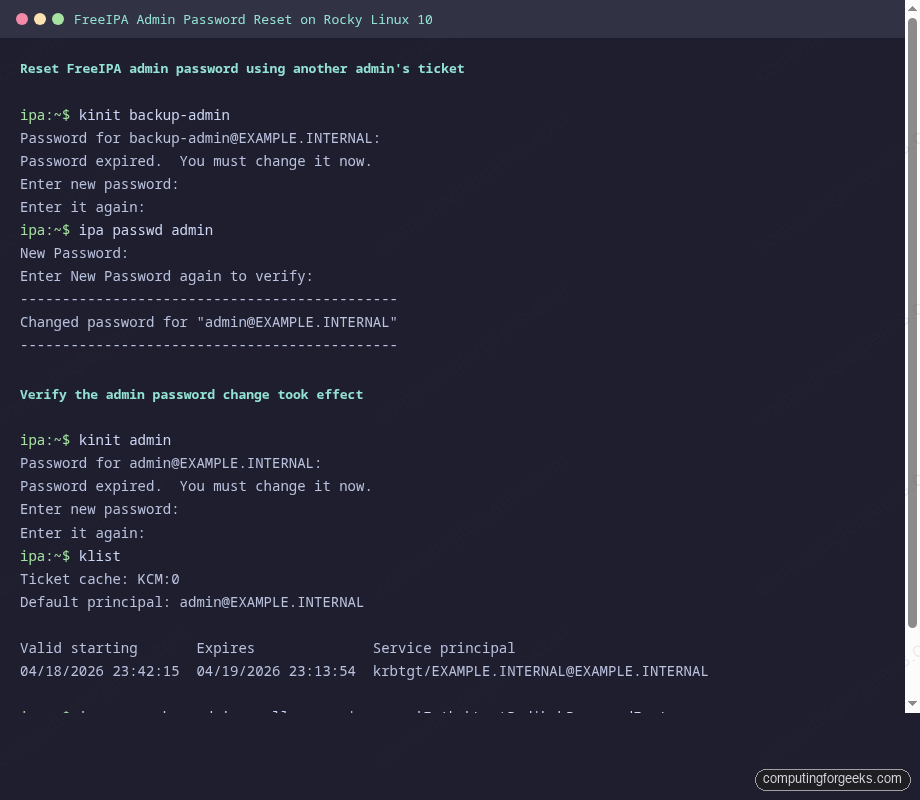
FreeIPA treats password changes made by another admin as expired on first use. The admin user must change their password at next login, which is the correct security behaviour: the person who lost the password must pick a new one they own. Here is the full flow captured on a Rocky Linux 10 test box:
Method 2: Reset using the Directory Manager password
Use this path when no other admin exists but you still know the Directory Manager password set during ipa-server-install. The tool is ldappasswd bound as cn=Directory Manager. Export the CA certificate so TLS validation works against the self-signed IPA CA:
export LDAPTLS_CACERT=/etc/ipa/ca.crtReset the admin password over LDAPS. The -S flag prompts for the new password, -W prompts for the Directory Manager password, and -ZZ enforces StartTLS:
ldappasswd -ZZ -D "cn=Directory Manager" -W -S \
  -H "ldap://${IPA_HOST}" \
  "uid=admin,cn=users,cn=accounts,${IPA_BASE_DN}"
The prompts come in this order: new password, new password again, then the Directory Manager password. On success the command returns no output and exits 0. Verify by grabbing a Kerberos ticket with the new admin password:
kinit adminFreeIPA flags this as a forced password change because the Directory Manager wrote the hash directly. The first kinit admin therefore asks you to change the password again:
Password for [email protected]:
Password expired.  You must change it now.
Enter new password:
Enter it again:
After you pick a final password, confirm the ticket:
klistThe output should show the admin principal with a current timestamp:
Ticket cache: KCM:0
Default principal: [email protected]

Valid starting       Expires              Service principal
04/18/2026 23:42:15  04/19/2026 23:13:54  krbtgt/[email protected]
Method 3: Reset the Directory Manager password first, then admin
If neither Method 1 nor Method 2 applies because you’ve lost both the admin password and the Directory Manager password, you have one remaining option: edit the 389 Directory Server configuration file directly to inject a new DM password hash, then use Method 2 on top. This requires root shell access on the FreeIPA server itself.
First stop 389 Directory Server. Changes to dse.ldif while the daemon is running get overwritten on shutdown:
sudo systemctl stop "dirsrv@${IPA_INSTANCE}.service"Generate a new SSHA512 hash for the Directory Manager. Use pwdhash, which ships with 389-ds-base:
sudo /usr/bin/pwdhash -s SSHA512 "DMResetPass#2026"The output is a single hash line that starts with {SSHA512}:
{SSHA512}wKnLRx8fD4O1nQ7yqjJ9vXhB3pEd5aN7sTfUv2mK9pX1rYzB8cWq3dLbRt0eP5hF9mKjA2nT7uC4vWxY6sOpen dse.ldif and replace the nsslapd-rootpw attribute. The file is gigantic because 389 Directory Server stores its entire live configuration in LDIF form:
sudo vi "/etc/dirsrv/slapd-${IPA_INSTANCE}/dse.ldif"Search for nsslapd-rootpw: and replace the existing hash with the one you just generated:
nsslapd-rootpw: {SSHA512}wKnLRx8fD4O1nQ7yqjJ9vXhB3pEd5aN7sTfUv2mK9pX1rYzB8cWq3dLbRt0eP5hF9mKjA2nT7uC4vWxY6sSave and start 389 Directory Server back up:
sudo systemctl start "dirsrv@${IPA_INSTANCE}.service"Verify the new Directory Manager password works with a plain anonymous search bound as DM:
ldapsearch -x -D "cn=Directory Manager" -w "DMResetPass#2026" \
  -H "ldap://${IPA_HOST}" \
  -b "${IPA_BASE_DN}" -s base "objectclass=*" | head -5
A working bind returns the base entry:
# extended LDIF
#
# LDAPv3
# base <dc=example,dc=internal> with scope baseObject
# filter: objectclass=*
Now loop back to Method 2 above and run ldappasswd against the admin DN with the new Directory Manager password. That resets the admin and you’re back in business.
Verify access through the Web UI
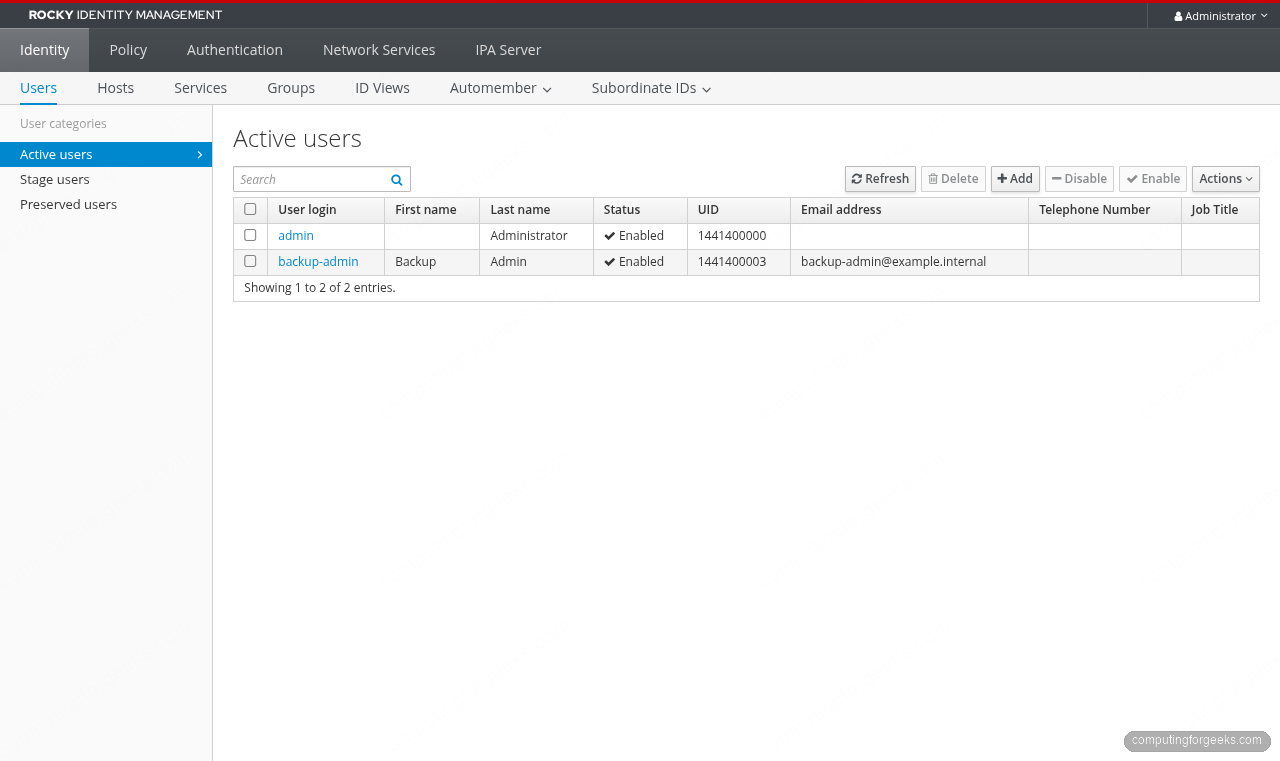
After any of the three methods, open https://${IPA_HOST}/ipa/ui/ in a browser, sign in as admin, and confirm the dashboard loads. The first login after a password change completes the password policy cycle and the account returns to normal operation. If the login form rejects the password, check that your browser isn’t autofilling the old one and that the clock on your client matches the IPA server within 5 minutes (Kerberos clock skew).
Confirm on the server side that the krbLastPwdChange attribute updated:
ipa user-show admin --all | grep -E "Last password change|User login"The timestamp should match the time you ran the reset, within a minute:
  User login: admin
  Last password change: 20260418204215Z
Password policy notes
FreeIPA ships with a default global password policy that is stricter than most admins expect. If your reset fails with a policy error, this is why. View the active policy with:
ipa pwpolicy-showThe real output from a fresh install:
  Group: global_policy
  Max lifetime (days): 90
  Min lifetime (hours): 1
  History size: 0
  Character classes: 0
  Min length: 8
  Max failures: 6
  Failure reset interval: 60
  Lockout duration: 600
  Grace login limit: -1
The 8-character minimum is the main constraint during a reset. History is 0 and character classes is 0 on a stock install, which means you can reuse an old password and you don’t need mixed-case or digits. Pick a password that clears the length bar or the reset will fail with Constraint violation: Password is too short. Method 2 bypasses the IPA-level policy because cn=Directory Manager writes the hash directly into 389 Directory Server, which is why it’s the right tool for a full lockout but also why the first kinit forces a change afterward.
Common errors and fixes
Error: “kinit: Password has expired while getting initial credentials”
This is the expected message immediately after Methods 1 and 2. FreeIPA flags the new password as expired so the human owner picks a final value. Run kinit admin a second time and follow the password-change prompt. The ticket issues after the change completes.
Error: “ldap_bind: Invalid credentials (49)” on Method 2
The Directory Manager password is wrong. It is not the same as the IPA admin password. It was set with --ds-password during ipa-server-install. If you can’t remember it, move on to Method 3 to reset it.
Error: “Constraint violation: Password is too short”
Your new password violates the IPA password policy. Pick something that clears the 8-character minimum and includes at least one digit or special character. Temporarily loosen the policy only if you absolutely must:
ipa pwpolicy-mod --minlength=6 --minclasses=1Error: “Cannot contact any KDC for realm”
SSSD on the client machine cannot reach the KDC on the IPA server. Confirm UDP/TCP 88 is open in the firewall, that /etc/krb5.conf points at the correct realm and FQDN, and that DNS resolution for ${IPA_HOST} returns the right IP. A quick test:
dig +short "${IPA_HOST}"
nc -vz "${IPA_HOST}" 88
Both should succeed. If nc fails, run firewall-cmd --list-services on the IPA server and confirm freeipa-ldap and freeipa-ldaps are in the output.
Avoiding future lockouts
Two habits prevent almost every FreeIPA admin-lockout incident I’ve seen:
Create a second user in the admins group the day you install FreeIPA. The cost is one ipa user-add plus ipa group-add-member admins. Details live in the FreeIPA user and group management guide. A second admin turns “I lost the only password” from a Method 3 incident into a Method 1 five-minute fix.
Store the Directory Manager and admin passwords in a shared team password manager the moment ipa-server-install completes. Those two passwords are not things any human should be expected to remember six months after deployment, and the system has no self-service recovery flow without them.
With the reset complete, the FreeIPA install guide covers the surrounding setup, the replica configuration guide adds HA so a single password loss cannot take down auth across the fleet, and the Let’s Encrypt for FreeIPA article swaps the self-signed cert for a public one so the Web UI you just signed into stops triggering browser warnings.



![Install Kali Linux 2026.1 Step by Step [Full Guide]](https://computingforgeeks.com/wp-content/uploads/2026/03/install-kali-linux-20261-step-by-step-768x403.png "Install Kali Linux 2026.1 Step by Step [Full Guide] 5")
Thanks for the instructions however really having an issue trying to set FreeIPA password:
sudo ldappasswd -ZZ -D ‘cn=Directory Manager’ -W -S uid=admin,cn=users,cn=accounts,dc=ipa-quincy,dc=domain,dc=com -H ldap://ipa-quincy.domain.com
New password:
Re-enter new password:
Enter LDAP Password:
Result: No such object (32)
Additional info: No such Entry exists.
Not sure what to look at here.