You install openSUSE Leap 16, open a music file or an MP4, and nothing plays. That is not a broken install. Leap ships without the common patent-encumbered codecs (H.264, H.265, AAC, MP3 in their full form), because openSUSE cannot legally distribute them from its own servers. The fix is the Packman repository, a long-running community project that packages exactly these codecs for openSUSE. By the end of this guide you will have multimedia codecs on openSUSE Leap 16 working everywhere: VLC, GNOME Videos, browsers, and the command line.
This is easier than the forum threads make it sound. It is three moves: add Packman, switch your media packages to it, then install the codec set. Each step is shown with the real output from a Leap 16 desktop.
Verified on openSUSE Leap 16 (GNOME 48.4) in June 2026, and the steps still hold.
Why Leap 16 ships without the common codecs
Two repositories already help a little. The main repositories carry open formats like Opus, Vorbis, VP9, and AV1, and Leap 16 adds a dedicated openh264 repository so Firefox can do H.264 video calls. What is still missing is the full proprietary set that most real-world media uses: the complete H.264 and H.265 encoders, AAC, and MP3 through a single capable build of FFmpeg. Packman fills that gap. It is the same repository longtime openSUSE users have relied on for years, and it is the standard answer for codecs on the distribution.
Add the Packman repository
Add Packman with a raised priority so its multimedia packages are preferred over the stripped-down versions in the main repositories. The priority number matters: a lower number wins in zypper, and 90 beats the default 99:
sudo zypper addrepo -cfp 90 https://ftp.gwdg.de/pub/linux/misc/packman/suse/openSUSE_Leap_16.0/ packmanRefresh the repositories so zypper pulls in the new metadata. The first time it reads Packman it asks you to trust the signing key; accept it:
sudo zypper refreshConfirm Packman is enabled and carries the raised priority:
sudo zypper lr -d packmanThe repository shows as enabled with priority 90:
URI            : https://ftp.gwdg.de/pub/linux/misc/packman/suse/openSUSE_Leap_16.0/
Enabled        : Yes
Priority       : 90 (raised priority)
With Packman in place and ranked above the main repositories, the next move switches your already-installed media packages over to it.
Switch your media packages to Packman
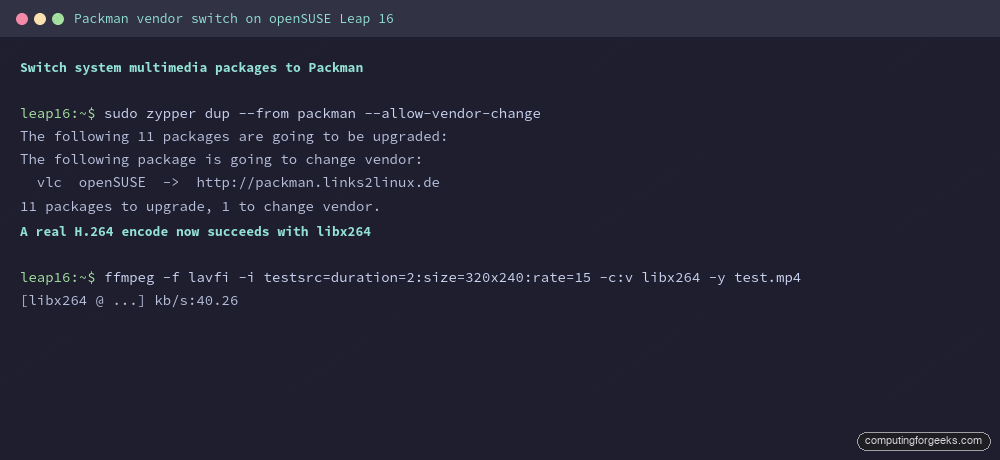
This is the step that does the real work, and the one people skip. Some multimedia libraries are already installed from the openSUSE repositories in a reduced form. You want the Packman builds instead, so you tell zypper to perform a distribution upgrade restricted to Packman, allowing it to change the vendor of those packages:
sudo zypper dup --from packman --allow-vendor-changezypper lists what it will switch. On a fresh GNOME desktop it upgrades a handful of multimedia packages and changes the vendor of the player that was already installed:
The following 11 packages are going to be upgraded:
The following package is going to change vendor:
  vlc  openSUSE  ->  http://packman.links2linux.de
11 packages to upgrade, 1 to change vendor.
The part that trips people up is doing the install of the codecs without this vendor switch first. Skip it and you end up with a mix of openSUSE and Packman libraries that conflict, and playback still fails. Run the dup --from packman first, every time.
With the libraries now sourced from Packman, install the codec packages that supply the actual decoders.
Install the codec set
The base GStreamer plugins (good, bad, ugly, and the FFmpeg bridge libav) are already installed on the GNOME desktop from the openSUSE repositories. What they lack is the patent-encumbered codec add-ons, which Packman ships as the matching -codecs packages. Pull those, plus the full FFmpeg, from Packman:
sudo zypper install --from packman --allow-vendor-change ffmpeg gstreamer-plugins-bad-codecs gstreamer-plugins-ugly-codecszypper installs the two codec add-ons and the supporting decoder libraries they pull in:
The following 6 NEW packages are going to be installed:
(1/6) Installing: gstreamer-plugins-ugly-codecs-1.26.10
(2/6) Installing: libopenaptx0-0.2.0
(3/6) Installing: librtmp1-2.4.20151223
(4/6) Installing: libfaac0-1.50
(5/6) Installing: libde265-0-1.1.1
(6/6) Installing: gstreamer-plugins-bad-codecs-1.26.10
The bridge that lets GNOME Videos use these codecs is gstreamer-plugins-libav, which is already installed. It links against the FFmpeg libraries, and because the vendor switch above replaced those with the full Packman build, the GStreamer player now decodes the same formats FFmpeg does. If you do not have a player, VLC is the most forgiving choice and is on the GNOME desktop by default; after the vendor switch it is the Packman build.
Check that the codecs work
Confirm the FFmpeg you now have is the Packman build:
ffmpeg -versionYou should see version 7.1.2 with a long list of enabled libraries including libx264, libx265, and the AAC and MP3 encoders:
ffmpeg version 7.1.2 Copyright (c) 2000-2025 the FFmpeg developers
built with gcc 13 (SUSE Linux)
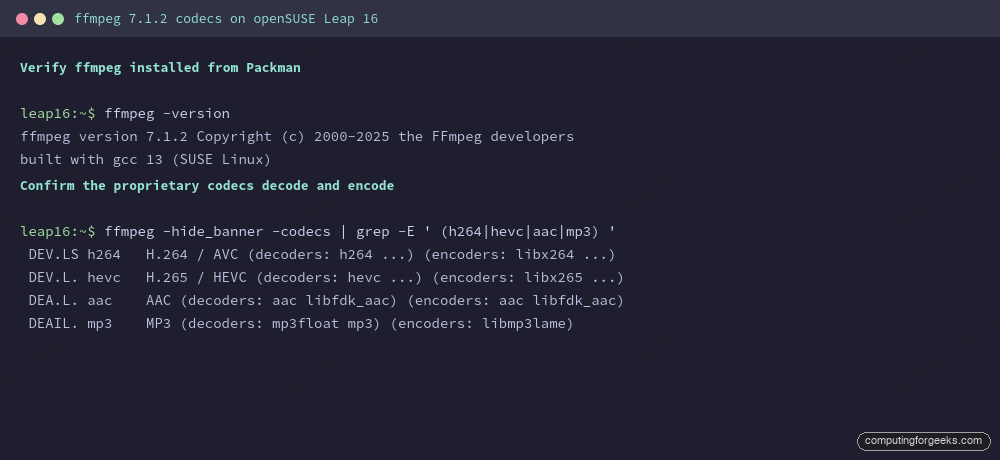
The real test is whether the codecs that were missing are now present. List them and look for both decoders and encoders:
ffmpeg -hide_banner -codecs | grep -E ' (h264|hevc|aac|mp3) 'Each line shows the codec with its decoders and encoders, which means playback and conversion both work:
 DEV.LS h264   H.264 / AVC (decoders: h264 ...) (encoders: libx264 libopenh264 ...)
 DEV.L. hevc   H.265 / HEVC (decoders: hevc ...) (encoders: libx265 ...)
 DEA.L. aac    AAC (decoders: aac libfdk_aac) (encoders: aac libfdk_aac)
 DEAIL. mp3    MP3 (decoders: mp3float mp3) (encoders: libmp3lame)
The terminal confirms each previously-missing format now carries both a decoder and an encoder:
For a hands-on check, encode a short clip to H.264. If this completes, your desktop can now play and convert the formats that failed before:
ffmpeg -f lavfi -i testsrc=duration=2:size=320x240:rate=15 -c:v libx264 -y test.mp4It writes a small test.mp4 and reports the encoded bitrate. Open any MP4 or MP3 in VLC or GNOME Videos now and it plays.
Common questions
Do I still need the codecs if Leap already added the openh264 repository?
Yes. The openh264 repository gives Firefox H.264 for video calls, but it does not provide the full FFmpeg build, the H.265 and AAC encoders, or the GStreamer bridge that desktop players use. Packman covers all of that.
Can I install the codecs without the vendor switch?
You can, but you should not. Without zypper dup --from packman --allow-vendor-change first, you get a mix of openSUSE and Packman multimedia libraries that conflict, and playback still breaks. The vendor switch aligns every related package on one source.
Will a future system update undo this?
No. Because Packman has a higher priority and you switched the vendor, normal updates keep pulling the Packman builds. You only repeat the dup --from packman step if you add the repository fresh on another machine.
That is the whole job. If you just finished setting up the machine, the things to do after installing Leap 16 guide covers the rest of the desktop, and the zypper command reference is handy for managing repositories like Packman.