An internal mail server is still one of the quickest wins for a sysadmin. Application servers need somewhere to drop cron output, deployment pipelines need somewhere to send build reports, and on-call teams need a place to page alerts. A small Postfix server paired with Dovecot for IMAP covers all of that in about twenty minutes on Ubuntu 26.04 LTS, with proper TLS and authenticated submission.
This guide sets up Postfix 3.10.6 as the MTA, Dovecot 2.4.2 for IMAP and SMTP SASL authentication, a Maildir layout per user, TLS on all relevant ports, UFW firewall rules, and then proves the stack works by sending real mail from a second Ubuntu 26.04 VM and retrieving it over IMAPS with curl. Every command was run on a pair of freshly cloned Ubuntu 26.04 VMs: mail.c4geeks.local (server) and client.c4geeks.local (sender).
Tested April 2026 on Ubuntu 26.04 LTS (Resolute Raccoon), kernel 7.0.0-10, Postfix 3.10.6, Dovecot 2.4.2
Prerequisites
Two freshly installed Ubuntu 26.04 LTS servers on the same network. In this guide, mail.c4geeks.local at 192.168.1.169 runs Postfix and Dovecot, and client.c4geeks.local at 192.168.1.177 sends mail and reads it back over IMAPS. Both boxes were built from the stock cloud image with root SSH access, SELinux/AppArmor enforcing, and UFW in its default state. If either is missing the basics, finish the Ubuntu 26.04 initial server setup first. Resolving mail.c4geeks.local works here through /etc/hosts entries on both hosts; in production you would use an A record (or MX record for external delivery).
Set FQDN and reusable shell variables
Postfix refuses to start with a bare hostname like ubuntu; it insists on a fully qualified name. Pin one on the server and record the matching entry on the client:
sudo hostnamectl set-hostname mail.c4geeks.local
echo '192.168.1.169 mail.c4geeks.local mail' | sudo tee -a /etc/hosts
echo '192.168.1.177 client.c4geeks.local client' | sudo tee -a /etc/hosts
hostname -f
The final command must print the full mail.c4geeks.local, not a short name. Repeat the hostnamectl and /etc/hosts steps on the client with its own hostname.
Every command below uses a handful of values that would otherwise appear a dozen times. Define them once at the top of the SSH session on the server:
export MAIL_HOST="mail.c4geeks.local"
export MAIL_DOMAIN="c4geeks.local"
export MAIL_USER1="alice"
export MAIL_USER2="bob"
export MAIL_PASS='MailTest#2026'
export TRUSTED_NET="192.168.1.0/24"
Swap the values for your real domain, pick real passwords, then confirm they are set before running anything that touches Postfix:
echo "Host:    ${MAIL_HOST}"
echo "Domain:  ${MAIL_DOMAIN}"
echo "Users:   ${MAIL_USER1}, ${MAIL_USER2}"
echo "Network: ${TRUSTED_NET}"
Install Postfix and Dovecot on the mail server
Ubuntu’s postfix package launches a TUI wizard that blocks unattended installs. Preseed the two answers it asks for, then install Postfix, Dovecot IMAP, Dovecot POP3, and the mailutils helper package in one shot:
echo "postfix postfix/main_mailer_type select Internet Site" | sudo debconf-set-selections
echo "postfix postfix/mailname string ${MAIL_HOST}" | sudo debconf-set-selections
sudo apt-get update
sudo DEBIAN_FRONTEND=noninteractive apt-get install -y \
  postfix mailutils dovecot-core dovecot-imapd dovecot-pop3d
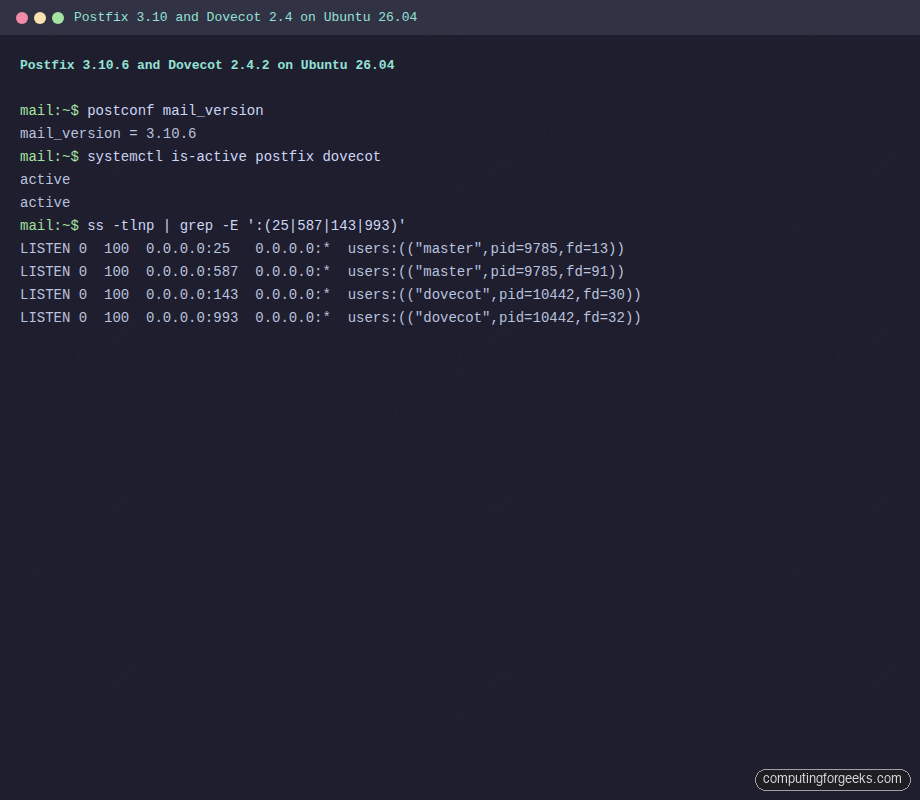
Confirm Postfix 3.10.6 and Dovecot 2.4.2 from the 26.04 archive, and that both services came up cleanly:
postconf mail_version
systemctl is-active postfix dovecot
The output should show the MTA version and both services already running:
mail_version = 3.10.6
active
active
Running terminal capture on the server showing both services listening on the expected ports:
Configure Postfix main.cf
Rather than editing /etc/postfix/main.cf by hand, postconf -e edits each directive in place and keeps comments intact. Apply the full server configuration in one block:
sudo postconf -e "myhostname = ${MAIL_HOST}"
sudo postconf -e "mydomain = ${MAIL_DOMAIN}"
sudo postconf -e 'myorigin = $mydomain'
sudo postconf -e 'inet_interfaces = all'
sudo postconf -e 'inet_protocols = ipv4'
sudo postconf -e 'mydestination = $myhostname, $mydomain, localhost.$mydomain, localhost'
sudo postconf -e "mynetworks = 127.0.0.0/8, ${TRUSTED_NET}"
sudo postconf -e 'home_mailbox = Maildir/'
sudo postconf -e 'smtpd_sasl_type = dovecot'
sudo postconf -e 'smtpd_sasl_path = private/auth'
sudo postconf -e 'smtpd_sasl_auth_enable = yes'
sudo postconf -e 'smtpd_relay_restrictions = permit_mynetworks, permit_sasl_authenticated, reject_unauth_destination'
sudo postconf -e 'smtpd_recipient_restrictions = permit_mynetworks, permit_sasl_authenticated, reject_unauth_destination'
home_mailbox = Maildir/ switches local delivery from traditional mbox to Maildir, which Dovecot handles natively and locks per message (mbox requires whole-file locking that conflicts with IMAP). The SASL directives tell Postfix to ask Dovecot about passwords over a Unix socket we wire up in a later step.
Check the running config picked up the changes:
sudo postconf -n | grep -E 'myhostname|mydomain|mynetworks|home_mailbox|sasl'Create mail users and Maildir
Postfix uses the system passwd database by default, so every mail user is a Linux account. Create two test accounts:
sudo useradd -m -s /bin/bash "${MAIL_USER1}"
sudo useradd -m -s /bin/bash "${MAIL_USER2}"
echo "${MAIL_USER1}:${MAIL_PASS}" | sudo chpasswd
echo "${MAIL_USER2}:${MAIL_PASS}" | sudo chpasswd
The Maildir itself is created on first delivery. No action needed here.
Generate a TLS certificate and enable Dovecot SSL
Dovecot 2.4 requires TLS by default (the ssl = required directive). For a LAN-only internal mail server, a self-signed cert is fine and clients can pin it. For a mail server that talks to the public internet, swap this step for a real Let’s Encrypt cert using the HTTP-01 challenge on port 80, as in the Nginx + Let’s Encrypt guide.
sudo mkdir -p /etc/ssl/mail
sudo openssl req -new -x509 -nodes -days 365 \
  -subj "/CN=${MAIL_HOST}" \
  -keyout /etc/ssl/mail/mail.key \
  -out /etc/ssl/mail/mail.crt
sudo chmod 600 /etc/ssl/mail/mail.key
Dovecot 2.4 renamed several TLS directives. The correct names are ssl_server_cert_file and ssl_server_key_file, not the v2.3 ssl_cert and ssl_key that many older guides still show. Write a dedicated conf file so the override is easy to spot later:
sudo tee /etc/dovecot/conf.d/10-ssl.conf > /dev/null <<'CONF'
ssl = required
ssl_server_cert_file = /etc/ssl/mail/mail.crt
ssl_server_key_file = /etc/ssl/mail/mail.key
CONF
Configure Dovecot for Maildir, auth, and the Postfix SASL socket
Dovecot 2.4 on Ubuntu 26.04 defaults to the mbox backend with mail_path = ~/mail. Postfix already writes to ~/Maildir, so tell Dovecot to read from the same place. Also point mail_inbox_path at ~/Maildir instead of /var/mail/$user, otherwise Dovecot will create an empty mbox and report zero messages even when mail has arrived:
sudo sed -i 's|^mail_driver = .*|mail_driver = maildir|' /etc/dovecot/conf.d/10-mail.conf
sudo sed -i 's|^mail_path = .*|mail_path = %{home}/Maildir|' /etc/dovecot/conf.d/10-mail.conf
sudo sed -i 's|^mail_inbox_path = /var/mail/.*|mail_inbox_path = ~/Maildir|' /etc/dovecot/conf.d/10-mail.conf
Wire up the SASL auth socket that Postfix asked for in its smtpd_sasl_path setting. A clean drop-in avoids editing the vendor-shipped 10-master.conf:
sudo tee /etc/dovecot/conf.d/99-postfix-sasl.conf > /dev/null <<'CONF'
service auth {
  unix_listener /var/spool/postfix/private/auth {
    mode = 0666
    user = postfix
    group = postfix
  }
}
CONF
Restart Dovecot and confirm the socket is now visible inside the chrooted Postfix queue:
sudo systemctl restart dovecot
ls -la /var/spool/postfix/private/auth
The socket is owned by postfix and has mode 0666, which is exactly what Postfix expects:
srw-rw-rw- 1 postfix postfix 0 Apr 18 11:24 /var/spool/postfix/private/authEnable submission port 587 with STARTTLS and SASL
Port 25 is reserved for server-to-server SMTP. Mail clients should submit outbound mail on port 587 with STARTTLS and authentication required. Postfix’s master.cf already lists a commented-out submission entry; turn it on and harden it in one step with postconf -M:
sudo postconf -Me submission/inet='submission inet n - y - - smtpd'
sudo postconf -Pe 'submission/inet/syslog_name=postfix/submission'
sudo postconf -Pe 'submission/inet/smtpd_tls_security_level=encrypt'
sudo postconf -Pe 'submission/inet/smtpd_sasl_auth_enable=yes'
sudo postconf -Pe 'submission/inet/smtpd_tls_cert_file=/etc/ssl/mail/mail.crt'
sudo postconf -Pe 'submission/inet/smtpd_tls_key_file=/etc/ssl/mail/mail.key'
sudo postconf -Pe 'submission/inet/smtpd_client_restrictions=permit_sasl_authenticated,reject'
sudo postconf -e 'smtpd_tls_cert_file = /etc/ssl/mail/mail.crt'
sudo postconf -e 'smtpd_tls_key_file = /etc/ssl/mail/mail.key'
sudo systemctl restart postfix
Verify all four ports (25, 587, 143, 993) are listening:
sudo ss -tlnp | grep -E ':(25|587|143|993)'Open UFW firewall ports
The host-level firewall needs matching rules, otherwise the client will see Connection refused:
sudo ufw allow 22/tcp
sudo ufw allow 25/tcp
sudo ufw allow 587/tcp
sudo ufw allow 143/tcp
sudo ufw allow 993/tcp
sudo ufw --force enable
sudo ufw status numbered
If you already follow the UFW firewall guide, adapt the rules to your source-IP restrictions. A public-facing MX needs 25 open globally; submission (587) and IMAPS (993) can be locked down to your office or VPN subnet.
Send and read real mail from a client VM
Switch to the client VM. Install swaks (the “Swiss Army knife for SMTP”) and curl, which between them can exercise every leg of the mail flow:
sudo apt-get install -y swaks mailutils curlCopy the server’s self-signed certificate to the client and trust it locally so swaks can verify the TLS session:
scp [email protected]:/etc/ssl/mail/mail.crt /tmp/mail.crtSubmit an authenticated message on port 587 with STARTTLS, using Bob’s credentials:
swaks --to [email protected] \
  --from [email protected] \
  --server mail.c4geeks.local --port 587 -tls \
  --auth-user bob --auth-password 'MailTest#2026' \
  --h-Subject 'Auth SMTP via 587' \
  --body 'Hi Alice, this was sent with SASL auth over STARTTLS on submission port 587.' \
  --tls-ca-path /tmp/mail.crt
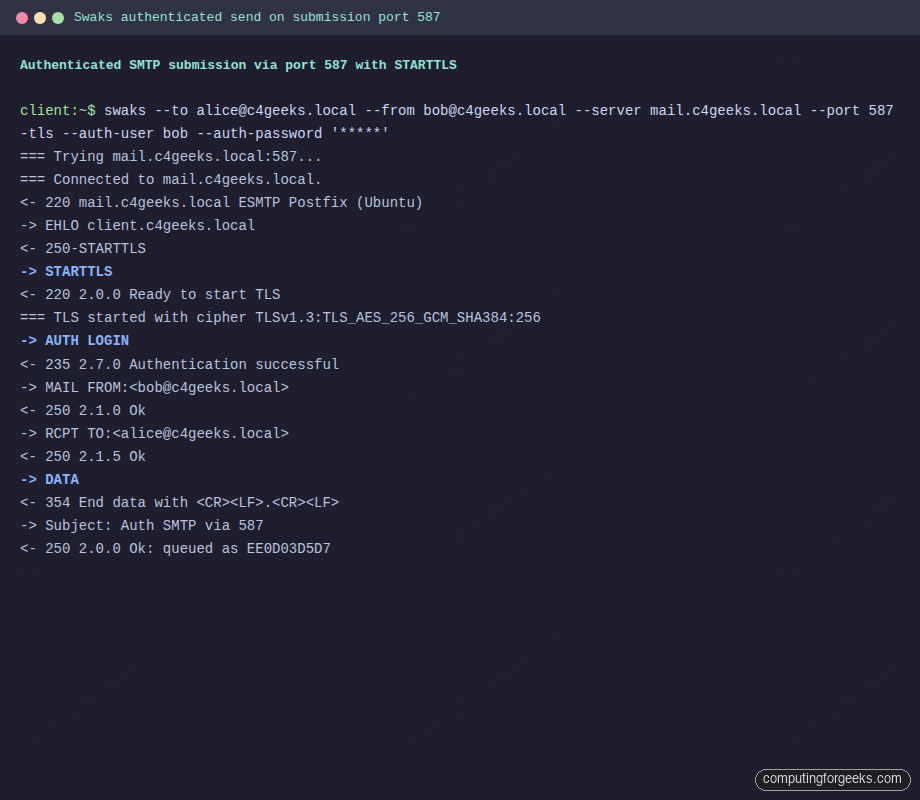
The session negotiates TLS, authenticates, and the server returns a queue ID:
<~ 220 mail.c4geeks.local ESMTP Postfix (Ubuntu)
~> STARTTLS
<~ 220 2.0.0 Ready to start TLS
=== TLS started with cipher TLSv1.3:TLS_AES_256_GCM_SHA384:256
~> AUTH LOGIN
<~ 235 2.7.0 Authentication successful
~> MAIL FROM:<[email protected]>
<~ 250 2.1.0 Ok
~> RCPT TO:<[email protected]>
<~ 250 2.1.5 Ok
~> DATA
<~ 354 End data with <CR><LF>.<CR><LF>
<~ 250 2.0.0 Ok: queued as EE0D03D5D7
~> QUIT
Full swaks session from the client VM, with the TLS cipher line and the server’s 235 auth-success response visible:
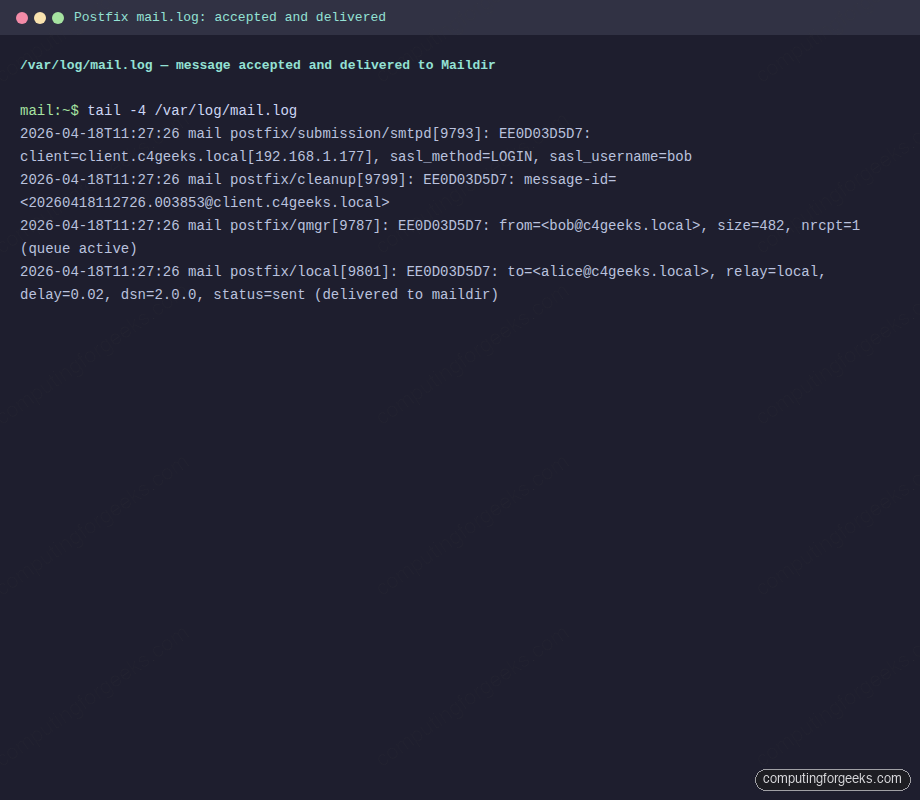
Back on the server, /var/log/mail.log records the full path from accept to local delivery:
sudo tail -4 /var/log/mail.logFour lines trace the message: the submission smtpd authenticated Bob, cleanup assigned a message-id, qmgr queued it, and the local delivery agent dropped it into Alice’s Maildir:
postfix/submission/smtpd: EE0D03D5D7: client=client.c4geeks.local[192.168.1.177], sasl_method=LOGIN, sasl_username=bob
postfix/cleanup: EE0D03D5D7: message-id=<[email protected]>
postfix/qmgr: EE0D03D5D7: from=<[email protected]>, size=482, nrcpt=1 (queue active)
postfix/local: EE0D03D5D7: to=<[email protected]>, relay=local, delay=0.02, status=sent (delivered to maildir)
Live tail of the same entries on the server, captured in a styled terminal window:
Now retrieve the message over IMAPS from the client. Using curl avoids installing a mail client and produces scriptable output:
curl -sk --url "imaps://mail.c4geeks.local:993/INBOX" \
  --user "alice:MailTest#2026" \
  --request 'STATUS INBOX (MESSAGES UNSEEN)'

curl -sk --url "imaps://mail.c4geeks.local:993/INBOX" \
  --user "alice:MailTest#2026" \
  --request 'FETCH 1:3 (BODY[HEADER.FIELDS (SUBJECT FROM)])'
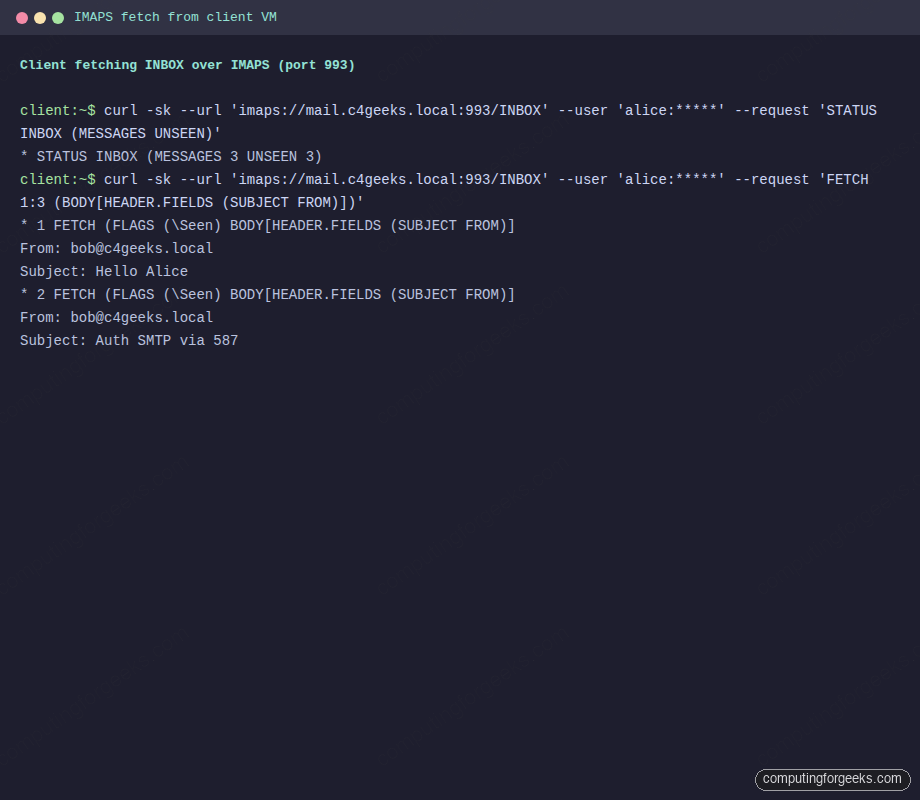
The STATUS command reports message counts, and FETCH returns the subject and from headers of each message. This is the canonical proof that Postfix wrote to disk and Dovecot exposed it over IMAPS:
* STATUS INBOX (MESSAGES 3 UNSEEN 3)
* 1 FETCH (FLAGS (\Seen) BODY[HEADER.FIELDS (SUBJECT FROM)]
Date: Sat, 18 Apr 2026 11:24:24 +0000
From: [email protected]
Subject: Hello Alice
* 2 FETCH (FLAGS (\Seen) BODY[HEADER.FIELDS (SUBJECT FROM)]
From: [email protected]
Subject: Auth SMTP via 587
Here is the same curl transcript from the client’s terminal, showing a real IMAPS session against port 993:
Any regular mail client (Thunderbird, Apple Mail, mutt) points at mail.c4geeks.local:993 with SSL/TLS and the same credentials works identically. Use mail.c4geeks.local:587 with STARTTLS for outbound.
Monitor and troubleshoot
Three commands handle 90% of day-to-day mail server operations. Watch the mail log in real time:
sudo tail -f /var/log/mail.logList messages currently queued for delivery:
sudo postqueue -pForce a queue retry (useful when DNS was broken and is now fixed):
sudo postqueue -fError: “fatal: no SASL authentication mechanisms”
Postfix logged this on a fresh test install because Dovecot had not yet created the SASL auth socket. Confirm the file exists:
ls -la /var/spool/postfix/private/authIf it is missing, the drop-in from the earlier step did not load. Check that /etc/dovecot/conf.d/99-postfix-sasl.conf exists and has the service auth { unix_listener ... } block, then restart Dovecot. The file must be a drop-in under conf.d/, not a new top-level file under /etc/dovecot/, or Dovecot will not include it.
Error: “ssl_cert: Unknown setting”
Dovecot 2.4 (shipped with 26.04) renamed ssl_cert to ssl_server_cert_file and ssl_key to ssl_server_key_file. Any guide written for Dovecot 2.3 or earlier will hit this. Use the new names as shown above.
Error: “SASL: no auth mechanism was offered or recognized” over port 143
Dovecot 2.4 advertises LOGINDISABLED on plain port 143 until STARTTLS is negotiated. Either use IMAPS on 993 (simpler, recommended) or issue STARTTLS before authenticating on 143. The default ssl = required in this guide is the safer choice.
Error: IMAP STATUS reports 0 messages when Maildir has files
This is the single most confusing Dovecot 2.4 trap on Ubuntu 26.04. The default config pairs mail_path = ~/Maildir with mail_inbox_path = /var/mail/$user, so Postfix writes to ~/Maildir/new while Dovecot looks for INBOX in an empty /var/mail/$user. Point mail_inbox_path at ~/Maildir as shown in the Dovecot configuration step, then restart and optionally force a rebuild:
sudo doveadm force-resync -u alice INBOX
sudo doveadm mailbox status -u alice messages INBOX
swaks exits with “TLS peer certificate failed CA verification”
The self-signed cert is not in the client’s CA bundle. Either trust it with --tls-ca-path /tmp/mail.crt as in the example, or replace the self-signed cert with a Let’s Encrypt cert tied to a public MX hostname.
Once the stack is proven, the operational work comes next. Lock the box down with the Ubuntu 26.04 hardening guide, add Fail2ban rules for the Postfix and Dovecot log patterns, and set up a cron job that rotates the self-signed cert before it expires.