

In our previous guide we covered the installation of KDE Plasma Desktop environment on Ubuntu. This tutorial will continue with the installation of Deepin Desktop Environment on Ubuntu 22.04/20.04. The Deepin Desktop Environment (DDE) in one of the most loved desktop environments that is native to Deepin Linux distribution designed by the Wuhan Deepin Technology Co.,Ltd.
The Deepin Desktop environment is designed to provide a beautiful, easy to use, safe and reliable system for Linux Desktop users. The DDE is comprised of the Desktop Environment, deepin Window Manager, Control Center, Launcher and Dock.
Install Deepin Desktop Environment (DDE) on Ubuntu
In this tutorial we will look at the steps that you can use to install Deepin Desktop Environment on Ubuntu. The DDE packages are not available on default Ubuntu upstream APT repositories but thanks to UbuntuDDE which has made its stable repository available to the public.
UbuntuDDE is a Remix flavor of Ubuntu system with Deepin Desktop Environment (DDE). If you’re looking for an Linux distribution based on Ubuntu and comes with Deepin Desktop Environment, then you can try UbuntuDDE.
1. Add UbuntuDDE Stable PPA repository
If you had tried other PPA repositories such as leaeasy without any success I recommend you clean them out.
sudo apt update && sudo apt install ppa-purge
sudo ppa-purge ppa:leaeasy/dde
Add Stable PPA repository for DDE:
sudo add-apt-repository ppa:ubuntudde-dev/stableHit the Enter key in your keyboard to add the repository.
Press [ENTER] to continue or Ctrl-c to cancel adding it.

Hit:1 http://security.ubuntu.com/ubuntu focal-security InRelease
Get:2 http://ke.archive.ubuntu.com/ubuntu focal InRelease [265 kB]
Get:3 http://ppa.launchpad.net/ubuntudde-dev/stable/ubuntu focal InRelease [18.1 kB]
Get:4 http://ppa.launchpad.net/ubuntudde-dev/stable/ubuntu focal/main amd64 Packages [25.1 kB]
Get:5 http://ppa.launchpad.net/ubuntudde-dev/stable/ubuntu focal/main i386 Packages [9,520 B]
Get:6 http://ppa.launchpad.net/ubuntudde-dev/stable/ubuntu focal/main Translation-en [8,680 B]
Hit:7 http://ke.archive.ubuntu.com/ubuntu focal-updates InRelease
Hit:8 http://ke.archive.ubuntu.com/ubuntu focal-backports InRelease
Fetched 326 kB in 10s (33.0 kB/s)
Reading package lists... Done
2. Install Deepin Desktop Environment (DDE)
After adding the repository successfully the next step will be to install Deepin Desktop Environment (DDE) on Ubuntu 22.04/20.04.
This can be done by executing the commands below in your terminal.
sudo apt update
sudo apt install ubuntudde-dde
A number of packages will be installed and the duration could be long depending on your internet speed.
...
The following packages will be upgraded:
  libldb2 libsmbclient libwbclient0 samba-libs
4 upgraded, 409 newly installed, 0 to remove and 185 not upgraded.
Need to get 529 MB/530 MB of archives.
After this operation, 1,920 MB of additional disk space will be used.
Do you want to continue? [Y/n] y
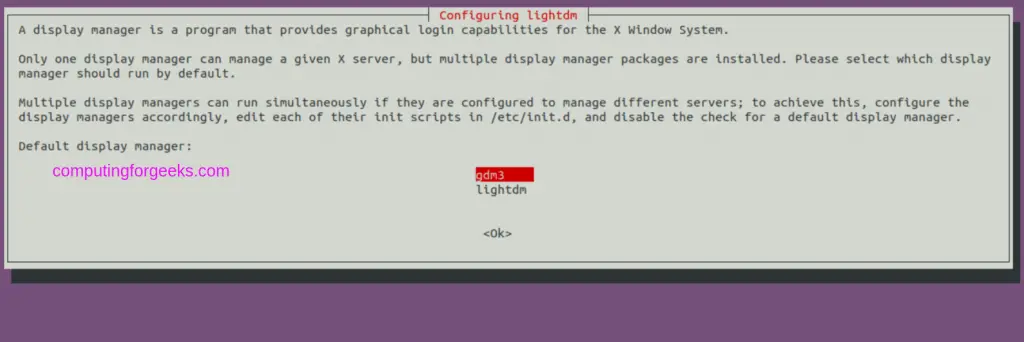
Choose default display manager when asked.
3. Using Deepin Desktop Environment (DDE)
After installation reboot your machine.
sudo systemctl rebootIn the Login screen use the Desktop switcher to choose DDE.

You should get the Deepin Desktop environment where you can start playing with it and doing some adjustments to fit your look and feel.

There is a page on the list of Deepin Applications that you can use on your Ubuntu system to improve productivity. You now have Deepin Desktop Environment installed on Ubuntu Linux system.
More guides on Ubuntu:

I tried it on Ubuntu 22.04 did not work.
What’s the issue Peter?
I’m not sure this is Peter’s problem but I get the following when running ‘sudo apt update’
E: The repository ‘https://ppa.launchpadcontent.net/ubuntudde-dev/stable/ubuntu jammy Release’ does not have a Release file.
I have confirmed that until today, the DDE binaries from the repo above are not ready yet for Ubuntu 22.04. It produces 404 error durring apt-add-repository :
E: The repository ‘https://ppa.launchpadcontent.net/ubuntudde-dev/stable/ubuntu jammy Release’ does not have a Release file.
I second this.
didn’t work for me either. i am pretty sure it’s not yet compatible with 22.04
me too,, only a black empty DE frozen,,,
The guide has been updated and tested, everything should work just fine
Please change the misleading title. The instructions for Ubuntu 22.04 cannot work because the ubuntudde-dev/stable ppa does not yet offer support for jammy as of beginning of May 2022. If you do try to install it on 22.04, you get a message about a missing release file.
The ppa doesn’t support 22.04.
The guide has been updated and works for Ubuntu 22.04
I tried on linux mint 20 it says
E: Unable to locate package ppa:purge
PPA doesnt work, error 404.
Looks like the article was written for Ubuntu 20.04 which was renamed to 22.04 and republished. As commented by others, the PPA doesn’t support 22.04
Did you even try this on 22.04? They don’t have the packages at all.
Same here
sudo apt install ubuntudde-dde
does not work
E: Unable to locate package ubuntudde-dde
It works.
I installed DDE but not appearing in login screen