

This guide will cover the installation Wine on Debian 12/11/10 workstation. Wine is an open source software that allows you to run Microsoft Windows applications on Linux. By leveraging its Winelib library, you can compile Windows applications to help with porting them to Unix-like systems.
If you want to know about new features in Wine 8, check Wine 9 release and new features article. This article will discuss the easy installation of Wine on Debian.
Enable 32 bit architecture
If you’re running a 64-bit system, enable support for 32-bit applications.
sudo dpkg --add-architecture i386The command above won’t return any output.
Add WineHQ repository
We will pull the latest Wine packages from WineHQ repository that is added manually.
First, import GPG key:
sudo apt update
sudo apt -y install gnupg2 software-properties-common
curl -fsSL https://dl.winehq.org/wine-builds/winehq.key|sudo gpg --dearmor -o /etc/apt/trusted.gpg.d/winehq.gpg
Add the Wine repository by running the following command:
sudo apt-add-repository https://dl.winehq.org/wine-builds/debian/The command will add repository to line /etc/apt/sources.list file.
Repository: 'deb https://dl.winehq.org/wine-builds/debian/ bookworm main'
Description:
Archive for codename: bookworm components: main
More info: https://dl.winehq.org/wine-builds/debian/
Adding repository.
Press [ENTER] to continue or Ctrl-c to cancel.
Adding deb entry to /etc/apt/sources.list.d/archive_uri-https_dl_winehq_org_wine-builds_debian_-bookworm.list
Adding disabled deb-src entry to /etc/apt/sources.list.d/archive_uri-https_dl_winehq_org_wine-builds_debian_-bookworm.list
Hit:1 http://deb.debian.org/debian bookworm InRelease
Hit:2 http://deb.debian.org/debian bookworm-updates InRelease
Hit:3 http://security.debian.org/debian-security bookworm-security InRelease
Hit:4 http://mirror.hetzner.com/debian/packages bookworm InRelease
Get:5 https://dl.winehq.org/wine-builds/debian bookworm InRelease [8,045 B]
Hit:6 http://mirror.hetzner.com/debian/packages bookworm-updates InRelease
Hit:7 http://mirror.hetzner.com/debian/security bookworm-security InRelease
Get:8 https://dl.winehq.org/wine-builds/debian bookworm/main i386 Packages [239 kB]
Get:9 https://dl.winehq.org/wine-builds/debian bookworm/main all Packages [1,272 B]
Get:10 https://dl.winehq.org/wine-builds/debian bookworm/main amd64 Packages [239 kB]
Fetched 487 kB in 1s (402 kB/s)
Reading package lists... Done
Update APT package index after.
sudo apt updateUsing OBS repository (Alternative)
You can also use OBS repository instead of the official repository. Add Wine OBS repository as shown below:
Debian 12:
wget -O- -q https://download.opensuse.org/repositories/Emulators:/Wine:/Debian/Debian_12/Release.key | sudo apt-key add -
echo "deb http://download.opensuse.org/repositories/Emulators:/Wine:/Debian/Debian_12 ./" | sudo tee /etc/apt/sources.list.d/wine-obs.list
Debian 11:
wget -O- -q https://download.opensuse.org/repositories/Emulators:/Wine:/Debian/Debian_11/Release.key | sudo apt-key add -
echo "deb http://download.opensuse.org/repositories/Emulators:/Wine:/Debian/Debian_11 ./" | sudo tee /etc/apt/sources.list.d/wine-obs.list
Debian 10:
wget -O- -q https://download.opensuse.org/repositories/Emulators:/Wine:/Debian/Debian_10/Release.key | sudo apt-key add -
echo "deb http://download.opensuse.org/repositories/Emulators:/Wine:/Debian/Debian_10 ./" | sudo tee /etc/apt/sources.list.d/wine-obs.list
Install Wine on Debian
After configuration of the APT repository, the final step is the actual installation of Wine on Debian.
Then install Wine from Stable branch:
sudo apt update
sudo apt install --install-recommends winehq-stable
After installation. verify version installed.
$ wine --version
wine-9.0
Using Wine on Debian
For basic usage of wine, check help page.
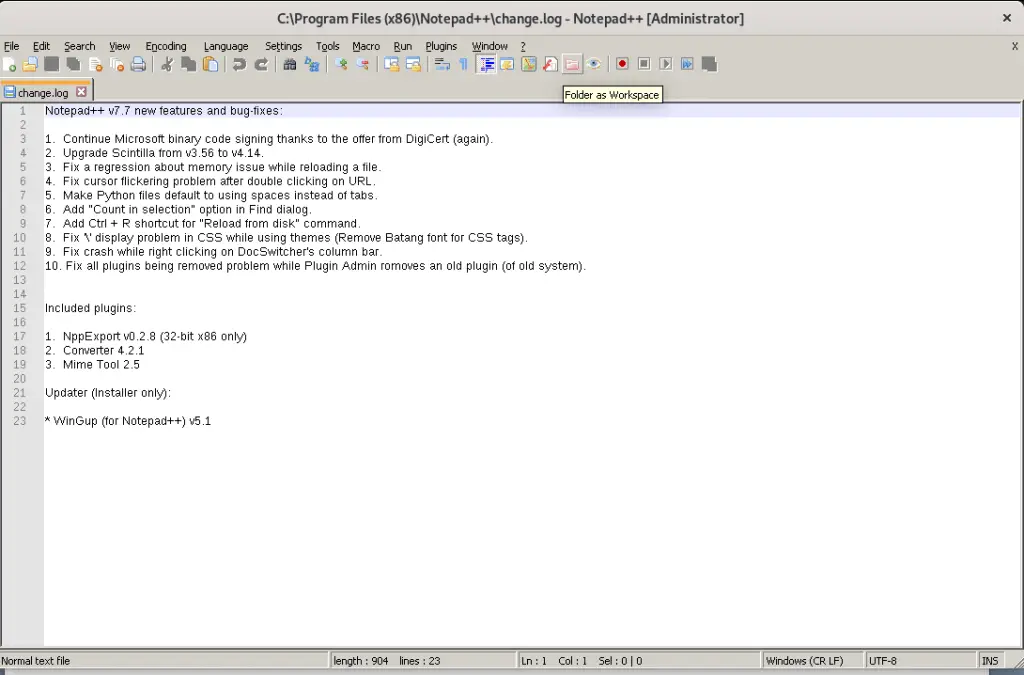
wine --helpExample below is used to run Notepad++ editor on Linux.
cd ~/Downloads
VER=$(curl -s https://api.github.com/repos/notepad-plus-plus/notepad-plus-plus/releases/latest | grep tag_name | cut -d '"' -f 4 | sed 's/v//g')
wget https://github.com/notepad-plus-plus/notepad-plus-plus/releases/download/v${VER}/npp.${VER}.Installer.exe
wine ./npp.${VER}.Installer.exe
Follow installation prompts like for any other Windows application.


Thanks for referring to our article on how to Install Wine on Debian.
Other guides.

The repository to debian 9 isn’t avaliable. Follow install process of debian 10
Sorry, my english is too bad.
Some packages could not be installed. This may mean that you have
requested an impossible situation or if you are using the unstable
distribution that some required packages have not yet been created
or been moved out of Incoming.
The following information may help to resolve the situation:
The following packages have unmet dependencies:
winehq-stable : Depends: wine-stable (= 6.0.0~buster-1)
E: Unable to correct problems, you have held broken packages.
x2 wine-stable (=8.0.1~brookworm-1)
The final command didnot work, i was completing the version 10. what did I do wrong.
Hi,
Which command in particular failed to work?
debian 9 support ended upgrade to 10
seems to work pretty sweet for Debian Buster. Thank you!
Awesome!
the ·
wine help commands did not work
Which command?
Leyendo lista de paquetes… Hecho
Creando árbol de dependencias
Leyendo la información de estado… Hecho
No se pudieron instalar algunos paquetes. Esto puede significar que
usted pidió una situación imposible o, si está usando la distribución
inestable, que algunos paquetes necesarios aún no se han creado o se
han sacado de «Incoming».
La siguiente información puede ayudar a resolver la situación:
Los siguientes paquetes tienen dependencias incumplidas:
winehq-stable : Depende: wine-stable (= 7.0.1~bookworm-1)
E: No se pudieron corregir los problemas, usted ha retenido paquetes rotos.
me pasa lo mismo
Hi, i was installing Wine 8 for Debian 10.10, Hinux 5, i proceeded to use the command ”sudo apt install –install-recommends winehq-stable” after doing all the steps carefully, and when i use it, i get an error that says ”could not find winehq-stable” or something like that, may someone know how to solve it?
Hi, today i was trying to install Wine on my Hinux 5 (Debian 10.10), and almost finishing, when i executed the command ”sudo apt install –install-recommends winehq-stable” it said something like ”could not find winehq-stable library” and i followed all the steps correctly, someone knows how to make it work?
We’ve tested the article and it works. Did you add the repo as we recommended.
hola quetal, hice todos los pasos al pie de la letra y cuando pongo el comando me aparece esto
estudiante@juanamanso:~$ sudo apt install –install-recommends winehq-stable
Leyendo lista de paquetes… Hecho
Creando árbol de dependencias
Leyendo la información de estado… Hecho
E: No se ha podido localizar el paquete winehq-stable
Los siguientes paquetes tienen dependencias incumplidas:
winehq-stable : Depende: wine-stable (= 8.0.0.0~bullseye-1)
E: No se pudieron corregir los problemas, usted ha retenido paquetes rotos.
Hola, Necesito ayuda con un error que me salta al querer usar el comando wget,
lo siguiente es el error que me sucede
estudiante@User:~$ wget -O- -q https://download.opensuse.org/repositories/Emulators:/Wine:/Debian/Debian_10/Release.key | sudo apt-key add –
gpg: no se han encontrados datos OpenPGP válidos
Que puedo hacer (?
EN-US:
Worked “first try”.
I had tried to install Wine by myself, but those attempts did not work, then I went to this tutorial and it worked PERFECTLY!
ES-AR:
Funcionó “a la primera”.
Resulta que yo había intentado instalar Wine por mi cuenta, pero me daba muchos (realmente, MUCHOS) errores. Después encontré este artículo y seguí los pasos: FUNCIONÓ AL TOQUE!
Nice happy to hear that.